-
Natural Petite Morphs for Victoria 7....
I can't agree more and that is why I make these sets so we have more to choose from and create characters more richer and with different looks. Glad you like it.
An Alicia or Gemma character wold be sweet! Hope somebody create one.
As for the set, it is not designed to work on the genesis 3 base figure. The product page says it is compatible with Genesis 3 "Figure" because you can use it with this generation as opposed to Genesis 2 for example. Also is stated that Victoria 7 is Required. Hope this helps with the confusion ;)
Hi Posermatic,
Thanks for Natural Petite Morphs for Victoria 7. Although the Product Page says that this product is compatible with Genesis 3 female, this is only partly true. If you dial these morphs at 100% on G3f then you can get some wrinkling etc or just different shapes. So, my question is, will you please release a Natural Petite Morphs for Genesis 3 Female, which is 100% compatible with the base G3f body. Are you also thinking of producing Natural Petite Morphs for other iconic 7 shapes? I can imagine petite breasts on some of the normally bustier, Valkeryie Warrior type figures might look rather strange, but some of the more slender, Elvish or teen type figures may benefit from a set of Natural Petite Morphs. Let's face reality not all teens are destined to have chests like Pamela Anderson or Kate Upton, some may never develop beyond Alicia Vikander or Gemma Ward for example.
Natural Petite Morphs for Victoria 7....Hi Posermatic,
Thanks for Natural Petite Morphs for Victoria 7. Although the Product Page says that this product is compatible with Genesis 3 female, this is only partly true. If you dial these morphs at 100% on G3f then you can get some wrinkling etc or just different shapes. So, my question is, will you please release a Natural Petite Morphs for Genesis 3 Female, which is 100% compatible with the base G3f body. Are you also thinking of producing Natural Petite Morphs for other iconic 7 shapes? I can imagine petite breasts on some of the normally bustier, Valkeryie Warrior type figures might look rather strange, but some of the more slender, Elvish or teen type figures may benefit from a set of Natural Petite Morphs. Let's face reality not all teens are destined to have chests like Pamela Anderson or Kate Upton, some may never develop beyond Alicia Vikander or Gemma Ward for example.
Need helpThese are both pretty good. My G3F built in only has short hair. I've looked through the hair already installed and none of it seems to 'work'. Not the barefoot dancer, Victoria 6, etc.
Since I am matching a foreground character to a background (probably in Gimp) i've considered just leaving the model 'nude' and manually coloring in a suit. I'm not that hot an artist where manual drawing is concerned. I suppose I could just practice and do the hair that way, but it would probably look better if I could find a matching hair that doesn't just 'stick' to it's one pose.What human figure do you tend to use the most and why?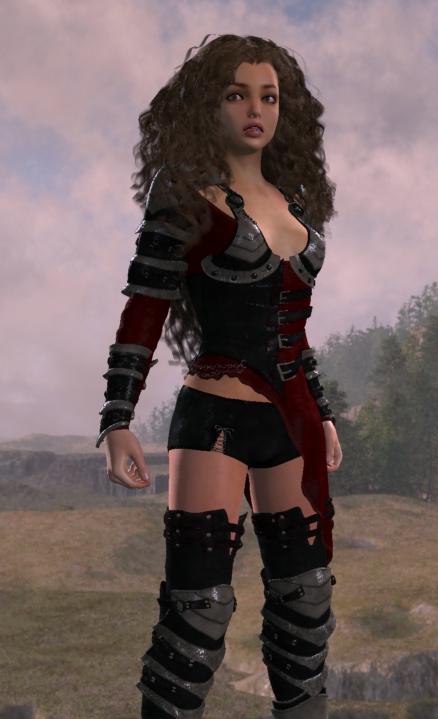 Okay, cool. I often never use the expression on my V4 Rosie, but have a lot of them. This one I couldn't resist... I was playing with my new expression for Genesis by SimonWM, and found this one!
 It's the same hair, which is four copies of Angelina Hair that I customized.
The biggest difference in this version of Rosie is that I stylized her more with the Girl 4 Head morph - just a touch. She started out as Victoria 5, but Rosie's (the real Rosie) face is less like Victoria and more like the Basic Female face shape, but with a touch of The Girl for the mouth and eyes.
When I remove the V5 Head from V5, the head shrinks, which worked great for adding the G4 Head morph. One of our daughters looks SO much like The Girl it just kills me! LOL
Anyway, thank you SO Much for the valued input! I really appreciate (and really NEED) that!
I've really become attached (as I'm sure you have all noticed) to my V4 Rosie - having worked on her for so many years. So any other version I might make has to measure up to her, or get deleted. So far I really like this one, and when I look at me new Genesis 2 Female version, I don't like it anymore.
But that's easily fixed. If there's one thing I did in order to properly test these Genesis figures was to buy up a bunch of great morphs!
I went even further for females with Genesis 2 Female - getting one of Thorne's killer morph packs for merchants, and a bunch of other faces, including ALL of the Daz Ladies (and the younger Belle 6, upon whom Rosie 6 is now based)... that's Rosie 6 on the right.
I often render Rosie with a distressed expression, I see... hmmm
Post Your Renders like it's the year 2020!!! Dart, which EYEdeas 3+ are you using for your versions? Would it perhaps be EYEdeas 3+ for Victoria 4 and Michael 4? Hmm... should I also grab EYEdeas 3+ - Vol. 01 - Natural 1? This is great that you are using the same eyes for 3 generations. Keep up the great work... your hours of tweaking have paid off. :)
Yes, that's the one and the example above is using the Natural expansion textures.
These eyes in the Genesis figures are not the same as the ones in my V4 character. For V4 I'm using the figure which contains both eyes and it just conforms like clothing, plus she's got the version which is remapped to use V4 eye maps. EYEdeas 3+ comes with many options for that, so it's good to read the manual before starting, and then using it as a reference as you work.
If we're using the remapped version, we don't have a need for the Naturals expansion. I bought that because, well... I like to have a lot of options.
[cut ... see original post]
Thanks Dart, For the explanation. I should have just grabbed both yesterday... could have had both for under $6... they were on some sale but I didn't realize it.
What hair is this?That looks like Belinda Hair by SWAM
https://www.daz3d.com/belinda-hair-for-genesis-3-female-s-and-genesis-2-female-s-and-victoria-4
Post Your Renders like it's the year 2020!!! Dart, which EYEdeas 3+ are you using for your versions? Would it perhaps be EYEdeas 3+ for Victoria 4 and Michael 4? Hmm... should I also grab EYEdeas 3+ - Vol. 01 - Natural 1? This is great that you are using the same eyes for 3 generations. Keep up the great work... your hours of tweaking have paid off. :)Yes, that's the one and the example above is using the Natural expansion textures.
These eyes in the Genesis figures are not the same as the ones in my V4 character. For V4 I'm using the figure which contains both eyes and it just conforms like clothing, plus she's got the version which is remapped to use V4 eye maps. EYEdeas 3+ comes with many options for that, so it's good to read the manual before starting, and then using it as a reference as you work.
If we're using the remapped version, we don't have a need for the Naturals expansion. I bought that because, well... I like to have a lot of options.
So when I built these eyes for Genesis, I decided to use the ones that use Arki's UV mapping which fits her textures, as well as to use individual eye figures, and parent them to the original eyes on the figure, which is a little more difficult to get right. I used Align to place the EYEdeas over each original eye, then scaled them to the right size (which is why it helps immensely to satisfy yourself on the character's final shape before starting this process) and then aligning a final time after resizing. It really wasn't hard.
Some notes to consider, EYEdeas eyes are spherical and Genesis eyes are not, so slight forward placement adjustments will be required after aligning. I didn't have any trouble, but I did play with this a bit to get them right.
I'm working on an article with my advanced shader procedure, which really isn't very tricky. I just spemt a lot of time working out my own preferences, but as you know, we all have our own tastes ;)
IG Iray Essentials - Genesis 3 Female & Victoria 7 won't installIG Iray Essentials - Genesis 3 Female & Victoria 7 (by Inane Glory) gives an immediate error and won't install through DIM.
If I fix the ZIP with Content Packaging Assistant, it installs.
Is anyone else having this problem? It might be occuring only with a recent update to the product.
Post Your Renders like it's the year 2020!!! Dart, which EYEdeas 3+ are you using for your versions? Would it perhaps be EYEdeas 3+ for Victoria 4 and Michael 4? Hmm... should I also grab EYEdeas 3+ - Vol. 01 - Natural 1? This is great that you are using the same eyes for 3 generations. Keep up the great work... your hours of tweaking have paid off. :)Iso history of daz studioI was curious about when did studio start? When was Michael and Victoria released? And all the historical info like that.
Pose and animation conversion for multiple generations of DAZ figuresWhat you did should work. Off hand, I can think of two things I can think of that might cause problems like you describe.
The first is using the proper procedure for this to work. Its pretty simple, but if you're new to DS or animation in DS, there are a couple of situations that might cause problems.
- First, to eliminate some possible sources of problems, start with a new scene, File->New.
- Load a fresh Victoria 4 and assign an aniblock, or other animation on her.
- Load a fresh Genesis 3 Female.
- In your scene tab (available in Window->Panes->Scene in case it isn't visible), Left Click on Victoria 4.
- Now, CTRL->Left Click on your fresh Genesis 3 Female.
- Launch the script (double click on it or Right Click and choose Load).
- Verify that the Entire Animation radio button is chosen.
- Optionally, uncheck the Support Undo checkbox (saves memory on long, i.e. more than a few seconds duration, animations).
- Click Accept and wait for the script to complete.
If under those circumstances you get bad results, the primary thing I can think of is that you may need to do is to turn off limits for the figure.
If you've already run the script once, you can clear the animation from the Genesis 3 Female via the Parameters pane menu, the lines with the little arrow/triangle in the top right corner of the Parameters pane. Chose Parameters pane menu->Clear Animation->Clear Figure to clear the animation.
To turn limits off on the entire figure, in the Scene pane Left Click on the figure, Genesis 3 Female in this case. Now Right Click and chose Select->Select Children from the popup menu. This will select all the bones of the figure. Now, in the main menu chose Edit->Figure->Limits->Limits Off (Rotation). This turns off all the rotation limits on all the selected joints in the figure and may cause the retargetting of the animation to produce better results.
Sometimes it is important to turn limits off on both figures as the aniblocks, or other animations, can contain data that exceeds the default limits.
I just transferred the cheerpeprally aniblock, part of the Cheerleader aniblock pack for Victoria 4. It worked fine. In this case I didn't turn off the limits on either figure. It would probably have transferred better it I did turn off limits, but it looks pretty good.
Make sure you don't have any aniblocks assigned to the target figure as Animate2 takes over most of the animation of the character. That's one of the reaons I recommended starting with a fresh scene.
If you want to make an aniblock for Genesis 3 Female:
- First retarget the animation to the normal timeline, i.e. not into an aniblock.
- Save your scene, at least temporarily, as the next step is likely to give you unexpected results and has no undo support.
- In aniMate2, use the Create aniblock from Studio Keyframes feature (Right Click on your figure's name towards the bottom left of the aniMate2 pane and pick from the popup menu). I believe this is only available in the full version of aniMate2. You may need to play around with the few options to get acceptable results. Which option you need to pick are dependent on the situation.
- In the upper section, rename your new aniblock and right click it and save it somewhere if you want.
My schedule is pretty tight right now, so it may take some time for me to reply. Hopefully, the information in this post will help you, but if it doesn't we'll see what we can do.
Which aniblock(s) did you try to transfer ? I may have them and can try them on my machine to see if I see any problems.
Victoria 4 is 10; Still a Looker...I still think that Smith Micro needs to give us a New Victoria figure. Poser is still lacking behind in features that Genesis 3 figures get, like more ways to make characters look wet and sweaty, more genital options, etc.I can't even find a decent Genital prop for V4 but I have plenty of good ones for M4.
Victoria, all the Victorias are from Daz, not Poser. We are up to Victoria 7 and Michael 7 now. The poser figures are no longer made by Daz, that ended with the debacle around Poser 5. So Posette is the last Daz created female figure to be included with Poser. Victoria has alsways only been available from Daz, from V1 onwards. They are up to Victoria 7 and Michael 7 now.
Daz side-effects and affects (sob story)It's like having another child....I buy Victoria and Michael and the other characters nice outfits and shoes and hairstyle. And houses and cars? Oh yeah..they get those too! My 3D people are just way too spoiled! I always catch myself thinking "wow..this would look good on (insert 3D character name)". God knows I don't spend as much money buying my real child all the stuff I buy my 3D people. Luckily my child IRL is grown and can afford to buy his own stuff.
Victoria 4 is 10; Still a Looker...I still think that Smith Micro needs to give us a New Victoria figure. Poser is still lacking behind in features that Genesis 3 figures get, like more ways to make characters look wet and sweaty, more genital options, etc.I can't even find a decent Genital prop for V4 but I have plenty of good ones for M4.
50% OFF Daz Originals this weekend, Sweet :)50% off and using the coupon really cuts the cost. You can get a really good deal, Has to be the Platinum Club Daz Origional coupon for it to work
True. Might forget the centaur and get the jester outfit and textures and gift card sale thingie instead.
Have you picked anything yet? Just a reminder, Sundays is the last day for this sale. I have to go back window shopping and look everything over again, Just can't make up my mind

Not yet but I have a daz gift card waiting to be used.
Edit thinking of getting SciFi starter bundle just to get liquid halo on sky 16 for Victoria 3 to be put on g3f with wear them all. The bundle appears cheaper than the outfit
Sometimes it works out that way. I remember a bundle one time that had one item I did not own yet. I had everything else in the bundle. It was cheaper to order the bundle than the one item I wanted. It really helps to watch these sales and keep track of what items in your wishlist go on sale.
 50% OFF Daz Originals this weekend, Sweet :)
50% off and using the coupon really cuts the cost. You can get a really good deal, Has to be the Platinum Club Daz Origional coupon for it to work
True. Might forget the centaur and get the jester outfit and textures and gift card sale thingie instead.
Have you picked anything yet? Just a reminder, Sundays is the last day for this sale. I have to go back window shopping and look everything over again, Just can't make up my mind
Not yet but I have a daz gift card waiting to be used.
Edit thinking of getting SciFi starter bundle just to get liquid halo on sky 16 for Victoria 3 to be put on g3f with wear them all. The bundle appears cheaper than the outfit
G3 Muscle Mapshttps://www.daz3d.com/musculature-hd-morphs-for-genesis-3-bundle
Thanks, but not just talking about HD muscle morphs. I'm talking the original V4 & M4 Muscle Maps products such as this:
https://www.daz3d.com/victoria-4-2-muscle-maps
These are a wonderful tool for artists to reference with, for drawing and painting. The old Michael & Victoria 4 versions look good, but lack the muscle 3D contouring details of the G3 HD products, and thus the lighting and rendering that is possible with the newer products. Being that they are DAZ Original products, would love to see DAZ update them.
Loretta / Lorenzo help neededPerhaps the runtime is loaded into the browser as "Content" instead of as a "Runtime"?
Okay, you see where in the above quote you have /Runtime/libraries/Pose/P3DA_LorettaLorez/MATs_Clothes
In the same folder which holds that particular Runtime is also a folder called ReadMe's. Open that. Look for a folder called Tutorials.
Yeah... just for kicks, go to the Files/Folder menu and "Add Runtime" to your Content tab. In the dialog window, add that same folder that holds the above mentioned Runtime folder. In the next window (after clicking Okay) select "Runtime"
Now, in the Pose category, under P3DA_LorettaLorez > MATs, you should see the files for loading the appropriate MATs.
There is a certain order of things, so reading Loretta's pdf manual will be a big help. The MAT files' icons sort of help, but only if you go through the proper order according to the manual. I only say this because some of the MATs only apply certain materials, while others might apply materials to everything, overwriting what you've already added.
Once you get used to it, you'll see that it's an ingenius system!
But if the loaders aren't showing up in your content tab... that makes things harder, and is an error that MUST be fixed. My option above, adding the folder again as a Runtime should do it for you though.
Ingenius? I have other words for it, which I cannot say. I am always on war with everything related to Daz Studio. If it would be the last animation software available, I would stop doing animation right away. There is not logic, all those tiny windows, everything is placed where you cannot find them. I wish Carrara would not be related to DS. But I have to live with that.
I have found the manual, using search my computer. Manual is for Poser use, but very helpful. Thanks.
The only folders I can use are the folders with de Loretta en Lorenzo basic characters. All other are not accepted as runtime (not a valid runtime) if I add the folders manually. Or if I do Content > Runtime, I get empty folders in my Carrara browser (but the files are there). I have the folder with many REM and INJ morphs, but they do not respond as Victoria does.
I cannot find any of the files in DS. I can get Loretta in DS by using opening the cr2 file with DS. But where all other is hidden in DS? Maybe export to Carrara is my solution. I cannot open them in Poser 7. pz2 should be usable in Poser but it doesn't. Nothing shows up. And not shure if I can export with parameters for Carrara.
So my mood is not very good. Happens always when working with DS. Never happens with Carrara. Going to switch of my computer, otherwise accidents will happen.
hi can someone help me i am trying to get sweaty skin in irayThanks JimBow, I noted that down. And I think I figured out where I was running into trouble. These steps are for V7. I was using a Gen3F Character with Gen3F skin maps. I tried a different model and then BOOM! All the settings are there. This one is a V7 character though not Victoria herself and the result is very good in my opinion.
Edit #7...Anagenessis does limit the controls. I added it after dialing the settings and lost the effect. I went back to re-apply and the controls aren't there. So I guess you have to pick sweaty or Anagenessis, not both.
Loretta / Lorenzo help neededI haven't answered yet because I'm still lost as to what the issue is.
There are (if I remember correctly) two versions for each. One with morphs already injected. I don't think we can use the REM file to remove those morphs, if that's the thing.
The other has no morphs, for times when they'll be so distant or that all we want is the base shape, and we don't want or need the extra files. The INJ file is there for if we change our mind and decide to add the morphs. Does the REM actually remove the morph files from the figure? I don't know. If not, and that's what you want to do, why not just load in a fresh one that doesn't have morphs?
Yes, there are two versions. The ones without morphs have only the pose parameters. Pose and morphs are not the same, but both are listed under parameters. The INJ should inject morphs and the REM should remove the items from the parameters list. I am doing the same with Victoria 4. And this works perfect. I can add or remove any parameter I want. But somehow L & L do nor respond. I want to remove the ones I do not use to make it more workable. But more important I want to give Loretta for instance jeans. There are pz2 files for that. See also my previous reply.
The Lorenzo page says: :"Each figure comes with a blank alternative so that all the morphs can be injected if needed, thus saving on resources further if morphs are not needed." So it should be possible, but so far, no succes.
Daz 3D is part of

Connect
DAZ Productions, Inc.
7533 S Center View Ct #4664
West Jordan, UT 84084Licensing Agreement | Terms of Service | Privacy Policy | EULA
© 2026 Daz Productions Inc. All Rights Reserved.