-
Genesis 9 Coming Soon! Preorder Victoria 9 HD Today
3DRT said:
On a recent stream, we saw that navel morphs for G9 are all HD. Is the creation of HD morphs still limited to DAZ PAs? If so, wouldn't that severely limit the capability of artists on other stores to create custom characters for G9?
I don't think I've ever purchased a custom character that had any noticeable navel morph that was not an HD Daz PA character.
Genesis 9 Coming Soon! Preorder Victoria 9 HD Todayjardine said:
i'm mostly curious about when the genesis 9 core morph packages will be released.
it'd be nice if they were released at the same time victoria 9 premieres.
i'm not particularly interested in picking up any next-generation characters until they're available. though v9 does look interesting.
j
I dfon't have any info but I would certainly expect Starter Essentials, Victoria 9, and the morphs to appear together.
Auto-dial morphs for clothes?That's two differnt things. Yes, having a master slider that controls the sub-morphs is better - in several ways - than baking everything to a single combined morph without links. However, when you do that setting the master (whether a pure controller or a morph which also triggers sub-morphs) will trigger multiple morphs and DS will apply those to the fitted items, projecting any that are not initally present. When creating a custom morph for fitted items you should there ensure that the custom morph is matching only the raw changes of the identically-named figure morph, it should not incorporate any changes from the sub-morphs because if it does they will be doubled up.
[Released] dForce2Morph [Commercial]Can this plugin create an additive morph for a whole timeline?
Like creating one single morph that reflects the changes to an item throughout the whole timeline?
(Finding the exact spots again will be difficult, unless there was (reliably) N steps per frame, but maybe it also lets new possibilities emerge. Thinking of export for computer games.)
Auto-dial morphs for clothes?So your suggesting doing each morph as a separate part rather than a single controller? Interesting, it would be a lot more work in some ways.
Will it still autofollow, yes but what about if you use one of those morphs for a different character and you need it to do something different wouldn't it cause issues?
I've always been told it's best to use a master slider, I mainly create my own morphs in a modeller these days so haven't yet messed with this type of morph much.
Another thing to try and see what happens.
Need help fitting/transferring an obj fileWhat I see happen there is the pants are colliding against the character when they need to collide against the green item underneath.
If you have a smoothing modifier already try changing what it's colliding against.
If that doesn't completely get rid of it the push modifier already suggested could help.
Both of these options might only partially fix it though. The best solution is to fix it in a modeller to fit over the green clothing and either update the base mesh or create a morph.
Genesis 9 Coming Soon! Preorder Victoria 9 HD Todayi'm mostly curious about when the genesis 9 core morph packages will be released.
it'd be nice if they were released at the same time victoria 9 premieres.
i'm not particularly interested in picking up any next-generation characters until they're available. though v9 does look interesting.
j
Need help fitting/transferring an obj fileInside Daz Studio you can try to apply a smothing modifier, and set it to collide with the green object.
Or you can add a push modifier and weightpant where you want the mesh to be pushed out.
Or outside Daz Studio, you can take it into a modeller, e.g. blender, and adjust the clothing, and then either import it as a morph to the existing clothing or as a new object.
Question for the PAs - Female ArmourNyX said:
I'd like to see some armor that acutally has a flatened chest area, instead of modling around a female's breasts. Real armor/flak jakets/bullet proof vests and the like don't stretch around breasts.
Of course, I realize this is probably impossible with the way meshes actually work, but a morph to flatten G8Fs chest (or whichever generation) would be nice.
Yes, this has been raised before (by me, for one) - the problem is that when a shape is applied, if it affects the breast shape the difference from the default shape will be projected into the armour, producing weird distortions. Aplying a rigidity Group might help with that, but because of the size of the area that would have to be included it might then be problematic with other shapes that should project into the armour (or other heavy/constricting clothing).
Question for the PAs - Female ArmourI'd like to see some armor that acutally has a flatened chest area, instead of modling around a female's breasts. Real armor/flak jakets/bullet proof vests and the like don't stretch around breasts.
Of course, I realize this is probably impossible with the way meshes actually work, but a morph to flatten G8Fs chest (or whichever generation) would be nice.
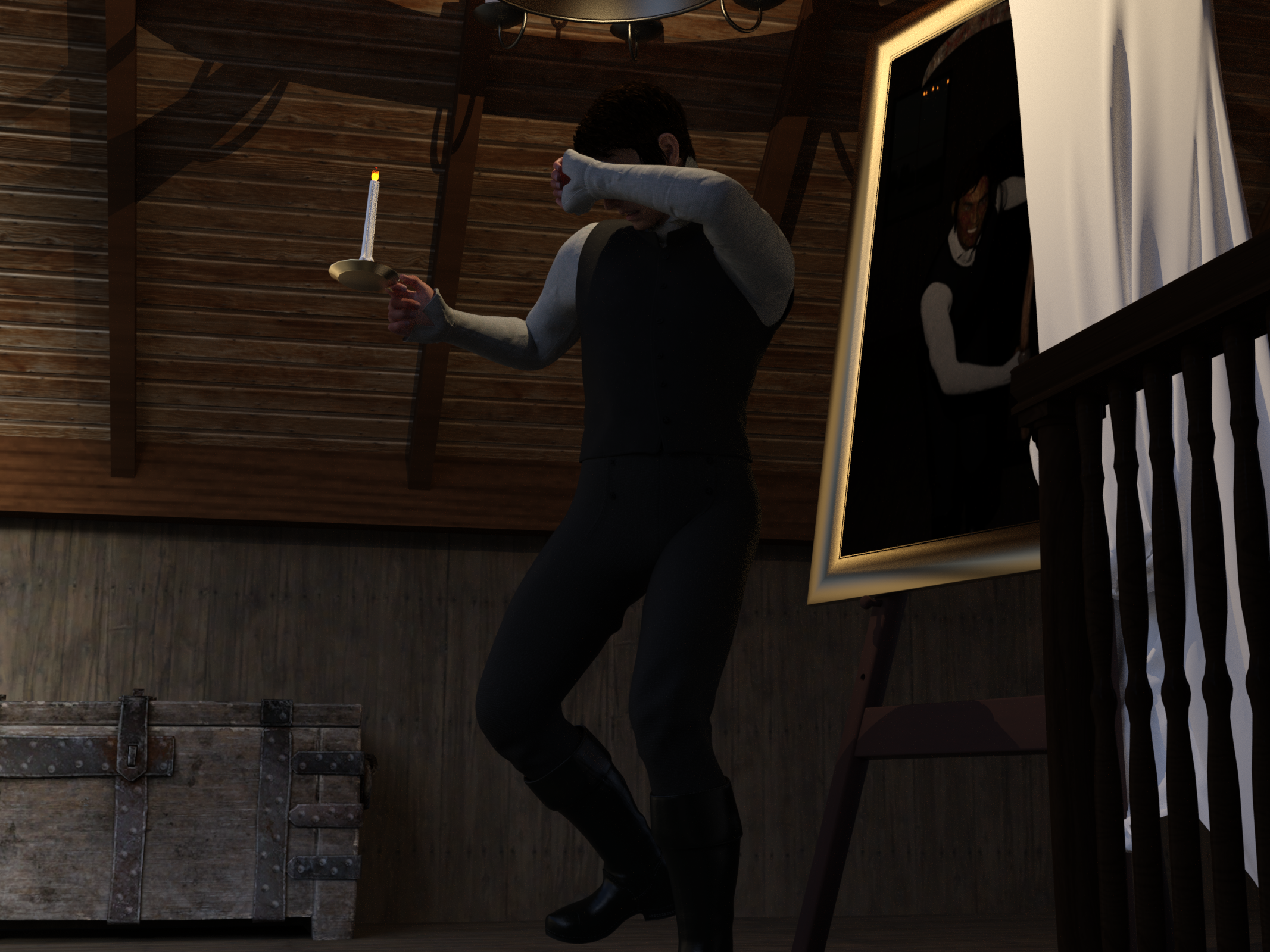
Freebie Challenge October 2022-"Horror Movies!" - Main ThreadThe Picture of Dorian Gray
If you don't know it, it's based on the Oscar Wilde story about a handsome young man who has his portrait painted; he doesn't like it and he curses it. He wishes that he will be young forever and that the painting will age instead. From then on, he sees the painting change for the worse every time he does something wrong, but he himself doesn't grow older or uglier. Eventually he hides it in the attic. With every sin, the painting gets uglier and scarier. Yet he can't destroy it or let anyone see it, lest he become hideous and scary himself. It's a good movie (1945) but an even better book. This is my take. I realize the portrait doesn't change to include weapons, but it does make him look much more sinister.
No count: G8M, Daz shaders, Daz primitives (planes for sheet and painting)
Paid: Ichabod outfit for Genesis Males
Free:
- The Attic -selfish plug here :-)
- Anton face morph
- Testing hair
- Walther 2.0 - skin
- Props - Stable Builder - candle and chandelier
- Allen Art Free Jewelry Shaders - shaders for picture frame, candle, chandelier
- Viking Age Props - chest
- Merlin's Free Scythe
- G8M Big Evil Smile
- Green and vein skin for G8M
- Rectangular mirror
- Easel
- HDRI lighting
 Auto-dial morphs for clothes?
The issue with having slave morphs set by a slider is that what DS projects is the actual morph, so a morph to match the compound shape named to match the slider will be applied but all the salve morphs will still be projected. Ideally you want a match for each morph used that works only on the actual shape of that morph, not any others that it also sets - with luck the standard morphs will either alrady be covered or will project well so you don't need to add a custom shape for most of them.
Auto-dial morphs for clothes?Pendraia said:
icemage1993 said:
wow I didnt know Sickle was involved with Oblivion's mods. But then again I saw a lot of daz stuffs in Oblivion/skyrim.
Try morrowind it was a long time ago, a group of us used to hang out on the Canadian ice forums and started ds around the same time. And yes some modders back then did the wrong thing.
By the way, I think I fixed it!
I loaded g8f, dialled in my custom morph, loaded my outfits, and I didnt delete the custom morph like your said, but I use morph loader pro and replace it out right following this guide by Richard:
I hope that wont cause any trouble down the line!
Richard Haseltine said:
You can replace a generated morph with one of your own making, using Morph Loader Pro, giving the imported morph the same name as the target morph, and setting Overwrite Existing to Deltas Only.
That should work fine also as long as you selected to overwrite deltas. Sounds like you got it working which is terrific. I didn't mention it because I thought I might end up confusing you. You can do it either way.
well Iam only stand on the shoulder of the giants and follow their words to a T. The forum is truly a treasure trove of knowledge.
Auto-dial morphs for clothes?icemage1993 said:
wow I didnt know Sickle was involved with Oblivion's mods. But then again I saw a lot of daz stuffs in Oblivion/skyrim.
Try morrowind it was a long time ago, a group of us used to hang out on the Canadian ice forums and started ds around the same time. And yes some modders back then did the wrong thing.
By the way, I think I fixed it!
I loaded g8f, dialled in my custom morph, loaded my outfits, and I didnt delete the custom morph like your said, but I use morph loader pro and replace it out right following this guide by Richard:
I hope that wont cause any trouble down the line!
Richard Haseltine said:
You can replace a generated morph with one of your own making, using Morph Loader Pro, giving the imported morph the same name as the target morph, and setting Overwrite Existing to Deltas Only.
That should work fine also as long as you selected to overwrite deltas. Sounds like you got it working which is terrific. I didn't mention it because I thought I might end up confusing you. You can do it either way.
Auto-dial morphs for clothes?wow I didnt know Sickle was involved with Oblivion's mods. But then again I saw a lot of daz stuffs in Oblivion/skyrim.
By the way, I think I fixed it!
I loaded g8f, dialled in my custom morph, loaded my outfits, and I didnt delete the custom morph like your said, but I use morph loader pro and replace it out right following this guide by Richard:
I hope that wont cause any trouble down the line!
Richard Haseltine said:
You can replace a generated morph with one of your own making, using Morph Loader Pro, giving the imported morph the same name as the target morph, and setting Overwrite Existing to Deltas Only.
Auto-dial morphs for clothes?hansolocambo said:
It's a complex matter and finding information about that given that 99% of Daz users are... well just users, is basically close to impossible.
The things I have so far that seem related to that all turn around the idea of creating (out of Daz) custom morphs for specific shapes and injecting (once in Daz) CTRL morphs that will auto load for characters that need a more specific deformations. I find a lot of blah blah about that but damn still no clean clear tutorial about. Finding information as someone who can 3D model more or less anything and wants to become a content creator is a nightmare. After months I still have more
This seems to help a lot the process of creating not just one but multiple control morphs to help your clothes adapt to multiple shapes. What I still don't understand is : when creating one let's say much taller morph for the cloth. a very fat custom morph, another for very small body (growing up), another for big busted characters, etc. How to name that morph so that it auto-dials the slider, is it just based on the naming of the slider like Pendraia says ?
I was specifically referring to character morphs which I've done many times for my own use and also on the more recent freebies I've created. I'm currently in the process of completing a freebie for dawn that has 4 custom character morphs that autofollow when the character is dialled in to the original figure. In discussions with mec4d recently we were discussing creating custom morphs for full body morphs and I haven't tried it but believe it would work for those also as it's a function of autofollow to use morphs in the outfit or create them if needed. Unfortunately autofollow created morphs often have distortions.
If you like tomorrow I'll have a look as I have a freebie in the works I'm doing for genesis 8 and can try it out on things like a tall morph.
Hopefully this tool explains a bit the process it does automatically because then, using it would definitely answer a lot of questions.
- 2 Creating Clothing Morphs With Blender and Daz Studio
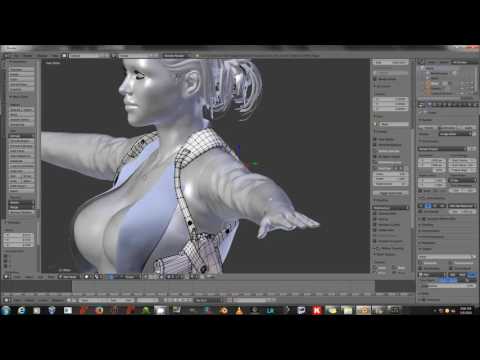
And then there is that video, that definitely is exactly about what you (and I) need. All done manually. I hope that using ShapesInjector and following SickleYield explanations, all will be more clear. This is by far the best (and for all I know the only one) video that really explains that subject.
Sickle is amazing and I was lucky enough that having known her since elder scrolls days she has in the past been patient enough to answer my questions and she is very expert in using blender. I highly recommend her tutorials.
A lot of what I've picked up over the years has been from forum threads and bought tutorials. To my knowledge there is no one all encompassing tutorial. Esha's digital art live tutorials in the store cover 6 parts of the process and is probably the most thorough. I only have the rigging one but I would suggest looking at those and perhaps Arki's tutorials also in the store. They are fairly expensive... the alternative is to hunt for tutorials on specific areas for example mcm - morph control morphs, or how to split morphs. Josh Darling has some good YouTube videos on things like this.
Auto-dial morphs for clothes?No problem, contact me via message if you need. Just remember it's the Custom morph in the clothing that needs the same name as the morph in the character.
Auto-dial morphs for clothes?@Pendraia @Richard Haseltine Much obliged it guys, I think the naming trick to overwrite the morph is the best solution, thats so cool actually. My custom character has a single dial morph but I also ERC Freeze some base genesis 8 female morphs in (arm length, shoulder scale...etc), I think it should be fine, no? And thank Pendraia, but I dont want to bother you with anymore hassle, I will try to fix this thing by myself.
Armor deformation with transfer utilityTransfer Utility should always be treated as a starting point. Go into it assuming that you will need to change at least some weights. You'll need the Weight Map Brush (Alt+Shift+W), and if you've never done any weight painting, look up some tutorials.
Auto-dial morphs for clothes?It's a complex matter and finding information about that given that 99% of Daz users are... well just users, is basically close to impossible.
The things I have so far that seem related to that all turn around the idea of creating (out of Daz) custom morphs for specific shapes and injecting (once in Daz) CTRL morphs that will auto load for characters that need a more specific deformations. I find a lot of blah blah about that but damn still no clean clear tutorial about. Finding information as someone who can 3D model more or less anything and wants to become a content creator is a nightmare. After months I still have more questions than clear understandable answers.
Anyway... the few things I believe are definitely related to what you (and I) need to know have answers in the links I found so far :
- 1 ShapesInjector
https://www.daz3d.com/shapesinjector
This seems to help a lot the process of creating not just one but multiple control morphs to help your clothes adapt to multiple shapes. What I still don't understand is : when creating one let's say much taller morph for the cloth. a very fat custom morph, another for very small body (growing up), another for big busted characters, etc. How to name that morph so that it auto-dials the slider, is it just based on the naming of the slider like Pendraia says ?
Hopefully this tool explains a bit the process it does automatically because then, using it would definitely answer a lot of questions.
- 2 Creating Clothing Morphs With Blender and Daz Studio
And then there is that video, that definitely is exactly about what you (and I) need. All done manually. I hope that using ShapesInjector and following SickleYield explanations, all will be more clear. This is by far the best (and for all I know the only one) video that really explains that subject.
Please if anyone around, content creator, has some more bookmarks to share about tutorials explaining how to inject custom made morphs for custom made clothes, so that they (on the user side) adapt better than what Daz does by default, this would be great. Although I have the feeling that SickleYield's video is the Eldorado on the subject.
Daz 3D is part of

Connect
DAZ Productions, Inc.
7533 S Center View Ct #4664
West Jordan, UT 84084Licensing Agreement | Terms of Service | Privacy Policy | EULA
© 2026 Daz Productions Inc. All Rights Reserved.