-
"Victoria 7 Attitude Expressions" problem - need help
edited: moved quotes to the proper locations
The product pages says "Additionally, you'll have 15 others poses files that will mix the Attitude unique morphs and Victoria 7 basic face parameters to give you truly unique expressions." I wonder what "basic face parameters" are. Is that an unlisted required product?
barbult had the right idea!:
-> On the laptop I installed as well
Genesis 3 Female Expressions
https://www.daz3d.com/genesis-3-female-expressions
and now "Victoria 7 Attitude Expressions" also work on the laptop.
I was under the impression the basic face parameters were the ones that ship with G3F/V7. In any case, I also have the Expression morphs product for G3F (blanking on the name, but it's the standard daz original one that is for sale that came out iwth the body and the head morphs)
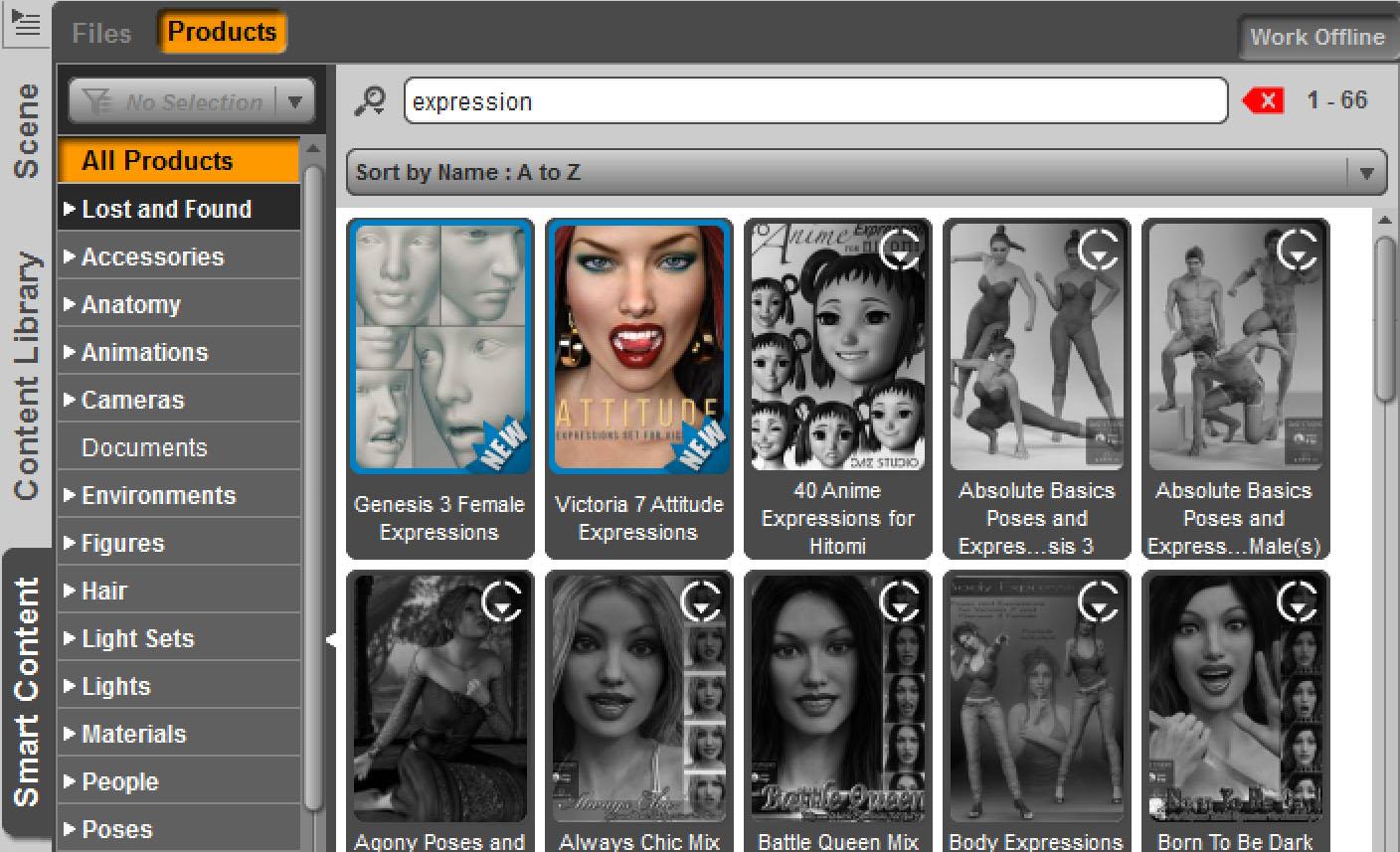
That expression product can be very hard to find in the Smart Content tab because it does not show up when a Genesis 3 female figure with "Filter by context on" is selected.
Additional Explanation:
-> Some of the first "Morph only products" for G3 did not contain any preset files. Therefore they do not show up in the categorisations.
To remedy this most new morph only products now contain presets which have categories set as well...
To find that product in the smart content tab
- make sure filter by context is OFF -> NOT selected
- enter "expression" in the smart content tab filter bar
Side Note:
I also made the reverse test on the pc.
- Uninstalled the DAZ Connect version of "Genesis 3 Female Expressions" in the smart content tab
-> Then "Attitude Expressions" stoped working properly
"Brace yourself, my dear wallet! There's always another Sale - and Glitches!"Hard to say no to a bunch of items that are less than 50 cents each in your cart (gotta luv blowout sales)... Victoria's wardrobe closet is now overflowing, I neeed a bigger closet...
Another morning, another $16 to Daz! The 'any new items for add'l discount' thing really opens up a LOT of options, with 4+ pages of new releases!
 Absolute Basics Poses and Expressions for Genesis 3 Expressions Help
i bought the Ophelia 7 Pro bundle and it comes with Absolute Basics Poses and Expressions for Genesis 3 Females. I applied a pose to a Victoria 7 and then I try to apply an expression and nothing happens. I tried Merge into Scene on both the Victoria 7 root/top of the hierarchy, and directly to the Head. The face remains static. I get the same non-change on an Ophelia 7, and even Genisis 3 figures. I looked to see if it added a dial and do not find anything. I have not seen such behaviour before. What should I be doing to get the expressions to apply?
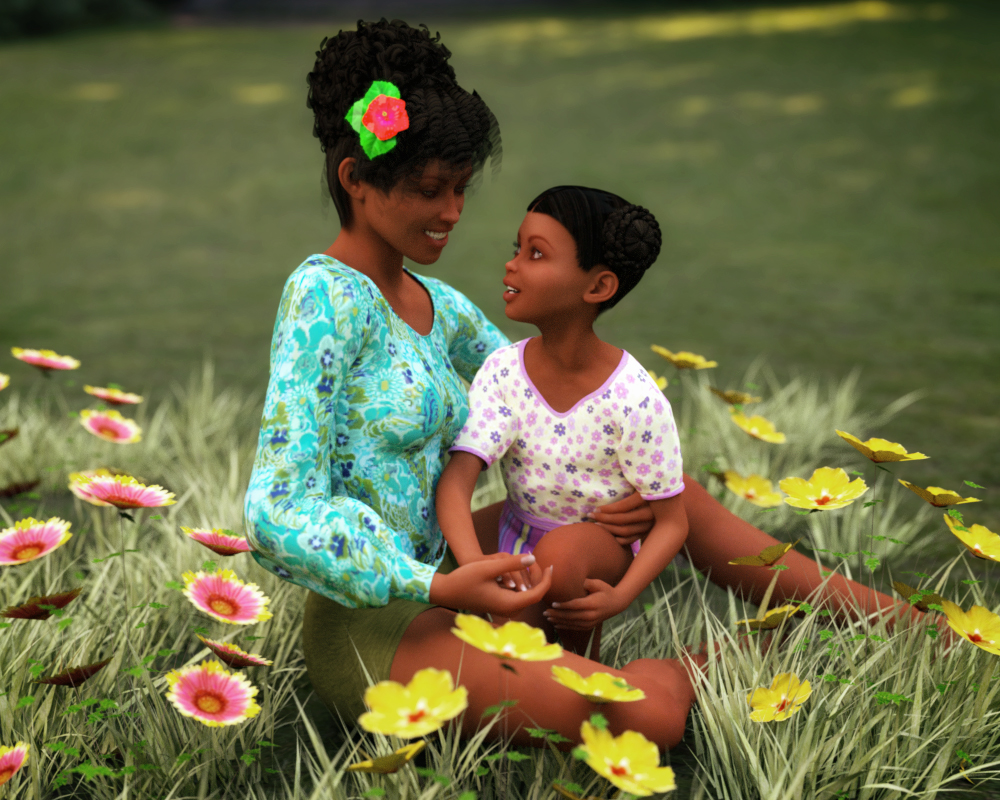
3D Art FREEBIE CHALLENGE-MAY 2017- WINNERS ANNOUNCED-Entries Thread OnlyMy Entry is called Mother's Day at the Park
This Render is based on my mother and me.
No Count
Genesis 2 Female
Paid
Nidale
Freebies used
1.)HoSM Flowers set 2
https://www.renderosity.com/mod/freestuff/hosm-flowers-set-2/25770
2.)Louise Hair for V4 and V3
http://www.sharecg.com/v/64723
3.)Grass from Aery Souls's Wooden Door props
4.)Gnomie Buns Hair for Victoria 4
http://www.sharecg.com/v/82219/browse/11/Poser/Gnomie-Buns-Hair-for-Victoria-4
5.)G2F Blouse & Skirt with Frills
https://www.wilmapsdigitalcreations.co.uk/view_product.php?id=446
6.)Shorts from the G2F Shorts & Short Top set
https://www.wilmapsdigitalcreations.co.uk/view_product.php?id=411
7.)G2F Playsuit
https://www.wilmapsdigitalcreations.co.uk/view_product.php?id=392
V4 Muscle Morphs and Victoria Alive Morphs won't load into charactersJust bought these products and the morphs won't load into my characters. I usually save my characters as scenes. I think that might have something to do with it. Anybody got any suggestions?
"Victoria 7 Attitude Expressions" problem - need helpI was under the impression the basic face parameters were the ones that ship with G3F/V7. In any case, I also have the Expression morphs product for G3F (blanking on the name, but it's the standard daz original one that is for sale that came out iwth the body and the head morphs)
The product pages says "Additionally, you'll have 15 others poses files that will mix the Attitude unique morphs and Victoria 7 basic face parameters to give you truly unique expressions." I wonder what "basic face parameters" are. Is that an unlisted required product?3D Art FREEBIE CHALLENGE-MAY 2017- MAY FLOWERS BRINGS MOTHER'S DAY CELEBRATIONS-Main ThreadMy Entry is called Mother's Day at the Park
This Render is based on my mother and me.

No Count
Genesis 2 Female
Paid
Nidale
Freebies used
1.)HoSM Flowers set 2
https://www.renderosity.com/mod/freestuff/hosm-flowers-set-2/25770
2.)Louise Hair for V4 and V3
http://www.sharecg.com/v/64723
3.)Grass from Aery Souls's Wooden Door props
4.)Gnomie Buns Hair for Victoria 4
http://www.sharecg.com/v/82219/browse/11/Poser/Gnomie-Buns-Hair-for-Victoria-4
5.)G2F Blouse & Skirt with Frills
https://www.wilmapsdigitalcreations.co.uk/view_product.php?id=446
6.)Shorts from the G2F Shorts & Short Top set
https://www.wilmapsdigitalcreations.co.uk/view_product.php?id=411
7.)G2F Playsuit
https://www.wilmapsdigitalcreations.co.uk/view_product.php?id=392
ALL LINKS CHECK OUT EXCEPT FOR #3 THE LINK SEEMS TO GO NO WHERE PLZ MOVE IT TO THE ENTERIES THREAD
Carrara vs. DAZ StudioI admit to really disliking DAZ Studio for recent years, and Carrara seemed a quite a bit easier for character work. But honestly, with the lack of development of Carrara, and the cool stuff going on with DAZ Studio, I guess I'm a convert to Studio. Here's one of my first Iray renders with a stock G3 character in a room using Iray. I'm certainly not any sort of expert, but IMO it's looking pretty stunning. Not because anything I did, but I think the Iray, together with the materials, and the G3 characters, really has some impressive stuff. Yeah, the hair needs some work at the roots, and the skin needs a bit more life (SSS or something), but I'm pretty impressed. All I did was tweak some of the materials, like the glass in the sunglasses.
I'm sure the experts will say "yeah, we can do that in Carrara", but for us newbies I think it's easier to achieve good stuff.
I agree with you.
Daz Studio is truly amazing, and is headed to a bright future of just getting better and better and better forever. Which is very cool. I'm immensely proud of my friends at Daz3d for what they've come up with, and continue to push forward. It truly is amazing!
I guess it really depends on what you want from the software.
As much as I want to love Daz Studio, I still just haven't got to grips with it yet.
Carrara Pro seems (to me) like it was custom made for me and what I want to do - even though it does a LOT more than what I ever ask it to.
But I would never claim to be able to produce that render in Carrara. That's a beautiful render! Wow!
I really wish that we had Genesis 3 support in Carrara - mostly because I have friends here that really want it. But Misty has fixed that now... so that's cool! Kudos to Misty!!! But I've been building a library of content for years now and am aimed in a different direction than having hyper-realistic humans. Digital actors, yes. But not necessarily 'real'. So even though I dabble in Genesis 1 (which I really Love) and Genesis 2 M&F (which I also really Love), my earlier generation figure are still dear to me and very fulfilling for what I ask of them.
Since about my third year with Carrara, once I got better at working shaders on my own, I started caring less and less about how the promo pics of a product looked, knowing that I could make it better in Carrara. But that statement goes for any 3d render software. In this case, however, I find Carrara's Texture Room to be an amazing gift to the multiverse! I've just added an older creature figure to my cart - one that I had my eye on a l o n g time ago. I still love perusing the older depths of the catalog... there's a lot of really cool stuff still to be had.
I think that Daz3d is really doing it right with Daz Studio... I really do. I will still continue to slowly try and immerse myself into it when I can. But I'm really in no hurry.
I have a feeling that they have been messing around with Carrara behind the scenes when they can spare someone to toil with it. I once read that "All 3d software is good in its own way - it has to be because it takes genius to make it in the first place" or something to that effect. So with that in the back of my head, I also have my own understanding that, to try and persist development that another genius began must be a real challenge - especially if such a place is already excelling at making the software that already fits their dream.
So, to me... I understand and, in a small way, am somewhat thankful. I don't really need an update or upgrade right now. That's selfish to say, but it's true. Carrara is really quite perfect for what I want. It's that Dream Game that a gamer endeavors to find. It's the only reason why I truly need a computer... that and what I'm doing now - hanging out with my Carrara friends.
But it's also true that, if I couldn't have Carrara, I would be using Poser or Daz Studio right now. I would be in a different mindset - I know this because I came to Carrara from Poser. Carrara was something else for me to get used to. It was everything I had hoped it to be, and yet it was also so much more, that I almost had that roller coaster inertia feeling in my gut when I'd get inside to work on a scene. So vast. So limitless. But yet those wonderful, familiar controls on the left margin of the screen (yet tiny, like I like them to be!) gave me more than enough familiarity that I somehow always knew what to think about next.
The first hurdle to conquer, however, from a content-user's point of view, was that all Poser (or DS) content will require custom shader work before it will work properly. Daz3d has a fine little tutorial called something like "Victoria 4 got you feeling blue?" that gave my the initial tricks to master getting around that in its basic form. But it was after I started buying Carrara-specific content, and looking at pro-class shaders when I really started to understand a lot more about what needed to be done.
I'm in the middle of writing an article about this sort of stuff, so I should probably stop babbling now.
But I want you to know that there are many people on your side. Use what makes you feel good... what you enjoy. When we can shoot a render like this and say that it was just a simple thing, and that we liked it... I'd say we're feeling pretty good... enjoying ourselves!
Bravo and congrats on finding a comfort zone!
 "Victoria 7 Attitude Expressions" problem - need helpThe product pages says "Additionally, you'll have 15 others poses files that will mix the Attitude unique morphs and Victoria 7 basic face parameters to give you truly unique expressions." I wonder what "basic face parameters" are. Is that an unlisted required product?"Victoria 7 Attitude Expressions" problem - need help
Short Version:
I can now confirm the observed results by the jakiblue after having tested an installation with DAZ connect on a laptop.
but i don't get why yours are working as they should, when you install via connect. Mine simply won't work.
I was so far not able to figure out why an installation with DAZ connect on my pc is not showing any errors when clicking on the presets.
- - -
Longer Version:
update / edit: removed some information to focus on the most relevant points
@ Test results on the laptop
On the laptop I have only the bare minimum of products installed among them Genesis 3 Starter Essentials.
-> To test I installed Victoria 7 and Victoria 7 Attitude expressions.
- - -
-> Example Attitude expressions 12 (Preview image closed mouth)
In general some very weird things are going on. For some reason on both the pc and the laptop mouth open 100% are dialed in.
Then it seems negative values for the lips are used to close the mouth again.
Result on laptop installed with DAZ connect:
On the laptop only 5 expressions for the mouth area are dialed in under currently used. -> The pose looks wrong.
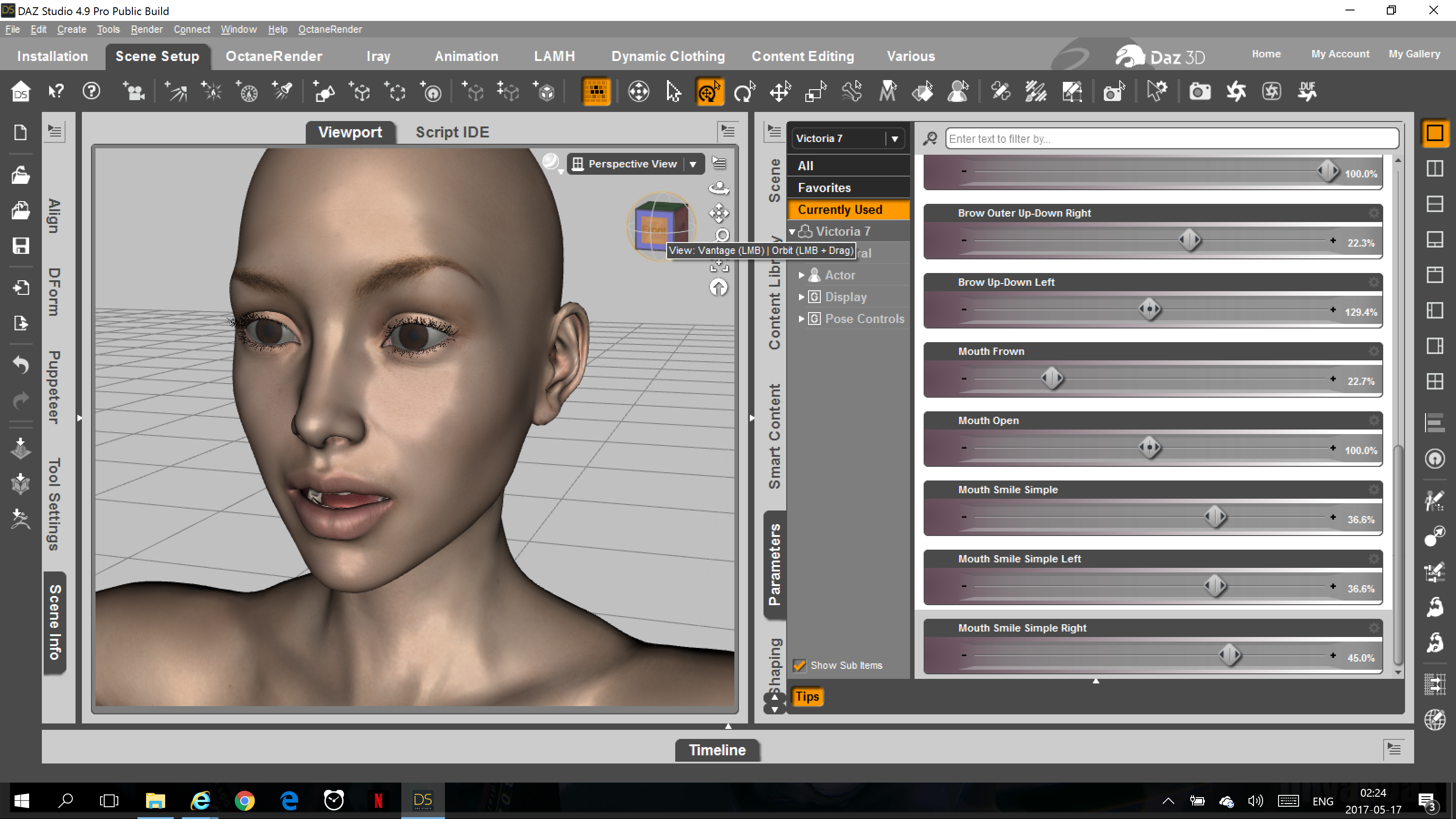
Result on pc installed with DAZ connect:
On the pc there are countless other expressions for the mouth and lips area dialed in as well. -> The pose looks as in the preview image.
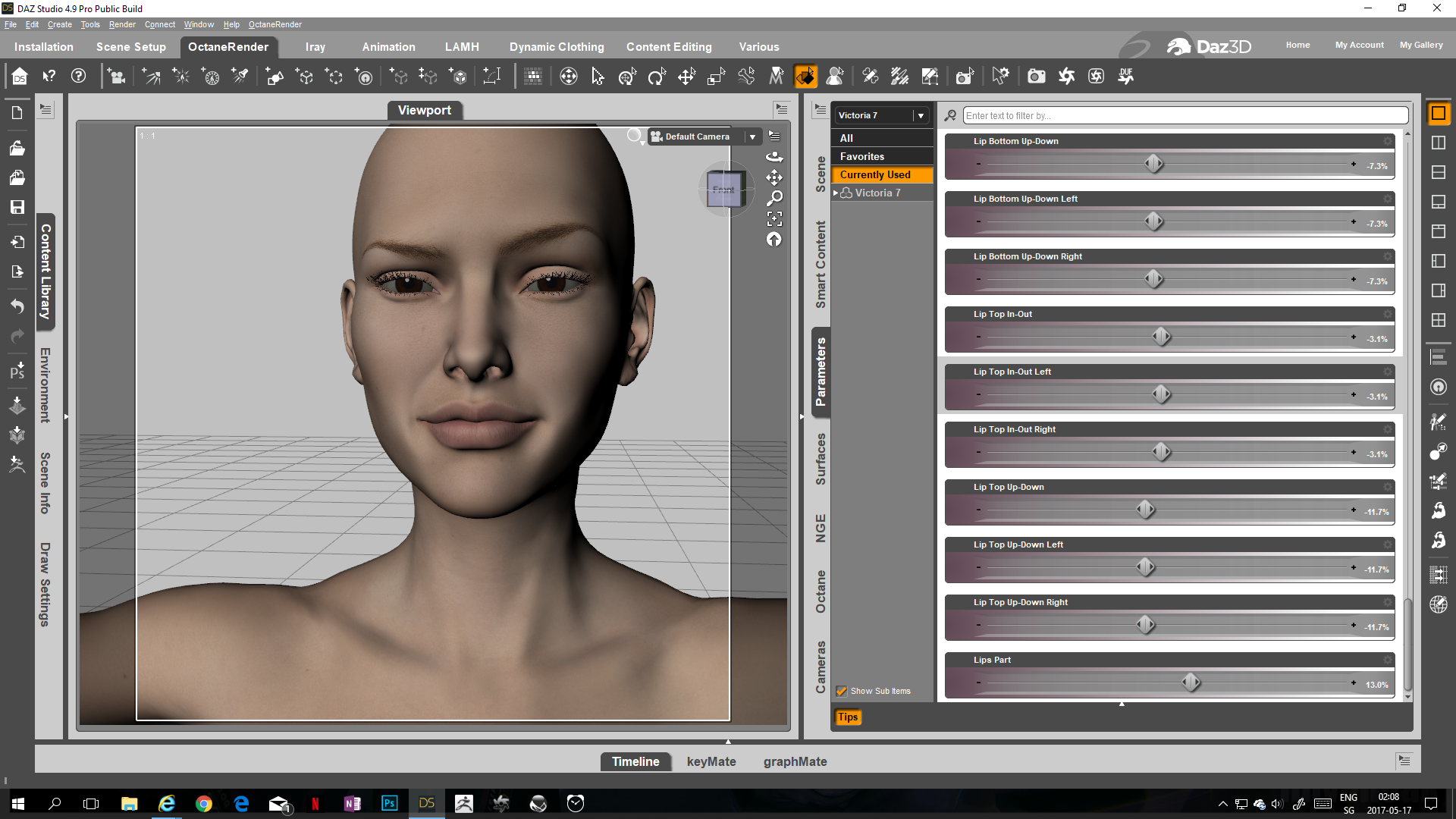
- - -
When testing this on the laptop one thing seemed very odd:
- When clicking on the preset it seems the morph is first dialed in correctly and then immediately some of the dialed in values are removed again.
- - -
What is compatible to What in DAZ StoreHi I am a new DAZ beginner, however I am beginning to become more and more frustrated. I cannot see anywhere it clearly states Which clothes, props movements can be used with what. Actor. G2 G3 G4 named actors etc. So if I understand it you can only use G3 hair on G3 actor. Or Victoria on Victoria. or whatever named character. So what happens when you crerate your own chartacter and think hey Victorias hair would look good on your charcter of Freds suit looks good, i will buy that only discover you need to purchase some other actor for it work to work or is not compatable. There are lots of items I feel like using but cannot find a definitive guide to the compatabilty limitations of hair clothes etc. Maybe I am being thick here. but I do not wish to purchase items tha I cannot use. Can someone give me some simple guidelines. Many thanks Grouchmax
Upgrading to 4.9 and how do I rig for V4?Sorry, I thought you meant you wanted to rig nwe clothing. AutoFit will do the conversion of older clothing provided you have a clone shape for the base figure (Aiko 4 is not a figure, it's a shape for Victoria 4). Each Genesis has a clone for the previous geenration, there are also add-ons in the store that allow you to go back to older figures or you can go in steps (AutoFit Victoria 4 to Genesis, then Genesis to Genesis 2, then Genesis 2 to Genesis 3).
Upgrading to 4.9 and how do I rig for V4?You "update" by installing the current version - there aren't patch installers.
Victoria 4 uses legacy rigging - to start with, you need an OBJ for the clothing with the groups for the bones - do you have that?
I have lots of clothes, specifically a set for A4 that I wanted to move over. OTher than that, not sure what you mean about "Groups for the bones".
Hi
consider investing in the GENX 2 plugin and moving all of your favorite V4 shapes up to the G3 female
V4 is 11 year old figure tech.

The figure content creation/rigging tools for the genesis figures will be So much more pleasant and efficient to use going forward ...trust me.What's the GENX 2 plug in?
3D Art FREEBIE CHALLENGE-MAY 2017- MAY FLOWERS BRINGS MOTHER'S DAY CELEBRATIONS-Main ThreadMy Entry is called Mother's Day at the Park
This Render is based on my mother and me.
No Count
Genesis 2 Female
Paid
Nidale
Freebies used
1.)HoSM Flowers set 2
https://www.renderosity.com/mod/freestuff/hosm-flowers-set-2/25770
2.)Louise Hair for V4 and V3
http://www.sharecg.com/v/64723
3.)Grass from Aery Souls's Wooden Door props
4.)Gnomie Buns Hair for Victoria 4
http://www.sharecg.com/v/82219/browse/11/Poser/Gnomie-Buns-Hair-for-Victoria-4
5.)G2F Blouse & Skirt with Frills
https://www.wilmapsdigitalcreations.co.uk/view_product.php?id=446
6.)Shorts from the G2F Shorts & Short Top set
https://www.wilmapsdigitalcreations.co.uk/view_product.php?id=411
7.)G2F Playsuit
https://www.wilmapsdigitalcreations.co.uk/view_product.php?id=392
Victoria 4.2 Morphs ++ ... Where Are They?Did you run the updater - DzCreateExPFiles-v4 in \Runtime\Libraries\!DAZ? If you don't use PowerLoader (don't get a dialogue on loading the figure) did you go to Poser Formats>Your content dierctory>Pose>Daz's Victoria 4>Morph Injections and double-click the INJ poses for the morph set(s)?
Victoria 4.2 Morphs ++ ... Where Are They?for me
Runtime\Libraries\!DAZ\Victoria 4\Deltas
The Victoria 4 support folder could not be found (Solved)Hi, did a search and could not find resolution to issue, I am having. I am getting critical error message, each time I try to load, V4, M4, K4, A4..........support folder could not be found. I checked runtime support folder, all content there. I have tried everything, uninstall/install, checked all folders/directories, content directory manager, all path is correct, Daz/Poser format. Assistance appreciated.
"Victoria 7 Attitude Expressions" problem - need helphttps://www.daz3d.com/victoria-7-attitude-expressions
Ok, I need some help here. I am beyond my wit's end on this product. I have had a ticket in that was deemed 'solved' yet the problems still exist and I need to know if ANYONE else is experiencing these problems, or if I am alone in them. I truly cannot understand what is going on.
I have installed the product via DIM, and the problems persist. I have uninstalled the product and then MANUALLY deleted the corresponding folder from data -> cloud to ensure that the product is completely gone.
I have installed the product via Smart Content and the problems persist. I have then uninstalled the product and then MANUALLY deleted the corresponding folder from data -> cloud to ensure that the product is completely gone.
I have uninstalled DS, completely deleted every speck of content, and started again. I install a fresh version of DS and am slowly reinstalling all my content. This problem persists.
The product installs 32 expression files. 16 of them are named various things such as yummy, decided, smiling etc, including a reset. 16 of them are simply named Expression_01, Expression_02 etc.
I have attached screenshots showing some of the results I get.
I have checked and double checked my Victoria 7 figure is correct - there are NO stray morphs that load that may cause the problem. Same with G3F base. These problems happen on every single G3F character I try. Whether they are DAZ iconics, daz store bought characters for the bases, or non-daz store ones.
My DS version is 4.9.3.166 pro 64 bit.
Is ANYONE out there at all experiencing the same problems or am I - for some unknown reason - the only person in existance who cannot use these expressions???
Victoria 4.2 Morphs ++ ... Where Are They?I just reinstalled V4.2 and the Morphs ++ so I can recreate an older character. I found Vicki just fine, and the icons for the morphs. They appear to have installed to Vicki. The problem is, I can't find the morphs anywhere on the character. All I have are the male morphs. No body, face, etc. It's been years since I worked with V4, so it's probably a case of not looking in the right place. Can someone point the way?
Pose RandomizerAnother example: Victoria 7 in Fashion Model Pose 14 and its 4 variations generated by Pose Randomizer.


Daz 3D is part of

Connect
DAZ Productions, Inc.
7533 S Center View Ct #4664
West Jordan, UT 84084Licensing Agreement | Terms of Service | Privacy Policy | EULA
© 2026 Daz Productions Inc. All Rights Reserved.