-
Adding Body Morphs, Custom Morphs and Auto-Follow to Clothes
AutoFolow doesn't require any action - if a fitted item doesn't have a morph matching a morph on the base figure then it will try to project the morph into the fitted item, aiming to keep the same relation with the underlying surface. How well it works varies by outfit and morph.
As for the others, you need to reshape the clothing as required (to fit the target morph or to make the chnages required for the adjustment and export as OBJ, keeping the same vertex count and order as the original model (which can be tricky in marvellouse Designer if you are working from the original pattern as it will redo the conversion to geometry each time; you can reload the original exported OBJ and simulate that) and, in the case of morphs to match figure morphs, using the same name as the morph (you can get the name from the Parameter Settings dialogue in Daz Studio, click the gear icon on the slider). Once you have the OBJs import them using Morph loader Pro to create the morphs.
What is the most extreme thing you've ever done with dForce?G1 morph made with dForce...not very extreme of course, I spare you the hardcore stuff:))
 Will Victoria 9 finally deform loose clothing correctly when you apply breast morphs?
One thing I notice is that the Genesis 9 figure has a lot less detail in its morphology by default. That might help, actually? It sort of depends on how many of the little crunches and twists in Genesis 8 were caused by the default morph shape, with all its abs and muscle creases and such.
But the way you solve it with a figure is the same way you solve eyelashes affecting the hairstyle and such. You distribute a solution to the problem with the figure as seperate content that loads automatically when you load the figure.
I'm basically saying "Will this be fixed out of the box, finally, Daz? Or is the community going to need to fix it for you again?" Now that the solutions have been invented and everybody understands how they work, it should be easy for Daz to implement them.
New Release: Bringing Daz figures To Life in UE5Using python script to generate JCMs is quite cool, I'd wait for DTL to further improve the results. Have manually sculpt some JCMs and keep using the modified DTU Daz Morph Driver nodes for now, there are too much other work to do after the characters have been imported.
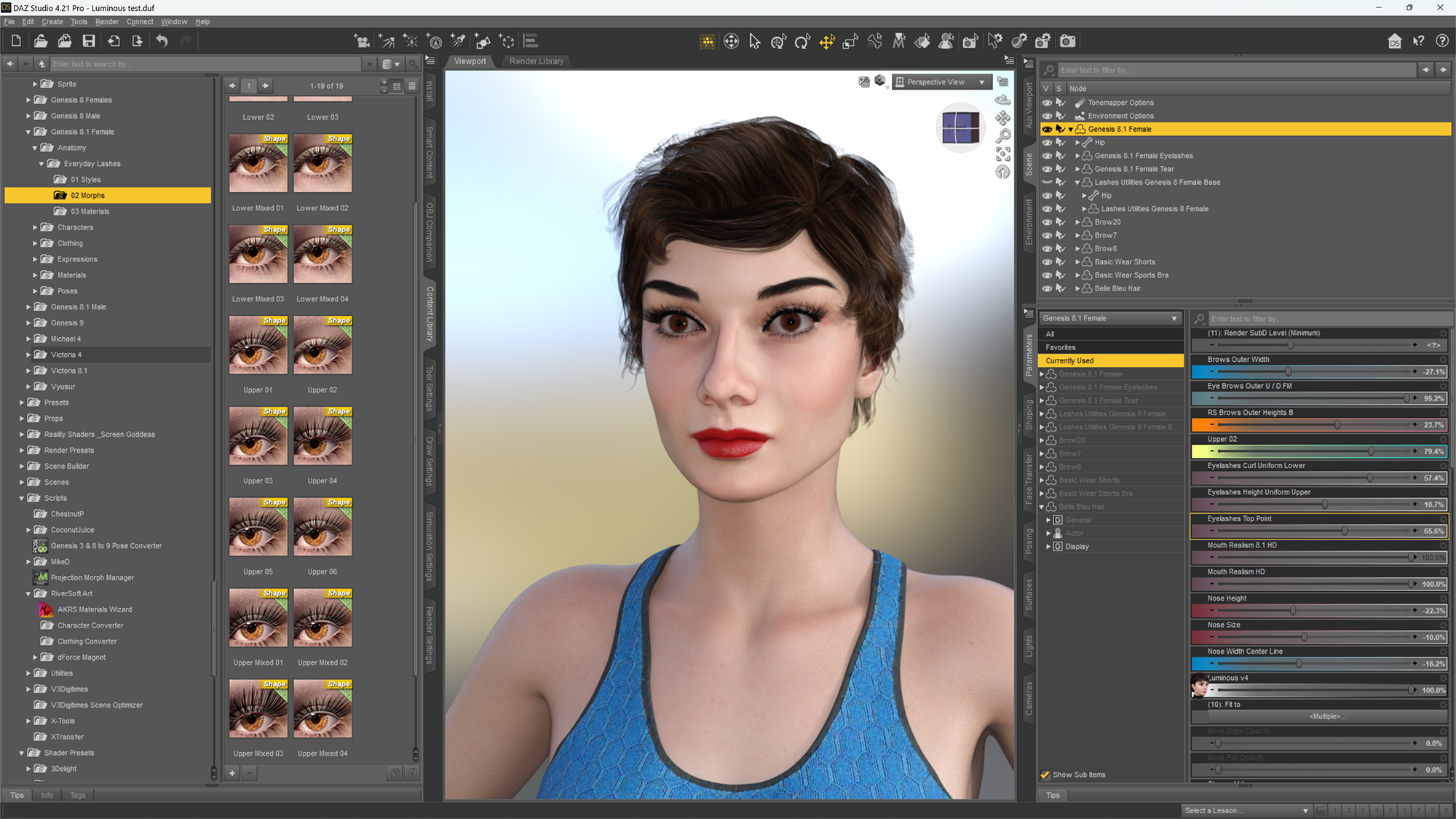
AOBB's Luminous v4 for G8.1F (aka Audrey Hepburn). No materials nor textures included.Okay, so I had some more fun with Luminous - I added the eyeliner (Riversoft Art Materials Wizard), which is a must for Audrey, I used a product for G8.1F named Everyday Lashes to get that extra thickness and length in the upper, outer corner lashes (morph "Upper 2" in the Parameters tab) and I worked on the shape of her brows - I made them wider and lifted their outer ends. I still wasn't happy with Luminous' nose, so I narrowed its ridge and tip and made it somewhat longer to compensate for making it smaller before. To give her that cute, Pixie look I went with the Belle Blue hair that I shaped using its preset and built-in morphs. Here is the effect:
 Genesis 9 we are back in the game Carrara users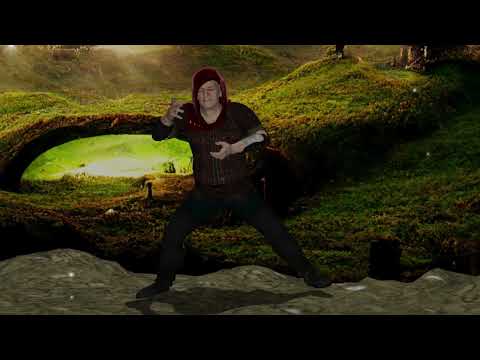
video
morph and Diffuse texture from G8M Ebeneezer
(Ultimate Unwrap 3D repaint, morphloader cloned )

Dolb and Ebeneezer
New Release: Bringing Daz figures To Life in UE5dave_0aa47f5a80 said:
1044083166 said:
@dave_0aa47f5a80 how to sample the DQS to shapekeys? I have tried some methods, but it doesn't have good perfermance.
The short answer is with many months of trial and error! In terms of performance during conversion, DTL takes a few minutes to convert a SubD 0 figure to an hour and a half for a SubD 1 figure with clothes and accessories. DTL completely rebuilds the skeleton and morph set - this takes time. In terms of performance at runtime, I find using UE's PoseDrivers to drive the JCMs is super efficient and gives really good performance.
Thank you! I have created a python script in Blender 3.3 to sample these shapekeys according to your method. It needs about 30 minutes to run. Of course, it depends on sampling accuracy. I'm trying to use posedriver in Unreal 5 . Hope to have a good result! Also, look forward to your plugin!
New Release: Bringing Daz figures To Life in UE5catmaster said:
Bone Driven Controller node in Unreal is bugged because it doesn't support linear mapping from bone rotation angle range e.g. 0-90 to morph target alpha e.g. 0-1, its settings always make non-linear results with or without using curves. DTU bridge fixed the C++ code of this node and made the Daz Morph Driver node which is used in Genesis8JCMPostProcess. The bridge and other plugins can't be used in UE5.1 preview as UE5.1 preview can't compile the C++ classes it creates.
Pose Driver node is more complex, hopefully this node isn't bugged. Would DTL plugin use the vanilla Pose Driver node, or create additional engine plugin with modified source?
Vanilla PoseDriver nodes work perfectly once they are set up, there is no need for any plugin (or engine) source modification. The JCMs created by DTL are always prefixed with 'Genesis8Figure__' so that the anim BP postprocess I created can be re-used for any character created by DTL, whether they are G8F, G8M, G81F or G81M (the same goes for control rig setup). End users will not have to deal with setting up the PoseDrivers as the anim BP post process in the demo project I will ship works 'out of the box' for any DTL converted character, even when extra joints and / or geografts have been added.
I standardised all the G8* skeletons and JCM naming because setting up PoseDrivers can be difficult. They are still 'experimental', so have their quirks. There are some parameters that must be set up in a certain order (e.g. RBF radius last) and if they are accidently compiled with the wrong settings (e.g. drive bone instead of curve) the UE curves arrays can get corrupted, leading to the dreaded 'Duplicate or Invalid curves' error. Once this happens the anim BP will start randomly crashing UE with an 'array out of bounds' error. I have typed out literally 100's of crash reports.
With persistence and by keeping backup copies of the project to revert to when the curves array gets corrupted, it is possible to set up all JCMs with PoseDrivers (as can be seen in the DTL tech overview movie). Once they are set up, they are solid and run hyper efficiently with no issues at all.
[Released] dForce Assistant [Commercial]marble said:
RiverSoftArt said:
marble said:
I could see myself using this because I have avoided buying long, flowing garments precisely due to the difficulty I have with dForce-ing them. As you point out - they almost always end up in an explosion. However, I also avoid using animation for dForce because I often want to animate the characters in a scene but the dForce animation takes over the timeline (DAZ Studio does not have Non-Linear Animation). I've asked on this forum previously whether there is a way to save out a single frame from the timeline as a stand-alone scene but the suggested methods have not really worked well for me. What I would want is the result of the dForce animation without saving the animation (timeline) that led to it.
So I wonder whether you might be able to script that frame isolation - perhaps as a separate product? I would buy that and also this becuase it would open up a lot of new possibilities for me.
You might try using dForce2Morph to save out the result of the dForce animation as a single frame which can you morph to in your master scene.
I have that so I can give it a try but I didn't think of it as a way to save out a frame from the timeline - rather as something to "solidify" a drape into a garment. Anyhow, I'll have a look.
It is not necessarily intuitve (and a little cumbersome) but it can work that way. Good luck!
Genesis 9 clothing questions & answersIt will autofollow if the morph is not already in the outfit. You do not have to worry about adding any morphs to the add on - in fact I would advise against it. Just add your morph to the outfit and that is sufficient.
Genesis 9 clothing questions & answersMada said:
The add on is fitted to the clothing item and as such will automatically inherit any of the FBMs applied in the outfit :)
Do the morphs have to be there in the clothing item before you use the Transfer Utility on the addon, or can they be added later, after the addon is already there?
Genesis 9 clothing questions & answersprinzeugen said:
Any way to make V9 feet fit into a pair of V8s shoes ??
Flat shoes should work fine with autofit. High heels as always will take more work - its not a straightforward rig that I can transfer with a template. A lot of it depends on the foot pose, height of the heel etc - plus the fact that you have to bake in joint rotations for high heels to work properly. Its all the same problems we run into with transferring high heels from previous generations to the next.
If you really really want to have the shoes and don't mind if they're props you can try lining up G8 as close as possible to G9 feet and export that as an obj, then import and parent. They won't bend on the toes but you'll have something to use :)
edit: of course you need left and right shoes in that case - so either use the geometry editor after importing to delete the extra shoe, or use a modeler to delete so you end up with a left and right shoe obj
Genesis 9 clothing questions & answersSo I have another follow-up question about the dynamic surface add-on. I successfully created one and added it to a clothing item, and it works exactly as expected. All good there. What about custom morphs? For example, using this technique on a shirt, if you create a custom morph for your shirt to support something like the Heavy FBM in G9 (or the masculine and feminine body shapes for that matter), do you also have to make another version of the addon that matches up to the morphed version of the shirt?
Tim
AOBB's Luminous v4 for G8.1F (aka Audrey Hepburn). No materials nor textures included.I really don't know what to say to that, @BronzeDragon. The images I post as promos and include in the zip files aren't retouched at all. They go online straight from the DAZ Studio renderer. I try to give the "Hollywood" characters the hair, makeup and clothing that seems true to them - like the Audrey hairstyle that I cobbled up from two hair sets to get that slick hairdo with bangs. That, a good skin texture and the BOSS Pro Light Set does the magic, I guess. I don't fiddle with the morph settings either. All characters are set to 100% and I don't tweak them any further.
I do correct my characters in the renders that go to my gallery using photoshop and DAZ morphs though, because they aren't there to promote the freebie really. They are just my artwork. I will write often in the gallery description what head morph was used and where to find it but the promo images that I post with the freebie are 100% retouch- and any manipulation-free.
BTW, your render of Luminous v4 is outstanding and I don't see any problems with it.
I don't have any bright ideas as to how to help you. I don't consider my head morphs perfect and I don't hide their flaws. I think I just have a knack for making them look good without cheating.
Duplicate Formulas FoundThanks Richard, Bejaymac, Umi no Senshi no Isho, and PerttiA, for your replies.
I do believe the duplicate issue was with the Beth character itself. I have moved content between discs and somewhere I got a duplicate along the way.
I have tried to remove everything, everywhere of the Beth charcter, which was a bit tricky since it is called "Beth", "M3DBeth", and "M3D Beth".
Anyway, after all was deleted/uninstalled, there still were sliders for the various Beths under the SHAPING tab for some reason. The uninstall fixed the duplicate issue, but now some of my characters upon loading, looks for and can not find the Beth morphs, thus preventing the character from loading until I click OK.
I then tried to reinstall the Beth character so see if that would fix the "morph-search" issue. It didn't, but I didn't get the duplicate issue back either.
So all in all. Some of the problems are solved, but the solutions created a few new ones.
[Released] dForce Assistant [Commercial]RiverSoftArt said:
marble said:
I could see myself using this because I have avoided buying long, flowing garments precisely due to the difficulty I have with dForce-ing them. As you point out - they almost always end up in an explosion. However, I also avoid using animation for dForce because I often want to animate the characters in a scene but the dForce animation takes over the timeline (DAZ Studio does not have Non-Linear Animation). I've asked on this forum previously whether there is a way to save out a single frame from the timeline as a stand-alone scene but the suggested methods have not really worked well for me. What I would want is the result of the dForce animation without saving the animation (timeline) that led to it.
So I wonder whether you might be able to script that frame isolation - perhaps as a separate product? I would buy that and also this becuase it would open up a lot of new possibilities for me.
You might try using dForce2Morph to save out the result of the dForce animation as a single frame which can you morph to in your master scene.
I have that so I can give it a try but I didn't think of it as a way to save out a frame from the timeline - rather as something to "solidify" a drape into a garment. Anyhow, I'll have a look.
AOBB's Luminous v4 for G8.1F (aka Audrey Hepburn). No materials nor textures included.I must say, I like your characters very much. But, have a problem. I load your preset of the character into a blank scene and it loads, but it never looks just like the images that you post and include with the downlload. I've checked every single setting I can find and every single thing is set to zero except your morph and it is set at 100%. It doesn't look right, sort of to squat, if you know what I mean. I've attached a render of what I have, just so you can see. Any suggestions would be very appreciated. As an after thought, I should mention that this happens to all of them, male or female.
 Getting on the 9 train, or not
Yes. Though I had some trouble with a loincloth/slit dress for G8F. I think the weight maps might've needed to be repainted in my attempt, but I don't know how to do that. Other regular G8F dresses, G8M pants and shirts fit well. I haven't bought any new outfits for G9 yet.starionwolf said:terry_duquette said:
Continue to test and learn on G9, character blend from G8 transferred morphs, some G9 body morphs, auto-fitted clothes working really well! Transferred Body compression effects, then made a shirt morph to allow the bra to be seen and not poke thru.
thanks for the information. I was going to ask if Genesis 9 can wear clothes that were made for Genesis 8.
Getting on the 9 train, or notterry_duquette said:
Continue to test and learn on G9, character blend from G8 transferred morphs, some G9 body morphs, auto-fitted clothes working really well! Transferred Body compression effects, then made a shirt morph to allow the bra to be seen and not poke thru.
thanks for the information. I was going to ask if Genesis 9 can wear clothes that were made for Genesis 8.
ISO: M3 RawArt Man-Bat SkuHello All,
I am working with Rawn and DAZ CS to locate the sku for a set by RawArt called something like "Man-Bat" (not certain on the name however)? It was morph pack for M3 that turned him into a Were-Bat like creature with his actual arms being replaced/morphed with wings. Resembling "Tyldak" from the ElfQuest saga. If anyone has this set, can you please provide me with the SKU for it?
Thanks in Advance!
-MJDaz 3D is part of

Connect
DAZ Productions, Inc.
7533 S Center View Ct #4664
West Jordan, UT 84084Licensing Agreement | Terms of Service | Privacy Policy | EULA
© 2026 Daz Productions Inc. All Rights Reserved.