-
Genesis 9 clothing questions & answers
barbult said:
Why do I get this morph when I auto fit something?
I added some extra morphs that's not in Genesis 9 but help with clothing movements... I forgot to move that into the hidden folder - you can just drag it to hidden - I will note for it to be updated in the templates :)
Genesis 9 clothing questions & answersCatherine3678ab said:
Lyoness said:
Diomede said:
I am still getting the Daz Studio crash when I try to use a dress template for the transfer utility. The transfer utility does work without the template, but get the undesirable result in the lower center of the tunic skirt. Can be fixed with weights and morphs, but I assume that is what the template helps with. I was making a simple tunic for the G9 Basic Masculine shape. Used Marvelous Designer but very simple shape. All quads. Only 2 material zones (collar and everything else).
Showing result without template, but with smoothing set to one and default DForce applied and simulated.
EDIT: This tunic was designed for the Genesis 9 basic masculine shape as an avatar in MD. In the transfer utility, I set source to 'current' and checked the options for reverse shape.
EDIT 2: I did submit a ticket with a copy of the zip file that accompanied the crash.
I didn't keep reading to see if anyone else has commented on this.
The key is: have Genesis 9 selected in your scene tab. THEN open the transfer utility and run.
For some reason, that avoids the crashing.edit:
I see that you did manage to get the transfer utility to work for you. I'm thrilled.
And now, you know how to prevent it from crashing next time!!? No, there are some of us who have been finding one must have 'nothing' in the scene selected before running the T.U. Applied to Mac and Windows.
I'm working with Windows, and I've tested selecting various things before opening the TU. Consistently, I do not have crashing if the g9 is selected
to me, unselecting everything is a hassle.AIUTO...CHI CONOSCE L’ITALIANO? PARTE TREDICICiao ragazzi. Ho nuovamente un problema con il Transfer Utility. Nello specifico, dovrei adattare al mio personaggio degli occhiali da sole. Li posiziono correttamente sul personaggio, come dovrebbero essere e li esporto in obj. Importo nuovamente gli occhiali in formato obj e sono nella posizione corretta, poi utilizzo il transfer utility, flaggando reverse source shape from target e poi sicuramente commetto qualche errore perchè sebbene gli occhiali rimangano nella posizione corretta, le lenti e la montatura si deformano un pò e il risultato non mi piace. Secondo voi cosa sbaglio? P.s. purtroppo non riesco a postare le foto. L'alternativa a cui ho pensato è quella di applicarli semplicemente senza usare il transfer utility, ma poi temo sia un problema spostarli quando metto in posa in personaggio
Genesis 9 clothing questions & answersLyoness said:
Diomede said:
I am still getting the Daz Studio crash when I try to use a dress template for the transfer utility. The transfer utility does work without the template, but get the undesirable result in the lower center of the tunic skirt. Can be fixed with weights and morphs, but I assume that is what the template helps with. I was making a simple tunic for the G9 Basic Masculine shape. Used Marvelous Designer but very simple shape. All quads. Only 2 material zones (collar and everything else).
Showing result without template, but with smoothing set to one and default DForce applied and simulated.
EDIT: This tunic was designed for the Genesis 9 basic masculine shape as an avatar in MD. In the transfer utility, I set source to 'current' and checked the options for reverse shape.
EDIT 2: I did submit a ticket with a copy of the zip file that accompanied the crash.
I didn't keep reading to see if anyone else has commented on this.
The key is: have Genesis 9 selected in your scene tab. THEN open the transfer utility and run.
For some reason, that avoids the crashing.edit:
I see that you did manage to get the transfer utility to work for you. I'm thrilled.
And now, you know how to prevent it from crashing next time!!? No, there are some of us who have been finding one must have 'nothing' in the scene selected before running the T.U. Applied to Mac and Windows.
Genesis 9 clothing questions & answersDiomede said:
I am still getting the Daz Studio crash when I try to use a dress template for the transfer utility. The transfer utility does work without the template, but get the undesirable result in the lower center of the tunic skirt. Can be fixed with weights and morphs, but I assume that is what the template helps with. I was making a simple tunic for the G9 Basic Masculine shape. Used Marvelous Designer but very simple shape. All quads. Only 2 material zones (collar and everything else).
Showing result without template, but with smoothing set to one and default DForce applied and simulated.
EDIT: This tunic was designed for the Genesis 9 basic masculine shape as an avatar in MD. In the transfer utility, I set source to 'current' and checked the options for reverse shape.
EDIT 2: I did submit a ticket with a copy of the zip file that accompanied the crash.
I didn't keep reading to see if anyone else has commented on this.
The key is: have Genesis 9 selected in your scene tab. THEN open the transfer utility and run.
For some reason, that avoids the crashing.edit:
I see that you did manage to get the transfer utility to work for you. I'm thrilled.
And now, you know how to prevent it from crashing next time!!Genesis 8 or 8.1 shapes on genesis 9?davidtriune said:
Yep, finally found that, had to figure out where the correct "unhide" was located, once found I was able to follow the steps... My next question is where does it put said Morph in the G9 Heiarchy, I don't find anything resembling the name of what I am trying to convert.
So did you transfer the morph yet? if you did, it should show up in the parameter tab (i just like to filter by "all"). It will start with FBM if it's a body and FHM if it's a head.

No success at all, I think the major difference is the tool, in the image I'm trying to follow, there is a section that does not light up or have options for me, and that is the extended options box. My only option is to select an item shape from under where I specify Genesis female 8.
My last attempt did do Something, looked like maybe it tried to fit GF8 onto G9... but the head was completely messed up, with eyes coming out of the top of ones head and whatnot... Might be longer and more drawn out, but I think I'll try the clone option, as was previously mentioned.
Zbrush related questionsI don't really know the right wording for this. Sorry if this is hard to read or something.
I would like to create hand morph on this plane. I know I can scrupte a hand on zbrush, but I already have the hand model from genesis 8,it is possible to do this on Zbrush without sculptuing?
New Release: Bringing Daz figures To Life in UE5catmaster said:
Using python script to generate JCMs is quite cool, I'd wait for DTL to further improve the results. Have manually sculpt some JCMs and keep using the modified DTU Daz Morph Driver nodes for now, there are too much other work to do after the characters have been imported.
We can use script to replace manual sculpting. Just adjust the bone angle, create a new shapekey, make it active and let vertivces of model which without JCMs and DQS automatically snap to DTU model with JCMs and DQS based on their topology. I think it's a convenient way. In fact, my sript works like this.
Genesis 9 clothing questions & answersWhy do I get this morph when I auto fit something?
Genesis 9 clothing questions & answersCatherine3678ab said:
Mada, I redid my vest using the Transfer Utility with nothing selected in the viewport. Opted to get the morphs from the tight body suit template ... and this time it did not crash!
After saving the clothing, I closed D/S and manually removed the obviously unnessary morphs [i.e. for feet and hands]. Have uploaded the vest to Renderosity where eventually it should become available if anybody wants it.
Was quite pleased at how well the templates' morphs work.
Fantastic! I'm glad to hear you found a way to avoid the crashes :)
Skin body G8 to G9I found a way to get around the boundary problem, which is to turn on the "single UDIM" uv set on the g9. this compresses the UV maps into a single UDIM tile, so every surface now uses one texture.
You just need to append every texture into a single 8k x 8k image file. Then you could move around UV lines to fit the texture, like I did in my first post.
I'm trying to "bake UV maps" to automate this. Similar to bake textures, I "project" the UV map from the g8 to g9 (on g8 clone), using belnder's Data Transfer modifier. I had to download a single UDIM uv set for the g8 before i could do that (from the ITF Character Dev Kit)
It works pretty well, but there's a few gaps in the uv map that i'm trying to fix.
Here is before and after.
Genesis 8 or 8.1 shapes on genesis 9?Yep, finally found that, had to figure out where the correct "unhide" was located, once found I was able to follow the steps... My next question is where does it put said Morph in the G9 Heiarchy, I don't find anything resembling the name of what I am trying to convert.
So did you transfer the morph yet? if you did, it should show up in the parameter tab (i just like to filter by "all"). It will start with FBM if it's a body and FHM if it's a head.
Genesis 9 clothing questions & answersMada, I redid my vest using the Transfer Utility with nothing selected in the viewport. Opted to get the morphs from the tight body suit template ... and this time it did not crash!
After saving the clothing, I closed D/S and manually removed the obviously unnessary morphs [i.e. for feet and hands]. Have uploaded the vest to Renderosity where eventually it should become available if anybody wants it.
Was quite pleased at how well the templates' morphs work.
Genesis 9 clothing questions & answerswhoohoo! Glad you got it working :)
I am really pleased with how much easier it is to take things back to base shape using this method - reverse back from a morph always disappointed me.
Genesis 9 clothing questions & answersYou will get better results if you use the process in the 2nd post in this thread, the one in the video :) reverse source never really did it for me, which is why I worked out the swapping base shapes around method - to get a better fit. Its an extra step but you will get rid of the crunchy bit in the centre of the dress. You have to export the obj for the base figure and then import that to use with the transfer utility.
In the video you change the base shape from default to the masculine shape, then use create follower in dev tools to fit it to G9. You don't need the template for this bit, all you need is to be able to dial a morph up and down. Once you have the outfit fitted to G9 masculine - you can dial back down to base shape - and turn on smoothing if needed. Export an obj with the base shape.
Now you can import the obj that's shaped like the base and work from that.
https://www.daz3d.com/forums/discussion/comment/7776621/#Comment_7776621
If you get constant crashes with the templates (still tracking the bug down since its not consistent enough to pinpoint a cause for everyone) you can try the alternative method of going to Utilities on Genesis 9 and loading the template you want to use in the scene. Use that to transfer from instead of G9, and use replace source with target under general options on the transfer utility popup - so NOT the one where you choose which figure to
After using that method go to scene identification and rename the obj/node name before you save it
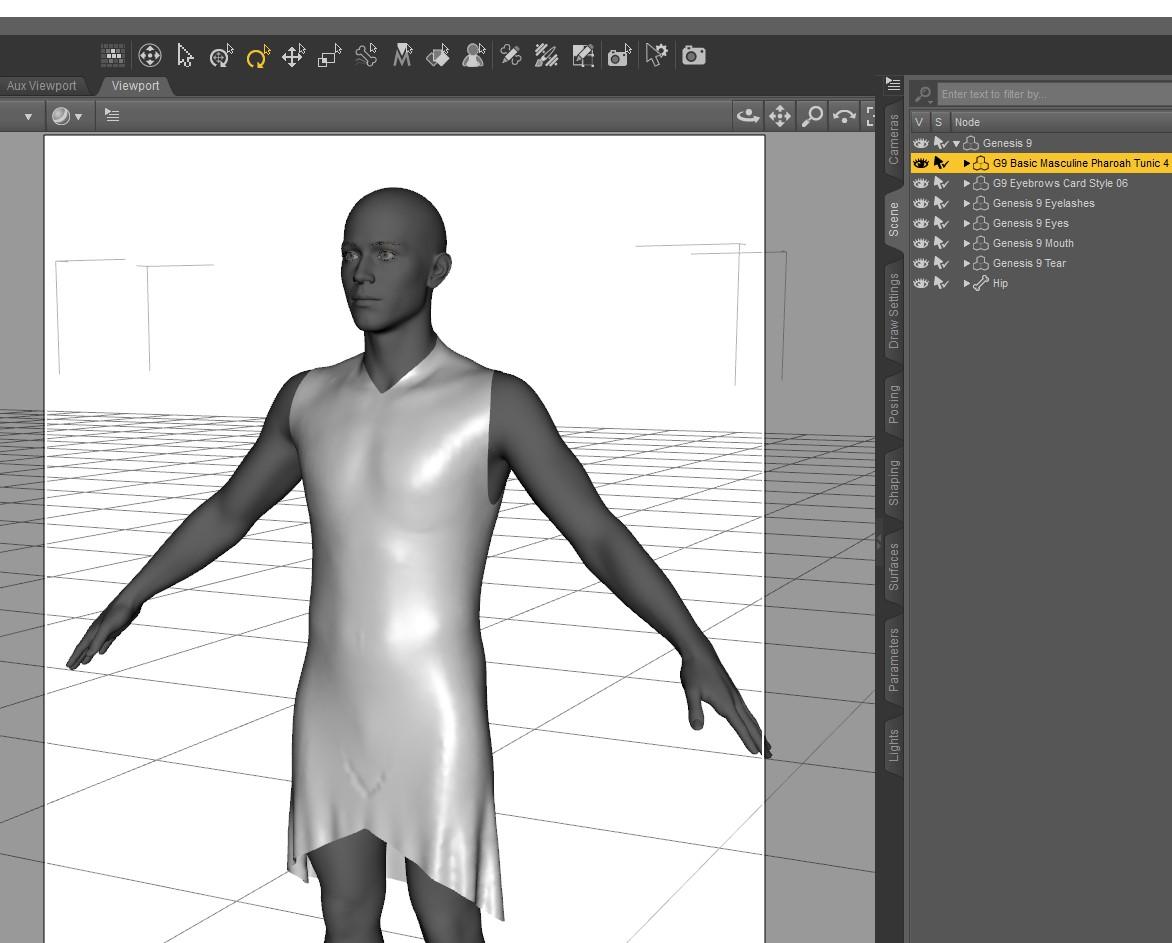
Genesis 9 clothing questions & answersI am still getting the Daz Studio crash when I try to use a dress template for the transfer utility. The transfer utility does work without the template, but get the undesirable result in the lower center of the tunic skirt. Can be fixed with weights and morphs, but I assume that is what the template helps with. I was making a simple tunic for the G9 Basic Masculine shape. Used Marvelous Designer but very simple shape. All quads. Only 2 material zones (collar and everything else).
Showing result without template, but with smoothing set to one and default DForce applied and simulated.
EDIT: This tunic was designed for the Genesis 9 basic masculine shape as an avatar in MD. In the transfer utility, I set source to 'current' and checked the options for reverse shape.
EDIT 2: I did submit a ticket with a copy of the zip file that accompanied the crash.

 Gen8/Gen9 Compatibility?
There are AutoFit clones for previous geenrations, as usual, but as usual they work better with soemthings than others.
It is possible to transfer (non-HD) morphs and textures using external applications, there are discussions in other threads.
What is the most extreme thing you've ever done with dForce?
A face only a mother could love...maybe .. ;-)Sven Dullah said:G1 morph made with dForce...not very extreme of course, I spare you the hardcore stuff:))
 Genesis 8 or 8.1 shapes on genesis 9?
davidtriune said:
Vially said:
So, where pray tell do you find that Morph? I've selected unhide on just about every Genisis 9 shaping catagoy it has, and there is no indication that this "Morph" now shows up anyplace.
first, click the Genesis 9, not any of its bones, in the scene hierarchy. next, show hidden properties (see image). then in the parameters tab, click "all", and type in "genesis 8". it will be a barely visible slider.
Yep, finally found that, had to figure out where the correct "unhide" was located, once found I was able to follow the steps... My next question is where does it put said Morph in the G9 Heiarchy, I don't find anything resembling the name of what I am trying to convert.
What does "Auto Follow Transforms" do?I saw a reference to this term, Auto Follow Transforms, on another website pertaining to the Genesis 9 Eyes and I'd like to have a better understanding of the term. What exactly does it do or is supposed to do? I have a character morph that I created for Genesis 9 and the eyes and the mouth don't move like they should with the morph. The eyes are too small and sit further back in the head. The mouth just sits back too far. I'd like to have the eyes and mouth move into place when the body morph is dialed. My workaround at this point is to move them where they should be an then create a morph of the new position/size and then create a control property to spin them all. If there's a better solution, I'd rather use that. I was thinking this Auto Follow Transforms might fit the bill. Thoughts?
Daz 3D is part of

Connect
DAZ Productions, Inc.
7533 S Center View Ct #4664
West Jordan, UT 84084Licensing Agreement | Terms of Service | Privacy Policy | EULA
© 2026 Daz Productions Inc. All Rights Reserved.