-
is possible to turn a non G8 figure into a G8 Character Morph?
Ok, so the exact situation is that I want to create my ideal werewolf character.
I want to combine certain aspects of these two characters with some other G8 morphs to create my character (not intending to sell it, but if that's a possibility, yay!, for now I need it for art inside my novel)
Manitou
- https://www.daz3d.com/manitou
HH Werewolf
- https://www.daz3d.com/hh-werewolf
So, is it possible to make these into morphs for G8?
Please keep in mind I BARELY understand the technical aspects of the art.Anatomical elements on adult G8 and G8.1 modelsHaving expressed my appreciation for Catty 8.1 in this thread, it turns out that I can’t get her "Male Anatomical Elements" to look normal and the usual parameter/morph sliders won't work (apart from one or two exceptions).on those genitalia.
Let me explain: Catty 8.1 like Nishi and Hans 8.1 and a few others has two types of anatomical elements:
01 Female Anatomical Elements
02 Male Anatomical ElementsOn applying the "Genesis 8 Male Genitalia" from the central Smart Content "Anatomy" section on the Catty figure, the (sometimes 'dreaded') "Auto-Fit" popup appears asking you "What figure was the item originally designed for?". It's obvious that according the system Catty is a female figure. Within the autofit dialog you (basically have to) choose "Genesis 8 Male" which results in the figure getting the "Genesis 8 Male Genitalia" node (so far so good) that you apply one of two "Male Gens" materials to from the Catty figure. However, the end result does not quite look like the usual "Genesis 8 Male Genitalia" (let's say it is anatomically odd) and like I said the usual parameter/morph sliders won't work (apart from one or two exceptions) on those male genitalia. Products like "Transgender Shapes for Genesis 8" and "Genesis 8 UV Swap: Male and Female Base" don't seem to have any impact on this particular problem.
My question: How do you get the "Male Anatomical Elements" to look 'normal' with a figure like Catty that pretty much uniquely have their own Male and Female Anatomical Elements?
Genesis 9 Coming Soon! Preorder Victoria 9 HD TodayGordig said:
Padone said:
@jeylien The HD merchant resource doesn't exist for G1-G81 because it is not needed for those figures.
You've never seen merchant resources for previous generations, but that doesn't mean they didn't exist. We weren't meant to see the G9 merchant resources, either.
I think this is new - previous generations required that the end user own the morph packs directly, I guess for users exclusively populating their scenes with Daz characters they will now be more optional
Freebie Challenge October 2022-"Horror Movies!" - Main ThreadThe Exorcist
This render is inspired by the 1973 supernatural horror movie, The Exorcist.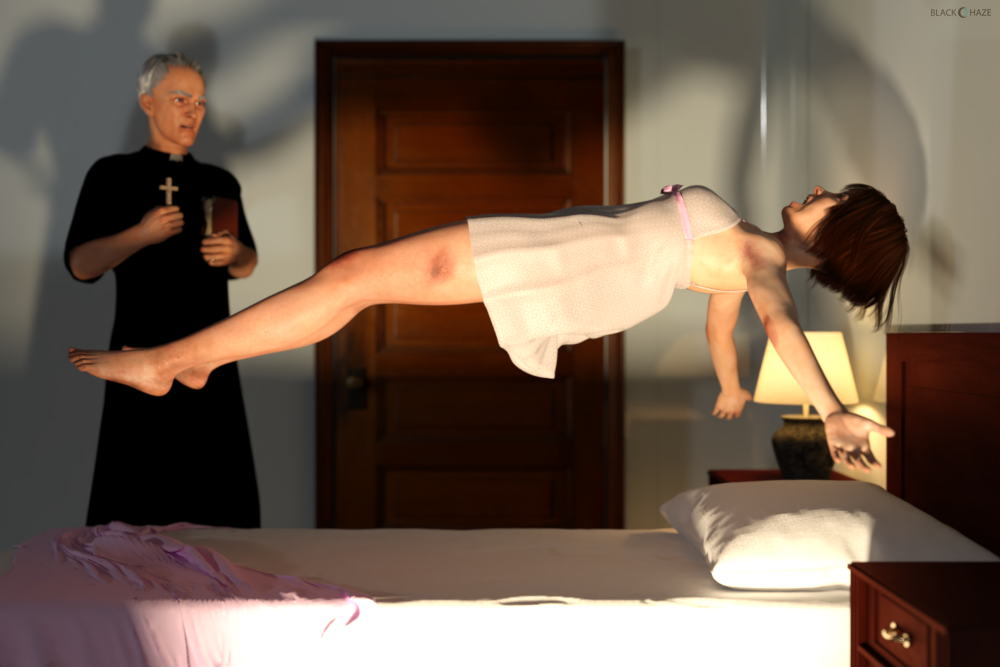
- Aiko 3 Reimagined for G8F
https://www.deviantart.com/tritiumcg/art/Aiko-3-Reimagined-for-G8F-861367761
- Jo Evans - Full Head and Body Morphs for G8F
https://www.deviantart.com/tritiumcg/art/Jo-Evans-Full-Head-and-Body-Morphs-for-G8F-859276366
- Transgender Genesis 8
https://www.deviantart.com/agentunawares/art/Transgender-Genesis-8-723851486
- Elderly Woman - Head Morph for G8F
https://www.deviantart.com/tritiumcg/art/Elderly-Woman-Head-Morph-for-G8F-854449238- Chameleon ROse2 for Genesis 8 Female by zoro_d (skin material)
https://www.renderosity.com/freestuff/items/85859/chameleon-rose2-for-genesis-8-female
- Rough Textures for G3F and G8F
https://www.deviantart.com/noone102000/art/FREEBIE-Rough-Textures-for-G3F-and-G8F-804353596- Buzzed Nape Short Bob for G8F
https://elleque.net/?p=8460
- So-oldier Hair for G8M by squarepeg3d
https://www.renderosity.com/freestuff/items/81424/hair-so-oldier-hair-for-g8m
- OnFleek for Genesis 3 & 8 Female(s)
http://shop.aprilsvanity.com/onfleek-for-genesis-3-8-female-s.html- Plush Lingerie for Genesis 8/8.1 Female by Tiboza
https://www.renderosity.com/freestuff/items/90893/plush-lingerie-for-genesis-881-female
- Free Lace Iray Shaders by adarling97
https://www.renderosity.com/freestuff/items/84697/free-lace-iray-shaders
- Clerical Garb by mjc26250
https://sharecg.com/v/82699/browse/21/DAZ-Studio/Clerical-Garb
- Erte inspired dforce dress for G8F - #3 by perlk
https://www.renderosity.com/freestuff/items/92127/erte-inspired-dforce-dress-for-g8f-3
- Old Book by Bonnyb1234
https://www.renderosity.com/freestuff/items/88625/old-book- Bed with dForce Blankets by sadrielxv
https://www.renderosity.com/freestuff/items/88392/bed-with-dforce-blankets
- Interior Door Game-Ready by AlirezaSadeghi
https://www.turbosquid.com/3d-models/free-max-model-interior-door/612776
- Round Windows Minikit by PixelSploiting
https://www.renderosity.com/freestuff/items/88401/round-windows-minikit-dufobj
- Simple table lamp 03 by Moin3D
https://www.renderosity.com/freestuff/items/90732/simple-table-lamp-03huge time loss on loading G8f for 'Formula output property not found'About 30% of that log is "bugs" that need what I class as minor surgery to fix.
The rest is split between files you can probably safely delete, and files you can't touch without breaking the product.
If a product is a morph or expression for G8 then expect it to have "required" products that aren't listed.
question about Facegen head formatIf I'm not mistaken, you could load the .fbx into Blender, export out an .obj file. Then load the .obj file into FaceGen and let it morph away any of the target Genesis figures you select.
Moving Morphs from Centuar 8 to Centuar7Hmmmm been struggling with this most of the day Gen3 Centaur does have the "male centaur additive " and that is just the centaur horse body , and if I unparent the Genesis8 male Centaur body from the Genesis8 male ,then delete the Genesis8 male,eyelashes and Geoshell ,drop the resolution on both bodies to base ,........ then I have 2 centaur bodies that look the same ,so does that mean I could then ,apply a shape to the G8horse body ,export it ,then import that shape as morph on the G3 horse body ?
Genesis 9 Coming Soon! Preorder Victoria 9 HD Todayjeylien said:
In the livestream yesterday (I wasn't able to watch live, so watching now!), people were talking about the Merchant Resource versions of the G9 morphs, and while I can see those in the store, I never saw any merchant versions of the Daz head & body morph sets for Genesis8, so I was wondering, did that ever exist? (If so, could somebody give me a link or tell me where to go for that?) Though I currently couldn't afford them, I would've gotten the merchant version in the past if I'd known that was available. Glad it's an option with G9 now though, and I guess I'll just have to work more and save up more and upgrade sooner than I'd planned!
Oh the PAs do NOT pay that much lol ... anytime Daz3D puts a super silly high price on items, that is to DETER people from buying it/them.
Only PAs can buy the Merchant Resources for these basic morphs AFAIK.
You would have to contact Daz3D via the help support ticket system and talk with them about any licenses available [such as for merchant resource use] of their morphs by non-PAs.
What we all can do is make and sell or share Shape Presets [as those require the end user to also own the morph packages] -- if mixed in with our own morphs, they MUST be dialed out of the morphs we share [free or $]. [last I read, I do not speak for the company, I just read [too] many posts.]
Genesis 9 Coming Soon! Preorder Victoria 9 HD TodayIn the livestream yesterday (I wasn't able to watch live, so watching now!), people were talking about the Merchant Resource versions of the G9 morphs, and while I can see those in the store, I never saw any merchant versions of the Daz head & body morph sets for Genesis8, so I was wondering, did that ever exist? (If so, could somebody give me a link or tell me where to go for that?) Though I currently couldn't afford them, I would've gotten the merchant version in the past if I'd known that was available. Glad it's an option with G9 now though, and I guess I'll just have to work more and save up more and upgrade sooner than I'd planned!
Hardware for Viewport vs Render?Richard Haseltine said:
You are not going to get real time rendering out of Iray, but yes hardware that boosts rendering will boost the Iray Drawstyle. A remaining limitation will be the need to transfer the data to the GPU - for a full render that is usually a small part of the process, but with a constantly updating preview it becomes much more significant.
does any other similar quality renderer get me closer?
What is the Best Way to Copy a Fully-Developed Character into a Different Scene?After adding hair, clothing, various textures and shading, and many other features to a character, I never do save the work with the character preset, because I will have to redo everything. Right now, I am saving them into scenes if I have added such varied details in the framework of my characters. But my question is this: Is there a way to USE the character preset so that all these extra details are saved along with the character? If not, is there a way I can more efficiently transfer the character from one scene to another without losing all of this work?
I know that I have used grouping before with other objects. Do I have to do the same thing with Daz in order to make everything transport reliably into the next scene? Or is there yet a better way. The reason I am asking is because I am thinking about creating a comic book / graphic novel utilizing my renders. Any help anyone can provide will be greatly appreciated. Thanks in advance. ;)
Hardware for Viewport vs Render?You are not going to get real time rendering out of Iray, but yes hardware that boosts rendering will boost the Iray Drawstyle. A remaining limitation will be the need to transfer the data to the GPU - for a full render that is usually a small part of the process, but with a constantly updating preview it becomes much more significant.
How to avoid mesh shrinkage with Morph exported from ZBrush?Hey Everyone, my workflow is like this
Goz from Daz
in Zbrush - subdivide to level 4
Sculpt
reset to level 1
Goz export back to Daz
Accept Morph and name - make sure reverse deformations is on
Then turn new morph dial to 100 - notice mesh shrinkage
is there a way to avoid this?
Thanks for the help
Aubrie Morph Preset for A4Texture, Hair, and Clothes Not Included!
Requirements:
Victoria 4.2 Base
Victoria 4.2 Shapes++
Aiko 4 Base
Stephanie 4 Elite Base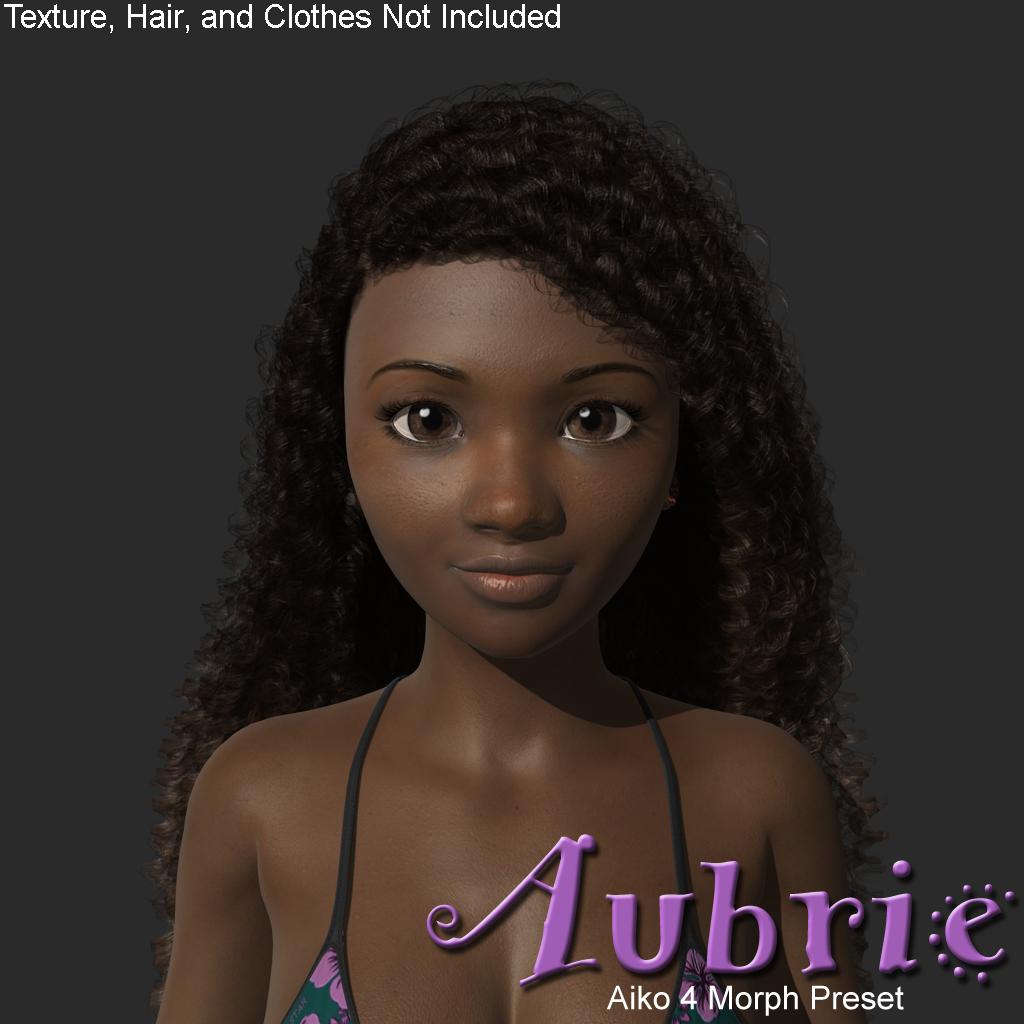
 G8F Eyes Closed eyelid distortion. Please help!
Most likely a corrective morph that should be triggered by both closing the eyes and having a specific shape applied is instead triggering for the eyes closing anyway. Check to see if any of your Daz, or other, products have an update - if the issue remains after applying any updates then enable Preferences>Show Hidden Properties in the Parameters pane option menu and see what properties are triggering when you close the eyes on a zeroed figure.
question about Facegen head formatSeven193 said:
The Facegen docs say:
"Facegen v3.7:
Create -> Scan, creates face shape from 3D scan mesh (or other mesh)
Get face shape from a 3D scan (or other mesh)
The scan must be in a neutral expression
It must be in Wavefront .OBJ format
No UVs or color maps required; shape only
For color, use the Photo tab BEFOER this step"
I never used it before, but your head scan must be in Wavefront format, not .fbx.
Must be using Facegen v3.7 or later.
3D models don't come with color, so I guess it's expecting you to load a photo too, unless you're just using it to create a morph, and don't care about generating texture maps.K so its useless basically?
question about Facegen head formatThe Facegen docs say:
"Facegen v3.7:
Create -> Scan, creates face shape from 3D scan mesh (or other mesh)
Get face shape from a 3D scan (or other mesh)
The scan must be in a neutral expression
It must be in Wavefront .OBJ format
No UVs or color maps required; shape only
For color, use the Photo tab BEFOER this step"
I never used it before, but your head scan must be in Wavefront format, not .fbx.
Must be using Facegen v3.7 or later.
3D models don't come with color, so I guess it's expecting you to load a photo too, unless you're just using it to create a morph, and don't care about generating texture maps.[Released] dForce2Morph [Commercial]Pendraia said:
RiverSoftArt said:
Pendraia said:
Really cool idea! I'm just wondering does it work with other figures as well as Genesis? I use a variety of figures and I would want it to work with them all or I may as well continue to do this the old fashioned way...
I don't understand. This is designed for clothes and hair. It would work with any figure as it is not about the figure.
I've found that isn't always the case with other converters. I'd rather ask than make the assumption that it will work. I can convert dforce simulations to morph but always looking for tools that will speed up the process.
This script is not a converter. It creates a morph from a simulated item shape.
[Released] dForce2Morph [Commercial]generalgameplaying said:
Can this plugin create an additive morph for a whole timeline?
Like creating one single morph that reflects the changes to an item throughout the whole timeline?
(Finding the exact spots again will be difficult, unless there was (reliably) N steps per frame, but maybe it also lets new possibilities emerge. Thinking of export for computer games.)
It creates a morph from the base shape of the clothing/hair item to the shape at the frame you use it on. The morph is an interpolation between those two shapes and would not follow the changes the clothing did over the timeline.
Question for the PAs - Female ArmourRichard Haseltine said:
kyoto kid said:
NyX said:
I'd like to see some armor that acutally has a flatened chest area, instead of modling around a female's breasts. Real armor/flak jakets/bullet proof vests and the like don't stretch around breasts.
Of course, I realize this is probably impossible with the way meshes actually work, but a morph to flatten G8Fs chest (or whichever generation) would be nice.
...Zev0's Breast Control has a "Breast Zero" setting as well as a, "Impact Front" pose morph while other breast utilities have similar adjustments. There is also a freebie flat chest morph for G8.
A morph cannot stop other morphs from affecting the shape.
Can't you just zero the morphs related to the chest area applied to the armor?
Daz 3D is part of

Connect
DAZ Productions, Inc.
7533 S Center View Ct #4664
West Jordan, UT 84084Licensing Agreement | Terms of Service | Privacy Policy | EULA
© 2026 Daz Productions Inc. All Rights Reserved.