-
Not all cr2 files are converted
When I categorize cr2 files (from the Poser formats folder to the categories folder) not all cr2 files are visible.
https://www.daz3d.com/giacomo-for-michael-4-and-hiro-4 This one seems quite stubborn and will not convert over but some stuff I bought on other sites (that are also cr2 files) are converted over to the categories folder just fine.
Anyone has any idea why the inconsistencies?How can I convert texture maps from V/M4 to Genesis?In order to load a UV Set the OBJ must have the same vertices and polygons, which the Victoria 4 and Genesis figures don't. However, Genesis already have the Victoria 4, Michael 4, and Kids 4 UVs
Yeah, I just noticed that, but the v4 has a very weird face. Fortunately I have the same texture as m4 so it's all good
It will cost you more going from generation to generation when you can spend less and go straight thru to G8. What are your detailed goals for getting things to G8?
Well, a few years ago, when Genesis first came out I bought the iconic paacks for both 3 and 4. Then Daz ate my save files and after a while I moved on. Now I decided to go back to my webcomic so I am looking at updating all my old 4 stuff the the current genesis, since morph loader doesnt like v4. I would love to go Aiko/Hiro 8 (if they are out) but I only have Aiko 6. I tried to find Hiro 6 to wish list it but I couldnt find him. Anyhow I noticed that genesis 8 does not have the uv sets I need so I would have to get that situated first.
How can I convert texture maps from V/M4 to Genesis?In order to load a UV Set the OBJ must have the same vertices and polygons, which the Victoria 4 and Genesis figures don't. However, Genesis already have the Victoria 4, Michael 4, and Kids 4 UVs
Morph loader not workingWith Victoria 4 (and Michael 4) you need to zero the figure, this removes any posing and scaling. Genesis generations need to be at base resolution and the Genesis 8s need their eyelash geografts deleted (or load the development versions and export).
Do You Have the Time ~ Carrara Challenge #39 ~ FINAL Results ~entry #16
title: time tunnel
artist: shlomi laszlo
homage
used:
m4 and shaders for it
https://www.daz3d.com/m2a2-bradley-ods
Interactive Lessons - FeedbackAnd you have https://www.daz3d.com/michael-4-for-genesis-2-male and it is installed, via Install Manager or Connect?
How do I edit the Lucas Genesis 8 skin map/texture cheaply? OK, I put each file in the proper folders by hand and got the Laticis pubic hair to show up above the G8 pubic hair.
The problem still remains, because when I turn off the Eye in the Daz Scene Tab the new pubes do disappear but the origianl G8 pubes below still show up.
Have any of you tried this on the Generation 8 gens? It was designed for Generation 2.Unless I am still doing this incorrectly it looks like I will have to paint the pubes out, which will leave that area flat and with out texture, which I think will be OK.
To bad the G8 gens do not have the Michael 4 option for total nude gens.
Thanks again!
I think some of the G8 characters do have totally nude gens but Lucas 8 is not one of them. I think Michael 8 does but I don't remember 100%.
I don't know what the Laticis Imagery Pubic Hair problem is, it's been a long time since I tested them but they worked. You much of installed to wrong place. There should be a read me included with the zip file giving specific instructions for manually installing such products although 90% of the freebies expect you to copy all the folder below the 'Content Library' level of the zip to the corresponding 'Content Library level of your own DAZ Content Library. Sorry.
Geneis to look like Victoria 4What are you wanting? Genesis (assuming you mean the original) will take Victroia 4 (and Michael 4 and Kids 4) materials, and has a clone shape for AutoFitting clothes and other conformers.
How do I edit the Lucas Genesis 8 skin map/texture cheaply?OK, I put each file in the proper folders by hand and got the Laticis pubic hair to show up above the G8 pubic hair.The problem still remains, because when I turn off the Eye in the Daz Scene Tab the new pubes do disappear but the origianl G8 pubes below still show up.
Have any of you tried this on the Generation 8 gens? It was designed for Generation 2.Unless I am still doing this incorrectly it looks like I will have to paint the pubes out, which will leave that area flat and with out texture, which I think will be OK.
To bad the G8 gens do not have the Michael 4 option for total nude gens.
Thanks again!
You painted over the pubic hair in an image editing program, correct? Did you then replace the original torso map in the Surfaces pane with your new edited version? iIf so, are there other maps that contain pubic hair? Transparency / Cutout Opacity maybe? If you have, did you clear memory or alternatively restart Daz3D? I've had problems with daz caching texture maps and not updating ones I add in that have identical names.
Edit: I did a quick edit and just removing the diffuse map's pubic hair is not enough. You have to remove at least the SSS/Translucency maps. I just loaded them all including bump into Photoshop and did a piss-quick job with the stamp tool.
Remove the maps, and apply your edited maps. Either rename all the maps to something NOT identical to the old maps or you have to use Purge Memory (it's in the Content Library under Scripts -> Utilities) after removing the old maps. If you don't purge memory daz will take the maps it cached (which are the old ones). Then apply the maps again.
How do I edit the Lucas Genesis 8 skin map/texture cheaply?OK, I put each file in the proper folders by hand and got the Laticis pubic hair to show up above the G8 pubic hair.The problem still remains, because when I turn off the Eye in the Daz Scene Tab the new pubes do disappear but the origianl G8 pubes below still show up.
Have any of you tried this on the Generation 8 gens? It was designed for Generation 2.Unless I am still doing this incorrectly it looks like I will have to paint the pubes out, which will leave that area flat and with out texture, which I think will be OK.
To bad the G8 gens do not have the Michael 4 option for total nude gens.
Thanks again!
What is the Gens 01 and 02 for in Lucas G8?Thanks, I tried the Michael 4 Genitals, unter Materials and it doesn't load on to Lucas. Do I need a newer character's gens?You have to buy a generation that matches the generation of the character you are using. So Lucus 8 can use Michael 8, Darius 8, Lucas 8, Edward 8, Ollie 8, and Owen 8 genitals included if you bought those in the pro bundle.The genitals are the same, only the textures are different. The females are Victoria 8, Stephanie 8, Olympia 8, Monique 8, Aiko 8, Alexandra 8, Charlotte 8, and Penny 8.
Note: Sakura 8 or Josie 8 are not included.
I think I've listed all the generation 8 pro bundles that would include genitalia.
What is the Gens 01 and 02 for in Lucas G8?Thanks, I tried the Michael 4 Genitals, unter Materials and it doesn't load on to Lucas. Do I need a newer character's gens?Michael 3 texture on Genesis 1 or Genesis 2 male?TC2 + M3/D3 plugin + M4 plugin (+ optional: Michael 4 for Genesis 2 Male)
https://www.daz3d.com/texture-convertor-2-tc2
https://www.daz3d.com/tc2-michael-3-david-3-plugin
Thanks for the links, but unfortunately this won't work on a Mac. Do you know if this converter is a stand alone application? Or do you have have another application installed on the computer along with it to work?
Michael 3 texture on Genesis 1 or Genesis 2 male?TC2 + M3/D3 plugin + M4 plugin (+ optional: Michael 4 for Genesis 2 Male)
https://www.daz3d.com/texture-convertor-2-tc2
https://www.daz3d.com/tc2-michael-3-david-3-plugin
Export FBX fails!When trying to export a simple character Michael 4 with clothes and some movements from aniblocks as an fbx file nothing works as it did in earlier versions of DAZ3D.
The export of a simple FBX file and a simple character from DAZ3D takes about two hours to finalize! This is way too long and nothing like your earlier versions of DAZ3D could manage in no time at all.
I have now tried different settings but the results are really bad when trying to open them in the same old version of Lightwave 3D 9.6 as I have used successfully earlier when working with DAZ3D exported fbx files.
Anyone knows how to solve this?
sculpting mesh questionthe non human examples sold at DAZ3D largely use HD morphs which only Premier Artists have access to.
I personally would suggest a higher poly legacy mesh like Victoria or Michael 4, is a quite different workflow to using the Genesis range but as creatures if not fitting clothing they are quite awesome,
Philosophers egg is a site that sell morphs for them that gives an idea of their flexibility.
Even in the DAZ store you can find some brilliant morphs PA's of the past made.
The great thing also is they and their content are frequently on sale very cheap too.
https://www.daz3d.com/super-physical-female-bundle
is currently free and includes V4
https://www.daz3d.com/freak-hero-pack
also currently free includes M4
Genesis confusion....OK, what happened here was that we used to have generation 1,2 3 and 4 which were completely different figures to the Genesis figures. The main characters for Gen4 for example were Victoria 4 and Michael 4.
So then Genesis came onto the scene, a completely different technology. and as they started releasing characters for him/her they kept the names Michael and Victoria, and so they became M5 and V5 (and several other generation 5 characters), although they were based on Genesis. Similarly wehn Genesis 2 came the first character figures released for the Gensis 2 line were V6 and M6. and Genesis 3 spawned V7 and M7. Then came the next Genesis generation, and it was decided that Genesis 4 could well get mixed up with Generation 4 of the older figures, ie V4 and M4. So they missed out using Genesis 4,5,6 and 7 and jumped straight to Genesis 8, with the characters beig 8 as well, so V8, M8 and so forth. So the now the Genesis number matches the main character generation number.
does that make sense to you? have I explained it properly?
Oh and BTW you are in exactly the right place.
The New Users Forums are the direct result of requests for more information, more help, and more activities for our newer community members - what a great idea!
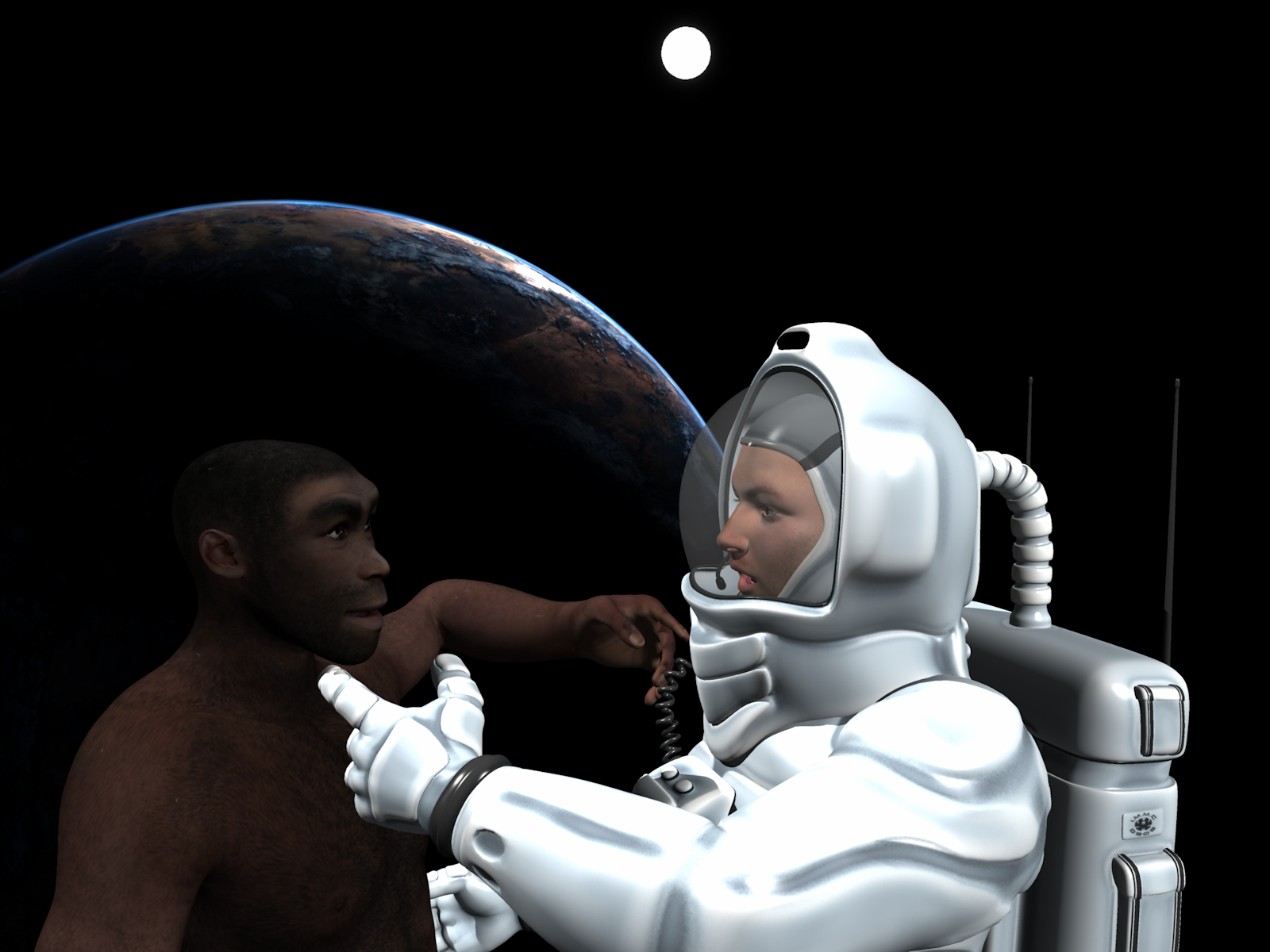
These forums are going to be moderated a little more strictly than our general forums. As a community it will be important for us to cultivate an atmosphere of collaboration and encouragement that will allow for our newest additions to have fun and to learn in an environment that is conducive to both.Do You Have the Time ~ Carrara Challenge #39 ~ FINAL Results ~Entry: # 8
Title: Caveman to Spaceman
Artist: Bunyip02
Category: General Entry
WIP Links: https://www.daz3d.com/forums/discussion/comment/3464991/#Comment_3464991
Products Used: https://www.daz3d.com/michael-4-base-male-3d-model
Genesis
https://www.daz3d.com/genesis-generation-x2
https://www.daz3d.com/homo-erectus-m4
https://www.daz3d.com/zero-gravity
https://www.daz3d.com/iray-hdri-space
About Your Image: Mans evolution through time from the caveman ancestors to spacemen exploring outer space and our continued fascination with both.
 Slow Dancing AniBlocks Animations for V4/M4 and Genesis 3?
Are there any slow dancing AniBlocks animations for Victoria 4/Michael 4/Genesis 3 figures?
Not Found: Hiro 4 and Hiro 3If you installed all the files included with the Pro bundle, you should have everything you need, including the PowerLoader (except Michael 4, of course). When you load M4 you should get a popup for the powerloader with the option to load H4 amongst the morphs. Check it and it will then be available as a slider under the Parameters tab. Alternatively, you can find the H4 .cr2 in the Content Library under Poser Formats>"your library">Figures>DAZ People as Richard said. If you wish to use the texture that came with the figure, it should be found in Poser Formats>"your library">Pose>JM_Hiro4.
Daz 3D is part of

Connect
DAZ Productions, Inc.
7533 S Center View Ct #4664
West Jordan, UT 84084Licensing Agreement | Terms of Service | Privacy Policy | EULA
© 2026 Daz Productions Inc. All Rights Reserved.