-
Getting on the 9 train, or not
..so a few question after trying to digest t all I've read.
1. Are G9's skin textures (even non HD ones) 8K?
2. If so, can one reduce the skin map resolution back to 4K using a script like The Scene Optimiser?
3. Do non HD textures look worse than HD ones when rendered?
4. Is G9 radically different enough to the point that there will be no morph/shape transfer utilities from older generations like G3 an G8 (meaning you will have to buy all new figures/characters)?
Given the return to the unimesh, am hoping to see the next release of the Skin Builder utility will work for male characters as well since G9 uses the same UV for both. Hopefully we'll see a number of utilities that embrace both genders in the same package.
Getting on the 9 train, or notPadone said:As for detailed topology it's not just navel and nipples, it's everywhere the whole figure.
I'm not a fan of autofit because usually doesn't work fine, but since everyone is talking about the incredible autofit features of G9 then I tried. Below there's the simple G2 Persian Top on G9, the result is not impressive it seems fine until you pose, then you see the bracelet goes to the elbow in G9 while it should stay above as in G2. This could be a problem or not depending on the outfit.

I wonder..
I can remember either Genesis or G2 has a different size degree from other character generations in some limbs, but I cannot remember which of those two it happened with. Anyway, this discrepancy had to be corrected for in my pose transfer scripts. I think it was about 4.4% different in size, and applied to knee and elbow bend. I wonder if this is what we're seeing here. The clothing limb has rotated the same number of degrees as the G9 limb, but unfortunately the size of the degree for the clothing is different from the character.. Maybe, maybe not, but it could be an explanation if it only happens with knee and/or elbow bend.
Regards, Richard.
Getting on the 9 train, or notPerttiA said:
RAMWolff said:
So with this new mesh set to be "inbetween" folks will be able to make small breasted women, trans folks, little kids and all that with no issues with how the clothing fits. That's the idea any ways. I've read this thread and a couple of others and folks seem so upset that nipples and navels are now just a morph and hi def map. SO WHAT! I think what it boils down to is folks don't like change but are intrigued enough to check it out and then complain about X Y & Z until they get used to the new way! LOL Cracks me up!
So, what is the method you use to make your own morphs to the G9 pokies and navel?
Well I'm not a PA here, I work mostly in Poser but have developed for DS in the past and Genesis 9 is wooing me back to the fold as I really really loved Genesis 1 for the male/female ease of use. I'm a ZBrush person so for me making nips and navels are no big deal and then just add in a Normal map and you have what you need. Now the PA's here have access to other tools that make the fine details really pop out like those little bulgy bits on the areola's of both males and femals. I MIGHT be able to do that with a really hi def Normal map but I've not tried as of yet.
All in all I'm very happy that DAZ has decided to go down this road again with all the improvements that have come along under the hood in DAZ Studio. So this new Genesis will have a better chance of becoming the norm for the future of figures for this platform. Who knows, with DAZ they may decide to go back to split figures for the 10th iteration of Genesis! LOL Now now, no throwing rotten fruit at me, I've been around A LONG TIME here and I've seen it all! LOL
Genesis 9 Males?Kerya said:
Timbales said:
I'm still concerned about the G9M chest. I haven't seen a render yet where I think it doesn't have a compressed mesh look under the breast, or looking like undeveloped muscle. My fear is that will transfer over to clothes and they will look odd on him. I'm wagering many clothing vendors will try to make G8M clothes also look good on G8F (like they do with hair) and it's not going to be pretty.
Did you see Mada's reply about turning on/off the base joint correctives?
https://www.daz3d.com/forums/discussion/comment/7841506/#Comment_7841506
She even made a pose preset to turn them off/on:
https://www.daz3d.com/forums/discussion/comment/7841556/#Comment_7841556
I did. It doesn't address the area I find to be a problem.
Getting on the 9 train, or notTimbales said:
Mada said:
Timbales said:
I'm not going to render a checkboard skin either. Thank you.
OK here's an image with the shoulder bend down. It looks like you don't have joint correctives turned on.
edit : added an image with the shoulder bend down and a male skin, as well as a clothing item with both shoulders bend down and breast gone morph. I do use the checkerboard texture because it shows up problems right away.
I am specifically talking about the creases and shapes that are still visible under the breast, not the shoulders. And they get even worse when you dial in the male shape.
If I'm the only person in the world that cares that these are there, that's fine. But it's starting to feel like I'm being gaslit and being told they aren't there when they clearly are, and that I'm at fault for not thinking this is a good look.
No, you're not.
If it becomes a permanent feature for the G9 series it's going to impact character sales, at least for me anyway.
Let's hope the PA's or devs decide it's neither attractive nor desirable and do something to fix it.
Getting on the 9 train, or notMada said:
Timbales said:
I'm not going to render a checkboard skin either. Thank you.
OK here's an image with the shoulder bend down. It looks like you don't have joint correctives turned on.
edit : added an image with the shoulder bend down and a male skin, as well as a clothing item with both shoulders bend down and breast gone morph. I do use the checkerboard texture because it shows up problems right away.
I am specifically talking about the creases and shapes that are still visible under the breast, not the shoulders. And they get even worse when you dial in the male shape.
If I'm the only person in the world that cares that these are there, that's fine. But it's starting to feel like I'm being gaslit and being told they aren't there when they clearly are, and that I'm at fault for not thinking this is a good look.
Genesis 8 or 8.1 shapes on genesis 9?Want to thank you David.
This has been a big help, but now I have my work cut out for me :)
Cassie just does not do well with the morph on G9. Explodes, looking sort of like a dForce item the catches on something. The exploding happens at about 30% on the slider. Tried twice, and not good either time.
So for Now Cassie stays G8.1. I may try again to do just head and/or body, not the full body, but to be honest, the G9 base shape is SO different from G8, that I think it has problems understanding what it is supposed to be changing.
Good News is it works fantastic on G8.1, so maybe I can figure out how to get her up on the market. Thoughts for another day.
Thank you again for the help.
V
Getting on the 9 train, or notI am mostly tending to say NO. I am not going on that train.
I might get some characters off and on, but I've stopped trying to transfer my character to G9, for there is no point, when joints are not better and customized expressions would take to much time to bring over.
Unlike Other opinions, I think that because of its geometry, G9 suits better for male characters.
To me, G9 is mostly a disappointment.Will "Portrait Poses for G9F" work on G8F?richardandtracy said:
No. Not yet. You need a pose converter/transfer script because the bones don't have the same names. I have plans to do one, but life is interfering at the moment and I haven't seen any others yet. Regards, Richard.
Thanks for the info. I will keep an eye out for a converter. :)
Will "Portrait Poses for G9F" work on G8F?No. Not yet. You need a pose converter/transfer script because the bones don't have the same names. I have plans to do one, but life is interfering at the moment and I haven't seen any others yet. Regards, Richard.Any G8 female morphs or add ons that bring the toes to a point?Not offhand. There's some minotaur/centaur/hoseman characters with hooves as feet, but you'll have to check the product page to see if they specifically offer separate geografts, and not a full body morph.
Like this one:
https://www.daz3d.com/classical-minotaur-for-genesis-81-male
- One Minotaur Hooves Geograft
I assume this geograft is fully separate, and not part of a full body morph.DAZ, MD, and Traditional Pattern Making - Graduationbarbult said:
Stupido3D said:
barbult said:
I am interested in you you import Daz clothing into MD and drape it in MD, if you do that.
I have never simulated daz clothing per se, but I have simulated many other objs.
I attached an example of simulated obj garments. The bag in the image was not an obj, that was a MD garment.
Key findings
- any obj needs to be fully welded otherwise any unwelded pieces fly away or fall apart
- weft and warp will still work according to the UV layout of the obj, so you can still tweak the fit of the obj slightly
- it is best to position and resize against the avatar before bringing it into MD, and also subdivide it to the required mesh density
- for me, simulating an obj with the GPU acceleration simulation setting for too long will crash the program
- you can adjust the fabric properties of obj garments just as you would an MD garment file
- sometimes the UV will 'break' when you open an older MD file containing obj garments. I.e., MD will give you an error warning you that it forgot the UV. You can still proceed to export this to Daz and then reset the correct UV by clicking the 'load UV set' and choosing the obj file with the unadulterated UV.
Thanks for these tips! MD crashes often for me with GPU render, too.
I tried exporting a DS garment as OBJ and simulating it in MD. Then I exported it back out of MD and imported it into DS. But, back in DS, the imported OBJ did not have any of the textures of the original garment or any of the individual surfaces. So I'm still missing some understanding of how to handle this process. Hmmm. Maybe I am supposed to use the MD obj export as a morph source for the original garment instead. Any other suggestions?
That's a good point. The few times i've used 'obj garments' as we seem to be calling them, I've only used ones with simple UV (one UDIM tile) and only one material zone. So never encountered the issue.
In such cases where the garment has multiple surfaces, i guess we cannot easily maintain those Surfaces/Material Zones during the process so would have to do some workaround.Loading via Morph Loader Pro could be one solution, but only on the proviso that you maintained geometry during the process. What if you subdivided the mesh before going to MD (in order to get a more detailed simulation)? In that case, i suppose you wouldnt be able to load it as a morph on the original Daz garment. You would have to instead load the simulation as a morph onto the subdivided mesh.
Getting on the 9 train, or notMattymanx said:
For those who do want a good reason to start using Genesis 9: - The below image uses V9 with the Essential Shapes bundle plus Growing Up for G9 on the teen and what comes with the G9 base. So three products to make both an adult and teen.
Both pair of shorts are G8F, tops are G3F and G3M. Out of the box, Genesis 9 is handling previous generation clothing extremely well compared to its predecessors.

..OK color me impressed, this is what I needed to see.
The difference in bust size and profile between the older and younger character looks far more natural than what I get with G3 and G8 even using Growing Up and/or several breast fix utilities
To do what you did here with G3 and G8 has been a constant struggle having to make a bunch of different adjustments using various morph tools. Even so, clothing textures, particularly any with stripes or patterns tend to distort sometimes badly.
I have been struggling to get the GOGO dress to fit a slender and slightly lanky "twiggy" like character. and it's been a nightmare, particularly with G3. Using a different G8 teen base (which already has a smaller bust profile) helped a bit but I still cannot use the black & white texture without it distorting badly. I also get a bulge in the middle of the chest which is due to a "fit helper" modelled into the clothing mesh to prevent the old "saran wrap" look around the breasts.
Seems that G9 gets around this quite well.
Still to recreate my characters with G9 will need more utilities and resource content than currently is available which means a fair amount of extra expense. . Also not sure how well custom character design will work just with morphs and no sculpting, the latter which sounds like will be necessary for any serious work.
Genesis 9 Males?xyer0 said:
@plasma_ring This is what would be ideal: The undeveloped chest of a male or female child. It also would work well under clothes.
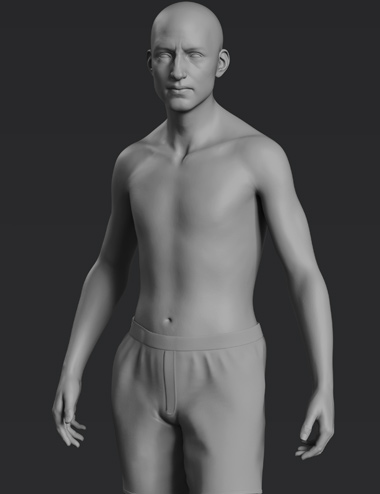
Oh yeah, I think that shape is totally doable. I actually just posted this in another thread, but I made a smoothing morph that's partially dialed in here. I tend to like the dudes who are a little uh. Top-heavy. But it doesn't look great on every body type. :V
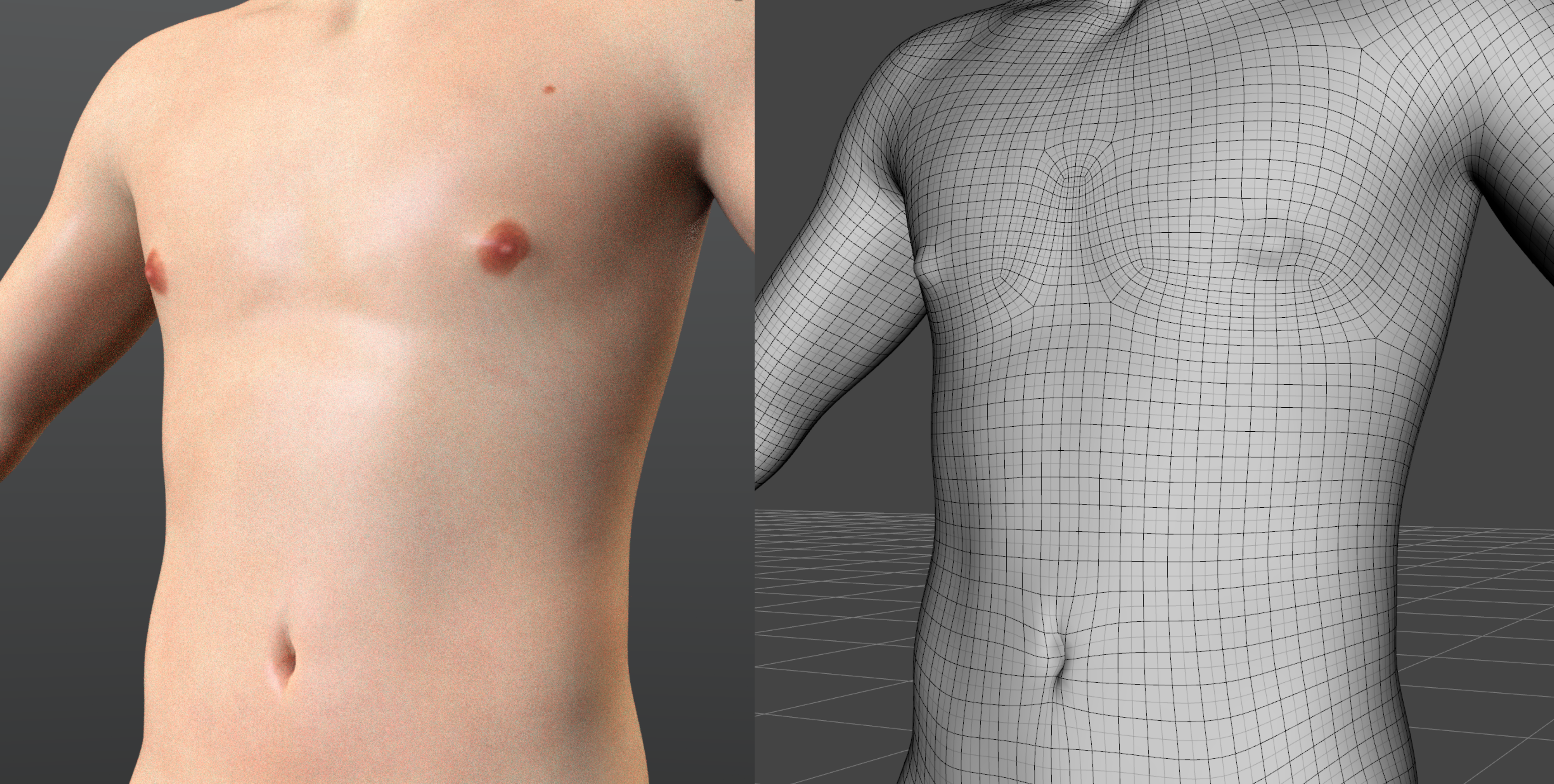
It's not a fantastic example, but that under pec geometry is what creates the definition and it can be smoothed out entirely flat or shaped differently with no problems. I think we probably just haven't seen many examples at all of masculine body sculpts where people are doing something very different with it.
I remember there was some concern on this point regarding the official body morphs since even the lithe and emaciated body types seemed to have pec definition, I think? This might be of interest; it looks like the figure has one of the edge loops creased sharply by default, even on the lithe morph. I can't even see it on the wireframe view in Daz, but it's really obvious in ZBrush, and I can see it in a clay render depending on how the light hits that part of the body. (I'm not sure if this is the culprit because tbh I'm not 100% sure I'm understanding the problem correctly.)
The one caveat when smoothing things out is that the corners that form the pec curves can stand out a bit when you flatten the entire chest, since they don't want to lay at the same depth as the geometry around them. But it's pretty easy to fix by grabbing the point and moving it in slightly. This is the basic lithe shape with the crease smoothed out, with no other morphs: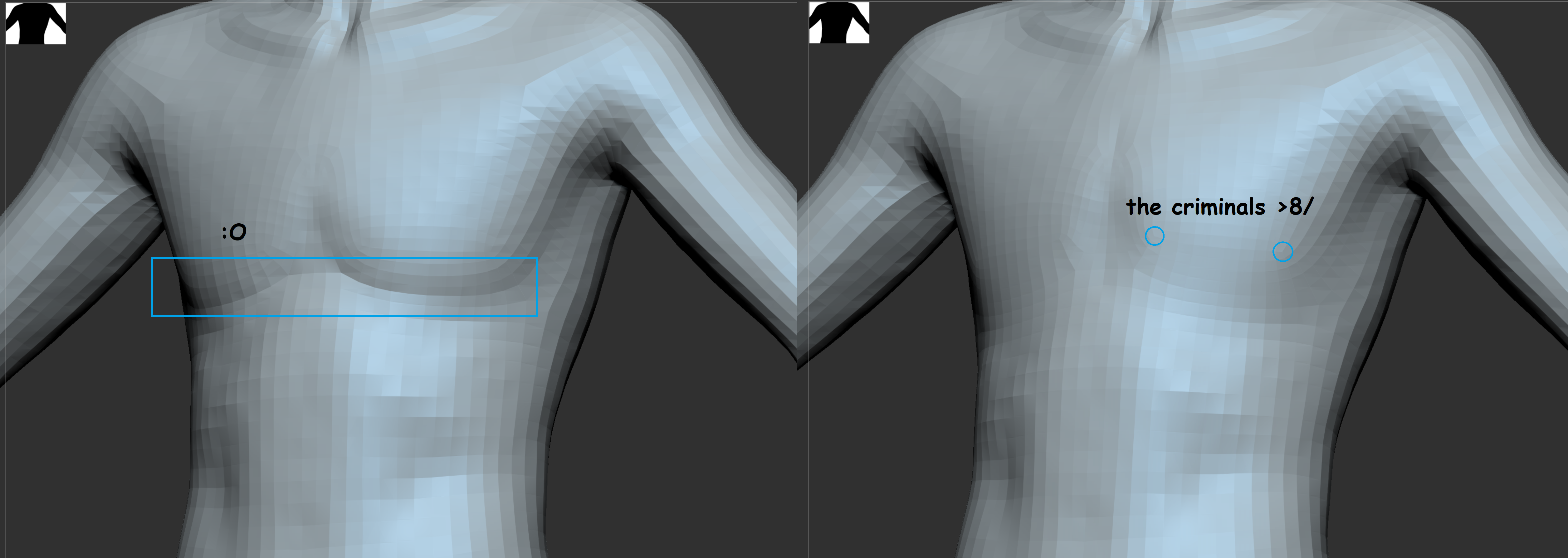 Getting on the 9 train, or not
Here's a basic resolution morph, and then the same with Normals baked from a HD sculpt.
It took me about ... 15 mins to whip up in Zbrush and maybe 5 mins to bake it in Substance Painter, and I'm sure you can do similar in Blender or a dozen other apps.
Genesis 8 or 8.1 shapes on genesis 9?are your characters built from different morphs? if so, you will need to combine them into one morph before you can transfer it. as long as it's just one morph, you can transfer it using my steps.
you can combine morphs using Shape Splitter or by following these steps.
1. set character to base resolution (from parameters tab, scroll down a little bit and find "resolution level", set that to "base")
2. zero the pose on the character
3. export (file->export) with default options (and check "filter objects" by "selected roots")
4. load a new 8.1 figure.and select it
5. import your exported file as a morph:
edit->object->morph loader pro
click "choose morph files..." select your obj file, press ok
6. find and favorite that morph and transfer to g9
Any G8 female morphs or add ons that bring the toes to a point?Seven193 said:
It might be better accomplished with a geograft than a morph, if all the toes and lower foot needs to disappear without distortion. If it's like turning a foot into a claw.
I suppose that could work, would you happen to know of a product that turns a foot into a claw?
Genesis 9 Males?Timbales said:
I'm still concerned about the G9M chest. I haven't seen a render yet where I think it doesn't have a compressed mesh look under the breast, or looking like undeveloped muscle. My fear is that will transfer over to clothes and they will look odd on him. I'm wagering many clothing vendors will try to make G8M clothes also look good on G8F (like they do with hair) and it's not going to be pretty.
Did you see Mada's reply about turning on/off the base joint correctives?
https://www.daz3d.com/forums/discussion/comment/7841506/#Comment_7841506
She even made a pose preset to turn them off/on:
https://www.daz3d.com/forums/discussion/comment/7841556/#Comment_7841556
Getting on the 9 train, or notPadone said:
Oso3D said:
It should be noted that in a lot of arenas, the approach taken is generally to make a high polygon sculpt, project it onto a lower polygon figure, and then bake the difference as Normals. That process does not require HD tools.
Or, as I did here, just do it in basic resolution.
Yes using normal maps for G9 instead of HD is certainly an option, if this is what you mean. But it will only work by a distance not for closeups if you need to show the details silhouette. With G1-G8 we get a detailed topology so we don't need HD for the basic body features, with G9 you do, again that's why G9 is HD based.
p.s. As for your "basic resolution navel" you need to show a closeup of the wireframe to prove your point, unless it's a normal map.
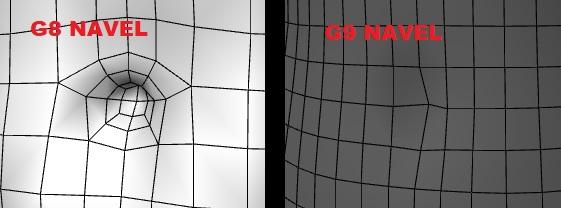
So, I wanna be clear that I'm not posting this to prove that you can do just as well with the G9 navel as you could with G8's dedicated topology--especially since I don't claim to be good at sculpting--but I do think it's weird to be doubting people's word over this? I'm not a PA so I don't have access to HD tools, and it's entirely possible to do a morph like the one Oso posted without them. This is at subdivision 1. It's hard to do it by sculpting in a small area, but if you make a larger indentation and then move the sides inward you can get more depth and shape the edges of the hole a bit. You just have to be careful not to warp the mesh so much it stretches the texture. I don't know if that's how Oso did it and I don't expect this to rise to your standards for a morph, but there are options between full HD and slightly moving a vertex inward.
Genesis 8 or 8.1 shapes on genesis 9?Thanks for that, a couple more pieces to add to the puzzle :)
One last question, then I'll be busy for a very long time...
I have built quite a few characters on my own that I intend to make a story from, or maybe they are making themselves known so I can tell their story... Anyway, I saved these as Figure/Prop assets, and they now load into DAZ Studio without having to load G8.1.
Is there a way that I could transfer these characters to G9 as well?
This is Cassie, the main character, I've brought her forward from G2, and had to rebuild her twice... and every time I load her up, I see something else that needs 'tweeking', If I can get her onto G9 that would be great, I can play around with her some more, (still not 100% happy with her, or her me, or somesuch, but she's getting there.
Again thanks in advance.
V
Daz 3D is part of

Connect
DAZ Productions, Inc.
7533 S Center View Ct #4664
West Jordan, UT 84084Licensing Agreement | Terms of Service | Privacy Policy | EULA
© 2026 Daz Productions Inc. All Rights Reserved.