-
ISO: Hiro3 Anime PosesThis may not be a lot of help, but there is a pose transfer script that will transfer a pose from G8M to H3 so if you have a G8 pose you feel is appropriate, you can get it on H3. https://www.renderosity.com/freestuff/items/86762/g8f-to-victoria-3-aiko-3-pose-transfer. I know it says G8F to V3/A3, but the bones and joint angles in Generation 3 seem to have been virtually identical across the range, so the converter should work with G8 to H3. Regards, Richard.ISO: Hiro3 Anime PosesThis may not be a lot of help, but there is a pose transfer script that will transfer a pose from G8M to H3 so if you have a G8 pose you feel is appropriate, you can get it on H3. https://www.renderosity.com/freestuff/items/86762/g8f-to-victoria-3-aiko-3-pose-transfer. I know it says G8F to V3/A3, but the bones and joint angles in Generation 3 seem to have been virtually identical across the range, so the converter should work with G8 to H3. Regards, Richard.Decimator and dForce
Catherine3678ab said:
One can get the garment to work in dForce if one takes the time to add in the dForce Weight Map and nullify the weights over all the bows. I normally use the timeline for simulations.


After running the sim, applied a ribbon morph to wave them a bit. Very nice set :-)
Yep, I guess the next step would be to use weightmaps as you have done. And morphs to hang the ribbons etc.
The reason I started the thread was really to ask whether dForce and Decimation together are a no-no. I'm still not sure whether you decimated but looking at your simulation times I think you must have.
Decimator and dForceOne can get the garment to work in dForce if one takes the time to add in the dForce Weight Map and nullify the weights over all the bows. I normally use the timeline for simulations.
After running the sim, applied a ribbon morph to wave them a bit. Very nice set :-)
Reinstalling DS and my experiments along the way.So 2 years ago I lost my DS content external hard drive. I unfortunately lost a lot of wip's and freebies that I had picked up along the way. For a while I was really despondent and didn't have the energy or enthusiasm to reinstall the massive amount of items I've collected over 17 years of doing Daz Studio.
Luckily a friend on facebook posted an ai image and it sparked my interest again and now I'm reinstalling after 2-3 years of hardly touching a computer.
To start this off I'm going to post the ai image and the morph I created using dial spins...sometime in the future I'm going to try and do a better job using zbrush.
Feel free to lurk, comment, ask questions and even if you have done something with the character I'm playing with feel free to post an image.

 Decimator and dForce
Could try posing the figure & garment, select the figure and send it over the bridge to the modeller, morph the clothing to look better, in D/S select the clothing and from the modeller send back in the reshaped clothing. Very important to "reverse deformations." If it's a keeper, select the figure and zero the pose, dial out the new morph on the clothing, select the clothing and save the new morph.
Then repose the figure with the clothing, dial in the new morph, etc. for the scene.
Decimator and dForceI bought a G8F clothing item which turns out to have an extermely high polygon count and it does not have dForce. When I tried to add a dForce modifier, it just crashed and I had to re-start DAZ Studio.
I have Decimator so I reduced the polygon count to 40% and tried again. Now, after adding dForce again, it explodes immediately. Seems that dForce doesn't like Decimated mesh. The clothing has a lot of fitting and movement morphs which I consider to be important but I think that if I export it as an OBJ file I will not retain those morphs. Seems I'm stuck with a useless piece of mesh unless someone can educate me as to how I can resolve this. To be clear - despite the included morphs, the garment looks awful when posed which is why I want to add dForce.
[Update]
I did export it at the lower resolution. I then re-imported the OBJ file and used the transfer utility. However, attempting to add and use dForce again resulted in an immediate explosion.
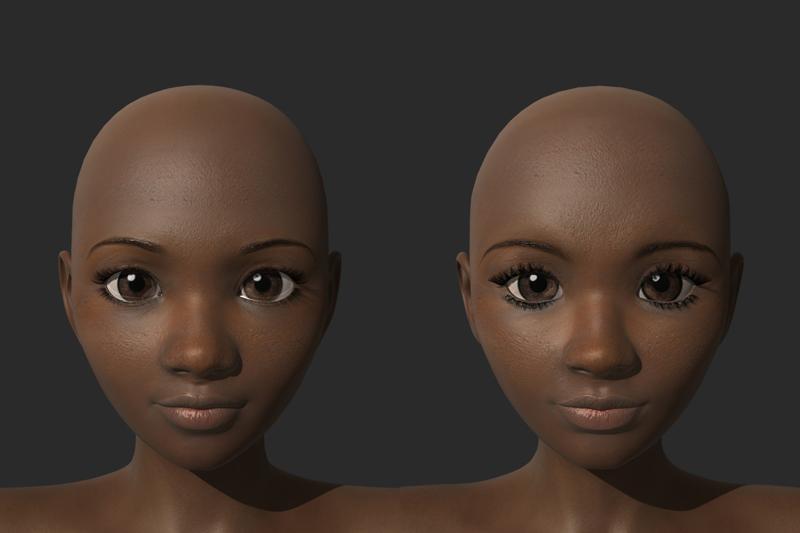
Generation 3 Aiko and Hiro Appreciation ThreadThe one on the Left is a morph preset for Aiko 4 I recently released as a freebie. The one on the Right is the Aiko 3 version (wip).
I can't decide whether to leave the A3 version as is or make it more A3.
 Tried Parenting and...
shilar_aa3b93f9ab said:
NorthOf45 said:
Wings sometimes fit to the character, sometimes they parent to the chest, or upper chest for those with upper and lower. Sometimes you have to manually reposition simple parented wings to make them look right, which you can do because they are parented, not fit. Sometimes there are morph adjustments to fit various characters. Which wings are we talking about?
Fae wings by Darkworld designs. They fit Victoria 4, which for some odd reason disappeared from autiofit.
Oh, those are, um, not new, but I have a one from the same vendor of similar vintage, Night Wings. They don't fit to or parent to any G3 figure by themselves, but you can parent them manually. They do drop down quite a bit when you do that, but you can just translate them into place. Using auto-fit will keep the morphs, but basically strip any bones (and rigging) which makes posing impossible.
Tried Parenting and...NorthOf45 said:
Wings sometimes fit to the character, sometimes they parent to the chest, or upper chest for those with upper and lower. Sometimes you have to manually reposition simple parented wings to make them look right, which you can do because they are parented, not fit. Sometimes there are morph adjustments to fit various characters. Which wings are we talking about?
Fae wings by Darkworld designs. They fit Victoria 4, which for some odd reason disappeared from autiofit.
Tried Parenting and...Wings sometimes fit to the character, sometimes they parent to the chest, or upper chest for those with upper and lower. Sometimes you have to manually reposition simple parented wings to make them look right, which you can do because they are parented, not fit. Sometimes there are morph adjustments to fit various characters. Which wings are we talking about?
Genesis 9 Coming Soon! Preorder Victoria 9 HD TodayPadone said:
Gator said:
You can turn subD off and then it's roughly the same number of vertices.
Again, with G9 you are forced to use HD for the basic body features, then HD requires a high level of subdivision at least 3-4 this is the whole point there.
I seriously feel like I'm missing something. At base resolution on the female G8/8.1 figures, the standard non-HD nipple morph looks similar to the results I got when I tested how hard it would be to create a basic shape like that without dedicated topology. At subdivision level 1--which as I understand it is equivalent to G9's base resolution--I can see detail if I dial in an HD morph. At subdivision level 2, the details are very clear. There's a huge difference in visibility between level 2 and level 4, but not really between 2 and 3 or 3 and 4.
If you want anything but a rounded cone sticking out on G8, you're almost definitely working at a subdivision level higher than base, but not necessarily at 3 or 4. If you have any HD morphs like scars or veins, you could dial those in and check what they look like at different resolutions to get an idea of what you'd need, since those are usually on parts of the body that have uniform topology. Some of them really do need 3 or 4 to show up, but there has never been a world where adding real detail through HD morphs didn't require a higher subdivision and Daz-exclusive products.
TL;DR you should not need to work at a super high resolution just to see an HD nipple morph, but I imagine you will if you need to see pores and things (because that's how it works now).
Genesis 9 Coming Soon! Preorder Victoria 9 HD TodayI am another one a bit perplexed over the obession with the issues around nipple/navels. When I buy a character, either from here, or any other store, I primarily look at the head and body morph, and the skin quality. I can't recall even once that the shape of the navel/nipples altered my buying choice in the slightest. If third party characters don't come with customised versions of these body parts, that would not bother me at all. I accept that some buyers will be concerned about this, but I suspect they would be a minority.
I do like that G9 has removed the eye and mouth geometry from the main mesh. This should mean transfering characters to G9 should be easier, as most of the converters we have now do seem to struggle with the eyes, which are frequently deformed, particularly with large eyed stylized characters like Aiko.
Small sized, but high polygon items like eyes, mouths, navels and nipples are well handled as geografts, as then we can set their sub-d levels independent of the main mesh. It always seemed crazy having to set the overall mesh to a high level of sub-d just because it is needed by one small part of the body.
Genesis 9 Coming Soon! Preorder Victoria 9 HD Todayvozolgant said:
Can Genesis 9 have a female body with a convincing male chest, free from visual anomalies? Visual anomalies would be defined as: Problems arising from a female normal map, with breast detail, being used on Genesis 9 while its male chest morph is dialed to maximum; if one even exists, or a poor looking male chest that has geometry problems.
As I said, only the PAs havea ccess to the model - it would be a pretty niche product so I doubt anyone is likely to have tried.
Genesis 9 Coming Soon! Preorder Victoria 9 HD TodayCan Genesis 9 have a female body with a convincing male chest, free from visual anomalies? Visual anomalies would be defined as: Problems arising from a female normal map, with breast detail, being used on Genesis 9 while its male chest morph is dialed to maximum; if one even exists, or a poor looking male chest that has geometry problems.
Can Genesis 9 have a female body with a convincing male chest, with no anomalies?Can Genesis 9 have a female body with a convincing male chest, free from visual anomalies? Visual anomalies would be defined as: Problems arising from a female normal map, with breast detail, being used on Genesis 9 while its male chest morph is dialed to maximum; if one even exists, or a poor looking male chest that has geometry problems.
Will Victoria 9 finally deform loose clothing correctly when you apply breast morphs?How would you expect a figure to solve this? Projection morphs can help, and are already provided in some cases, but they can also be counter productive. dForce can certainly help, but doesn't require a new figure anyway. Custom morphs in the clothing can help in general, though not in all poses, but those have to be constructed per-morph (by human adjustment to the mesh or by using a cloth sim).
Will Victoria 9 finally deform loose clothing correctly when you apply breast morphs?That's... simply not true. There are workarounds you can apply to all current and future clothing by changing the character model. Like adding morphs which turn the character's chest into a shirt-shape, which are then automatically inherited by any clothing that model wears, so you can crank them up to puff out the middle of the shirt while the actual breasts underneath remain the same shape. Or adding "flap bones" to the character, simulating hanging cloth, which the morph or pose creator can resize manually and the clothing creator can choose whether a particular vertex is shirt flap (scales with flap bone,) bra cup (scales with breast bone) or a little of both.
If you build one of these systems into the figure up-front, literally every artist who makes content for the figure will be forced (or at least heavily incentivized) to follow those conventions when designing content. If you don't, we're all dependant on arbitrary support morphs hand-made in each individual article of clothing, which take a long time to create and may not even match whatever body morphs become popular 5 years from now.
A new figure only comes out once every few years. This is Daz3D's chance to get it right, right from the start, before any 3rd party content even gets made.
Will Victoria 9 finally deform loose clothing correctly when you apply breast morphs?Extreme morphs of the Genesis, and clothes that don't follow deformations properly are two different things.
On one hand you have the Daz team that does a very professional work. And on the other hand you have PAs (anyone on earth) that create products to sell, and do a more or less good job at that. Some products are very impressive and behave perfectly well when influenced by bones or corrective morphs. Others behave terribly. That depends on how well the product was made.
When an asset doesn't work well at all, it's the content creator that didn't know how, or didn't take the time to perfect it.
Best option is to dive into the content creation side of Daz, to understand how all these clothes bundles are created. This way it's then possible to fix imperfections and resave correct versions of the .duf files of the shirts, etc. so that they morph better around those breasts your... friend seems so fond of ;)
No "Coming Soon" Gen 9 stuff from PAs?I would have thought there would be some teaser threads from PAs about the cool Gen 9 stuff they have been working on....
Has Daz required Radio Silence? I would have thought they would want a bit more buzz building up.
Somebody has to be working on Morph Converters, Clothes, Poses, Expressions etc etc.... c'mon, lets see emDaz 3D is part of

Connect
DAZ Productions, Inc.
7533 S Center View Ct #4664
West Jordan, UT 84084Licensing Agreement | Terms of Service | Privacy Policy | EULA
© 2026 Daz Productions Inc. All Rights Reserved.