-
Genesis V5 (Victoria 5) head morph to GF3 Head
Relax, Leo. I understand that you are frustrated, but you must understand that I am not a DAZ employee, or moderator, or affiliated in any way with the GenX products (other than the fact that I happen to have them). I am merely an ordinary user like yourself that is trying to help. The reason why I spoke to the textures was because you said, in the annotations in the third image attached to your third post, "Objective: to transfer the facial features of the Victoria 5 model on the left to the GF3 model on the right. Including textures."
It is unfortunate that you chose to focus on the texture issue and not my other comments. There is no "just do this and it will work" solution in your case, because the issue is related to the specific configuration of your PC, I believe. And therefore a solution specific to your PC is required. I know that GenX, with the two addons will do exactly what you want to do, because I have done it myself. We need to address the "greyed out" figures issue before we can do anything else. Once we have solved that, the rest should be relatively easy. In order to help you with that we require some information about your PC, like I had asked for and which you have not yet provided. Please let us know how your content is configured and we may be able to help, since I am convinced that that is at the root of the problem. Let's find out..
Z Stretching Out OutfitWhat outfit is used in the promos for this product?
https://www.daz3d.com/z-stretching-out-poses-for-genesis-3-female-and-victoria-7
hi does anyone know where i can get the hair and model thanks so muchIt is Victoria 7 and OOT Amber Hair and the OOT Iray Texture Expansion for Amber Hair at "the other place".How to make clothing with Blender?If it is first time to make clothing for daz figure, I strongry recommend make clothing shape to fit zero figure.that means, export zero base non morphed figure to blender with zero pose. then make clothing which fit to the zero base shape. (of course no posing)
you can check it easy after import clothing to daz studio, it is actually fit to genesis3base . after confirm it, use TU with default option or template which you choose.
even though you can use reverse otpion with TU (and I think that is reason why your clothing not fit well,, after transfer morphs) , after all you need to adjust it for zero base figure for best fit.
As you know All DAZ characters should be morphed from zero figure. rigs and weight map and JCMs are first made for zero base (each genearation) to work best.
it is same about clothings. even though you use daz famous Victoria 7 or Aiko 7 etc.. they are simply morphed shape from zero base genesis3female. then if you model clothing which fit to zero base figure at first, you can make morphs for each morphed character, to overwrite auto-genrate morph. I think there is almost no merit, start for non zero morphed shape.
without it is high heel or very special clothing which need to use special pose.
Once you could do well for zero base figure, you can try start modeling for non zero base characters, then tweak Transfer Utility Setting if you really like the way.
"Brace yourself, my dear wallet! There's always another Sale - and Glitches!"I know you probably have already, but Emma and Jordi's female characters have a nice variety of skin materials, you can use the morphs from other characters and apply the skins. Open up the products and look at the thumbnails, you get a woman with spiders, vampires, etc. At around $6 a gal, it was fun shopping!
And yeah, Victoria 8 was guessed for this summer. I'm another one stocking up on Genesis 3 because I'm limiting another generation- I have more than what I can use now.
hi does anyone know where i can get the hair and model thanks so much.
That looks like Victoria 7 and Christina Hair OR Darya Hair (@ other store) with OOT Hair Shaders (@ other store).
I was considering Christina hair too but it's newer than the product the promo pic is from. But of course, OOT could have had it made already then but stored it for release later.
Is there a way to recover an old DAZ Studio .daz scene file?StratDragon said:
Bejaymac said:
IIRC there used to be a way to recover the old DAZ scenes, not sure if it still works in newer version of DS4.
Load your DAZ scene, you wont see anything in the viewport but the scene tab should list everything that was in the scene.
Your log shows Genesis was in the scene, so go ahead and load a second Genesis into the scene.
Now select the first Genesis in the scene tab and delete it from the scene.
Now click the UNDO button, and with luck DS should recreate the first Genesis using the data from the second Genesis.
If it works then do the same for everything else in the scene, then delete the second version of everything and save your scene.
If it doesn't work then your scene's gone without a copy of 4.0 to recreate the DSO, DSD & DSV files.
I tried this in 3.x and 4.8 with V4.2 and it didn't work for me, which is a shame 'cus it sounded like an awesome fix.
but oddly I noticed some of my damaged scenes were looking for the "3.0" data folder in ..\data and I had them in ..\content\data
so duplicating the 3.0 file to the root directory(..\data) before the content folder sorted some of this mess out for me. I guess I had it mapped this way in DS3
I know this is an older Post, but I just happen to have run into this this weekend and I found this thread while looking for a solution.
Bejaymac's Process will work for Genesis because it has a Consistent GUID (Global Unique ID), but it won't work for anything Pre-Genesis.
All those who say, "Smart Content is Useless. I Never Use it. I dont want it." Well here is a place where the Foundation of Smart Content helps you.
Before Smart Content, the GUID wasn't Gobal it was Local and handed out to an Asset when you saved a scene in Studio (well Actually Loaded the Asset, but Saving wrote it out to the Disk). Thing is the LUID was Unique ONLY to your system. if you had two Computers they each had their Own LUID for Victoria 4, therefore I couldn't start a project on Bill's computer and finish in on Sally's. With the addition of Smart Content, GUID's are actually Global and everyone has the Same GUID all Daz 3D Content. Therefore I can hand John a scene File and if he has all the Assets, he will be able to load the Scene. (This is what makes Redy To Render files work.)
So here is how StratDragon get that Pre-Genesis Scene back, and Make it so he can share the Scene file with a partner.
First you load the broken scene, and as Bejaymac said you won't see anything save Boundary Boxes.
It will most likely look something like this:

Now to Rebuild it and this is a lot of tedious work:
- Load new copy of Asset, save V4
- Select the Old Asset in the Scene tab
- Move to the Parameters tab and select the old Asset
- Right Click the Asset and Select Copy > Copy Figure
- Select the New Asset in the Scene tab
- Move to the Parameters tab and select the New Asset
- Right Click the Asset and Select Paste > Paste to Figure
- This will copy the Position data, Pose, Shaping, etc. Except the Surface/Material/Texture
NOTE: the Following will only work if there Surface data. if not, then you will have to find rework the surfaces.
- You can do the same thing in Surfaces
- Select the Old Asset in the Scene tab
- Move to the Surfaces tab and select the old Asset
- Right Click the Asset and Select Copy Selected Surface(s)
- Select the New Asset in the Scene tab
- Move to the Surfaces tab and select the New Asset
- Right Click the Asset and Select Paste Selected Surface(s)
NOTE: with Genesis, you have to be careful because some of the Skin Materials are actually from V4 and they won't reload properly, (Or that has been my experience)
In the end you should have your Scene back. In my case, all of the mess above resolved into this.
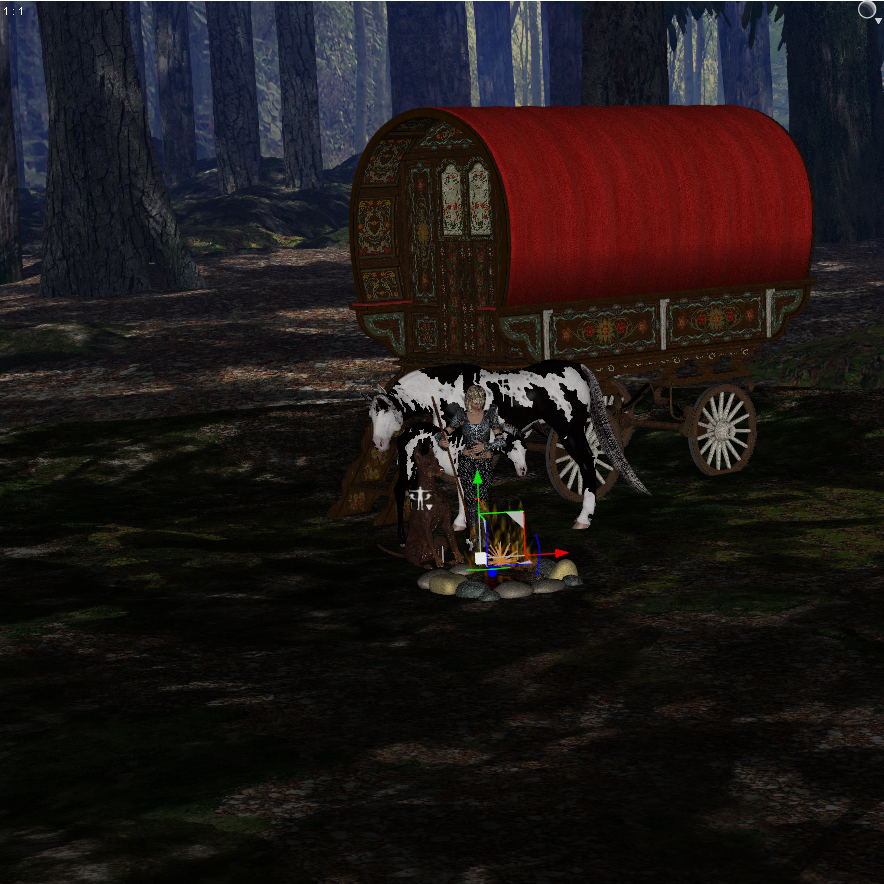
The Advantage of this method, is that you will have a Scene which uses the assets with the new GUID's.
In my scene the Fire and the Staff were an issue and I had to replace them, because I couldn't find the Originals.
This took me about twenty minutes to Rebuild and most of that was finding the Fire and Staff.
Also selecting the missing item and going to Smart Content tab with Products select, made getting to the content much quicker.
Hope that helps.
hi does anyone know where i can get the hair and model thanks so muchThat looks like Victoria 7 and Christina Hair OR Darya Hair (@ other store) with OOT Hair Shaders (@ other store).
Red Head on Site Banner: How!!I go with Slosh's hair shaders. You can set the transparency and shine, there's three levels for each. There's settings for the top coat, etc.
Surprised they featured a Renderosity character for a Daz page that's prominent. I would think we have enough Daz characters to do one of those.
I'm surprised too. And unless I'm reading it wrong, Maryann is a Victoria 4 figure--which would definitely be directing folks to try some older models rather than the Gen3 Daz would like one to buy.
Why anyone should be surprised is beyond me, I doubt DAZ are that petty. The images posted on the main page are more than likely to show what can be done with the app "and" the products, not to promote specific products. Face it, without the DAZ base figures none of the characters would exist. There are also images that have been rendered outside of DS is other renderers that have been showcased.
I love the DAZ MP as much as the next person, but there are other ways to make images, other places to get meshes and other stores.
Yes, you are reading it wrong, Maryann is for genesis 3, says so right there on the product page.
Yeah, I went back and saw I was wrong. Sorry about the confusion.
Red Head on Site Banner: How!!I go with Slosh's hair shaders. You can set the transparency and shine, there's three levels for each. There's settings for the top coat, etc.
Surprised they featured a Renderosity character for a Daz page that's prominent. I would think we have enough Daz characters to do one of those.
I'm surprised too. And unless I'm reading it wrong, Maryann is a Victoria 4 figure--which would definitely be directing folks to try some older models rather than the Gen3 Daz would like one to buy.
Why anyone should be surprised is beyond me, I doubt DAZ are that petty. The images posted on the main page are more than likely to show what can be done with the app "and" the products, not to promote specific products. Face it, without the DAZ base figures none of the characters would exist. There are also images that have been rendered outside of DS is other renderers that have been showcased.
I love the DAZ MP as much as the next person, but there are other ways to make images, other places to get meshes and other stores.
Yes, you are reading it wrong, Maryann is for genesis 3, says so right there on the product page.
Red Head on Site Banner: How!!I go with Slosh's hair shaders. You can set the transparency and shine, there's three levels for each. There's settings for the top coat, etc.
Surprised they featured a Renderosity character for a Daz page that's prominent. I would think we have enough Daz characters to do one of those.
I'm surprised too. And unless I'm reading it wrong, Maryann is a Victoria 4 figure--which would definitely be directing folks to try some older models rather than the Gen3 Daz would like one to buy.
Strange effects with female Anatomical Elements bugged after using geoshellI am using the latest version of Daz Studio 4.9 something.
I am using Victoria 7 and the genitalia I got together with her in the Pro Pack. I have also bought 3feetwolf's New Gens now but getting the same effect.
No geometry shell is used anymore, but since I used it this one time I have this bug now that isn't going away anymore.
Issue with DAZ OriginalsFolks, I have a question. The answer may solve the issue.
What is the difference between "Artist:Daz Originals " and "Artist:Daz Originals (any artist name)" ? Is there any, DAZ?
If the item is only credited to "Daz Originals" then normally it's been created in-house, such as original figures like victoria/ophelia/centaur etc. If the item is credited as "Daz Originals" and another artist, it's either been commissioned or acquired by daz from the original author (the artist that's credited next to Daz Originals"). There are likely exceptions to this, but this is the case for the most part. Hopefully that clears things up, unless i misread the question.
OK. Sort of. I know that the persons I spoke with were careful to say they would not force any artist to do a thing they didn't want to. The setup here is liberal enough, what the artist does and the way its done can affect what percentage of the sales they get. I do get (with a raised eyebrow) that the highest level is with all the 'brokering' companies is paid by doing it 100% their way for THEM. Well, until you make a big name for yourself and can make other arrangements with them. 40% is pretty normal I think. And if the "PA" doesn't like that, they're sure welcome to take it out on their own.
Meantime, I think what you say is mostly accurate. As you say, exceptions to the rule. ;)
Which couch/sofa is this?Any one know what sofa is in this promo? https://www.daz3d.com/rough-day-poses-for-victoria-7 Haven't been able to locate it. TIAIssue with DAZ OriginalsFolks, I have a question. The answer may solve the issue.
What is the difference between "Artist:Daz Originals " and "Artist:Daz Originals (any artist name)" ? Is there any, DAZ?
If the item is only credited to "Daz Originals" then normally it's been created in-house, such as original figures like victoria/ophelia/centaur etc. If the item is credited as "Daz Originals" and another artist, it's either been commissioned or acquired by daz from the original author (the artist that's credited next to Daz Originals"). There are likely exceptions to this, but this is the case for the most part. Hopefully that clears things up, unless i misread the question.
Generation 3 Aiko and Hiro Appreciation ThreadI assumed that Patrick was interested in Aiko, not Victoria. I don't know how well GenX would handle the A4 conversion followed by the Faerime,.
And yes, Morphia is the V4 conversion
Generation 3 Aiko and Hiro Appreciation ThreadAhh!Thank you...what about Kioko and Hitoro?They are morphs, so they could work, but I don't know how t accomplish it. If you want a Victoria 4 possibility (heads only) there's Faerime and Boopsie (careful, 2 versions of this). If you still want anthro characters there's this
http://www.capsces.com/capframe.htm
MimicMolly's Renders & WIPsOriginally, my next render was going to be FWSA Livia HD for Victoria 7, but lately my G3 figures don't want to render. My laptop freezes. I thought it was a problem with the materials but IDK anymore.(It used to do this when I accidentally rendered something Iray in 3Delight.) I will unistall/reinstall and see if that fixes anything. Anyway, I decided to GenX her head to G2F, with a 100% V6 body and 50% breast size.
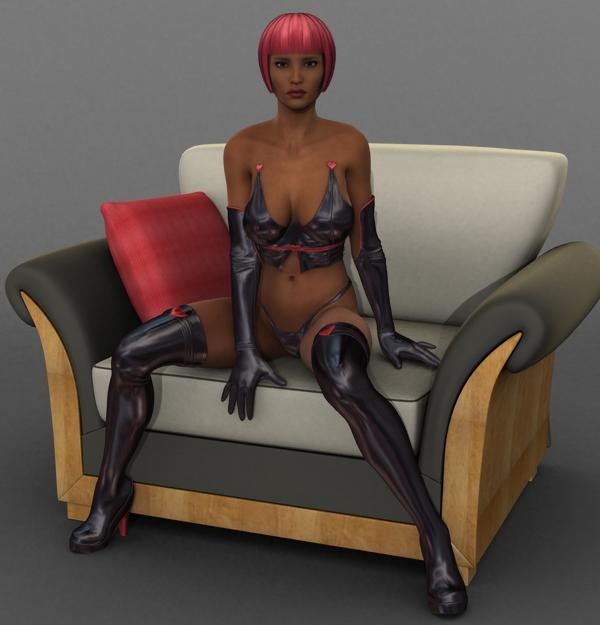
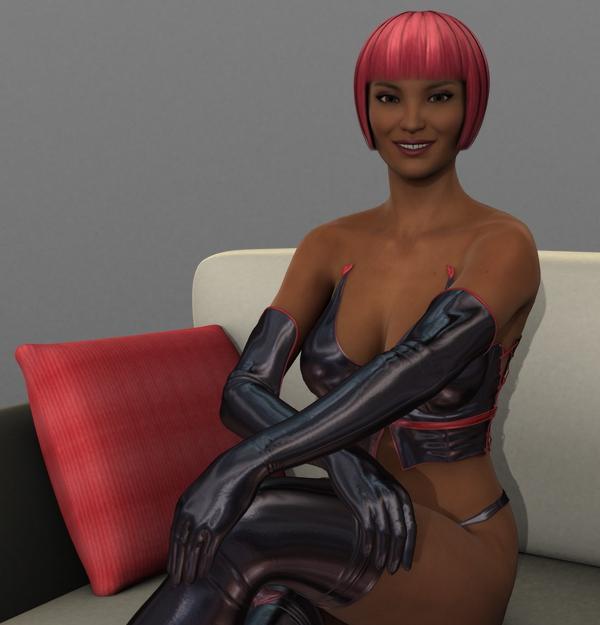
Her outfit is Dark Heart for Genesis 2 Females(s) and her hair is Foxy Hair but the pink hair + light red diffuse, so it would match the red accents on her suit. The chair comes from i13 Getting Ready - Room and Makeup, but I used other shaders for the wood and the pillow. Her poses come from BWC Sitting Vicky for Victoria 6. IDK what happened to her eye textures, but the weird haloed texture doesn't necesarily hurt her appearance.
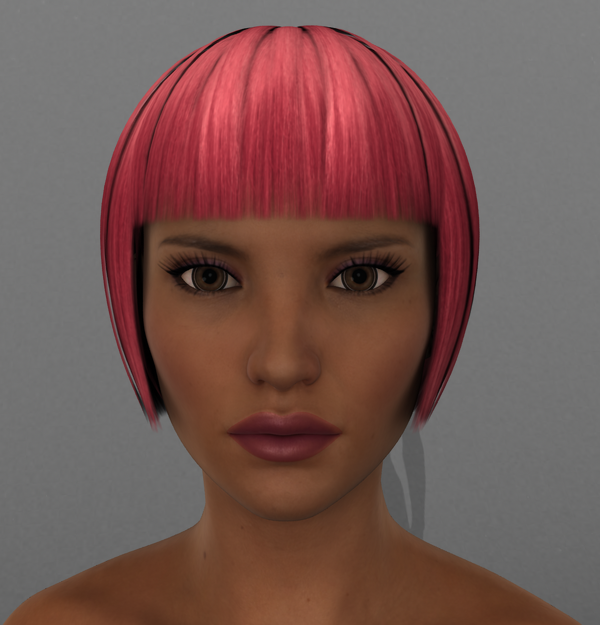
This looks like some kind of awkward photoshoot, I'm sorry. XD
"Brace yourself, my dear wallet! There's always another Sale - and Glitches!"One more bug: P3D Celine in yesterday's Coven sale broke, no longer receives base 50% off.
Reported
this should be working now
Thanks! It's working :)
A couple more broke today though: https://www.daz3d.com/fwsa-gillian-hd-for-victoria-7-and-lf-sorbet-swimwear and https://www.daz3d.com/fwsa-finley-hd-for-victoria-7-and-her-jewelry from the Coven sale are not getting their base 50% off.
Selbsthilfegruppe DAZ Studio - Beispiele, Fragen, Diskussion und sonstiges GequatscheHallo an Alle hier,
ich wollte mal anfragen, ob sich hier welche von euch mit Genesis 1 auskennen und deren Verwendung im Iray-Render?
Ich hab den Iray Converter für Genesis 1 und V4 schon gesichtet. Braucht man den unbedingt?
Bislang habe ich versucht, eine "V5 Elite texture Valerie" mit dem Iray UberBase-Shader zu verbinden. Das sieht in einer outdoor-Szene einfach unrealistisch und schlecht aus.
Ich habe einfach einen vorgefertigten Canyon mit dem Terradome3 Iray geladen und einen HDR-Himmel (Pro-HRD-Skies for Terradome3) benutzt.
Ach ja..zur Info, warum ich dabei noch Genesis 1 benutzt habe: Es gibt für Genesis gewisse Morphs/Figuren z.B. von RAW oder von DAZ selbst (Gorilla for Genesis) usw.
Leider entstammen diese schönen Sachen noch aus der Prä-Iray Zeit. Fragt sich, ob und wie man die am Besten anpassen kann.
Gruß Lars
Hallo Lars, willkommen im Club!

Von den Materialdefinitionen her unterscheiden sich Genesis, Genesis 2 und 3 im Grunde nicht, und die Grundlagen sind ebenso anwendbar auf die alten Millennium Figuren bis hinunter zu der 'Millennium Woman' Victoria 1 Figur.
Das Iray Uber Base Script konvertiert die Parameter der 3Delight-Materialien 1:1, da diese aber nicht auf in der realen Welt gemessenen Werten basieren, sondern auf wilden Vermutungen und "Augenmaß", kommt dabei dann natürlich nix vernünftiges bei heraus.
Nein, so unbedingt benötigt man die diversen Konverter nicht. Dem Einen oder Andern mögen sie aber die Arbeit etwas erleichtern. Man kann nach dem Konvertierungsvorgang mit dem Iray Uber Base die Parameter auch von Hand zurecht trimmen (und sich das Ganze dann anschließend als Shader Preset zwecks weiterer Verwendung abspeichern):
- Die Specular Texturen (die ganz in Schwarz/Schwarzweiß) müssen von Glossy Color nach Glossy Layered Weight verschoben werden. [Da die für gewöhnlich dank "Pfusch am Bau" im Textur Slot von "Specular Color", anstatt, wie es korrekt wäre, im Textur Slot von "Specular Strength" landen].
- Glossy Color wird fälschlicherweise die "Specular Color" des 3Delight Materials zugewiesen. Da aber Nichtmetalle die Färbung reflektierten Lichts nicht ändern können, muß man die Farbe dort wieder in RGB 255-255-255 Weiß abändern.
- Translucency Weight ist abhängig vom Hautton: je dunkler, desto weniger. Für kaukasiche Abstammung 0.45 - 0.50, für asiatische 0.35 - 0.40, und für afrikanische 0.25. Die hohe Melaninkonzentration bei den dunkleren Hauttypen sorgt dafür, dass in der oberen Hautschicht schon ein großer Anteil der einfallenden Strahlung absorbiert und somit logischerweise weniger Licht zurück an die Hautoberflache reflektiert wird.
- Translucency Color: da die Texturen der älteren Figurengenerationen schon den endgültigen Anteil der Absorptionseffekte der unteren Hautschichten enthalten, sollte man hier der Einfachheit halber die Diffuse (Haupt-) Textur mit einer Farbe von RGB 255-255-255 einfügen.
- Glossy Reflectivity ist das Ergebnis einer etwas komplexen Berechnung unter Einbeziehung des Brechungsindex des betreffenden Materials. Hier verwende ich den Wert 0.532250, was einem Brechungsindex von 1,52 (für die Hornschicht) entspricht.
- Glossy Roughness: DAZ 3D verwendet hier eine Methode, die von Disney entwickelt wurde. Dabei wird der eingegebene Wert quadriert, was zu einer besseren Wahrnehmbarkeit bei unterschiedlichen angewandten Werten führen soll. Für gewöhnlich wird der Wert von 0.3 für die Oberflächenrauhheit der menschlichen Haut verwendet. Da dieser dann aber aufgrund der Quadrierung viel zu niedrig ausfallen würde (0,3 x 0,3 = 0,09) sollte man die Quadratwurzel von 0.3 verwenden: 0.547723.
- Je nach Güte der Specular Texturen muss man den Glossy Layered Weight Wert über die eingebaute Begrenzung hinaus erhöhen. Dafür klickt man auf das kleine weiße Zahnradsymbol, dann auf "Parameter Settings...", und entfernt den Haken bei "Use Limits". Dann kann man den Parameter auf einen Wert von ungefähr 3.25 setzen.
VOLUME Gruppe:
- Transmitted Measurement Distance: 1.00
- Transmitted Color ist abhängig von der verwendeten Diffuse Textur. Am einfachsten greift man sich den RGB Wert direkt aus der Textur in einem Grafikprogramm wie Photoshop etc. ab, und gibt diesen dann in den Color Picker in DAZ Studio ein. Wie auch bei Glossy Color werden hier von etlichen Shader-Bastlern die abenteuerlichsten (und physikalisch komplett falschen) Farbkombinationen verwendet. ["Künstlerische Freiheit" ist eine dumme Ausrede, wenn man von dem, was man tut, nicht die geringste Ahnung hat!]
- Scattering Measurement Distance: 0.05
- SSS Amount: 0.83500
- SSS Direction: 0.80
- Bump: Iray arbeitet mit Bump etwas unterschiedlich. Als Faustregel kann man den nach der Konvertierung erhaltene Wert für Bump mit 3 bis 5 multiplizieren. Auch wieder abhängig von der Güte der Bump Textur. Verfügt die Figur über eine Normal Textur, kann man den Wert auch so lassen und die Bump Texturen rausschmeißen.
Für die Haut kann (und sollte) man dann noch den Top Coat aktivieren. Da die Standardparameter dort zufälligerweise den optischen Eigenschaften der öligen Schicht auf der menschlichen Haut entsprechen, muß man dort nur den Wert von Top Coat Roughness anpassen: dafür nimmt man den Wert von Glossy Roughness, den man je nach Vorliebe noch um ein paar Klicks nach unten verringern kann.
NACHTRAG:
Hupps, einen Parameter vergessen:

Glossy (Top Coat ) Color Effect: bei Materialien, die über mehr als einen Layer verfügen (zusätzlich Volume/Top Coat/etc.) muss der Color Effect Parameter auf "Scatter & Transmit" (Voreinstellung "Scatter Only") gesetzt werden. Damit der Anteil des Lichts, der nicht an der Oberfläche reflektiert wird, and den darunterliegenden Layer zwecks weiterer Berechnungen weitergegeben wird.
Daz 3D is part of

Connect
DAZ Productions, Inc.
7533 S Center View Ct #4664
West Jordan, UT 84084Licensing Agreement | Terms of Service | Privacy Policy | EULA
© 2026 Daz Productions Inc. All Rights Reserved.