-
Anime Toons and Filatoon Shader Q&A
ArtsyDragon said:
I'm going to do my questions one at a time.
@Mada stated The Filatoon shader is used in combination with Filament’s fast rendering. The toon outline is accomplished by creating a geometry shell and applying a special shader to it.
I do not know how to create a geometry shell. I don't see an option to create one in the starter essentials group of options.
If you do need to add a shell manually, it is in the Create menu with the thing you want shjelled selected
@ainm.sloinneadh stated There's a scene file in the starter essentials that'll set the environment up for you.
Is that in the Environments tab 'basic filatoon environment'?
Anime Toons and Filatoon Shader Q&AOkay, I'm slowly getting it. Here is the question:
When I go to render, I get a warning message that says WARNING! Obscuring the viewport during an OpenGL render may corrupt the final image.
How do I render without this error? Am I doing something wrong? I have never used Filament before so please educate me. I am dull witted.
Anime Toons and Filatoon Shader Q&AMada said:
ArtsyDragon said:
I'm going to do my questions one at a time.
@Mada stated The Filatoon shader is used in combination with Filament’s fast rendering. The toon outline is accomplished by creating a geometry shell and applying a special shader to it.
I do not know how to create a geometry shell. I don't see an option to create on in the starter essentials group of options.
@ArtsyDragon
Q : Where can I find the FilaToon shader scripts
A : My DAZ 3D Library > Shader Presets > Filatoon. Under that you will find FilaToon - Base and Filatoon - Outline. You can also apply any of the presets and it will create the outline geoshell if it doesn't exist (except for FilaToon - Constant, it will apply the shader without the outline). If everything is black after you apply the preset make sure you're in the Filatoon renderer, and either turn on Auto Headlamp or add some lights.I do not have a Filatoon folder. I'm in Content Library > My Daz 3D Library > Presets and it goes for DS Defaults to Iray
I'll check the first post to see what I can find. :) Thank you
Anime Toons and Filatoon Shader Q&AArtsyDragon said:
I'm going to do my questions one at a time.
@Mada stated The Filatoon shader is used in combination with Filament’s fast rendering. The toon outline is accomplished by creating a geometry shell and applying a special shader to it.
I do not know how to create a geometry shell. I don't see an option to create on in the starter essentials group of options.
@ArtsyDragon
First post has more info now :)
Q : Where can I find the FilaToon shader scripts
A : My DAZ 3D Library > Shader Presets > Filatoon. Under that you will find FilaToon - Base and Filatoon - Outline. You can also apply any of the presets and it will create the outline geoshell if it doesn't exist (except for FilaToon - Constant, it will apply the shader without the outline). If everything is black after you apply the preset make sure you're in the Filatoon renderer, and either turn on Auto Headlamp or add some lights.Anime Toons and Filatoon Shader Q&AI'm going to do my questions one at a time.
@Mada stated The Filatoon shader is used in combination with Filament’s fast rendering. The toon outline is accomplished by creating a geometry shell and applying a special shader to it.
I do not know how to create a geometry shell. I don't see an option to create one in the starter essentials group of options.
@ainm.sloinneadh stated There's a scene file in the starter essentials that'll set the environment up for you.
Is that in the Environments tab 'basic filatoon environment'?
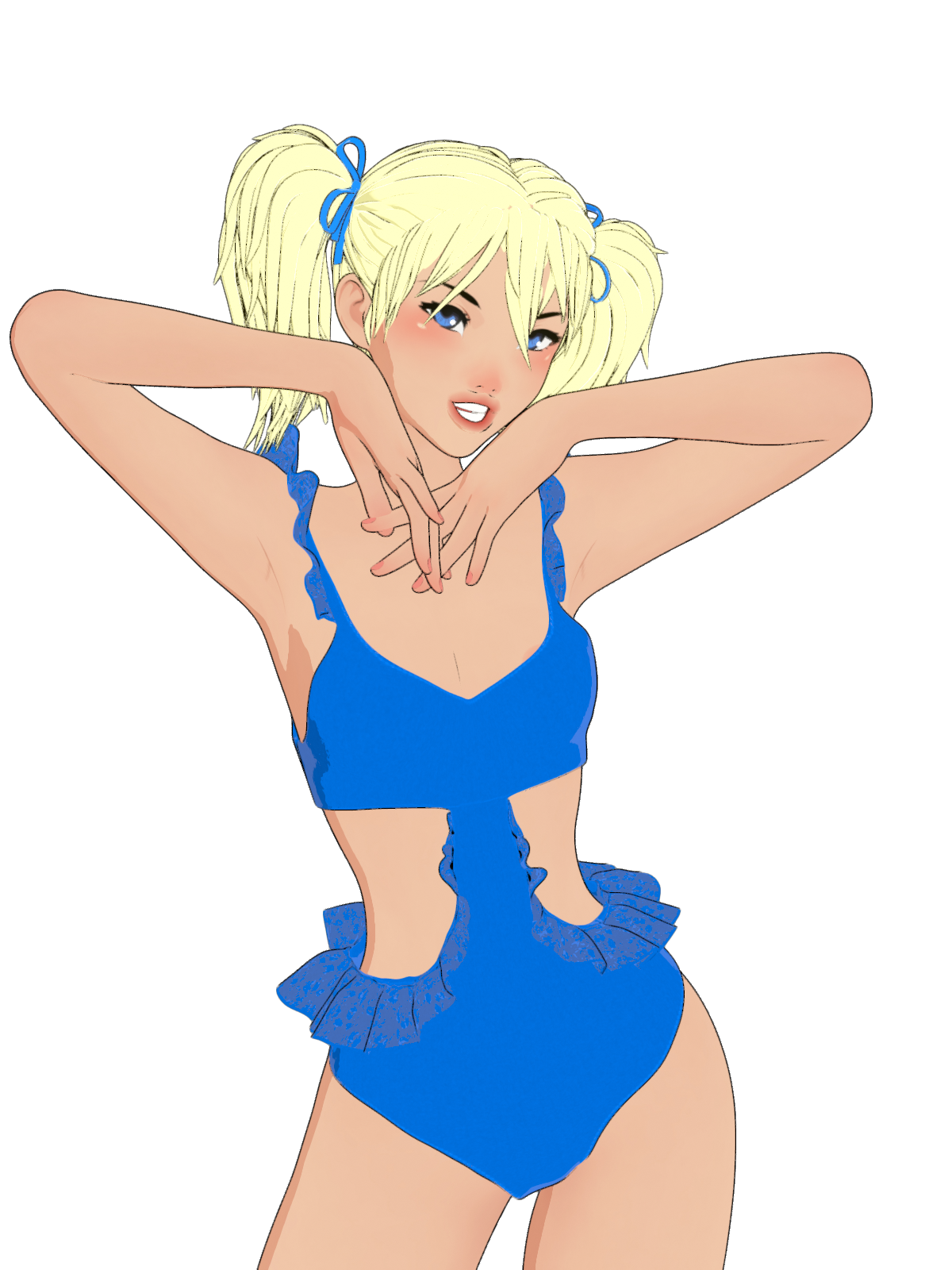
Anime Toons and Filatoon Shader Q&A@marble G9 and this filament toon base is free with Daz Studio So you can play with it without having to buy anything, Here is a render with lace on the new Daz + swimsuit. It's not great but I have no idea what I'm doing and someone else may be able to explain how to do it better.
 Anime Toons and Filatoon Shader Q&A
esha said:
I love the Filatoon shader!

Here are a few tips to get you started:
- Switch your viewport to Filament mode
- Add a distant light, at about 10000 to 15000 lumen
- To get a file of the workspace view, go to your render settings, set the size you want and switch your render engine to "Viewport" (right at the top of the panel).
Rendering is instant, it's amazing!Hope that helps; those were the things I struggled with when I used Filatoon for the first time, so I thought I'd pass this info on to make things easier for other users.
Thank you for your hints. I'm desperate to get this to work for me as I've always wanted to do a graphic novel but couldn't draw.
What About G8 Essentials and Dforce Essentials ???Ok will grab them as well and I've been reading and seeing the filatoon renders and people's opinions about it, it's very much loved right now lol
I'm wondering if you can use dforce with this new filament?
Hair makes my Animations lagcain-x said:
There is an eye icon in the Scene tree - find the hair and hide it. The goal is to get he major animation work done without the lag, right?
Once that is done, then unhide the hair, do whatever animation you need on the hair (if needed), then render. If your hair is complex, playback of the animation will be slow. Rendering should not be an issue. Are you using Iray or Filament?
I hid the hair and facial hair, animation still laggy. I'm using Iray
MimicMolly's Renders & WIPsI wasn't going to update DAZ Studio because I'm back to doing 2D art. But then, I wanted to try FilaToon. My hope was to make lineart to color (and edit) manually to where it's unclear if my art was from 3D models or hand-drawn. The bad news; it wasn't good for this use. The good news; it finally made Filament usable for me and easier to render pics. I do like the look, so I'll try to see if I can incorporate it more into my DS workflow.
Here is a quick self-portrait I did with it. After "practicing" with it for a bit.
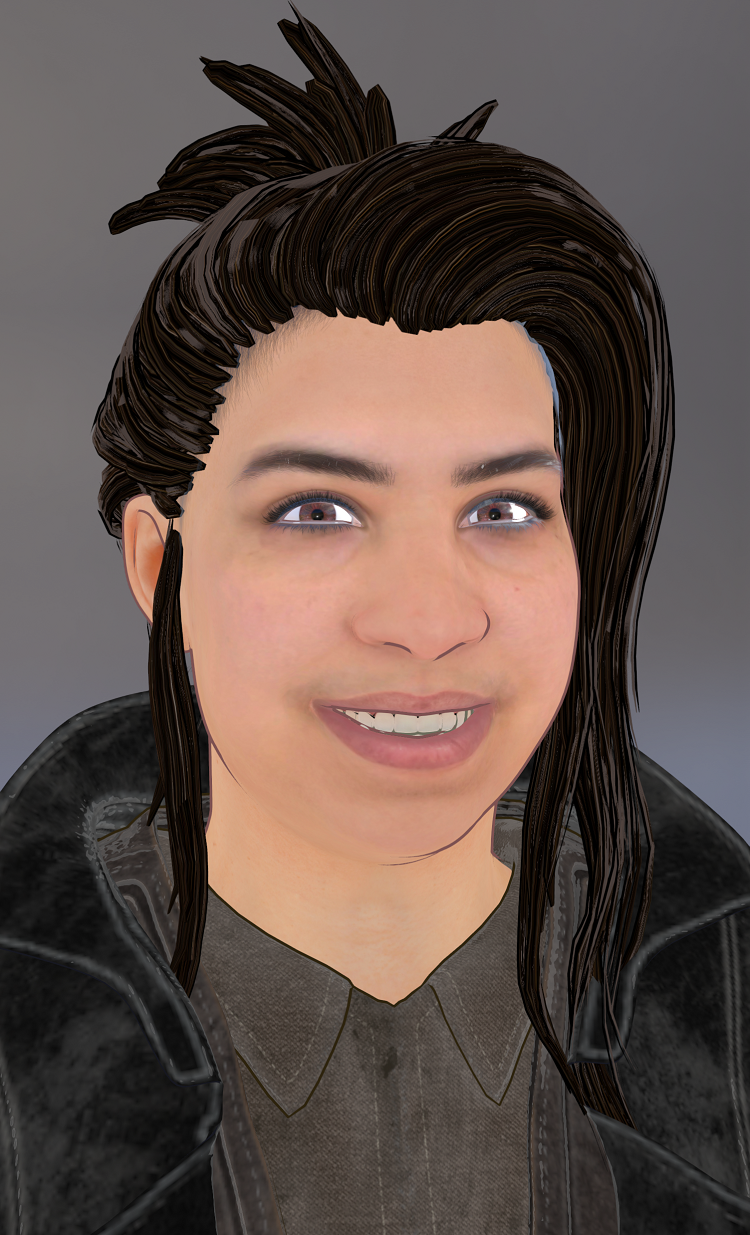
This was the first test renders I did. At least for my own uses, I feel like the outline looks better when the color is changed from black to something close to the skin or hair color. Like on the characters, it should be a desaturated brown to match the skin, and the hair outline should match the hair color. (For the hair specifically, there is a "rim" color that is gray. That needs to be changed since it's the highlight color.)
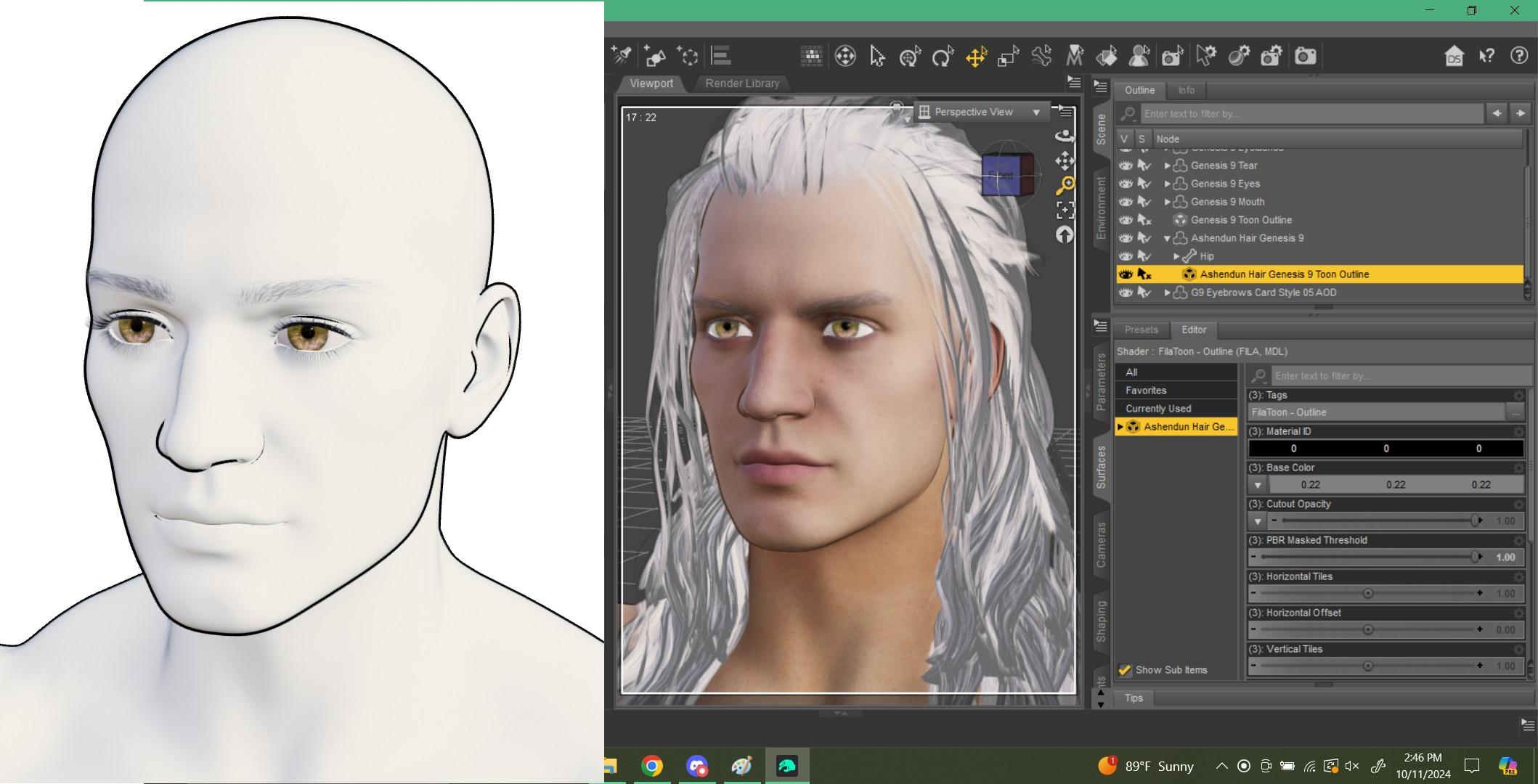 Anime Toons and Filatoon Shader Q&A
Dartanbeck said:
cathan01_wwg1wga said:
The filatoon shader is really nice. I was just getting used to my anime/ painting routine using daz iray and gimp, but filatoon reduces my workload significantly (postwork, especially). Now I just have to learn how to use filament more efficiently...
Adding your own lights helps even more.
That will open up a lot more fun when adjusting the Filament Draw Options - like the amazing Color Grading options!
So don't forget to go Create > Create New Filament Draw Options Node (way at the bottom)
Thanks, Dartanbeck. I'm reminded of when I finally decided to move on to iray from 3delight. Took me forever to get used to new lighting and shaders. I need to experiment making toon animal renders with lahm and dforce fur ASAP. Really wish I could get the Gen 9 anime shapes on Gen 8, though...
What About G8 Essentials and Dforce Essentials ???Genssi 8 Starter essentials has the AutoFit clone for Genesis 9, so that fitted items can be down-converted. Default resources has a number of issues, including FilaToon, the Filament toon shader.
FilaToon / Cell shaded rendering with FilamentOh... and turning "Generate Texture Mipmaps" off in Filament can be very helpful as well if things aren't looking the way you need them to
Anime Toons and Filatoon Shader Q&ADartanbeck said:
daveso said:
I'm thick as a brick. This stuff is flying over my head, like out of site. I decided to give it a go, but wow, I'm so not knowing what to do, I realize everyday how much I have no clue about in DS. I think I might have to start over, from the very beginning. #1 - this is DAZ Studio. This is how you launch it.
Yeah ... like the description by Mada seems right on..but what are LUT? I cannot get an outline no matter what I do? Why does it ask me to select a node? What are they asking for? It seems these shaders and associated files are all over the place. Maybe its more together in Content Library and not Smart Content? Then there's stuff in Essentials, Shaders, who knows where else.Okay, let's see if we can help.
..but what are LUT?
Okay, at this stage in the game, don't even Think about what a LUT is. That's for when you get more advanced into really tweaking things
I cannot get an outline no matter what I do? Why does it ask me to select a node? What are they asking for?
For this and any other problems you might have, do this as your first step into all of this - okay? Just follow me here:
- Load one of the presets - Base Anime Femine or Masculine - or Vicky 9
- In the Scene pane, open the hierarchy of the figure - just one level will do. We want to see everything that's parented to the figure
- Look for a parented item that ends in the words: "Toon Outline"
- Select that and, in the Parameters pane, use Mesh Offset to edit the thickness of the outline
Keep in mind that this Toon Outline is a very special shader that is not always visible at all times. It shows up according to the angle of the camera along with whatever might block it from view. It's been carefully designed that way to create a good outline without looking crazy all over the place. A very special shader indeed!
So now, if we add clothing or mesh hair or props that are not Filatoon already, Select the item and go to the Surfaces pane.
- Select all surface materials Except for those that should be transparent and, for starters, apply the General Filatoon Shader Preset (Shader Presets > Filatoon > Presets)
- Applying that shader has now also applied a Toon Offset Geometry Shell for you - unless there was already a GeoShell on it.
- In the same way, we can now select that Toon Offest in the Scene pane, and edit the outline using Mesh Offset in the Parameters pane.
Something else to know about Filatoon:
Filatoon character presets tell Filament to turn on the headlamp for itself.
It does this because it requires at least one Daz Studio light source to be present in order to become visible (not including HDRI or Sun/Sky).
Adding your own lights to the scene (think Photography studio techniques here) and then turning the headlamp slider off in Filament Draw Options will give you a Lot of power towards creating the look and feel that you want.
Filament Draw Options Node can be loaded via the Create menu - waaaaay toward the bottom > Create New Filament Draw Options Node
Select that in the Scene pane and make adjustments in the Parameters pane. Be careful! There are a lot of options in there! If you've added at least one light, start by editing the Headlamp option to 0.00
The sliders toward the top that begin with "Color Grading" are a Lot of fun to use for adjusting the overall look of the scene!
Hope this helps man!
@Dartanbeck I sincerely appreciate your help on this. Unfortunately, thick as a brick I am. Nothing seems to be as you state... I'm really happy for those having a good time with this, but it just makes me frustrated. I'm having enough problems with Ultrascenery 2, so I'm backing off this new toy and maybe will try again a some future date. My patience is just not there anymore. Everything just seems so frustrating as I get older. It just makes me want to move on from DAZ Studio even, but I stick as I've spent so much money over the years.
pre-paid Daz membership taken away!Ron Knights said:
So now again, we have a paid version of DAZ Studio. Many years ago I paid extra for DAZ Studio Advanced (was that the name?). Right after that, DAZ Studio went free.
I just don't see any compelling new features for the paid version of DAZ Studio. It's nothing that interest me. And all those sale prices and coupons continue to confuse me.
I can't help wonder if this new paid version is a step toward DAZ Studio version 5. Will DS v5 be a subscription only version?
It isn't a paid (subscription) version of daz Studio - it is a subscription set of additional plug-ins, and content, and possibly other things on top of the standard daz Studio - which has had updates in the latest build and has just gained a Filament-based toon shader, so clearly not being neglected in favour of the subscription strand.
FilaToon / Cell shaded rendering with FilamentDaneel said:
So if I understand correctly:
Engine - viewport / Filament
Filament Draw Options where I can play with the settings.
Yeah, that's right ! Nice ! And also give her some shadows, for instance, by setting Deep Shadow Map in DistantLight > Shadow Type.
Edit: Hmm... I still don't like harsh shadow ~~ too iray mind-set, haha ~ Post-work might be needed.
FilaToon / Cell shaded rendering with FilamentYikes, the learning curve
 Looks like I'm gonna be thrashing about a bunch before getting anything close to the Vicky 9 promo renders. Hair is going to be a problem. Eyes are going to be a problem. But ok, it's a start.
G8.1M
100% Kota, 30% The Brute, 10% Toon Hero (Head)
Skin: KotaIs there a way to get a sky in Filament other than a billboard/cyclorama?
FilaToon / Cell shaded rendering with FilamentSo if I understand correctly:
Engine - viewport / Filament
Filament Draw Options where I can play with the settings.
Anime Toons and Filatoon Shader Q&AGrim-Red said:
"- Q1: does Filament support Spotlight ? Why it looks weird with splotlight ? (ss1) If I crank up Lumen, it looks even worse ! (ss2)"
YES. Make sure you select your light and turn off the photometric option. All the old lights from 3DL ( distant, spotlight, linear light etc) work with Filament. If you need shadows projected on objects, floor etc select the shadow option " deep shadow map".
"- Q2: how to make soft shadow on the figure, it looks too harsh. With a distant light in the scene, I made a spotlight a mesh light with Disk + Height as usual, the shadow on the face is still harsh. (ss3) It's totally different from Iray render (ss4) Besides, there's meant to be a shadow on some area on char's face with that spotlight, but there isn't ~~" See Q1 answer
"- Q3: as for Outline shell, why I cannot see outline in some area... like the outline on the hoodies body, on the hair sides... (ss5) And the outline is not so smooth, like sort of dot lines ( in the render...)."
That becomes more/less visible depending on where you placed the light and how you rotate the scene. That shell acts like a solid glossy surface, it doesn't reflect everything every time. You have to see wich angle works best depending on what you want to be seen best.
"- Q4: Opacity on the hair cards doesn't work . Is there any good way to make hair a bit transparent ?" Not as far i know, for now.
"- Q5: Depth of Field doensn't work in Filament at all ! Is that true ?"
Correct, to date DoF does not work with Filament. The way around is to do separate renders, save in .png ( transparent background for the figures you intend to have) and assemble the multiple renders by blurring the background/items in background with Photoshop or any photomanipulation program of your choice ( even GIMP).
Ah, it's really good to know ! I should've checked more info. from the PDF posted by Mada... just went for a try in a rush, haha ~ Some quick tweaks made things getting much better !
Thank you very much !!
FilaToon / Cell shaded rendering with FilamentDartanbeck said:
crosswind said:
Daneel said:
I have absolutely no idea how is this Filament working. Can you suggest me sources where I can learn about it? What options have to use or modify?
I bought Vicky 9 and all of the filatoons but I have no idea, how can I use them. :(
Me too ~ almost first time I went for a workflow with Filament and the new toon shader an hour ago. I got some fundamental knowledged in her from Jay https://www.youtube.com/watch?v=dE1pSOPfLNw
Maybe you can take a look first. Then just need to understand what those properties in Filament drawstyle / toon shaders work for, and have more experiments with them.
That can certainly help, just know that we don't get the same results using those methods with Filatoon.
Filament has undergone a Massive Upgrade in Daz Studio with this release.
Since the Genesis 9 Toon figures load with a special instruction to turn the headlamp On (so that we can see something - anything) the Scene Lighting scale, for example, has little to no affect at this point (first loading character)
So here's what to do:
- Load one of the preset figures (at least until we understand everything)
- Create > New Filament Draw Options Node
- Create Distant Light
Now play around with the Filament Draw Options and the light settings - back and forth a bit to get a feel for what's going on.
Note that many (most?) of those options are over my head.
The settings that are really beneficial to play with from the user's side - at least in the initial stages, are the Color Grading options toward the top as well as the Distant and Scene lighting strength options. I find it best for me to turn off the headlamp in the Filament Draw options right away, so I can use "My" lights without the headlamp impeding my flow
Yep, I got it ~ I'm now reading the PDF that Mada shared and try what you suggested. It's getting better and better . Nice ! Thank you very much !
Daz 3D is part of

Connect
DAZ Productions, Inc.
7533 S Center View Ct #4664
West Jordan, UT 84084Licensing Agreement | Terms of Service | Privacy Policy | EULA
© 2026 Daz Productions Inc. All Rights Reserved.