-
MANGA STYLE & VISUAL STYLE topic - Update Sept 23rd 2017: Fixed Dropbox links! [Commercial]
GRFK DSGN Unlimited said:
I'm still voting for a Filament version, though not as popular it seems.
FilaToon is now a thing, so someone must have been listening! lol
Anime Toons and Filatoon Shader Q&A3Diva said:
rokkr said:
Ghosty12 said:
rokkr said:
Ghosty12 said:
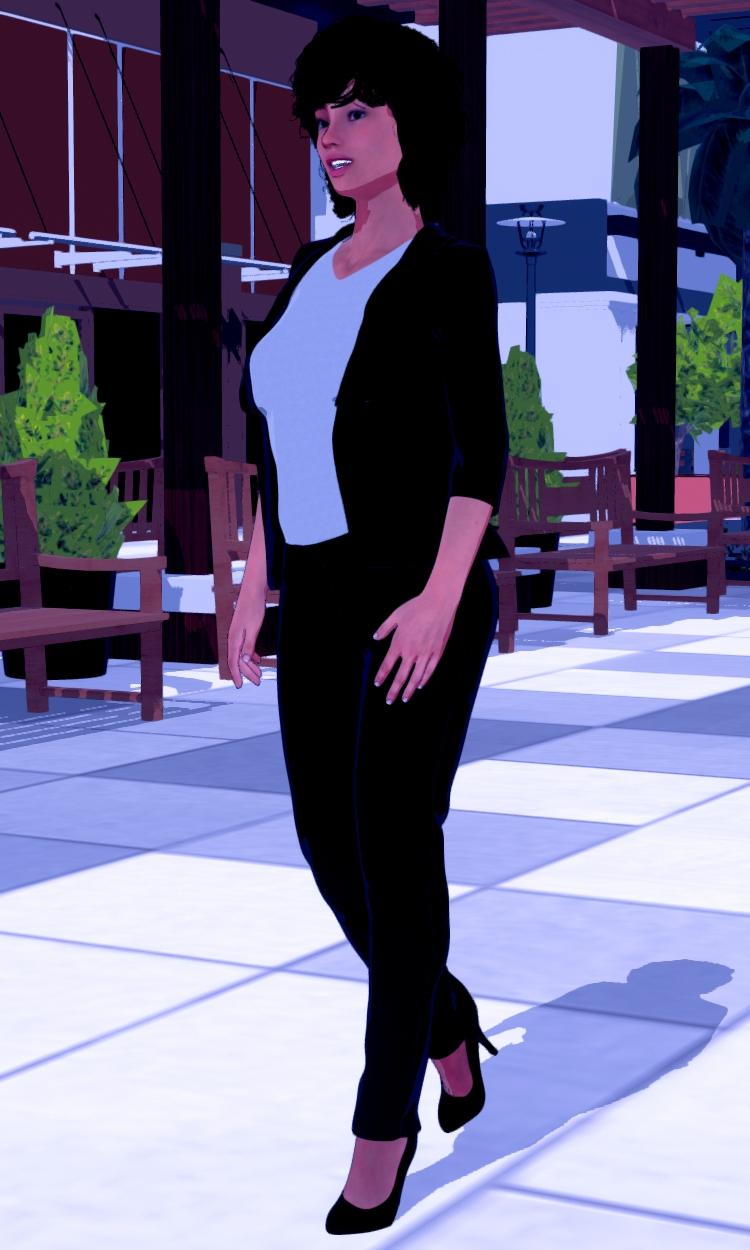
Just my test of an outdoor scene playing aroound with the night time setting still trying to work it out. Also Genesis 8 using the characters texture, just added Filatoon to it. Did find the setting to make the character shadow more pronounced.
Cool! How did you make the shadow?
Thank you.
 The initial shadow is a distant light, then add in the Filament Draw Options in there you will find three shadow options, Shadow Type, Shadow Map Size and Shadow Cascades. Setting the Shadow Map Size to 2048 or higher and Shadow Cascades to 4 will give a very good looking figure shadow.
Thank you! I'm still learning to use those "regular" lights (you know, distant, spot, point) since, most of the time, I just use an HDRI with some ghost lights. But I'm making some progress and, thanks to you and other people here, I've learned a lot today!
Also, make sure on your Light's settings the "Shadow Type" is set to "Deep Shadow Map" or "Raytraced" - anything but "None".
Yeah forgot about that bit.
 The light I used was from Riversoft Arts 3Delight to Iray To Filament converter plugin, so had the shadow was preset to Raytraced.Anime Toons and Filatoon Shader Q&A
rokkr said:
Ghosty12 said:
rokkr said:
Ghosty12 said:
Just my test of an outdoor scene playing aroound with the night time setting still trying to work it out. Also Genesis 8 using the characters texture, just added Filatoon to it. Did find the setting to make the character shadow more pronounced.
Cool! How did you make the shadow?
Thank you.
The initial shadow is a distant light, then add in the Filament Draw Options in there you will find three shadow options, Shadow Type, Shadow Map Size and Shadow Cascades. Setting the Shadow Map Size to 2048 or higher and Shadow Cascades to 4 will give a very good looking figure shadow.Thank you! I'm still learning to use those "regular" lights (you know, distant, spot, point) since, most of the time, I just use an HDRI with some ghost lights. But I'm making some progress and, thanks to you and other people here, I've learned a lot today!
Also, make sure on your Light's settings the "Shadow Type" is set to "Deep Shadow Map" or "Raytraced" - anything but "None".
Anime Toons and Filatoon Shader Q&A3Diva said:
crosswind said:
Mada said:
crosswind said:
- Q3: as for Outline shell, why I cannot see outline in some area... like the outline on the hoodies body, on the hair sides... (ss5) And the outline is not so smooth, like sort of dot lines ( in the render...).
@crosswind
A couple of reasons and fixes there - the outline shell needs to have a bit of thickness and if the outfit just have a thin mesh it loses the line. But first thing you can try to improve it is to use the expand all on the clothing item, the geoshell sometimes get hidden by the body if its tight fitting, so looser is better in this case. That should fix the dot lines.Wow ! That worked like a charm ! And I used a thickened garment by using Thickener plugin in the previous post, the result was not good... lack of outline. This time I used the original hoodies, and tweak the setting, it's much better. Thank you very much Mada !
I'm sorry but I still have another question: How to make a surface looks metalic with FilaToon and Filament drawstyle ? There's a Metallicity property on Filatoon shader but it seems no change after dialing it ...
I'm not sure, but there should be a metallic shader for FilaToon under:
Shader Presets >> FilaToon >> Presets >> FilaToon - MetallicYou can also just apply a regular Iray Metal shader to whatever you want to turn metal and it should look semi-metallic in Filament.
Yeah, I missed that shader preset ! Then with Iray Uber, it seems even better... I didn't thought of that. Nice ! Thank you very much !
 Anime Toons and Filatoon Shader Q&A
Mada said:
I'm sorry but I still have another question: How to make a surface looks metalic with FilaToon and Filament drawstyle ? There's a Metallicity property on Filatoon shader but it seems no change after dialing it ...
Apply the metallic preset to your item, then find the environment weight on the shader (last one on the list)... slide it from 0 until you get the effect you wanted.
Good to know the settings ! Now it looks shinny... I don't expect it to be like the effect in Iray. Thank you very much !
FilaToon / Cell shaded rendering with Filament...Cool! Where is it? I was looking for some template and couldn't find it.
Templates are all in the Default Resources for DAZ Studio. Filament env. light preset is in G9 Starter Essentials.
Anime Toons and Filatoon Shader Q&Acrosswind said:
Mada said:
crosswind said:
- Q3: as for Outline shell, why I cannot see outline in some area... like the outline on the hoodies body, on the hair sides... (ss5) And the outline is not so smooth, like sort of dot lines ( in the render...).
@crosswind
A couple of reasons and fixes there - the outline shell needs to have a bit of thickness and if the outfit just have a thin mesh it loses the line. But first thing you can try to improve it is to use the expand all on the clothing item, the geoshell sometimes get hidden by the body if its tight fitting, so looser is better in this case. That should fix the dot lines.Wow ! That worked like a charm ! And I used a thickened garment by using Thickener plugin in the previous post, the result was not good... lack of outline. This time I used the original hoodies, and tweak the setting, it's much better. Thank you very much Mada !
I'm sorry but I still have another question: How to make a surface looks metalic with FilaToon and Filament drawstyle ? There's a Metallicity property on Filatoon shader but it seems no change after dialing it ...
I'm not sure, but there should be a metallic shader for FilaToon under:
Shader Presets >> FilaToon >> Presets >> FilaToon - MetallicYou can also just apply a regular Iray Metal shader to whatever you want to turn metal and it should look semi-metallic in Filament.
Anime Toons and Filatoon Shader Q&AI'm sorry but I still have another question: How to make a surface looks metalic with FilaToon and Filament drawstyle ? There's a Metallicity property on Filatoon shader but it seems no change after dialing it ...
@crosswind
Apply the metallic preset to your item, then find the environment weight on the shader (last one on the list)... slide it from 0 until you get the effect you wanted.Anime Toons and Filatoon Shader Q&AWonderland said:
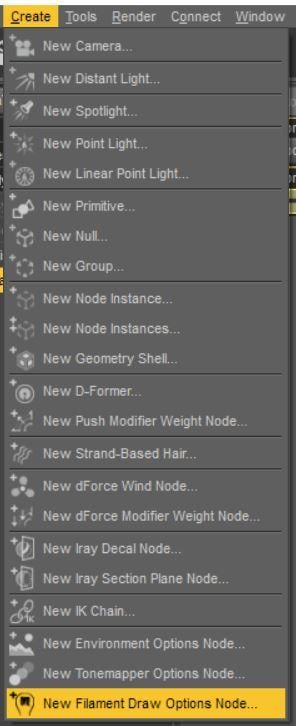
OK stupid question, where are the filament draw settings? I just loaded the set icon that says Basic Filatoon Environment and that set up the scene with distant lights and already in the filament renderer. Under the render setting, there's no adjustments. Where are these setting for shadows and things?
"Create" >> "New Filament Draw Options Node..."
 Anime Toons and Filatoon Shader Q&A
Mada said:
crosswind said:
- Q3: as for Outline shell, why I cannot see outline in some area... like the outline on the hoodies body, on the hair sides... (ss5) And the outline is not so smooth, like sort of dot lines ( in the render...).
@crosswind
A couple of reasons and fixes there - the outline shell needs to have a bit of thickness and if the outfit just have a thin mesh it loses the line. But first thing you can try to improve it is to use the expand all on the clothing item, the geoshell sometimes get hidden by the body if its tight fitting, so looser is better in this case. That should fix the dot lines.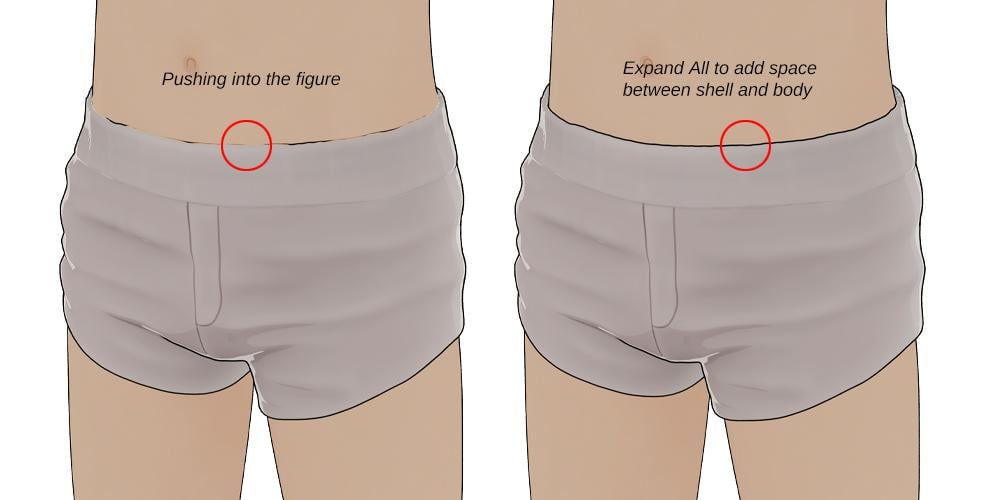
Wow ! That worked like a charm ! And I used a thickened garment by using Thickener plugin in the previous post, the result was not good... lack of outline. This time I used the original hoodies, and tweak the setting, it's much better. Thank you very much Mada !
I'm sorry but I still have another question: How to make a surface looks metalic with FilaToon and Filament drawstyle ? There's a Metallicity property on Filatoon shader but it seems no change after dialing it ...
Anime Toons and Filatoon Shader Q&AOK stupid question, where are the filament draw settings? I just loaded the set icon that says Basic Filatoon Environment and that set up the scene with distant lights and already in the filament renderer. Under the render setting, there's no adjustments. Where are these setting for shadows and things?
Anime Toons and Filatoon Shader Q&AWonderland said:
I can't find the whole product in smart content. It's in the content library but when I search for toon or anime in smart content, it doesn't show up....
It doesn't show up, because it's under "Daz Default Resources" folder, not in a "Toon [anything]" folder. Just navigate in your Smart Conent to Shaders->Filament this will already show Daz Default Resources, so you can open it and the shaders are there, but you can also go Shaders->Filament->Toon.
Anime Toons and Filatoon Shader Q&AGhosty12 said:
rokkr said:
Ghosty12 said:
Just my test of an outdoor scene playing aroound with the night time setting still trying to work it out. Also Genesis 8 using the characters texture, just added Filatoon to it. Did find the setting to make the character shadow more pronounced.
Cool! How did you make the shadow?
Thank you.
The initial shadow is a distant light, then add in the Filament Draw Options in there you will find three shadow options, Shadow Type, Shadow Map Size and Shadow Cascades. Setting the Shadow Map Size to 2048 or higher and Shadow Cascades to 4 will give a very good looking figure shadow.Thank you! I'm still learning to use those "regular" lights (you know, distant, spot, point) since, most of the time, I just use an HDRI with some ghost lights. But I'm making some progress and, thanks to you and other people here, I've learned a lot today!
Anime Toons and Filatoon Shader Q&Arokkr said:
Ghosty12 said:
Just my test of an outdoor scene playing aroound with the night time setting still trying to work it out. Also Genesis 8 using the characters texture, just added Filatoon to it. Did find the setting to make the character shadow more pronounced.
Cool! How did you make the shadow?
Thank you.
The initial shadow is a distant light, then add in the Filament Draw Options in there you will find three shadow options, Shadow Type, Shadow Map Size and Shadow Cascades. Setting the Shadow Map Size to 2048 or higher and Shadow Cascades to 4 will give a very good looking figure shadow.Anime Toons and Filatoon Shader Q&AMada said:
ArtsyDragon said:
Mada said:
ArtsyDragon said:
I'm going to do my questions one at a time.
@Mada stated The Filatoon shader is used in combination with Filament’s fast rendering. The toon outline is accomplished by creating a geometry shell and applying a special shader to it.
I do not know how to create a geometry shell. I don't see an option to create on in the starter essentials group of options.
@ArtsyDragon
Q : Where can I find the FilaToon shader scripts
A : My DAZ 3D Library > Shader Presets > Filatoon. Under that you will find FilaToon - Base and Filatoon - Outline. You can also apply any of the presets and it will create the outline geoshell if it doesn't exist (except for FilaToon - Constant, it will apply the shader without the outline). If everything is black after you apply the preset make sure you're in the Filatoon renderer, and either turn on Auto Headlamp or add some lights.I do not have a Filatoon folder. I'm in Content Library > My Daz 3D Library > Presets and it goes for DS Defaults to Iray
I'll check the first post to see what I can find. :) Thank you
I think that is pointing toward that you don't have all the files installed, or that you need to reinstall. Make sure that you have the latest default resources installed.
Not "Presets", but Shader Presets
Anime Toons and Filatoon Shader Q&APetra said:
Can one put normal Iray shaders on the new Victoria 9 toon shape?
Yes but you won't have the outline, and the normal G9 eyeballs would probably work better with Iray Textures.
If you're just after the iray texture but still want the outline and render in filament, just drop the base colour texture used in iray into the right channel.
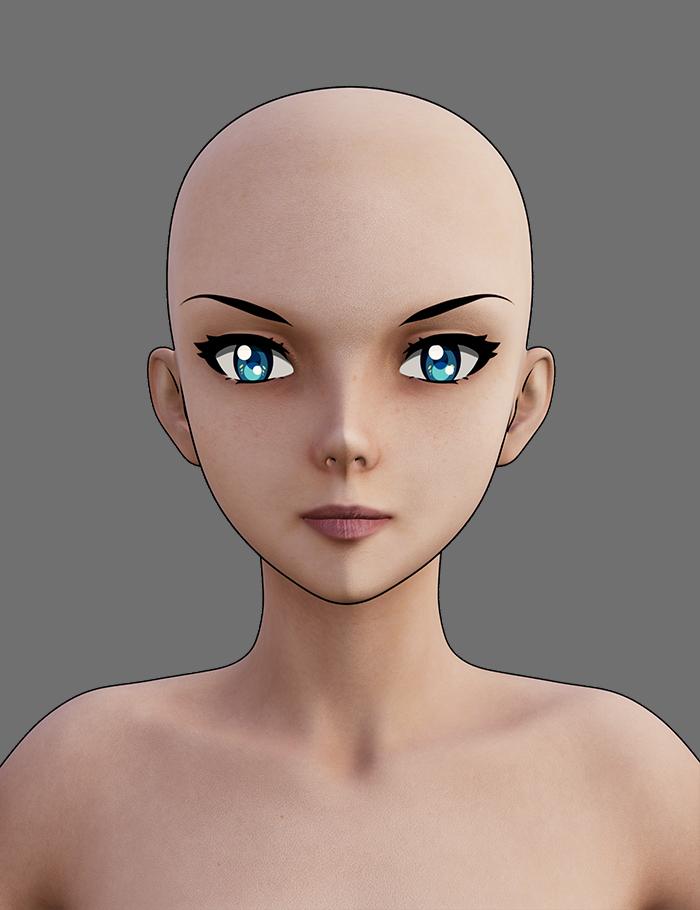
In this image I loaded Vicky Toon, and then applied Josie's Iray shader, and then removed the maps from the normal and specular channels to get a flatter look
 Anime Toons and Filatoon Shader Q&A
This is a bit easier than I thought it would be - well for the basic anyway. I've changed the offset for the skin geoshell to 0.20 and then discovered that the pants, shoes and t-shirt have a geoshell after adding the filatoon outline so upped the offset for them to get a better outline. All from reading one post from Dartenbeck
This is a G8 toon character I converted for G9. I could only mix the anime head up to 55% otherwise the inside of the mouth started to poke out. Also added a bit of the young anime heros and set the mascline body proportions to 30%. The background is from the Anime backgrounds and lights set. I've never used filament to render before. This is actually a lot of fun 
The problem I'm getting is the outline on the front of the t-shirt seleves and the bottom of the t-shirt are not there.
FilaToon / Cell shaded rendering with FilamentGordig said:
midgard229 said:
TesseractSpace said:
Yeah, some kind of scene-wide shader conversion script would help a lot. Hopefully one is in the works.
You can use the general shader like a normal shader. Select multiple surfaces then apply. General toon shader and it should work. Sometimes it will miss some items and you have to reslect them and try again. Overall it works almost on anything that is an actual mesh, just nothing like vdb or opacity mapsWhich is exactly why having a scene-wide shader conversion script would be helpful. My first experiment was with Urban Future 7, which has a LOT of different objects nested within each other, making a LOT of different surfaces to have to select and apply the shader.
Something like the RSSY 3delight / Iray to Filament converter would be amazingly handy for getting started with a scene
What About G8 Essentials and Dforce Essentials ???Faeryl Womyn said:
Ok will grab them as well and I've been reading and seeing the filatoon renders and people's opinions about it, it's very much loved right now lol
I'm wondering if you can use dforce with this new filament?
Filament is just a name, it has nothing to do with being made of strands.
Anime Toons and Filatoon Shader Q&AArtsyDragon said:
Mada said:
ArtsyDragon said:
I'm going to do my questions one at a time.
@Mada stated The Filatoon shader is used in combination with Filament’s fast rendering. The toon outline is accomplished by creating a geometry shell and applying a special shader to it.
I do not know how to create a geometry shell. I don't see an option to create on in the starter essentials group of options.
@ArtsyDragon
Q : Where can I find the FilaToon shader scripts
A : My DAZ 3D Library > Shader Presets > Filatoon. Under that you will find FilaToon - Base and Filatoon - Outline. You can also apply any of the presets and it will create the outline geoshell if it doesn't exist (except for FilaToon - Constant, it will apply the shader without the outline). If everything is black after you apply the preset make sure you're in the Filatoon renderer, and either turn on Auto Headlamp or add some lights.I do not have a Filatoon folder. I'm in Content Library > My Daz 3D Library > Presets and it goes for DS Defaults to Iray
I'll check the first post to see what I can find. :) Thank you
I think that is pointing toward that you don't have all the files installed, or that you need to reinstall. Make sure that you have the latest default resources installed.
Daz 3D is part of

Connect
DAZ Productions, Inc.
7533 S Center View Ct #4664
West Jordan, UT 84084Licensing Agreement | Terms of Service | Privacy Policy | EULA
© 2026 Daz Productions Inc. All Rights Reserved.