-
Any model similar to the Dracthyr on WoW?
Its still too bulky for what I am looking for. :/ Attached is the ingame modelGhostofMacbeth said:He doesn't have to be bulky. Just a quick application of the thin and lithe morph from Daz. Not played the game so I am not sure if that is closer to what you are looking for.
Anyone figured out how to use Geo-Grafting Navel and Nipples for Genesis 9?billyben_0077a25354 said:
I will be returning this product. I have used geografts before and the vendors always made them easy to copy the materials over to the Geograft by using scripts and having a copy materials button in the product. This having to apply the skin mat 3 times is for the birds. Also it will only work with single mat skins. Any skin that includes the genitials mat does not work (I just tested every character I have). All I have been able to get the geograft to work with are the single skins and chest skins for Victoria and Michael and the 8 base skins. None of the PA model skins seem to work at all (at lease the models I have) Also the morphs provided are very basic. I would have liked to see a product that at least has the same nubmer of morphs as the nipple and neval morphs for the G3/8/8.1 generations. It is amazing that this product got out of QC. It is not up to DAZ Studio's usual standards.
I've used them on Nao, a PA character, and they worked fine with her genital mats. I might be misunderstanding what you mean by single skins.
The biggest issue I've had with these is that they distort pretty badly when using the Breast Fullness Lower morph. They're not the most complete solution, but they're around the same level of detail as the official morphs if you need to keep your characters at low subdivision. This character is using them at subdivision level 1 and the geografts at 4.

My steps for using them are load the geografts on the character > apply the PBR (or Iray Uber) shader to the geografts > copy the character's body texture > paste the body texture onto both geografts.
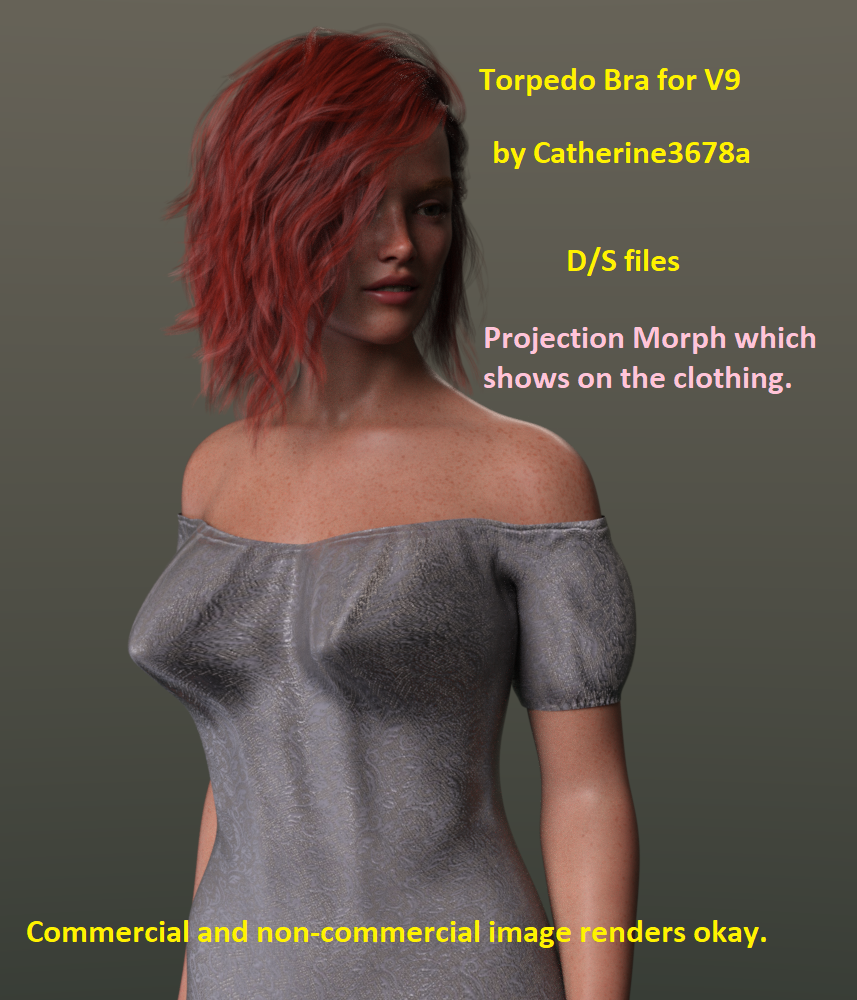
Torpedo Bra for Victoria 9 - projection morphThe Torpedo Bra was fashioned to work with V9, it also works with G9 Female.
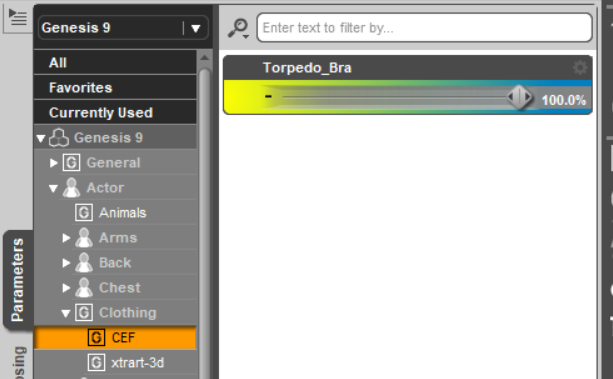
One selects the figure and dials in the morph. These types of morphs only work on the clothing.
Uploaded to Renderosity
The Torpedo Bra goes by several names including Bullet Bra.
Used in promo:
Lights, one of the Easy Portrait presets plus 1 sphere mesh light.
Fair Maiden Under Dress.
Voss Hair G9
Genesis 9's Victoria 9Product includes ONLY the projections morphs for the Torpedo Bra. Just merge like folders together then open D/S and enjoy :-)
 Getting on the 9 train, or not
Mattymanx said:
Diomede said:
On topology and edge loops. - Reply to Oso3D but really a clarification for people less advanced than Oso3D.
Why do vintage modelers emphasize edge loops? Recall the picture of the G9 torso mesh does not have any edge loops outlining the oval stomach musculature on the front of the human torso, nor does it have edge loops for the lower border of the rib cage. Instead it has a flat grid. As a result, if one were to just shrink wrap the base torso to a slim and healthy adult human, the edges of the grid do not line up with the edges of the rib cage or stomach oval. It may still look OK depending on how dense the mesh is, which subdivision can aid, but major features would be dependent on internal deformation of squares, not outlines by edge loops. (See attached pic). However, that is inefficient if you know ahead of time that the shape you want has an oval stomach and a slope for the lower rib cage. The same shape could be achieved with fewer polygons, less subdivision, less strain on computer resources. In practice, people who struggle to have 3 or 4 Daz figures in a scene could have 7 or 8 if the mesh was more efficient.
Other examples of issues include several joints. There have been complaints about rubbery joints reminiscient of V4 and M4. Some of that is due to JCMs being occasionally deactivated, a bug which I am sure will be fixed (Thank you, Mada, for monitoring the forums and helping diagnose and solve that problem for users). But another part of the issue comes from poor edge flow of the mesh in the joints. If the edge loops better matched human skeletal and musculature structure then the rigging and weightmapping would have better results and there would be less need for morph fixes like JCMs.
I have used the word 'vintage' in the term vintage modelers to try to signal that I know Daz believes the mesh of G9 is a step forward, not backward. Daz3D is well aware of the points I have made about edge flow, and consciously chose the G9 mesh as is. One possible good reason to do so would be a decision to rely more on mesh density and sculpting to define shape than selecting and manipulating individual edge loops.
Just clarification. I am on the Genesis 9 train. I have had occasion to dabble in ZBrush and similar. Looking forward to the people who open ZBrush for the first time and who can't figure out why they can only replicate a seemingly infinite number of spheres instead of sculpting the starting sphere. :)
There is a right time and place for doing edge loops to define a specific shape in any model, but Genesis 9 is a canvas to be built on top of, and it's mesh is the way it is to allow more creative freedom to those who build on it. From the start, the Genesis figures were meant to be a multi-use figure that could be 1001 different people of all shapes and sizes. So lets say the stomach area is defined for muscles, then morphing it into a pregnant belly or someone who is very heavy set becomes a problem as you have to sculpt out the detailed areas. But doing a well toned body who is fit is much easier in this example. Where as in the case of Genesis 9, with the mesh the way is it, is much easier to sculpt the body into either.
Well said. The base figure is just that...a base to build on.
How do I get Genesis 9 into Blender or Zbrush for content creation?You would export G9 base, in base resolution as an obj, for sculpting on the character (for morphs).
You can export in a morphed version is you use 'reverse deformation' when creating the morph.
Stella HD for G9 - do the foot morphs also work for G8/G8.1?
You can use it to give the feet to other characters too, just set it to -100%. But yeah these won't work on G8.felis said:
No, a morph is based on the actual geometry, and the geometry between G8 and G9 is very different.
Besides, I am not sure what you are trying to obtain. The reason Bluejaunte includes the foot morph, is to be able to dial the foot morph out, as it can distoft footwear.
Prop Creation in 3DS Max - Best PracticesCan anyone point me in the direction of some sources for best practices tutorials for DS prop creation in 3DS Max? I'm looking to create props with morphs and multiple surfaces. Not looking to transfer figures from DS to Max.
Thanks.
Any model similar to the Dracthyr on WoW?He doesn't have to be bulky. Just a quick application of the thin and lithe morph from Daz. Not played the game so I am not sure if that is closer to what you are looking for.
AIUTO...CHI CONOSCE L’ITALIANO? PARTE TREDICIRuthven said:
Crios said:
Imago said:
Crios said:
Allora, io G9 non l'ho neanche scaricato, neanche per curiositàScaricatelo e goditi tutte le parti svolazzanti in giro e la mancanza di parti biologiche necessarie. In pratica hanno aggiunto "quelle parti lì" nel pacchetto ma hanno rimosso capezzoli e ombelico. Vai a capire.

Cioè hanno messo Ciuffa e Monsieur Parbleu nel pacchetto gratuito, e hanno levato l'ombelico?
Non nel pacchetto gratuito, nell'Essentials Expansion a pagamento.
Sempre meglio, comunque, che metterli solo nei pro bundle come prima.
Per quanto riguarda ombelico e capezzoli, però, è veramente una boiata; però non sono sicura di aver capito bene una cosa: ci sono nell'hd solo di Michael e Victoria? Su G9 non li vedi aumentando la suddivisione?
Mi auto-rispondo dopo essermi presa la briga di andare a verificare:
L'ombelico compare portando la suddivisione a 3; con la figura a risoluzione base è appena accennato, a risoluzione alta si vede meglio.
I capezzoli sono morph HD; che credo di per sè siano comunque già compresi nella figura base, perché non ho ancora preso né Victoria né Michael. Se renderizzi figure vestite non ti servono, o puoi attivarli anche solo appena appena. Quindi, in effetti, i geograft non servono, a meno che uno non voglia farli apparire anche su figure a suddivisione bassa.
[SOLVED] {kinda} Eyeball/Inner Mouth Morphs affecting Body VerticesEdit: After much brainstorming I've discovered that I have nothing to do with it. It's just something Daz Studio does, the same happens for other morph products on the market. So... it's solved as in, it's not solvable, but it causes no problems. If you're struggling with the same problem, just leave it.
In short: custom morphs made for Genesis 9 eyeballs have some effect on the body geometry as well, as discovered after using "Select Morph Vertices". And I can't remove them. Nor do I have any idea how this is possible.
Here's a breakdown of what's happening.
- I zero the eyeballs and change the resolution from High to Base (I do the same with the body as well);
- I export the eyeballs (and eyeballs alone);
- I import them to Blender and move the necessary vertices around;
- I export the Eyeballs, back in Daz Studio I have Genesis 9 Eyes selected in the scene (still zeroed and base res) and I load them through Morph Loader Pro;
- Genesis 9 Eyes still selected I navigate to the new morph (Actor/Head/Face/Eyes/myCustomDirectoryName) in the Parameters tab;
- Now I click on Genesis 9 in the scene, switching to the body geometry itself and still see the same morph in the same directory on this geometry.
- Now I right click on the morph (in Edit Mode of course) and choose "Select Morph Vertices". And it selects some random vertices on the body. I have no idea why or how it's even possible. I know it's not supposed to be happening.
I try the good old "Heart the Morph>Double Click>Morph Editing>Clear Selected Deltas from Favorites", Daz Studio tells me I need to select the geometry on which this morph is located, aka Genesis 9 Eyes, instead of Genesis 9, otherwise it doesn't work. But when I select Genesis 9 Eyes, then the vertices selected on Genesis 9 geometry are not affected at all.
Another interesting fact is that I CAN see this morph while I have Genesis 9 selected, even though it belongs to Genesis 9 Eyes. I can't do the same with the morphs I haven't made myself, like the Head Shapes from Daz itself. As soon as I go to Genesis 9, the morphs for the eyeballs simply disappear from Parameters tab, and I have no idea what causes this difference. Whatever tutorials I learnt creating morphs from, didn't teach me this. Is anyone here who can/is willing to?
Stella HD for G9 - do the foot morphs also work for G8/G8.1?No, a morph is based on the actual geometry, and the geometry between G8 and G9 is very different.
Besides, I am not sure what you are trying to obtain. The reason Bluejaunte includes the foot morph, is to be able to dial the foot morph out, as it can distoft footwear.
Issue with AJC College Times Outfit for Genesis 8 and 8.1 MalesLindsey said:
Try the outfit on one of the supported shapes. Says on the product page "Other Shapes may be supported in Daz Studio by Auto-follow"
Here's the outfit on three of the supported shapes: Michael 8, Owen 8 and Lee 8.
Aha! Thank you! This fixed all the "faceting" issues. His previous shape was primarily Torment 8.1 with some custom character shapes blended in. I approximated the same look with Michael 8.1 and Lithe which are supported, and it looks great now. I've always used auto-follow, I had no idea using the supported shapes made such a difference. Excellent knowledge to have. I attached a new pic of the character so anyone else visiting this thread can see the before and after. EDIT: Oh, the earlier pics were deleted. Well, the new one is currently attached all the same

The remaining issue is the crotch area, unfortunately. It still has that jagged edge problem, I assume because it's not a supported morph? I tried using the Fit Control morphs and it still has the same problem.
Richard Haseltine said:
I don't have the set, but is there a Rigidity map interfering with the morph transfer in the groin?
I'm not entirely sure how to check this. The few google responses I found weren't super helpful. Where would I look for this?
AIUTO...CHI CONOSCE L’ITALIANO? PARTE TREDICIMuscleman said:
Veramente li ha ma sono morphs HD delle figure estese diciamo... V9, M9 etc...
Ragazzone, i morph HD rubano una quantità assurda di risorse. Di fatto il modello non li ha, punto.
Altrimenti quel prodotto non avrebbe ragione di esistere...Ora quando si vuole applicare un nuovo morph al seno di un personaggio femminile servono due morph, uno per il corpo e uno per il GeoGraft...
XTransfer Module 1- Genesis 3 to Genesis 8 Morph Converter (Commercial)I've had a lot of issues with doing conversions lately. THIS IS NOT AN ISSUE WITH XTRANSFER. My library for G3 is messy to say the least, and now its just messy and huge for G8. XTRANSFER kept dying no matter what I tried to do with my transfers. (I have an idea about this.. but it takes ages to test and try things.)
I hit on the idea of building another basic library for whatever I'm trying to transfer. I just loaded Genesis 3 and Genesis 8 essentials, and ONLY the required elements for what I wanted to transfer including XTRANSFER. This worked just fine.
1) You need to build you basic library for this by downloading G3 and G8 essentials then manually unzipping them into an 'essentials' library. Make sure you have XTransfer in there as well.
2) You can add the stuff you want to transfer to G8 to the 'essentials' library, but I prefer to use a 'test' library. In that library just manually install all the items and required dependances.
3) Configure Daz to use your 'essentials' library and 'test' library.
4) *I'm not sure if you need to do this, but I did, I cleared the cache, and loaded G3F and G8F so that would speed up loads and ensure there's no confusion with the old cache. I exited and restarted Daz.
5) Run Xtransfer as before, and it will likely just work since there's no cr*p in your library anymore. The run is also faster... I dump the Xtransfer output to the 'test' library, so its easy to find and deal with.
6) In Daz, Swap back your main library, and remove the 'essentials' library. Clear the cache and exit.
7) *Load a G3F and G8F to rebuild the cache. (This wll bring you back to Daz's usual slow painful aweful load speeds.)
8) Load G8F and you now have a viable morph. (In my case I can now just copy the XTransfer files over to my main library.)
This might help all you folks struggling with your transfers. I also posted some other advice for folks struggling with difficult morphs. (Also... not an XTRANSFER issues... this is an issue with bad morphs.)
https://www.daz3d.com/forums/discussion/341526/xtransfer-commercial/p27
Head gamesPlaying around with Victoria 9 and the Face Morphs Kit for Genesis 9. Started with Victoria 9, dialed her head back to about 75%. Stated adjusting morph dials from the Face Morphs Kit to get the look I wanted. I don't know why it's so satisfying watching a new person emerge as I move dial around, but it is. Very much so!
I'll be honest I was missing the mark of what I was seeing in my head. So I then I added VYK Sydney for Genesis 9 at 15%. That little bit gave me what I was looking for. I just couldn't quite get what I wanted with the morphs dials only. Sometimes, you just have to mix other character heads in and see how they react. In this case, it gave me what I wanted. I rely on morph dials because my morphing skills in other programs are almost nonexistant. I can do small things, but not whole heads or their various parts. I'm looking forward to more morphs showing up in the store.
The skin is the Vitctoria 9 default skin. Eyes are from Natural Eyes 9 for Genesis 9.
 Issue with AJC College Times Outfit for Genesis 8 and 8.1 Males
I don't have the set, but is there a Rigidity map interfering with the morph transfer in the groin?
Anyone figured out how to use Geo-Grafting Navel and Nipples for Genesis 9?Probably you did something wrong.
Although, geografts do not transfer HD morphs including skin detailing. So the body part that is a graft often looks off even if all skin settings are properly transfered. Which is why grafts aren't perfect solution.
morphing a geograft asset in custom posehansolocambo said:
yeah you're right. I'm using morph systems of other 3D apps, but Reverse Deformation, which I should get more accostumed to, is indeed a great option for that too.
You could probably emulate Reverse Deformations, depending on how the application worked - spawn a morph for the posed/shaped version you want to adjust, make the adjustments and spawn a morph, then set the before version to -1 and the after to 1 on a zeroed figure and spawn your final morph from that.
DAZ achieves new lows in customer support (but appears to have ambitions to go lower still)Panzer Emerald said:
nemesis10 said:
Ron Knights said:
criket, have you tried using Crossover?! Crossover allows you to create a "bottle" to run the installer in a simulation of Windows. I used Crossover many times when I had a Mac, and wanted to run old Windows installers.
I forget the price, but it is well worth it. It's certainly easier than what you've endured so far.
Unfortunately, I don't think it works. The installers were designed to work in the era of OS 9 and early Windows. OS X was introduced and the installers ran using Rosetta. Eventually, Rosetta was deprecated. In my experiments, the installers for Windows and OS X wrote to different system folders with appropriate permissions so simply placing the files where they should be isn't enough. You could use Crossover to activate the Windows installer but you can't make it write to the proper OS X system folders.
I should say that this isn't strictly Daz's fault. In this case, they are the broker for a vendor who has passed away. It isn't clear that they have access to the assets that the installers use.
Bolded for emphasis.
Also, it could be a lack of bodies to fill positions in the service (food and retail mainly) industry in general. You see it everywhere, all the people who used to work in that sector left after COVID for numerous reasons, not wanting to be dealing with Karen-esque customers anymore being one of them.
could just be Daz lost a lot of their CS people to other remote or warehouse jobs.
I actually don't think this is this is what is going on. Creators make their products, package them, and Daz3d creates the metadata, and posts them for sale and download. Support can troubleshoot if there is an issue with Daz Studio, errors in a script, morph, or mat than can be seen in a text editor etc. Otherwise, they contact the creator to fix the problem. In this case, the creator has passed away and so can not do support. The company does not have the power or legal right to reverse engineer a creator's product. Exactly like Amazon, the company can accept a return, contact the vendor, and deal with a broken product that way. They can't disassemble a product to update it. This is an unusual situation where technology was rapidly changing and, in this case, the installers were never updated.
Getting on the 9 train, or notDiomede said:
See the blender video at this comment. In general, for posing and animation purposes, an even mesh is inefficient. There needs to be more polygons where there is more bending, and there can be fewer polygons where the body does not bend or express. For example, the middle of the front of the shin does not bend, so the mesh need not have as many polygons there. But the ankles and the knees bend, and the back of the calf muscle contracts and bulges. So the top and bottom and back of the shin bone need more polygons. The top and bottom blend when the ankle and knee joints bend. The calf muscle contracts and bulges when the muscle exercises. It is good to have plenty of polygons near the joints and near muscles, but extra polygons are not needed in the middle of long bones. Genesis 9 has even polygons, so it is inefficient from the perspective of edge loops. Given the total number of polygons used, there are too many in the middle/front of the shin and not enough by the ankle and the knee and back of the calf. That is an oversimplified explanation. There are actually plenty of polygons in the ankle and the knee. But hope it helps get the general idea across. See this video.
See here. Getting on the 9 train, or not - Page 30 - Daz 3D Forums
The reply is that an even grid is better for sculpting. (1) The even gridmakes it easier to completely reshape the base figure. (2) For posing and animating, if the creator is going to rely on morph fixes instead of good edge flow, then the even grid gives maximum freedom to the sculpting brush.
Trade-offs.
OK, even grid is more versatile and specialised grid is more efficient. I think I get that, but
Padone said:
Hylas said:
To be fair, SubD 3 for G9 is the equivalent of SubD 4 for G8, right?
It is rather the opposite.
In terms of geometry, a G9 at subD 3 will take up (very roughly) as much space while renderng as a G8 at subD 2?
How? I thought G9 had denser mesh (= more geometry?) than G8.Daz 3D is part of

Connect
DAZ Productions, Inc.
7533 S Center View Ct #4664
West Jordan, UT 84084Licensing Agreement | Terms of Service | Privacy Policy | EULA
© 2026 Daz Productions Inc. All Rights Reserved.