-
Victoria 8
Greetings,
I love Victoria 8. Great figure, fantastic posing and bends....

DAMN that's badass! I need to use rim lights more often... Nice work!
-- Morgan
Victoria 8Serene, that's gorgeous. I just love the colouring in it.
I like V8's face - I don't like her eyebrows and the eyes are kinda off to me (can't put a finger on it), but I like the face look. And boy, I MUST have that hair by April, it's just superb.
I love Victoria 8. Great figure, fantastic posing and bends....
Victoria 8Hi @Llynara,
I love what you're doing with applying Genesis 3 Skins to Genesis 8! Every image you've posted in this thread looks fantastic! So much so I decided to buy Victoria 8.
I have a quick question. How are you applying the Genesis 3 eye materials? I've tried what @AprilYSH suggested (https://www.daz3d.com/forums/discussion/comment/2524026/#Comment_2524026), however I'm not having any luck with the appearance of the eyes using non Genesis 8 materials. Could you share your process?
Trish
Thanks, Trish! Glad you are finding these helpful. I'm having too much fun with them!
Most of the eye materials are loading okay, such as Gwennilis. Usually I just got to Content Library and load the materials from the Genesis 3 Female->Characters folders without any issue. But a few are really funky, like Anneka's glowing eyes:
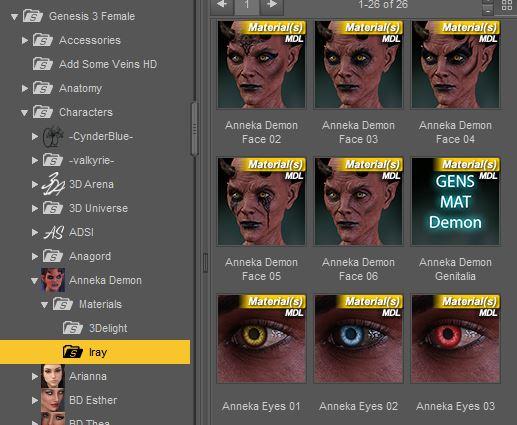
(For some reason, Gwennili's weren't a problem. Go figure.)
I don't know exactly what they changed with the eyes, or why some work perfectly out of the box and some don't.
G3 to G8 Eye Material Workaround
So far this has been succesful so far on the ones I've had trouble with:
- Load a G8F or V8 eye preset- doesn't matter which one. Just double click on one of them. You just want to overwrite whatever the issue is in the G3F material.
- Then go into the Surfaces tab and find the "Iris" section.
- Replace the "base" map with the desired G3F eye material. Just click on the picture of the base map and choose "browse" from the menu that pops up.
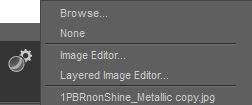
- You can find these under "\My DAZ 3D Library\Runtime\Textures," often under the name of the PA, or if they're a DAZ original, under the DAZ/Characters folder.
Thank you! You're awesome! That seemed to do the trick for Princess Ali II.
Trish
Day 4 of Generation 8 and...This one has nothing to do with Victoria 8, because I didn't bother buying her. It's Genesis 8 all the way - all I bought were the head and body morphs and the expressions. I've been putting the morphs through SimTenero's randomiser to create new shapes and then resurfacing them with SB3 textures. I've done a few of them now and there's nothing particularly special about the one pictured - I just wanted show one that uses existing stuff from a mix of previous generations.
As mentioned, it uses a Skin Builder 3 texture, and the top, hair and skirt are all Genesis 2. The shoes are Genesis, and the stockings are from a Genesis 3 product. All of this went straight on with no trouble - I did have to adjust the top a bit to fit over the skirt, but they're from two different G2 outfits and I've had to do that anyway when using the same combination on G3 and even on G2. Heels can be problematic - I've had the most success with Genesis and G3 shoes and the least with G2 in my limited experiments with them. So far, tops have needed to be of a tighter fit - there's a lot of under-boob clinging going on which shows up a mile away with anything looser fitting.
I'll probably buy her a pair of heels of her own eventually, but in the meantime I think I can get a lot out of my current G8 resources and existing content, and there's nothing at all wrong with G3, either. No rush for the shiney stuff here :)
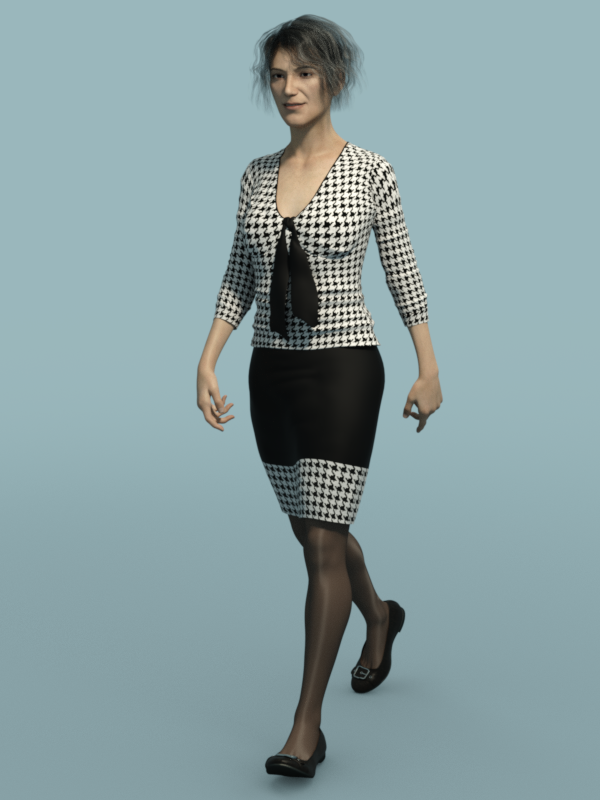
She looks like she's 45 going on 60. Sorry I just don't get it. Enlighten me please because I am missing something here.
Yay! She's supposed to look older. What I was aiming for was somebody with a reasonably natural looking expression, a 'normal' looking older face which didn't make her look like an aging super-model and just enough chunk around the middle to suggest she wasn't willing to let herself go yet but wasn't so obsessed with it that she couldn't help giving in to the odd cream cake urge. I saw her as some kind of senior schoolteacher or one of the hospital admin types that spends her days struggling with budgets while the medics moan at her because there's no money and the hours are too long. I can't see glamour-girl Vicky being half as convincing in the same role.
I think you succeeded very nicely in creating a very believable character. Kudos!
"Brace yourself, my dear wallet! There's always another Sale - and Glitches!"I remember that. There was a bit of fuss at the time, but obviously they've decided to stick with no bundle for the future. It really bugs me. The head and body morphs for G8 are a necessity. They're not an option like a new outfit or something. You will NEED them for characters, and you need them cos quite frankly, Genesis 8 Female is ghastly.
We had a very successful garage sale yesterday, so I actually have the funds to purchase Victoria 8 Pro bundle. I was really torn - get the Pro which could possibly net you a discount down the line when M8 or Monique or other iconics come out....or not get the Pro because I'm tired of the "new shiny best thing" and that I kinda don't like V8 much. Her face is nice, but I don't like the eyebrows and I'm hearing that peeps aren't keen on the skin shader or her eyes. So after thinking on it overnight, I've decided to pass on V8. I'm simply not interested at this point in time. Yes, she can wear G3F clothing (except shoes) so I really don't need to start a new wardrobe for her.....so that helps. But yeah.....I'm not interested in her. It's a weird feeling to actually be able to safely afford a pro bundle even with australian currency conversion ($59US = $77AUS) and not want it. If my 10% discount for owning one previous Victoria genesis pro bundle could have been applied against JUST the Victoria 8 base, then I might be more inclinded to pick her up. But it doesn't. It only works on the pro bundle which frankly, I don't want.
I can't believe there's no bundle price for the head & body morphs and expressions for G8. I mean, if you're going to get one, you want them all. Ridiculous.
They didn't bundle the morphs for G3F or G3M, either. But I do agree with you...
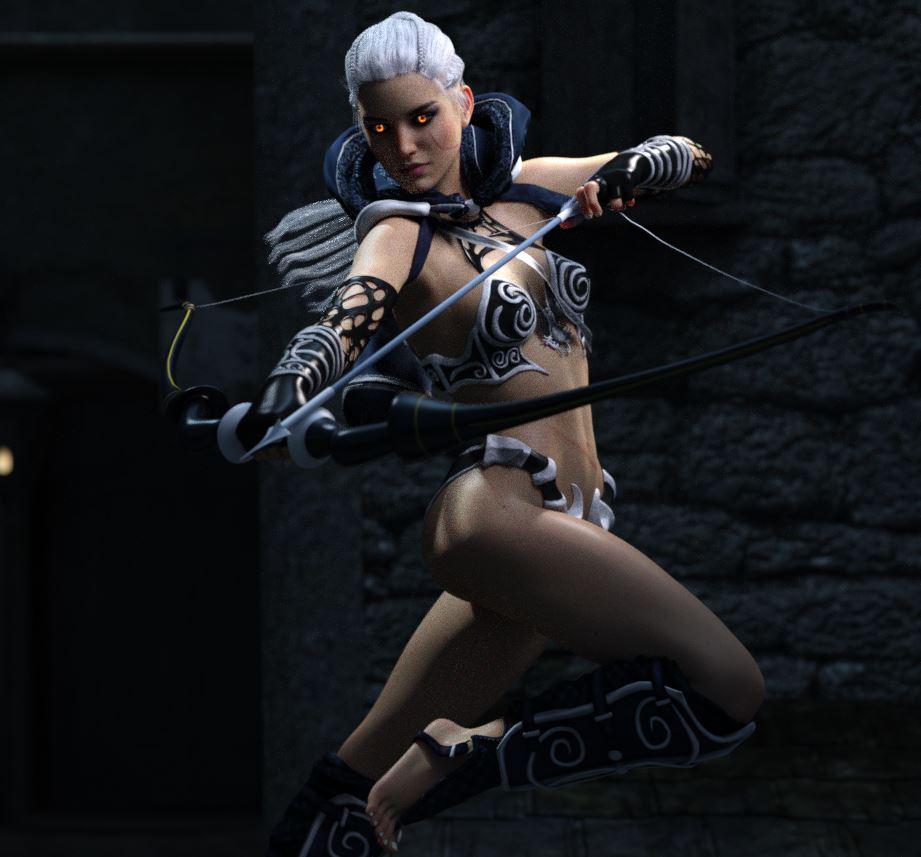
Victoria 8We're slowly getting there with Gwennili on G8F (still rendering.) This is a bit grainy, but no bad speckles like the one before: I should probably just stick her in a studio with an HDR for a quick render, but I'm also testing other things here. So it's taking longer...
Hi @Llynara,
I love what you're doing with applying Genesis 3 Skins to Genesis 8! Every image you've posted in this thread looks fantastic! So much so I decided to buy Victoria 8.
I have a quick question. How are you applying the Genesis 3 eye materials? I've tried what @AprilYSH suggested (https://www.daz3d.com/forums/discussion/comment/2524026/#Comment_2524026), however I'm not having any luck with the appearance of the eyes using non Genesis 8 materials. Could you share your process?
Trish
Thanks, Trish! Glad you are finding these helpful. I'm having too much fun with them!
Most of the eye materials are loading okay. Usually I just got to Content Library and load the materials from the Genesis 3 Female->Characters folders without any issue. But a few are really funky, like Anneka's glowing eyes:
(For some reason, Gwennili's weren't a problem. Go figure.)
I don't know exactly what they changed with the eyes, or why some work perfectly out of the box and some don't.
G3 to G8 Eye Material Workaround
So far this has been succesful so far on the ones I've had trouble with:
- Load a G8F or V8 eye preset- doesn't matter which one. Just double click on one of them. You just want to overwrite whatever the issue is in the G3F material.
- Then go into the Surfaces tab and find the "Iris" section.
- Replace the "base" map with the desired G3F eye material. Just click on the picture of the base map and choose "browse" from the menu that pops up.
- You can find these textures under "\My DAZ 3D Library\Runtime\Textures," often under the name of the PA, or if they're a DAZ original, under the DAZ/Characters folder.
(Please redo images to not show maps if you wish to replace them. ~mods)
Okay! Cry and you buy it anyway!Nope, not buying any Gen8 characters yet. I'll happily use the base figure + body, face and expression morphs. As far as main people sets, I'm waiting for ones that are not Victoria.
Victoria 8I love Victoria 8. Great figure, fantastic posing and bends....
Wow...I LOVE it! :) Looks great.
Laurie
Victoria 8I love Victoria 8. Great figure, fantastic posing and bends....
Victoria 8We're slowly getting there with Gwennili on G8F (still rendering.) This is a bit grainy, but no bad speckles like the one before: I should probably just stick her in a studio with an HDR for a quick render, but I'm also testing other things here. So it's taking longer...
Hi @Llynara,
I love what you're doing with applying Genesis 3 Skins to Genesis 8! Every image you've posted in this thread looks fantastic! So much so I decided to buy Victoria 8.
I have a quick question. How are you applying the Genesis 3 eye materials? I've tried what @AprilYSH suggested (https://www.daz3d.com/forums/discussion/comment/2524026/#Comment_2524026), however I'm not having any luck with the appearance of the eyes using non Genesis 8 materials. Could you share your process?
Trish
Novica & Forum Members Tips & Product Reviews Pt 9Pose Labels: Z Deadly Weapon-Gun and Poses
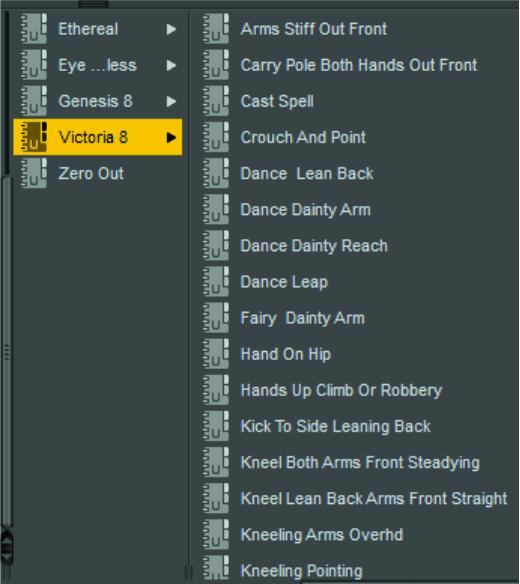
Before you buy this, be aware the woman's hiney is thrust out on most of them so it is more comic/action appeal rather than realistic. I'm categorizing poses and thought I'd share for this set, what I labeled them, and what number went with each. I try to describe the position, not what theme it applies to (like shooting) and thought it might be fun if we shared some of our pose labeling. If you have this set, take a peek and get a few laughs at what I have doing what. These are only the poses for this set, so it's a sample of pose labels. I've also done Etheral so I'll share those too, later tonight. If I continue to do this, I'll do a separate post for each pose set, then do a summary pose for references.
To categorize- in Content Library, go to Categories and right click, create a subcategory. I made mine !!!!!!Genesis 8 (the ! put it at the top of your lists) and then I created a Pose folder (right click, create a sub-category). Under that one, a Genesis 8 folder (right click,create a sub-category) and Victoria 8 folder. Then you right click>Create A Subcategory, and make a folder for each of your poses.
For your poses up in the Daz Studio>Daz section- you right click and choose Categorize, then follow the sub-menu tree till you get to !!!!!!Genesis 8> Poses>Genesis 8 (or Victoria 8) and then the pose file (Like Standing Arms Bent.)
Headed to mom's for a couple hours.
How I choose labels-
1. first choice- make it an action that I can picture (like the second one- carrying a pole)
2. whichever body part action is most noticed, put that first. Such as standing, leaning, crouching, sitting, or like the first one, "arms stiff out front"
3. don't think of the theme, think of what you'd say if you saw it as a standalone pose. I have a Dance Leap for one of these supposedly gun poses. No way would this honestly be a gun pose, the locked, exaggerated leg looks bad IMO. So here's the label, and the pose that caused the label. If you don't have the set, you can look at the promo thumbnails and guess what is what.Arms Stiff Out Front 16
Carry Pole Both Hands Front 10
Crouch and Point 2
Dance Leap 15
Hand on Hip 1
Hands Up- Climb or Robbery 7
Kick To Side Leaning Back 20
Kneel Both Arms Front Steadying 8
Kneel Lean Back Arms Front Straight 19
Laying Knees and Elbows Bent 13
Lean Back and Pull 4, 6
Lean Back Holding On 14
Leap and Shoot 17
Model Hip Out Knee Bent 12, 18
Point Gun 5, 6
Pointing Confident 11
Sitting- Chair or Couch 3
Stand Ready To Bat 9I will also be adding the gun prop (labeling it Z DW gun so I know it goes with that pose set) so it's handy. It will be under Poses. Recommend any props that go with the poses, be put under the poses as separate files, with labels that match the poses because the poses are getting mixed together.
As you do more products, your list will grow. This has Etheral mixed in too, which I will list later tonight.
Is the download server dead?DIM is under heavy load right now, it's getting as many bytes out as it can. We did double the bandwidth to it last year but with the customer base growth and the massive popularity of Victoria and Genesis 8 it is being fully utilized right now.
We did see that the DIM servers overloading would be an issue so over a year ago the Daz Studio team rolled out Daz Connect. Daz Connect uses a new server architecture so instead of being bottlenecked by the servers that we host it instead will download the files via a CDN with hundreds of servers spread across the world. Under heavy load like this the download performance is actually improved because the files are stored on many additional CDN servers than normal. Yesterday I was double checking the speeds and averaged 200Mbps when downloading through Daz Connect in the latest version of Daz Studio.
DIM could be redesigned to do the same thing. I'm not changing download systems just to get faster download speeds, and I'm probably not the only person that feels that way.
Daz Studio 4.9.4 Pro, General Release!nope. just using the translate tool. Make sure victoria 8 is loaded. If there's no morphs loaded the issue doesn't happen.
I'm not sure I understand -- you're trying to apply translations to a body part? Not rotations?
Is the download server dead?DIM is under heavy load right now, it's getting as many bytes out as it can. We did double the bandwidth to it last year but with the customer base growth and the massive popularity of Victoria and Genesis 8 it is being fully utilized right now.
We did see that the DIM servers overloading would be an issue so over a year ago the Daz Studio team rolled out Daz Connect. Daz Connect uses a new server architecture so instead of being bottlenecked by the servers that we host it instead will download the files via a CDN with hundreds of servers spread across the world. Under heavy load like this the download performance is actually improved because the files are stored on many additional CDN servers than normal. Yesterday I was double checking the speeds and averaged 200Mbps when downloading through Daz Connect in the latest version of Daz Studio.
Daz Studio 4.9.4 Pro, General Release!nope. just using the translate tool. Make sure victoria 8 is loaded. If there's no morphs loaded the issue doesn't happen.
Daz Studio 4.9.4 Pro, General Release!There's a bug in relation to Victoria 8's y position when grabbing her hands or arms for direct movement.
i.e.
load Victoria 8 > click and drag either her hand or feet directly.
Notice how the entire figure translates say 20 points up or down (based on the height of the figure. I was able to get it jerk down if applied a negative height via the body morphs).
I also noticed this sort of behavior in Genesis 3 when applying any of the pose helpers. Such as say 'shoulder shrug'. If you were to apply any of these helpers and attempted to grab said affected area, you would experience an unintended jerk in positioning.
This bug is reproducible on the mac and pc versions.
Thanks.
Is this using ActivePose? I can't reproduce it.
Daz Studio Pro BETA - version 4.9.4.122! (UPDATED)There's a bug in relation to Victoria 8's y position when grabbing her hands or arms for direct movement.
i.e.
load Victoria 8 > click and drag either her hand or feet directly.
Notice how the entire figure translates say 20 points up or down (based on the height of the figure. I was able to get it jerk down if applied a negative height via the body morphs).
I also noticed this sort of behavior in Genesis 3 when applying any of the pose helpers. Such as say 'shoulder shrug'. If you were to apply any of these helpers and attempted to grab said affected area, you would experience an unintended jerk in positioning.
This bug is reproducible on the mac and pc versions.
Thanks.
Is this using ActivePose? I'm not able to reproduce it.
Daz Studio Pro BETA - version 4.9.4.122! (UPDATED)There's a bug in relation to Victoria 8's y position when grabbing her hands or arms for direct movement.
i.e.
load Victoria 8 > click and drag either her hand or feet directly.
Notice how the entire figure translates say 20 points up or down (based on the height of the figure. I was able to get it jerk down if applied a negative height via the body morphs).
I also noticed this sort of behavior in Genesis 3 when applying any of the pose helpers. Such as say 'shoulder shrug'. If you were to apply any of these helpers and attempted to grab said affected area, you would experience an unintended jerk in positioning.
This bug is reproducible on the mac and pc versions.
Thanks.
Daz Studio 4.9.4 Pro, General Release!There's a bug in relation to Victoria 8's y position when grabbing her hands or arms for direct movement.
i.e.
load Victoria 8 > click and drag either her hand or feet directly.
Notice how the entire figure translates say 20 points up or down (based on the height of the figure. I was able to get it jerk down if applied a negative height via the body morphs).
I also noticed this sort of behavior in Genesis 3 when applying any of the pose helpers. Such as say 'shoulder shrug'. If you were to apply any of these helpers and attempted to grab said affected area, you would experience an unintended jerk in positioning.
This bug is reproducible on the mac and pc versions.
Thanks.
Morphs from G3 to G8I tried the Sickleyield method and it worked great. But my question is, why not just use the G3 version? So far I see no advantages to G8... Why do we need G8 if we already have all the morphs we want in G3??? The mouth may be a bit more realistic for some expressions but not such a big change. V8/G8 could just be another less attractive G3 character. I'm not seeing the huge advantages...
The facial rigging and better posing are huge advantages to me. I got into 3D art primarily to do book covers and promo art for my writing. Along the way, I found a new hobby I love that enhances my writing process and am starting to do covers for other writers. Lifelike expressions and great posing are crucial to that, as are well draped clothes, which is why I'm also working hard to learn everything I can about dynamic clothing.
With the latest updates to Studio and the new G8, I'm finally getting the results I've been striving towards for the past year and a half. I am totally on board with the new stuff, but not afraid to use the old stuff when needed (I love the old stuff!) I'm also learning Poser and many other things as I try to find the right tools for the right job.
So yeah, personally I'm happy to embrace the new technology. It's opening doors I didn't even know were there.
I have sooo many expression and bending and merchant resource morphs for G3 already... The free G8 doesn't have as many dots, is that from a morph package? I also found that if I play with just the free G8 facial morphs, expressions and visemes, I can do quite a lot with facial expressions. I'm waiting to hear a response from my ticket to see if they'll give me a discount since I have the Victoria pro bundle stuff but bought individually, not as a bundle. I still haven't used my coupon so may go for the morphs, but doubt I'll be investing a bunch more money into it. As of now, I don't see a huge difference, but it might be because I already have so many morphs for G3...
My free G8 has plenty of dots - have you installed the PowerPose Templates download? Try this: https://www.daz3d.com/forums/discussion/comment/2539036/#Comment_2539036
Daz 3D is part of

Connect
DAZ Productions, Inc.
7533 S Center View Ct #4664
West Jordan, UT 84084Licensing Agreement | Terms of Service | Privacy Policy | EULA
© 2026 Daz Productions Inc. All Rights Reserved.