-
Algovincian Non-Photorealistic Rendering (NPR)
I was having ok results with the core dzToon and the free Geometry Outline Shader, except dzToon... removes the ability of an object to cast shadows. Grr.
Now I'm using PWToon, and enjoying it quite a bit. There are a few things I wish it did that it doesn't (like outlining material zones). There are, however, ways to work around that, like doing separate 'material ID' passes and whatnot.
What I'm really liking is that, once you get familiar with it, the workflow is pretty short. Color images, I change four things, turn on outlines and inner lines, check the output, and maybe increase the size of outlines, and I'm done. B&W, I do mostly the same, but remove diffuse maps, set diffuse colors to pure white, and make sure it has a displacement map to catch details.
Non-photorealistic Renders (NPR)Ugh. Just tried to import a DS scene into Carrara and it was utterly mangled. Think I'll stick with PWToon.
(I've found it very hard to work with DS content in Carrara. There's a LOT of conversion which frequently doesn't work for no obvious reason)
I had high hopes for the soft body physics in Carrara - operative word being "had".
- Greg
Non-photorealistic Renders (NPR)Ugh. Just tried to import a DS scene into Carrara and it was utterly mangled. Think I'll stick with PWToon.
(I've found it very hard to work with DS content in Carrara. There's a LOT of conversion which frequently doesn't work for no obvious reason)
Unfortunate, because I could really use the 'oversample lines.' With PWToon, I've sometimes encountered lines that look badly jagged, which is annoying (and not easily fixed unless I do a separate 'line' pass and blur it.)
Non-photorealistic Renders (NPR)It looks more robust than PWToon, although I REALLY like working in DS. May be worth experimenting with, though. Hmm.
So I'm attempting NPR approach to my webcomic, which started out in 3DL, switched to Iray photorealism, with a few experiments with NPR. My previous attempts at 'art style' renders with my comic were unsatisfying -- it took a lot of work and I wasn't happy with the results. I had been attempting post production efforts, which have some critical problems (namely, that a filter has no idea that THAT bit is a character and THAT bit is wallpaper). Then experimented with the default dzToon, which has other problems (like being unable to cast shadows ?!?).
What do you guys think?
http://thefarshoals.webcomic.ws/comics/51/
(Warning: violence. Against robots)
Non-photorealistic Renders (NPR)Redo of an earlier render. Originally photorealistic, now PWToon. I'm really digging the extra control over shading.
This is a nude, fair warning.
http://willbear.deviantart.com/art/The-Archer-tn-584068466
Bot Genesis, problems changing shadersSpecifically, if I try to convert, say, Bot Torso materials to UberShader or Simple Shader (or PWToon, which is what I started wanting to do), the item goes invisible.
I never tried this prior to 4.8, so I have no idea if it's a recent bug or not.
Any tips?
Non-photorealistic Renders (NPR)That looks great - so clean!
- Greg
Thank you!
I'm debating directions for my webcomic. I think I'm going to try a colored toon style -- flat color with sketch on top. I'm debating how much shading vs. lines. PWToon offers a lot of tools to control these parameters.
One of the key elements to making it work is making sure the surface has a good amount of detail for the shader to draw, when needed -- with something with fur or scales this means a good displacement map.
Originally I was thinking of tossing the diffuse maps and replacing with simple color, but now I think I can get much the same effect by amping up the light levels to somewhat 'wash out' the color details a bit.
Non-photorealistic Renders (NPR)I'm working at putting together a portfolio to try to get game illustration work. It had occurred to me that full photorealistic renders are sort of... not super useful for most game art. So... working on more lineart and similar.
http://willbear.deviantart.com/art/Ratman-and-Asaatthi-PWToon-BW3-583659129
Non-photorealistic Renders (NPR)I just went 'eh, to hell with it' and got PWToon and already really liking it. Heh.
I don't know why I was so resistant, it's not like I'm somehow more 'real' using DIFFERENT tools.
Hoorah for new toys!
- Greg
Non-photorealistic Renders (NPR)I just went 'eh, to hell with it' and got PWToon and already really liking it. Heh.
I don't know why I was so resistant, it's not like I'm somehow more 'real' using DIFFERENT tools.
Non-photorealistic Renders (NPR)I've been returning to toon/drawn style rendering, doing stuff... a bit more primitive than Algovincian, but:
I started with Iray render here: http://willbear.deviantart.com/art/The-Sere-Amphora-582875302
Did a lineart render using DZToon and some of those freebie Geoshell outline things here: http://willbear.deviantart.com/art/Ratman-and-Asaatthi-Lineart-583213979
Layered them with lineart on Overlay mode, some tweaks to curves: http://willbear.deviantart.com/art/Ratman-and-Asaatthi-Semicolored-583359118
Grayscale version: http://willbear.deviantart.com/art/Ratman-and-Asaatthi-Gray-583359203
I ended up liking the third ('semicolored') best. I'm redoing it right now because the original Iray render used depth of field, which I need to shut off.
I'm hoping to get PWToon soon and see if that helps workflow. Right now for lineart my method:
Set Diffuse/Ambient color to pure white, no textures. Be sure to have a texture for displacement (if there isn't one, use bump map)
Adjust Outline Threshold and Displacement to get the lines I want. If certain lines aren't appearing, use a geoshell outline to add to it.
If I want a more grayscalish effect, probably drop the ambient and actually use lighting.
Lookin good! Thanks for posting a bit about your process, and let us know how you like PWToon if/when you pick it up.
- Greg
Submitting content for publicationHeh, no, the lineart is not my shader, THAT is just DzToon plus occasional use of that Geoshell outline freebie. Sorry for any confusion!
I wanted to submit art for RPG work, and it hit me that photorealistic stuff isn't going to fly for most purposes, inspired to give toon stuff another wack.
I'm thinking of picking up PWToon and trying it out, too.I use PWToon tto do Lineart styrle renders.
This is one
Non-photorealistic Renders (NPR)I've been returning to toon/drawn style rendering, doing stuff... a bit more primitive than Algovincian, but:
I started with Iray render here: http://willbear.deviantart.com/art/The-Sere-Amphora-582875302
Did a lineart render using DZToon and some of those freebie Geoshell outline things here: http://willbear.deviantart.com/art/Ratman-and-Asaatthi-Lineart-583213979
Layered them with lineart on Overlay mode, some tweaks to curves: http://willbear.deviantart.com/art/Ratman-and-Asaatthi-Semicolored-583359118
Grayscale version: http://willbear.deviantart.com/art/Ratman-and-Asaatthi-Gray-583359203
I ended up liking the third ('semicolored') best. I'm redoing it right now because the original Iray render used depth of field, which I need to shut off.
I'm hoping to get PWToon soon and see if that helps workflow. Right now for lineart my method:
Set Diffuse/Ambient color to pure white, no textures. Be sure to have a texture for displacement (if there isn't one, use bump map)
Adjust Outline Threshold and Displacement to get the lines I want. If certain lines aren't appearing, use a geoshell outline to add to it.
If I want a more grayscalish effect, probably drop the ambient and actually use lighting.
Submitting content for publicationHeh, no, the lineart is not my shader, THAT is just DzToon plus occasional use of that Geoshell outline freebie. Sorry for any confusion!
I wanted to submit art for RPG work, and it hit me that photorealistic stuff isn't going to fly for most purposes, inspired to give toon stuff another wack.
I'm thinking of picking up PWToon and trying it out, too.ToonyCam Pro vs pwToon: Which would you recommend?Just throwing in my $0.02...
I really like pwToon. It offers a bit more control over the toon effect. I have a couple of pwToon renders in my gallery to show what I've done here (http://www.daz3d.com/gallery/#images/59568/), here (http://www.daz3d.com/gallery/#images/86451/), and here (http://www.daz3d.com/gallery/#images/92818/). It takes a bit more work to use pwToon, but I like the results. I really recommend using Crescent's pwToon presets (http://www.sharecg.com/v/69733/favorite/21/DAZ-Studio/Crescents-pwToon-Cel-Shaders) as an excellent starter.
ToonyCam, on the other hand, is really great if you want a toon look without a lot of hassle. If you're using some snazzy 3Delight shaders and want to keep that look, ToonyCam is great. I have one sample in my gallery (http://www.daz3d.com/gallery/#images/16691/) that shows how TC can keep some of the 3Delight shader look.
I'm not trying to drive up traffic to my gallery. I'm just trying to show a couple of samples so you have an idea of what can be done.
You can post the images inline...just drop the gallery link into the image box (the one that looks like a framed landscape on the tool bar of the comment box).
***********
But a comment on the original intent of this thread...
Neither is better. They do similar things but do them differently enough that both are useful and one may work out easier/better in one situation and the other one in another situation. Sometimes you need a 24 oz framing hammer and sometimes you need a 6 oz tack hammer..
But if you had to get just one, pwToon is probably the one I would get...it's the one with more options.
ToonyCam Pro vs pwToon: Which would you recommend?Just throwing in my $0.02...
I really like pwToon. It offers a bit more control over the toon effect. I have a couple of pwToon renders in my gallery to show what I've done here (http://www.daz3d.com/gallery/#images/59568/), here (http://www.daz3d.com/gallery/#images/86451/), and here (http://www.daz3d.com/gallery/#images/92818/). It takes a bit more work to use pwToon, but I like the results. I really recommend using Crescent's pwToon presets (http://www.sharecg.com/v/69733/favorite/21/DAZ-Studio/Crescents-pwToon-Cel-Shaders) as an excellent starter.
ToonyCam, on the other hand, is really great if you want a toon look without a lot of hassle. If you're using some snazzy 3Delight shaders and want to keep that look, ToonyCam is great. I have one sample in my gallery (http://www.daz3d.com/gallery/#images/16691/) that shows how TC can keep some of the 3Delight shader look.
I'm not trying to drive up traffic to my gallery. I'm just trying to show a couple of samples so you have an idea of what can be done.
ToonyCam Pro vs pwToon: Which would you recommend?I "tried" to do some toonifying in photoshop - I think filters can be used if being very particular as Mr Timmins pointed out, I like how the pwToon post @nDelphi put up, nice! Here was my attempt (before and after)
If you do it with pwToon you are better off converting the photoreal textures to black and white, you can use Photoshop and clean them, if needed, to get just the black lines. Then use the diffuse channel to add the color you want.
Toonifying photoreal textures is always a turn off for me, whether it is done with shaders or with Photoshop. Some like it, I am one of the ones that don't. It just doesn't look right to me.
Your 3D render is awesome. I like it.
ToonyCam Pro vs pwToon: Which would you recommend?I "tried" to do some toonifying in photoshop - I think filters can be used if being very particular as Mr Timmins pointed out, I like how the pwToon post @nDelphi put up, nice! Here was my attempt (before and after)
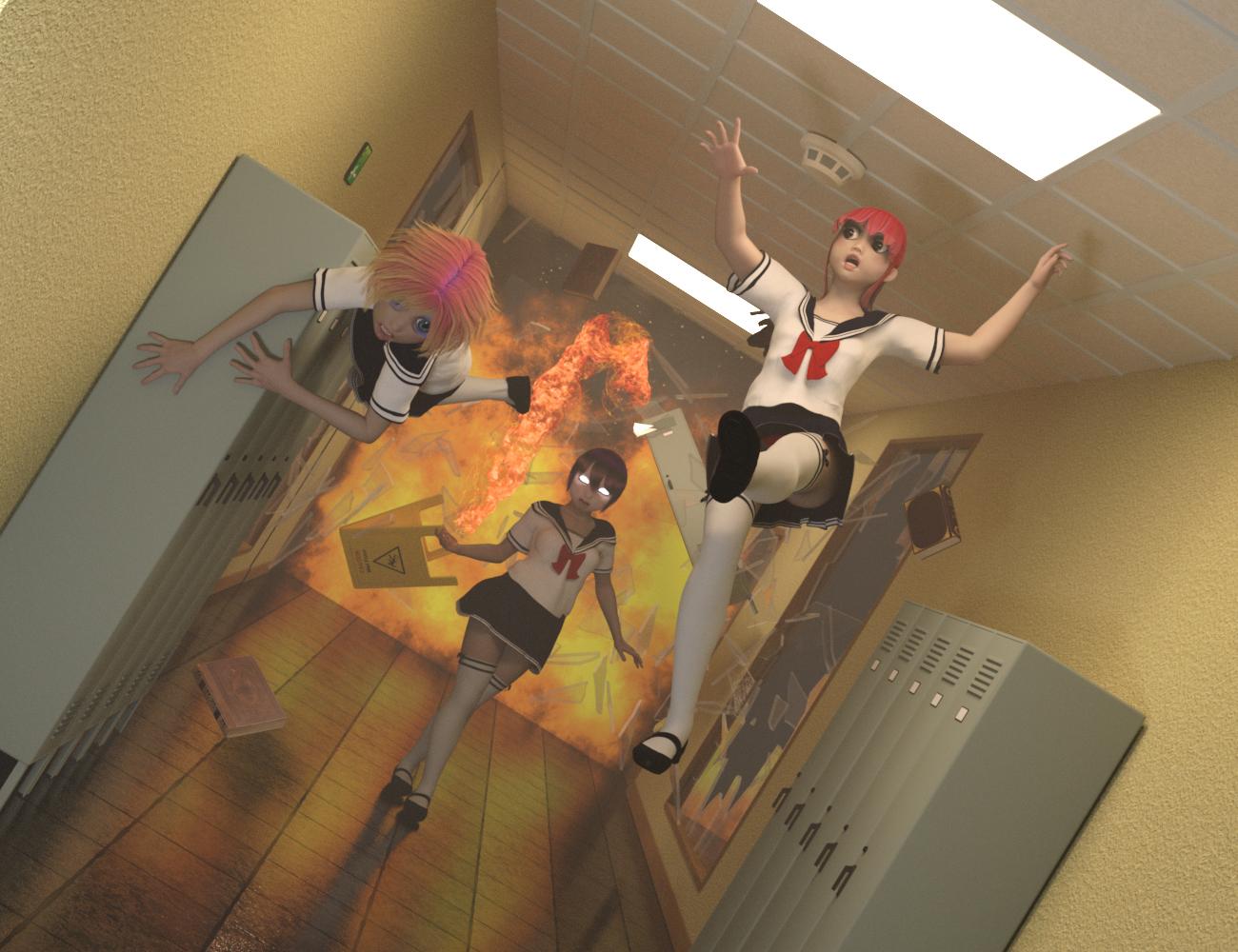
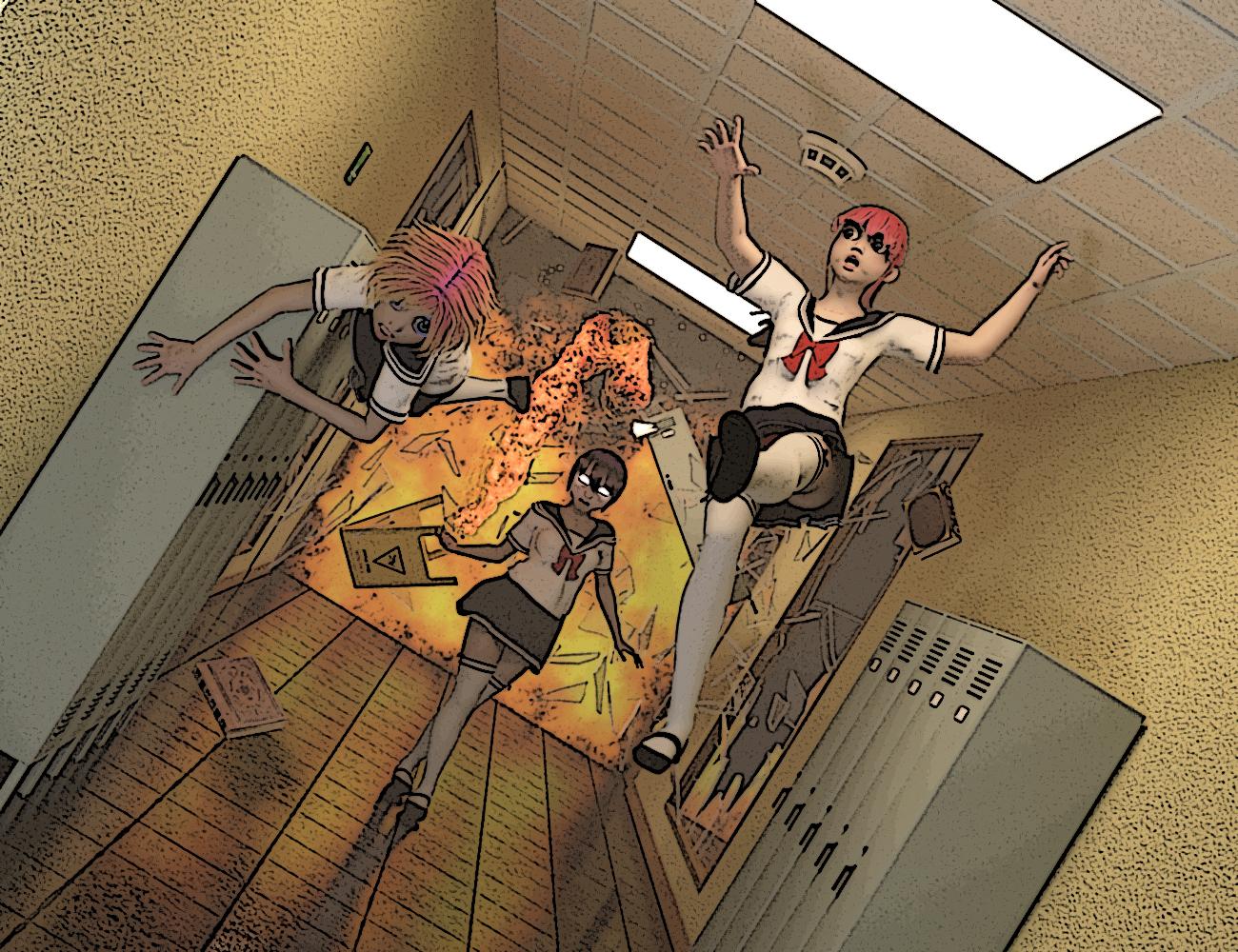 ToonyCam Pro vs pwToon: Which would you recommend?
Even though I now have pwToon, I am interested in other people's experience with either products. And I'd love to see more renders!
I don't know if I posted these here before on the forum, but if you want to see more, here are a few renders, all done with pwToon.
These are basically tests, one even has a jet exhaust test. It isn't really easy to create action, but I do try.
ToonyCam Pro vs pwToon: Which would you recommend?I've tinkered with pwToon, but don't have a clue what I'm doing. I'll post something once I get the hang of it.
Thanks, guys, for the info and the renders.

Daz 3D is part of

Connect
DAZ Productions, Inc.
7533 S Center View Ct #4664
West Jordan, UT 84084Licensing Agreement | Terms of Service | Privacy Policy | EULA
© 2026 Daz Productions Inc. All Rights Reserved.