-
Genesis 9 we are back in the game Carrara users
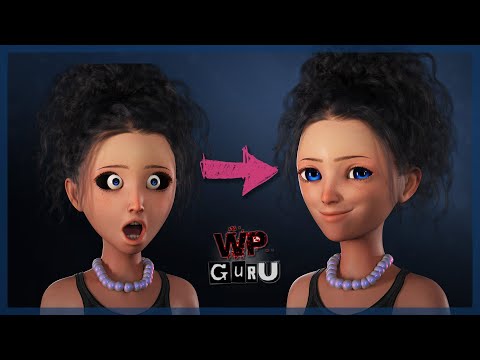
UPDATE: Eyes Size Not Just Position
- in my G9 facial morph example above, I tested for eyes that change position, but not eyes that change size
- for eyes that change size, more steps are required
- the generous Jay Versluis has posted a video that shows how to create a follower morph for the eyes if you change the size/shape of the G9 Face
 help with D-Force
Yeah once in a while object is modelled in a similar way that textures were not PBR but biased with added shadows etc. Combination or one of (1) changing various dForce sim settings, (2) using Marvellous Designer, or (3) making a morph to smooth out any wierd shapes added to object would eventually fix this.
Clothing not fitting after morphMaking your own morphs is very best as Catherine is showing.
But in case you aren't up to that yet:
(1) Large "mammarie" fitting (lol) is one of the biggest challenges.
(2) Suggest you get Zevos:- (a) Zevos's fit control
- (b) Zevos fit-control addon
- (c) Zevos https://www.daz3d.com/projection-morph-manager
(d) and to use with (c) get body morphs (rarestone or EJ if still at DAZ store) for G8, or Zevos though don't that, so don't know whether to recommend
With these you would have a good start matching warrioress figures.
Not perfect but would get you closer and started. Though Catherines way is "free" at cost of lotsa sweat and learning. My way most of the time too.Legs may need you to work more with option (c).
Mamaries should be doable with a+b.
Smoothing while good only gets you the last bit there.looking for deer familyMelissaGT said:
Is there a huge difference in body type between a doe and a buck, other than the antlers? Yes, it is a shame there are no fawns...but there is the Fallow Deer morph...and those textures you might be able to sub in on a smaller Whitetail to fudge it.
Also, how different is a fawn to an adult deer as compared to a foal and adult horse? Meaning that you could dial a foal morph into a deer and probably get at least a passable fawn.
looking for deer familyIs there a huge difference in body type between a doe and a buck, other than the antlers? Yes, it is a shame there are no fawns...but there is the Fallow Deer morph...and those textures you might be able to sub in on a smaller Whitetail to fudge it.
looking for deer familydaveso said:
MelissaGT said:
Gordig said:
You probably won't find better (certainly not for the money) than the Hivewire Horse addons at Renderosity.
This. There are some gorgeous deer morphs for the Hivewire Horse on Rendo. Wait for them to go on sale...CRCW goes 50% quite often. You need to buy the base Hivewire Horse and then the deer morph of your preference (there are a few)...and yes they are sold separately.
I've been eyeballing them for months. They've come and gone and come again on sale dozens of times. The horse and mule deer are on sale now. No doe or fawn to bew had though, at least I have not dound any at rendo or anywhere affordable. thre was a site , i think poser stuff, Lynn was the name, but I know she passed, but the site was around for a bit. Cant remember the name of it. she had a lot of great products. If I remmember right they were in obj format. i hav poser so it would be eay enough to set up and export to DS
It's Lynn's Creations you're looking for I think; she had loads of animals in different formats, some poseable, some static. I think they're all rather low-poly and low-res textures though. The website might still be around.
I'd also encourage you to get the Hivewire horse and add-on morphs, these animals are just gorgeous and very life-like. Does shouldn't be a problem with them, and for a fawn, you could maybe make some morphs of your own?
Edit: No, can't find the place anymore, sadly.looking for deer familyMelissaGT said:
Gordig said:
You probably won't find better (certainly not for the money) than the Hivewire Horse addons at Renderosity.
This. There are some gorgeous deer morphs for the Hivewire Horse on Rendo. Wait for them to go on sale...CRCW goes 50% quite often. You need to buy the base Hivewire Horse and then the deer morph of your preference (there are a few)...and yes they are sold separately.
I've been eyeballing them for months. They've come and gone and come again on sale dozens of times. The horse and mule deer are on sale now. No doe or fawn to bew had though, at least I have not dound any at rendo or anywhere affordable. thre was a site , i think poser stuff, Lynn was the name, but I know she passed, but the site was around for a bit. Cant remember the name of it. she had a lot of great products. If I remmember right they were in obj format. i hav poser so it would be eay enough to set up and export to DS
looking for deer familyGordig said:
You probably won't find better (certainly not for the money) than the Hivewire Horse addons at Renderosity.
This. There are some gorgeous deer morphs for the Hivewire Horse on Rendo. Wait for them to go on sale...CWRW goes 50% quite often. You need to buy the base Hivewire Horse and then the deer morph of your preference (there are a few)...and yes they are sold separately.
Gen 9 trouble fitWhen using transfer utility, with Victoria as Source, try to set shape to 'current' and tick 'Reverse Source Shape from Target.
Gen 9 trouble fitHi mates, In the last few days I have created a series of panties for Genesis 9. I used my usual technique: base on gen 9 via transfer utility. Except that for a panty, the unisex model is too female/male and it doesn't fit well (if you know what I mean. Hm.) when I then transfer to models like Victoria 9. So I recreated the model on the Victoria 9 avatar. It fits perfectly when I load the .obj. Unfortunately, when I use transfer utility to Victoria 9, the result is catastrophic. It breaks what is the perfectly fitted base (same if i transfer ton Gen9 base model) Any ideas?Character in this promo ?zombietaggerung said:
Looks like Brooke 8.1's skin on Victoria 8.1's morph. And since those character are listed at the bottom of the page in the "additional products used" section, it seems a pretty good guess.
Alright, thanks alot !
Getting on the 9 train, or notIf anyone picks up the new SC Fantasy Armor outfit, could you tell me if the breasts are baked into the model or not? I don't want to waste time buying more clothes for Gen9 if they're going to be female-only. Or, I dunno, put it in the title: "for G9 Feminine."
EDIT: Never mind (not that anyone noticed anyway); I was dense and forgot I could check the supported morphs section. No sale, feminine only. I wonder what the point of making G9 was if artists are only going to bother supporting only one gender in it. Doesn't show much confidence in their own product if they don't ask their artists to support it fully.
I hope someone makes a Cross-Figure Morph Kit for G9, because at least with G8 I could convert the good female clothes to the men. With G9 I'm just SOL apparently.
Holiday Giveaways 2022!Day Six is up in TheFantasiesattic. Character morph for G8F.
Clothing not fitting after morphcaraTRON.7263 said:
Catherine3678ab said:
Well I'm not. Don't know why you think I am.
Because the tutorial you referenced on your DA is about making morphs for a figure, and then you mentioned "combining all of them into one Full Body Morph for the character figure."
Have you ever made a morph?
No. As I said I'm very new.
Those generated morphs need to be replaced with morphs that make the clothing look better.
So how do I get started on learning how to do that? Again, the tutorial you referenced appears to pertain to morphing figures.
Also, I meant to ask in my last post, what did you mean by "the PAs?"
all those morph dials, etc. that come with the products we buy here were created by the PAs.
PAs = published artists [whose works are sold in the Daz3D store]
In the walk through tutorial, it is the 'Battle Pilot Suit' being morphed.
The shape of the character "Oso3D Pugman Body" is being put into the Battle Pilot Suit.Best way for learning is by doing ;-) A walk through tutorial is one that you can follow along page by page while doing the work as well. That is how I make them so hopefully I don't miss too many if any steps that require mentioning. Replace the outfit I used, with 1 you want to morph and the character morph in Genesis# that you want to use.
Tip: To make it easier to see poke through, before sending the figure and clothing over the bridge to Hexagon, apply a basic shader [and red is a good colour] over the Genesis figure.
Why G9 is not good for blender (or any other 3d app)3141592654 said:
Padone said:
Apart that, we normal users can't do HD morphs, only PAs can, so forget of using blender or other apps to do morphs for G9. That is, with the daz morph loader we are limited to the base mesh, so G9 will not allow us to sculpt detailed morphs.
One of the things to remember is that Daz Studio is made for RENDER ARTISTS ... it was not really designed for people who can actually model, map, texture, rig, and animate. It was designed for rendering scenes using someone else's models ( PA merchandise ).
The goals of Daz / Tafi are mixed among commercial, liberal, gaming, and possibly NFT related slants and what we end up with is ... Genesis 9. It will have some benefits and some deficits (just like each generation) ... but it seems to follow what one might expect with those mixed goals.
As a maturing 3D artist (who started with only rendering), my desires and needs have changed through the years. For myself, Daz Studio still covers a lot of ground in my powerpoint illustrations ... but in other work, I am increasing turning to other resources.
I see as well that the world is changing and we are developing forward. New CG programs come up and provide new options. I really love to use Daz figures in my images, but to use them outside of Daz is just cumbersome sometimes or some features even cannot be used.
I have hoped that with G9 some Daz specific stuff would be left for the past and more common technology would be used. G9 might be great for Daz users, but the benefit for users of other software is limited. At least that's my point of view.
G8.1 tear clipping with the eyesdtrscbrutal said:
That is a real problem area with custom morph/sculpts. Some of the face morph packs have dials that specifically deal with the lower eyelid depth/curve. I have also used deformers, and Mesh Grabber for small corrections within Daz Studio. You can also export the figure to another program i.e. Blender and make the adjustment there.
Thanks. Yesterday I had a go in Blender but I found about half the tear was inside the eye and while I had a quick try, it didn't seem practical especially as I wasn't sure what it was supposed to look like!
I never seem to remember MeshGrabber, I'll try that since I'll be able to see the results as I go along. Thanks!
Otherwise, G8 is an option in this case.
Clothing not fitting after morphCatherine3678ab said:
Well I'm not. Don't know why you think I am.
Because the tutorial you referenced on your DA is about making morphs for a figure, and then you mentioned "combining all of them into one Full Body Morph for the character figure."
Have you ever made a morph?
No. As I said I'm very new.
Those generated morphs need to be replaced with morphs that make the clothing look better.
So how do I get started on learning how to do that? Again, the tutorial you referenced appears to pertain to morphing figures.
Also, I meant to ask in my last post, what did you mean by "the PAs?"
all those morph dials, etc. that come with the products we buy here were created by the PAs.
Clothing not fitting after morphcaraTRON.7263 said:
Richard Haseltine said:
You can create morphs for any kind of shape chnage, including those that will help with fitting. You can often make minor adjustments inside Daz Studio - select the clothing, Create>New dForm, move the Field that is added by tthis until the vertices (points) in the affect area highlight, and then move the dForm itself (parent to the dForm's base) to pull the mesh around.
I've managed to do this, which appears to result in my being able to make [X/Y/Z] [Translate/Rotate/Scale] morphs to the dForm which has effects on the clothing, where applying the same action to the clothing item itself produces a different or no result; but all of those actions seem fairly hamhanded. How would I make more detailed adjustements to a clothing item?
Catherine3678ab said:
Daz Studio comes with a collection of "content creation tools" ... all those morph dials, etc. that come with the products we buy here were created by the PAs. We also can create a lot of things either for our own models [made from scratch] or as additional perks for the items we have purchased.
In my DA Gallery I have a Tutorials folder which has includes one called "Making Replacement Full Body Morphs"
https://www.deviantart.com/catherine3678ab/gallery/74400506/tutorials
As what you've shown is all one piece, then if you are using Hexagon, I would recommend making and saving several little morphs - and then combining all of them into one Full Body Morph for the character figure. {this is for reasons concerning the limits of Hexagon - if using Zbrush or similar, then hopefully you could do it all in one session.} As you mention that the 'smoothing modifier' almost corrects most of the issues, then certainly use that first so that there would be less work to do in a modeller if you want to try making a morph.
About renaming the dials - the tutorial on Making pJCMs for Clothing in Daz Studio covers that.
Renaming a generated morph as I mentioned, is okay as is. However if the generated morph was saved, then the renamed morph also has to be re-saved and then manually deleted from the data folders when D/S is closed.
You seem to be talking about making morphs to the figure in order to fix problems with the clothing. Shouldn't I be making morphs to the clothing item?
Well I'm not. Don't know why you think I am. When you dial in the character morph to the figure -- it generates those morphs into the clothing. Those generated morphs need to be replaced with morphs that make the clothing look better.
Here's an example of a specific change I'd like to be able to make to a clothing item. (Warning, discussion of mammaries incoming.
 ) If you look at the product images for this torso armor, it seems as though it would show a significant amount of cleavage, but when I load it onto my figure, the width of the "corset lace" portion is virtually nonexistant. In the first image I've attached, the upper orange dot is roughly where the metal end and the lace begins. In broad strokes, I'd like to make the horizontal amount of chest uncovered be wider; not necessarily as much as the first outfit above, but more in that dierction. Adjusting the Cleavage slider to push the breasts further away from eachother doesn't help much; the problem, it seems, is that the portion of the breast that the armor is meant to leave uncovered is being mostly taken up by the Z distance away from the sternum, leaving little space in the X direction. What it seems that I would need to do, then, is reshape the armor so that the boundry between the metal and the lace portion (marked in orange) falls further out along the edge of the breast. How might I do that?
Morphs are generally made using a modeller such as Hexagon, Zbrush, Blender, etc.
The reason I suggest putting the figure in base resolution is because it will pass subdivision onto the clothing. We need the clothing at base resolution to make morphs. While sending items over the bridge to Hexagon normally takes care of those details, some prefer to export out .obj files [no groups] to import into other modellers to make their morphs.
Have you ever made a morph?
Clothing not fitting after morphRichard Haseltine said:
You can create morphs for any kind of shape chnage, including those that will help with fitting. You can often make minor adjustments inside Daz Studio - select the clothing, Create>New dForm, move the Field that is added by tthis until the vertices (points) in the affect area highlight, and then move the dForm itself (parent to the dForm's base) to pull the mesh around.
I've managed to do this, which appears to result in my being able to make [X/Y/Z] [Translate/Rotate/Scale] morphs to the dForm which has effects on the clothing, where applying the same action to the clothing item itself produces a different or no result; but all of those actions seem fairly hamhanded. How would I make more detailed adjustements to a clothing item?
Catherine3678ab said:
Daz Studio comes with a collection of "content creation tools" ... all those morph dials, etc. that come with the products we buy here were created by the PAs. We also can create a lot of things either for our own models [made from scratch] or as additional perks for the items we have purchased.
In my DA Gallery I have a Tutorials folder which has includes one called "Making Replacement Full Body Morphs"
https://www.deviantart.com/catherine3678ab/gallery/74400506/tutorials
As what you've shown is all one piece, then if you are using Hexagon, I would recommend making and saving several little morphs - and then combining all of them into one Full Body Morph for the character figure. {this is for reasons concerning the limits of Hexagon - if using Zbrush or similar, then hopefully you could do it all in one session.} As you mention that the 'smoothing modifier' almost corrects most of the issues, then certainly use that first so that there would be less work to do in a modeller if you want to try making a morph.
About renaming the dials - the tutorial on Making pJCMs for Clothing in Daz Studio covers that.
Renaming a generated morph as I mentioned, is okay as is. However if the generated morph was saved, then the renamed morph also has to be re-saved and then manually deleted from the data folders when D/S is closed.
You seem to be talking about making morphs to the figure in order to fix problems with the clothing. Shouldn't I be making morphs to the clothing item?
Here's an example of a specific change I'd like to be able to make to a clothing item. (Warning, discussion of mammaries incoming.
) If you look at the product images for this torso armor, it seems as though it would show a significant amount of cleavage, but when I load it onto my figure, the width of the "corset lace" portion is virtually nonexistant. In the first image I've attached, the upper orange dot is roughly where the metal end and the lace begins. In broad strokes, I'd like to make the horizontal amount of chest uncovered be wider; not necessarily as much as the first outfit above, but more in that dierction. Adjusting the Cleavage slider to push the breasts further away from eachother doesn't help much; the problem, it seems, is that the portion of the breast that the armor is meant to leave uncovered is being mostly taken up by the Z distance away from the sternum, leaving little space in the X direction. What it seems that I would need to do, then, is reshape the armor so that the boundry between the metal and the lace portion (marked in orange) falls further out along the edge of the breast. How might I do that?G8.1 tear clipping with the eyesThat is a real problem area with custom morph/sculpts. Some of the face morph packs have dials that specifically deal with the lower eyelid depth/curve. I have also used deformers, and Mesh Grabber for small corrections within Daz Studio. You can also export the figure to another program i.e. Blender and make the adjustment there.
Daz 3D is part of

Connect
DAZ Productions, Inc.
7533 S Center View Ct #4664
West Jordan, UT 84084Licensing Agreement | Terms of Service | Privacy Policy | EULA
© 2026 Daz Productions Inc. All Rights Reserved.