-
Filament work done with DAZ beta builds (hopefully path forward to opacity fixes)Reviving this. Has anyone tried the latest beta to see if the new changes to filament are live and working?Limited Time Freebies Discussion Thread
miladyderyni_173d399f47 said:
It is a pretty nice selection. I got Maryse a while back on deep discount because I liked the skin although I haven't tried the shape since I don't have Mika.
Maryse looks remarkably unhappy without Mika as a base. Seriously! Wide mouth, looks frowny. The skin is very nice! Oddly, the skin shows seams with the Filament preview - No idea why. No problems with 3DL or Iray. The skin looks great on other characters, too. If/when I finally get Mika7, Maryse will be complete.
New! Novica & Forum Members Tips & Product Reviews Pt 14Fishtales said:
jjoyner said:
NorthOf45 said:
Novica said:
jjoyner said:
I don't know if you have Amusement Park - Ferris Wheel (https://www.daz3d.com/amusement-park--ferris-wheel) or not, but if you do, do you know if the wheel spins. As far as I can tell, it does not. I bought it last Spring.
Hey there! I do have it, but haven't installed it or used it. Perhaps someone who has actually done so can assist. The place to look would perhaps be in the Scene tab, breaking down the "bones" of it and seeing if in the parameters something shows up such as a slider for any of those. That's about all I can think of.
Sorry to say that nothing moves, or at least not as expected. All parts are static props, with little or no attempt at rigging. The Center Points on the chairs (Cabins) are at the bottom, so rotations are messed up. You can spin them, but the top section spins, too. And, the gates do not open. Ansiko's is not much better, wheel does not turn, but some of the chairs can be rocked and the gates opened (the instances hierarchy is messed up). Haven't tried powerage's yet. The original Ferris Wheel (with Iray add-on) rotates and the seats stay horizontal as the wheel spins, and you can rock them back and forth.
Thanks much. I suspected that the answer was No. I searched all of the parameters prior to posting and had found nothing to rotate regarding the wheel itself. I have two other Ferris Wheels – the Sarsa/DAZ Original Ferris Wheel and one by Mausel from 2010 from the long defunct Content Paradise store. I had tested the Sarsa Ferris Wheel and confirmed that it rotates nicely and also noted that the seats remain horizontal as the wheel rotates. Perhaps its vintage look can be updated with “shinier” shaders. The Amusement Park - Ferris Wheel set looks nice so it’s too bad that the wheel doesn’t rotate. The Mausel Ferris Wheel doesn’t rotate properly; you can rotate the wheel by rotating it on its z-axis, but the gondolas aren’t rigged to rotate and remain horizontal.
This Ferris Wheel. I did this annimation five years ago and I amsure it came with the product. I haven't looked at it since so I can't remember how I did it. I also did one withe the swing ride and carousel.
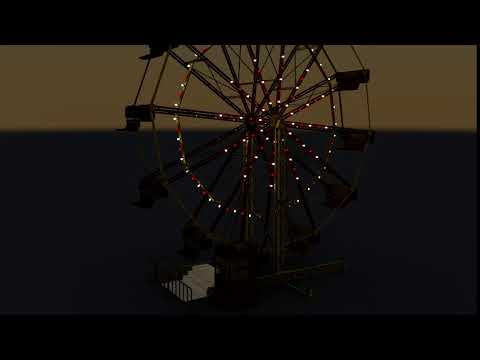
Finally got around to installing the powerage Ferris Wheel. The wheel spins, and the individual baskets all pivot to stay level. You must use the top-level "Poses Controls - Wheel Turn" to get the proper movement.
Here's a MEGA link to a little animation I made with Filament. powerage ferris wheel.mp4
MANGA STYLE & VISUAL STYLE topic - Update Sept 23rd 2017: Fixed Dropbox links! [Commercial]Dupe post due to Cloudfare.
I concure on Filament. And would love to see it available for Mac OS systems.
MANGA STYLE & VISUAL STYLE topic - Update Sept 23rd 2017: Fixed Dropbox links! [Commercial]I'm still voting for a Filament version, though not as popular it seems.
MANGA STYLE & VISUAL STYLE topic - Update Sept 23rd 2017: Fixed Dropbox links! [Commercial]Does this only work in 3Delight and iRay? I'd love for it to work in Filament as well.
Help render and AMDYou can use filament, that's the only one which will use amd cards in daz studio, but it's more a preview render engine not full featured as 3dl or iray. As an alternative you can export to blender and work there, both cycles and eevee work fine with amd cards. There's the daz bridge and diffeomorphic to do that, I recommend the latter.
Viewport doesn't show nothing how could i fix this?In the upper right corner where it says Front View, clcik that and select Perspective View.
Else you can load an item, then it will show up in any view. It is just that orthogonal view like Front View, the ground plane will only be a line, which you might have clipped away in your screenshot.
The button left of 'front view' is the drawstyle. It is currently in Filament (a kind of realtime renderer), you might want to switch that to 'Teture Shaded'.
Filament PBR - Distant Light issueYou can only use 1 distant light in filament.
Two GPU's but only one workinghapciupalit said:
fearthefailure said:
What GPU's are you using for this? I'm assuming they're Nvidia GPU's so that you can GPU render, as AMD GPU's aren't supported for GPU rendering in DAZ at present [unless something changed since I last checked]. I'm looking to do another dual GPU build with Nvidia GPU's this time, but it's a bit difficult to find updated information about which cards still have mGPU support. I believe Nvidia once had it on the 3060, then removed it after the 40 Series was released. I've been asking around but no one would respond. When I look up the specs, there's no mention of it aside from the standard mGPU is dead schtick that isn't actually true outside of gaming.
Sorry I haven't seen your comment until now. I'm using 2x3090. I might be wrong but the problem with AMD GPUs is on the iray, if you want to do filament renders you should not have a problem, but iray is powered by nvidia, so it make sense to only work with nvidia GPUs. Other than the fact that on task manager I didn't had a problem with the GPUs on any DAZ version I have used. Before this machine I had an older one with 2x1080ti. I'm still using it from time to time, to render animations and it still works well without any problems.
My apologies for not seeing your response until now. Thank you very much for returning and providing this information. Would you still consider the 1080 Ti dual setup still pretty fast? I'm just looking for an idea of how much faster GPU rendering is. If you render one character at stellar quality and no other elements in the scene, how long do you think that would take?
Huge Opportunity for the Future of DAZ if they are bold enough to embrace it.Integration into other areas is fine. But Daz should be sorting the issues that they/the customer base already have. Like better customer service (listening to their customers). Removing bits of the program that are defunct (like is Filament still supported?). Having the latest version of the program working on Mac, like it does on Windows. And every other age old gripes that other users have. But hey, that's just how I see it.
Set loading crashI'm using Filament (PBR) Drawstyle and Perspective View, I've never changed those as far as I know. I've only been using Daz a little over a month now, so I'm always wondering if I changed something by accident and still learning the software.
Improve Renderdigitell said:
Sorry for the delay in response. I was hospitalized.
Render size in pixels is 1800x2700.
Progressive Render settings attached image:
I looked at the log and I cant make out anything about what could be the cause.
Thank you for your help!
Christina
o) Max Time set to ZERO on the slider and it will do 5000 iterations or converge first. 7200 seconds almost is never enough for a iRay render of that size.
PLUS what I already spoke of you checking above:
a) Check and turn off/down fog/haze under the Environment
b) Adjust the Filtering to be sharper in the Filtering
c) Check the Camera Lens forcus by setting the Preview Window to use the Filament preview (top right hand side list of white gizmos)
You could probably stand to watch the introductory series of tutorials on the YouTube DAZ 3D channel; by that Dutch guy (WP?) and Colm Jackson have made them.
What is FilamentRichard Haseltine said:
I don't believe Filament is intended, even by Google, to be quite that feature-rich.
Given the features available in https://github.com/google/filament, I'm inclined to think there is a lot left untapped with DAZ's implementation of the filament render engine. Just some things have not been plumbed in to tap this potential.
Loading an older G3 character in DAZ causes a crash, but only if I attempt to view in irayI've never had this happen before, and this seems to be specific to this one character... not sure if it's a textue or what but ...
If I view it in any mode (Texture based,filament, wireframe...etc. all is well) if I click to view in iray... Daz crashes. with an exception:
Exception Reason
DAZStudio.exe caused ACCESS_VIOLATION in module "E:\Program Files\DAZ 3D\DAZStudio4\libs\iray\libiray.dll" at 0033:00000000F6CFBBDB, mi_plugin_factory()+2658315 byte(s)
Registers
RAX=000000000014E834 RBX=000000003115B370
RCX=00000000000C4030 RDX=00000000000001A8
RSI=000000003115B370 RDI=000000003115DBD0
FLG=00010212 RBP=000000003115A470Dark scene in Texture Shaded viewA lot of my purchased scenes have masses of lights, which, when they're in the scene, make the entire scene dark and hard to navigate in Texture Shaded view. Now, I've since started using Filment view to navigate such scenes because Filament is great for making the scene bright and easy to see. But I was just wondering, apart from deleting every light, is it possible to make things easier to see in Texture Shaded view? If so, how?
Can Daz Studio use an eGPU?@gordig There's no "DAZ implementation" of filament as there's no "DAZ implementation" of iray. What DAZ does is to pass the scene data, but the engine itself with its features and hardware support is independent from DAZ. So yes filament works with any gpu.
White skin color in viewportPlease don't post images showingf nude, textured figures.
You are using the Filament Drawstyle (the lightbulb icon at top-right) which does tend to be overbright without adjustment to the Envirionment Intensity.
Daz Studio 5 development updateFilament is interesting as a level of screen detail, but it isn't anywhere up to the image quality of the game engine render engines, particularly when considering transparency. If the Omniverse non-raytraced version could be added to the toolset to compliment or replace Filament, I think that would be fantastic.
Regards,
Richard
Daz Studio 5 development updateRichard Haseltine said:
Essentially everything added in 4.20+ is DS 5 (or whatever it ends up being called) that can be made to work in the older version of Qt, and so has been released as 4.x updates.
That's truly great to know that DS 4 is getting updated with fixes/features that are compatible with the newer Qt (and DS 5).
I wonder how much longer it will take for the remaining DS 4 features to be rolled into a viable, shipping DS 5? Native Apple Silicon processor support (non-emulated), Filament, fixed GUI glitches, fixed keyboard shortcuts, etc.? I'm primarily interested in performance improvements within DS and the bug fixes with the interface and shortcuts. Don't know if Iray rendering is emulated or not, but if any aspect of the internal Iray render pipeline (between DS and Iray) can be improved for native performance, that would be most welcome.
Surely there's a project management methodology being used to track milestones and obstacles during development. A high level/forward looking update on DS 5 progress is what we're looking for since we don't have a product yet. It would help build customer confidence. Or not if we're still years away from seeing DS 5. :)
Thanks, Richard! We always appreciate the updates and insights you're able to give us. :)
Lee
Daz 3D is part of

Connect
DAZ Productions, Inc.
7533 S Center View Ct #4664
West Jordan, UT 84084Licensing Agreement | Terms of Service | Privacy Policy | EULA
© 2026 Daz Productions Inc. All Rights Reserved.