-
The older generation: Victoria 2/3, Michael 2/3 and their children renders
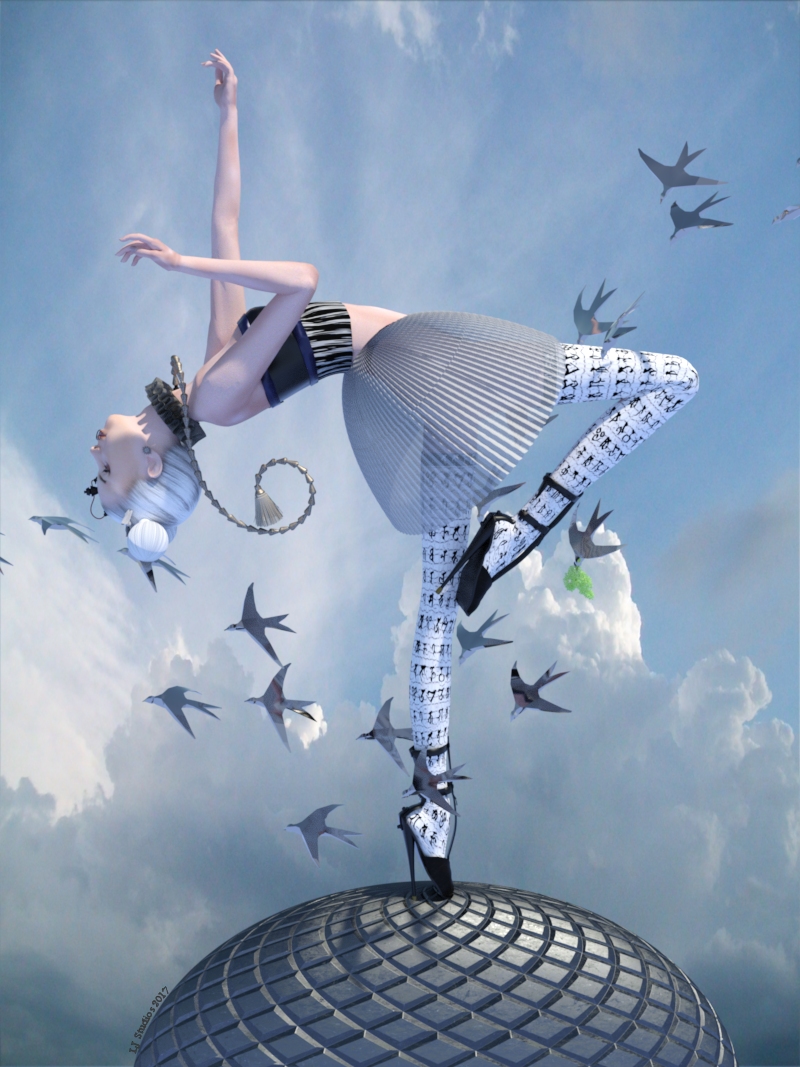
It is most fitting that I come after mmalbert cause she and I are working on the Art Doll thing. Here is the first rendition of my version of an art doll. It is a weight mapped Victoria 2 with converted iray textures on her. The following list are the currently available freebies. Sure wish Runtimedna was back up and that Traveler would reoffer all of the neat clothing sets he made for Vicky.
Environment: Background Cloudy Skies Backgrounds-01-Part 6 Of 8 by pixlgirl.
Environment: Birds Flock 3D Model by Forester.
Environment: Plant Vase flowers N050317 by Andreo.
Girl: Character: Texture Natty-V2 Clone by Casette.
Girl: Clothing: Gee String Zip_String for DAZs Victoria 1 by Xorron Andreas Dirks Goblin Desgin.
Girl: Clothing: Neck Chain Tassel for curtains N050112 by Valery Korneev.
Girl: Clothing: Neck Ruff V4 Renaissance Neck Ruffs-- UPDATED!! by Rosemaryr.
Girl: Clothing: Shoes Fetish Pumps V4 by Reiko-Kano.
Girl: Clothing: socks BAT KneeSocks by BatLab.
Girl: Hair Updo Hair SR1 by Kozaburo. Removed the bun. Changed the texture to white.
Girl: Hair: Bows Pillows 3D Collection by 3DBar.
Girl: Poses Hand Pose Vol. 1 for Victoria by HarpoonVolt.
Shader: Clothing Pd-Daz Studio Soft Leather Shaders by Parrotdolphin.
Shader: Skirt: Hair bows Iray Nobiax Shaders by kaz42.On A Clear Day You Can See Forever
 Michael 8
Actually Daz3D decided to align themselves with Microsoft and cancel the rest of the Generation 8 line, skip 9 and go straight to 10. Also there will be no V11 but V12 will come with all wheel drive and a push rod suspension system plus twin turbos.
I would go for a Victoria 12 if they add Dynamic hair and cloth
Skin way darker in renders than in storeSo I continue to be really upset that the renders you get from models bought from the Daz store don't look at all like their store photos (especially models from Daz). It really sucks that Daz and other artitist do not include their lighting and render settings in their models. I do not have the time or expertise to tune 10 different settings and spend hours with lights for a render.
Looking at the lighting affects available in the store, would any of these give renders similar to the renders for Victoria 8 and others?
Perhaps this one?
https://www.daz3d.com/illumination-iray-lights
Can anyone recommend a good **easy to use** presets products for lighting and render settings.
mod edit to remove obscenity
Michael 8Michael 8? Aren't we skipping it since Victoria 9 is already in the pipeline?
 HD Morphs do not export properly with FBX Export
FBX is only as good as what it is able to export.
it certainly can export high resolution mesh like Victoria 4
it's more to do with how the mesh appears in DAZ studio and whether it is actual vertices or not.
HD is not
From the numbers Inkubo posted, it appears that it IS seeing at least part of the vertices and polygons in the mesh, but not the total count of both "layers". Whether that is by design or not is something only the development team at DAZ3D can answer.
HD Morphs do not export properly with FBX ExportFBX is only as good as what it is able to export.
it certainly can export high resolution mesh like Victoria 4
it's more to do with how the mesh appears in DAZ studio and whether it is actual vertices or not.
HD is not
Legacy UVs for Genesis 8 [Commercial]Any chance of making Legacy UVs for Genesis 8: Victoria 4?
Yes, it will be next. Check out the opening post.
That's fantastic, looking forward to the release.
Legacy UVs for Genesis 8 [Commercial]Any chance of making Legacy UVs for Genesis 8: Victoria 4?
Yes, it will be next. Check out the opening post.
Legacy UVs for Genesis 8 [Commercial]Any chance of making Legacy UVs for Genesis 8: Victoria 4?
Or is it some way around it, to use your previous product for Victoria 4 to Genesis 3F
and then somehow apply it to G8F?
Where can I find figure properties?Hi, another question :-)
When I select a character it gives the name, e.g. Victoria 8, and the hair, but where can I find which skin and eyes I used?
Are there any historical shirts for the guys that open at all?It seems like there are a million racy items for the women with all kinds of "taking it all off" morphs, but not much for the guys. I'm looking for a romantic, historical shirt for a male that actually opens or unbuttons.
And yes, it's for a romance novel cover.
Is there anything out there? Do the guys get to take it all off or do they just get to watch Victoria do it?
Maybe I'm missing something, but I've looked at what I have and what's in DAZ and Rendo's store. There are plenty of pirate shirts, regency shirts, tunics and "romantic" shirts, but nothing historical or romantic that seems to open to the slightest degree. The only open ones I see are modern. Any suggestions are appreciated. Thanks!
how do I get V4 please?V4 and the things you need to use her are in this bundle
Test a new character Morph?I thought that would fix things, the ERC. That's why I wanted to offer to share the whole enchilada, as far as I've puzzled it out, at least. Let's give an example.
This is Sabrina. She's an entirely custom character. Some day, I'm going to dig into creating a fully custom skin for her. She has Iray materials for G8, but I rendered her toon in blender because I was busy and I can limit Blender renders to using 2 CPU cores, while Iray will use all four and slow down everthing else. Sabrina goes about 5'2" (157.48cm for silly metric people). Compare to G8 base female who is a shade over 5'9. When I designed Sabrina, I wanted her to work well with either Base female or Victoria poses. Since I don't have any V8 poses, the most recent iteration of Sabrina was built on proprotions similar to G8/G3. She has a full suite of Joint Controled morphs. Sadly, there is more work to do on them. Right now, her armpits show an unseemly gap, so that's going to require reworking the shoulder JCMs. She also has custom expression control MCMs that alter her base level emotes to fit her character. This is as close I've gotten yet to professional level character.
I wasn't planning to go over how I do all of that, but I was going to hit on a key point. Sabrina being so much shorter than G8 Basic Female.
It's not a good idea to make short morphs. There are some elements, like the various height moprhs that could be used, but the key thing is that it's hard on the figure (specifically, it increases the chances of bad results with rigging) if the size difference between the base shape and the morph is very large.) The image blow illustrates a lot of how I dealth with that.
On the left, in the white, is Sabrina, again. She divides into two morphs and two character controllers. So on left is the Full Sabrina dial. Next to her, in green, is only the Full Body Morph (FBM). The first thing you notice is the FBM is much taller. Very much taller. About 7 inches. Next along, in yellow, is just the FHM (Full Head Morph). What may be hard to see at this point is that the FHM is about the same size in that third case as it is in the first and last cases. The last case, in blue, is an alternate, more fit version of Sabrina.
Because I wanted to keep her proprotionally the same for poses, she's somewhat unrealistic. She should be a bit less skinny and probably a bit longer of torso compared to limbs, but that's the price one pays. I suspect I can deal with skinny, but I haven't decided if I will because I may have to remake all the body JCMs to do so.
In order to get the right effects (shorter, but otherwise normal, thus requiring a fairly constant head size), what I did was scale the whole figure down to 86.84%, I think. Then I used Head Propagating Scale to restore the head size. Leaving aside the Head scale, which was personal choice, this is how Daz wants you to make figures. One reason is it's hard on the tools trying to deal with extreme changes, but another is that it makes mix and match easier. If you "bake in" a height change, then you decide to mix the character with another, you must always have the height change, meaning using height or scale morphs to deal with it. If, instead, you set the height change to live on the main character dial, you and mix and match the individual body and head morphs and the figure will maintain, roughly, her supermodel height until you get around to specifying how tall you want her to be.
This was one of the things I wanted to cover, along with how to create separate head and body morphs. (Something I knew how to do for a while, but never got around to dealing with. My previous comment about G8 making it easier is that there is a tool in the Dev folder for making those separate morphs.)Thank you for the great topics - those are things I, of course, hadn't considered. I'm sure the community (myself included) would be really happy to have a good tutorial on custom character creation. It would probably be a HUGE help to not only myself but many others who wish to learn how to do this. :)
Or if a tutorial is too much work (I'm sure it would be a really big undertaking) perhaps a thread started where people who want to learn can ask questions and get help specifically for this topic.
How do I make Victoria 5 smile?How do I make Victoria 5 smile?
Buy her chocolates and diamonds....
What features would you like to see appear in dazstudio 5?A few Content related suggestions:
For Smart Content, allowing the pane to remember the last location for a given item. For example, I find myself selecting Genesis3 to look for a good shirt. I drill down to Wardrobe -> Shirt and then pick one. I click on the shirt to look for materials but don't like the choices, so I delete it and click on Genesis 3. Now I have to scroll back down to Wardrobe -> Shirt and scroll down the list to where I last was. If I switch back and forth between three or more objects it's an inconvenient. I understand there'd have to be a limit, but if it could buffer the last few items it would improve workflow.
Also for Smart Content, an option to change the Filter in the upper left corner. Sometime I want to look for a shirt for Genesis 3 Female, and I think one of the Genesis 3 Male shirts would be great. ATM, the only way to find it in Smart Content is to uncheck Filter By Context and go through all the shirts, since the Filter shifts to No Selection. It would be nice to be able to select Genesis 3 Male (or Genesis 2 Female, etc.) as easily as I select Victoria 7, or get a listing when Filter By Context is unchecked.
For Content Library, the ability to have more than one Content Library pane. For older content in particular, I find myself jumping back and forth between two or more folders for poses, materials, characters, etc. The back and forth buttons are helpful, but have a limited memory, and since each sub-folder is a step it limits its usefulness. This would be particularly helpful for people who segment their libraries based on publisher/genre/etc.
+1
Would be so useful.
(Just Released) My first characters for Genesis 8 Female (Commercial)Textures applied to Victoria 8
What features would you like to see appear in dazstudio 5?A few Content related suggestions:
For Smart Content, allowing the pane to remember the last location for a given item. For example, I find myself selecting Genesis3 to look for a good shirt. I drill down to Wardrobe -> Shirt and then pick one. I click on the shirt to look for materials but don't like the choices, so I delete it and click on Genesis 3. Now I have to scroll back down to Wardrobe -> Shirt and scroll down the list to where I last was. If I switch back and forth between three or more objects it's an inconvenient. I understand there'd have to be a limit, but if it could buffer the last few items it would improve workflow.
Also for Smart Content, an option to change the Filter in the upper left corner. Sometime I want to look for a shirt for Genesis 3 Female, and I think one of the Genesis 3 Male shirts would be great. ATM, the only way to find it in Smart Content is to uncheck Filter By Context and go through all the shirts, since the Filter shifts to No Selection. It would be nice to be able to select Genesis 3 Male (or Genesis 2 Female, etc.) as easily as I select Victoria 7, or get a listing when Filter By Context is unchecked.
For Content Library, the ability to have more than one Content Library pane. For older content in particular, I find myself jumping back and forth between two or more folders for poses, materials, characters, etc. The back and forth buttons are helpful, but have a limited memory, and since each sub-folder is a step it limits its usefulness. This would be particularly helpful for people who segment their libraries based on publisher/genre/etc.
V4 vs V4 EliteV4 Elites were character morphs and textures for Victoria 4.2 base that had been made with the aid of a fancy 3D scanner suite. The textures where optimized for the Human Surface Shaders that was included with any Elite character.
How do I make Victoria 5 smile?No, that is for Victoria 4. If you want a tool that offers a wide range of options have a look at Expression Magic
https://www.daz3d.com/genmalem5xprssnmagic
https://www.daz3d.com/genfemv5xprssnmagicI’m confused about what the “Wear Them All” product does.A few clothing items doesn't fit great even on it's original targent generation but sometimes when going more than one generation forward with a clothes item it works better if you autofit an A3 clothing to V4, save as clothing preset, autofit to Genesis, save as clothing preset, autofit to G2F, save as clothing preset, autofit to G3F, save as clothing preset, autofit to G8F, save as clothing preset. A lot of open, closes, and saves of characters and clothing to do that but for some really good clothing that you want to use it is helpful.
That particular path will never work better since it isn't possible to AutoFit to V4. In fact, given a choice between starting from a V4 outfit and an A3, or other third generation, outfit the A3 will probably be a better choice as it won't pass through the V4 down-pointing toes phase.
So using the Wear them All Autofit from V3 to V4 and then saving as a clothing preset and then using the autofit from V4 to G2F to G3F to G8F with saving as clothing presets each step of the way won't work?
Autofit is only for Genesis figures, there's no "Wear them All Autofit to V4"..
How did DAZ do the backward compatibility in the days when the introduced V4 and M4 after V3 and M3? Or did they now do that then?

From Victoria 2 to Victroia 4 there was a separate figure which usually took the new figure's maps and had the nwe figure's head, but was dividied up into bones and rigged like the previous figure of the same sex. Thata llowed the (non-mixing) use of older clothes with the newer figures. There were also standalone tools that would do a similar job to AutoFit, but the use of fall-off zones and angles rather than weight maps made the process a lot more error-prone.
Daz 3D is part of

Connect
DAZ Productions, Inc.
7533 S Center View Ct #4664
West Jordan, UT 84084Licensing Agreement | Terms of Service | Privacy Policy | EULA
© 2026 Daz Productions Inc. All Rights Reserved.