-
DAZ, MD, and Traditional Pattern Making - Graduation
I'm working on perfecting this issue as well - I take a screenshot of the back and front of the original and when I create the drape for the morph I match it up as close as possible, using weft-warp, steam positive and negative. The order that the morphs are created is important too - I'm still working on the order. This technique may not work in the end, but I thought I'd get put it 'out there for some feedback. Thanks for yours - always invaluable and insightful as ever.
barbult said: Each one looks good, but when I mix FBMs. they become somewhat of a mess sometimes.
dForce Time's Out Outfit for Genesis 8 - shirt and corsetIf someone owns this product, would you please render a shirt only image? I would like to see what the shirt looks like without the corset.
Also please confirm the cloak has an up/down hood morph or is it a hide hood option? I did look at the file list but I am not certain.
dForce Time's Out Outfit for Genesis 8 and 8.1 Females https://www.daz3d.com/dforce-times-out-outfit-for-genesis-8-and-81-females
Morph Dial vs Binary Shape vs GraftA "shaping preset" could also be a file that applies values to multiple morph dials (e.g. from one of the Genesis Head and Body Morph packs) without having a single master control dial that would allow for partial strength.
Hands Morph into Paws and/or HoovesI don't think so. The ones I have in my library all have somewhat regular hands vs pawed or hooved feet. I imagine that is to make them a bit more useful with regards to them still being able to hold things and make hand gestures. I do have a finger-length morph from somewhere but the mesh starts going a bit funky if you switch off the limits and go beyond 150%.
Morph Dial vs Binary Shape vs GraftIn a product's description, is it possible to tell for sure whether a particular body modification is an analog dial which can be applied to varying extents and causes a smooth morph from one shape to another, an action which reshapes the body but can only be applied 100% or not at all, or an action which hacks off part of the figure's anatomy and sticks something else on in its place? (I think that "graft" is an accurate turn for the third one, please correct me if I'm wrong.)
I'm not sure how common Type 2 is, and I'm not entirely sure that it actually exists. It is my interpretation of the "Apply/Remove" phrasing used in the features list of this product, but I don't think I've encountered it anywhere else (at least in the context of shaping as opposed to posing).
For example, in this product, based on limited experience I have an incling that the lower body is Type 1 but the paws are Type 3, but based on the description it sounds as though they are the same type; is it possible to tell without buying it?
Based on the phrasing used in the first linked product, one might think that Type 1 is called a "morph" or "morph dial" and Type 2 is called a "preset," but I definitely own multiple products whose descriptions refer to a shape as a "shaping preset" but said shape can be applied with a dial. With this in mind, what does "preset" actually mean? Can it mean both Type 1 and Type 2?
Using V4/G3F Morphs on a G8FI've found some products pertaining to [Using V4/G3F Morphs on a G8F] this, but I'm unclear on the exact function of each product, and some of them seem like they do the same thing.
In general. If I want to take a morph intended for Victoria 4 or Genesis 3 Female and apply it to a Genesis 8 Female, how many products do I need? Can this be done with a single product, or do I need one product to get the morph file to work at all on a G8F, and another one to get it to work properly by morphing the G8F to be shaped like a V4/G3F? (Or is neither of those descriptions accurate?) Does converting a morph for V4 take more steps/products than for G3F?
In specifics. For V4, is this all that I need, or does that only serve the second function in the latter scenario? For G3F, is this all that I need, or does that only serve the first function in the latter scenario? If it only serves the first function, then I haven't found anything to serve the second function for G3F. Also, either way, I don't understand the difference between this product and this product. Do they in fact do the same thing, and I would only ever need one of them?
Thanks in advance for the clarification.
Smoothing modifier in animationsI have a problem. When rendering a animation the smoothing modifier on clothing doesn't apply in between frames. So only the first frame that i'm currently on when starting the rendering has the smoothing modifier applied. When it switches to the next frame the smoothing modifier is not (or not properly) applied. First going to that frame, allowing the smoothing modifier to apply before rendering, and then rendering it applies it properly again. But the next frame will once again not apply it properly.
Turning on interactive update has no effect.
Making a morph out of the smoothing modifier is not a option, there is a new morph ever frame using animorph.Any ideas on how to get the smoothing modifier to apply properly between rendering frames?
Morphing hair: Ponytail to LooseI am pretty sure that there isn't one but I also feel that something like this is missing. You can find awesome loose and open hair styles and equally awesome ponytails but it is difficult do find matching styles.
One of my most used open hair styles is AprilYSH's Bronwyn hair and I never found a matching ponytail.
I found a tutorial on DeviantArt how to morph Linday's dforce hairs into a ponytail, but I never succeeded to do so..
Hands Morph into Paws and/or HoovesI want to depict characters in varying stages of shifting between human and animal. Most of the head morphs for the animals I want to this end, I've been able to find in one form or another, at least assuming that a morph intended for one human figure can be made to work on another (a matter I intend to make a different thead about), and foot morphs are pretty handily covered by HFS Shapes. (I'm not sure about textures for hooves, but I think that can be done from scratch.) What continues to ellude me, however, is morphs for turning hands into feet; in particular, what I'd like to be able to do is canine/feline paws, bovine/porcine hooves, and rabbit front paws.
I'm aware of one piece of digital art, seemingly made with Daz/Poser, that seems to depict hands properly morphing into hooves; a convincing final result that looks about the same as the feet, and an intermediate stage with the fingers partially fused and the nails partially converted into hooves. I've messaged the creator to ask what asset(s) they used to make this, but I haven't heard back from them yet and don't know whether I will. Other than that, I've got nothing. Every animal-like morph package I've been able to find has hands that still look mostly human, if they're changed at all.
By combining products, I've been able to make hands that look sort of like dog/wolf paws by combining the grafts and textures from She Wolf, HFS hand morphs, HFS finger length morphs, and G8 Female Body Morphs hand/finger morphs, along with bending the joints past their normal limits; but I'm still not happy with it. (Screenshots attached.) The palms look "puffy" even when I put Palm Scale all the way in the negative, the fingers still look too hand-like making them look more like bear claws than wolf paws IMO, the claws/nails are too small (which stems from the claws on the She Wolf hands being too small to begin with), and the thumb is in the wrong place and I don't know of a way to move it to where it should be. I imagine I'd get similar results for feline paws using Catgirl by the same artist which I also have. And I've got nothing for hooves or rabbit paws.
Are there any products that can turn hands into paws or hooves the way HFS Shapes can do with feet? Or failing that, does anyone have any suggested products that they think I might be able to combine to get a result similar to such? Thanks in advance for any help anyone can offer with this.
EDIT - It seems that the images didn't attach properly the first time. Fixed.
Genesis 9 we are back in the game Carrara usersHow I solved the I/O Error, This is just from my own personal experience. I was always under the assumption that once a character is saved to the Carrara browser, it is a complete entity, in other words, it doesn't need any other input aside from the texture folder. Turns out I may be wrong in that assumption. I've created a number of "Custom" characters for use in Carrara, and I save them all to an 'Objects' folder. I reload them frome the objects folder and all seems fine, I can pose them, or animate them. So I feel confident that I have a 'completed" character and I zip up the source files for archiving. Then when I reload the character, some time later, and go to apply a pose preset, or sometimes manipulate a dial, I get the annoying I/O Error. WTF!!! In frustration, i delete the character and create a new one, cause I still have the source files, and all is fine again. Turns out, you got to keep the data folder in the mix cause I think Carrara looks for links in that folder when applying a pose or morph. Now I save the data folder with the runtime/textures along with the .car file and I no longer get that error. So, could be a User Issue
 SF-Design - Easy Feet for Gen 9
Siciliano,
Can these feet morph you did could be available for G8 also?
Morphing hair: Ponytail to LooseDoes anyone know of a hair model for Genesis 8 that can morph from a ponytail to loose about the shoulders?
Thanks!Content can't be foundRichard Haseltine said:
So is the issue things not appearing in Smart Content or that you are not seeing all of them? Do you have the Filter By Context box checked, at bottom left? That will reduce the number of items shown by restricting the list to only those marked as compatible with the current selection.
Basically, I have everything I've ever purchased listed alphabetically in Content Library for Daz Studio 4.21 Pro. I can see any item I want if I know its name. However, I keep things simple and work primarily out of Smart Content. I have checked and unchecked the filter box. Some content, like https://www.daz3d.com/aiko-3-0-mega-bundle, is listed as an active character for me to select in Smart Content. At the same, many older items related to it like, https://www.daz3d.com/ravyn-for-aiko-3, are not listed in Smart Content at all. So, unless I activily go searching for it, I tend to forget I even have some of these outfits or accessories to utilize.
I would like to know if there is a way to transfer all content from the library to the smart system so I don't have to constantly look around or forget about something I paid for long ago.
Expanding an object like a bracelet over clothes?Blender is not the "best" tool. It's a good tool. For some more-so. For others less-so.
Used it extensively for a year and found it unintuitive. 'Hated' the UI/names/logic layout. Bears repeating - again.
Not everyone needs all the supposed features of Blenders. DS has alot of cool features/ui etc too. And could be argued some features are better. That's another thread.
Agree complex will become intuitive and simpler. But is very important to stress it takes tons of time to achieve that. Not everyone has time nor interest in that.
Getting back to OP's thread:
Hexagon with its native bridge and following Wendy's instructions works just almost instant, when you get familiar with it.
Most morph-making is so fast in Hex. Or use zBrush, or other 3D app.Or just use internal DS dFormers, like Richard lays out.
Measure MetricsUse for what? Each measure neds its own associated morph, ideally one that will not conflict with other measures you want adjusted though that isn't always possible. So the answer would depend on what you were trying to achieve - it certainly isn't desirable or practical to hav a morph for every property in every use, and the ideal morph to use will likely be situation-dependent.
Rotating bones after creating new figureThe widgets for moving the end points ar emeant to stay oriented to world space, as far as I know, since manipulating them will - among other things - determine the bone's orientation. One option might be to simply spawn a morph for each translation; since morphs are linear they are perfectly suited to this, unlike rotation and scale. That is, move the mesh using the Translate or Universal tool, with the model otherwise zeroed and the coordinate system set to local, export as OBJ, and import as a morph target (Edit>Figure>Morph Loader Pro, taking care to use the same preset for both export and import). Hide the native transaltion sliders and place the morph sliders in their slot (or just use them from the figure node).
Measure MetricsRichard Haseltine said:
The thing about Measure Metrics that has always bugged me is that it offers you an enormous amount of information, measures a host of figure dimensions. But only allows you to adjust a small subset of them, regardless of which version of the script you load. I was initially excited by the apparent utility of the script, but while I still use it with virtually every character I build I find myself feeling cheated somehow. Why give me all those other measurements and not allow me to adjust them?
You can adjust them, by specifying which morph or property to use, and you can then save your set-up for future use.
There is documentation for Measure Metrics and, lined near the bottom of the page, Figure Metrics http://docs.daz3d.com/doku.php/public/software/dazstudio/4/referenceguide/plugins/measure_metrics/start
So what morph do you use? Can you recommenda a complete set so i can use them all ?
formula operation add and mult the same?Thank you, Richard, for your fast answer. While I try here to explain why I thought it performs an addition rather than a multiplication; I understand my misapprehension :)
The snippet is taken from a morph file for Genesis 8 Female, which is called "G3F Pose". If you load a G3F Pose on G8F, her arms and legs are in the wrong positions. If you now activate this morph, 45.75 degrees will be added to the left shoulder rotation and everything is fine. What I did not understand so far is that this addition DOESN'T HAPPEN IN THIS SNIPPET. This snippet renders only the multiplication between the 45.75 degrees and the position of the "G3F Pose" slider which has to be set to 1.0 so that the correction is working. The ADDITION HAPPENS THEN IN THE FORMULA STACK as described in the documentation of "formula".
Thank you again for triggering my thinking!
(What remains is the error in the documentation but I think this is no real problem.)
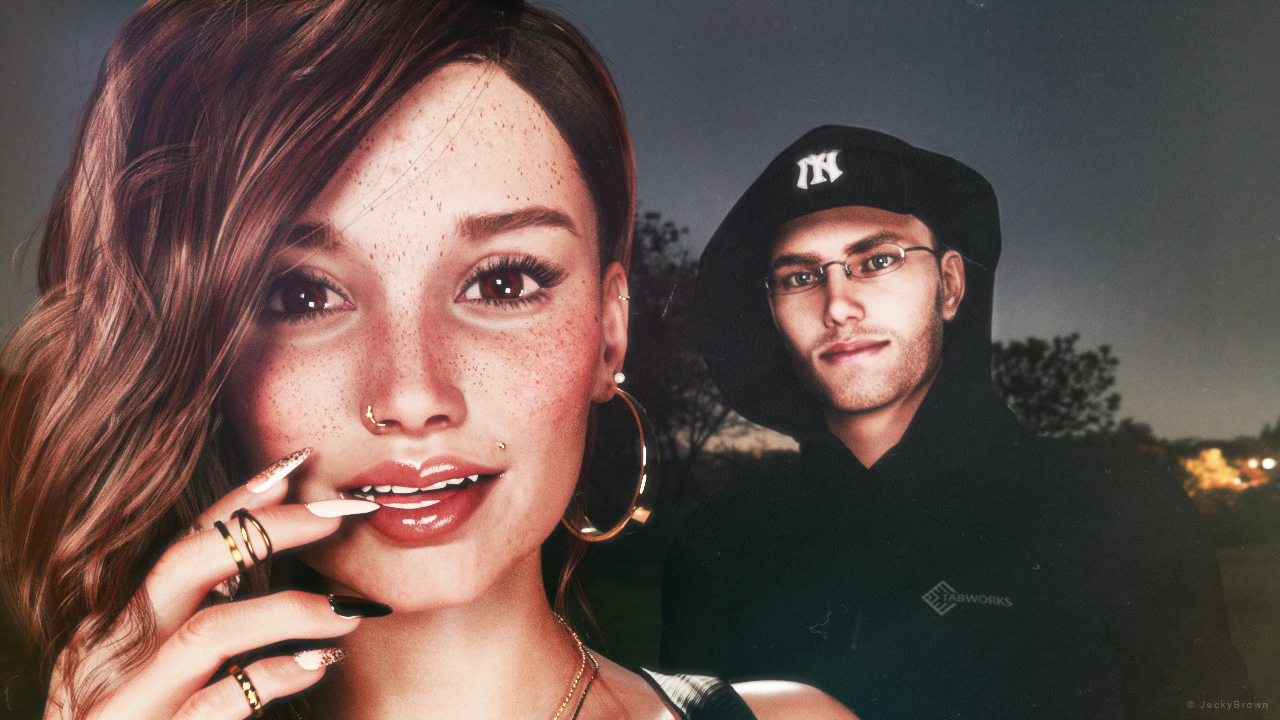
Freebie Challenge DEC 22 - "The Night is Darkest..." - Entries Thread Only3D Art Freebie Challenge December 2022 "The Night is Darkest..."
"Moonlit Desire"
[Best watched at full size for details.]Starring: TaylorLasha and Walther 2.0
The tale: (Entirely fictional)
The Night is Darkest... when there is no moon... "It was a clear black night, a clear white moon" [*2] thought Walther R. when he was walking towards TaylorLasha who was standing in the middle of the field looking at the moon. Tonight it's a full moon... [*2] © Warren G - Regulate
Non-Motion Picture (and even more theme) Soundtrack:
Shakatak - Dark Is The Night (© 1983) https://www.youtube.com/watch?v=wzTElDr46UY
COUNTABLE FREEBIES: (Alphabetic order)#01! 33 Eyes Materials for the Genesis 8 + 8.1 people by LevKornowska
https://www.renderosity.com/freestuff/items/88372/33-eyes-materials-for-the-genesis-8-81-people **#02! Chameleon ROse2 for Genesis 8 Female by zoro_d
https://www.renderosity.com/freestuff/items/85859/chameleon-rose2-for-genesis-8-female **
[Lashes morph used]#03! Dante DMC5 Free Stubble for Genesis 8 Male by InTheFlesh
https://sharecg.com/v/94752/gallery/21/DAZ-Studio/Dante-DMC5-Free-Stubble-for-Genesis-8-Male **#04! EA Sidecut Hair for Genesis 3 & 8 Female(s) by EichhornArt
https://www.renderosity.com/freestuff/items/82972/ea-sidecut-hait-for-genesis-3-amp-8-femela-s- **
[Skullcap used]#05! ED's Brick Shader (Iray) by Edheldil3D
https://www.deviantart.com/edheldil3d/art/Freebie-ED-s-Brick-Shader-Iray-788871766 **#06! G8M Walther 2.0 by Ruslanomar
https://sharecg.com/v/97276/gallery/21/DAZ-Studio/G8M-Walther-2.0 **#07! Hoop Earrings for Genesis8 Female by Afrodite-Ohki
https://www.renderosity.com/freestuff/items/92631/hoop-earrings-for-genesis8-female **#08! Iray Jewelry Shaders by AllenArt
https://sharecg.com/v/95893/gallery/21/DAZ-Studio/Iray-Jewelry-Shaders **#09! Free Update for Biker Outfit G8F and Sideswept Hair by zoro_d

https://www.renderosity.com/freestuff/items/85860/free-update-for-biker-outfit-g8f-and-sideswept-hair **
[Side Swept ROse Hair update used only]#10! Little Flower Studs for Genesis 8 and/or 8.1 Female by AllenArt
https://sharecg.com/v/98499/gallery/21/DAZ-Studio/Little-Flower-Studs **#11! Maddy for GF8 Charakter Shape by MysticArtDesign
https://sharecg.com/v/98461/browse/21/DAZ-Studio/Maddy-for-GF8-Charakter-Shape **
[LIE Blush Make up & freckles, customized, also used on G8M]#12! Moonlit Golf HDRI by Greg Zaal
https://polyhaven.com/a/moonlit_golf#13! My Heart Necklace for Genesis 8 Female by Amy Aimei
https://www.deviantart.com/amyaimei/art/My-Heart-Necklace-for-Genesis-8-Female-729010047 **#14! Nail Art for Genesis 8 and 8.1 Female(s) by zoro_d
https://www.renderosity.com/freestuff/items/92918/nail-art-for-genesis-8-and-81-females **#15! New Walther 2.0 tanned skin + hair system by Ruslanomar
https://sharecg.com/v/98463/browse/21/DAZ-Studio/New-Walther-2.0-tanned-skin-%2B-hair-system **#16! OnFleek for Genesis 3 & 8 Female(s) by AprilYSH
https://aprilsvanity.com/shop/onfleek-for-genesis-3-8-female-s.html#17! Piercing Gaze for Genesis 8 Females by SWTrium
https://www.renderosity.com/freestuff/items/83703/piercing-gaze-for-genesis-8-females **#18! ShirtDress G8F_FREE by SdeB
https://www.sdebstore.com/collections/free-stuff/products/shirtdress-g8f_free **#19! Side Swept ROse Hair (G3F,G8F) Part 1&2 by zoro_d
https://www.renderosity.com/mod/freestuff/side-swept-rose-hair-g3f-g8f-part-1/79533 **
https://www.renderosity.com/mod/freestuff/side-swept-rose-hair-g3f-g8f-part-2/79534 **#20! Simple Glasses for Genesis 8 Male/Female by GEOmetalics
https://www.renderosity.com/freestuff/items/85459/simple-glasses-for-genesis-8-male-female **#21! "STRONG" for G8M Character Morph & Pose by Mar3D
https://www.renderosity.com/mod/freestuff/strong-for-g8m-character-morph-amp-pose/82833 **#22! SY 200 Morphs for Genesis 8 Head and Body by SickleYield
https://sharecg.com/v/91888/view/21/DAZ-Studio/SY-200-Morphs-for-Genesis-8-Head-and-Body **#23! TaylorLasha For Genesis 8 Female by MagicMaiden
https://www.renderosity.com/freestuff/items/92992/taylorlasha-for-genesis-8-female **
NO-COUNT ITEMS:--- Antique Locket for G8F, G8.1F and G9 by Hypertaf (Holiday Loyalty Sale 2022 Free Item)
--- Hoodie for G3M by Tab
--- Nose Ring 01 for G2F, G3F and/or G8F by AllenArt
--- Scene Lights for Iray by Lali Kamala (Holiday Loyalty Sale 2021 Free Item)
++ Surf's Up Hat from Surf's Up Outfit and Board for G2M by Sarsa [Customized texture]PURCHASED/PAID FOR ITEMS: None 100% Freebies
*1 E-mail address required
** Registration required
#x! Countable Items (Bold ones are used by me for the first time I think.)
--- No longer available freebies
++ Free with DAZ Studio (or the Essentials)
$x. Purchased/Paid For Item
Rendered with DAZ Studio 4.10.0.123 (nVidia Iray®)Other free software used: GIMP v2.10.32 and Irfanview 4.60
Postwork: used the AltaLux Image Enhancement Filter (Effect) by Stefano Tommesani that comes with Irfanview and some filters (oa) that come with GIMP. Also used mcjLut by mcasual (https://sites.google.com/site/mcasualsdazscripts9/mcjlut) with the free FilterGrade Cinematic LUTs Pack (https://filtergrade.com/free-cinematic-luts-video-editing/).
"Moonlit Desire"
Importing hand poses to Blender (DAZ to Blender bridge) – scaleHi,
I've posed and keyframed a Gen 8 character in Daz, and now I need to import it to Blender. The figure is mostly animated with translations and rotations, but I have some necessary hand poses set on.
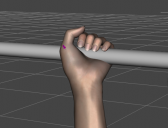
Whenever I tried importing it to Blender with DTB, the hand poses were not executed properly. From what I've found in other discussions, there are plenty of issues with the official Bridge and already came across the Diffeomorphic script, but as a Mac user, it's not an option for me. FBX results are terrifying, so I'm not going to even post them lol
I think scaling might be an issue, but I'm not sure. I've tried many settings, and here are the results for "Export Morphs" checked:
(morph sliders set on 0)
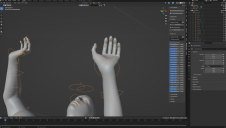
(adjusted morph sliders value)
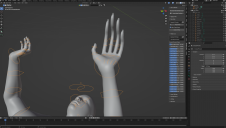
Now, "Export Morphs" unchecked:
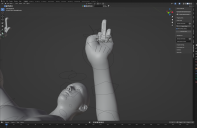
As you can guess, I'm not exactly happy with the results. Is there any way to fix it?
Daz 3D is part of

Connect
DAZ Productions, Inc.
7533 S Center View Ct #4664
West Jordan, UT 84084Licensing Agreement | Terms of Service | Privacy Policy | EULA
© 2026 Daz Productions Inc. All Rights Reserved.