-
Filatoon Black border applying shader makes clothes vanish
Where did you find that filament->toon->border ? There's no such a "border" Shader preset.
You can add simply add Filatoon - General from Surfaces pane > Preset to the selected surfaces of Lillian gown.
Filatoon tips and tricksDreamlight has a tutorial that came out in 2021 https://www.daz3d.com/filament-pro-lights-and-rendering-secrets--2-new-lights--video-tutorial that I bought but never had a chance to examine. Today I opened the first video and a lot of my confusion with the lights was cleared up. I checked and it is currently on sale. Now this is NOT Filatoon and it discusses the previous version of Filament Draw Options, but it is close enough for anyone who never used 3Delight or messed with Filament before. Dreamlight also touches on some adjustments that had confused me for the toons. (I have to finish the tutorial still.)
As for sets, if you have bought older products with SKUs in the 22000s and before, good chance they are 3DL and will work with the Filament shader applied. I used it on a set this morning with no issues.
Filatoon Black border applying shader makes clothes vanishHi
Having some fun exploring the filatoon shader but I have tried applying the shader to say the lillian dress and if i apply the filament->toon->border shader it makes the clothes vanish and leaves just the border how do i get the border to work LOL liking this a lot (dont know what i will do with it but even so fun)
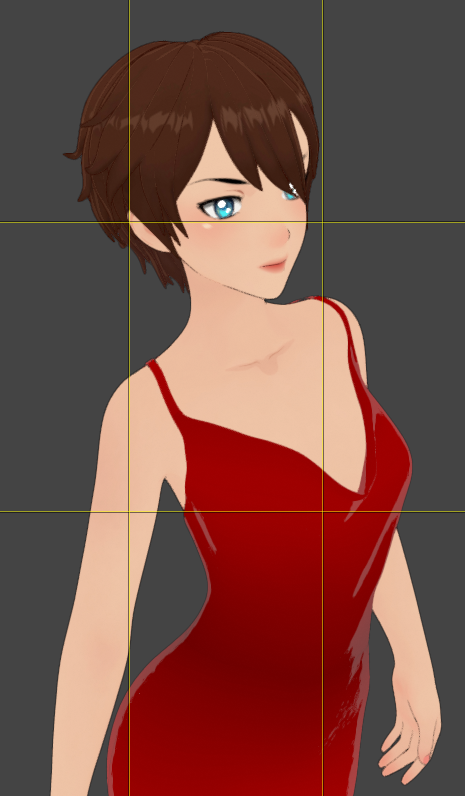 FilaToon / Cell shaded rendering with Filament
WendyLuvsCatz said:
Pax Asteriae said:
Rendered out this as a video to see how it was going and... well...
https://youtube.com/shorts/nMsdT9K-zSU
I suppose it's one way to fix pokethrough. Not quite sure why Filament decided he and his pants needed to vanish, but it definitely gave me a laugh.
it does that in animation sometimes if you have geografts, reloading the scene and rendering sometimes fixes it
There's no geografts though.
 It just decides it's had enough. It did also did it twice in viewport (well, the render's just the viewport anyway, so...) when I was fiddling around with the camera. I never know what it's going to hide either; the first time, the top and his body went and just left his pants, and the second time it was everything but eyes, teeth and hair. It just amused me that it was halfway through the video and suddenly he became The Amazing Dancing Teeth.FilaToon / Cell shaded rendering with Filament
Pax Asteriae said:
Rendered out this as a video to see how it was going and... well...
https://youtube.com/shorts/nMsdT9K-zSU
I suppose it's one way to fix pokethrough. Not quite sure why Filament decided he and his pants needed to vanish, but it definitely gave me a laugh.
it does that in animation sometimes if you have geografts, reloading the scene and rendering sometimes fixes it
AIUTO...CHI CONOSCE L’ITALIANO? PARTE QUATTORDICI@Tiziano
Metti a 1 L'Environment Weight e togli la headlamp.. non avrai problemi di luce. Il comando serve appunto a gestire la luce di "base". Se metti altre luci e ti viene tutto troppo bruciato lo riabbassi.
Non c'è bisogno di Premier.. ti danno il G9 in versione anime e i materiali con l'aggiornamento delle librerie.. Vicky è solo l'ennesimo character. Il materiale lo puoi applicare a qualsiasi oggetto. Ricordati solo che poi non puoi renderizzare con Iray (i materiali Filatoon in Iray fanno pena).L'unica rottura è lo spessore delle linee.. tocca creare più geoshell (1 per ogni spessore che vuoi) e poi disattivarla nelle parti che non vuoi.
Almeno mettessero una funzione per avere lo sfondo in Filament...Anime Toons and Filatoon Shader Q&AMada said:
Petra said:
Can one put normal Iray shaders on the new Victoria 9 toon shape?
Yes but you won't have the outline, and the normal G9 eyeballs would probably work better with Iray Textures.
If you're just after the iray texture but still want the outline and render in filament, just drop the base colour texture used in iray into the right channel.
In this image I loaded Vicky Toon, and then applied Josie's Iray shader, and then removed the maps from the normal and specular channels to get a flatter look
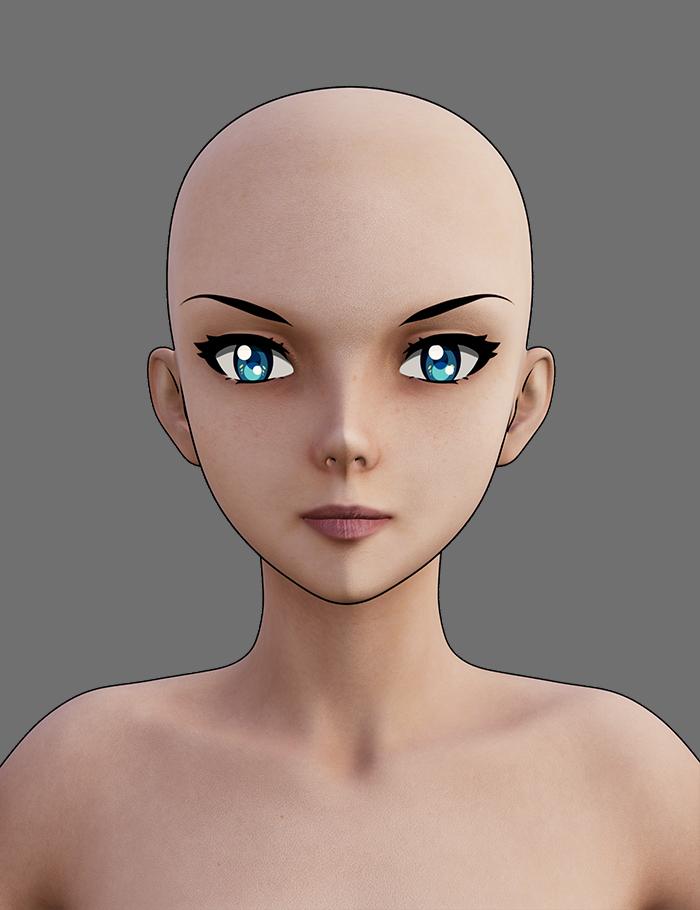
Thank you so very much Mada, that is lovely. Is there a light that you could recommend that works good with filament renders?
FilaToon / Cell shaded rendering with Filamentrlvanoosterhout said:
I really dont understand it. I used the filament tool on different object. They keep turning black. Has anyone written a step by step guidance already. Getting hopeless here......
Giving a comprehensive sbs guidance will take some time. Let's firstly resolve the "black / dark scene" issue:
1) Do what's shown in below screenshot.
2) Load a G9 toon character or your current scean is already lit.
FilaToon / Cell shaded rendering with FilamentRendered out this as a video to see how it was going and... well...
https://youtube.com/shorts/nMsdT9K-zSU
I suppose it's one way to fix pokethrough. Not quite sure why Filament decided he and his pants needed to vanish, but it definitely gave me a laugh.
FilaToon / Cell shaded rendering with Filamentrlvanoosterhout said:
I really dont understand it. I used the filament tool on different object. They keep turning black. Has anyone written a step by step guidance already. Getting hopeless here......
I was getting this as well I found using one of the presets, skin hair etc worked.
FilaToon / Cell shaded rendering with Filamentrlvanoosterhout said:
I really dont understand it. I used the filament tool on different object. They keep turning black. Has anyone written a step by step guidance already. Getting hopeless here......
Have a look at Mada's thread https://www.daz3d.com/forums/discussion/704951/anime-toons-and-filatoon-shader-q-a#latest
FilaToon / Cell shaded rendering with FilamentI really dont understand it. I used the filament tool on different object. They keep turning black. Has anyone written a step by step guidance already. Getting hopeless here......
AIUTO...CHI CONOSCE L’ITALIANO? PARTE QUATTORDICIL'unico modo per usare FilaToon in Filament è quello di lasciare la headlamp on?
4.23.0.1 the good Bad and Weirdness.ArtAngel said:
The really good surprising news is this: I downloaded it onto an older custom build that has an old Kepler card. A GTX760. This machine never had DAZ installed on it. I DIM downloaded it and installed it the exact same way I did on the dual 1080ti machine. It was the best install. It did not obliterate any files. Everything related to Genesis 9 and Genesis 8 works as it should and so do the toons.. It rendered in a flash. I'll go back and attach screenshots for each post. The problem for me is I need my dev packages, because I won't do much if anything on the 760 it was just a test.
Also I was so impressed with the whole filatoon thing, and because I'm trying to use up my store credit, I went back on the 12th and bought the three bundles and every toon offering they had and the otter and a few other things. Today I bought nothing but stll have a decent store credit left. So I am not complaining about the product.
Yes, because it was a neat installation with metadata successfully imported. And filament supports OpenGL, so it also works well with your Kepler card. Congrats !
4.23.0.1 the good Bad and Weirdness.ArtAngel said:
The Weird:
1. Due to the Library Data. Beta version 4.12 has the toons installed and they not only work, but they rendered in Iray on my dual 1080ti rig. I'll post pics in a minute or three. Again I did not install anything on the BETA. This is due to the LIBRARY files.
Content assets are shared among different DS versions as you must have the same library settings configured in Content Directory Manager, however, new FilaToon shader as well as new filament plugin and API are DS 4.23 dependent. You cannot make them work in older DS versions ~~
What About G8 Essentials and Dforce Essentials ???Faeryl Womyn said:
I'm wondering if you can use dforce with this new filament?
That depends on what you mean by "dForce". dForce hair that is strand-based does render in Filament and FilaToon, though I haven't spent much time with it yet. Cloth hairs and clothing will render exactly the same as non-dForce mesh hair and clothing in Filament/FilaToon, because they're the same thing as far as the renderer is concerned.
Anime Toons and Filatoon Shader Q&Abarbult said:
crosswind said:
barbult said:
crosswind said:
barbult said:
I started with Base Anime Feminine and dialed some Bette converted to G9. The environment is Colorful Toon Street. The hair is Nyoko Hair.from Aiko 3

Pretty !
 You turned on Bloom ?
No, I didn't. This is just the way the Filatoon shader made it. The bulb has emission on.
Odd ~ I don't have this effect without turning on Bloom in fila draw options... but when I wanted to show you by tweaking Bloom property, DS crashed due to filament api...

Oh, since you told me where to look for bloom, I took a screenshot of my Filament Draw Options. It does have some bloom settings. I didn't explicitly set those settings. What I did do is start with the Basic FilaToon Environment. Maybe that set the Bloom.
Yep, you're right ! I got it !
Anime Toons and Filatoon Shader Q&Acrosswind said:
barbult said:
crosswind said:
barbult said:
I started with Base Anime Feminine and dialed some Bette converted to G9. The environment is Colorful Toon Street. The hair is Nyoko Hair.from Aiko 3
Pretty !
You turned on Bloom ?No, I didn't. This is just the way the Filatoon shader made it. The bulb has emission on.
Odd ~ I don't have this effect without turning on Bloom in fila draw options... but when I wanted to show you by tweaking Bloom property, DS crashed due to filament api...
Oh, since you told me where to look for bloom, I took a screenshot of my Filament Draw Options. It does have some bloom settings. I didn't explicitly set those settings. What I did do is start with the Basic FilaToon Environment. Maybe that set the Bloom.
Anime Toons and Filatoon Shader Q&Abarbult said:
crosswind said:
barbult said:
I started with Base Anime Feminine and dialed some Bette converted to G9. The environment is Colorful Toon Street. The hair is Nyoko Hair.from Aiko 3
Pretty !
You turned on Bloom ?No, I didn't. This is just the way the Filatoon shader made it. The bulb has emission on.
Odd ~ I don't have this effect without turning on Bloom in fila draw options... but when I wanted to show you by tweaking Bloom property, DS crashed due to filament api...
Anime Toons and Filatoon Shader Q&AMarcCCTx said:
Could this be rewitten for filatoon https://www.daz3d.com/rssy-3delight-and-iray-to-filament
It will have to be completely remade because, though technically both are filament, FilaToon is a completely new beast. There wasn't an exclusive old filament shader -- we were basically using Uber Iray ignoring the parts that didn't work (like translucency, metallic flakes, some top coat configuration, for instance) and adjusting it accordingly. FilaToon has its own shader with its specificities. Someone correct me if I'm wrong, but I don't even know if a proper conversion tool can be made because there are some configurations you can't even extract from the Uber Iray shader (for instance, ambient, shadow, rim; even the glossy layer works differently).
Daz 3D is part of

Connect
DAZ Productions, Inc.
7533 S Center View Ct #4664
West Jordan, UT 84084Licensing Agreement | Terms of Service | Privacy Policy | EULA
© 2026 Daz Productions Inc. All Rights Reserved.