-
Is there a solution to fix the stifness of woman private area in this pose?
WendyLuvsCatz said:
you could probably use a Dformer or MeshGrabber
or if you install Hexagon and the bridge
send to Hexagon and use smooth brush to create a morph to send back to DAZ Studio
I think it would require a JCM which adds another layer of complexity. That's why we pay money for DAZ and PAs to make these morphs for DAZ figures. Best bet so far is to buy one of the 3rd Party products from R'otica. Otherwise, Zev0's Shape Shift has some Hip/Anatomy morphs included.
Is there a solution to fix the stifness of woman private area in this pose?I know how to morph.
But... I'm bad at sculpting T_T.
Not really sure what to fix, the thigh or maybe curve the vjj?Is there a solution to fix the stifness of woman private area in this pose?you could probably use a Dformer or MeshGrabber
or if you install Hexagon and the bridge
send to Hexagon and use smooth brush to create a morph to send back to DAZ Studio
2022 Christmas at DAZ & PA GiftsArtAngel said:
Merry Christmas Destiny's Design & Lyrra Madril. Thank you so so so much for the holiday freebie. The dForce Unionsuit, aka LongJohns is something I, and others, were searching for in the forums. Many thanks!
I actually didn't know that! well I hope you all have fun with it. btw - there are morphs to open the back hatch, but we couldn't show those in promos. Morphs are easy to miss so I thought I should point it out. Oh and it also unbuttons with a few morph options, if you gents get too hot ;)
LM
Creature Creator for G8 family?Was there ever a creature creator morph package for G8F-M? I can't find anything and the store Search isn't helpful.
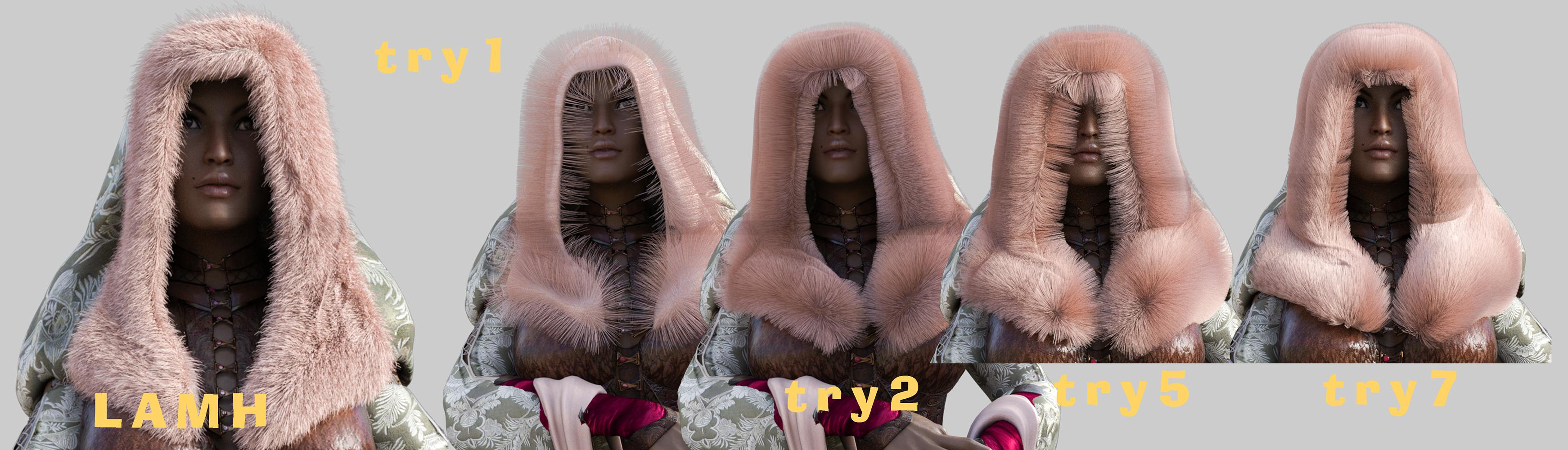
The NightQueen Wardrobe Collection -how to get fur to show?Arki was kind enough to give info (and it worked!):
docs.daz3d.com/doku.php/public…
You will need the LAMH Player for the fur to work. Here is the paragraph of the readme with the appropriate instructions:
"The fur presets Included are fur presets for the free LAMH (Look At My Hair) Player. It is available in the DAZ 3D store: www.daz3d.com/look-at-my-hair-…. If you want to use the fur, please first load and morph your clothing set on your posed Genesis 3 Female (you need one of the hood types, one of the sleeve types or the stola), then select the piece you want to add fur to and open your LAMH player. By clicking on the “Attach LAMH Preset” Button in the bottom left corner of the LAMH Player. Then navigate to the folder Genesis 3 Female - Clothing - Arki - NightQueen and select the appropriate Fur preset.
Please note that this fur preset will only be visible when rendering in 3Delight. If you want to use your generated fur in Iray, plase select the fur prop in your scene hierarchy, then go back to the LAMH Player and click on the “to OBJ” button at the bottom. After a while, DAZ Studio will convert your for to a solid .obj prop which then will accept our provided Iray fur shaders.
Make sure that the garment pieces you wish to add fur to are NOT parented to Genesis 3 Female. To do this, click on the piece in question in your hierarchy tree of your scene tab and drag it to the bottom of the list. It should now appear outside of the genesis 3 Female hierarchy, but still posed and morphed."But then any time I tried to parent it trying to pose with it and it was a disaster of lamh crashes so I took WendyLuvsCatz's / suggestion (thank you!) and looked into strand based hair. It's close and probably more than good enough for future use for me :)
For your entertainment :P
 DAZ achieves new lows in customer support (but appears to have ambitions to go lower still)
Panzer Emerald said:
You know, I'm legitimately surprised that after all this time and with all the advances that've happened with plug-ins that no one has really stepped up to the plate to do their take on the GenX line as a spiritual successor. There was X-Transfer, but iirc that only worked between Gen3 and Gen8 and even that was highly unreliable and prone to frequent crashes from my experience.
Sorry to get off topic, but it's a thought that I sometimes have when this subject comes up every so often.
Maybe it is simply that Dimension3d was a genius ...
DAZ achieves new lows in customer support (but appears to have ambitions to go lower still)You know, I'm legitimately surprised that after all this time and with all the advances that've happened with plug-ins that no one has really stepped up to the plate to do their take on the GenX line as a spiritual successor. There was X-Transfer, but iirc that only worked between Gen3 and Gen8 and even that was highly unreliable and prone to frequent crashes from my experience.
Sorry to get off topic, but it's a thought that I sometimes have when this subject comes up every so often.
DAZ Horse 3 - will there actually be any support this time?AllenArt said:
Here are some of the horses side by side. You decide ;)

My ranking:
1) DAZ Horse 2
2) Hivewire Horse
3) Linday Morph
4) DAZ Horse 3
DAZ Horse 3 - will there actually be any support this time?Morph addon request.
stylized toon morphs and textures.
all I have is 3dUnivrse tumbleweed and lady little fox Diamond. I don't have haywire horse and toon morph but I may have to go grab at some point with such limited options. Valiant knight toon or stylized riding in on Tumbleweed? LOL.
google Disney Horse and take all my money. I don't do western images, least not with horses. How about a stylized modern day police horse. Would love male/female variations.
oh who am I kidding. It's Genisis 9 Cenitars and more of the same.
Perception check on G9 form definitionI tested with Casey and I could get him pretty close to Genesis 8 in height and proportion. I did feel like it would be nice if there was a morph to lift the chest a bit higher and I also dialed the breasts gone up to get it closer to vanilla G8 male.
Picture shows the dials I used.
Question about using DS from a different computerhjake said:
Wonderland said:
outrider42 said:
I was going to suggest Splashtop myself. I have used it for about 5 years now. You can also use Splashtop on a phone or tablet through their Google/Apple apps, basically any device that has a screen can probably run Splashtop. I have used Splashtop on my phone several times in a pinch, and on every phone and tablet I have had over the years. I even used it on an Amazon Fire tablet. So this could be an option for you, too, and you wouldn't even need their laptop.
....'Wait, does this mean I could use DS or Photoshop on an iPad Pro and do everything with the Apple Pencil? If that would work, it would be life changing! I.would do that from home even!
I have not used the Apple iPad Pro so I don't know Splashtop's ability to run on the iPad. You could use the trial version to see. I do not know if pressure sensitivity or stylus angle will be recognized on the remote computer even if drivers are installed on local and remote. The stylus might just be considered a mouse. All work is done at the remote computer. The local computer/phone/tablet is operating the remote through a browser-like window.
My bigger concern would be input lag for something as sensitive as sketching and filling in an area where pressure and angle might be an issue.
Next is screen size. I have logged into the remote on my Samsung android phone but that was more to check on rendering or syncing status or to grab a file from the computer when I am away from a computer. Unless I use Samsung Dex to connect to a TV or monitor and my bluetooth a mouse and keyboard to my phone, then, voila, instant computer as grandma's cottage in the wood. Assuming you have wifi or plenty of data. :-)
I have used Daz Studio, Affinity photo, publisher, and designer, but not with a stylus. A wacom tablet is on my wishlist.
To work with Daz effectively I use the View tab for scene manipulation when I am not in full screen. If you are not in full screen mode, then long drags of the local mouse can take you off the remote screen and cause in predictable behaiour because Daz Studio thinks you are still dragging the mouse but at the edge of the remote screen.
Also you should be able to do your artwork on the iPad and file transfer to the remote.
If you intend to use the stylus as the mouse, not as a fine art tool, then it should work just fine.
Really everything depends on your internet connection speed at both ends versus your patience for input lag.
Actually, I use Splashtop at home all the time. Editing on my local computer. Rendering, video converting, and office work on my remote computers. With the headless video display adapter outrider42 suggested, and I ordered today, it means none of the computers have to be attached to a monitor and if they are then I may be able to use multiple screens from remote to local without actually having to connect a second screen to the remote.
I could use Windows RDP at home no problem but I find Splashtop a better fit for me.
I'd be using the pencil just like a mouse. I have iPad apps to draw directly on the iPad with pressure sensitivity. I'm more interested in just manipulating programs like DS and Photoshop either from my friend's house or just laying back relaxing rather than having to sit at a desk with the computer. The screen is just a bit smaller than a laptop. I used to use a fairly small laptop often for Poser and it was doable. I sometimes watch tutorials in YouTube on the iPad and I can see everything pretty well and maybe I could even pinch out to see even closer, not sure or of course just zoom in with perspective view. My friend and I both have high speed internet so that shouldn't be a problem. After Christmas I'll call them and get more info. Thanks for the suggestion!
Experimenting with ML Deformer in UE5.1Krys Kryngle said:
InTheFlesh said:
Krys Kryngle said:
If anyone needs it for experimentation I'd be glad to share. It's just an FBX skeletal animation without the mesh so I don't think I'll be breaking any copyrights or anything. I can also save someone some time with the presets for Maya if anyone needs it. No sense typing in all those values if you don't have to.
That would be muchly appreciated if you would!

Well, I tried but there were a few errors in my animation. I tried to open up Maya again so I could adjust and they changed their license and I no longer have access (I'm really starting to dislike Maya). I think the best way would be to generate the animations in DAZ to start with so we can avoid Maya. This would also allow us to use all those awesome detail morphs like skin folds and wrinkles, or custom morphs made for custom characters. I posted a message for Riversoft Art to see if he would add keyframing to his random pose generator. I think that would be a good start. Then we have to figure out how to get the vertices to match for the FBX and Alembic going into Unreal. I think I can do that in Blender and I'm sure there are some other ways. @mrpdean_7efbae9610 figured it out with Houdini, which is awesome, I just don't want to learn another piece of software right now. Overall it does work, there just isn't a smooth workflow yet.
https://www.daz3d.com/forums/discussion/443532/released-pose-randomizer-pro/p3
Yes, you either need to transfer the vertex order from the alembic cache to your character mesh, OR you can replace you character mesh with a zero'd out frame of your alembic cache and then transfer the skin weights across.
Transferring the vertex order is possible but it's fliddly because your character will almost always be made up of multiple primitives, the body, eyes, eyelashes, clothes etc. In my initial experiements at transferring the vertex order in Maya, it transferred the orders on the body correctly but not the eyes, clothing etc. So I think you'd need to split all the parts out and then transfer the vertex order of them all separately.
In contrast, transferring skin weights is fairly simple in any DCC. In most DCC's like Maya, Max, Houdini the process relies on the proximity of the vertices in 3d space, not the vertex order. So, if frame 0 of your alembic cache matches the rest pose of your FBX character exactly, which is does with the process I described above, then the vertices of both should should be positioned exactly the same in 3d space, meaning you can easily transfer the skin weights from your fbx character onto the mesh extracted from frame 0 of your alembic cache. You'll also need to transfer or recreate the materials on this new character mesh, but that's fairly easy to do in most DCC's.
I'm fairly certain my workflow can be performed in Maya and Max. I don't know about Blender but I'd be surprised if it wouldn't also be possible in blender. I might give it a try in Blender one day.
The only reason I chose Houdini is because I could automate most of the steps, so much fewer clicks required to complete the process.
Let's appreciate/discuss today's new releases - ongoing threadBandoriFan said:
Yay the new horse is coming out! I'll get the reindeer bundle and waited so long for Daz Horse 3! There is so much they can do with horses not just with realism but stylization too. They are such sweet animals.
They can have medieval, unicorn, and equestrian bundles and from the reindeer bundle description there might be morph bundles like there are for people but if we get the sleigh ride bundle we'll get those packs for free when they're released. The sleigh ride pack itself also looks like it has so many good things too. Then I can render someone petting a reindeer which would be so cute!
Maybe the new dragon will come soon too
There is nothing in the ad copy that says we'll get anything for free when it's released.
Question about using DS from a different computerWonderland said:
outrider42 said:
I was going to suggest Splashtop myself. I have used it for about 5 years now. You can also use Splashtop on a phone or tablet through their Google/Apple apps, basically any device that has a screen can probably run Splashtop. I have used Splashtop on my phone several times in a pinch, and on every phone and tablet I have had over the years. I even used it on an Amazon Fire tablet. So this could be an option for you, too, and you wouldn't even need their laptop.
....'Wait, does this mean I could use DS or Photoshop on an iPad Pro and do everything with the Apple Pencil? If that would work, it would be life changing! I.would do that from home even!
I have not used the Apple iPad Pro so I don't know Splashtop's ability to run on the iPad. You could use the trial version to see. I do not know if pressure sensitivity or stylus angle will be recognized on the remote computer even if drivers are installed on local and remote. The stylus might just be considered a mouse. All work is done at the remote computer. The local computer/phone/tablet is operating the remote through a browser-like window.
My bigger concern would be input lag for something as sensitive as sketching and filling in an area where pressure and angle might be an issue.
Next is screen size. I have logged into the remote on my Samsung android phone but that was more to check on rendering or syncing status or to grab a file from the computer when I am away from a computer. Unless I use Samsung Dex to connect to a TV or monitor and my bluetooth a mouse and keyboard to my phone, then, voila, instant computer as grandma's cottage in the wood. Assuming you have wifi or plenty of data. :-)
I have used Daz Studio, Affinity photo, publisher, and designer, but not with a stylus. A wacom tablet is on my wishlist.
To work with Daz effectively I use the View tab for scene manipulation when I am not in full screen. If you are not in full screen mode, then long drags of the local mouse can take you off the remote screen and cause in predictable behaiour because Daz Studio thinks you are still dragging the mouse but at the edge of the remote screen.
Also you should be able to do your artwork on the iPad and file transfer to the remote.
If you intend to use the stylus as the mouse, not as a fine art tool, then it should work just fine.
Really everything depends on your internet connection speed at both ends versus your patience for input lag.
Actually, I use Splashtop at home all the time. Editing on my local computer. Rendering, video converting, and office work on my remote computers. With the headless video display adapter outrider42 suggested, and I ordered today, it means none of the computers have to be attached to a monitor and if they are then I may be able to use multiple screens from remote to local without actually having to connect a second screen to the remote.
I could use Windows RDP at home no problem but I find Splashtop a better fit for me.
Let's appreciate/discuss today's new releases - ongoing threadRichard Haseltine said:
Wonderland said:
barbult said:
BandoriFan said:
Yay the new horse is coming out! I'll get the reindeer bundle and waited so long for Daz Horse 3! There is so much they can do with horses not just with realism but stylization too. They are such sweet animals.
They can have medieval, unicorn, and equestrian bundles and from the reindeer bundle description there might be morph bundles like there are for people but if we get the sleigh ride bundle we'll get those packs for free when they're released. The sleigh ride pack itself also looks like it has so many good things too. Then I can render someone petting a reindeer which would be so cute!
Maybe the new dragon will come soon too
Where did you get the idea that you'd get "those other packs for free"? I don't se the word "free" any place in that ad. It says "You’ll also get upgraded access to all Daz Horse 3 features once released, including morphs for different sizes and breeds, improved mane and tail, additional textures, and more!"
"Upgraded access" is not likely the same as "free".
I'm wondering if the horse we are getting is not the full version, just a temporary incomplete version they are sending out before Christmas because the complete product is not finished yet. I may be wrong but I have a feeling we'll be getting product updates for it in DIM. That said, im sure there will be tons of paid content coming up and we'll probably get an orange banner for discounts.
I don't see any reason to think it is knowingly unfinished, but I would think there will be updates for the additional cotnent where that is included with the product we have bought.
It seemed to work just fine for me. I could pose it, transform it into a reindeer, and render it with no problems at all (except the mane taking quite long to simulate, but I was on the laptop, on it's not particularly fast). I also think that there's a bigger 'horse bundle' still in the making, but the one we got today doesn't seem 'incomplete' to me. Also, for me, I liked the sleigh so much, would probably have paid 14 bucks just for that ;-)
DAZ Horse 3 - will there actually be any support this time?zombiewhacker said:
I would happily stick with DAZ Horse 2 and all its morph/texture add-ons for the rest of my life if only someone would release a versatile reins set that is simple to equip and pose.
Well, there are a few at Renderotica, but you probably meant reins for horses, so, yeah, that would be nice.
 DAZ Horse 3 - will there actually be any support this time?
I would happily stick with DAZ Horse 2 and all its morph/texture add-ons for the rest of my life if only someone would release a versatile reins set that is simple to equip and pose.
Let's appreciate/discuss today's new releases - ongoing threadWonderland said:
barbult said:
BandoriFan said:
Yay the new horse is coming out! I'll get the reindeer bundle and waited so long for Daz Horse 3! There is so much they can do with horses not just with realism but stylization too. They are such sweet animals.
They can have medieval, unicorn, and equestrian bundles and from the reindeer bundle description there might be morph bundles like there are for people but if we get the sleigh ride bundle we'll get those packs for free when they're released. The sleigh ride pack itself also looks like it has so many good things too. Then I can render someone petting a reindeer which would be so cute!
Maybe the new dragon will come soon too
Where did you get the idea that you'd get "those other packs for free"? I don't se the word "free" any place in that ad. It says "You’ll also get upgraded access to all Daz Horse 3 features once released, including morphs for different sizes and breeds, improved mane and tail, additional textures, and more!"
"Upgraded access" is not likely the same as "free".
I'm wondering if the horse we are getting is not the full version, just a temporary incomplete version they are sending out before Christmas because the complete product is not finished yet. I may be wrong but I have a feeling we'll be getting product updates for it in DIM. That said, im sure there will be tons of paid content coming up and we'll probably get an orange banner for discounts.
I don't see any reason to think it is knowingly unfinished, but I would think there will be updates for the additional cotnent where that is included with the product we have bought.
Let's appreciate/discuss today's new releases - ongoing threadbarbult said:
BandoriFan said:
Yay the new horse is coming out! I'll get the reindeer bundle and waited so long for Daz Horse 3! There is so much they can do with horses not just with realism but stylization too. They are such sweet animals.
They can have medieval, unicorn, and equestrian bundles and from the reindeer bundle description there might be morph bundles like there are for people but if we get the sleigh ride bundle we'll get those packs for free when they're released. The sleigh ride pack itself also looks like it has so many good things too. Then I can render someone petting a reindeer which would be so cute!
Maybe the new dragon will come soon too
Where did you get the idea that you'd get "those other packs for free"? I don't se the word "free" any place in that ad. It says "You’ll also get upgraded access to all Daz Horse 3 features once released, including morphs for different sizes and breeds, improved mane and tail, additional textures, and more!"
"Upgraded access" is not likely the same as "free".
I'm wondering if the horse we are getting is not the full version, just a temporary incomplete version they are sending out before Christmas because the complete product is not finished yet. I may be wrong but I have a feeling we'll be getting product updates for it in DIM. That said, im sure there will be tons of paid content coming up and we'll probably get an orange banner for discounts.
Daz 3D is part of

Connect
DAZ Productions, Inc.
7533 S Center View Ct #4664
West Jordan, UT 84084Licensing Agreement | Terms of Service | Privacy Policy | EULA
© 2026 Daz Productions Inc. All Rights Reserved.