-
Dimensional Scaling of Bones
I would strongly recommend not doing any non-uniform scaling on any rig, ever. It's almost guaranteed to mess up animation, morphs and so on. Uniform scaling is usually OK. Far better to do a morph to shorten the fingers than a non-uniform scale. If you aren't sure how to do that, it would be a good skill to learn (Blender, for example).
One of the reasons is non-uniform scaling breaks batching (in game engines at least). The matrix math can also make weird things happen in the renderer, especially to surface normals.
DAZ Horse 3 - will there actually be any support this time?JOdel said:
Oh c'mon. The poor beast just needs a proper horse morph...
LOL! Good one
 Searching for so-called Baby Face Adult Male Face Character
Diomede said:
Greetings. I am looking for a rounder adult face character, male, preferably for G8M or G9M. The ideal would have face morph and matching skin maps - very slight stubble or 5 o'clock shadow would be a jackpot. Very slight. Would prefer not to achieve with a weight morph or a child morph, but will likely go that route if search is unsuccessful. Softer jaw line, less high cheek bones,... Ethnicity not particularly important. Think of someone who does not have the traditional 'leading man' looks, although may have been a leading man none-the-less. The opposite of John Hamm and Henry Cavill. Someone typically expected to be hired to play the Jimmy Olson sidekick photographer character, not the Clark Kent Superman investigative journalist character.
EDIT: speaking of stubble, is there a 5 o'clock shadow or stubble skin overlay or geoshell for G8M or G9M? Would be better to separate the search.
Both the Genesis 9 Base morphs to 100% Male / 0% Female, the Genesis 8 Male Base, and the Genesis 3 Male Base all qualify I think. Not as much as Lou Costello or Bob Costos, but reasonably in that general area.
DAZ Horse 3 - will there actually be any support this time?AlmightyQUEST said:
The rodent base was a more neutral base not quite like any of the animals it would morph into, so fingers crossed that's the plan here.
This is definitely not a neutral base, it's marked as a Thoroughbred breed. It's most likely unifinished and rushed to meet the xmas deadline and release the Reindeer.
As for abandoning the rodent, it's irellevant to this situation. This is a DO base, even if AM doesn't do anything for it further, there will be other PAs who will build around it and, at least for a while, Daz will certainly buy / comission items for it.Let's appreciate/discuss today's new releases - ongoing threadRichard Haseltine said:
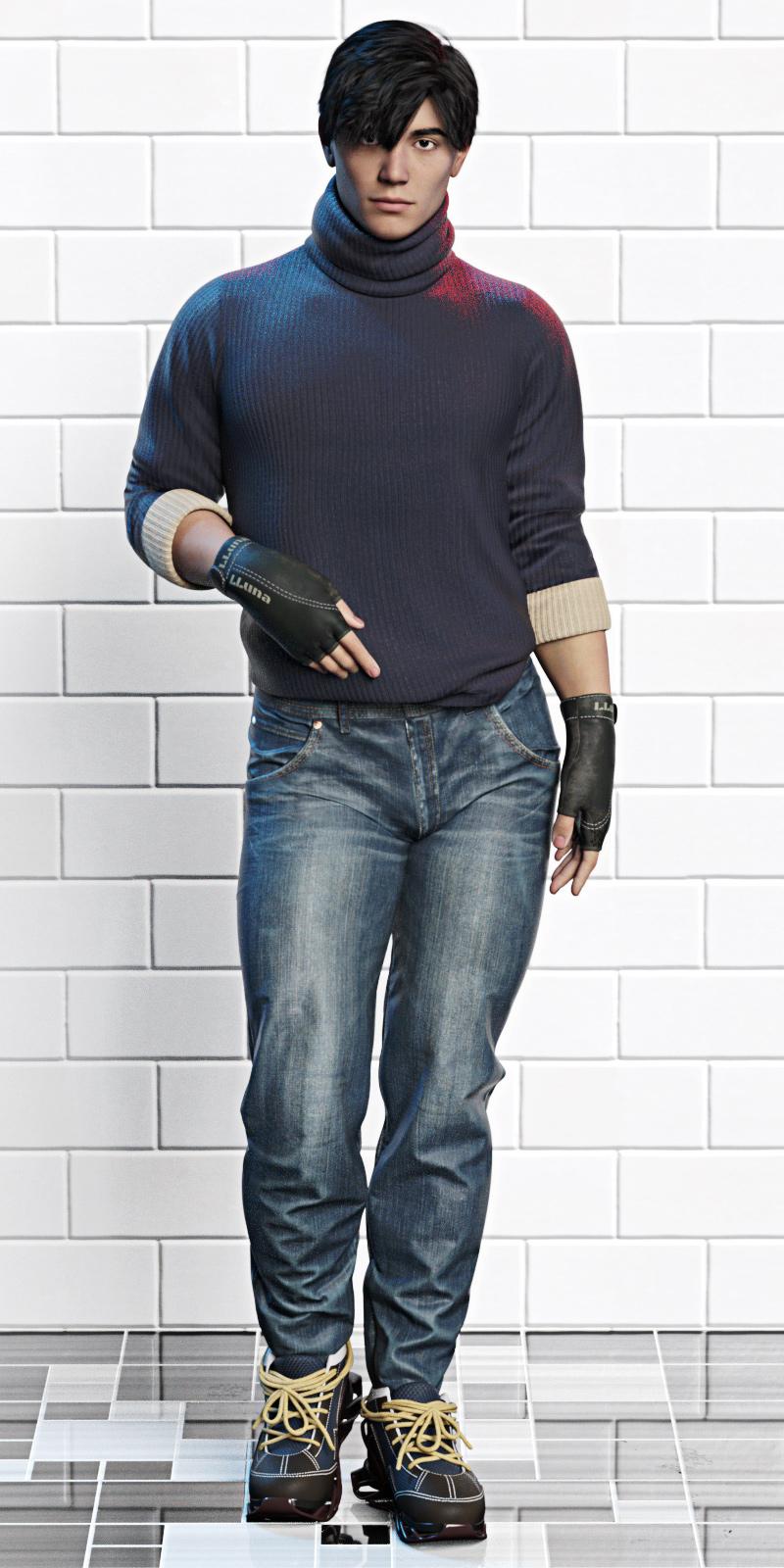
I'd be interested to see the Luthbellina without the "tactical" stuff - just the clothes without the straps.
Please excuse that the render's a bit uncooked in places.
The sweater has a morph to fit over the belt; the jeans have morphs to fit in and out of the shoes, as well as three belt loop morphs; there are two morphs to adjust the tightness of the shoes; the gloves have no dedicated morphs. All have the standard fitting morphs.
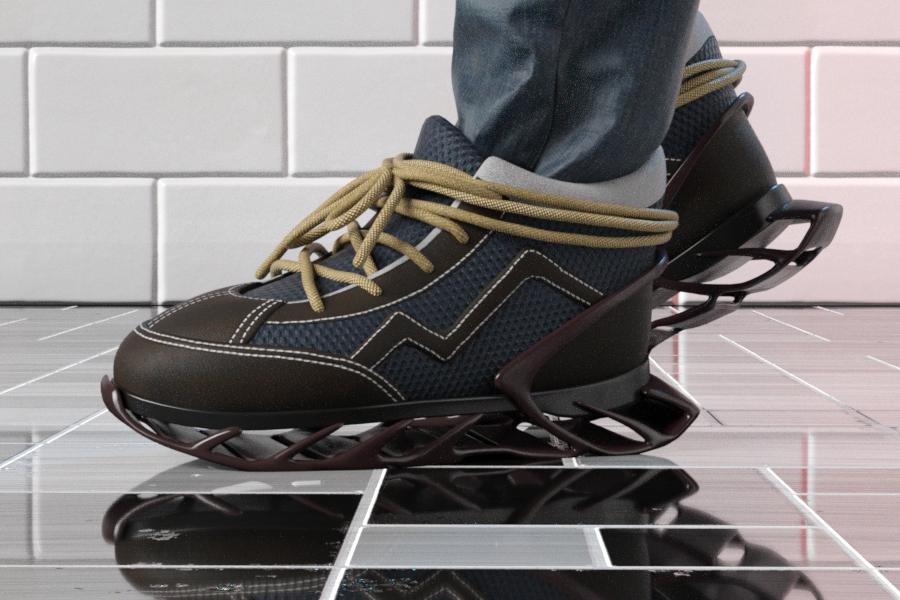
They're really nice items without the belts, and it's great to get some good regular clothing honestly, although I'm not 100% sold on the sneakers. The soles are a bit... out there if your characters don't commonly wear Yeezys or anything weird like that.
My kingdom for more actual gender-neutral standing poses.
EDIT: Very quick render of the shoes from the side (and it was very quick, because I hid everything except the jeans and shoes...) Great for running/parkour.
 Metadata problems - (Reason found)
https://www.daz3d.com/cc-angelic-accoutrements
GUID: 01c2990f-6003-4fe1-b0e4-9fafca217f14https://www.daz3d.com/only-dress-for-genesis-8-female
GUID: 6572a82b-1103-4b4e-9912-d781b8297b0279531 - Reindeer irradiator and poses (no link, it doesn't exist anymore in the store)
GUID: 869ce964-48cb-4179-b65a-5fe334e2bc8679534 - Sbibb kitten poses and morph (no link, it doesn't exist anymore in the store)
GUID: 5dd744e4-dd3a-45b2-bc31-2c3ff527b07chttps://www.daz3d.com/better-together-poses-for-genesis-8
GUID: 2f0b2a05-1cad-4508-944a-936b52b5e8e083933 - Half-timbered house (no link, it doesn't exist anymore in the store)
GUID: 65722092-e1a8-49e8-84eb-7a1f436dde12Edit to add: I have checked my user installed content and none of them conflict. Will update once I'm done searching the DSX files!
Searching for so-called Baby Face Adult Male Face CharacterGreetings. I am looking for a rounder adult face character, male, preferably for G8M or G9M. The ideal would have face morph and matching skin maps - very slight stubble or 5 o'clock shadow would be a jackpot. Very slight. Would prefer not to achieve with a weight morph or a child morph, but will likely go that route if search is unsuccessful. Softer jaw line, less high cheek bones,... Ethnicity not particularly important. Think of someone who does not have the traditional 'leading man' looks, although may have been a leading man none-the-less. The opposite of John Hamm and Henry Cavill. Someone typically expected to be hired to play the Jimmy Olson sidekick photographer character, not the Clark Kent Superman investigative journalist character.
EDIT: speaking of stubble, is there a 5 o'clock shadow or stubble skin overlay or geoshell for G8M or G9M? Would be better to separate the search.
DAZ Horse 3 - will there actually be any support this time?Oh c'mon. The poor beast just needs a proper horse morph...
DAZ Horse 3 - will there actually be any support this time?Cybersox said:
AlmightyQUEST said:
The rodent base was a more neutral base not quite like any of the animals it would morph into, so fingers crossed that's the plan here.
Perhaps, but let's not forget that that product line was abandoned after just a few releases, and that was after you had to buy the base first. I bought in thinking that we'd be getting rats, mice, weasels, etc, and instead there were only the odd choices of two diffent sets of squirrels and a porcupine.
That lack of follow through made me feel duped, and it really soured my on his products for a long time.
DAZ Horse 3 - will there actually be any support this time?AlmightyQUEST said:
The rodent base was a more neutral base not quite like any of the animals it would morph into, so fingers crossed that's the plan here.
Perhaps, but let's not forget that that product line was abandoned after just a few releases, and that was after you had to buy the base first. I bought in thinking that we'd be getting rats, mice, weasels, etc, and instead there were only the odd choices of two diffent sets of squirrels and a porcupine.
Is there a way to bake a geograft into the original mesh?Thanks for the reply.
Update Base Geometry requires the exact same number of vertices. The option to update everything overwrites everything and defeats the purpose. I had to use the transfer utility. It transfered most of the weight maps, but not the rigidity groups or maps. I had to manually do those as close as possible.
At the very least, I'm getting more comfortable with these tools. lol
Transfer Tool CrashingOk,
So here's an update... I watched several of Mada's videos, and browsed through the huge post that Felis linked above.
A couple things to note about my approach:
1). In D|S, I loaded G9DEV, set base feminine to 100%, zeroed, and exported "G9F"as OBJ.
2). Imported "G9F" into Hexagon, modeled the coverup, added materials, and exported the OBJ, coverup.obj.
3). Imported the coverup.obj into Blender to properly UV map, as Hex does a crap job of UVs. Exported coverup.obj and UV map.
4). In D|S, I loaded G9DEV, set base feminine to 100%. Imported coverup.obj, no pokethrough, and everything looks good.
5). Go to Transfer tool, set "G9F" as the source, and "current", and the coverup as the target. I selected full body template, and ran the tool.
6). Transfer tool works, but still have clipping. In the clothing, I see that there is a hidden slider for BaseFeminine_body_bs_Body, set to 100%. I set the slider to 0%, and the coverup looks normal, with no pokethrough.
Impressions:
1). I may be a bit daft, but still don't quite understand the G9 setup. I can see that for some common clothing, that it may be easier to model on the base character, and it will inherit some stretching/morphing for either the feminine/masculine morphs.
2). Going forward, say if I was to make a bikini for G9F, what would the process be, and would I go about it differntly than i did above?
3). What about if I was making a boxy 3-button suit for G9M? What should I do fifferently than if I was making it for G3/G8M?
Thanks, -David
Some of the HD morphs in the Genesis 8 Female Head Morphs package stopped workingRichard Haseltine said:
I also don't have mesages relating to QFS (which I would guess is Qt File System or Service, the file-handling code in the Qt framework used to build DS).
Try uninstalling the morphs, then go to \data\daz 3d\genesis 8\female\morphs\daz 3d\head\ in each content directory and make sure they really are gone, then reinstall.
Yes, upon uninstalling, the entire head directory disappears. I then reinstalled it.
I had discovered something intersting with one of my characters. The Crows Feet morph works on her, but only one side of her face. The other side, the control has no effect. She has Forehead Wrinkle set as well, but that also has no effect. What is even more interesting is that when I loaded the character later on today, the Crows Feet HD setting that was working, switched sides! It was initially on the right side of her face, but now it is on the left.
So, something weird is going on here.
Thanks,
Geo
How should i converting a G3 shape to G8Hmm ... your title is one question "How should i converting a G3 shape to G8" and your question in the first post is another topic.
To convert a shape to from G3 to G8, there are tutorials around however very briefly, one could make a clothing figure out of G8 {base mesh no geografts} fit to G3, dial G3 shape in, hide G3 and everything except the "clothing" and export out the .obj clothing of G8. The select G8 and bring the shaped .obj in as a morph.
........................
The question in your post:
I want to convert a product(https://www.daz3d.com/slinky-suit-for-genesis-3-female-s)to genesis8 and it include a pressure。
how can i use this pressure on genesis8
Select G3, load the clothing, the auto-fit usually pops up, select the appropriate clone ... and watch D/S turn the clothing into clothing on G8. If it's a keeper, select the clothing and resave it with a new name to new folders {so it doesn't overwrite the original files}.
n.b. If you haven't already, consider installing the auto-fit clones I made as they take into account the "T" and "A" poses.
Is there a way to bake a geograft into the original mesh?If Edit>Figure>Geometry>Update Base Geometry doesn't work I think you will have to run the Transfer Utility (with the original version of the clothing as the Source and the new as the Target - you don't have to go back to transfering from the base figure). I am not aware of any way, other than export as OBJ, to bake a GeoGraft and exporting would of course take you back to the same point as updating the mesh.
Transfer Tool Crashing-
Fixed #DS-2460 - Transfer Utility crash
-
Manifested when projecting from a figure to a prop with a projection template, particularly if the prop was the primary selection when Transfer Utility was invoked
-
http://docs.daz3d.com/doku.php/public/software/dazstudio/4/change_log#4_21_1_24
Transfer Tool CrashingFelis,
Your suggestion did work; however, when the auto-transfer happens, the garment pulls into G9F, no matter which projection template i use, even if I select none. I'm about to give up and go back to G3/G8. This is beyond maddening, especially with the broke forum engine. -David
Is there a way to bake a geograft into the original mesh?I made a mistake where I didn't double up the polygons where there is a hole in the clothing item and that area doesn't appear smooth. I've done all the weight maps and everything. I'd like to not start over. Transfer utility doesn't work great with this clothing item, but I think that's probably my only option. Just wanted to check if anyone has a better idea how to modify the original mesh.
Pig NoseI'm looking for pig nose morphs that will work on a G8F.
One of the nose morphs in this looks good for it, however these are HD morphs which I am told means they cannot be converted to G8. G1 Creature Creator Heads has "NosePig" listed amoung the morphs, but I'd like to know if there are any other options; both because it doesn't seem to be included in the product images so I can't tell what it looks like, and because I don't think that product has anything else I need that isn't covered by another product I want or already have. Does anyone know of any others?
DAZ Horse 3 - will there actually be any support this time?AlmightyQUEST said:
The rodent base was a more neutral base not quite like any of the animals it would morph into, so fingers crossed that's the plan here.
...I was hoping more related critters would have been based off of it.
Daz 3D is part of

Connect
DAZ Productions, Inc.
7533 S Center View Ct #4664
West Jordan, UT 84084Licensing Agreement | Terms of Service | Privacy Policy | EULA
© 2026 Daz Productions Inc. All Rights Reserved.