-
Definitely not convinced on Genesis 8 yet.
With this approach my full-packed G3 will definitely win over hollow G8 each time in every aspect :)
Seems like you don't understand my point. It's clear:
1. G8 is not 'new generation' of figures. Everything it has 'new' could be done as addons to G3 and many such addons already exist and are even superior to what G8 has in base: HD expressions, HD muscles, conforming eyelashes, realistic eyes. Nails might be implemented as geografts. In fact, most of products of these kinds do exist in numbers and many users have them already bought (I do).
2., Instead of extending existing figure or making real innovations DAZ decided to give 'next gen' name to what really is just 'service release' (remember Vicky3 SR1, V4.1 and V4.2 - good old times... ?). And now people start to wait Lilith 8, Gia 8 or what their favourite figure was and will eagerly empty their wallets when said figures will come like they did for 5, 6 and 7 generations.
3. So they changed default pose to make it difficult for average Joe user to use new clothes and other stuff on G3. (Even after excelent tutorial from SY you still need make manual corrections as transfer is never 100% accurate). Yes, A pose is better for those who model clothes but at the same time it's worse for shoes so 'aid to devs' is not an argument here.
4. Doing all above mentioned DAZ almost lost me as customer. Everything I bought after G8 release are PC+ items and some old stuff. And interesting old stuff is quickly coming to an end.
This really doesn't make sense.
Let me break it down.
1. Genesis 8 certainly isn't a massive tech change from Genesis 3, and while most of what it has could have been built into G3, all of what has could not. And those things that could not are, technically, important. This means Daz had a reason of some sort to consider those things important. Otherwise, they'd have been equally served updating G3.
2. Given that Genesis 8 is not really a huge tech change over Genesis 3, something about those tech changes that could not be retrofitted into G3 had to be compelling for Daz. Something about them had to mean either zero or negative revenue growth if they did not do those things, according to their market projection. Otherwise they would not have done G8.
3. Here you go off the rails. Because, for some reason, your instinct is to consider what Daz is doing to be a personal attack. They are out to get you, as opposed to possibly having a more logical reason. Because somehow, you seem to surmise that by attack people like you, Daz will make money. This really doesn't make sense. Daz is in a position hwere, being the dominant force in its market, it need not coddle you, but it is not so huge as to actively antagonize "the average Joe." It makes no sense for them to do so, even from a dirty money grubbing point of view. In this case, exactly because G3 and G8 share so much basic structure. It has been trivial to convert between them, with vendors and hackers dropping conversion tech into the market from day one. To argue that one must be super special, while a member of this forum especially, to use the conversion items is silly. No Daz figure has worked to some extremely high degree of utility without addons. The fact that conversion can be done so easily potentially makes Genesis 8 LESS profitable for Daz, as a great many products for one will work for the other. Perhaps they do hope the new shiny will blind people to that, or they hope the converts will lead people to retrofit G8 products to G3 to keep pipe flowing, but whatever their aim here, the A pose is not a personal attack, or a means of creating difficulty for "the average Joe." The A pose is, effectively, the industry standard for 3D humans outside the world of Daz and Poser. It's far more logical to consider that, especially given Daz's other products that a meant to connect the Studio product ecology to Games and Animation, that the switch to A pose was designed to increase market share. Since people using Daze stff in those areas often have to rerig daz figures to have them work within the frame work of the game engines. This is not different from Genesis 3 abandoning Daz's pet Triax weight system for the more standard general weight map. Triax, as tech, is superior to basic weight mapping, but it takes more time to set up. A lot more. (Yes, I know it doesn't have to take more time, but if you don't, it is just a general weight map that takes up more space.) Being more complex, and being that Daz was pretty much the only vendor to implement it, Triax was of no use beyond the existing Daz/Poser world which made Daz prodcts harder to use in Games and Animation. G3 was designed to be easier for Games and Animation. Similarly, the change from morph expressions to bone controlled expressions. G8's new power pose face template and A pose are directly in line with changes from G2 to G3. G3 was more friendly to Games via lower poly count, General weights, and face bones. Beyond that, the two figures aren't very much different. G8 is more friendly to Games still via a more subdividion friendly mesh, (slightly) lower poly count, better access to the rigging, and industry conforming rest pose.The fact that you don't need these things is irrelevant, because you dollars aren't going to keep Daz in business. Sooner or latter the bottom will drop out of the hobbist market. To continue to exist, Daz has to make it's products viable across as much to the 3D worl as possible.
It is almost sensible to view a corporate entity as parasitic. After all, they are designed in a way consistent with anti-social personality disorder. That said, they aren't all sociopathic, and you can often glean quite a bit about their motives from what they do. Daz, if it did not purse the wider market of 3D beyond posing stuff, would have no other option but roll out non-update figures as new shinies and hope to suck cash out of the unwary. If they had done this here, G8 would be no different from G3, except maybe the subd mesh, because that, alone make it harder to trans fer morphs. Instead, all of the changes to G8 suggest, strongly, that the figure is a bid to open or expand a new market.
4. Given what it seems clear that Daz is after, which is a whole new market segment, Daz can probably afford to risk losing you as customer. The thing of it is, on a long enough timeline, they can't afford to not risk it. The fact is, without expansion to new market segments, their endgame would be the same non-update release death spiral you already believe G8 to be.
5. None of this is meant to make you happy. Be as unhappy as you like with the new figure. The fact that an entity needs to do a thing to survive doesn't make that thing easier for everyone else. So by all means, be unhappy. This rebuttal is simply meant to point out that your interpretation of events is inconsitent with reality. It only holds up in a frame work where the only actors are Daz and people like yourself. I, my self, am not super impressed with Genesis 8 because so much of it is Genesis 3. But I can recognize the compelling business case behind, "G3 would be a lot more appealing to new markets if it worked like so." And I can understand that technical issues that would make retrofiting those specific things to G3 difficult, if not impossible. I can recognize enough of what makes these things work to have a fair idea of G8 would look like if it were what you believe it to be, and understand enough basic economics to know that it simply would not work the way you think it would. That, as G8 is right now, it represents a pretty big gamble on Daz's part, because so much of it can be retrofit to G3. Daz is trying to bury Victoria 4 (in part), not create a whole new version of that ecosystem by driving people to Genesis 3.
6. It probably wouldn't have been overly difficult to make a whole new mesh for Genesis 8, which would have totally killed backward compatability. More difficult, yes, but I could probably do it in a couple of weeks, all alone, and I don't have a day job doing this stuff. That would, perversely, be better evidence for your theory than mine. By completely ending all direct connection between G3 and G8 they really do make a new shiny with "hostage" type lock in. That they didn't suggest that that G3/G8's basic mesh is as nearly optimized as they can make it. They could have invented a new one, but it wouldn't provide any benefits. Which would make a compelling argument that they only did it to make life harder for the average Joe. The simple fact that they didn't suggests that making life harder for Joe was not, in fact, a priority. (I figure the complexity built into the Clone shapes and added clone data that allows G8 to interface with all of the Genesis line of wearables, if not perfectly, is at least 50% as much effort as making a new mesh. I could be over estimating that, I admit, they could have done it with a script. My thoughts of how they could fairly quickly have made a new mesh run in a similar direction, though, so I suspect it would even out. In short, they could have spent effort making things more difficult. Instead, they added tools to make things easier. They fact that it's not easy enough for you is irrelevant. Somebody was going to complain. I suppose you get to be somebody. In 2019, it'll be somebody else. If it isn't, that would be ironic.)Raine for Genenis 3It lists Vicoria 7 under Required Products so it uses as it states "This product uses the Victoria 7 UV Maps". You always can return it but you'll see that most of the newer models will require it. It's a necessary expense in my opinion.
Raine for Genenis 3Bought ir but the darn figure won't load with out an error Missing: data/daz 3d/genesis 3/female/uv sets/daz 3d/victoria 7/victoria 7.dsf
Victoria 7 basic cost almost twice as much as the Raine bundel
Nvidia Iray live preview viewport drops to CPU mode - #248297Submitted as Request #248297 linked back to this thread.
- - -
There have been several threads in the past in which customers mention that they are experiencing issues with Iray droping from GPU to CPU mode.
In theory Iray should only drop to CPU mode when the VRAM of the video card is fully used.
In practice it seems this is happening at seemingly random occasions with plenty of VRAM to spare.
- - -
Known workarounds for final rendering:
If you are done preparing your scene and are ready to render an image in the final render window it is highly recommended
- to save the scene and close DAZ Studio
- restart DAZ Studio, reload the scene and start the final render- - -
Drawback of Nvidia Iray live preview viewport dropping to CPU mode
What is the point of the Nvidia Iray live preview viewport?
A GPU live viewport is supposed to give an almost realtime impression at the same or a similar quality as the final render.
In theory:
Users are supposed to be able
- to preview different texture sets
- swap in and out different characters
- try different clothing, hair or props
etc.
In practice
After swapping in and out a few characters, textures and hair props the Iray Live Preview Viewport drops to CPU mode.
A look at both the DAZ Studio Log file and GPU - Z shows that only a fraction of the available VRAM was being used.
There does not seem to be any valid reason for the Nvidia Iray live preview viewport to be falling back to CPU mode as long as there is still plenty of VRAM available.
- - -
How can you know that the Iray live preview has fallen back to CPU mode?
1) You can check the DAZ Studio log file:
Help -> Troubleshooting -> View Log File...
for more information please compare:
2) Closely observe the info bar in the bottom left corner after you load a new object or texture with the Nvidia Iray live preview viewport active.
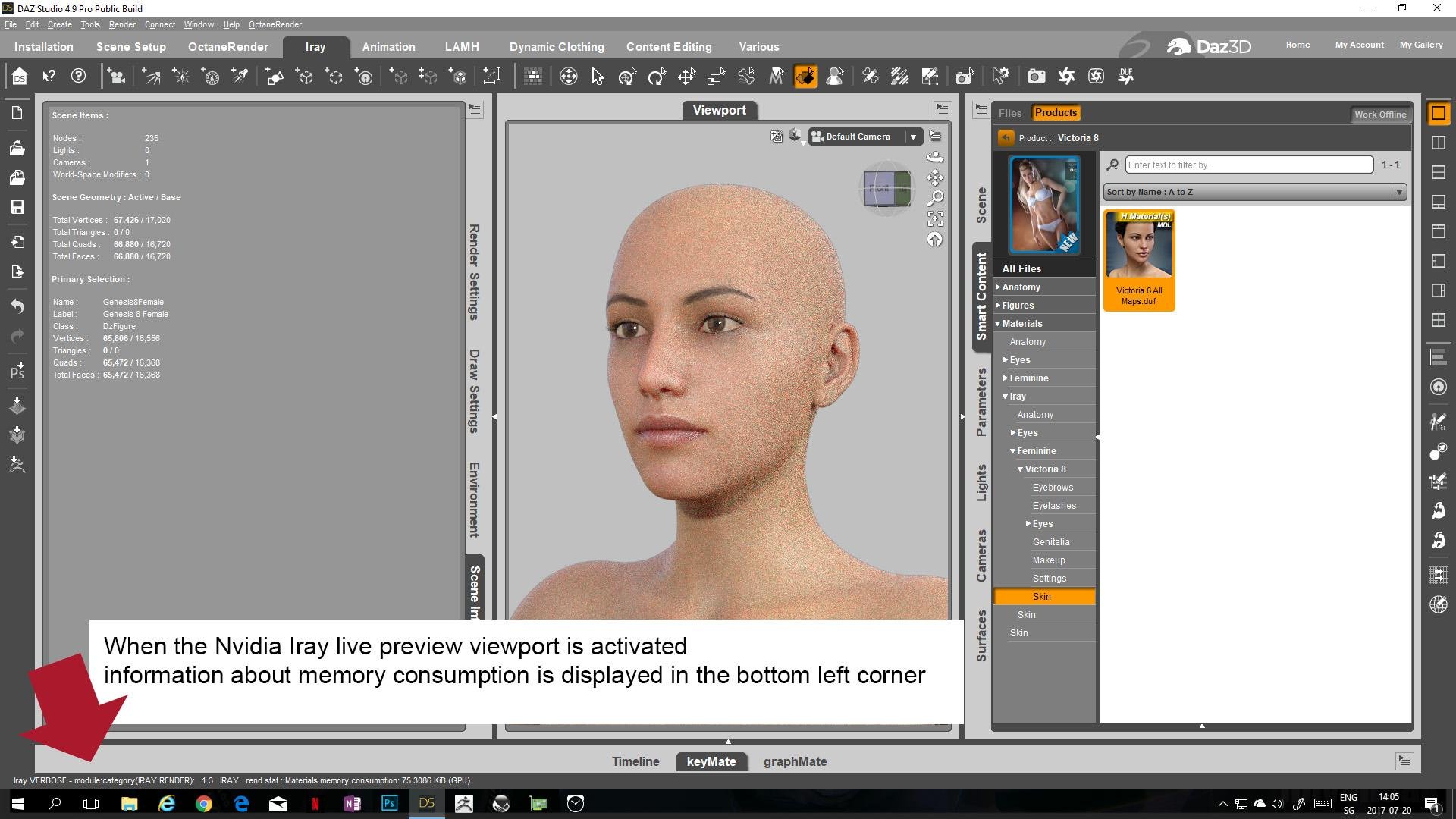
- - -
TEST EXAMPLE 01):
Update/Edit 2017 - 07 - 22:
System information:
DAZ Studio 4.9.4.122
Nvidia Game Ready Driver 384.76
Windows 10 Pro
OS Build 15063.483
1x GTX 1080 for the display
2x GTX 1080 Ti to render
based on the DAZ Studio log file:
The total VRAM is: 11 GiB
The available VRAM on Windows 10 is: 9.17244 GiB
-> This means with all other applications closed and only DAZ Studio running the Nvidia Iray live preview viewport should not fall back into CPU mode unless the whole 9 GB of VRAM are used up by geometry, textures, the frame buffer and the work space.
- - -
TEST STEPS:
Step 1) started DAZ Studio
Step 2) loaded Genesis 8 female
2017-07-20 14:03:04.769 Iray VERBOSE - module:category(IRAY:RENDER): 1.9 IRAY rend progr: CUDA device 0 (GeForce GTX 1080 Ti): Processing scene...
2017-07-20 14:03:04.769 Iray VERBOSE - module:category(IRAY:RENDER): 1.8 IRAY rend progr: CUDA device 2 (GeForce GTX 1080 Ti): Processing scene...
2017-07-20 14:03:04.770 Iray VERBOSE - module:category(IRAY:RENDER): 1.2 IRAY rend stat : Geometry memory consumption: 3.70369 MiB (device 0), 0 B (host)
2017-07-20 14:03:04.770 Iray VERBOSE - module:category(IRAY:RENDER): 1.11 IRAY rend stat : Geometry memory consumption: 3.70369 MiB (device 2), 0 B (host)
2017-07-20 14:03:18.045 Iray VERBOSE - module:category(IRAY:RENDER): 1.2 IRAY rend stat : Texture memory consumption: 549.001 MiB (device 0)
2017-07-20 14:03:18.046 Iray INFO - module:category(IRAY:RENDER): 1.2 IRAY rend info : Initializing light hierarchy.
2017-07-20 14:03:18.047 Iray VERBOSE - module:category(IRAY:RENDER): 1.11 IRAY rend stat : Texture memory consumption: 549.001 MiB (device 2)
2017-07-20 14:03:18.047 Iray INFO - module:category(IRAY:RENDER): 1.2 IRAY rend info : Light hierarchy initialization took 0.00s
2017-07-20 14:03:18.047 Iray VERBOSE - module:category(IRAY:RENDER): 1.11 IRAY rend stat : Lights memory consumption: 948 B (device 2)
2017-07-20 14:03:18.048 Iray VERBOSE - module:category(IRAY:RENDER): 1.2 IRAY rend stat : Lights memory consumption: 948 B (device 0)
2017-07-20 14:03:18.137 Iray VERBOSE - module:category(IRAY:RENDER): 1.11 IRAY rend stat : Material measurement memory consumption: 0 B (GPU)
2017-07-20 14:03:18.138 Iray VERBOSE - module:category(IRAY:RENDER): 1.11 IRAY rend stat : Materials memory consumption: 75.3086 KiB (GPU)
2017-07-20 14:03:18.312 Iray INFO - module:category(IRAY:RENDER): 1.9 IRAY rend info : CUDA device 0 (GeForce GTX 1080 Ti): Scene processed in 13.773s
2017-07-20 14:03:18.314 Iray INFO - module:category(IRAY:RENDER): 1.2 IRAY rend info : CUDA device 0 (GeForce GTX 1080 Ti): Allocated 4.37901 MiB for frame buffer
2017-07-20 14:03:18.318 Iray INFO - module:category(IRAY:RENDER): 1.8 IRAY rend info : CUDA device 2 (GeForce GTX 1080 Ti): Scene processed in 13.779s
2017-07-20 14:03:18.367 Iray INFO - module:category(IRAY:RENDER): 1.2 IRAY rend info : CUDA device 2 (GeForce GTX 1080 Ti): Allocated 4.37899 MiB for frame buffer
2017-07-20 14:03:18.369 Iray INFO - module:category(IRAY:RENDER): 1.9 IRAY rend info : CUDA device 0 (GeForce GTX 1080 Ti): Allocated 1.65625 GiB of work space (2048k active samples in 0.055s)
2017-07-20 14:03:18.529 Iray INFO - module:category(IRAY:RENDER): 1.8 IRAY rend info : CUDA device 2 (GeForce GTX 1080 Ti): Allocated 1.65625 GiB of work space (2048k active samples in 0.162s)- - -
Step 3) loaded alternative textures ( Victoria 8)
2017-07-20 14:05:33.262 Iray INFO - module:category(IRAY:RENDER): 1.0 IRAY rend info : Updating materials.
2017-07-20 14:05:33.265 Iray INFO - module:category(MATCNV:RENDER): 1.0 MATCNV rend info : found 78 textures, 0 lambdas (0 unique)
2017-07-20 14:05:33.271 Iray INFO - module:category(IRAY:RENDER): 1.0 IRAY rend info : Emitter geometry import (1 light source with 2 triangles, 1 instance) took 0.00s
2017-07-20 14:05:33.271 Iray INFO - module:category(IRAY:RENDER): 1.0 IRAY rend info : Updating caustic portals.
2017-07-20 14:05:33.272 Iray INFO - module:category(IRAY:RENDER): 1.0 IRAY rend info : Updating decals.
2017-07-20 14:05:33.274 Iray INFO - module:category(IRAY:RENDER): 1.0 IRAY rend info : Rendering...
2017-07-20 14:05:38.268 Iray VERBOSE - module:category(IRAY:RENDER): 1.9 IRAY rend progr: CUDA device 0 (GeForce GTX 1080 Ti): Processing scene...
2017-07-20 14:05:38.268 Iray VERBOSE - module:category(IRAY:RENDER): 1.8 IRAY rend progr: CUDA device 2 (GeForce GTX 1080 Ti): Processing scene...
2017-07-20 14:05:47.551 Iray VERBOSE - module:category(IRAY:RENDER): 1.3 IRAY rend stat : Texture memory consumption: 1.39478 GiB (device 2)
2017-07-20 14:05:47.552 Iray VERBOSE - module:category(IRAY:RENDER): 1.2 IRAY rend stat : Texture memory consumption: 1.39478 GiB (device 0)
2017-07-20 14:05:47.639 Iray VERBOSE - module:category(IRAY:RENDER): 1.3 IRAY rend stat : Material measurement memory consumption: 0 B (GPU)
2017-07-20 14:05:47.640 Iray VERBOSE - module:category(IRAY:RENDER): 1.3 IRAY rend stat : Materials memory consumption: 75.3086 KiB (GPU)
2017-07-20 14:05:47.640 Iray INFO - module:category(IRAY:RENDER): 1.8 IRAY rend info : CUDA device 2 (GeForce GTX 1080 Ti): Scene processed in 14.366s
2017-07-20 14:05:47.640 Iray INFO - module:category(IRAY:RENDER): 1.9 IRAY rend info : CUDA device 0 (GeForce GTX 1080 Ti): Scene processed in 14.366s
2017-07-20 14:05:47.640 Iray INFO - module:category(IRAY:RENDER): 1.8 IRAY rend info : CUDA device 2 (GeForce GTX 1080 Ti): Allocated 1.65625 GiB of work space (2048k active samples in 0.000s)
2017-07-20 14:05:47.641 Iray INFO - module:category(IRAY:RENDER): 1.9 IRAY rend info : CUDA device 0 (GeForce GTX 1080 Ti): Allocated 1.65625 GiB of work space (2048k active samples in 0.000s)Step 4) loaded Victoria 8
Removed Genesis 8 Female and loaded Victoria 8 from actor preset
Step 5) loaded alternative textures for Victoria 8
Tried out several different makeup presets
Step 6) loaded Lainey for Victoria 8
Removed Victoria 8 from scene and loaded Lainey for Victoria 8 from actor preset
2017-07-20 14:08:21.570 Iray VERBOSE - module:category(IRAY:RENDER): 1.8 IRAY rend progr: CUDA device 2 (GeForce GTX 1080 Ti): Processing scene...
2017-07-20 14:08:21.571 Iray VERBOSE - module:category(IRAY:RENDER): 1.9 IRAY rend progr: CUDA device 0 (GeForce GTX 1080 Ti): Processing scene...
2017-07-20 14:08:21.571 Iray VERBOSE - module:category(IRAY:RENDER): 1.3 IRAY rend stat : Geometry memory consumption: 15.2232 MiB (device 0), 0 B (host)
2017-07-20 14:08:21.571 Iray VERBOSE - module:category(IRAY:RENDER): 1.2 IRAY rend stat : Geometry memory consumption: 15.2232 MiB (device 2), 0 B (host)
2017-07-20 14:08:26.186 Iray VERBOSE - module:category(IRAY:RENDER): 1.3 IRAY rend stat : Texture memory consumption: 2.87624 GiB (device 0)
2017-07-20 14:08:26.186 Iray INFO - module:category(IRAY:RENDER): 1.3 IRAY rend info : Initializing light hierarchy.
2017-07-20 14:08:26.187 Iray VERBOSE - module:category(IRAY:RENDER): 1.2 IRAY rend stat : Texture memory consumption: 2.87624 GiB (device 2)
2017-07-20 14:08:26.187 Iray INFO - module:category(IRAY:RENDER): 1.3 IRAY rend info : Light hierarchy initialization took 0.00s
2017-07-20 14:08:26.188 Iray VERBOSE - module:category(IRAY:RENDER): 1.2 IRAY rend stat : Lights memory consumption: 948 B (device 2)
2017-07-20 14:08:26.188 Iray VERBOSE - module:category(IRAY:RENDER): 1.3 IRAY rend stat : Lights memory consumption: 948 B (device 0)
2017-07-20 14:08:26.331 Iray VERBOSE - module:category(IRAY:RENDER): 1.2 IRAY rend stat : Material measurement memory consumption: 0 B (GPU)
2017-07-20 14:08:26.331 Iray VERBOSE - module:category(IRAY:RENDER): 1.2 IRAY rend stat : Materials memory consumption: 172.973 KiB (GPU)
2017-07-20 14:08:26.498 Iray INFO - module:category(IRAY:RENDER): 1.8 IRAY rend info : CUDA device 2 (GeForce GTX 1080 Ti): Scene processed in 15.523s
2017-07-20 14:08:26.502 Iray INFO - module:category(IRAY:RENDER): 1.9 IRAY rend info : CUDA device 0 (GeForce GTX 1080 Ti): Scene processed in 15.527s
2017-07-20 14:08:26.503 Iray INFO - module:category(IRAY:RENDER): 1.2 IRAY rend info : CUDA device 2 (GeForce GTX 1080 Ti): Allocated 4.37902 MiB for frame buffer
2017-07-20 14:08:26.503 Iray INFO - module:category(IRAY:RENDER): 1.8 IRAY rend info : CUDA device 2 (GeForce GTX 1080 Ti): Allocated 1.65625 GiB of work space (2048k active samples in 0.000s)
2017-07-20 14:08:26.503 Iray INFO - module:category(IRAY:RENDER): 1.3 IRAY rend info : CUDA device 0 (GeForce GTX 1080 Ti): Allocated 4.37904 MiB for frame buffer
2017-07-20 14:08:26.504 Iray INFO - module:category(IRAY:RENDER): 1.9 IRAY rend info : CUDA device 0 (GeForce GTX 1080 Ti): Allocated 1.65625 GiB of work space (2048k active samples in 0.000s)Step 7 loaded alternative textures for Lainey
Tried out several different makeup presets
Also raised SubDivision level to 3.
Novica & Forum Members Tips & Product Reviews Pt 9V4's shoulder and armpits are the WORST! LOL.
For those who still use V4 regularly and want to fix those armpits/shoulders, there's a brilliant product at the "other" store by Corvas called SimpleDetailsV4. I bought it WAY back when I still used V4 and it eliminates those armpit problems brilliantly. It's a product that I wish everyone who uses V4 would use - I still cringe and die a little inside when I see art with V4 in the galleries and her armpit crease is practically all the way to her ear! Also check his freebies there - he's got a free "smooth details" that enhances the Simple Details or can be used alone.
Look at how poorly Victoria 4 poses- that ultra-rounded shoulder and the crease!
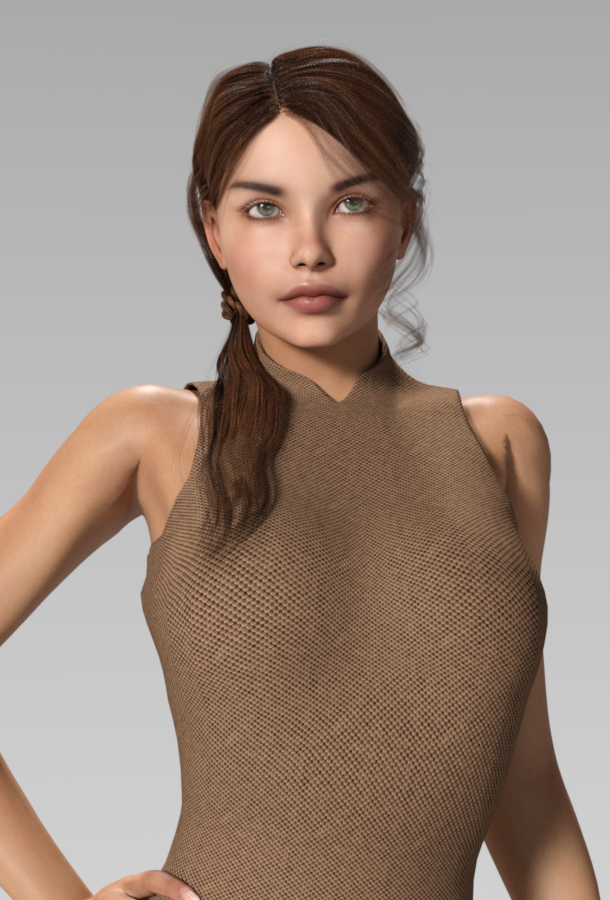
What product is this Short Hair?It looks like it might be this one. https://www.renderosity.com/mod/bcs/samira-bob-hair-for-victoria-4-and-genesis-3-females/116521/
Morphs from G3 to G8L'Adair - thanks for that. I've not had a look through yet but I have very few G3F characters, as I was mainly using Carrara and Daz did not update that to support G3F (hence I didn't buy loads of stuff!). So will this technique work with older characters? I have LOADS of V4 characters.
You're welcome.
The basics, how to use the Map Tranfer utility, how to create Material Presets, and so on will be helpful in a general way. However, the UVs are so drastically different between Genesis 3/Generation 7 and the previous generations, you'll have to find other ways to use V4, G1, and G2F on G8F. If you stay solely with Daz Studio, you should probably invest in Cayman's Legacy UVs products. We were talking about this in the tutorial thread, and I was reminded by @jakiblue you need your V4 materials converted to DUF files to work with Cayman's products. Draagonstorm has two scripts available. I'd recommend the slightly more expensive one, as it can batch convert an entire folder at one time: The V4 Skins Batch Converter to Genesis 2 Female(s). You'll need to have Victoria 4 for Genesis 2 Female for it work, but I suspect you already do. You may well have the batch converter, too!
Cayman has a Legacy UVs product that lets G8F wear the base female materials. If you decide to use that, you may have some DAZ "6" figures, like Victoria 6, you'd want to convert to the G2F base. The tutorial would work really well for that.
Novica & Forum Members Tips & Product Reviews Pt 9A few more quickies from Rendo, the SAV Alpha Scalp (a lot of different options, only one shown) and VH Nandi (which for some reason, would not install using DIM and the package assist product. Had to do it by hand.)
Nandi is wearing the OOT Side Tail Hair out of the box. I used IDG Shiny Scales Shaders on the shirt, which don't have to be shiny and make great shirt textures. She's V4. I mentioned in a previous post, I don't like the default eyebrows, they're "sleek" and shiny and need more texture. The only thing I'm tweaking is the skin, converting to Iray when needed.

Look at how poorly Victoria 4 poses- that ultra-rounded shoulder and the crease!
 How to get V4's Marie Elite body onto G8F?
Hello,
I am interested in getting V4's Elite Texture: Marie (V4EM) - http://www.daz3d.com/v4-elite-texture-marie - skin and body/head morphs onto the Genesis 8 Female (G8F).
So far I have been able to get her textures onto G8F by doing the following:
*Opening up V4 into Daz Studio
*Loading V4 Elite Marie Textures and Body Morph/Pose onto V4
*Saving-As a material preset
*Creating new scene > Loading G8F > following Cayman's Legacy UVs for Genesis 8: Victoria 4 instructions
Now I am in a bit of a pickle, because I am trying to figure out and understand how to get her body morphs/pose onto the G8F. I use the word "pose" mainly because technically her body morph is located in the Pose folder of the runtime library.
Any help would really be appreciated! Thank you in advance!
Out with the old, In with the new V8
I have to say that I'm really loving the new characters and the crisp realism .. the amount of details I can put into just her exressions alone make her well worth the investment if you haven't already picked up Victoria 8. With that said... I hope its not too far away until she has a mate and a baby... I'd love to see a Genesis 8 baby... I think that to avoid issues the baby should come with a diaper for modesty sake but I have to point out that infant related art for advertisments has the potential to be a million dollar industry so hopefully Daz can work out the moral issues.
Anyways... I know G8M couldn't be that far off... Keep up the good work and for making my renders BEAUTIFUL. I have a great set of poses for Gen 3 where the character interacts with snakes... would love to see a pose collection for Gen 8 that also does the same.. Those Gen 3 ones don't translate well when it requires interactions and hopefully Gen 8 male will release with couples poses if your really a clever bunch and the supersuite update if you wanted to knock it out of the park as you guys always tend to do.. More varied HDRI enviroments.. loved the flying in air ones as favorite.. gave my superheros space to fly in.. oddly enough, I'd like to see some European cathedrials and landmarks from around the world would be cool... Even little things like the Hollywood hills sign in the background .. let's not forget sacred grounds and night time scenes.. including a grave yard of course. Hotel parking lots.. Vegas or interesting city locations
Anyways.. thanks DAZ for making great products.Morphs from G3 to G8Okay... I'm not really finished with it, but I've started posting the link elsewhere, so I figure it's time to announce it here, where the inspiration came from...
From Map Transfer to Material Presets; A Step-by-Step Tutorial The tutorial uses Victoria 7 throughout, and walks you through using the Map Transfer utility to convert all the materials to the Base Female UVs, all the way through saving corresponding Material Presets in your own materials folder for ease of use with Genesis 8 Female. It was written with new users in mind, so if you are new to this hobby and follow along from start to finish, you shouldn't have any problems understanding what to do.
It's long, because the instructions are explicit, but the Map Transfer utility is simple and easy to use, once you know how. The same is true for saving Material Presets.
There are 20 DAZ "7" females, if you don't count the Centaur, (which didn't actually give us a new female figure.) That's a lot of options to leave behind when you're working with G8F and all those wonderful morphs we made! (I have 112. Ice Dragon Art admits to having 118. And you?)
I hope some, (many?) of you find the tutorial at least half as useful as I found this thread and all the help from Redz, Singular Blues and the others posting here.
This is going to be very useful and its much appreciated that you took the time to do it! I have to go back the morphs thread and start working on my G2f character clone....
Morphs from G3 to G8Okay... I'm not really finished with it, but I've started posting the link elsewhere, so I figure it's time to announce it here, where the inspiration came from...
From Map Transfer to Material Presets; A Step-by-Step Tutorial The tutorial uses Victoria 7 throughout, and walks you through using the Map Transfer utility to convert all the materials to the Base Female UVs, all the way through saving corresponding Material Presets in your own materials folder for ease of use with Genesis 8 Female. It was written with new users in mind, so if you are new to this hobby and follow along from start to finish, you shouldn't have any problems understanding what to do.
It's long, because the instructions are explicit, but the Map Transfer utility is simple and easy to use, once you know how. The same is true for saving Material Presets.
There are 20 DAZ "7" females, if you don't count the Centaur, (which didn't actually give us a new female figure.) That's a lot of options to leave behind when you're working with G8F and all those wonderful morphs we made! (I have 112. Ice Dragon Art admits to having 118. And you?)
I hope some, (many?) of you find the tutorial at least half as useful as I found this thread and all the help from Redz, Singular Blues and the others posting here.
Definitely not convinced on Genesis 8 yet.I'm sticking with G2, although there are some nice outfits out there for G8F. It's a pity that G8F clothing can't be used on G2F, but I'm not sure if I'm the only person who feels that way (I probably am :P)Go over to the Morphs for G3 to G8 thread and look for any post by Singular Blues. In his/(her?) signature, you'll see two links to Redz tutorials. Click on and download the Redz Tutorial for Adding Clones to G8. He uses G2F as his example, and walks you through making a G2F clone for G8F and a G8F clone for G2F. Once you have the G8F clone saved, per his instructions, G8F will show up in your auto-fit dialog, allowing you to auto-fit G8F clothing to G2F... as with all auto-fit, some things will work much better than others. But it's something. And it's free. You can test it on some of the free clothing items for G8F popping up at sites like Rendo, ShareCG, and Wilmap.
There is thread that explains exactly how to transfer G3F morphs to G38 AND includes the free clone that you need to do it.
To clarify, the instructions walk you through creating the clones you need. It's my understanding they couldn't just give us the clone... something about DAZ and IP, (intellectual property.)
I have converted 118 G3F characters to G8F in about 6 hours. They look exactly the same on G8F as they do as the original character. Cost to me? $0 in money and about 6 hours of my time.
I'll bet some of those are DAZ "7" base figures, like Victoria 7. Their materials won't work on G8F directly, but you can convert them via the Map Transfer utility. For anyone who needs help with that, I've put together a tutorial. I'm still adding images and such, but the instructions are all there: From Map Transfer to Material Presets.
Hair and clothing are interchangeable for the most part and its not very hard to save them in a way that saves all of the movement morphs etc in the clothing. Another free tutorial for that by Sickleyield I believe.
Yes, "my hero," Sickleyield: Convert Clothing G3 to G8, G8 to G3.
I haven't seen any issues with eyes on my transfers.... I can't speak for all the clothing as I haven't had time to really work at it but most of my transfers of other generations moving up (v4 to G2f, G2f to G3f, work pretty well.
The eyes can do really weird things with the extreme, toon or stylized, shapes, but for more realistic shapes there shouldn't be much issue. Using the Development figure to import the morphs, I've noticed what looks to be the inner eye mesh intersecting with the outer mesh, around the edges. But that outer mesh is the EyeMoisture, so it shouldn't be noticable. And if it is, you can always, set both Refraction Weight and Cutout Opacity to zero and hide it altogether, (in Iray. I assume you can do something similar in 3Delight.)
Released: Easy Shape Master - Age Control and Body Tuning for Genesis 8 Females [commercial]SF-Design "
Here is another promo showing Victoria 8 as a teen girl using the "YOUNGER" dial of Shape Master"That's a pretty convincing teen. Well done!
Thank you :) Glad you like it
ENOUGH Sexy Bikini Women@Mendoman "there's been quite a lot of talk about new Victoria and G8 in general. Some don't like the appearance of new Vicky, and therefore haven't upgraded. Then there's those, who have spent thousands of dollars in their library, and are not willing to start from scratch knowing that new G8 does not really offer anything ground breaking"
Same stuff was siad when G3F was introduced.
Released: Easy Shape Master - Age Control and Body Tuning for Genesis 8 Females [commercial]SF-Design "
Here is another promo showing Victoria 8 as a teen girl using the "YOUNGER" dial of Shape Master"That's a pretty convincing teen. Well done!
[Tutorial] From Map Transfer to Material PresetsI think you do need V4 figure tho - the skins need to be in .duf format for them to work with Cayman Studios stuff....if the V4 Elite Amy isn't in duf format, you need to load it onto V4, then save as a material preset in the duf format.
Thanks for the detailed walkthrough. Can you explain what you mean with the above? By explain I of course mean create another comprehensive guide with intermissions. Basically I bought this thinking it would work with V8, what can one do other than buy V4?To use your V4 materials on G8/V8, I believe the best solution for you is to get Legacy UVs for Genesis 8: Victoria 4. Cayman's product provides "Victoria 4 legacy UV maps for Genesis 8 and the geografts" so you shouldn't need to have V4 in order to take advantage of the product.
Thanks, Jakiblue. I forgot about the file type issue, not using V4 much. I believe it's still possible without V4, if you have Victoria 4 for Genesis 2 Female and one of Draagonstorms's scripts. I just applied Amy to G2F without opening V4. I have the aforementioned product and the V4 Skins Auto Converter for Genesis 2 Female(s). I bought it about a month before her batch converter was released. (I could have returned it and got the batch converter, but I had no clue about the 30 day policy!) This script requires G2F be loaded in the scene, and it applies the materials to the figure. You then need to save them as a .duf material preset. I'd say saving an entire figure's presets would be as tedious as doing the same through my tutorial! lol
The V4 Skins Batch Converter to Genesis 2 Female(s) doesn't explicitly state it saves to .duf files, but I think it does, based on the statement: "... you can select one folder, and the script will convert all of the .DS, .DSA or .PZ2 files, that are Material Presets, in that folder and it's subfolders to Material Presets that will work seamlessly with Genesis 2. ... Then you just press the Process button and let the script do the rest."
The thing is, if you don't already have these utilities, you're looking at $36-$38. And that doesn't include the cost of Cayman's product. Another reason, perhaps, for @yakasyes to opt for returning Amy...
[Tutorial] From Map Transfer to Material PresetsI think you do need V4 figure tho - the skins need to be in .duf format for them to work with Cayman Studios stuff....if the V4 Elite Amy isn't in duf format, you need to load it onto V4, then save as a material preset in the duf format.
Thanks for the detailed walkthrough. Can you explain what you mean with the above? By explain I of course mean create another comprehensive guide with intermissions. Basically I bought this thinking it would work with V8, what can one do other than buy V4?To use your V4 materials on G8/V8, I believe the best solution for you is to get Legacy UVs for Genesis 8: Victoria 4. Cayman's product provides "Victoria 4 legacy UV maps for Genesis 8 and the geografts" so you shouldn't need to have V4 in order to take advantage of the product.
[Tutorial] From Map Transfer to Material PresetsYou can convert the "6" figures materials to base materials, though, and then they'll work with the corresponding version of Cayman's Legacy UVs.Thanks for the detailed walkthrough. Can you explain what you mean with the above? By explain I of course mean create another comprehensive guide with intermissions. Basically I bought this thinking it would work with V8, what can one do other than buy V4?
To use your V4 materials on G8/V8, I believe the best solution for you is to get Legacy UVs for Genesis 8: Victoria 4. Cayman's product provides "Victoria 4 legacy UV maps for Genesis 8 and the geografts" so you shouldn't need to have V4 in order to take advantage of the product.
The only other suggestion I have is to return Amy and get your money back so you can purchase a G3F that will meet your needs. If you're heart is set on Amy, you need the Legacy UVs.
You can convert the "6" figures materials to base materials, though, and then they'll work with the corresponding version of Cayman's Legacy UVs.
Thanks for the detailed walkthrough. Can you explain what you mean with the above? By explain I of course mean create another comprehensive guide with intermissions.
You don't need another guide, you can use this one.
A "6" figure is any DAZ base figure for generation 6, aka Genesis 2. So Victoria 6, Gia 6, The Girl 6, and so. Each of these "base figures" has it's own, unique, UVs. Let's say you have Victoria 6 and Cayman's Legacy UVs for Genesis 8: Genesis 2 Female. You would follow along with this tutorial, using Victoria 6 everywhere it mentions Victoria 7, and Genesis 2 Female everywhere it mentions Genesis 3 Female or G3F. (There are some things specific to V7, like the issue with the eyes. But Cayman has a solution for the eyes so you can skip that bit.) When you are finished, you should have a folder of presets of V6 for G2F UVs. Those are the materials you'd use with Cayman's product.
I hope this answers your questions.
Legacy UVs for Genesis 3 [Commercial]I am ecstatic!!!! I picked up the one that applies V3 skins to G3F and I can FINALLY use all my whacky samildinach skins again! I'm still playing with iray conversion - this one I used the Anagenessis 2 (using the Genesis settings cos I'm not sure if it's Victoria 3 compatible???????). Does v3digitimes have an iray converter for V3 skins? (Unsure).
anyway, this is a really really quick test render (default iray render settings) just to test samildinach's V3 Ainenna skin on Olympia 7. So happy! LOL. (she's wearing a top as it's pretty much just pasties on the breasts so covering up for the forum)
One quick question - I don't want to use the V3 eyes, I want to keep the G3 eyes......is there a way of turning off or not applying the V3 settings?
I don't know of any one-click V3 to Iray solution other than just applying the ubershader... which actually doesn't work as badly as you'd think... but you can do the conversion pretty easily using the manual settings mode for NGS2 Anagenessis which, conveniently, also allows you to skip converting the G3 eyes. There's a thread on it here if you have questions: https://www.daz3d.com/forums/discussion/156011/generation-3-v3-m3-s3-a3-etc-iray-converter ;
Daz 3D is part of

Connect
DAZ Productions, Inc.
7533 S Center View Ct #4664
West Jordan, UT 84084Licensing Agreement | Terms of Service | Privacy Policy | EULA
© 2026 Daz Productions Inc. All Rights Reserved.