-
Celebrity Look-a-Likes for 3D figures Part 4
shg0816_13461e8196 said:
Intenzo over at Renderhub has some characters (definitely NSFW). Any thoughts on any of those?
Here is the list -
PS1 - Riley Reid
PS2 - Eva Elfie
PS3 - Sasha Grey
PS4 - Original Creation
PS5 - Original Creation
PS6 - Victoria Sweet
PS7 - Angelica (Abby C)
PS8 - Original Creation
PS9 - Nickey Huntsman
PS10 - Emma Evins
PS11 - Original CreationNo links due to nudity and the named ones definitely come with a NSFW search caution
So for whom is this tool for?Mada said:
Padone said:
Ivy said:
.. Ai generated by where the prompts follow a storyboard or story script ..
That's exactly the weak point of AI and why it's not useful, I mean at all. In a story, even for static backgrounds, you need various different views of the same environment, from different camera angles. Now AI can't do that, it can't "remember" a scene and give you different shots of it. The same as AI can't do different shots of the same character, eventually interacting with other characters and the scene.
Its rapidly reaching the stage where it can do that, and also where loras would be useful in training the AI to create different shots from the same environment. Using the same character is also a lot closer, for example the AI is trained to use Michael and Victoria right now so you can definitely get consistency across images.
That would be phenomenal. If the AI can allow to "save definitions" of characters and environments for later use, then understand the "director language" for the camera and lights and figure poses, then we can reach a point where manually doing it in a 3D app is no more necessary. But honestly, I'm not as optimistic as you that this is any close. Actually AI is only good to generate single images not related by any context, that makes AI completely unuseful for storytelling.
So for whom is this tool for?My thoughts after one week of experimenting with Daz AI Studio:
Separate applications for two different usage cases
AI tools can be used to enhance existing 3D software like Daz 3D Studio.
3D tools can be used to enhance AI Image Generators like Daz AI Studio.
I think it is great that there are separate software applications with a dedicated UI for two different approaches to create images.
Both have their advantages and disadvantages.
Daz3D is in the position to provide unique solutions based on Daz Studio for AI Image Generators
- a Pupeteer plugin for Daz AI Studio to adjust character poses in a 2D interface as ControlNet input
- a realtime 3D viewport for Daz AI Studio to pose a Genesis figure to adjust character poses as ControlNet input
- a real time 3D viewport for Daz AI Studio with a depth map shader to translate, rotate and scale 3D scenes as ControlNet input
- img2img for style transfer (announced for Daz AI Studio on about page)
- inpainting (announced for Daz AI Studio on about page)
- Face Transfer as a post-processing effect applied after image generation
3rd party solutions for those tasks do exist for local offline versions of Stable Diffusion.
Unfortunately, they cannot all be used for commercial purposes. Continued support and development is not guaranteed.
Daz could provide reliable long-term solutions.
Image quality & style
I am happy with the image quality of the current Daz AI Studio checkpoint for some types of images (sci-fi, vehicles, toon).
I had some luck with generating attractive characters without using the Victoria and Michael LoRA.
I found the results of the Michael LoRA interesting but was not happy with the look of Victoria.
Subjective taste, the uncanny valley...
I miss the ability to blend shapes or reduce the morph strength as in Daz 3D Studio.
An option to combine the LoRA of Michael and Victoria with other Stable Diffusion XL checkpoints to create different styles could be interesting.
All-purpose vs specialized checkpoints
I do wonder what will happen to the current checkpoint if it is further trained in different areas.
A prompt that in one specific area yields great results may create different results after further training with other images.
How often will there be training updates for one all-purpose checkpoint by Daz?
Would multiple specialised Daz checkpoints for different themes like fantasy, scifi etc. yield better results?
It might be useful to have access to past versions of checkpoints for long-term projects that rely on generating the same look of images.
So for whom is this tool for?Padone said:
Ivy said:
.. Ai generated by where the prompts follow a storyboard or story script ..
That's exactly the weak point of AI and why it's not useful, I mean at all. In a story, even for static backgrounds, you need various different views of the same environment, from different camera angles. Now AI can't do that, it can't "remember" a scene and give you different shots of it. The same as AI can't do different shots of the same character, eventually interacting with other characters and the scene.
Its rapidly reaching the stage where it can do that, and also where loras would be useful in training the AI to create different shots from the same environment. Using the same character is also a lot closer, for example the AI is trained to use Michael and Victoria right now so you can definitely get consistency across images.
Character preset saved without brows but will load with browsI know a lot of funnier ways to lost an hour or two than trying to use the Post Load Script Settings panel…
There is likely at least one bug in the duf file (I'll have to open a ticket). When I open the Post Load Script Settings panel after loading Fanny HD from her .duf file, it looked like that:

The 'JS Fanny Eyebrows.duf' is not located at:
/People/Genesis 9/Characters/JS/Fanny HD/AddOns/JS Fanny Eyebrows.duf
but here:
/People/Genesis 9/Characters/Daz Originals/Fanny HD/AddOns/JS Fanny Eyebrows.duf
I fixed it and as nice bonus, Fanny HD's Eyebrows are now loaded automatically, but I have a question regarding this panel : most elements' paths start with 'data/' but one starts with '/data/'. Are both equivalent or is one of them an error ?
I played a bit with the setting: first, I removed any mention of the MATs files which was not my best idea because I ended with gray eyes, grays eyelashes and grey mouth (I did it because looking at Victoria 9 Post Script Settings panel, there was no mention of MATs files). Then I replaced all mention with what seems to be the accurate files but ended with the wrong eye color (I changed it to see how it would react) and the normal maps that are supposed to be added were not:

Then, I moved the Eyes at the bottom of the list of addon to load (well, moved, I had to duplicate it twice because I didn't find a way to change either the name of a sub-setting or how to move a sub-setting), which solved the item color but trying to add a sub-setting just to load the normal maps didn't change the situation.
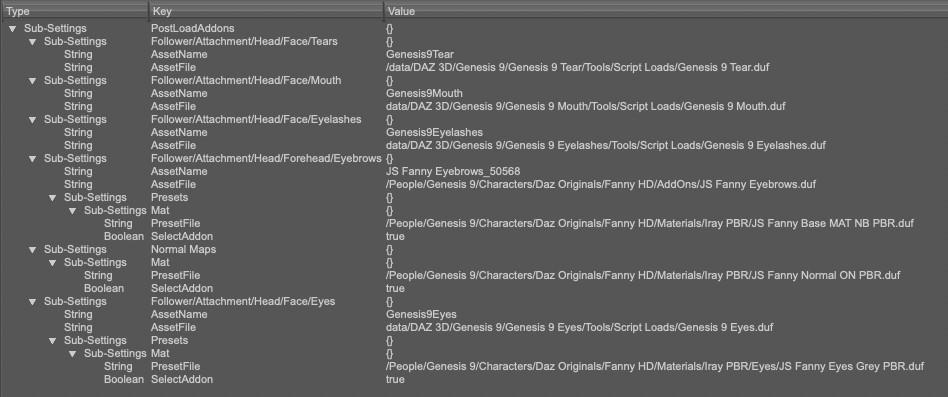
I also tried to create a material presets, but still no normal maps (while loading manually the material presets added the normal maps just fine).
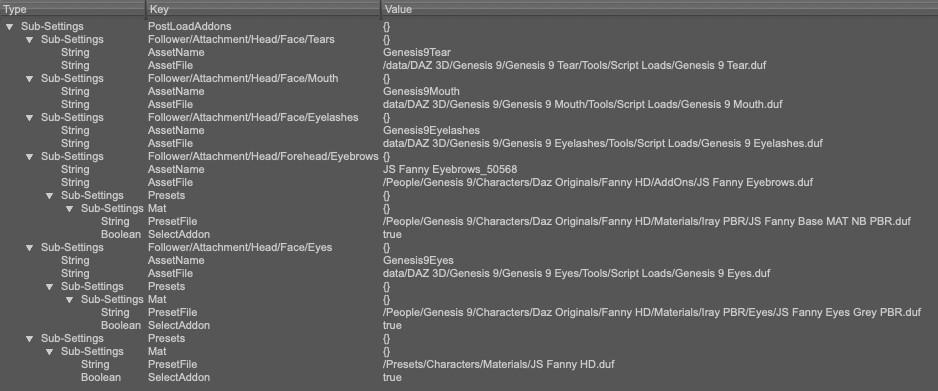
I'm likely doing something wrong, but I don't see what (not that I really understand what I'm doing in the first place). If someone has an idea, I'm all ears

In the meantime, I now have a character preset that will load the base character with the correct PBR map, the correct eyes color and a material presets that will take care of adding the normal maps.
There's Always Another Sale Thread -- Discussions Only Pt 2pctech4ny said:
Richard Haseltine said:
pctech4ny said:
I'm tempted to get one ofd the "Welcome New" items just because I see Decimator as one of the $10 bundles that would unlock... Is it still useful these days? For instance say the occasional clothing or prop object that has WAY too many polygons than are really needed?
Too many for what? Generally it is texture sizes, not polygon count, that is limiting for Iray.
I am reminded of the situation with the first outfit for Victoria 9 and all the discussions about that. So yes it may be a rare case but if I really needed to optimize a scene to cram more stuff into my 12GB VRAM, that would be another tool I could use, I can already use Scene Optimizer to reduce texture sizes.
But there are other things I could probably use in the near-future, rather than a hypothetical case for Decimator. Maybe I'll just pass this time and keep checking the deals evey day and eventually the things on my wishlist can be finagled into a good deal.
That (cramming the scene) would be you RAM not GPU VRAM
Aiko 3 textures to v4Moved to Techncial Help as itr is not a Daz Studio question.
I don't think there are any tools to do this, no, though you could do it in anything that allowed baking materails from one model to another if you made n Aiko 3 mesh shaped like Victoria 4 or vice versa
There's Always Another Sale Thread -- Discussions Only Pt 2Richard Haseltine said:
pctech4ny said:
I'm tempted to get one ofd the "Welcome New" items just because I see Decimator as one of the $10 bundles that would unlock... Is it still useful these days? For instance say the occasional clothing or prop object that has WAY too many polygons than are really needed?
Too many for what? Generally it is texture sizes, not polygon count, that is limiting for Iray.
I am reminded of the situation with the first outfit for Victoria 9 and all the discussions about that. So yes it may be a rare case but if I really needed to optimize a scene to cram more stuff into my 12GB VRAM, that would be another tool I could use, I can already use Scene Optimizer to reduce texture sizes.
But there are other things I could probably use in the near-future, rather than a hypothetical case for Decimator. Maybe I'll just pass this time and keep checking the deals evey day and eventually the things on my wishlist can be finagled into a good deal.
Character preset saved without brows but will load with browsHello,
I saved a character preset using the no brows textures from JS Fanny HD but when I'm loading it, the preset will load with the textures with brows baked in

I tried to save the character preset a couple of times, thinking that the previous time, I may have been too tired and did something wrong, but the result never changed.
To explain my process:
- Loading Fanny HD
- Applying the no brows material settings from the IRAY PBR material directory, then setting the Normal to On
- Saving character presets
- Loading it
With other caracters (like Victoria 9), that process is working fine and no brows are baked in the textures shown when loading a character preset saved without them. But with Fanny HD, here's the result (character saved on the left, character preset loaded on the right):

Scene tab also shows that no brows are loaded:

If someone's has an idea, I'm all ears
 So for whom is this tool for?
I am in the multiple tools in the toolbox camp. With shadow catchers, any 2D image generated in any way can be combined with a 3D workflow. The online Daz AI image generator is just one more way to get a 2D image. I am OK with using a background from Polyhaven (or whatever it is called these days) and sticking a Michael and Victoria walking on its beach. I am OK with using a pic of my local state Capitol building from my phone and inserting Daz Dragon 3 circling the dome in a variation on Earth vs the Flying Saucers. And in the case of Daz AI, my personal opinion is that the data used to train the AI model were legally acquired. That legality issue isimportant tome because reportedly some AI databases were acquired under false pretenses. My opinion might be right or wrong, but the current version of Stable Diffusion I have been learning from has many assets acquired under the premise the assets were being acquired for educational purposes, not for profit. As long as I am using Stable Diffusion for educational purposes, includuing teaching myself basic concepts of a combined AI workflow, I am OK with my current use of Stable Diffusion. But I will be moving on from Stable Diffusion at some point, perhaps even for profit (I can dream). I am glad that Daz3D is trying to make its asset library useful in an AI workflow. Might turn out great, or might fail. But I am glad they are trying.
Artificial, yes. Intelligent, not so much.Yes, Richard, thank you. And I remember now who the red hair of the beautiful Victoria 9 reminds me of. After all, this is her. Just think, if you had not presented this picture before my eyes, perhaps I would never have guessed about this mysterious connection between two beauties. What a pleasant discovery!Getting on the 9 train, or notRichard Haseltine said:With my two daughters, one looks like my wife, one looks like a female version of me. They look utterly unrelated. Victoria 8 & Charlotte 8 look more related than my daughters. Reality is messier than simple assumptions. Regards, Richard.
An idea that could make a real breakthrough in AIeliezerbh_813cdbc78b said:
If it were possible to create a character based on the facial features and body of a character with a certain name from your content, as well as give her a garment from your huge content, as well as hair and shoes and poses and facial expressions, everything comes from the huge content that daz offers to its customers, this would be a wonderful and unique thing that does not have the possibility This in no other AI.
Because of the way these systems work, what you're asking for isn't that easy to achieve. DAZ would need to build additional models called LoRAs ("low-rank adaptation") for each of the pieces of content that you might want to use, and use them to condition the output by combining them with the main model. In fact, that's probably exactly how their "Michael 9" and "Victoria 9" options work: they've built LoRAs trained on images of Michael and Victoria, and when you ask for Michael or Victoria, they add the appropriate LoRA into the generation process.
They'll probably add more over time, but creating LoRAs for every piece of DAZ content available would be very costly. Training AI models is expensive and requires non-trivial amounts of time and computer power.
Also, regarding the selection of the environment, the time and the weather and again from the content offered here on the site. This will enable some important and unique things that no other AI has.
Again, that probably involves building custom LoRAs. I would guess that if they do this then 'time of day' and 'weather' might be the first things they'd add, because those probably have the widest application. Developing LoRAs for specific environment content would have the same issue as developing one for a specific character: there's a lot of content, and you'd need to decide which pieces you want to build the LoRA model for.
There are other issues too. Suppose that DAZ decided to build a LoRA based on content from a specific PA, say Stonemason. You could build a training set from all Stonemason's sci-fi sets, for example. That would give you (if everything went well) a LoRA that could be used to create sci-fi images more or less "in the style of Stonemason". If I were Stonemason, I don't know how I'd feel about that.
So DAZ would have, at the very least, some tricky licensing issues to resolve.
Keeping a character exactly the same throughout several identical scenes which will open up the possibility for creators of comics and stories that require successive scenes of identical characters and environment.
This is something that the latest versions of the generators are starting to add: the ability to create character or setting consistent from image to image. I haven't played with any of the most recent iteration, so I don't know how well it works. My guess would be "sort of"; there's always going to be some drift from one image to the next, some of which may be almost unnoticeable, some of which may be glaring. This is actually an area where, again, a custom LoRA based on a specific character would help.
And later perhaps develop a character with specific ethnic motifs that are not found on the site such as appearance, hairstyles and clothing that are used in all kinds of countries and peoples or periods and according to these guidelines create the plot that corresponds to the period, the country and the culture of the clothing and appearance of the people living in it.
For these motifs, you need input images to use in your training set. Lots and lots of images. Where are those images going to come from? How are they made?
No one has done this yet in AI and as we will see DAZ AI can do it more quickly because of the existing content.
think about it !My best guess is that DAZ has basically taken the Stable Diffusion engine (and probably one of Stable Diffusion's bigger models, such as the one built from the LAION-2B data set) and is customizing the output by applying assorted LoRAs trained on DAZ content in order to give the results a specific "DAZ-like" look and to influence the human figures to resemble specific DAZ figures (Michael and Victoria presently). I would guess that they worked with Stability.AI's engineers to build training sets based on images made with DAZ content, including their flagship human figures.
They can probably automate the process of creating training images based on specific pieces of content to some degree. It's quite likely that they already did that for Michael and Victoria, so they may have a set of tools that will take any figure and render out large numbers of images of that figure from different angles, different lighting conditions etc. Those images then get fed into the training process to create the LoRA models.
If I'm right that they've automated that part, then they have an advantage. But it's a step up, not a magic bullet. They still have to pay the cost of (a) rendering all those input images, and (b) computing the LoRA from that. Both those parts are computationally expensive -- which means that they're costly in real world terms. The results are also not guaranteed; there's always the chance that they'll find that particular models don't tend to reproduce well in this way.
Unless Studio AI proves to be very profitable to DAZ, they'll probably only do it for a quite limited range of content. The economics are just against doing it on a very large scale.
Will products already owned work in AI Studio?alaltacc said:
Richard Haseltine said:
sausagemix_d9e00246a7 said:
Lol wasnt AI supposed to DeMoCratiZe art??? Looks like its just another new pipeline to siphon money off people with a passing interest in art in order to pay ever increasing fees to make it. Reminds me of streaming vs cable. In year or 2 the costs of these products/subscriptions will cost as much as having adobe or zbrush. And for what? an amalgamation of other peoples styles.
There is a free tier, though. Whether it will get more free content in futue I don't know, but it certainly wouldn't surprise me.
DAZ servers (even if they are rented servers) cost money (very costly graphic cards, electricity, etc). I can understand charging for the use. My problem is that it looks like we would need to buy every product again (or at least to buy an extension of the license) to use them in the AI generator.
I can understand that there are licensing issues even with the PAs (when they put their products for sale there was no provision for creating LoRas out of them), but for someone that already uses Stable Diffusion (a lot) in my own computer with all the LoRas, Controlnets and whatnots on one hand; and that have spent a good chunk of money building a Daz library to use inside Daz on the other hand (I'm even a Daz+ subscriber), it's really really hard to pay extra to use these (same already paid for) assets in the online AI generator. So, apart from my view that the AI shoud have been integrated in Daz Studio instead of being used as a stand-alone product based on Stable Diffusion (and vastly inferior to a local installation of SD), there's also the frustration of not being able to use the products that I already have without paying extra.
This has been updated with AI provisions. But do they apply retrospectively?
https://www.daz3d.com/eula#general_license
I bought most of my content before AI was a thing. Surely the rules I accepted at that time are what counts? Otherwise Daz could turn round and move all my assets to a subscription model within Studio! I am not a lawyer, so maybe common sense doesn't apply here, and Daz can indeed change the rules underneath us?
So as an example, I didn't agree not to make a Victoria 7 LoRA back when I bought her, so what's to stop me now? And even if there is something if I don't share it, does it matter? Who would know?
I should say, I'm done with AI,because but I find the process boring, but I also find the technology interesting, and I am curious about these things...
Daz AI Studio - Official Beta Launch!LoRA strength
Are there plans to add a dial to adjust the strength of the Victoria 9 and Michael 9 LoRA?
Customers might be able to achieve interesting results if they could manually adjust and experiment with LoRA strength.
Potentially unwanted side effects of LoRA
LoRA strength sliders could improve the overall image quality when using LoRA.
LoRA tend to orverride the style of the base checkpoint with sometimes unwanted side effects.
Example:
The Victoria 9 LoRA may not only add the face of Victoria 9 but also an auburn hair color, the ponytail hairstyle, clothing, monochrome backgrounds, lighting, etc. of the images used in LoRA training.
Lowering LoRa strength to 0.6 - 0.8 could provide the benefit that only the most trained attribute, in this case the face of Victoria 9 is applied.
###
Maybe LoRA strength sliders may be implemented when additional LoRA for clothing, hairstyles, lighting, environments are added?
They want to make us pay for characters we've already purchased to use in AI image generation?frank0314 said:
mike.smith2005 said:
Leonides02 said:
They want to make us pay for characters we've already purchased to use in AI image generation?
Where do you see this? Not that I'm arguing, I just don't see that said anywhere.
It doesn't
There is this in the FAQ under section "How do Products Work"
Our Free and Paid users will have access to our core characters Victoria 9 and Michael 9 with other characters available for purchase from the store in the future that you can add to your account.
I am not sure what that means, but the implication is that you can acquire content to use in the AI engine. It is not clear if you will need to repay for content already owned, or have to purchase another add on licence, like we need to for Interactive, or 3D Printing.
Getting on the 9 train, or notIt looks like Daz AI Studio will be using Genesis 9 only, which makes sense, as it is the latest generation.
If you look at my Victoria 8.1 to Victoria 9 side-by-side picture (caution: NSFW) Victoria 81 vs Victoria 9 - side-by-side by alien-area on DeviantArt
https://www.deviantart.com/alien-area/art/Victoria-81-vs-Victoria-9-side-by-side-1038921915the differences are personal taste. Also, if you are not focussing on portraits, but pictures showing the full character or more than one character, the 8 K pbr skins are overkill.
I got could results with https://www.daz3d.com/1-click-pbrskin for G3 and G8, so I guess I will stay with my installed base for a long time, casually adding environments.
Daz AI Studio Discussionsoutrider42 said:
If you refresh the page, you lose everything on the page. It does not save anything. So if you want to save your pics, you need to save them from the browser before you close the tab or do any refresh. If you want to save a prompt, maybe whip out the old Note Pad.
Daz would need to add training data for a crazy number of products. With well over 20,000 products, it just isn't possible. Even limiting it to G9 items and more recent environments/props/vehicles ect would be a challenge. It takes time to train a Lora. And in this situation, they need to also render all the images first before doing any training. That's a pretty serious project.
There are people on CivitAI who somehow upload multiple Loras every week, but they are dedicating all their time to do that...making Loras has become their full time job (they typically have something like Patreon to support them).
But that raises some questions. While Daz stated this is being developed by a different group of people outside of Daz, I would assume these people get paid to do this work. Thus one would conclude these are resources that could perhaps be used to help improve Daz Studio by adding more developers to the team. I would think getting Daz Studio 5 across the finish line would be a bigger priority than chasing after AI generation. Daz AI is extremely limited, and even if they add a bunch of stuff it is always going to have some guardrails attached. Meanwhile people can go to CivitAI and use any number of custom checkpoints and loras, not only can they can download locally, they can also generate images online through CivitAI itself. That gives people far more options and freedom. Maybe they do not have Victoria 9, but they certainly have loras that specialize in redheaded women with freckles. Yes, you can get consistent characters using already available loras, plus many more. So Daz is not offering anything that is truly new here.
I will add that CivitAI is priced higher. Like DazAI it has a free plan, but you are limited by a currency called "buzz". You use buzz points to generate an image. There are of course paid plans, but they start at $10 and go all the way up to $50 PER MONTH, while DazAI is $4 (for now). So there is that, but as I said, you can download these to use locally without any restrictions. If you have a PC that is decent for Daz Iray, chances are it will also be decent for Stable Diffusion. You can even use GPUs with just 4GB of VRAM. To use SDXL, which is what DAZAI is based on, it is better to have 8GB or more. But it is possible to use small capacity cards and you even use AMD GPUs. Though I must warn you, AMD is not great for rendering AI, but the option is there, they will function, just slowly. Even the lowly 4060ti can run AI very close to the fastest AMD GPU available (7900XTX,) which is kind of sad. But at least it is possible to use AMD.
All that said, AI still has a lot of problems. It is pretty much only good at basic poses. Anything besides "standing straight and still for a portrait" starts to get funky. You want an action shot, good luck with that. You can use image to image as a pose template, which can be very cool when it works. In fact, in theory you can even draw a stick figure and use that as a guide pose. But it doesn't always work (rather it kind of rarely seems to work as well as you hope). If you really want consistency, you want true 3D models. But AI can be fun to play with. It can scratch that loot box/gambling itch, because sometimes you never know what you are going to get next. You might get something really cool and unexpected, or you might get another mutant freak to haunt your nightmares. That element of not knowing can be part of the fun for some people.
OK, thanks for the answer.
I will save future DAZ AI prompts & images locally then.
I don't see what's preventing DAZ 3D/their hired developer vendor from allowing the DAZ AI users from uploading their own DAZ Studio renders made with the products the users own as a "Learning Appendix" to the DAZ AI superset that is currently available to us all. That is how I made, or rather, the AI at Creator.NightCafe.Studio made the current avatar I am using on the DAZ forums. I suppose I could upload my DAZ renders at NightCafe.Studio as a new training subset and in that way I can create subject matter trained subsets.
I have installed a version of Stable Diffision and used it a few times on my local PC, LOL, the hardest part was finding the images' and videos' location after I generated them. Even though I have only an RTX 4070 the generation was impressively fast. For now my interest in having it local is eventually to get around to building and linking it locally. I prefer the ease & speed of NightCafe.Studio though as I get 10 easy credits a day (more is possible but I'm too lazy to do the extra work needed) and add 100 more credits via a $15 a quarter Pro subscription. I'm mostly just hoarding credits now as I'm sure the AI will get better, faster, cheaper, and give the 'prompter' more finely honed control over the image, eventually. Currently the AI produces mostly somewhat random pathways to combine it's stored data when you get beyond a certain set of basic requirements, maybe it needs to be trained in motion and a lot of other things, which can be entertaining in itself to see what it comes up with.
Comparing Daz AI to Midjourney - thoughtsIn the current beta version of Daz AI Studio an Upscaler is not yet implemented.
The upscaler does not only increase the resolution of the image by a factor of 2x or 4x but can also add or remove (skin) details.
I used the upscale model
4x_foolhardy_Remacri
for most Stable Diffusion images featuring characters
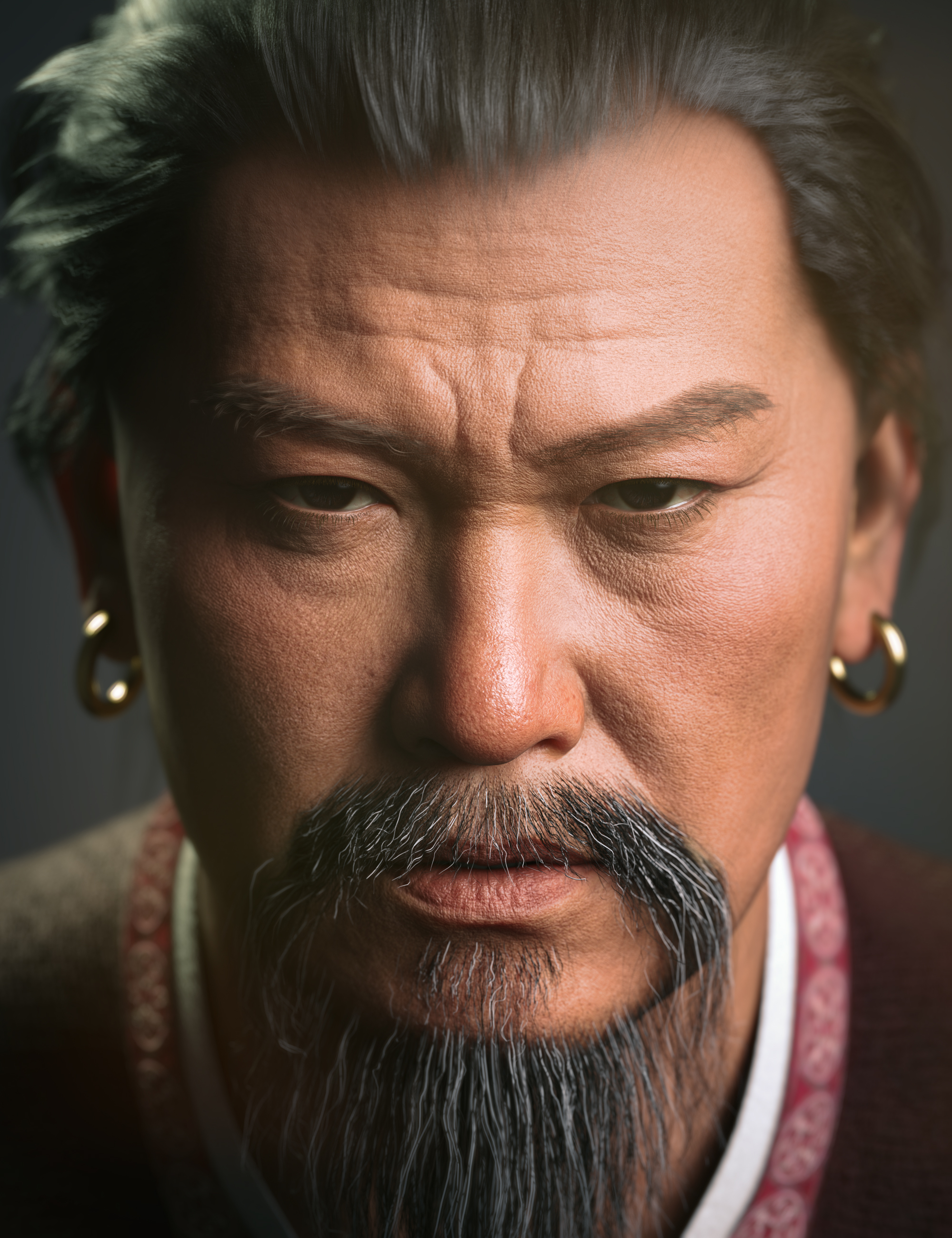
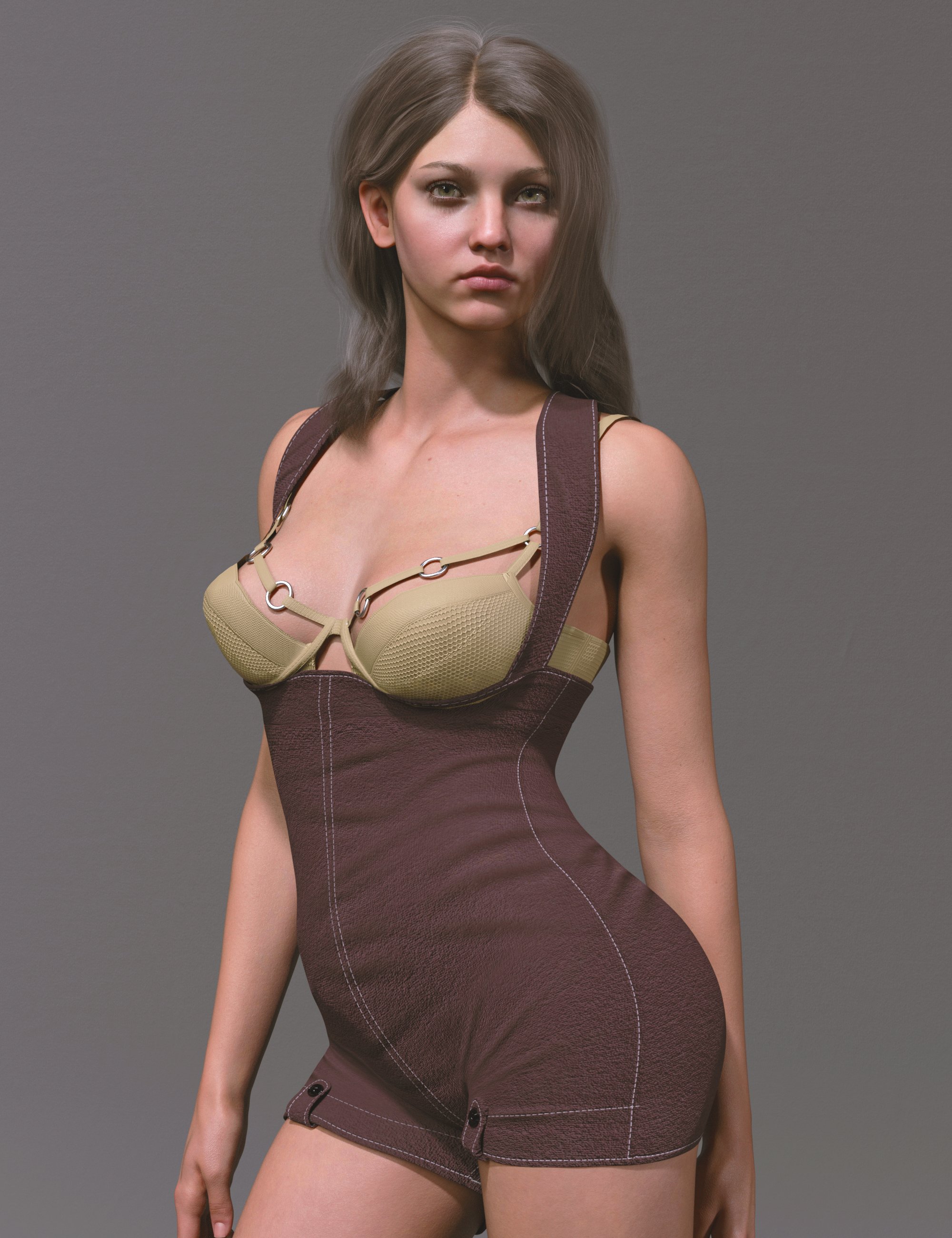
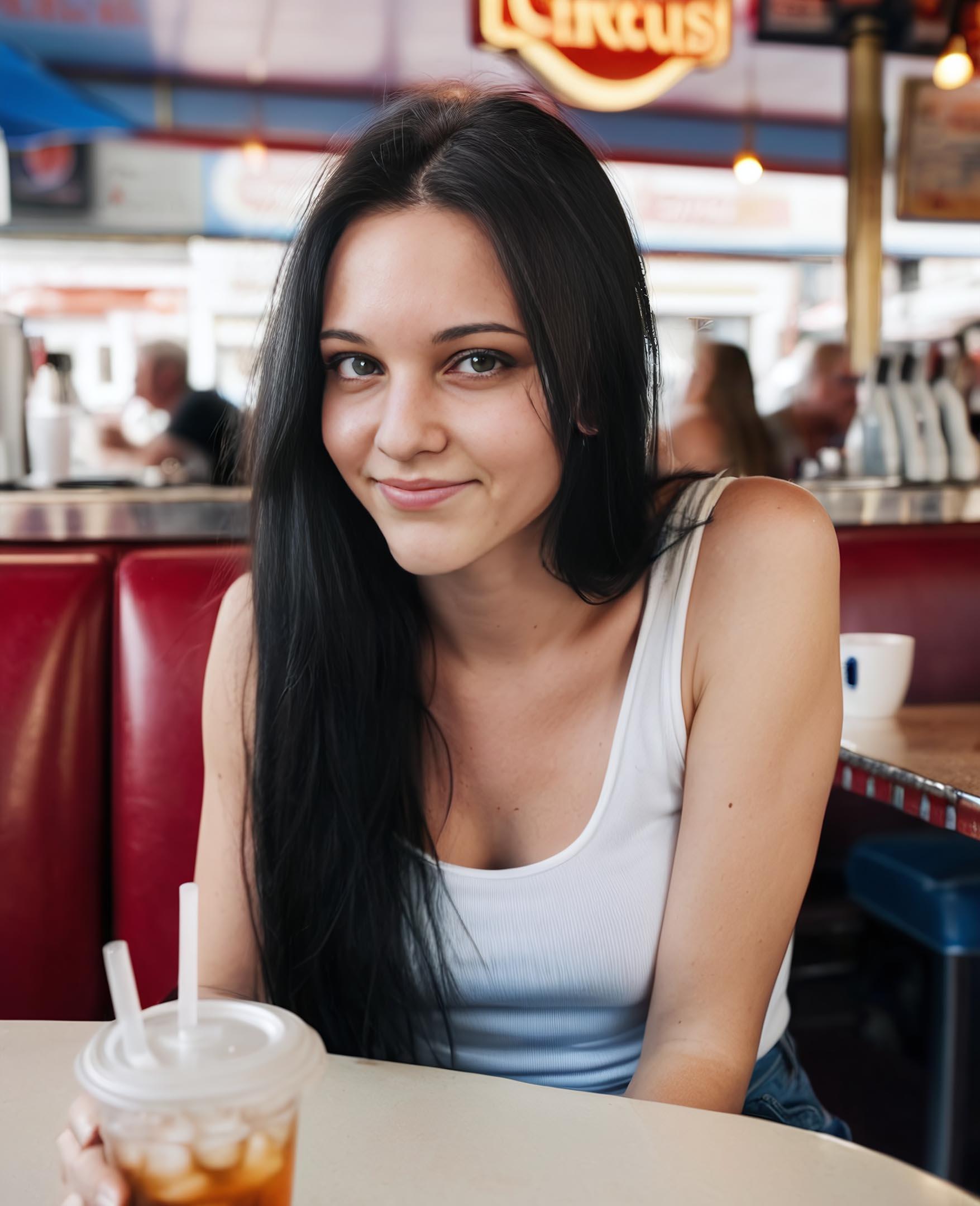
Some examples showing what can be achieved with custom Stable Diffusion XL workflows using licensed Daz 3D characters as img2img source:
Genghis Khan 9 HD (Daz 3D store promo image)
Stable Diffusion XL with checkpoint Copax TimeLessXL:

Giana HD with Expressions for Genesis 9 (Daz 3D store promo image)
Stable Diffusion XL with checkpoint epicrealismxl:
KOO Virgil HD for Genesis 9 (Daz 3D store promo image)
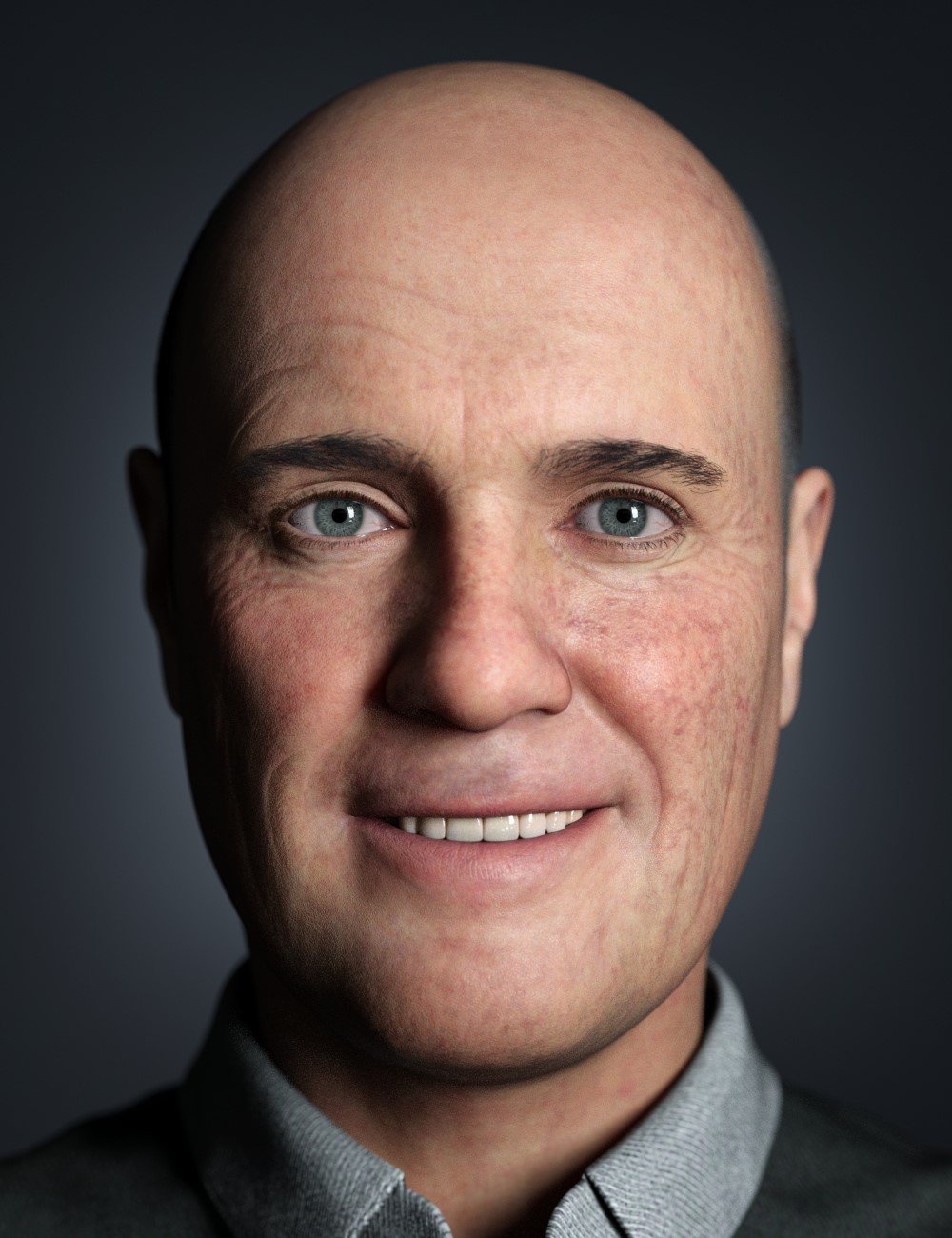
Stable Diffusion XL with checkpoint Copax TimeLessXL:

###
My current guess is that Daz 3D trained a custom "checkpoint" for Stable Diffusion XL.
Michael and Victoria could be "LoRA" (Low Rank Adaptions) trained with a few images.
The possibilities of Daz AI Studio will depend on which additional features Daz 3D makes available to their customers.
- choosing different upscalers,
- choosing advanced layouts that use two KSamplers instead of just one to generate additional details but take longer to calculate
- choosing different samplers, schedulers, etc.
- create an indivudial UI with custom nodes
###
My personal preferences would be to
- pay Daz3D a license fee to use their trained checkpoint and LoRA.
use them
- in an offline version of ComfyUI
or
- a dedicated offline version of Daz AI Studio.
In any case I am happy that Daz 3D choose Stability AI as partner.
Daz AI Studio DiscussionsIf you refresh the page, you lose everything on the page. It does not save anything. So if you want to save your pics, you need to save them from the browser before you close the tab or do any refresh. If you want to save a prompt, maybe whip out the old Note Pad.
Daz would need to add training data for a crazy number of products. With well over 20,000 products, it just isn't possible. Even limiting it to G9 items and more recent environments/props/vehicles ect would be a challenge. It takes time to train a Lora. And in this situation, they need to also render all the images first before doing any training. That's a pretty serious project.
There are people on CivitAI who somehow upload multiple Loras every week, but they are dedicating all their time to do that...making Loras has become their full time job (they typically have something like Patreon to support them).
But that raises some questions. While Daz stated this is being developed by a different group of people outside of Daz, I would assume these people get paid to do this work. Thus one would conclude these are resources that could perhaps be used to help improve Daz Studio by adding more developers to the team. I would think getting Daz Studio 5 across the finish line would be a bigger priority than chasing after AI generation. Daz AI is extremely limited, and even if they add a bunch of stuff it is always going to have some guardrails attached. Meanwhile people can go to CivitAI and use any number of custom checkpoints and loras, not only can they can download locally, they can also generate images online through CivitAI itself. That gives people far more options and freedom. Maybe they do not have Victoria 9, but they certainly have loras that specialize in redheaded women with freckles. Yes, you can get consistent characters using already available loras, plus many more. So Daz is not offering anything that is truly new here.
I will add that CivitAI is priced higher. Like DazAI it has a free plan, but you are limited by a currency called "buzz". You use buzz points to generate an image. There are of course paid plans, but they start at $10 and go all the way up to $50 PER MONTH, while DazAI is $4 (for now). So there is that, but as I said, you can download these to use locally without any restrictions. If you have a PC that is decent for Daz Iray, chances are it will also be decent for Stable Diffusion. You can even use GPUs with just 4GB of VRAM. To use SDXL, which is what DAZAI is based on, it is better to have 8GB or more. But it is possible to use small capacity cards and you even use AMD GPUs. Though I must warn you, AMD is not great for rendering AI, but the option is there, they will function, just slowly. Even the lowly 4060ti can run AI very close to the fastest AMD GPU available (7900XTX,) which is kind of sad. But at least it is possible to use AMD.
All that said, AI still has a lot of problems. It is pretty much only good at basic poses. Anything besides "standing straight and still for a portrait" starts to get funky. You want an action shot, good luck with that. You can use image to image as a pose template, which can be very cool when it works. In fact, in theory you can even draw a stick figure and use that as a guide pose. But it doesn't always work (rather it kind of rarely seems to work as well as you hope). If you really want consistency, you want true 3D models. But AI can be fun to play with. It can scratch that loot box/gambling itch, because sometimes you never know what you are going to get next. You might get something really cool and unexpected, or you might get another mutant freak to haunt your nightmares. That element of not knowing can be part of the fun for some people.
Daz 3D is part of

Connect
DAZ Productions, Inc.
7533 S Center View Ct #4664
West Jordan, UT 84084Licensing Agreement | Terms of Service | Privacy Policy | EULA
© 2026 Daz Productions Inc. All Rights Reserved.