-
funkeyness in character converter
i prefer using g3 figures they use less reasources i used rssy character converter script to convert it.
i dont use blender and do not really know your conversion method .
is there a chance i can get your morph fix please ?
Problems with geograft morph mergingpijatetaricapelotudosgddgsdg said:
Yea I get that I can do two different morphs, one that combines the 17 geograft ones and another one that combines the 4 morphs from the G8F, but I was looking a way to have all of them in just one (specifically being a morph for the geograft), I guess it's not a big deal but I was trying to figure out which is why i was asking around here
That is not really correct. What we showed you above is just to create one controlling morph (a single dial) on G8F figure, by just importing the same OBJ twice, one on G8F, one on the geo-graft, by using the way of Primary Figure from Graft (Facet Order) in MLP. Since the geo-graft is a conformer to G8F figure, so the morph combined for 17 morhphs on the geo-graft will Auto Follow the controlling morph on G8F. You shoudn't make the controlling morph on the geo-graft... (though technically you're able to do it in another way)
I'm doing this because the morph i'm trying to create out of the 21 morphs is meant to be used in Blender as a shape key, then I'll add a driver to that shape key/morph and link it to a bone for a rig, which is a rig meant to be used mainly for animations.
With the standard method we showed you, it's very easy to make what you want in Blender by using Diffeomorphic Daz Importer add-on. All morphs with their ERC Links in Daz can be imported into Blender and the add-on automatifcally creates Shape Keys / Drivers for you.
But if the only way is creating the two morphs (one out of the 17 and another out of the 4) then I'll try some workaround or something, I guess I could possibly use the 4 morph one as a JCM somehow?
If you really want to create only one morph property to control all 21 morphs, you can do it in Property Hierarchy. Create a single controlling morph on G8F or the geo-graft, then drag 21 morphs to its Sub-Components > 1st Stage.
Problems with geograft morph merginglapaji9579 said:
So basically there are 17 morphs that im combining, all which are morphs from the GEOGRAFT, but then there are another 4 morphs which are from the GENESIS 8 FEAMLE FIGURE itself, in the morphs section of that figure. Making it a total of 21 morphs having to be turned into a single morph for the geograft. However, when I'm exporting, only the 17 morphs from the geograft are merged into one, those 4 ones from the figure are completely skipped. I'm trying to find a way to merge all the 21 morphs, so the 17 morphs are already merged no issue but i need to also merge them with the other 4 ones from the G8F morphs (which are not directly geograft morphs).
We' ve already showed you the process above. You should've selected G8F rather than the geo-graft to export as OBJ.
Problems with geograft morph mergingYea I get that I can do two different morphs, one that combines the 17 geograft ones and another one that combines the 4 morphs from the G8F, but I was looking a way to have all of them in just one (specifically being a morph for the geograft), I guess it's not a big deal but I was trying to figure out which is why i was asking around here
I'm doing this because the morph i'm trying to create out of the 21 morphs is meant to be used in Blender as a shape key, then I'll add a driver to that shape key/morph and link it to a bone for a rig, which is a rig meant to be used mainly for animations
But if the only way is creating the two morphs (one out of the 17 and another out of the 4) then I'll try some workaround or something, I guess I could possibly use the 4 morph one as a JCM somehow?
New purchases going MIAMoved to Technical Help as it seems to be a DIM rather than a Daz Studio issue.
We do need more information. For example, many morph packs don't add files thata re visible in the content panes - rather they add new property sliders to the figure.
funkeyness in character converterWell, that'll depend on how you converted the Lizardian... though I'm out of curiosity why you had to convert it from G8M to G3M ~~ So, did you convert it with any tools ?
Anyway, it's not really possible to fix the converted Lizardian in your 2nd screenshot because the mesh of lips... maybe plus teeth and mouth are "glued together".
I roughly converted it by using Fit Suit method (just a single dial without Big Scale morph, I didn't split the head & body...) and it seemed the mouth cavity could be fixed. (screenshot 1)
I sent it to Blender, fixed the Lips and Teeth by using Smooth and Grab brushes, plus a Mask of course. Then sent it back to DS to update Lizardian G3M's morph (screenshot 2)
Edit: This is a commonly-used way to fix converted figures especially for such non-human creatures with unique head / body parts.
Problems with geograft morph mergingSo basically there are 17 morphs that im combining, all which are morphs from the GEOGRAFT, but then there are another 4 morphs which are from the GENESIS 8 FEAMLE FIGURE itself, in the morphs section of that figure. Making it a total of 21 morphs having to be turned into a single morph for the geograft. However, when I'm exporting, only the 17 morphs from the geograft are merged into one, those 4 ones from the figure are completely skipped. I'm trying to find a way to merge all the 21 morphs, so the 17 morphs are already merged no issue but i need to also merge them with the other 4 ones from the G8F morphs (which are not directly geograft morphs).
[Released] Blender to Daz Studio Plugin released!!! Official support thread [Commercial]dragotx said:
crosswind said:
dragotx said:
crosswind said:
dragotx said:
How do we set up characters for G9 when they are transferred in with this utility? I haven't been able to get them rigged at all yet
Transfer a G9 character from Blender to DS ? G9 is already in DS ~~ what do you want to be exactly ?
I'm looking to convert characters that are made in blender over to G9 in Studio, not ones that started in Studio.
If you mean you're making a character morph for G9, i.e you sculpted / shaped a figure base on a G9 mesh in Blender, then you don't need this BTD add-on at all. You just export it to OBJ, import OBJ as a morph to G9 in DS by using Morph Loader Pro.
If you mean you're making a standalone character in Blender but want to make it as a G9, that'll be another story ~~ You have to wrap this figure with G9's mesh and import it as a morph to G9 in DS....
Hmm, ok, that gives me an idea on what to look for in tutorials, thanks!
To get accurate advice on what steps you need to take, you would first need to define what you mean by "characters that are made in blender over to G9 in Studio".
You cannot load any custom mesh onto G9 via Morph Loader Pro in Daz Studio. It needs to have the same topology. You cannot load any texture onto G9 mesh; the texture map needs an appropriate UV layout.
Transferring topology (wrapping the base mesh to a custom figure) and texture transfer between different topologies and UVs are both standard processes in 3D and you can google "wrapping" and "texture transfer". You can do both in Faceform Wrap. Whether these processes apply in your case is of course is an open question.
Change/adapt the shirt automatically generated wrinklesOK, do you know some software like Blender ? You can send the shirt to Blender, reshape the wrinkles by using Draw / Grab / Smooth / Flat brushes, etc. so as to make them look more organic and / or natural. Then import the shirt back as a fixing morph to DS.
[Released] Blender to Daz Studio Plugin released!!! Official support thread [Commercial]dragotx said:
crosswind said:
dragotx said:
crosswind said:
dragotx said:
How do we set up characters for G9 when they are transferred in with this utility? I haven't been able to get them rigged at all yet
Transfer a G9 character from Blender to DS ? G9 is already in DS ~~ what do you want to be exactly ?
I'm looking to convert characters that are made in blender over to G9 in Studio, not ones that started in Studio.
If you mean you're making a character morph for G9, i.e you sculpted / shaped a figure base on a G9 mesh in Blender, then you don't need this BTD add-on at all. You just export it to OBJ, import OBJ as a morph to G9 in DS by using Morph Loader Pro.
If you mean you're making a standalone character in Blender but want to make it as a G9, that'll be another story ~~ You have to wrap this figure with G9's mesh and import it as a morph to G9 in DS....
Hmm, ok, that gives me an idea on what to look for in tutorials, thanks!
You're welcome !
G9 WoesMasterstroke said:
8k texture - check
better expressions G8.1 started it. - check
(BTW: Standard expressions doesn't really work on heavy customized characters anyway)
Unisex, for better vendors' support. Give a male base morph to G8F - check
Renaming groups for industrial standards - just call it G8.2 - well kinda check8K texture - yes, theoretically possible on any base, but there is an advantage in setting that as a precedent from the start of the generation.
Better expressions - actually, quite aside from the thing where they by default disabled G8.0 expressions on G8.1, this had a lot of compatibility issues.
I *presume* they took the decision to hide the G8.0 face sliders to avoid the need for vendors to try to support two sets of face expressions. But what you ended up with was a load of G8.0 controllers that ended up non-functional, and even if you reenabled them G8.1 characters had no correctives for the G8.0 expressions, and G8.0 characters had no correctives for the G8.1 expressions. A blank slate had advantages.Unisex - It's actually pretty easy to set a male morph on G8F (I use it quite a lot for making teen boys, as I find it's generally easier to masculinise G8F teen morphs than get G8M ones to match well with them), but clothing fits are going to be mediocre to poor because it wasn't set as a precedent from the start of the generation, and existing clothes will not have support for it.
Renaming groups for industrial standards - the level of change they did absolutely cannot be addressed by "just make a 8.2". In renaming all the bones and controls, and altering the skeletal heirarchy, you'd break compatibility with all existing rigging for character morphs and their correctives, and all clothing. All you might retain is compatibility with is G8 UVs.
So, what do we need G9 for?
What did we need G8 for? At its core, it was a reposed G3.
It did way less than G9 was trying to overhaul.
Most annoying example is Strand base dforce Hair for G9 only, unsuable with previous G8.
Actually, a large number of these strand based hairs use a standalone scalp and are not restricted to being generated from the G9 geometry.
Even the ones that are generated from the G9 geometry, you can actually work around most of those by turning G9 into a bodysuit that can be fitted to G8F.
richardandtracy said:
can I ask that you think of the levels of compatibility between G3/G8 and G8.1 before disagreeing too much
Worse than many people think, actually.
The change in base pose means that all the correctives for the shoulders and thighs have changed, both in shape and name, so clothes lose those when converted, and if you just use a scene ID override, the difference in base silhouette between the clothing and figure causes issues with auto-follow.
I have an active ticket on a product where it's been created with a non-matching base pose (it is unfitted here, this is the base pose for both):
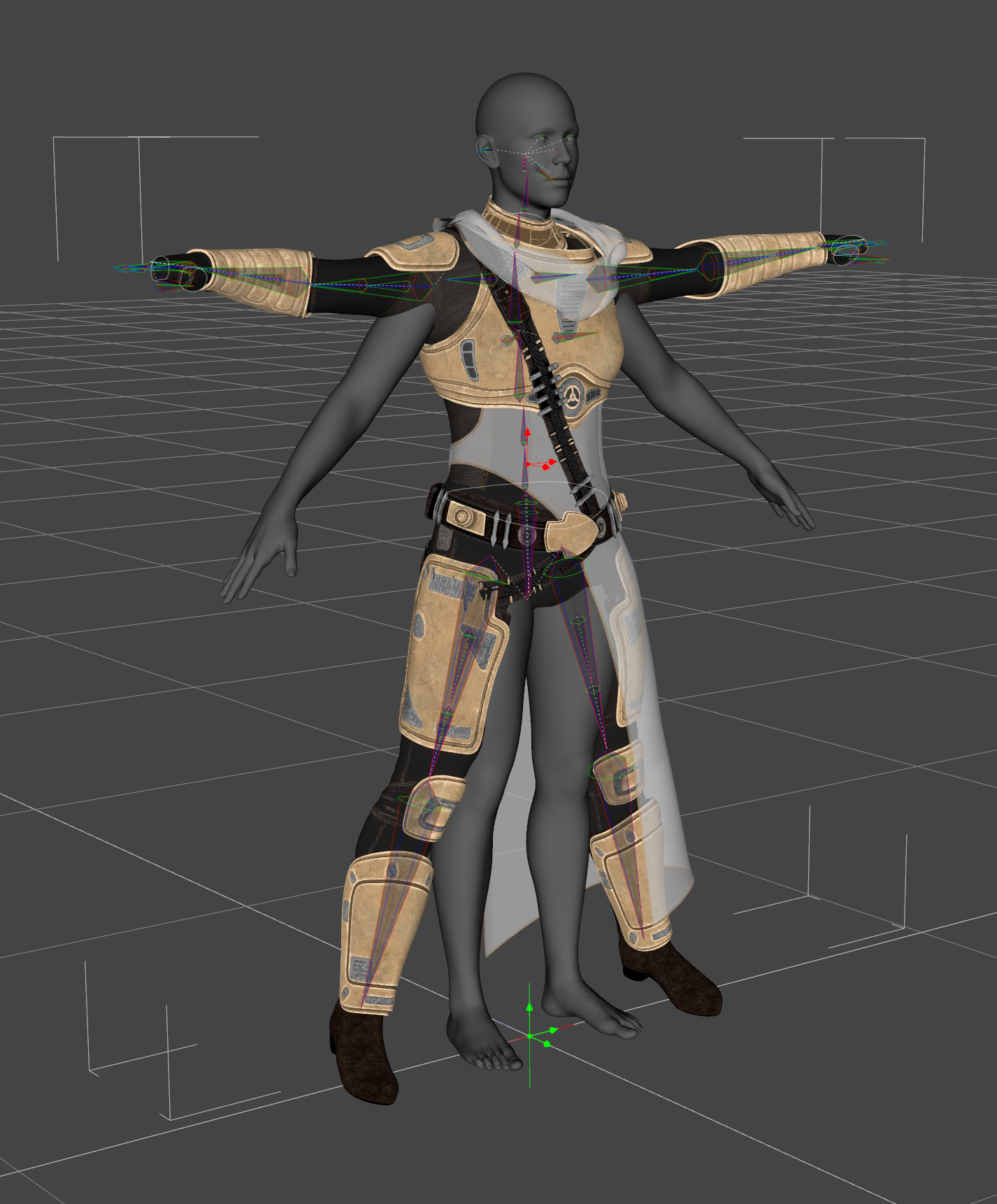
While fitting it causes the skeleton to follow, it causes mucked up rigging in the hands: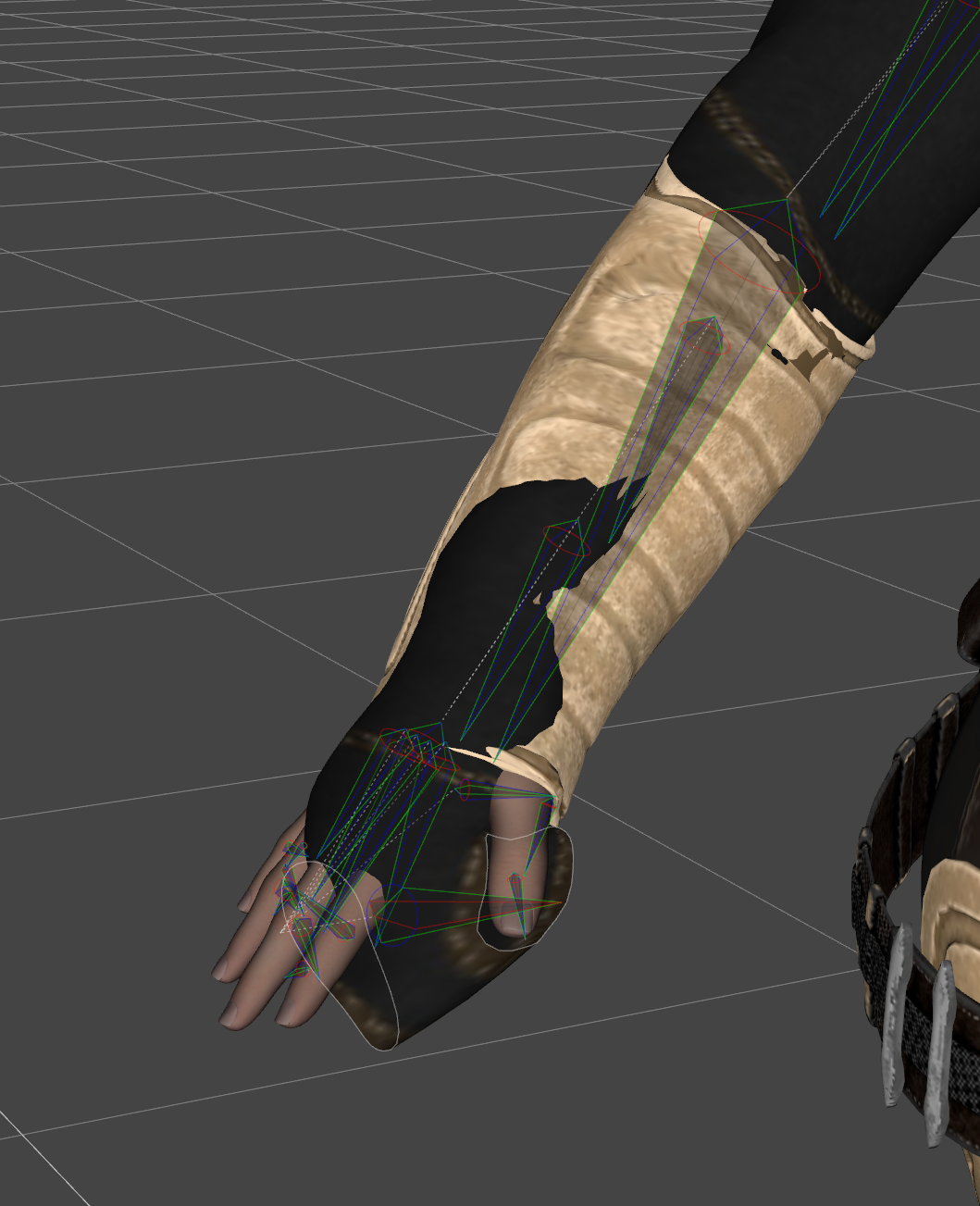
And on heavier morphs, auto-following is wildly off, because it's trying to copy morphs from the wrong part of the figure - here's a comparison between the actual product (left) and my fixed version (right) on Astaroth:
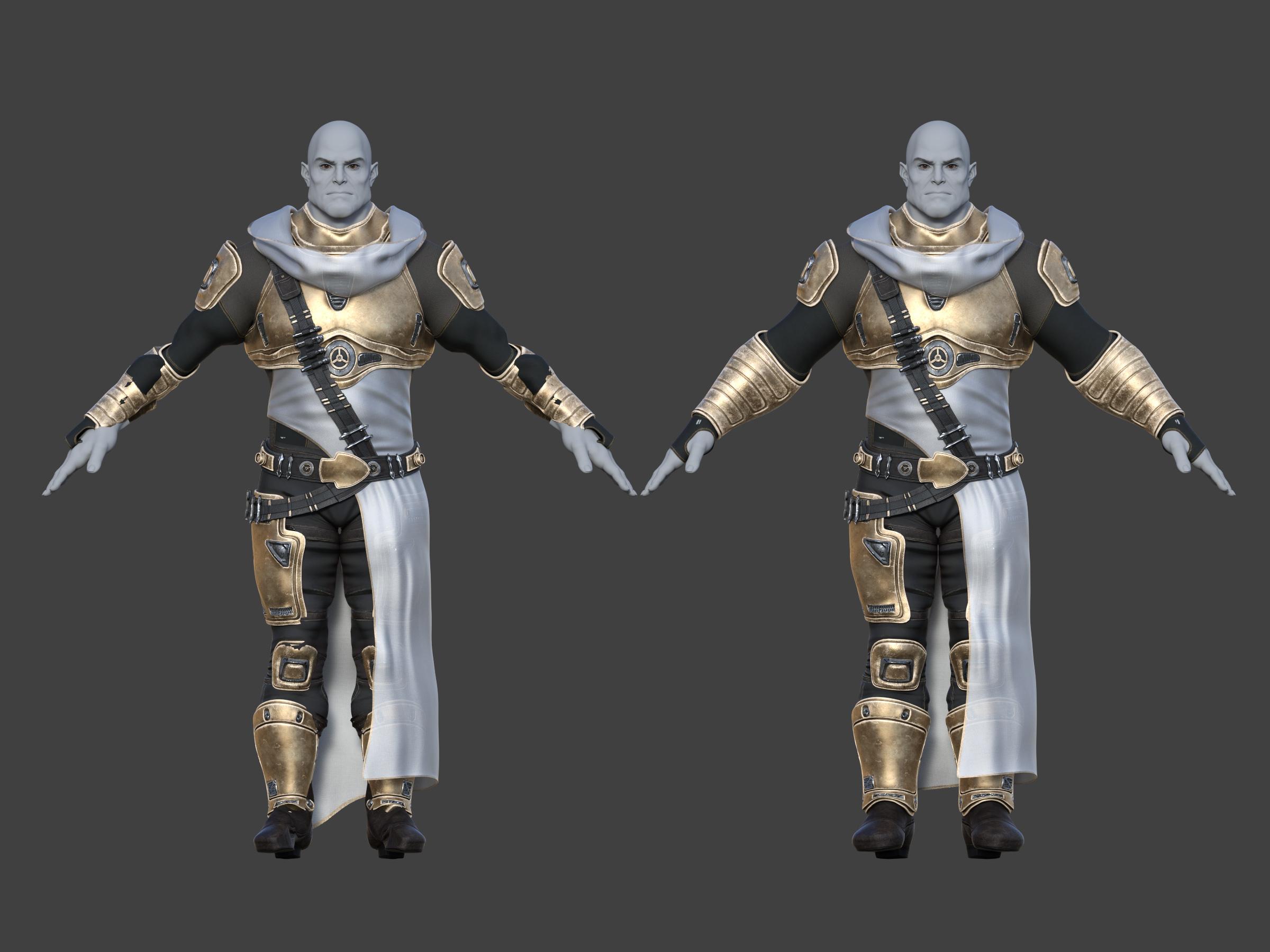
(To be clear, although this is a G9 product - or, more specifically, a G9 version within a product - this is not a G9 specific issue, this is a "the clothes weren't made in this base pose issue", which is what comes up when you try to scene ID G3 clothes onto G8).
Fortunately, I'm already a weirdo who cares about this stuff and has a suite of custom scripts for carrying out this conversion between G3 and G8, so could apply it to fix this G9 product, but it *does* come up as an issue.
[Released] Blender to Daz Studio Plugin released!!! Official support thread [Commercial]crosswind said:
dragotx said:
crosswind said:
dragotx said:
How do we set up characters for G9 when they are transferred in with this utility? I haven't been able to get them rigged at all yet
Transfer a G9 character from Blender to DS ? G9 is already in DS ~~ what do you want to be exactly ?
I'm looking to convert characters that are made in blender over to G9 in Studio, not ones that started in Studio.
If you mean you're making a character morph for G9, i.e you sculpted / shaped a figure base on a G9 mesh in Blender, then you don't need this BTD add-on at all. You just export it to OBJ, import OBJ as a morph to G9 in DS by using Morph Loader Pro.
If you mean you're making a standalone character in Blender but want to make it as a G9, that'll be another story ~~ You have to wrap this figure with G9's mesh and import it as a morph to G9 in DS....
Hmm, ok, that gives me an idea on what to look for in tutorials, thanks!
[Released] Blender to Daz Studio Plugin released!!! Official support thread [Commercial]dragotx said:
crosswind said:
dragotx said:
How do we set up characters for G9 when they are transferred in with this utility? I haven't been able to get them rigged at all yet
Transfer a G9 character from Blender to DS ? G9 is already in DS ~~ what do you want to be exactly ?
I'm looking to convert characters that are made in blender over to G9 in Studio, not ones that started in Studio.
If you mean you're making a character morph for G9, i.e you sculpted / shaped a figure base on a G9 mesh in Blender, then you don't need this BTD add-on at all. You just export it to OBJ, import OBJ as a morph to G9 in DS by using Morph Loader Pro.
If you mean you're making a standalone character in Blender but want to make it as a G9, that'll be another story ~~ You have to wrap this figure with G9's mesh and import it as a morph to G9 in DS....
[Released] Blender to Daz Studio Plugin released!!! Official support thread [Commercial]crosswind said:
dragotx said:
How do we set up characters for G9 when they are transferred in with this utility? I haven't been able to get them rigged at all yet
Transfer a G9 character from Blender to DS ? G9 is already in DS ~~ what do you want to be exactly ?
I'm looking to convert characters that are made in blender over to G9 in Studio, not ones that started in Studio.
[Released] Blender to Daz Studio Plugin released!!! Official support thread [Commercial]dragotx said:
How do we set up characters for G9 when they are transferred in with this utility? I haven't been able to get them rigged at all yet
Transfer a G9 character from Blender to DS ? G9 is already in DS ~~ what do you want to be exactly ?
[Released] Blender to Daz Studio Plugin released!!! Official support thread [Commercial]savagestug said:
On my phone so I can't reply to above post, but I ran into issues being unable to export all. I was trying to export one of the smaller kitbash3d Shogun buildings (has a back yard area with pond, bridge, and vegetation) and could only export partial elements at a time. Nothing happened but map transfer with export all
You just right-click on the parent node to Select Hierarchy, then click Export > Selected button. It'll work.
MimicMolly's Renders & WIPsG9 is easily becoming my favorite figure because my rule of judging DAZ figures is how easy it is to recreate my OCs and G9 stays winning.
In this WIP, I'm trying to make Ernest's best friend/right-hand man, and didn't really need to try that hard and got close-enough in one sitting. (He's the big guy.) Unfortunately, he uses some unavailable morphs by AOBB, but he mostly uses M3D Mauro HD as a base. I need to redo Ernest's body and it seems like Wagner 9 + SY's "Tortilla Chip" body can work but I have to figure out how to zero out Wagner's feet/create a foot neutralizing morph because they look "innaccurate" for my OC.
 [Released] Blender to Daz Studio Plugin released!!! Official support thread [Commercial]
On my phone so I can't reply to above post, but I ran into issues being unable to export all. I was trying to export one of the smaller kitbash3d Shogun buildings (has a back yard area with pond, bridge, and vegetation) and could only export partial elements at a time. Nothing happened but map transfer with export all
Smooth Out Imperfections in Clothing When Posed?Masterstroke said:
n.aspros123 said:
crosswind said:
n.aspros123 said:
crosswind said:
Okay, but they're different in terms of design ~ It's tight under figure's breasts on the one you're using while that Rendo's one is obviously with a looser design. If the figure has larger breasts, you won't get the expected result with that Shrug Style Top... no matter you simulate in whatever way.
I suggest another way around since I ever mentioned that the initial shape of the cloting is important before simulation. You can make a morph with Blender to give the top a "looser style". (screenshot 1)
Then you'll get the expected result afer simulation and you won't have to tweak it each time after simulation. (screenshot 2)
Which tools did you use in Blender to make the morph?
As usual, Draw brush and Smooth brush in Sculpt mode.
I don't know what's going on with Blender. When scuplting the top using the draw and smooth brushes, it looks okay. See Top Blender 1 and Top Blender 2. When I change back to Object mode the top doesn't look as smooth while in sculpt mode. Top Blender 3. I've tried more smoothing and drawing sculpting. Best I can without someone having a look for me.
Did I have the Draw and Smooth brushes Radius and Strength set correctly?
When I dForce the top with the Blender Morph, it doesn't look smooth under the breasts. See Top After Blender 1 and Top Blender 4 p. I also have the use Mesh Grabber to pull the bottom of the top out as it clips with the skirt.
I can share any files if needed to be troubleshooted.
Can I try your top morph.obj ? @crosswind . I think the mesh in yours might be better than mine possibly. When the silk shader is applied, the imperfections standout more possibly?
Is your figure the base figure or a character morph?
There is one big annoying issue in DS, that is a downer.
When you make changes in body proportions of your character, as part of a full body morph, you will get those ugly creases all the time.
It happens on clothes and also on hair.
I have not yet found a solution to avoid this. I have fixed it in zbrush and saved it as a character morph on the cloth set, but when loading the clothing the next time the same ugly creases are back.
It might go away with a dforce simulation, but not permanently.
Morph projection issue is long lasting there... The more tighter the cloting is, the more distortion you'll get. Some fixing job has to be always necessary loh ~
Problems with geograft morph mergingThat's almost the SOP as Masterstroke said above.
Only: as for Export BOTH as obj at base resolution... actually just selecting G8F to export it as OBJ will do.
The final step needs to be Adjust Rigging to Shape with G8F selected and the single morph dialed, ERC Freeze the single morph on G8F. Save two morphs on G8F & geo-graft as Modifier Assets (morph assets). Then delete those 17 + 4 morphs as needed.
Edit: You may further need to check the morphs' behaviors by posing the figure, see if there's any corrective morphs need to be made.
Daz 3D is part of

Connect
DAZ Productions, Inc.
7533 S Center View Ct #4664
West Jordan, UT 84084Licensing Agreement | Terms of Service | Privacy Policy | EULA
© 2026 Daz Productions Inc. All Rights Reserved.