-
[Released] Turbo Loader for Genesis 9 [Commercial]
RiverSoft Art said:
PoshTentacle said:
RiverSoft Art said:
PoshTentacle said:
RiverSoft Art said:
PoshTentacle said:
RiverSoft Art said:
PoshTentacle said:
So I tried using Turbo Loader recently to improve my figure loading speed, and unfortunately, it broke my most-used character preset. Basically, in any scene that I have created that contains that character, one of its most important morphs defaults to 0%. According to the logs, the morph itself is loading, but the morph value is not.
Unfortunately, due to the fact that when loading a scene, morphs are loaded and then poses, I can't just load the broken scene and move the morph sliders back to 100% because it will distort the pose. The only way I have found to keep the exact pose is for me to re-create the broken character preset, load a fresh copy into the scene with the broken figure, and then copy the pose from the broken figure to the one with the correct morph. This will take a huge amount of time by reloading the character into every one of my broken scenes.
I tried resetting all the changes made by Turbo Loader using the "Reset Morph Directory" and "Reset Content Directories" buttons, but this did not resolve the issue.
Edit: Also, I haven't re-saved any of the scenes since the issue appeared in hopes that if I didn't save it, the scenes would still be fixable
Have you searched your HDD for *.tlOff files? That is what TL changes the extension to in order to turn off the morph. Reset Content Directories renames all morphs back to their .dsf extension. If you cannot find any .tlOff files, then the scenes should work as far as what TL did.
I did not find any .tlOff files. Is there maybe a cache or something that I need to refresh/empty after I reset all the morphs to their original state? Also, here are the error lines in the log that may help shine a light on things.
2026-05-11 11:01:50.533 [WARNING] :: \src\sdksource\fileinput\dzassetdaz.cpp(595): Formula output property not found:
File: /data/Daz 3D/Genesis 9/Base/Morphs/Jepe/JP Sandor HD/JP Sandor HD.dsf
URI: Genesis9:/data/Daz%203D/Genesis%209/Base/Morphs/Jepe/JP%20Sandor%20HD/JP%20Sandor%20Head.dsf#JP%20Sandor%20Head-0xa95d2ce?value

2026-05-11 11:01:50.533 [WARNING] :: \src\sdksource\fileinput\dzassetdaz.cpp(595): Formula output property not found:
File: /data/Daz 3D/Genesis 9/Base/Morphs/Jepe/JP Sandor HD/JP Sandor HD.dsf
URI: Genesis9:/data/Daz%203D/Genesis%209/Base/Morphs/Jepe/JP%20Sandor%20HD/JP%20Sandor%20Body.dsf#JP%20Sandor%20Body-0xa95d473?value
Just to repeat for clarity, the morph itself is loading, but the value of the morph is now missing.
Edit: Idk why that quote block is so hard to read, so here is the same message in regular text form:
2026-05-11 11:01:50.533 [WARNING] :: \src\sdksource\fileinput\dzassetdaz.cpp(595): Formula output property not found:
File: /data/Daz 3D/Genesis 9/Base/Morphs/Jepe/JP Sandor HD/JP Sandor HD.dsf
URI: Genesis9:/data/Daz%203D/Genesis%209/Base/Morphs/Jepe/JP%20Sandor%20HD/JP%20Sandor%20Head.dsf#JP%20Sandor%20Head-0xa95d2ce?value

2026-05-11 11:01:50.533 [WARNING] :: \src\sdksource\fileinput\dzassetdaz.cpp(595): Formula output property not found:
File: /data/Daz 3D/Genesis 9/Base/Morphs/Jepe/JP Sandor HD/JP Sandor HD.dsf
URI: Genesis9:/data/Daz%203D/Genesis%209/Base/Morphs/Jepe/JP%20Sandor%20HD/JP%20Sandor%20Body.dsf#JP%20Sandor%20Body-0xa95d473?value
Once the .tlOff files are gone, TL effects are gone. Did you install products lately?
Yes, I have installed products lately. I even reinstalled the JP Sandor character in hopes of fixing the issue, but unfortunately, it didn't solve anything.
You need to look at those products then for the problem. The TL shouldn't be the problem once you reverted everything - I don't see how it could. All it does is rename files and you renamed them back. It's possible that re-installing JP Sandor (perhaps it was updated?) between the original TL rename to tlOff could have hurt its installation, e.g., Sandor Original Morph -> TL Sandor Original Morph.tlOff -> Sandor Updated Morph -> overwritten by Sandor Original Morph? Or maybe you tried to do something with the metadata while Sandor was off and the metadata has locked in the idea that those morphs are missing files, which have now been restored? I am reaching here, but the original TL is not in the equation anymore.
Using Turbo Loader's reset function was something I did before reinstalling JP Sandor, so that shouldn't be a factor either. All I know is that before I used Turbo Loader to optimize my morph collection, everything was working fine, and afterward, the character was broken - even in scenes that I saved months before ever installing Turbo Loader. I've been communicating with support, and I'm trying to find out if I can edit the morph values in the DSON files directly to avoid having to reload the character into every single broken scene. *Sigh* Turbo Loader was a promising product, too. It's a shame that fixing the errors that started with it is going to cost me days of work.
I am sorry you are having difficulty. I wish I could help you.
One last question! After messing around with the Victoria chatbot on the Daz3d website, I found out that what is broken is the controller for the morph. Is that a problem you ever see with Turbo Loader? For example, in this case, JP Sandor HD controls two other morphs: JP Sandor Body and JP Sandor Head. JP Sandor HD being set at 100% should influence those other two morphs to be the same value, but it is leaving them at 0%.
[Released] Turbo Loader for Genesis 9 [Commercial]RiverSoft Art said:
PoshTentacle said:
RiverSoft Art said:
PoshTentacle said:
RiverSoft Art said:
PoshTentacle said:
RiverSoft Art said:
PoshTentacle said:
So I tried using Turbo Loader recently to improve my figure loading speed, and unfortunately, it broke my most-used character preset. Basically, in any scene that I have created that contains that character, one of its most important morphs defaults to 0%. According to the logs, the morph itself is loading, but the morph value is not.
Unfortunately, due to the fact that when loading a scene, morphs are loaded and then poses, I can't just load the broken scene and move the morph sliders back to 100% because it will distort the pose. The only way I have found to keep the exact pose is for me to re-create the broken character preset, load a fresh copy into the scene with the broken figure, and then copy the pose from the broken figure to the one with the correct morph. This will take a huge amount of time by reloading the character into every one of my broken scenes.
I tried resetting all the changes made by Turbo Loader using the "Reset Morph Directory" and "Reset Content Directories" buttons, but this did not resolve the issue.
Edit: Also, I haven't re-saved any of the scenes since the issue appeared in hopes that if I didn't save it, the scenes would still be fixable
Have you searched your HDD for *.tlOff files? That is what TL changes the extension to in order to turn off the morph. Reset Content Directories renames all morphs back to their .dsf extension. If you cannot find any .tlOff files, then the scenes should work as far as what TL did.
I did not find any .tlOff files. Is there maybe a cache or something that I need to refresh/empty after I reset all the morphs to their original state? Also, here are the error lines in the log that may help shine a light on things.
2026-05-11 11:01:50.533 [WARNING] :: \src\sdksource\fileinput\dzassetdaz.cpp(595): Formula output property not found: File: /data/Daz 3D/Genesis 9/Base/Morphs/Jepe/JP Sandor HD/JP Sandor HD.dsf URI: Genesis9:/data/Daz%203D/Genesis%209/Base/Morphs/Jepe/JP%20Sandor%20HD/JP%20Sandor%20Head.dsf#JP%20Sandor%20Head-0xa95d2ce?value 2026-05-11 11:01:50.533 [WARNING] :: \src\sdksource\fileinput\dzassetdaz.cpp(595): Formula output property not found: File: /data/Daz 3D/Genesis 9/Base/Morphs/Jepe/JP Sandor HD/JP Sandor HD.dsf URI: Genesis9:/data/Daz%203D/Genesis%209/Base/Morphs/Jepe/JP%20Sandor%20HD/JP%20Sandor%20Body.dsf#JP%20Sandor%20Body-0xa95d473?valueJust to repeat for clarity, the morph itself is loading, but the value of the morph is now missing.
Edit: Idk why that quote block is so hard to read, so here is the same message in regular text form:
2026-05-11 11:01:50.533 [WARNING] :: \src\sdksource\fileinput\dzassetdaz.cpp(595): Formula output property not found:
File: /data/Daz 3D/Genesis 9/Base/Morphs/Jepe/JP Sandor HD/JP Sandor HD.dsf
URI: Genesis9:/data/Daz%203D/Genesis%209/Base/Morphs/Jepe/JP%20Sandor%20HD/JP%20Sandor%20Head.dsf#JP%20Sandor%20Head-0xa95d2ce?value
2026-05-11 11:01:50.533 [WARNING] :: \src\sdksource\fileinput\dzassetdaz.cpp(595): Formula output property not found:
File: /data/Daz 3D/Genesis 9/Base/Morphs/Jepe/JP Sandor HD/JP Sandor HD.dsf
URI: Genesis9:/data/Daz%203D/Genesis%209/Base/Morphs/Jepe/JP%20Sandor%20HD/JP%20Sandor%20Body.dsf#JP%20Sandor%20Body-0xa95d473?value
Once the .tlOff files are gone, TL effects are gone. Did you install products lately?
Yes, I have installed products lately. I even reinstalled the JP Sandor character in hopes of fixing the issue, but unfortunately, it didn't solve anything.
You need to look at those products then for the problem. The TL shouldn't be the problem once you reverted everything - I don't see how it could. All it does is rename files and you renamed them back. It's possible that re-installing JP Sandor (perhaps it was updated?) between the original TL rename to tlOff could have hurt its installation, e.g., Sandor Original Morph -> TL Sandor Original Morph.tlOff -> Sandor Updated Morph -> overwritten by Sandor Original Morph? Or maybe you tried to do something with the metadata while Sandor was off and the metadata has locked in the idea that those morphs are missing files, which have now been restored? I am reaching here, but the original TL is not in the equation anymore.
Using Turbo Loader's reset function was something I did before reinstalling JP Sandor, so that shouldn't be a factor either. All I know is that before I used Turbo Loader to optimize my morph collection, everything was working fine, and afterward, the character was broken - even in scenes that I saved months before ever installing Turbo Loader. I've been communicating with support, and I'm trying to find out if I can edit the morph values in the DSON files directly to avoid having to reload the character into every single broken scene. *Sigh* Turbo Loader was a promising product, too. It's a shame that fixing the errors that started with it is going to cost me days of work.
I am sorry you are having difficulty. I wish I could help you.
One last question! After messing around with the Victoria chatbot on the Daz3d website, I found out that what is broken is the controller for the morph. Is that a problem you ever see with Turbo Loader? For example, in this case, JP Sandor HD controls two other morphs: JP Sandor Body and JP Sandor Head. JP Sandor HD being set at 100% should influence those other two morphs to be the same value, but it is leaving them at 0%.
Untitledblue_ said:
Things are starting to become clearer now. I had previously assumed that Victoria 4 was both a Daz Studio and a Poser Figure. It’s good to know that she is strictly a Poser Figure. Are there any Functions that don't work when using Victoria 4 in Daz Studio but do work in Poser?
V4 is indeed primarily a poser figure. She's the first of the Daz figures which was provided with Daz Studio materials (for 3DL) but she's not a figure made specifically for DS like the Genesis line.
Most V4 content made for poser works in DS, There are however a few exceptions:
- poser dynamic hair doesn't work at all in DS
- poser dynamic clothes load as static props in DS. They often play well with dForce if you apply a dForce modifier though.
- A lot of content for V4 only has poser materials. DS only reads a few basic properties of Poser materials so you will usually need to adjust materials in DS.
- A small number of custom morphs for V4 use a tech called "PMD injection", which is specific to poser.
- At the time V4 was released, there was a difference in the way Poser and DS handled scaling along individual axes. A handful of products rely on the way Poser handled scaling and therefore don't work as intended in DS.
I wasn't actually aware until now that Clothing for Victoria 4 Figures was rigged in Poser.
Either in Poser or using DS figure setup tools, which are able to do parametric rigging. But not using the transfer utility like Genesis clothes, as that is for weight mapped figures.
Does Poser use a different Rigging System?
Poser offers 3 types of rigging:
- Parametric rigging with spherical falloff zones => the one V4 and earlier Daz figures use, compatible with DS
- A variant of parametric rigging which uses "capsule" falloff zones, introduced in Poser 8 => not compatible with DS. It was used for a handful of figures produced by the owners of Poser like the P8 base figures.
- Their own version of weight mapping, introduced in Poser 9 IIRC => not compatible with DS. Used for the Poser base figures since P9, La Femme and L'Homme, and the Poser version of Dawn.
Is there actually a Feature in Poser, like the one for Genesis Figures, where the Clothing conforms to the Body?
At the time V4 was released there was only the "if there's a matching morph in the clothes it will follow". That's why having morphs in clothes to support the main morph packs was a big selling point.
Later on there was an utility (morphing clothes IIRC) released which enabled you to transfer morphs to clothing like the "transfer active morphs" in DS does.
Poser also introduced a morph brush which helped adjusting clothing if needed.
I've not used recent versions of poser but AFAIK they have a "fitting room" which likely helps with fitting clothes.
Would it work if I re-rigged a Piece of Clothing for Victoria 4 Figures in DAZ Studio? If the Clothing is re-rigged, would it then work just like it does for the Genesis Figures?
You can't rig clothes for V4 with transfer utility as V4 is not weight mapped. The clothes need to use the same kind of rigging as the base figure.
How can I activate this "Transfer Active Morph" function? Do I need to activate it individually for all clothing items as well as the Victoria 4 figure?
From memory, it's available from the context menu when you right click on V4.
You use it on V4 and it affects all items fit to her.
Now I’m a bit curious. I just double-checked and realized that DAZ has actually been around since 2000, I had previously assumed it started a bit later. Does the Original Company, Zygone, still exist?
Yes. They create 3D models for other markets, notably medically accurate models.
Did DAZ also develop the Victoria 1 Figure? That one was released in 1999.
The division of Zygote which later became Daz developed the "Millennium woman" and "Millennium man" figures, which were later renamed Victoria and Michael.
Poser was released back in 1995, did Zygone develop Figures for it right from the start?
I know they developed the base figures for Poser 4, "P4 nude woman" aka "Posette" and "P4 nude man" aka "The Dork". Not sure about earlier versions.
Did the Companies that took over Poser over the years also develop their own Figures for it, or do all the older Poser Figures Originate from Zygone / DAZ? I’m referring more to the early years (the 90s and 2000s), nowadays, there are several Figures designed solely for Posers. But I’d be interested in that early Period.
They did develop their own base figures at least for Poser 5 to 11, and a few others sold independently like Miki or the poser G2 line of figures (not to be confused with Genesis 2).
There is one more Point I’m curious about. Not long ago, I discovered that another Platform, one primarily focused on Poser and currently operated by the Company that owns Poser, has a Daz Sub-Forum. One of the Moderators from here is actually active there. He told me that this Sub-Forum has been active since 2003, now I’m wondering what People discussed back then, at a time when Daz Studio didn't even exist yet.
The first public beta of DS was released in early 2004, and I know there was a limited alpha before that. Maybe they created the subforum when the alpha was launched?
Celebrity Look-a-Likes for 3D figures Part 4magikhs said:
That Charlie Cox is a snack and a half. Ooof
When I saw the JP Harrow morph, it was just so obviously Charlie Cox it was painful (particularly with one of the example images).
This led me to think of, and now ask, the one 'Forbidden' question concerning these morphs: What is the exact 'legality' of pruducing such morphs?
It seems like it may be walking a fine line, as there have some celebrities that have sued movie/TV producers for using their likeness without compensation before (either an actual performance for which they weren't paid, or a 3D scan that was put in post production).
And now we have AI Slop which can do the same easily with anybody's face, and without the consent of the person.
I think that these morphs simply fly 'under the radar' low enough that their producers don't get into trouble.
That being said, I do recall many years ago how one 'Lara Croft Cosplay' outfit suddenly disappeared from the market, and if memory serves, the example images did use a 'Angelina Jolie' face morph (for Poser's Victoria 4), but I think it may have had to do with the outfit being an exact copy of the game version, and not the face used.
ipurched V4.2 long time back?Leana said:
jmucchiello said:
If you still have the install. I don't think you can download it.
You definitely sill can download Victoria 4.2 and her content. You can even download V1 if you have her...
I read V as version, not victoria.
ipurched V4.2 long time back?jmucchiello said:
If you still have the install. I don't think you can download it.
You definitely sill can download Victoria 4.2 and her content. You can even download V1 if you have her...
Untitledblue_ said:
Now I’m even more confused. So, is the Clothing rigged exactly the same way as the Genesis Figure?
Nope, not the same as Leana said above. The clothing for V4.x are rigged in Poser AFAIK (I've never been a Poser user...) but the clothing for Genesis figures are rigged in DS with Transfer Utility... and its approach is fairly different from the one in Poser.
That’s how I understand your Explanation, I load the Genesis Figure, then I load a Piece of Clothing. It fits the Base Figure perfectly. If I were to scale the Genesis Figure up or down significantly, the Clothing would scale along with it to the same extent. Is that roughly correct?
That's correct... a sort of "conforming" (that's why the rigged wearables are also called "conformers")... because the clothing has "skin binding" to the figure's bones. No matter you change the figure's shape or merely the Scales of bones (Node...), the clothing will follow.
I need a bit more explanation now, are "Morph" and "Shape" the same Thing? If I change the Size of a Body Part, that is a Morph? I apologize in advance for the Example, but I think it should make it clear to everyone what I mean, if I enlarge the Breasts from size A to size F, is that a Morph or a Shape?
Not the same thing. A Morph is defined as a group of vertices that can deform a mesh. It's also called a Delta so as to move the vertices along a certain direction. In DS, Morphs are literally shown as Properties in Parameters pane. A Shape is just a general term to describe a Geometry of a figure / prop etc. in DS. So, in other words, a Shape is just a geometry of whatever an object / figure that can be seen in DS' Viewport, Morphs are used to deform the Shape(s).
Just a quick Point about the Victoria 4 Figure again, does that mean it makes no difference to the Clothing whether the Figure has a "Weight Map" or not?
As for V4.x, correct, it makes no difference since both of V4.x figure and its clothing have no General Weight Mapping. Be noted, there's also a "way of weight calculation" when rigging the clothing to V4.x in Poser...as "spherical data" to define the falloffs as Leana mentioned.
When working with a Victoria 4 Figure, if Body Shape changes are manually loaded onto the Figure, do these count as Morphs as well? For instance, I have a Problem where a Piece of Clothing fits the Base Shape perfectly, but once I load a Character with specific Body Shape adjustments, the Clothing no longer fits the Body correctly, it doesn't quite adapt to the new Shape. Why does this work with the Genesis Figure but not with the Victoria 4 figure?
Yes, they're called Partial Body Morphs (PBMs). You can find them in Parameters pane accordingly. For Genesis figures in DS, there's a mechanic of "Auto Follow", so all PBMs (with Auto Follow enabled...) can be automatically transferred from the figure to the conformers (clothing, accessories, etc.). But for non Genesis figures, there's no Auto Follow triggered, so you have to use the function of Transfer Active Morphs so as to make the clothing a "perfect fit" on V4.x.
I might have assumed there would be backward compatibility Features in Daz Studio, like those allowing older Figures to utilize some of the capabilities of the Genesis Figures.
There ARE backward compatibilities in DS especially across Genesis generations as well as their Assets, but the "compatibilities across the assets from DS to Poser" is a different thing...
I have a Question out of curiosity, Victoria 4 was released back in 2006 for both Poser and Daz Studio, and Daz Studio itself must have been released around that same time. Was the decision made then to stop focusing on the Victoria 4 Figure and develop the Genesis Figures instead? Does the development of a previous Figure cease completely whenever a new one is released?
Though the first version of DS was released in 2005 and it supported Poser assets from very beginning, Victoria figures were still developed in Poser... they're still Poser figures. In other words, Poser figures and Daz3D Genesis figures belong to "different product lines".
However, even after V4.0 was released, V4.2, an add-on, was then released as a part of V4's lifecycle. So to me, the "development" was not really ceased... though I have zero idea about how Zygote Daz3D thought of their strategy at that time...
Untitledblue_ said:
Hello, I need a bit of an explanation regarding an older Figure. First of all, I’d like to know how Clothing works with Genesis 8 Figures. When I load the Base Figure and then load a piece of Clothing, it fits the Body Shape perfectly. When I load a Character onto the Base Figure, the Base Shape is modified using "Shapes and Morphs" and the Clothing changes right along with it. I would like a somewhat detailed explanation of how this works.
When a morph is set with the "autofollow" parameter, then when you use it DS will look for matching morphs (ie a morph with the same technical name) in any item "fit to" the figure,
- If it finds an existing morph, it will link it to the figure morph, so that it is applied automatically when the figure morph is used.
- If there's no matching morph, DS will automatically create a temporary one, by projecting the deformation on the mesh of the fitted item. Once that temporary morph is generated, it is linked to the figure morph.
Just a quick word on the Genesis 8 Figures again. I don't want to ask about the Structure this time, but rather focus on what "Weight Mapping" actually is. I think I’ve grasped that a Genesis Figure is built around a Bones. I don't want to go into too much Detail about the Rigging itself, I already know how to move the Figure.
Now for my actual Question. My understanding so far is that Victoria 4 Figures do not use "Weight Mapping". Could someone explain to me how this Figure is structured, then?
V4 indeed uses a different rigging system, which is usually called "parametric rigging".
From memory you define a skeleton with hierarchical bones (linked to a group of vertices in the mesh) and joints where bones meet and will bend (typically you have Side-Side, Front-Back and Up-Down rotations, but you can limit how the joint bends if required)
You then assign spherical falloff zones that use inner and outer spheres of influence to determine which vertices move when a joint is rotated, and the amount of movement the vertices move. IIRC inner sphere is "no influence", outer sphere is "100% influence", and influence is computed linearly between the spheres.A weight-mapped figure uses influence maps to define how vertices are affected by joint movements, which give you more control than the fallof spheres.
In that case, I’d be interested in knowing a bit more about the Clothing for Victoria 4 Figures. How is this Clothing structured?
The clothing has the same kind of rigging as V4. Bones with the same name as a V4 one will follow the one from V4 when it's posed.
I’ve noticed that when I load Clothing for a Victoria Figure, it fits the Base Figure quite well, however, when I then load a specific Character onto that Base Figure, the Clothing only adjusts roughly to the new Body Shape. Why doesn't this work as well as it does with the Genesis Figures?
V4 predates the Genesis line, she was released in 2006, long before Daz studio 4 and the first Genesis. So a lot of features which were added in Geneis figures later didn't exist yet.
With V4 you have the same system of "if there's a matching morph in the clothes it will be applied automatically" but there is no automatic creation of morphs if there's no matching one.
You can however use a DS feature called "transfer active morphs" to generate matching morphs for all the morphs currently in use which don't already have a match.Finally, a Question, can Clothing designed for Victoria 4 Figures be re-rigged in Daz Studio so that it behaves like Genesis Clothing? Is there a Function in Daz Studio that allows me to use Victoria 4 Clothing just like Genesis Clothing? Is there perhaps a Product that offers such a Feature?
No, there's no way to make it follow all morphs automatically when used with V4, only the transfer active morphs command.
Sydney 9 - Discussion ThreadI read Sydney 9 and thought it was going to be on the theme of Sydney 8. But no. Completely unrelated. Honestly? That just reinforces what I've been thinking for a while about Genesis 9. Most characters feel so random now and I'd even say most don't feel as unique. Not saying there weren't similar characters in G8F but I feel it's worse on G9. I preferred how characters were recognizable across figures, like a brand. Only a handful of names have survived, obviously Victoria but even the classic Aiko was just a character for a character instead of its own release and, even worse, member exclusive. Then what? Olympia? Josie? Freja and Kala returning from Genesis 8. I'm sure there are a couple more I'm forgetting but right now off the top of my head those are the only ones I can think of. Talking only about female characters, of course. Though male characters don't fare much better if I remember correctly. I don't know, it just feels so disconnected now. G9 has been around for quite a while now, and I don't know if it's because it might have been way less popular than G8 or even G3, but except for Victoria 9 I don't think I'd recognize any other G9 character being used somewhere.
I'll get her because as a member I get the coupons, but if it weren't for that I don't think I'd have gotten as many G9 characters I have. And I very, very rarely get clothes or hair unless they are also for G8. I don't know, I keep saying I'll give G9 a proper chance soon but I never do.
What actually IS new in DAZ Studio 6?I haven't used AI at all, yet.
Well I did, once, briefly. I had started my new web site, and got confused.
I asked AI to do something, and the result was laughable. I created the site from scratch by myself.
I haven't had sound on my DAZ Studio computer because things get complicated.
My TV has a bluetooth transmitter that allows me to have a soundbar near my recliner., No cables running across the room.
I also have a bluetooth headset that I can use to watch tv as well.
Anytime I try to connect anything else, things get confused. But I'm already confused.
So maybe I'll connect sound to my DAZ Studio computer. Just so i can harass Victoria.
What actually IS new in DAZ Studio 6?Ron Knights said:
OK, thanks.
Now I need to hookup speakers and a microphone to check her out. I might just decide to tease Victoria.
It can be used via plain text - it's the same AI assistant as on the web pages.
Sydney 9 - Discussion ThreadNot Victoria said:
I liked releases like Sigrid, Aro, Cate, Everett, and Frankie that brought something more distinctive. Sydney is fine if you don’t already own Emmy or Nadine, I guess. Maybe it's just me, but she, Emmy, and Nadine all look like a new trio of sisters like Madison Leona Brianna, the similarities in the face and body are hard to ignore because the only differences I can spot are a slightly different navel shape, breast size and some minor adjustments to the waist. and as we only get 2 a month I'd love to see DAZ take more risks with future G9 characters.
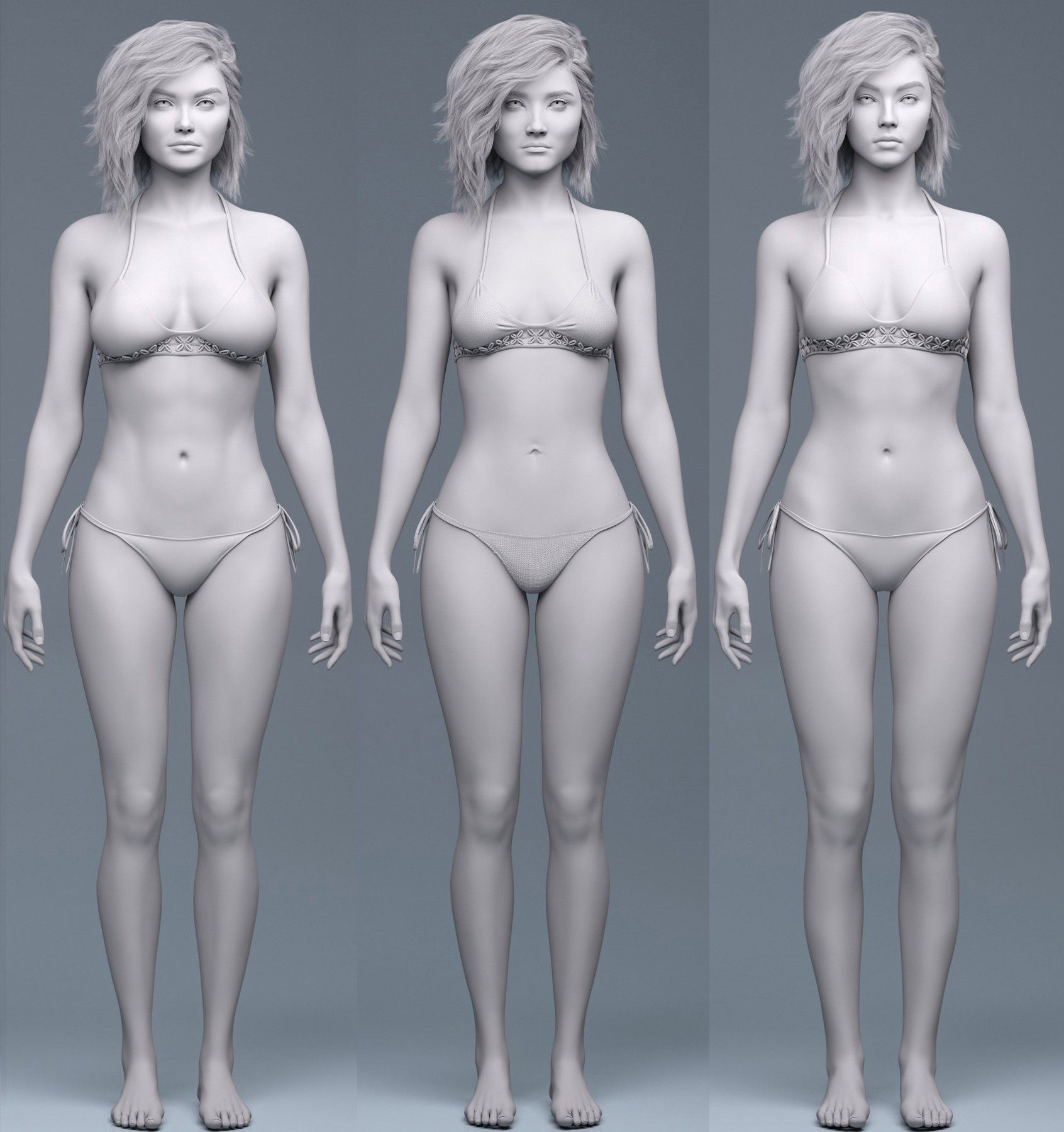
The eyes look similar but the rest of the face and the bodies look distinctly different to me, and I am poor at facial recognition.
What actually IS new in DAZ Studio 6?OK, thanks.
Now I need to hookup speakers and a microphone to check her out. I might just decide to tease Victoria.
List of G9 Core FiguresFull Updated list from page 1, (and I'll try to keep it updated):
I also made a Google Doc - Genesis 9 Core Characters. which will allow you to click on the character to see the link and a picture. I will update this with each release.
List of Genesis 9 Core Characters
01. Victoria 9 HD
02. Michael 9 HD
03. Josie 9
04. Pixie 9
05. Minerva 9 HD
06. Nikolai 9 HD
07. Ivar 9 HD
08. Freja 9 HD
09. Angela 9 HD
10. Thimor 9 HD
11. Joan 9 HD
12. Genghis Khan 9 HD
13. Xiu Lin 9 HD
14. Julia 9 HD
15. Lawrence 9 HD
16. Kiri 9 HD
17. Nathan 9 HD
18. Kala 9 HD
19. Ally 9
20. Olympia 9 HD
21. Olivia 9 HD
22. Van Helsing 9 HD
23. Julius 9 HD
24. Mira 9 HD
25. Calypso 9
26. Amelia 9 HD
27. Karmen 9 HD
28. Zack 9 HD
29. Dain 9 HD
30. Death 9 HD
31. Wang 9 HD
32. Maryam 9 HD
33. Chert the Troll 9 HD
34. Gren the Troll 9 HD
35. Snow Queen 9 HD
36. Jennie 9 HD
37. Walter 9 HD
38. Xola 9 HD
39. Tara 9 HD
40. Mercilus 9 HD Vampire Shape
41. Kara 9
42. Sophia 9
43. John 9
44. Hanako 9
45. Cheyenne 9
46. Neanderthal 9
47. Harlow 9
48. Zahara 9
49. Tabitha 9
50. Lianna 9
51. Wagner 9
52. Wukong 9
53. Thomas 9
54. Kaede 9
55. Toshi 9
56. Vicky 9
57. Mikey 9
58. Lycan 9
59. Kai 9 HD
60. Koa 9 HD
61. Ashley 9
62. Mateo 9
63. Sylvia 9
64. Astaroth 9
65. Lucas 9
66. Elena 9
67. Cecelia 9
68. Charlie 9
69. Willow 9
70. Chloe 9
71. Lyna 9
72. Xiao 9
73. Julian 9
74. Centaur 9
75. Lauryn 9
76. Ava 9
77. Brianna 9
78. Calum 9
79. Madison 9
80. Asha 9
81. Bishop 9
82. Audrey 9
83. Carter 9
84. Kayla 9
85. Valenia 9
86. Jaewon 9
87. Haerin 9
88. Wendy 9
89. Eduardo 9
90. Leona 9
91. Everett 9
92. Sigrid 9
93. Nadine 9
94. Aro 9
95. Cate 9
96. Emmy 9
97. Frankie 9
98. Sydney 9
99. Robin 9
100. Axel 9
101. Kristina 9
102. Bastian 9
103. Aelia 9
104. Isabella 9
Bonus List - Daz Originals G9 Orcs:01. Grommok the Orc HD for Genesis 9
02. Norba the Orc HD for Genesis 9
03. Grugmar the Orc HD for Genesis 9
04. Krugan the Orc HD for Genesis 9Bonus List - Daz Originals G9 Cats:
01. Niketa the Lioness HD for Genesis 9
02. Lahr the Lion HD for Genesis 9Bonus List - Daz Originals G9 Presidents (Editorial License):
01. Joey for Genesis 9
02. Donnie for Genesis 9Bonus List - Daz Originals Monster Mashup Creatures:
01. Exo Alien HD for Genesis 9
02. Goblins HD for Genesis 9
03. Hag HD for Genesis 9
04. Zombies for Genesis 9Bonus List - Daz Originals Character Creature Add-ons:
01. Tara 9 HD Succubus Add-On
02. Lianna 9 Undead Elven Add-On
03. Wagner 9 Dark Elf Shape Add-On
04. Wagner 9 Greater Demon Shape Add-On (Includes Materials)
05. Wagner 9 Demon Shape Add-On (Includes Materials)
06. Sylvia 9 Dryad HD
07. Willow 9 Alien Add-On
08. Lauryn 9 Cervitaur Add-On
09. Lauryn 9 Male Cervitaur Add-On
10. Ava 9 Harpy HD Add-On
11. Dragonscale HD for Genesis 9 (Valenia)
12. Dragon Wings and Tail for Genesis 9 (Valenia)
13. Atlantean HD for Genesis 9 (Nadine)
14. Axel 9 HD Minotaur Add-On
15. Axel 9 HD Minotaur Feminine Add-OnBonus List - Daz Originals G9 Centaur Variants:
01. Bulltaur for Centaur 9
02. Cowtaur for Centaur 9What actually IS new in DAZ Studio 6?Ron Knights said:
How do we activate Victoria, the AI assistant?
I looked all over and couldn't see any hints.
The AI is a Pane like Render Settings or Posing. Add the pane into your layout to use it.
What actually IS new in DAZ Studio 6?How do we activate Victoria, the AI assistant?
I looked all over and couldn't see any hints.
Sydney 9 - Discussion ThreadNot Victoria said:
I liked releases like Sigrid, Aro, Cate, Everett, and Frankie that brought something more distinctive. Sydney is fine if you don’t already own Emmy or Nadine, I guess. Maybe it's just me, but she, Emmy, and Nadine all look like a new trio of sisters like Madison Leona Brianna, the similarities in the face and body are hard to ignore because the only differences I can spot are a slightly different navel shape, breast size and some minor adjustments to the waist. and as we only get 2 a month I'd love to see DAZ take more risks with future G9 characters.
+1!
Sydney 9 - Discussion ThreadNot Victoria said:
I liked releases like Sigrid, Aro, Cate, Everett, and Frankie that brought something more distinctive. Sydney is fine if you don’t already own Emmy or Nadine, I guess. Maybe it's just me, but she, Emmy, and Nadine all look like a new trio of sisters like Madison Leona Brianna, the similarities in the face and body are hard to ignore because the only differences I can spot are a slightly different navel shape, breast size and some minor adjustments to the waist. and as we only get 2 a month I'd love to see DAZ take more risks with future G9 characters.
It would be easier to compare them if the names were written beneath each figure so we know who is who. I think she is getting wishlisted for the moment.
New Year, New Sales Thread: Report Issues Here 4 "Reporting Only"vwrangler said:
There's a database error on the store webpages for a PA that did some older items (very old, actually)
The Dress Headpiece for V3 lists "Lourdes" as the person who created the set https://www.daz3d.com/the-dress-headpiece-for-victoria-3-0
However, if you click on the "Lourdes" PA link in that product (or any other made by that PA), it takes you to one specific character with the same name: https://www.daz3d.com/lourdes-for-sydney-8
PA Lourdes seems to have over 80 items in the store: https://www.daz3d.com/catalogsearch/result?q=lourdes
Since every product with PA Lourdes listed links to character Lourdes for Sydney 8, this is pretty clearly a database content error that should be easy to fix, I hope.
reported, thank you.
New Year, New Sales Thread: Report Issues Here 4 "Reporting Only"There's a database error on the store webpages for a PA that did some older items (very old, actually)
The Dress Headpiece for V3 lists "Lourdes" as the person who created the set https://www.daz3d.com/the-dress-headpiece-for-victoria-3-0
However, if you click on the "Lourdes" PA link in that product (or any other made by that PA), it takes you to one specific character with the same name: https://www.daz3d.com/lourdes-for-sydney-8
PA Lourdes seems to have over 80 items in the store: https://www.daz3d.com/catalogsearch/result?q=lourdes
Since every product with PA Lourdes listed links to character Lourdes for Sydney 8, this is pretty clearly a database content error that should be easy to fix, I hope.
Daz 3D is part of

Connect
DAZ Productions, Inc.
7533 S Center View Ct #4664
West Jordan, UT 84084Licensing Agreement | Terms of Service | Privacy Policy | EULA
© 2026 Daz Productions Inc. All Rights Reserved.