-
* Released * Ultra Scenery Toolbox - Volume II
sandmanmax said:
Here's my Planet Xi. It's pretty much just the tutorial with bromeliads added from Mossy Hollow. Then I used AlienatorPro to replace some of the ferns and bromeliads with alien plants. Sky is one from Orestes Oblivion.
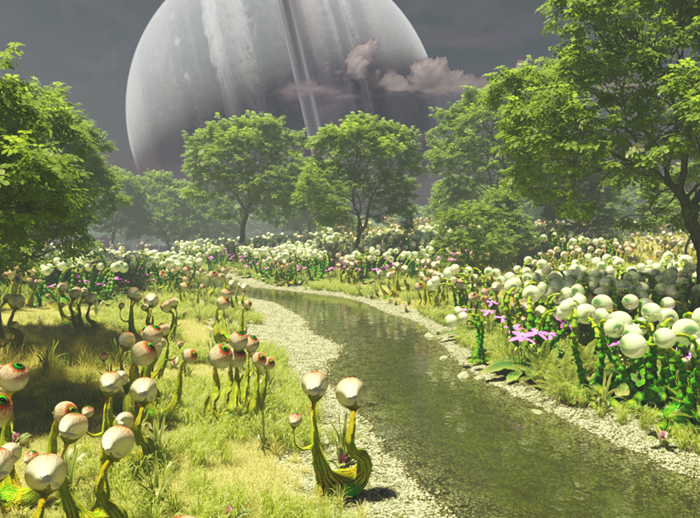
Spectacular stuff. The gas giant in the sky definitely adds something extra.
Cheers,
Alex.
* Released * Ultra Scenery Toolbox - Volume IIHere's my Planet Xi. It's pretty much just the tutorial with bromeliads added from Mossy Hollow. Then I used AlienatorPro to replace some of the ferns and bromeliads with alien plants. Sky is one from Orestes Oblivion.
Graphic Cardaxicecal said:
nazmy2_a263cf7a4b said:
Thanks for the input UHF.
Really due to how pathetically optimized DAZ and assets are... anything less than a 3090 with its 24GB vram is not enough to render realistically... like Of course if you have 8-10gb vram than sure its ok but there comes a time where you are doing yourself a disservice in the long run. I mean I use a 3070 with 8GB vram and I hate my life, but ofc I can't do anything about it cause a 3090 costs 200% msrp in my region assuming there is stock to begin with.
It depends on what you're trying to render and how much time you're willing to put into optimizing a scene to minimize resource usage. Even with a 3090, its quite easy to fill up 24Gb VRAM when working with bigger scenes(assuming you don't run out of RAM beforehand, which can be the case on systems running 128Gb RAM or less that are using a 3090). However, I do agree that some of the assets are STUPIDLY "optimized". A few weeks ago I loaded a character I had just purchase here, and tried to do a test render and it nearly fried my laptop. Originally I thought it was something with my laptop since all I had loaded in the scene was the character itself and one of Orestes's HDRIs that I've used quite frequently in the past. When I went back into Daz to see what happened, I find out that the default settings for the character had the display SubD level setting at 4 and the render SubD level at 5. It was definitely a "wtf?" moment and a promise to myself to never buy products from that particular PA again until I get my new rig... I wonder if even an RTX 3080 could render a character at that SubD level without struggling, nevermind it being in a full scene with HDRI, environment, and props...
Skydome lightingHi team, I know there have been a lot of questionsabout this but I'm still fudged. I purchased Orestes Iray HDRI Skydomes - Angry Heavens but am having difficulties getting the lighting right (First time using Skydomes)
I am creating a zombie animation, zooming from inside a cabin to the exterior. Happy with the the interior using a mesh light but when panning to exterior I cannot get the lighting to work properly. I've tried adding spots and distance lighting and also increasing lighting intensity and resolution on the dome but it wipes out the clouds. The second image is okay but I'd rather have the cloud formations showing more. I have attached some renders as examples.
Any advice would be most appreciated, thank you
Winter Forest HDRI will not install - helpi always buy from these artists :
Whitemagus .
iRadiance .
Orestes .
cake and one .
HD Scans Grungy Corner product nuts & bolts?HD Scans Grungy Corner by Dreamlight
This looks very nice & I'll probably get it later on down the road and use it in conjunction with Orestes HDRI skydomes. I'm curious to know is this just one huge model with a bunch of large texture? Also, what about the surrounding environment, particularly the surrounding buildings & ground? Are they part of it?
HDRI used in Extraterrestrial Flying SaucerTomCatOliver said:
It may not be an HDRI at all. The stars are clearly added on top of the background image, since they're painted onto the clouds as well as the sky, not hidden by the clouds.
I think you are right. If it were an HDRI it would be one of Orestes, but it doesn't match any of the ones he has in the store.
HDRI used in Extraterrestrial Flying SaucerAllenArt said:
Might be one of these:
https://www.daz3d.com/orestes-iray-hdri-skydomes--cloudy-night
https://www.daz3d.com/orestes-iray-hdri-skydomes--a-night-in-august
I have those products and it is neither.
HDRI used in Extraterrestrial Flying SaucerMight be one of these:
https://www.daz3d.com/orestes-iray-hdri-skydomes--cloudy-night
https://www.daz3d.com/orestes-iray-hdri-skydomes--a-night-in-august
Show Us Your Iray Renders. Part VIII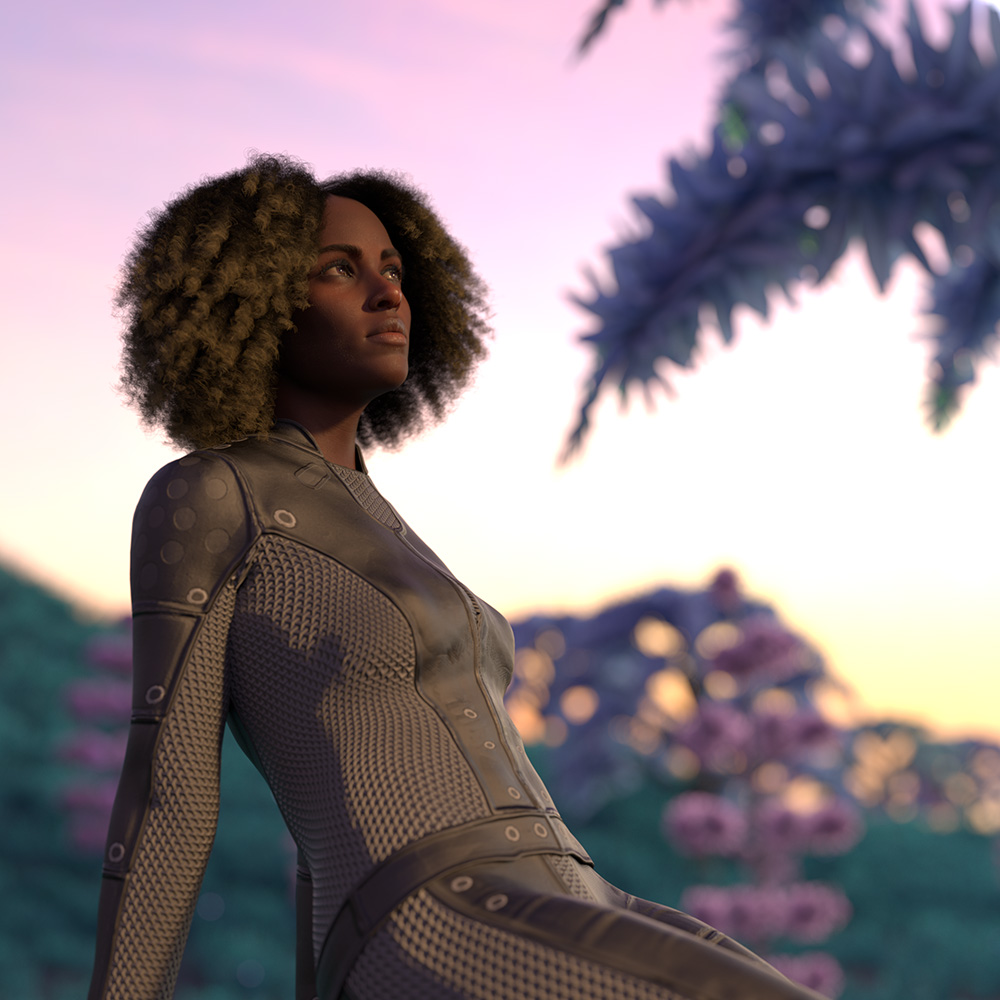
Jada 8.1, Tworest eyebrows, Tallia hair, Oso Alien Scenery backdrop, one of Orestes' skies
Duplicate keyGetting duplicate key error for the following products. How do we address these issues?
ERROR: duplicate key value violates unique constraint "product_guid_key"
UPDATE "product" SET name = 'SBibb Kitten Poses and Morph', default_name = 'SBibb Kitten Poses and Morph', store_id = 1, token = '79534', artists = 'SBibb'
UPDATE "product" SET name = 'Reindeer Irradiator and Poses', default_name = 'Reindeer Irradiator and Poses', store_id = 1, token = '79531', artists = 'FeralFey,Orestes Graphics'
UPDATE "product" SET name = 'Only Dress for Genesis 8 Female', default_name = 'Only Dress for Genesis 8 Female', store_id = 1, token = '79530', artists = 'Anain,Belladona'
UPDATE "product" SET name = 'Mars the planet', default_name = 'Mars the planet', store_id = 1, token = '78736', artists = 'Alvin Bémar
UPDATE "product" SET name = 'Stylized Animations for Genesis 8', default_name = 'Stylized Animations for Genesis 8', store_id = 1, token = '74489', artists = 'Daz Originals'
UPDATE "product" SET name = 'Beauties of the World for Genesis 8 Female', default_name = 'Beauties of the World for Genesis 8 Female', store_id = 1, token = '72333', artists = 'Cherubit,Daz Original'
UPDATE "product" SET name = 'Variety Facial Hair for Genesis 8 Male(s)', default_name = 'Variety Facial Hair for Genesis 8 Male(s)', store_id = 1, token = '54695', artists = 'RedzStudio'
UPDATE "product" SET name = 'Industrial Pneumatic Tools', default_name = 'Industrial Pneumatic Tools', store_id = 1, token = '20499', artists = 'Nightshift3D'
UPDATE "product" SET name = 'Genesis Starter Essentials', default_name = 'Genesis Starter Essentials', store_id = 1, token = '14812', artists = 'DAZ 3D,MAB,Neftis3D,Nouschka Design,PropsChick,Redhouse Studios,SWAM,Sarsa,WillDupre,Xena,Goldtassel,omnifreaker'
UPDATE "product" SET name = 'Lisa''s Botanicals - Palm Trees', default_name = 'Lisa''s Botanicals - Palm Trees', store_id = 1, token = '4751', artists = 'Lisa''s Botanicals'Dforce TreesThere are some old willow trees in the store .. and there's one in https://www.daz3d.com/the-orangery which you may have. I haven't time to try it right now but it might take a dforce modifier - may have to adjust the weights on it [make red things that are not to move] and I would recommend removing all the rest of the scene before running the sim. IF it takes, me with this computer would make and save a morph of the animation. Then load in whatever parts of the scene desired and one could also animate the morph [if doing animations]. I hope that works.
I don't have this one ... the willow in there looks like a good candidate {if it doesn't fall to pieces} https://www.daz3d.com/orestes-trees-vol-1
Update: the trees in the orangery are not willing subjects for dforce. One tree lost its trunk!
So yes, this has to be a good idea for a new product: Trees that can be used with dForce!
Problem with Installation of Orestes Milky Way SkydomeHi all,
I just purchased two of Orestes Skydome products, Cassini and Milky Way. Cassini installed and works just fine. Milky Way installs but nothing loads into the scene. When clicking on the render setting icon, it appears to go through a loading process and the Iray view resets, but the skydome doesn't load and the render settings remain unchanged. I've attempted installations via both Daz Connect and Daz Central with the same results. I've uninstalled and reinstalled; I've closed out Studio and Central and reopened and reinstalled. I've rebooted the PC. Still the same results.
Any help or advice would be greatly appreciated.
The Terracotta ArmyWell, I for one, am having loads of fun with this amazing set!
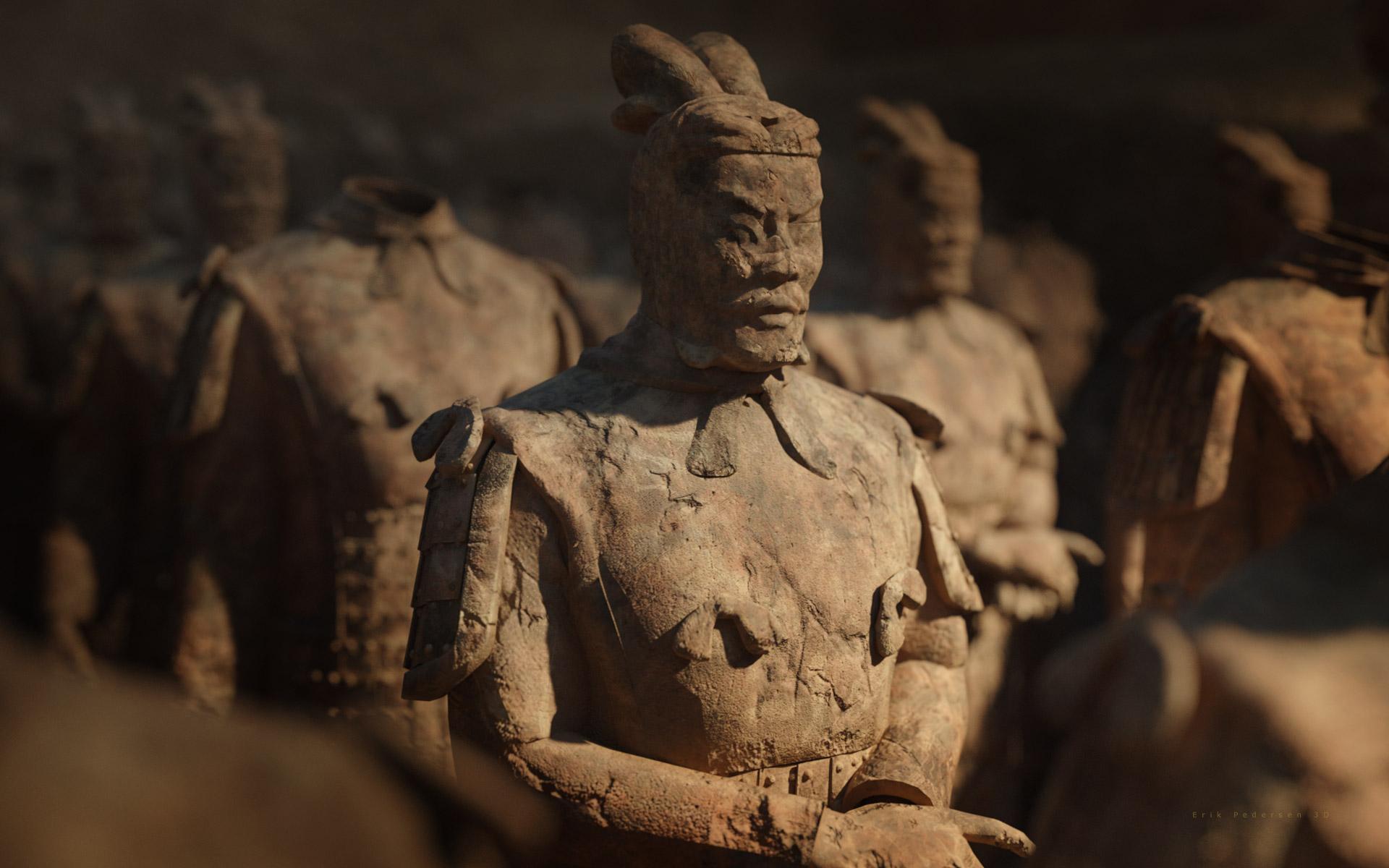
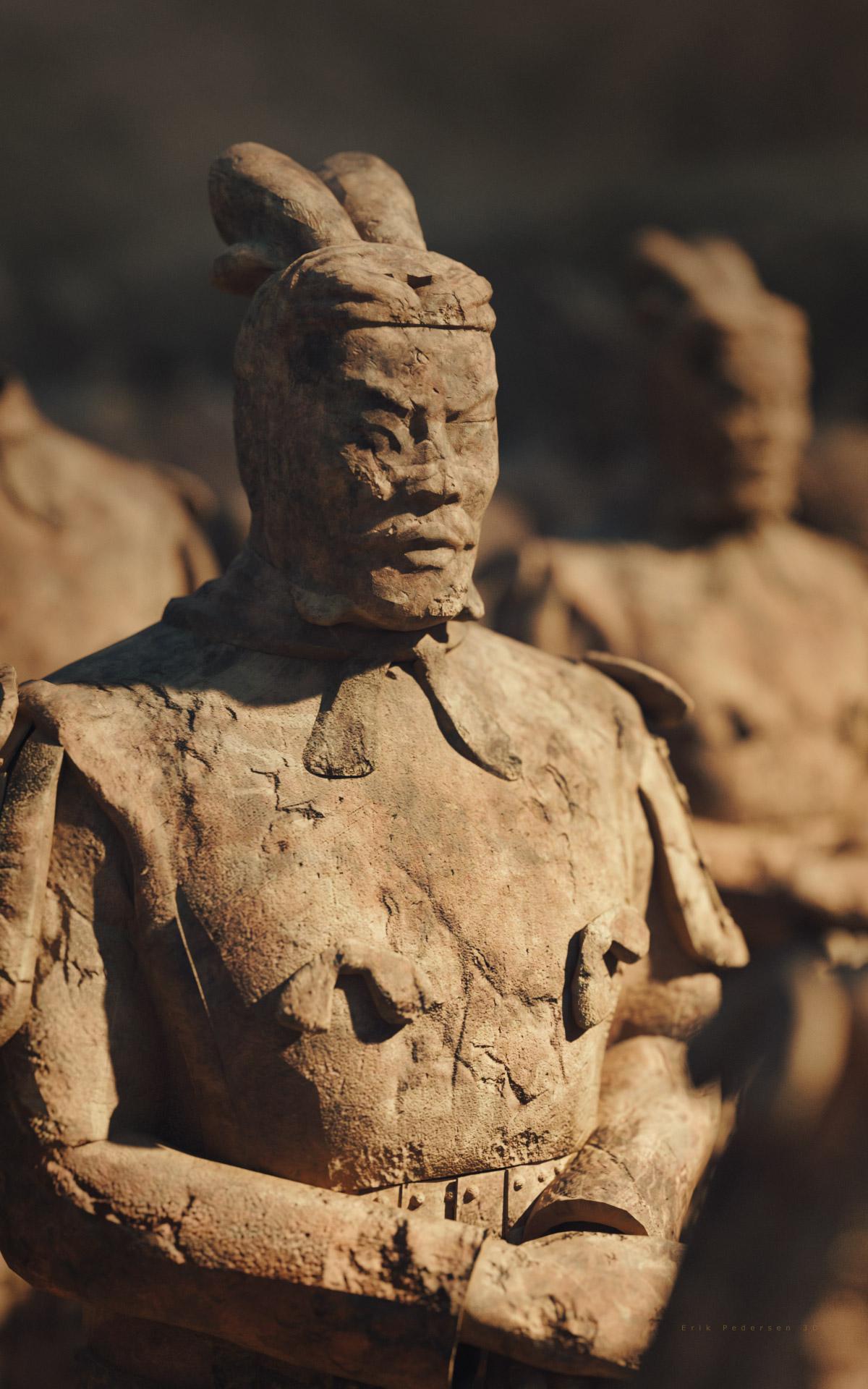
P.S. The lighting is a bit tricky. I used one of Orestes HDRIs and had to crank the Environment Intensity up from 1.00 to 4.50 - your results may vary depending on light setup, but the most I've ever had to up it was 2.0 so not sure if I am missing something somewhere, but the results speak for themselves.
UltraScenery - new territory [Commercial]sandmanmax said:
I've been obsessed with trying to include the Albert Mansion in an UltraScene and finally got it to play nice with the Wasteland. It's the Wetland 2 feature with the boardwalk removed and replaced with the AM wrecked one. The ecology is Wasteland 3, Water is Brackish Pond. All plants are included. The trees and shrubs are all from the AM set, but repositioned a bit. The whole set was moved back so the US is the front "flood". Sky is Orestes Cloudy-Brooding 2 with one of the Dimension Theory's Skies of Economy matte fog settings (light blue/white). I cleaned up all the cult graffiti and ditched the skulls and stuff so it's just a nice, old abandonned house.

That's a spectacular image, all it needs is a few kids on the boardwalk getting ready to do some exploration.
NEW 2021 Sales thread: Report Issues Here "There's Always Another Sale™"namffuak said:
There's no readme for Fast Flames Iray II and the readme for Orestes Iray HDRI Skydomes - Amaranthane has no product image (or, for that matter, a cart thumbnail).
Will report, thank you.
NEW 2021 Sales thread: Report Issues Here "There's Always Another Sale™"There's no readme for Fast Flames Iray II and the readme for Orestes Iray HDRI Skydomes - Amaranthane has no product image (or, for that matter, a cart thumbnail).
UltraScenery - new territory [Commercial]Greybro said:
That's quality right there! I thought I read something back when the house came out about it being difficult to clean all the occult stuff off of it. You've made it look easy!
sandmanmax said:
I've been obsessed with trying to include the Albert Mansion in an UltraScene and finally got it to play nice with the Wasteland. It's the Wetland 2 feature with the boardwalk removed and replaced with the AM wrecked one. The ecology is Wasteland 3, Water is Brackish Pond. All plants are included. The trees and shrubs are all from the AM set, but repositioned a bit. The whole set was moved back so the US is the front "flood". Sky is Orestes Cloudy-Brooding 2 with one of the Dimension Theory's Skies of Economy matte fog settings (light blue/white). I cleaned up all the cult graffiti and ditched the skulls and stuff so it's just a nice, old abandonned house.
I've posted a duf file of the a clean version some time ago here: https://www.daz3d.com/forums/discussion/440187/albert-mansion/p3 maybe you can use this
 UltraScenery - new territory [Commercial]
That's quality right there! I thought I read something back when the house came out about it being difficult to clean all the occult stuff off of it. You've made it look easy!
sandmanmax said:
I've been obsessed with trying to include the Albert Mansion in an UltraScene and finally got it to play nice with the Wasteland. It's the Wetland 2 feature with the boardwalk removed and replaced with the AM wrecked one. The ecology is Wasteland 3, Water is Brackish Pond. All plants are included. The trees and shrubs are all from the AM set, but repositioned a bit. The whole set was moved back so the US is the front "flood". Sky is Orestes Cloudy-Brooding 2 with one of the Dimension Theory's Skies of Economy matte fog settings (light blue/white). I cleaned up all the cult graffiti and ditched the skulls and stuff so it's just a nice, old abandonned house.
UltraScenery - new territory [Commercial]sandmanmax said:
I've been obsessed with trying to include the Albert Mansion in an UltraScene and finally got it to play nice with the Wasteland. It's the Wetland 2 feature with the boardwalk removed and replaced with the AM wrecked one. The ecology is Wasteland 3, Water is Brackish Pond. All plants are included. The trees and shrubs are all from the AM set, but repositioned a bit. The whole set was moved back so the US is the front "flood". Sky is Orestes Cloudy-Brooding 2 with one of the Dimension Theory's Skies of Economy matte fog settings (light blue/white). I cleaned up all the cult graffiti and ditched the skulls and stuff so it's just a nice, old abandonned house.
A superb render. Drenched in gothic atmosphere!
Cheers,
Alex.
Daz 3D is part of

Connect
DAZ Productions, Inc.
7533 S Center View Ct #4664
West Jordan, UT 84084Licensing Agreement | Terms of Service | Privacy Policy | EULA
© 2026 Daz Productions Inc. All Rights Reserved.