-
Benita for V8
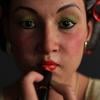
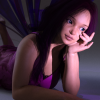
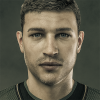
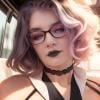
What does she look like sans Victoria 8? Not that I have any morph packs either yet... but at least planning to get those eventually.
Here's how she looks without V8. She looks a bit odd. It's pretty rare I want to do a character for an official figure, but I wanted to take advantage of V8's modelling.
Novica & Forum Members Tips & Product Reviews Pt 9Thank you for posting this, Novica! I am one of those people who have always struggled with GenX2. I did finally get it to work on an M4 about a year ago. A couple of months ago I needed to do another and ran into the same thing. Couldn't get it to work, didn't know what I was doing wrong, spent hours trying to find the solution. I'm bookmarking this and clipping it into my Evernote folder to refer back to!
I'm going to do a "may wanna try this" post for those who are getting back to GenX2 from a prolonged absence (me) and who need some refresher tips.
First, there's a lot of videos but here's one that really nails it, with perhaps a couple areas which you can tweak. So, let's start with my experiences last night and how I finally ended up tackling it. Feel free to provide your thoughts/ how you do it. Before you watch the video and get started, DO THIS:
1.) First make sure you have GenX2 installed. I did, but somehow when I went from studio 4.8 to 4.9, only GenX was installed. I KNOW I had GenX2 installed previously, because I discussed what I was doing on the GenX2 thread with Ralf, and in PMs- and posted my results in my threads! So whacky. How do you check? If you use DIM, just go type in Genesis Generation X2 and be sure it's installed.
2.) In the studio, go to Help>About Installed Plug Ins> and click on Genesis Generation X2. At the bottom, it will tell you the version number. 2.1.1.0 is the latest.
3.) I recommend this Black Sun Comics video: and start at 3:15 Here's some more helpful tips when watching that:
You find the GenX tool in Window (Panes/Tabs) then after you click on it, you can drag it wherever you want.4.) He doesn't change settings at the bottom. If you're going to do that, do it first so you don't forget. I changed Resolution to a lower number, which means sharper details. The official thread said not to get that ultra low (You can go to 0) and last time I used this, I had 30 and the results were very good. Default is 50, but the pdf mentions lowering it. What do you folks use? I also changed the limits to -20 and 20. I also compress the files, as per the discussion in the Commons.
5.) Note your generation 4 figures probably won't be in the dropdown for source, you can Load Source and track it down, or drag and drop. After you do it once, they will appear in the source choices.
For dragging over the first time for V4 and M4:
Content Library>Poser Formats>Daz>Figures> DAZ People then get the cr2 (base model)
Content Library>Poser Formats>Daz>Pose>DAZ's Victoria 4 (or Michael 4) >Morph Injections>INJ Morphs+++ (get the morphs you need. See Tip, next line.)TIP: Check all your characters BEFORE YOU START to see if they need addtional morphs, some of your muscular ones may need those. Just go to Product Library and the individual product pages, it's fast and easy. WHAT I DID: I loaded up the muscularity and the Morphs+++ because those two are common. If you're doing aged people or fantasy, you'll need the others, but I picked the two I think will be most commonly used, then I don't have to worry about it.
If loading the source and doing it from Load Files, in my studio it's Content>Runtime>Libraries for both of these, then:
Character>DAZ People>(Victoria 4, etc) for the base
Pose>(DAZ's Victoria 4,etc) >Morph Injections>INJ Morphs++ for the morphs.After you do these Generation 4 people once, they now appear in the Source dropdown list.
6.) Generally speaking- Select Edges if you are using a Generation 4 as the source. Use Smooth for the others. The explanation for this is in the official thread.
7.) Don't forget to use Select and choose Transfer On for all Non-Zero Values
8.) Doing complete vs head then body: after watching the video, I'm a firm believer in doing heads and bodies separately, due to getting a separate slider for the head and really maximizing morphs- you get sliders for each head and mixing morphs with other ones is SOOOOO easy. The way I named mine was to identify
a) character Tiffany (which would be the body one) OR TiffanyHead
b) where it came from REN (Renderosity)
c) what figure it came from V4
so the identifier would be Tiffany_REN_V4 for the body, or TiffanyHead_REN_V4 for just the head. The Name would be the same, without the underscores (_)Choose Actor for the body (in Region) and don't forget to choose HEAD for the head!
9.) To find the body- (Target, like Genesis 3 Female) > Actor > Generation X
10.) And in the Shaping pane, the head will be: Genesis 3 Female (whatever your target is) > Head > Generation X> VIctoria 4 (whatever your source was)
Hope this helps, you should breeze right along!This worked perfectly! I just moved my first V4 character to G3F. I do have a question though. Are there legacy UV's for V4 to Genesis 3F? I can't find them. I have one for m4 to G3 but can't find one for V4 to G3
Olympia 8@Ildanach, yep i've put in a ticket for that. The only response I've had so far is support replying and asking me for the product name and product sku so they can test it... :headdesk: (not sure why they wanted the name of the product and sku when I stated in the ticket it was OLYMPIA 8.......) So I'm still waiting for a reply.
Screenshot attached to show error message.
Indeed she does! I stand corrected. Not sure how I missed the brows the first time around. Cheers for that.
The UV set for Olypmia 8's brows is showing as "Default UVs" for me. No mention of Victoria 8 UV set being required. Though I do have Victoria 8 installed. Not sure why it's giving you problems. Did you submit a ticket?
a readme filelist should say where the uv dsf should be
file list is empty http://docs.daz3d.com/doku.php/public/read_me/index/44303/file_list
Olympia 8@Ildanach, yep i've put in a ticket for that. The only response I've had so far is support replying and asking me for the product name and product sku so they can test it... :headdesk: (not sure why they wanted the name of the product and sku when I stated in the ticket it was OLYMPIA 8.......) So I'm still waiting for a reply.
Screenshot attached to show error message.
Indeed she does! I stand corrected. Not sure how I missed the brows the first time around. Cheers for that.
The UV set for Olypmia 8's brows is showing as "Default UVs" for me. No mention of Victoria 8 UV set being required. Though I do have Victoria 8 installed. Not sure why it's giving you problems. Did you submit a ticket?
Olympia 8Bingo! Thank you so much for testing this. Your last paragraph give me the clue to solve the mistery. If every MAT preset is showing the issue with my scene and if using my MAT preset outside the scene doesn't show the issue, the problem is not Olympia 8 or the MAT preset. So, I was looking at the wrong pane. The culprit needs to be in my Render Settings, and in fact it was there. Disabling Spectral Rendering cleared the issue.
I really thank you again for taking your time and help me to solve this.

I don't think this is an Olympia 8 issue, but rather an issue with your settings. I don't have Olympia 8 so I couldn't test it on her mats, however I tested your scene's settings on 7 different mat sets (both Genesis 8 sets AND Genesis 3 sets), and the seams show up for all the mat sets I've tested it on. So I think it's a issue with your settings. Not an issue with the mats.
With your scene's settings on various mat sets the seams showed up on all the mat sets I tested them on. I tested them on 7 mat sets (from G8F mats to G3F mats). I also used different HDRIs. The visibility of the seams varried in intensity depending on what lighting or HDRI I used and what mat set I used, but every one of them have visible seams with your scene's settings and skin settings applied:
Genesis 8 Base Female mats with your scene and skin settings:

Narkissa for G3F mats with your scene and skin settings:

Victoria 8 mats with your scene and skin settings:

I tried it on several more mat sets (then applying your skin/shader settings), and again, they all have the seams visible. So there seems to be an issue with your scene's settings rather than an issue with Olympia 8.
Edit - BTW, I tested your skin settings OUTSIDE of the scene that you provided, and it doesn't reproduce that issue - so it looks like a combination of your Scene's settings AND your Shader/Skin settings that creates the issue.
You're welcome. I'm glad you got it figured out.
 With so much negative being thrown at poor Olympia 8, I wanted to make sure it wasn't an issue with her mats. I'm glad it's not. Because I really want to get her! I'm so looking forward to getting her!
  Olympia 8
Bingo! Thank you so much for testing this. Your last paragraph give me the clue to solve the mistery. If every MAT preset is showing the issue with my scene and if using my MAT preset outside the scene doesn't show the issue, the problem is not Olympia 8 or the MAT preset. So, I was looking at the wrong pane. The culprit needs to be in my Render Settings, and in fact it was there. Disabling Spectral Rendering cleared the issue.
I really thank you again for taking your time and help me to solve this.
I don't think this is an Olympia 8 issue, but rather an issue with your settings. I don't have Olympia 8 so I couldn't test it on her mats, however I tested your scene's settings on 7 different mat sets (both Genesis 8 sets AND Genesis 3 sets), and the seams show up for all the mat sets I've tested it on. So I think it's a issue with your settings. Not an issue with the mats.
With your scene's settings on various mat sets the seams showed up on all the mat sets I tested them on. I tested them on 7 mat sets (from G8F mats to G3F mats). I also used different HDRIs. The visibility of the seams varried in intensity depending on what lighting or HDRI I used and what mat set I used, but every one of them have visible seams with your scene's settings and skin settings applied:
Genesis 8 Base Female mats with your scene and skin settings:
Narkissa for G3F mats with your scene and skin settings:
Victoria 8 mats with your scene and skin settings:
I tried it on several more mat sets (then applying your skin/shader settings), and again, they all have the seams visible. So there seems to be an issue with your scene's settings rather than an issue with Olympia 8.
Edit - BTW, I tested your skin settings OUTSIDE of the scene that you provided, and it doesn't reproduce that issue - so it looks like a combination of your Scene's settings AND your Shader/Skin settings that creates the issue.
Olympia 8I opened a support ticket about the seams issue. They answer me as unable to reproduce the issue. Anyway, in the mean time I asked for 2 friends to render my scene and they see the same issue.
You can see the issue clearly on the beta version (4.9.4.122) using Texture Shaded in viewport. In the the stable version (4.9.4.117) the issue does not show using Texture Shaded preview. Anyway, when you use Iray Render Preview, the issue shows in both versions.
The thing is, when you use the Olympia 8 default iray material preset the issue is barelely visible, maybe because the translucency is set to 0.90, which is to high for a caucasian character and possiblement the reason why a lot of people have concerns about how Olympia 8 is rendering. I made soem adjustments, just to the skin channels, lowering the Translucency to 0.50, setting the Transmission Distance Measurement to 2, Transmission Color to a Skin Ttone (R 180, G 128, B 98), Scattering Measurement Distance to 0.75, SS Amount to 1, and SSS Direction to -0.60. With this settings, the issue is visible. If someone would like to take sometime and make a test render, I am attaching the scene file with this setup. Let me know if you get the same result as me.


Below is the scene file.
I don't think this is an Olympia 8 issue, but rather an issue with your settings. I don't have Olympia 8 so I couldn't test it on her mats, however I tested your scene's settings on 7 different mat sets (both Genesis 8 sets AND Genesis 3 sets), and the seams show up for all the mat sets I've tested it on. So I think it's a issue with your settings. Not an issue with the mats.
With your scene's settings on various mat sets the seams showed up on all the mat sets I tested them on. I tested them on 7 mat sets (from G8F mats to G3F mats). I also used different HDRIs. The visibility of the seams varried in intensity depending on what lighting or HDRI I used and what mat set I used, but every one of them have visible seams with your scene's settings and skin settings applied:
Genesis 8 Base Female mats with your scene and skin settings:
Narkissa for G3F mats with your scene and skin settings:
Victoria 8 mats with your scene and skin settings:
I tried it on several more mat sets (then applying your skin/shader settings), and again, they all have the seams visible. So there seems to be an issue with your scene's settings rather than an issue with Olympia 8.
Edit - BTW, I tested your skin settings OUTSIDE of the scene that you provided, and it doesn't reproduce that issue - so it looks like a combination of your Scene's settings AND your Shader/Skin settings that creates the issue.
Legacy UVs for Genesis 8 [Commercial]Thank you, Melanie! I have updated the list as you suggested.
Blake, though, is actually a Genesis 2 Base Female texture, even though it is called Blake for Victoria 6 and the MATs apply the V6 UV Sets. I did mention it in the post, that the clue resides in vital misalignments.
Legacy UVs for Genesis 8 [Commercial]Hello,
I'm not getting the results expected. This is Gen8 with Cassie Gen2 mats applied.
I don't know what I could be doing wrong since the process has only 3 steps after loading Gen8
Any suggestions?
Michael Grant
Michael, Cassie uses the Victoria 5 UV Set. If you load the MATs onto the original Genesis 2 you can see what the UVs are for each property in the Surfaces tab. In fact some of the eye surfaces for Cassie are Genesis 2 Base Female UVs, but the differences are so slight as to make little practical difference.
I put a provisional list of V5 and V6 textures in the "Legacy UVs for Genesis 3" thread. If a figure is not listed there it is probably a Genesis 2 Base Female texture, unless it is one of the iconic figures, like Monique....
Hi, I was recently checking through all the G2F and G3F characters in my content library to help me decide which of your G8F products I most need (obviously I need them all!) and I noticed some additions to your provisional list for G2F characters - Novica suggested in her thread that I should post them in your thread too. As this is the more active thread, I'll list them here:
Fully V5 UVs:
FWSA Riva
Vengeful SpiritV5 UVs for the skin but with some Base Female UV parts (typically eyes, eyelashes,etc):
FW Ashley
FW Caoimhe
FW Merfolk
FW Mirella
FW Naida & Nalin
FW Neomi
FW SassafratFully V6 UVs:
Bellatrix
BlakeV6 UVs for the skin with some stray UV parts:
Sisters for Zev0's Growing Up Pack (cornea says V4!)I don't know if you'd like to update your list in the other thread?
Can Gen 2 or Gen 3 Poses be (all or mostly) used with V4 and V3 in Poser?DAZ's Victoria 4 and Michael 4 ( and their morph off shots) are generation 4 Poser legacy rigged figures, so generations 2 and 3 would pre-date generation 4 and also be Poser legacy rigged figures, not weight mapped. Genesis 1 and 2 are generation 5 and 6, use DAZ's TriAx weight mapping and can be used in Poser through DAZ's DSON Importer plug-in for Poser. Genesis 3 and Genesis 8, generation 7 and 8, use Dual Quaternion rigging that is not compatible with Poser at all.
(Released) EcVh0 Pale Skin Shader for Genesis 8 Female [Commercial]Just a quick tip for everyone who has this. If you have gotten the Olympia 8 pro or Beginners pack the character Sharah comes with SSS maps that can be used with this shader with no alteration, and she comes with her make up baked into the SSS maps too so you don't have to mess with them either. Plus they all come in Brow and No Brow options. So it really is as easy as plugging in her SSS maps into the Translucency Channel and perhaps changing the Specular map for her own to have another skin for this shader with no extra work. You can use it with the original shader EcVh0 has as well. This example shows the differences you get with Olympia 8's SSS (Face), Sharah's (Torso) and Victoria 8's SSS maps as well (Legs) with the original shader but the arms show how Shara's work with the pale shader too. Sorry for the crappy render it was just a viewport proof of concept test that I screen captured to save time.
Thanks again haha! You are doing all the work for me I don't know how to thank you enough for these!
And three skin on one lady is really creative!
I bet she've been doing some weird poses on the beach to get no tan on her arms, some tan on her legs and lots of tan on her body! 
Or the worlds most disastrous spray tan! LOL And just to save you a bit more work here is Sharah SSS maps used with the Pale shader all over with no post work. Literally the only thing changed is putting the unaltered SSS into the translucency channel and swapping out the specular for her own (which probably doesn't even need to be done, it's just me being pernickety!). Just goes to show that it's always worth checking to see just what is included in a characters maps.
You can only get those disastrous spray tan here down in Australia!
Hahah thanks again, she looks absolutely amazing! (I think I've said that so many time to you haha)
Benita for V8What does she look like sans Victoria 8? Not that I have any morph packs either yet... but at least planning to get those eventually.
Olympia 8Wait. Olympia 8 DOES come with an eyebrow prop. That's my problem with her - she comes with an eyebrow prop, plus mats for the eyebrows, but they don't work for me as they throw up an error message wanting Victoria 8 UVs which I don't have.
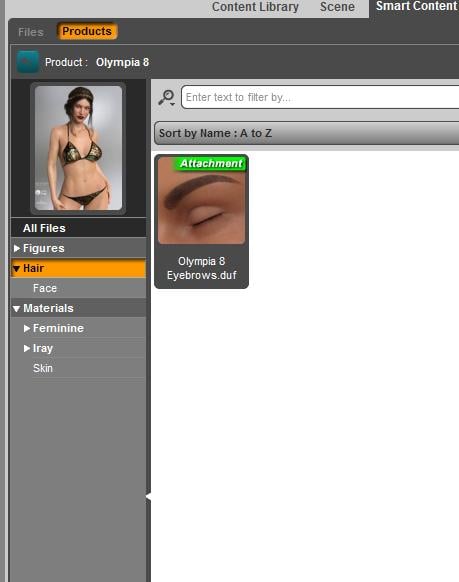
Good point about the eyebrows. Olympia 8 comes with materials for eyebrows, but unfortunately there aren't any eyebrows included with her (unlike with Victoria 8). Not sure if this was an oversight or not. So I used OhMyBrows on her instead.
Indeed she does! I stand corrected. Not sure how I missed the brows the first time around. Cheers for that.
The UV set for Olypmia 8's brows is showing as "Default UVs" for me. No mention of Victoria 8 UV set being required. Though I do have Victoria 8 installed. Not sure why it's giving you problems. Did you submit a ticket?
Coming soon : Bibi Set for Genesis 8 Female(s)Modern clothes for Genesis 8, Olympia 8 and Victoria 8... thin, voluptuous...
Novica & Forum Members Tips & Product Reviews Pt 9And I don't own most of them. So Genesis UVs don't work? And is there a way to see if some of the Genesis just didn't show up in the store dropdown, that do use Victoria 5? (A way in the studio? I am NOT going character by character and checking UVs. They (the Victoria 5, and the Genesis) both say "Base UV" so I am confused)
ETA: ah! I just noticed your later post about Cayman's list of characters by UV set - I'd forgotten all about that list. Actually mine has a couple of entries not on Cayman's list.
It's been interesting seeing everyone's take on Olympia 8. I'm still on the fence, trying hard not to get into Gen8 as yet, which is not too difficult seeing as my store credit is down to 7 dollars at the moment! And yes I used my PC coupons for July. I have an orange banner (because I did buy into Olympias 6 and 7) which says it lasts till August 7th so maybe next month...
I understand what you mean about going Genesis 8 / Victoria 8. I am "kinda" holding firm on not going to that generation- or I was- until I saw the facial expressions/posing which are SO much better- very fluid. You won't see it with my quicky portraits on the thread (my main goal has already been to show folks base, out of the box, and show quickly like for these new releases. Took me about four hours to test stuff/render.) So what I personally decided to do was get Genesis 8 characters while deeply discounted (that means 60% or more) so I can use their morphs- and totally disregard their materials (eyebrows I don't like) because I'm using Genesis 3 for the skins. (until an EASY way to get the morphs from Genesis 3 onto 8 is made.)
Most of what I'm doing now in the near future, is my Generation 4 conversions of skin and morphs up to Genesis 3. Omgosh, there are BEAUTIFUL skins for that Generation. Some of the vendors I check out first over at Rendo and here for beautiful and/or thicker eyebrows for women is of course Moussa, Sabby, Seven,(SASE, which combines those), Mihrelle, P3Design, Vyktorhia (I don't know if I spelled that right), Godin, Gypsyangel, Ozichick, Pixeluna,Saiyaness, Chevybabe25, to name a few. Raiya is a mixture, some are too penciled for me, but they are thicker, and many are quite good so far as more natural. We mentioned a few vendors a few posts back, too. When I think of unique overall, it's Saiyaness, Gypsyangel, Chevybabe25. Who do you folks like for variety overall, and for brows? (those are two different things. I buy some that have great morphs, with no intention of ever using the mats.)
Oh I'm using the FREE bits of Gen8 - i.e. the base female - and I've ported over a lots of morphs using Redz method from the other thread. I've been GenX2-ing all my favourites to G3F from earlier generations and manually transferring from there. So with a whole pile of G3F skin texures I have plenty to play with! I just haven't bought into the V8 or O8 stuff (waiting for the PA Sale then the PC Anniversary Sale hoping for bargains there
 )[Links] Victoria2 / Michael2 V2/M2 freebie list
How Do I Download Michael 1 & 2, and, Victoria 1 & 2
Unfortunately you can't, they are not available anymore.
Benita for G3FIt would be nice to see "Benita for Victoria 8" [ https://www.daz3d.com/benita-for-victoria-8 ] available for G3F ..... hint, hint
Benita for V8I don't have her but Victoria 8 uses Base Female so I assume Daz has dropped the multiple UV sets of the past generations which makes our lives easier :)
Benita for V8Could someone who has her please confirm whether or not she uses Victoria 8 UVs?
Olympia 8does she come with a separate body shape slider, no scaling applied?
Thanks. !!
i'm waffling cause vicki8 didn't have a shape only option,
Really? That's generally considered a nono, so I can't imagine DAZ has done that on a main character. Can't you just dial the head to zero?
Victoria 8 does have separate morphs, I'm not sure why they said that there isn't:
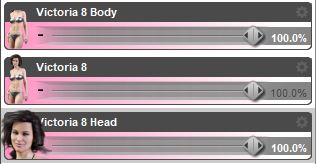
Well the problem seems to be that the body shape includes height scaling which she don't want for some reason.
If those separate morphs include scaling, it limits their usability a lot. For example, if you have 2 figures, tall and short, and you want to create a mixed character that uses tall figure's head and short figure's body, you'll end up with a new figure with short body with too big head. That's why the full body slider should be only one that includes scaling. If you mix tall and short full bodies, their body vs. head proportions still stay correct.
OK, but then can't you just scale the head proportionally? I've done that myself without any problems, especially with V3 which has a too small head compared to the body IMO.
Apart from that, people's body/head size porportions vary a lot, some have small bodies and large heads, others large bodies and small heads.
Daz 3D is part of

Connect
DAZ Productions, Inc.
7533 S Center View Ct #4664
West Jordan, UT 84084Licensing Agreement | Terms of Service | Privacy Policy | EULA
© 2026 Daz Productions Inc. All Rights Reserved.