-
[SOLVED] About clothes (and heels, since I expect a problem) and parenting for poses
Richard Haseltine said:
High heels are a problem as they are not uniformly close to the same part of the figure, so the weight-projection gives undesirable results. Transfer utility gives a starting point, but then the weightmaps will need editing - especially where the fitted item is far from the figure or where two parts of the figure might either be taken as a source for the projected weights, or where there is a transition (the midline on skirts or dresses, the crotch on trousers, the upper sleeves if loose). This is a job for the Node Weightmap brush tool. Some areas will also need morphs linked to the bends to keep them neat.
Yeah, I'm already kinda used to it since it's always a problem. It's a real mess in Blender too. Everything would be fine if rest pose was the one with heels but it needs two skeletons. That explains a lot why, in games, and MMO, they most of time create "fixed" champions or make "heels only" footwear for women. The struggles just start. Anyway, thanks for the hint. The reference to "Transfer Utility" has provided a direction.
Let's appreciate/discuss today's new releases - ongoing threadLinton said:
richardandtracy said:
I do like the 'Classic Earring Collection' https://www.daz3d.com/classic-earring-collection-for-genesis-8-81-and-9. Nice, understated and beautifully modelled with a good range of character support. The range of material options is impressive too. Regards, Richard
Any idea who the male morph face is in the promo?
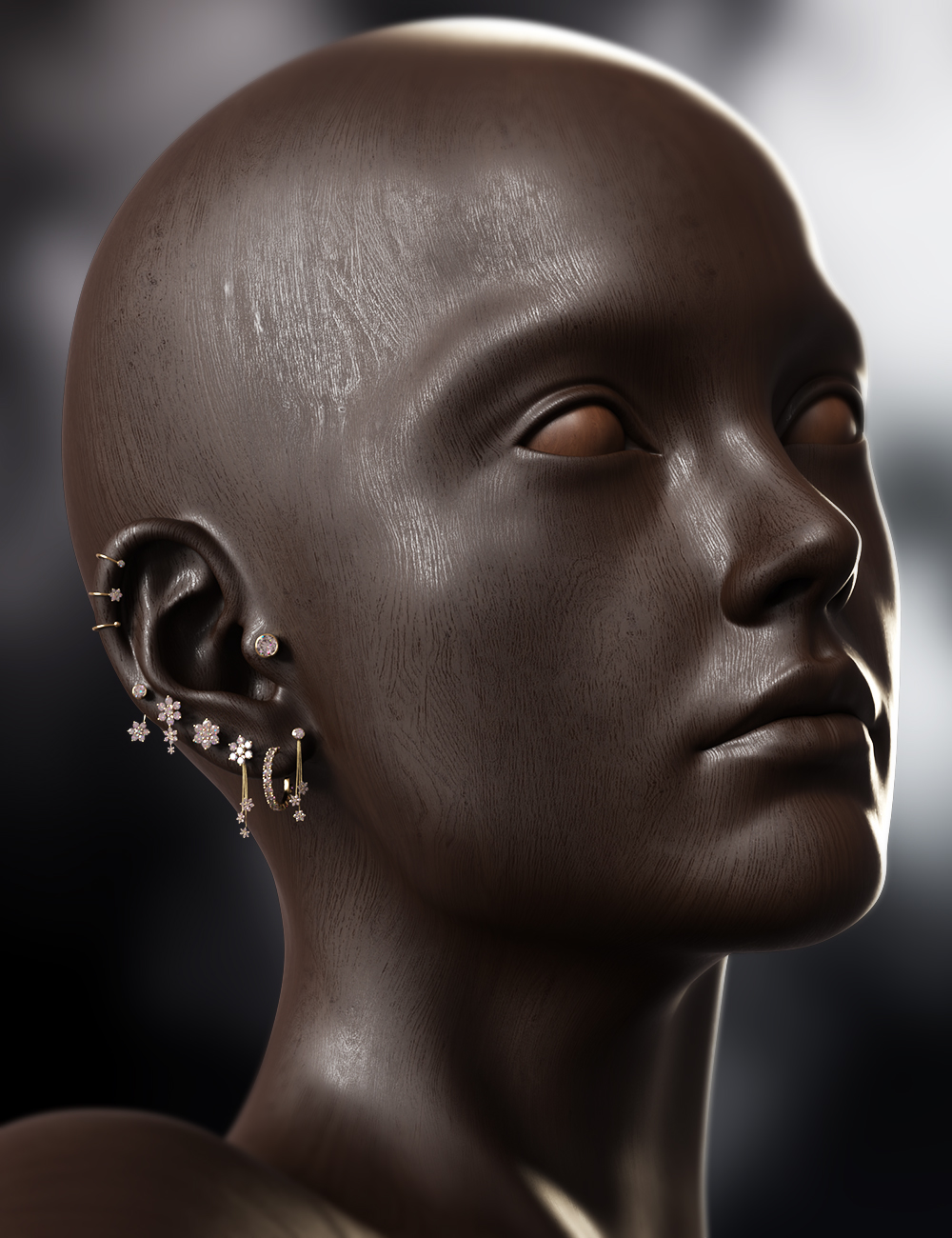
Hey there! I'm the promo Artist behind the promos for this product, the character is just one I made as I was messing around. I'm no character artist, so you won't find it on any store.
[SOLVED] About clothes (and heels, since I expect a problem) and parenting for posesHigh heels are a problem as they are not uniformly close to the same part of the figure, so the weight-projection gives undesirable results. Transfer utility gives a starting point, but then the weightmaps will need editing - especially where the fitted item is far from the figure or where two parts of the figure might either be taken as a source for the projected weights, or where there is a transition (the midline on skirts or dresses, the crotch on trousers, the upper sleeves if loose). This is a job for the Node Weightmap brush tool. Some areas will also need morphs linked to the bends to keep them neat.
Welcome to Hatsune Miku Anime Manga Cafe ☕Ethin said:
Redfern said:
Cris Palomino said:
Cute characters. What characters are these?
The base figure is...
https://www.daz3d.com/melody-for-a3
For the various genus morphs...
https://www.daz3d.com/furries-for-melody
For the various genus fure textures...
https://www.daz3d.com/furries-furs-rabbits-and-mice
https://www.daz3d.com/furries-furs-fox-and-wolf
https://www.daz3d.com/furries-furs-bast-and-anubis
...probably enhanced with morph and texture customization Ethin personally made.
Thanks Cris Palomino! What Redfern said.
Although I will add while I do have all those texture ^ sets the ones on the saber tooth and rabbit are actually custom ones I made. Also I used the ears from the Aiko bunny girl 'cause Melody's ears are somewhat lacking in pose-ability.
Oops! I didn't mean to dismiss your efforts, @Ethin . I took a shot as to what was used based upon overall color scheme...and missed by a wide margin.
Yes, you've done wonders with these vintage figures, proving they are still valuable assets and fill aniche no "current" figure does...at least for the moment. If DAZ releases an equivalent set for Genesis 9 that can depict the range of species Melody and Micah do, then you'll finally convince me to board the "DS" boat. Until then, Melody and Micah will remain my "go to" meshes for most characters anthropomorphic. This last part is directed at Cris Palomino .
Minerva 9She looks like a final boss. I see definitely a Pfeiffer vibe. This is 100% HD morph with default normal maps (Tried the fancy 8K and it scared me)
Natural eyes G9. Paramount Lights.
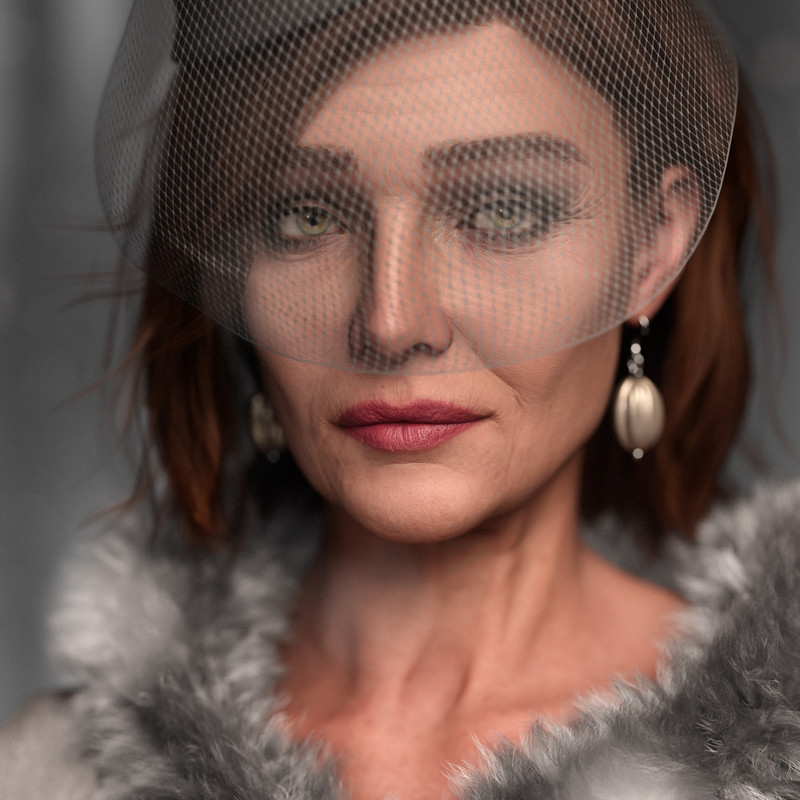
Also did a render dialing her 50% with a third party morph also at 50%. HD dials set to Zero, mormal maps default. Same make up. IG Photographers light. Scene Only.
 Why expressions on full poses?
Sadly this is an extremely poor practice. Not only does it make things very annoying when you want to keep a certain expression and use one of these poses, the chance that the expression will actually work with your character morph is usually very small and you usuall end up with something out of horror movies. Luckily it's not common and I learned to avoid them early on.
More Non-photorealistic Renders (NPR III)Yes, @Artini , those look terrific! Are those still Unity NPR? A month or two ago I finally collected my 2021 Christmas present, and purchased a Unity bundle from Humble-Bundle for the NPR assets. I have a year to collect from the Unity store, so I am in no hurry, but when I do, and I get a newer version of Unity, I would sure love to pick your brain on the subject -- I have enjoyed watching you produce NPR in Unity, and you were my inspiration for choosing the bundle.
@vrba79 :
Very nice -- That's a solid good look. Are you using PW to get the clean flats? The hair and dress looks way better than default 3Delight toon.
@csaa :
Yeah, not really that good for me -- I am the epitome of the 'starving artist', but not literally starving -- My family sees to it that I have my daily rice. I am old, and it has all been pretty mundane -- I devote more to my first love of studying to be a master of Martial Arts (which I began training alongside art) before I die -- It's the only thing I really care about -- The rest is all just distraction.
Since you are working on a comic, you might appreciate this...
Here are early cover mock-ups of my trilogy GN -- They will most likely change by the time I finally go to print -- The first two are hand-drawn, and the third is NPR :

The plan is 90% NPR (mimicking hand-drawn/inked) with 10% hand-drawn/inked pin-ups/inserts.
* EDIT: Oh yeah, the coding thing -- That is just another thing I am doing towards my ultimate goal of producing my GN's -- So far I am working on a Blender bridge for morph work, a cloth simulation morph creator for VWD cloth simulator (in Daz Studio), and a couple of morph utilities while working with morphs in DS. They are all in states of working with bugs I am trying to iron out...
Next on the list is one to automate my digital inking from my DS NPR passes.
Error during rendering.Another update...
So, the blank model in T-pose (default Gen 8) with a camera shifting to create animations frames were able to render 7 frames just fine in under 3 minutes time. So it is not my model. Cranked SubD up a notch. Rendered the same thing a second time with NO ISSUES. SubD is not the issue.
Poses appear to be causing this. pJCM files in particular. I tested this theory by applying the whole pose series (4 Frames total) from the render I was attempting to do when this began, to the base model in an empty scene just as when I tested the no pose and increased SubD theories. It failed on the very first frame. I just went through this with the duplicate formula issue and have been working with technical support to resolve it. We came to the conclusion that the Gen 8 Alice and her outfit were clashing with another Genesis 8 Alice morphs. I deleted the Alice morphs and resolved the issue. This feels the same as a random morph from a random product is causing issues when it loads. I have a lot of posing morphs that apply passively when I use a bend morph, so finding exactly which one is causing will not be fun but I am 98% sure I know what is causing it now.
Error during rendering.This result lead me to test about everything I can think of at this point:
2022-12-16 05:58:35.257 [INFO] :: Loaded first morph deltas: 0m 0.6s - /data/DAZ 3D/Genesis 8/Female/Projection Morphs/DAZ 3D/Expressions/eJCMConfused_HD_div2_proj.dsf
2022-12-16 05:58:35.358 [INFO] :: Loaded morph deltas: 0m 0.8s - /data/DAZ 3D/Genesis 8/Female/Morphs/DAZ 3D/Expressions/eJCMAngry_HD_div2.dsf
2022-12-16 05:58:35.376 [INFO] :: Loaded first morph deltas: 0m 0.3s - /data/DAZ 3D/Genesis 8/Female/Projection Morphs/DAZ 3D/Expressions/eJCMAngry_HD_div2_proj.dsf
2022-12-16 05:58:35.472 [INFO] :: Loaded morph deltas: 0m 0.6s - /data/DAZ 3D/Genesis 8/Female/Morphs/DAZ 3D/Celani 8/eJCMCelani8_Angry_HDLv3.dsf
2022-12-16 05:58:35.501 [INFO] :: Loaded first morph deltas: 0m 0.3s - /data/DAZ 3D/Genesis 8/Female/Projection Morphs/DAZ 3D/Celani 8/eJCMCelani8_Angry_HDLv3_proj.dsf
2022-12-16 05:58:43.169 [WARNING] :: ..\..\..\..\..\src\pluginsource\DzIrayRender\dzneuraymgr.cpp(369): Iray [WARNING] - API:DATABASE :: 1.0 API db warn : Transaction is released without being committed or aborted. Automatically aborting.
2022-12-16 05:58:49.684 [INFO] :: Total Rendering Time: 47.38 secondsI started thinking the HD expressions were causing an error because my (Render) SubD Minimum was set to 3 and these morphs appear to do their thing at 2 and 3 respectively. Thinking my settings were too high on my High Resolution Genesis 8 and not allowing the minimum to slip low enough to use these expressions, I reset them (Alt+Left Click) to default which is SubD Level 1 and (Render) SubD Minimum 2. I also loaded in new versions of her wearables to compare their SubD levels and make sure that none of them had been changed on accident. They were not.
This did not solve the issue. So, I removed all expressions from the test render from every frame of the timeline, saved my scene, closed Daz and restarted.
Expressions are now off, only the poses themselves still exist. Still crashes after frame 0 is done rendering. First Frame renders fine (an improvement from not rendering at all).
2022-12-16 07:12:51.619 Iray [INFO] - IRAY:RENDER :: 1.0 IRAY rend progr: Received update to 00220 iterations after 15.324s.
2022-12-16 07:12:52.628 Iray [INFO] - IRAY:RENDER :: 1.0 IRAY rend progr: Received update to 00239 iterations after 16.332s.
2022-12-16 07:12:53.619 Iray [INFO] - IRAY:RENDER :: 1.0 IRAY rend progr: 100.00% of image converged
2022-12-16 07:12:53.620 Iray [INFO] - IRAY:RENDER :: 1.0 IRAY rend progr: Received update to 00257 iterations after 17.324s.
2022-12-16 07:12:53.634 Iray [INFO] - IRAY:RENDER :: 1.0 IRAY rend progr: Convergence threshold reached.
2022-12-16 07:12:54.565 Iray [INFO] - IRAY:RENDER :: 1.0 IRAY rend info : Device statistics:
2022-12-16 07:12:54.565 Iray [INFO] - IRAY:RENDER :: 1.0 IRAY rend info : CUDA device 0 (NVIDIA GeForce RTX 3060): 275 iterations, 2.537s init, 15.968s render
2022-12-16 07:12:54.620 [INFO] :: Saved image: D:\Daz Renders\Dson Cleared Test00.jpg
2022-12-16 07:12:54.622 [INFO] :: Rendering frame 1
2022-12-16 07:13:07.394 [WARNING] :: ..\..\..\..\..\src\pluginsource\DzIrayRender\dzneuraymgr.cpp(369): Iray [WARNING] - API:DATABASE :: 1.0 API db warn : Transaction is released without being committed or aborted. Automatically aborting.
2022-12-16 07:13:29.155 [INFO] :: Total Rendering Time: 56.66 secondsI have read about clearing the Dson cache resolving some rendering issues. I cleared and deleted those files manually. Reload the scene and watch the folder repopulate the Cache. Okay, new files, should be fine, right?
No. Not even close.
So I am going one thing by another and I am going to test the model in a blank state, in a base pose and create nothing more than camera movements for an animation and test that. I plan to test this because I am wondering about bend morphs, MCMs and JCMs. An unposed model should provide me with further information. Stay tuned. If a base Genesis 8 model will not render in my next test I am eliminating ANY responsibility from myself and blaming Daz and Nvidia. Like I said, I have NEVER had this issue before Dec 8th when the newest Studio driver was released. Rolled back two drivers previous, everything worked fine for a week. Now it is doing the same thing. If this fails I am going to try the Public Beta versions next (currently using 4.21 Pro).
One other thing that I failed to mention, after my renders fail, Daz acts like it is loading when I return to Smooth shaded but when I switch back to iRay preview, the little spinning wheel goes away. Return to smooth shaded and try to render again and I get the "Unable to Render. Renderer already in use" warning. You have to shut Daz down to render again. I can continue to work and save my project or do anything I choose but once this original render fail happens, iRay cannot be used to render outside of the preview window in the work space.
[SOLVED] About clothes (and heels, since I expect a problem) and parenting for posesRichard Haseltine said:
Are you parenting or fitting (probably using the Transfer Utility to rig)?
Well... I'm not sure to understand what you mean.
From what' I've seen in a video, the clothes are imported and an operation is done, in Daz, on the geometry, afterwards. But... the video is already six years old and the pop-up window it shows never appears.
At this step, I don't know if I should parent in Blender, before, or not. In Blender parenting means "parenting clothes to skeleton" and then we can animate, change poses but... parenting and fitting in Daz sound to have different meaning. Currently, I really don't see at all what steps I should follow in Daz to get the same result. Fitting appears for the figure (I mean the genesis character) but it can't find the clothings (for which no fitting option appears).
EDIT : Ok, I've tested again, I see what you mean about the Transfer Utility. But now the scales and rotations are messed up. I guess I have to change the parameters in Blender during export.
EDIT 2 : Still messed up, whatever transfer parameters I'm using... Everything is properly displayed after import but transfer mess up things. I have no "ghost" from Blender since all transforms are applied and there's no "parents". But Transfer Utility change scales, rotations... Despair.
EDIT 3 : My bad... OK that's just it doesn't like clothings exported as FBX. Only wavefront format works fine. But... heels broke...
Welcome to Hatsune Miku Anime Manga Cafe ☕Redfern said:
Cris Palomino said:
Cute characters. What characters are these?
The base figure is...
https://www.daz3d.com/melody-for-a3
For the various genus morphs...
https://www.daz3d.com/furries-for-melody
For the various genus fure textures...
https://www.daz3d.com/furries-furs-rabbits-and-mice
https://www.daz3d.com/furries-furs-fox-and-wolf
https://www.daz3d.com/furries-furs-bast-and-anubis
...probably enhanced with morph and texture customization Ethin personally made.
Thanks Cris Palomino! What Redfern said.
Although I will add while I do have all those texture ^ sets the ones on the saber tooth and rabbit are actually custom ones I made. Also I used the ears from the Aiko bunny girl 'cause Melody's ears are somewhat lacking in pose-ability.
[SOLVED] About clothes (and heels, since I expect a problem) and parenting for posesAre you parenting or fitting (probably using the Transfer Utility to rig)?
Dragon FolkOso3D said:
I hope to made another reptilian humanoid at some point.
But... I mean, while... POSSIBLE, it's extremely unlikely that somebody would make a G9 figure that can somehow use dragon 3 mats. It would just be massively easier to make new textures that are similar in style, but for G9.
Another issue with dragon folk or anything like it is that people often have very specific ideas on what they want (I want an Argonian! I want D&D Dragonborn! etc) that the chance of an artist making exactly what someone wants is... low.
But hey, maybe you'll like it, whenever I manage. ;)
They really don't have to use the same mats, but I would need them to look similar enough to appear as the same figure transitionally shifting from dragon form to human form. In particular, I have dragons in my story that use the Eastern Dragon base, and for the story's sake as they morph too human or humanoid shapes they need to be identifiable as the same character in transition. Otherwise, I wouldn't be able to use it.
G8/G8.1F Eyes - The E.T. Factor?SapphireBlue said:
rlewisfr said:
SapphireBlue said:
@rlewisfr I think something else is going on here - those faces are not the proper faces of those G8/G8.1 characters. I think you might be in the unfortunate situation, where any G8 or G8.1 you load is loading in with an extra morph. It sometimes happens due to an error in a recent character purchase, where the character is dialed in with each other character you load.
In DS, select one of those G8/G8.1 characters you rendered before and check your parameters / shaping tab. Select the "Currently Used" option. Check through the list there to see if you've got some other character dialed in that the one you loaded. You may want to uninstall that other character for now to prevent this from happening. Others may have a better solution. Hope that helps!
EDIT: I'm going to hazard a guess that maybe you've got Dolly's head dialed in with those other characters. If I remember right, Dolly might have been a free gift for new members, and she has those features of big eyes, narrow chin etc. Just a guess!
Wow, thank you so much SapphireBlue, much appreciated. Yes, turns out there was some LY Rory Head morphs and a double on the RY Xara Head (Non HD) being added for some reason:
When I removed the offending morphs, things got WAY better and closer to the advertising material.
Is there any way to prevent this from happening to each G8/G8.1 load I do, or is this something I have to check each time I fire up a model?
Again, thank you so much for the assistance, I really do appreciate it!
I'm glad it helped!

So firstly, you need to put RY Xara's morph back in!! The 2 RY Xara morphs are 1 for her head shape and one for the HD details - they're not doubling up. The HD details add the finer details for close up renders. You can dial that down for distance renders etc, but the first one is her actual head shape. Without that, your render now is back to the basic G8 head shape only but with RY Xara's skin.

If you notice that LY Rory is dialed in everytime you start DS and load in G8/G8.1, then my only suggestion is to uninstall her for now and send a ticket to DAZ to see if there'll be an update for the character fixing that issue. Others here may know how to fix the issue in her files, but I don't have a clue about that I'm afraid. Right now, it seems LY Rory is the only problem here, so uninstalling her should prevent this from happening each time you load a G8/G8.1 character. So now I hope you can go back to appreciating their totally non ET faces like the rest of us do...
Ok, thanks to the advice, I have put Rory in a corner to think about what she has done for a while, and now all of the ladies are showing their true, fine colours. I had to go in to the /data/.../morphs/ folder and remove references to the Rory morphs (as I do manual installs rather than auto from IM or Central), but after that it is great.
Again, can't tell you how much I appreciate it.
Genesis 9 clothing questions & answersbarbult said:
A couple questions about templates:
- Why are there no breast adjustment morphs? There are morphs for many other body areas.
- Who is Nikolai9? He looks kind of chubby according to the morph. Why would he have morphs in the bodysuit template, but released characters like Michael and Victoria do not? Do they not need them, but he does because of his size?
Based on that name, and the time of year, my guess would be that Nikolai 9 is an upcoming St Nicholas (ie Santa Claus) character.
G8/G8.1F Eyes - The E.T. Factor?rlewisfr said:
SapphireBlue said:
@rlewisfr I think something else is going on here - those faces are not the proper faces of those G8/G8.1 characters. I think you might be in the unfortunate situation, where any G8 or G8.1 you load is loading in with an extra morph. It sometimes happens due to an error in a recent character purchase, where the character is dialed in with each other character you load.
In DS, select one of those G8/G8.1 characters you rendered before and check your parameters / shaping tab. Select the "Currently Used" option. Check through the list there to see if you've got some other character dialed in that the one you loaded. You may want to uninstall that other character for now to prevent this from happening. Others may have a better solution. Hope that helps!
EDIT: I'm going to hazard a guess that maybe you've got Dolly's head dialed in with those other characters. If I remember right, Dolly might have been a free gift for new members, and she has those features of big eyes, narrow chin etc. Just a guess!
Wow, thank you so much SapphireBlue, much appreciated. Yes, turns out there was some LY Rory Head morphs and a double on the RY Xara Head (Non HD) being added for some reason:
When I removed the offending morphs, things got WAY better and closer to the advertising material.
Is there any way to prevent this from happening to each G8/G8.1 load I do, or is this something I have to check each time I fire up a model?
Again, thank you so much for the assistance, I really do appreciate it!
I'm glad it helped!
So firstly, you need to put RY Xara's morph back in!! The 2 RY Xara morphs are 1 for her head shape and one for the HD details - they're not doubling up. The HD details add the finer details for close up renders. You can dial that down for distance renders etc, but the first one is her actual head shape. Without that, your render now is back to the basic G8 head shape only but with RY Xara's skin.
If you notice that LY Rory is dialed in everytime you start DS and load in G8/G8.1, then my only suggestion is to uninstall her for now and send a ticket to DAZ to see if there'll be an update for the character fixing that issue. Others here may know how to fix the issue in her files, but I don't have a clue about that I'm afraid. Right now, it seems LY Rory is the only problem here, so uninstalling her should prevent this from happening each time you load a G8/G8.1 character. So now I hope you can go back to appreciating their totally non ET faces like the rest of us do...
Minerva 9
Yeah, it was just a quickie. I forgot that we had a face older morph too, or I would have used that.Wonderland said:
GhostofMacbeth said:
Just a quick render with the Minerva skin on a guy
That looks really good except the eyelashes need to switched out, but definitely seems usable on a guy!
Minerva 9PixelSploiting said:
Havos said:
I am curious to know why a HD character needs a normal map, apart from adding pores. I assume the large facial wrinkles and the like would be modelled into the HD morph, so should not need a normal map as well to further enhance these.
I see in the two images posted by sid that the one with the normals have deeper and more defined creases, why could that not have been done with HD alone?
Since G 8.1 Daz Originals core figures no longer use bump maps with PBR skin shader. Everything is now on the normalmap. PAs might be using bump maps on their characters, but core figures come without it.
It also means that Daz Originals characters now have two sets of normalmaps - one standard and one toned down for use with HD morphs.
OK that makes sense, thanks.
G8/G8.1F Eyes - The E.T. Factor?SapphireBlue said:
@rlewisfr I think something else is going on here - those faces are not the proper faces of those G8/G8.1 characters. I think you might be in the unfortunate situation, where any G8 or G8.1 you load is loading in with an extra morph. It sometimes happens due to an error in a recent character purchase, where the character is dialed in with each other character you load.
In DS, select one of those G8/G8.1 characters you rendered before and check your parameters / shaping tab. Select the "Currently Used" option. Check through the list there to see if you've got some other character dialed in that the one you loaded. You may want to uninstall that other character for now to prevent this from happening. Others may have a better solution. Hope that helps!
EDIT: I'm going to hazard a guess that maybe you've got Dolly's head dialed in with those other characters. If I remember right, Dolly might have been a free gift for new members, and she has those features of big eyes, narrow chin etc. Just a guess!
Wow, thank you so much SapphireBlue, much appreciated. Yes, turns out there was some LY Rory Head morphs and a double on the RY Xara Head (Non HD) being added for some reason:
When I removed the offending morphs, things got WAY better and closer to the advertising material.
Is there any way to prevent this from happening to each G8/G8.1 load I do, or is this something I have to check each time I fire up a model?
Again, thank you so much for the assistance, I really do appreciate it!
G8/G8.1F Eyes - The E.T. Factor?@rlewisfr I think something else is going on here - those faces are not the proper faces of those G8/G8.1 characters. I think you might be in the unfortunate situation, where any G8 or G8.1 you load is loading in with an extra morph. It sometimes happens due to an error in a recent character purchase, where the character is dialed in with each other character you load.
In DS, select one of those G8/G8.1 characters you rendered before and check your parameters / shaping tab. Select the "Currently Used" option. Check through the list there to see if you've got some other character dialed in that the one you loaded. You may want to uninstall that other character for now to prevent this from happening. Others may have a better solution. Hope that helps!
EDIT: I'm going to hazard a guess that maybe you've got Dolly's head dialed in with those other characters. If I remember right, Dolly might have been a free gift for new members, and she has those features of big eyes, narrow chin etc. Just a guess!
Daz 3D is part of

Connect
DAZ Productions, Inc.
7533 S Center View Ct #4664
West Jordan, UT 84084Licensing Agreement | Terms of Service | Privacy Policy | EULA
© 2026 Daz Productions Inc. All Rights Reserved.