-
Minerva 9
Havos said:
I am curious to know why a HD character needs a normal map, apart from adding pores. I assume the large facial wrinkles and the like would be modelled into the HD morph, so should not need a normal map as well to further enhance these.
I see in the two images posted by sid that the one with the normals have deeper and more defined creases, why could that not have been done with HD alone?
normal maps cover details that would be just visible with subdiv7+ so they are necessary
Genesis 9 we are back in the game Carrara usersCouple of options. You can apply materials to the G9 and pieces (mouth etc) in Daz Studio before saving as a character preset. The materials will not be optimized for Carrara but at least some of the maps will preload. Then you can tweak them from there and save as a global shader for future use. Alternatively, you can load a blank G9 as a character preset then load the maps individually. However you do it, save as a global shader after the first time and you can use one-click drag and drop to apply the full texture set in the future.
Another idea is to load one of the existing Carrara optimized shaders and copy elements to corresponding parts of a loaded G9. Then swap out the maps. Here is an example. I loaded a Genesis 1 and a blank Genesis 9 with the base masculine morph dialed to 1. I drag and dropped one of the global Michael 5 skin shaders that came with Carrara to Genesis 1 actor level. I then copied and pasted the leg shader from Gensis 1 to the leg slot for genesis 9. I then navigated to the runtime/texture subfolder that contains the Daz Genesis 9 base male maps. I loaded the diffuse map in the color channel. I loaded the S map in the highlight channel. I chose the 'normal map' option in the bump channel and loaded the leg normal map. I repeated for the other body channels, and for the mouth, etc. For each G9 component (body, mouth, etc...), I dragged and dropped the adjusted global shaders to the browser for future use. The Michael 5 shader had a color in the subsurface scattering channel but it is not enabled by default.
Having to drill down to see dials in "Shaping"It's kind of a weird thing to try and describe in words. It used to be where if I selected a body part in "Shaping", on the right it would show every dial and morph. But recently it's starting doing this thing where I have to select the subcategory before it would show only the morphs associated with that subcategory. (See pic below) It only does this in the "Shaping" tab. The other tabs show everything when you select the parent body shape, which is what I want. Does anyone know how to get it back to that?
G9 older characterslou_harper said:Minerva looks great.
Is there are utility yet to convert G8 morphs to G9? I want Floyd.
No, but it can be done with the hidden clones. (It's tedious and may not be too good of a transfer. But there's no need to wait or even "pay," if you want to do it this way.)
You basically turn G9 into a bodysuit for G8M to wear. That way G9 gets the shape (Floyd 8) and retains its G9 poly count, so you can use the bodysuit as an .obj to load that morphed shape with Morph Loader Pro onto G9. I believe the character transfer utilities do something like this too but they do it quickly and accurately/less likelihood of user error.
Getting "import failed" on all attemptsGordig said:
It probably helps that I've really only used the bridge for G8/8.1 characters, and it's mostly worked great for that.
Yeah, that's probably it. Great support for the humans, "You're on your own lol" for everything else. DAZ Support last told me they don't actually, technically, support the Bridges. Every time I buy something, the "Best way to use your content!" gets shown at the last screen. Come to the Bridges and they're beyond unusable for most products. You saw in the Complaint Thread, trying to get the MilDragon 2 out? The joints are all whacked up, and Morphs don't export unless I do it myself with a standard FBX Export and set up the export rules by hand. But then the thing comes in at a ridiculous scale and the morphs themselves cause issues (More a Cinema problem there than DS's fault, but the initial scaling is definitely the exporter's problem).
Only way I can fix the joints is to delete the morph tag then re-add it later by hand. All this trouble that the Bridges should be fixing for us but aren't
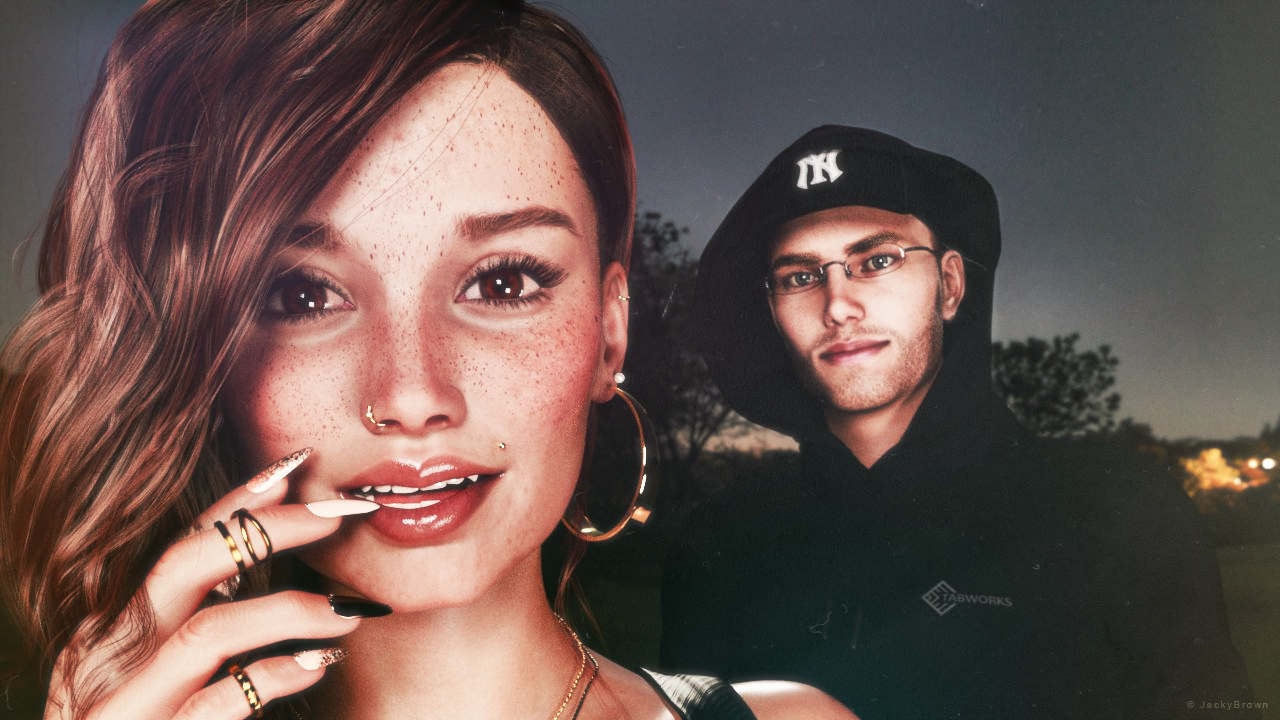
Freebie Challenge DEC 22 - "The Night is Darkest..." - Main Thread3D Art Freebie Challenge December 2022 "The Night is Darkest..."
"Moonlit Desire"
[Best watched at full size for details.]Starring: TaylorLasha and Walther 2.0
The tale: (Entirely fictional)
The Night is Darkest... when there is no moon... "It was a clear black night, a clear white moon" [*2] thought Walther R. when he was walking towards TaylorLasha who was standing in the middle of the field looking at the moon. Tonight it's a full moon... [*2] © Warren G - Regulate
Non-Motion Picture (and even more theme) Soundtrack:
Shakatak - Dark Is The Night (© 1983) https://www.youtube.com/watch?v=wzTElDr46UY
COUNTABLE FREEBIES: (Alphabetic order)#01! 33 Eyes Materials for the Genesis 8 + 8.1 people by LevKornowska
https://www.renderosity.com/freestuff/items/88372/33-eyes-materials-for-the-genesis-8-81-people **#02! Chameleon ROse2 for Genesis 8 Female by zoro_d
https://www.renderosity.com/freestuff/items/85859/chameleon-rose2-for-genesis-8-female **
[Lashes morph used]#03! Dante DMC5 Free Stubble for Genesis 8 Male by InTheFlesh
https://sharecg.com/v/94752/gallery/21/DAZ-Studio/Dante-DMC5-Free-Stubble-for-Genesis-8-Male **#04! EA Sidecut Hair for Genesis 3 & 8 Female(s) by EichhornArt
https://www.renderosity.com/freestuff/items/82972/ea-sidecut-hait-for-genesis-3-amp-8-femela-s- **
[Skullcap used]#05! ED's Brick Shader (Iray) by Edheldil3D
https://www.deviantart.com/edheldil3d/art/Freebie-ED-s-Brick-Shader-Iray-788871766 **#06! G8M Walther 2.0 by Ruslanomar
https://sharecg.com/v/97276/gallery/21/DAZ-Studio/G8M-Walther-2.0 **#07! Hoop Earrings for Genesis8 Female by Afrodite-Ohki
https://www.renderosity.com/freestuff/items/92631/hoop-earrings-for-genesis8-female **#08! Iray Jewelry Shaders by AllenArt
https://sharecg.com/v/95893/gallery/21/DAZ-Studio/Iray-Jewelry-Shaders **#09! Free Update for Biker Outfit G8F and Sideswept Hair by zoro_d

https://www.renderosity.com/freestuff/items/85860/free-update-for-biker-outfit-g8f-and-sideswept-hair **
[Side Swept ROse Hair update used only]#10! Little Flower Studs for Genesis 8 and/or 8.1 Female by AllenArt
https://sharecg.com/v/98499/gallery/21/DAZ-Studio/Little-Flower-Studs **#11! Maddy for GF8 Charakter Shape by MysticArtDesign
https://sharecg.com/v/98461/browse/21/DAZ-Studio/Maddy-for-GF8-Charakter-Shape **
[LIE Blush Make up & freckles, customized, also used on G8M]#12! Moonlit Golf HDRI by Greg Zaal
https://polyhaven.com/a/moonlit_golf#13! My Heart Necklace for Genesis 8 Female by Amy Aimei
https://www.deviantart.com/amyaimei/art/My-Heart-Necklace-for-Genesis-8-Female-729010047 **#14! Nail Art for Genesis 8 and 8.1 Female(s) by zoro_d
https://www.renderosity.com/freestuff/items/92918/nail-art-for-genesis-8-and-81-females **#15! New Walther 2.0 tanned skin + hair system by Ruslanomar
https://sharecg.com/v/98463/browse/21/DAZ-Studio/New-Walther-2.0-tanned-skin-%2B-hair-system **#16! OnFleek for Genesis 3 & 8 Female(s) by AprilYSH
https://aprilsvanity.com/shop/onfleek-for-genesis-3-8-female-s.html#17! Piercing Gaze for Genesis 8 Females by SWTrium
https://www.renderosity.com/freestuff/items/83703/piercing-gaze-for-genesis-8-females **#18! ShirtDress G8F_FREE by SdeB
https://www.sdebstore.com/collections/free-stuff/products/shirtdress-g8f_free **#19! Side Swept ROse Hair (G3F,G8F) Part 1&2 by zoro_d
https://www.renderosity.com/mod/freestuff/side-swept-rose-hair-g3f-g8f-part-1/79533 **
https://www.renderosity.com/mod/freestuff/side-swept-rose-hair-g3f-g8f-part-2/79534 **#20! Simple Glasses for Genesis 8 Male/Female by GEOmetalics
https://www.renderosity.com/freestuff/items/85459/simple-glasses-for-genesis-8-male-female **#21! "STRONG" for G8M Character Morph & Pose by Mar3D
https://www.renderosity.com/mod/freestuff/strong-for-g8m-character-morph-amp-pose/82833 **#22! SY 200 Morphs for Genesis 8 Head and Body by SickleYield
https://sharecg.com/v/91888/view/21/DAZ-Studio/SY-200-Morphs-for-Genesis-8-Head-and-Body **#23! TaylorLasha For Genesis 8 Female by MagicMaiden
https://www.renderosity.com/freestuff/items/92992/taylorlasha-for-genesis-8-female **
NO-COUNT ITEMS:--- Antique Locket for G8F, G8.1F and G9 by Hypertaf (Holiday Loyalty Sale 2022 Free Item)
--- Hoodie for G3M by Tab
--- Nose Ring 01 for G2F, G3F and/or G8F by AllenArt
--- Scene Lights for Iray by Lali Kamala (Holiday Loyalty Sale 2021 Free Item)
++ Surf's Up Hat from Surf's Up Outfit and Board for G2M by Sarsa [Customized texture]PURCHASED/PAID FOR ITEMS: None 100% Freebies
*1 E-mail address required
** Registration required
#x! Countable Items (Bold ones are used by me for the first time I think.)
--- No longer available freebies
++ Free with DAZ Studio (or the Essentials)
$x. Purchased/Paid For Item
Rendered with DAZ Studio 4.10.0.123 (nVidia Iray®)Other free software used: GIMP v2.10.32 and Irfanview 4.60
Postwork: used the AltaLux Image Enhancement Filter (Effect) by Stefano Tommesani that comes with Irfanview and some filters (oa) that come with GIMP. Also used mcjLut by mcasual (https://sites.google.com/site/mcasualsdazscripts9/mcjlut) with the free FilterGrade Cinematic LUTs Pack (https://filtergrade.com/free-cinematic-luts-video-editing/).
"Moonlit Desire"
Let's appreciate/discuss today's new releases - ongoing threadMimicMolly said:
beulahdroyds said:
Linton said:
richardandtracy said:
I do like the 'Classic Earring Collection' https://www.daz3d.com/classic-earring-collection-for-genesis-8-81-and-9. Nice, understated and beautifully modelled with a good range of character support. The range of material options is impressive too. Regards, Richard
Any idea who the male morph face is in the promo?
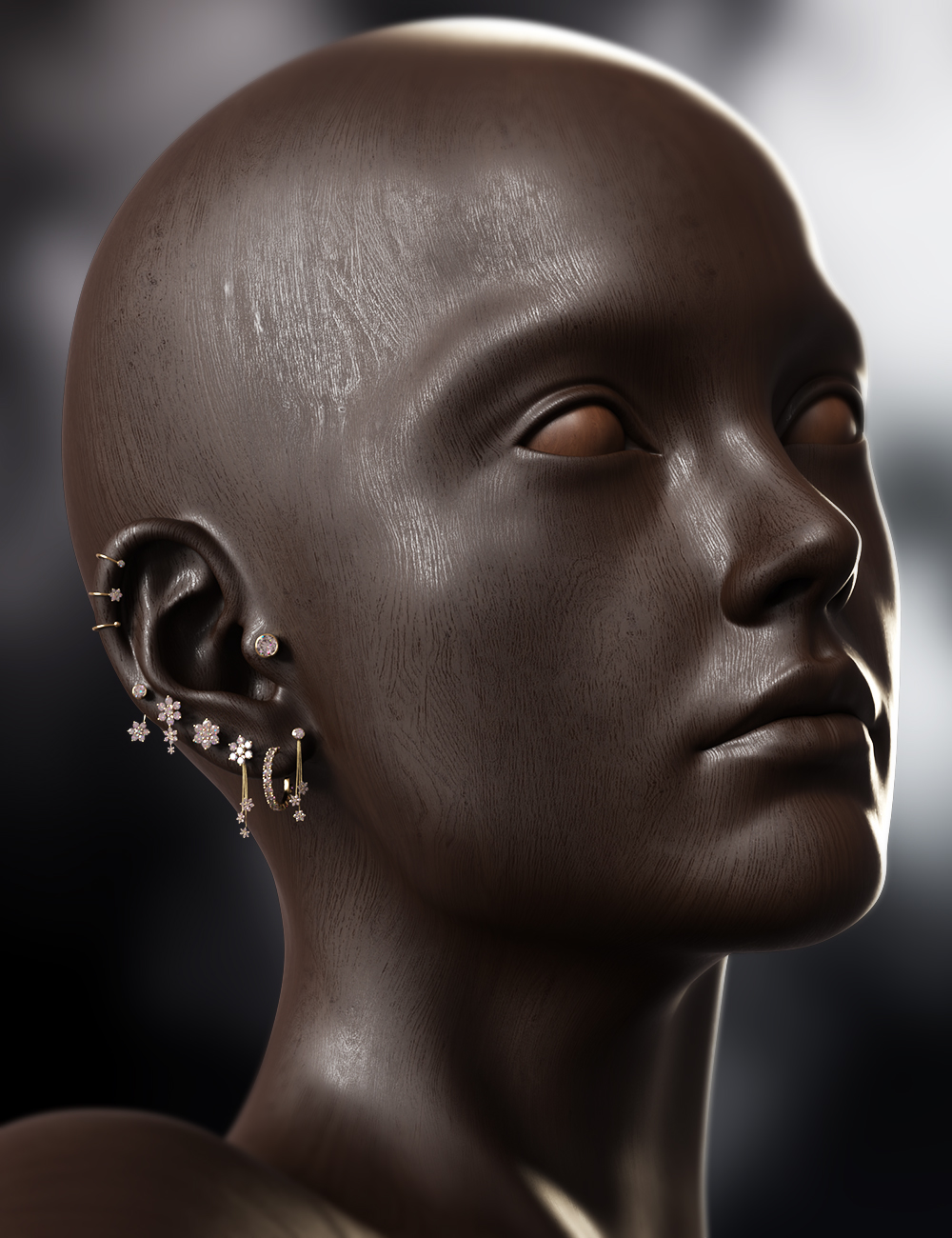
Hey there! I'm the promo Artist behind the promos for this product, the character is just one I made as I was messing around. I'm no character artist, so you won't find it on any store.
Do you at least remember or have the "recipe" to the morphs you used in your "messing around"?Unfortunately, I don't, but if I can figure out learning how to properly make characters I would love to fully flesh this character out as an actual Genesis Character
More Non-photorealistic Renders (NPR III)Thanks for sharing your work. We may all have different goals and aesthetics but we can certainly benefit from the energy and the enthusiasm we bring!
For cetain, automating a lot of work using scripts is a great time saver. Between Daz and Blender, I find myself writing more code on the Blender side, mainly because of transparency of the API and the wealth of examples and tutorials on the Web. (I'm hoping that Daz 5 opens up the SDK further!) Along the way I've also learned techniques used in hand-drawn illustrations -- not my forte, or my line of work, but fascinating nonetheless. All together, it's been very stimulating, for both the left and right side of my brain.

Right now I'm exploring backgrounds. How to quickly render scene backgrounds in NPR. Sticking with the principle that backgound details aren't so crucial (compared to the foreground or the "hero" elements of a scene), I find that line art combined with basic shading is good enough. For the later, Clip Studio Paint's rich toolkit of fills, hatches, stipples and gradients work wonders! Like you, I'm pretty happy with workflow where a majority NPR is automatically rendered, and touched up a bit in post-edit.
Cheers!
DaremoK3 said:
@csaa :Yeah, not really that good for me -- I am the epitome of the 'starving artist', but not literally starving -- My family sees to it that I have my daily rice. I am old, and it has all been pretty mundane -- I devote more to my first love of studying to be a master of Martial Arts (which I began training alongside art) before I die -- It's the only thing I really care about -- The rest is all just distraction.
Since you are working on a comic, you might appreciate this...
Here are early cover mock-ups of my trilogy GN -- They will most likely change by the time I finally go to print -- The first two are hand-drawn, and the third is NPR :

The plan is 90% NPR (mimicking hand-drawn/inked) with 10% hand-drawn/inked pin-ups/inserts.
* EDIT: Oh yeah, the coding thing -- That is just another thing I am doing towards my ultimate goal of producing my GN's -- So far I am working on a Blender bridge for morph work, a cloth simulation morph creator for VWD cloth simulator (in Daz Studio), and a couple of morph utilities while working with morphs in DS. They are all in states of working with bugs I am trying to iron out...
Next on the list is one to automate my digital inking from my DS NPR passes.
Let's appreciate/discuss today's new releases - ongoing thread
Do you at least remember or have the "recipe" to the morphs you used in your "messing around"?beulahdroyds said:Linton said:
richardandtracy said:
I do like the 'Classic Earring Collection' https://www.daz3d.com/classic-earring-collection-for-genesis-8-81-and-9. Nice, understated and beautifully modelled with a good range of character support. The range of material options is impressive too. Regards, Richard
Any idea who the male morph face is in the promo?
Hey there! I'm the promo Artist behind the promos for this product, the character is just one I made as I was messing around. I'm no character artist, so you won't find it on any store.
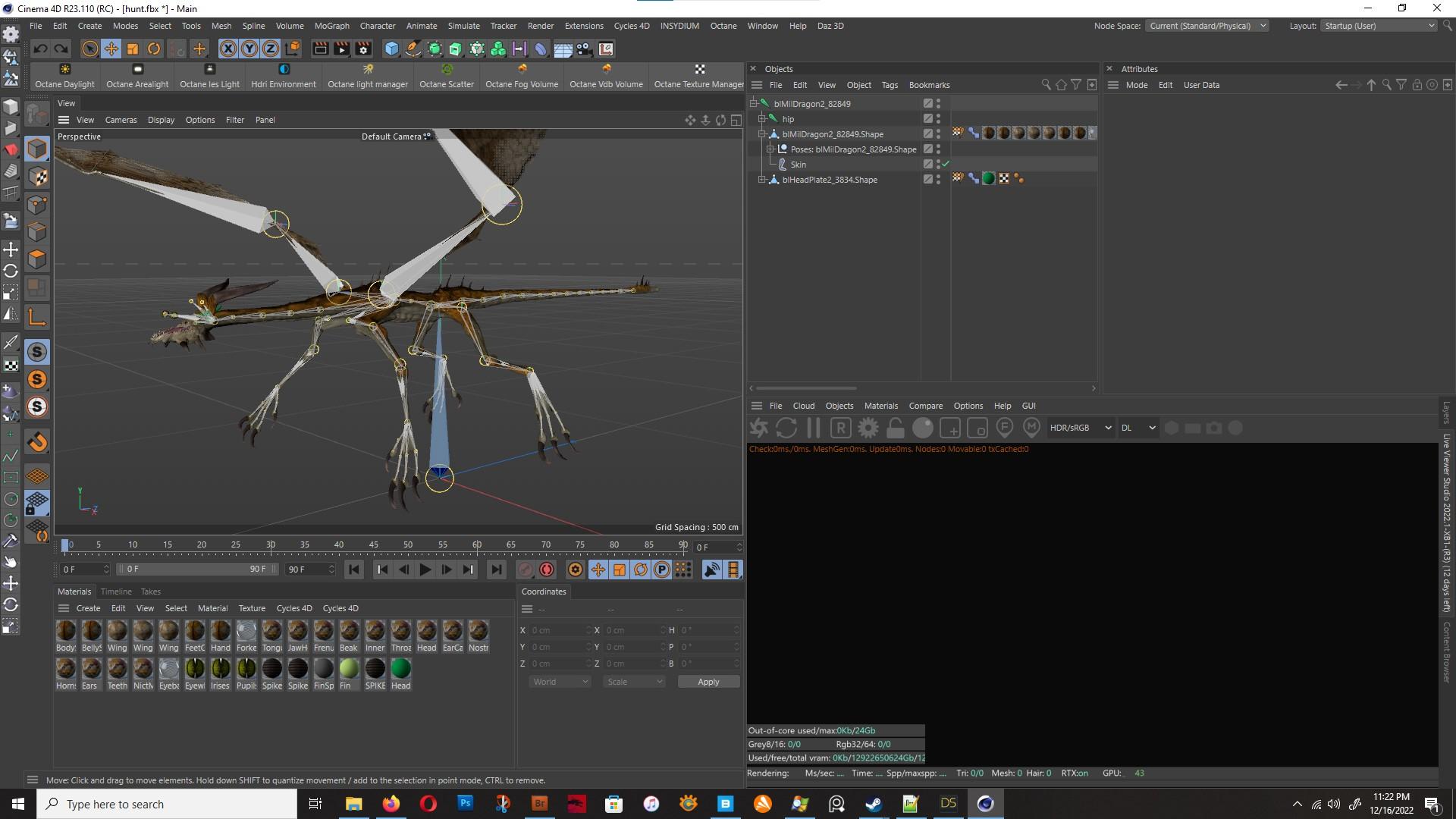
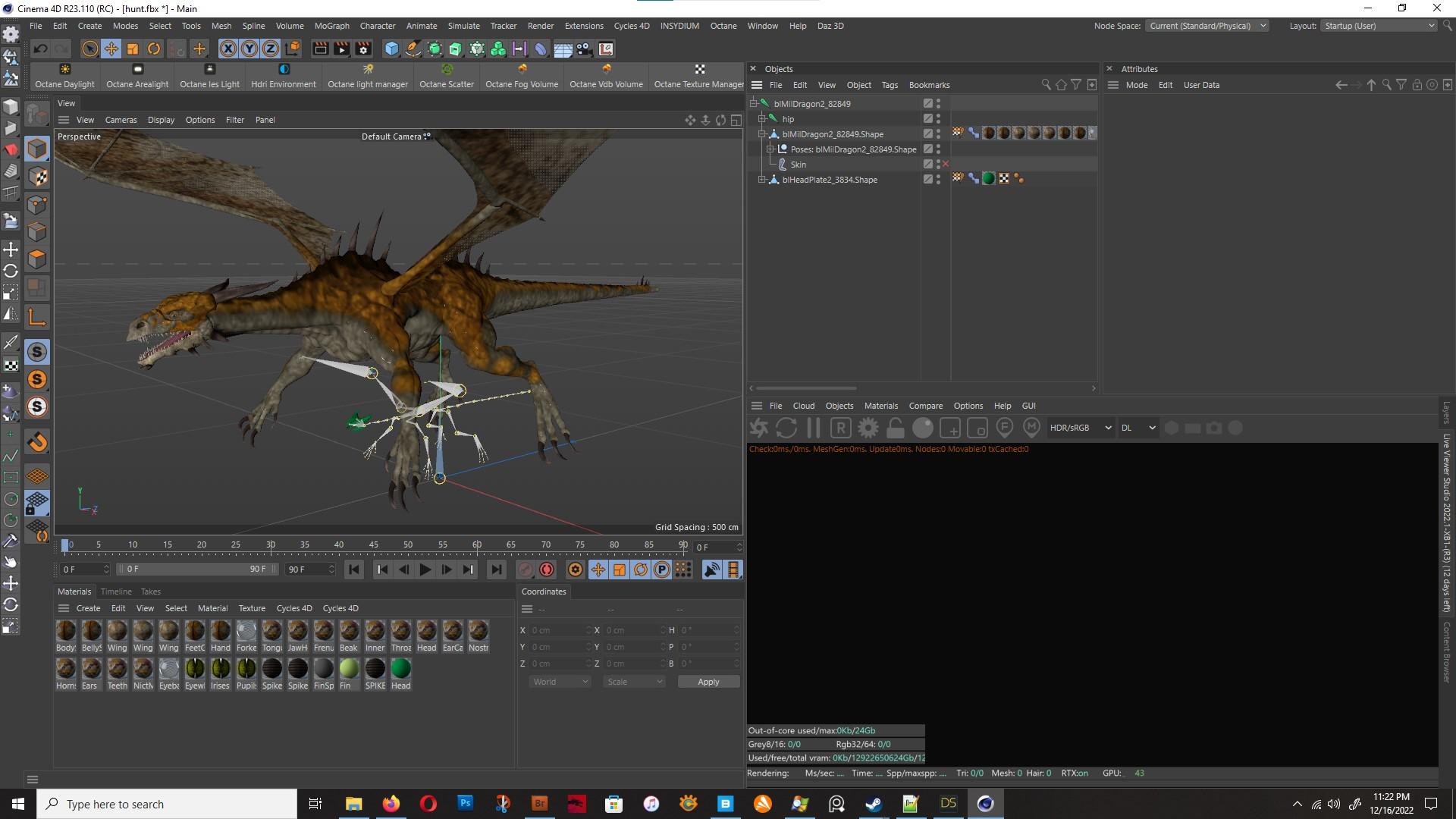
The I Miss the Old Days Complaint ThreadWanted to use something old / old'ish, and I picked the Blood Sands Arena prop, never used it before. <Weary> at the dragon joints being all kooky and not much I can do about it because of the quirks of the Pose Morph tag... Disabling the Skin so I can fix the Joint Orientation makes the model reset to the tag's Base Pose
Not really liking the sun glare there, it feels too strong. I like the lighting and there being a glare, just not the glare's strength.

///Off to bed now since super tired
The I Miss the Old Days Complaint ThreadGordig said:
Rezca said:
Unrelated: Found I've been getting excellent results using the File-Export-FBX to get figures out of D|S with fully functional morphs buuuuut there's no way to fix the joint orientations which are all reset universally every time. Mmm always one thing or the other isn't it :P
*Edit to add that the "Fix Joint Orientations?" popup does nothing. The figures still import with bad joints. :(
How do you do that? I haven't put a lot of work into it, but I haven't been able to make it work for me.
Through the Export Rules menu in the FBX Export options,
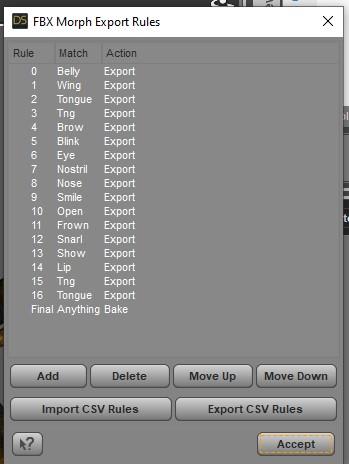
though with the MilDragon here it seems to only be taking the base morph into account since none of the head's morphs are present despite them being included in my export rules. Also once its imported, it ends up looking horribly deformed: If I reset the bind pose, then the mesh is now 'de-synched' with the Base Pose in the pose morph tag and so anything I do - scaling it, fixing joint orientations, etc - will have terrible results. If I leave it as it is then its this deformed mess.
 Expanding an object like a bracelet over clothes?
I don't think you can use mesh grabber to expand it, as it will expand it in one direction.
With Universal tool selected, have you tried to open Tool Settings and change the Coordinates when scaling?
In blender you can import the item, go to edit mode, select all and scale. If the item is uneven, then first place the 3d cursor in the center of the object and use the 3d cursor as pivot point. You can then reimport in DS and create a morph.
Holiday Giveaways 2022!Catherine3678ab said:
Naughty morphs alert! The figure morph of Nadine for G8F by AngellsGraphics affects the default load of G8F. This is being released in the Fantasy Attic's Annual Community Christmas Gifts.
Thanks for the info, I download the xmas gifts, but put them in a folder to install wen all the season gifts are complete.
Expanding an object like a bracelet over clothes?I've noticed that some jewelry type items don't respond well to the "Scale" slider, either badly distorting and/or going off to weird places. I was trying to use Mesh Grabber to morph the item one quarter quadrant at a time and pull it outward. The mesh seemed to distort in all kinds of odd ways, even though I tried to make sure I only had the surfaces on one side selected and hadn't accidentally picked up extra surfaces from elsewhere on the bracelet.
So, is there a way to use mesh grabber, select the entire object, and expand it outwards in one go? (I couldn't find such a feature, but then I'm still learning it) Or is there another/better way to expand an object if the scale slider doesn't work?
I'm suspecting that Blender is the answer, but I haven't used that app yet.
Holiday Giveaways 2022!Naughty morphs alert! The figure morph of Nadine for G8F by AngellsGraphics affects the default load of G8F. This is being released in the Fantasy Attic's Annual Community Christmas Gifts.
Minerva 9barbult said:
@carlosgimpera those are great renders. Thanks for commenting on your lighting and morph mix, too.
Oh. Thank you!
Minerva 9@carlosgimpera those are great renders. Thanks for commenting on your lighting and morph mix, too.
Head games@Quasar, I have been mixing G3M, G8M, G8.1M items to clothe Michael 9 and G9M base and morphs I have done as we have so few male clothes now for G9M. And I found the M3D facial hair and hats worked very well, along with PA facial hair for G8Ms worked extremely nice. Just with the Auto-fit Base templates. Even some boots loaded without issue. So play with the free G9 and morphs and use your existing wardrobes and hairs. Some will work, some won't. Have fun.
@AllenArt - I love that nose morph you have done. It matches the broken nose on my little sister after she walked behind me when I swung a bat in a backyard game of baseball, and go smacked with the bat. She grew-up with character on a fairy princess face.
Mary
Making Clones of G9 - TutorialNothing wrong with experimenting. Indeed if making shape morphs then one does need to adjust rigging. But not for clones.
I have checked my autofit clones and yes, the G9 clone for G8F does indeed dial G8F down to G9's height. The autofit clone works and the clones fit as desired.
When you loaded the G8F mesh to G9 [having the G8F clone dialed in], those should be correct sizes. Then dial out the G8F clone from G9 and export out the G8F clothing mesh [no groups]. This would have the G8F clothing mesh at G9's height.
Then make the morph with it on G8F [default load, no morphs dialed in] [always reverse deformations]. When the G9 clone shape is dialed in, G8F should get shorter. With all shapes zeroed, save the new autofit clone.
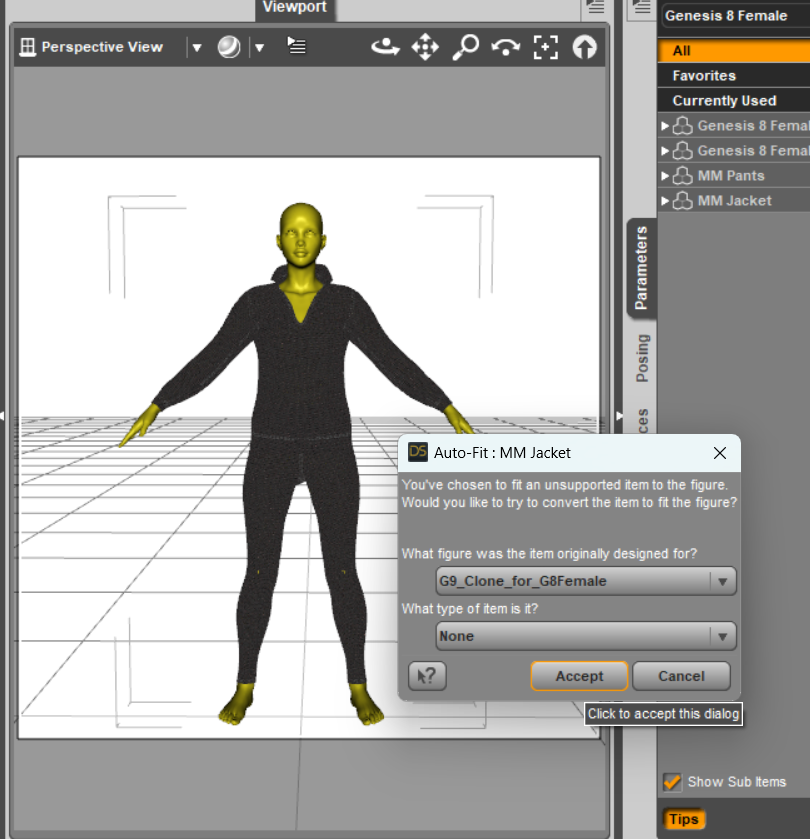
Then with G8F looking normal, add a G9 outfit and on the autofit dialog select the G9 clone that was made. Takes awhile for the program to adjust the weights but then the article of clothing should be fitting.
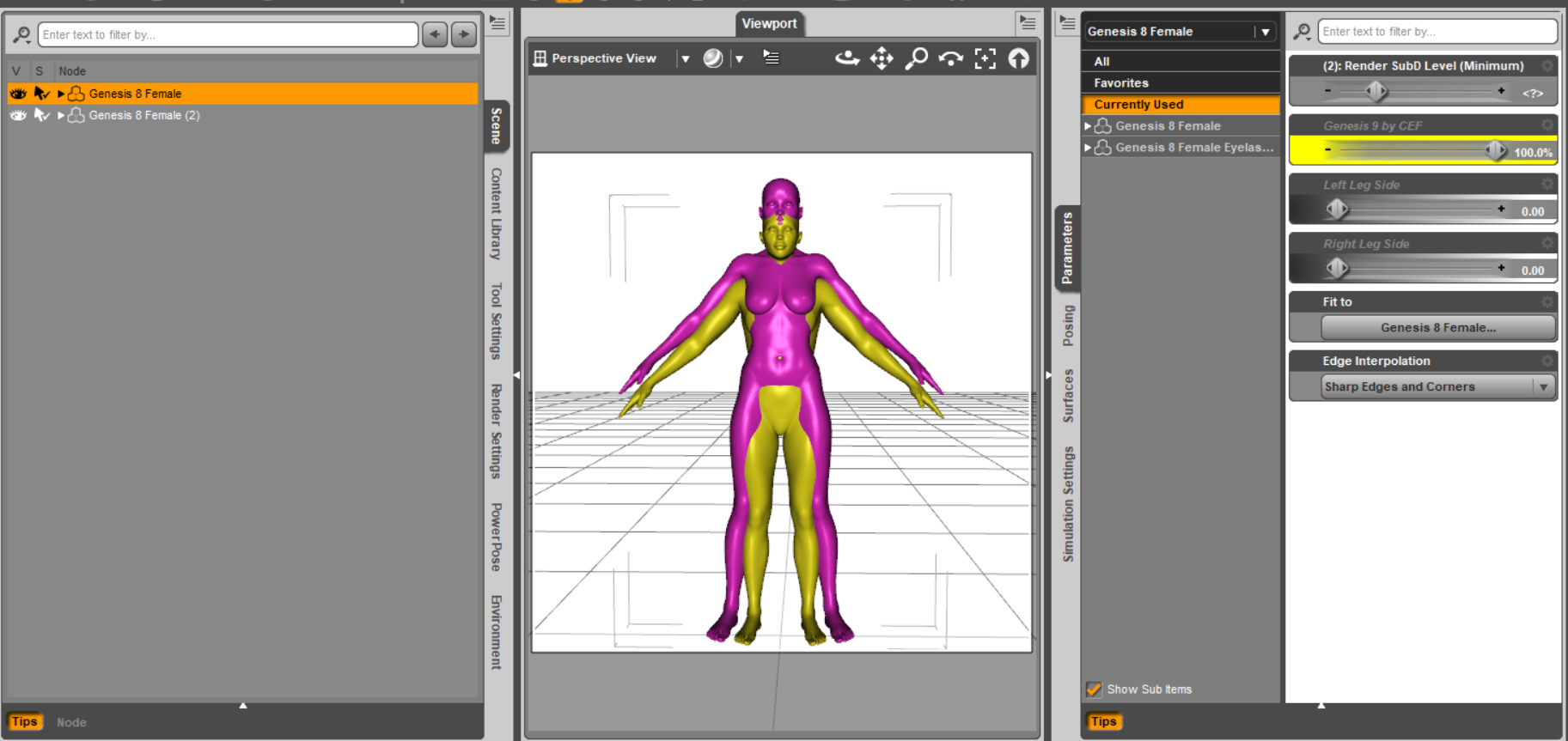
{With the sales I've downloaded a number of characters, the face of one apparently has infected my G8F so now I get to hunt that down}
eta: Naughty morphs found in the Christmas freebie from AngellsGraphics, Nadine for G8F.
Let's appreciate/discuss today's new releases - ongoing threadgalien said:
marcus.ames said:
galien said:
marcus.ames said:
Bluejaunte's back on top of their game with Tyler, too.
I like the character, but I've opened a support ticket as the eyeball's tend to poke through the lower eyelid when simple expressions are applied.
Lyra/Young Lyra have the same issue, and before knowing I can do something like a support ticket, I always compensated by scaling the eyes down 3.5%. But yeah, I noticed the same after posing her a bit. Fingers crossed.
Thanks for confirming that you also have this issue.
For Tyler, the best solution I have found is to set the hidden Eyes morph "Eye Whole Size" back to zero. When the character loads this is set to an increase of 20% (I don't understand why).
This is simply me fitting the eyeball to the eye socket. It's always a compromise, do I fit the socket to the eye or the eye to the socket. Probably a combination of both in the end, whatever I feel looks the way I want. Scaling down eye socket is going to make the eyes smaller compared to the rest of the face so this may not be what I want.
As for eyes poking through with some expressions: I just tested with some V9 expressions and indeed I get quite strong poke through with some. I'm so sorry for that, though I'm not sure I can fix this short of making JCM's which I can obviously not do for all expressions ever released. If Lyra had this too I can assume this is because both characters are a bit more goggle-eyed, I think is the word? but I'm sure it's also just a general eye socket shape issue. Naturally we don't want every character to have the same eye socket. Occasional issues with some expressions can be expected I think.
Anyway, with the eyes being separate geometry now the fix is pretty easy. Simply select an eye in the scene, or say "Left Eye" in the Scene tab (not the Genesis 9 Eyes item), then move it around as you would any object. With a somewhat extreme expression it hopefully won't be noticable that the eye is now technically in the wrong place. Case by case I guess.
Daz 3D is part of

Connect
DAZ Productions, Inc.
7533 S Center View Ct #4664
West Jordan, UT 84084Licensing Agreement | Terms of Service | Privacy Policy | EULA
© 2026 Daz Productions Inc. All Rights Reserved.