-
Making Clones of G9 - Tutorial
Catherine3678ab said:
Nothing wrong with experimenting. Indeed if making shape morphs then one does need to adjust rigging. But not for clones.
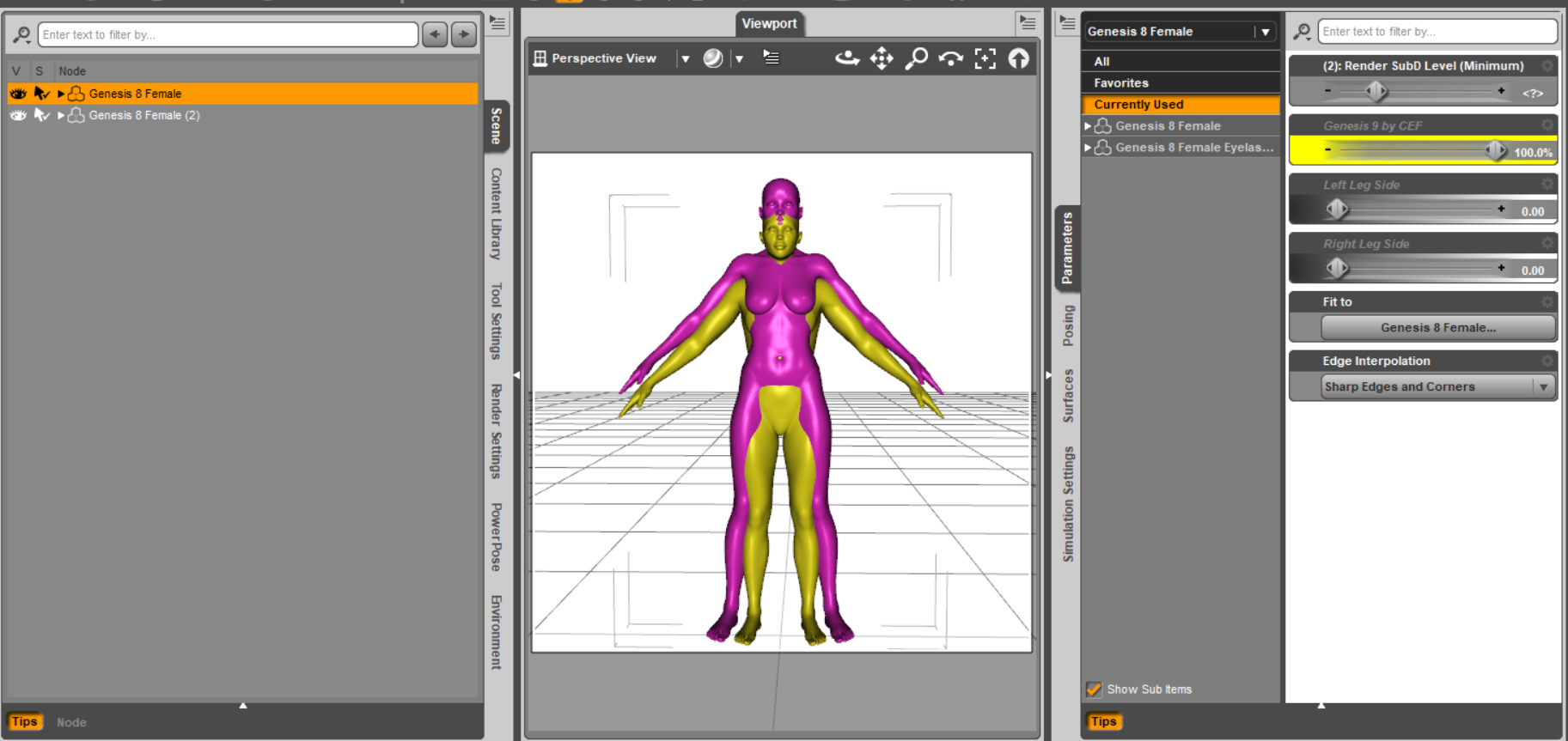
I have checked my autofit clones and yes, the G9 clone for G8F does indeed dial G8F down to G9's height. The autofit clone works and the clones fit as desired.
When you loaded the G8F mesh to G9 [having the G8F clone dialed in], those should be correct sizes. Then dial out the G8F clone from G9 and export out the G8F clothing mesh [no groups]. This would have the G8F clothing mesh at G9's height.
Then make the morph with it on G8F [default load, no morphs dialed in] [always reverse deformations]. When the G9 clone shape is dialed in, G8F should get shorter. With all shapes zeroed, save the new autofit clone.
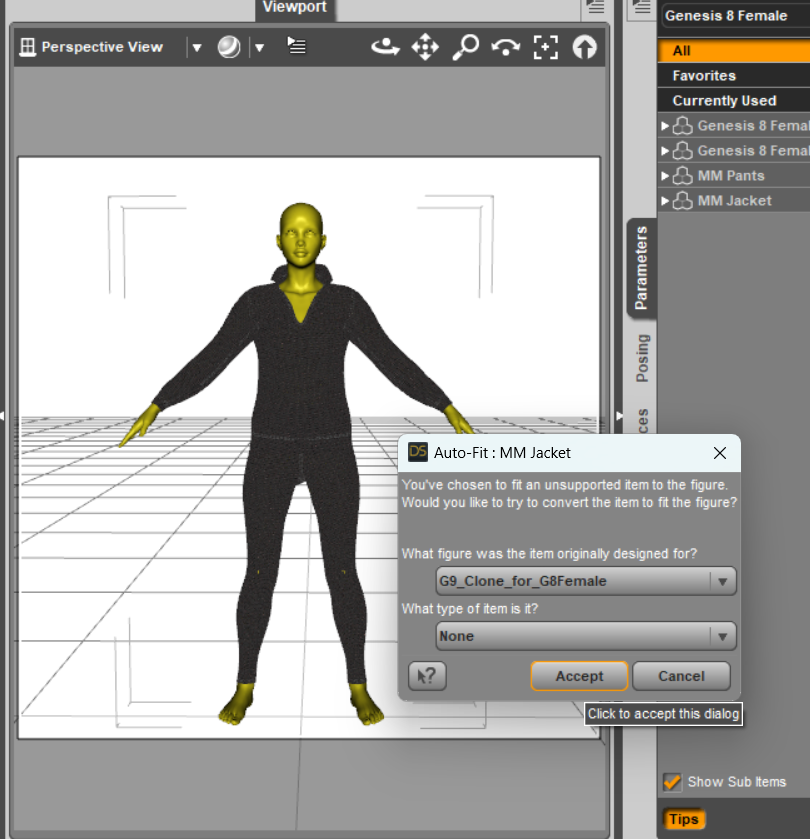
Then with G8F looking normal, add a G9 outfit and on the autofit dialog select the G9 clone that was made. Takes awhile for the program to adjust the weights but then the article of clothing should be fitting.
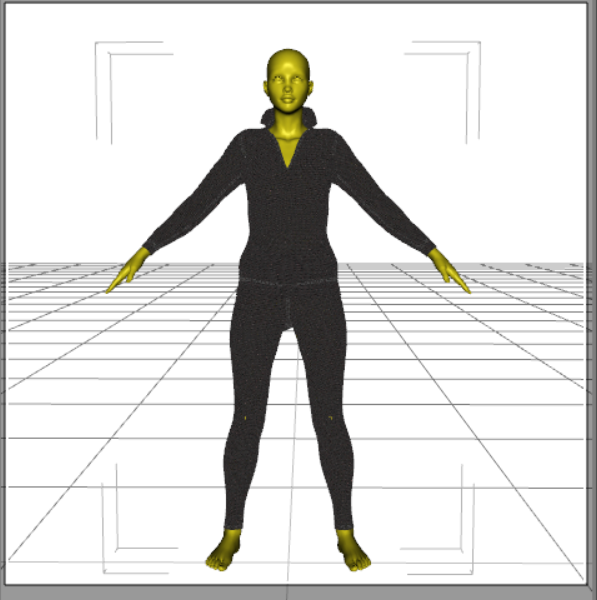
{With the sales I've downloaded a number of characters, the face of one apparently has infected my G8F so now I get to hunt that down}
eta: Naughty morphs found in the Christmas freebie from AngellsGraphics, Nadine for G8F.
Thanks a lot for your help Catherine, I finally made it to create the G9 clone, I was missing the step of dialing out the G8F Clone of G9 before exporting G8 mesh. I wish you a very happy holidays!
Hylas' cornerAnother M4 transfer. He takes expressions rather awkwardly but I think he's a cutie none the less.
Here’s a suggestion for PAsrichardandtracy said:
Wonderland said:
Buy morphs and dial your own. Why would you use a stock figure for a book cover anyway? ...
I suspect that, if you're earning a living, or a substantial part of your living, from creating book covers then time & deadlines are critical and speed - so stock characters - will get you to the deadline with an acceptable cover. Generating your own character from stock morph packs takes time. Possibly to the point a deadline is missed. There are a wide variety of users here, all have different needs from the program and content. I suspect each of us is an expert in the way we as individuals use the program, so may focus on what we want a lot. Not everyone will always have the same needs & wants. But, it also happens that unless you ask, there's a chance no-one will think of doing what you want.
You'd be surprised at how quickly you can spin a custom character with a little bit of random input. I threw the DO Genesis 9 Head Shapes into a randomizer set to max 30% and then quickly got to this guy after very minimal manual tweaking -
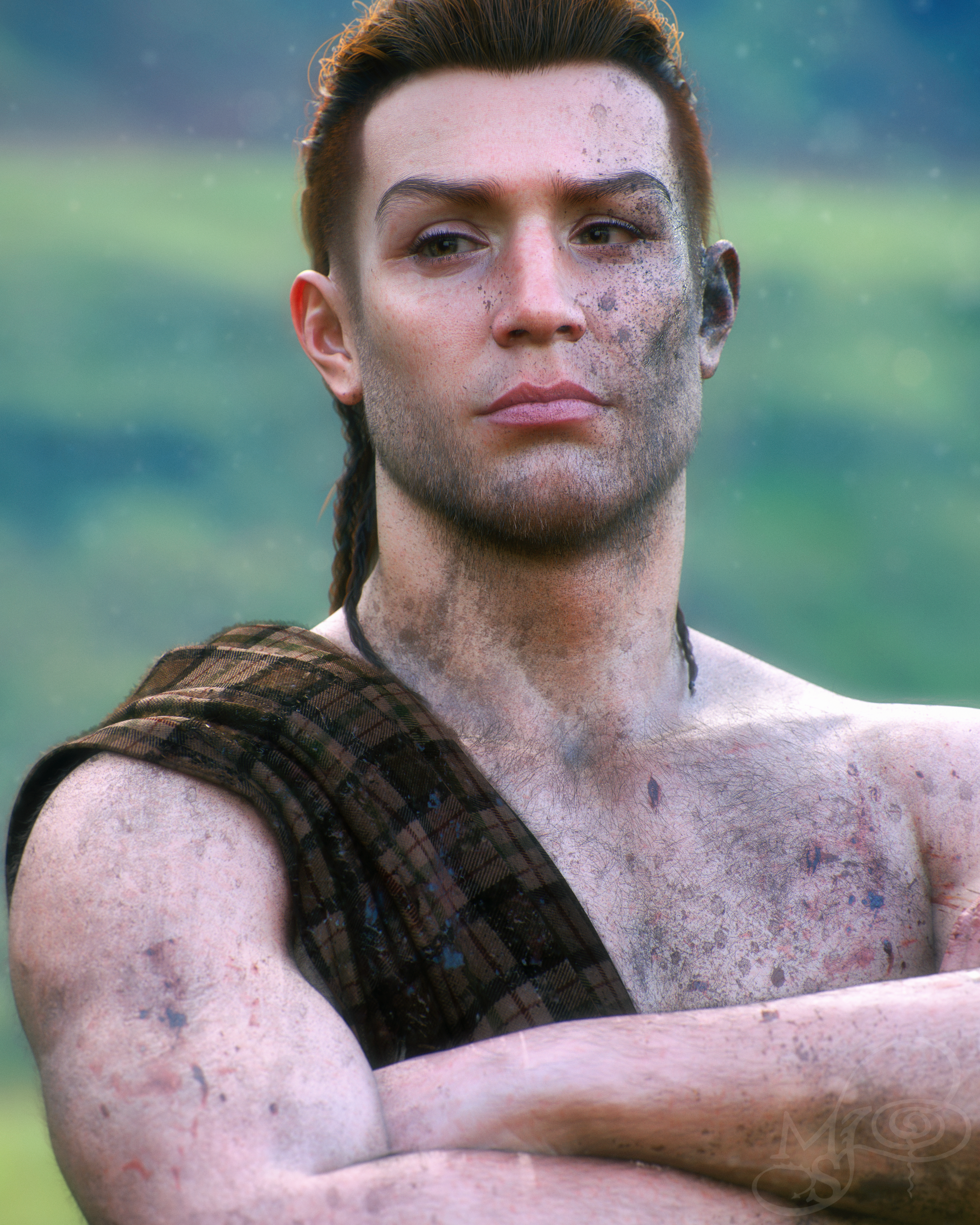
What took the most time was all the dirt/grime/blood and making that dang tartan sash as realistic as I could. The time spent on the actual character was an afterthought at that point, lol.
Here’s a suggestion for PAsWonderland said:Buy morphs and dial your own. Why would you use a stock figure for a book cover anyway? ...
I suspect that, if you're earning a living, or a substantial part of your living, from creating book covers then time & deadlines are critical and speed - so stock characters - will get you to the deadline with an acceptable cover. Generating your own character from stock morph packs takes time. Possibly to the point a deadline is missed. There are a wide variety of users here, all have different needs from the program and content. I suspect each of us is an expert in the way we as individuals use the program, so may focus on what we want a lot. Not everyone will always have the same needs & wants. But, it also happens that unless you ask, there's a chance no-one will think of doing what you want.
Daz Studio Pro 4.22(.0.x) - Highlights4.21.1.26 (December 22, 2022)
- NVIDIA Iray
- Integrated Iray 2022.1.1 (363600.1657); see this thread for more detail
- REQUIRES:
- NVIDIA Driver 526.67 (R525) on Windows
- NVIDIA Driver 526.98 (R525) on Windows in order to retain OpenCL/dForce compatibility
- See NVIDIA Driver Downloads
- NVIDIA recommends installing Studio Drivers (SD)
- SSSE3 enabled CPU is a minimum requirement on macOS/x86
- REQUIRES:
- Added native support for all Ada Lovelace and Hopper generation GPUs
- Added native "ghostlight" support (Iray Photoreal)
- See this thread for more detail
- ...
- Integrated Iray 2022.1.1 (363600.1657); see this thread for more detail
- Menus
- Updated default menus - recommend clicking the Window > Workspace > Update and Merge Menus action
- Menu items for submenus that do not have a 'leaf' action in the hierarchy (and are therefore considered 'empty') are no longer presented in a given menu
- 'Empty' submenu actions are not removed/deleted, they are made non-visible
- Editing/Configuration of menus has not changed - 'empty' menus are visible for editing purposes
- "Zero" Actions vs "Restore" Actions
- Actions that "Zero" properties now prompt to confirm intent
- "Zero" is literal - properties are assigned a value of 0 (or respective equivalent), which can have unintended consequences
- "Restore" is implicit - properties are assigned their respective "default" (memorized) values, which may not be 0 (or equivalent)
- Prompting can be silenced/overriden via script API; see the Change Log and the Action Trigger sample for more detail
- Actions that "Zero" properties now prompt to confirm intent
- Morph Projection
- Fixed an occasional crash in situations where projections were scheduled upon fitting and the target was changed/cleared before projection could complete
- Transfer Utility
- Fixed a crash when projecting from a figure to a simple object (prop) using a projection template, particularly if the object was the primary selection when Transfer Utility was invoked
- ...
- Scripting API
- Made additions in various areas; see the Change Log for more detail
- Fixed bugs and/or made improvements in various areas; see the Change Log for details
what do I need for G8F head adjustment morphs?This package has morphs to make the head thinner:
https://www.daz3d.com/genesis-8-female-head-morph-resource-kit-2
This has a morph to make the face shorter:
https://www.daz3d.com/the-look-face-morph-resource-for-genesis-81-females
This has morphs for both face length and width:
https://www.daz3d.com/200-plus-head-and-face-morphs-for-genesis-8-female-s
Project motion/transforms of one bone to another (fix root motion)Let me first try to describe the problem (maybe there is better way how to solve this). Also be warned I am DAZ Studio newbie!
I have collection of animations I need to transfer into Unreal Engine but I need the root motion feature. However, DAZ character (Genesis 8.1) does not have a root bone directly and the whole animation is done from the hip bone down to its children. When I export the character and the animation to the FBX file and import it into Unreal Engine, in place of the root bone, it says Genesis 8.1 so if I remember the object in DAZ studio and repeat the steps I have root bone in Unreal Engine which, however is staying in-place during the whole animation so I cannot use root motion feature in UE to actually move the character in the world together with animation.
I was able to fix this in Blender by from DAZ Studio and importing into Blender using the latest DAZ to Blender plugin. In Blender I did following:
- Created a placeholder bone where I copied the hip bone transforms.
- Then I deleted transforms - rotations from hip bone.
- I used Blender bone constraints to mimic XY translations and Z (in blender up/down axis) rotation (IN WORLD COORDINATES) on the root bone while all rotations i projected back to the hip bone.
By projecting - not copying stuff, animation played as expected with root bone as a parent to the hip bone.
I am trying to achieve the same in DAZ Studio as I feel that exporting to Blender, fixing it there and then to UE is too much work to achieve this and I am wondering if I can do the same directly in DAZ for animation I have.
My initial though was to replicate the steps I succeeded with in Blender (with the placeholder) but I do not know how. I want to project the whole animation transforms to the placeholder bone and then project translation to the Genesis 8.1 object with Y (up/down axis) rotations so that the whole character is moving and rotating with the animation. At the same time I want to project hip bone rotations ONLY back from the placeholder bone so that the hip bone is playing as before.
I am very new to DAZ Studio and I am totally lost with trying to achieve this goal. Maybe more important question is, if there is any other way I can achieve the root motion in DAZ Studio for importing it to Unreal Engine?
I would be thankful for any kind of help or pointing me to the right direction.
Holiday Giveaways 2022!riuken1 said:
Day 6 from https://www.thefantasiesattic.net/xmas/2022/index.html avaible to download againg. Tho I am a bit confuse, I try to test the morph and I no manage to get them to work, What is the folder were I have to put them. Thanks for the help in advance.
Depends somewhat on how you usually install your content (I do manual install only and as such have no exact reference as to were DIM and/or connect would install items).
Basically
(My Library:) content:data:DAZ 3D:Genesis 8:Female:Morphs:Nadine
should work
(personally I placed it in
content:data:DAZ 3D:Genesis 8:Female:Morphs:AngellsGraphics:Nadine
and that also works)
Edited to add:
You may have to look for/in the Documents folder
Documents / DAZ 3D / Studio / whatever connect library name is used (
 ) / data ----- (and the rest)Holiday Giveaways 2022!
Day 6 from https://www.thefantasiesattic.net/xmas/2022/index.html avaible to download againg. Tho I am a bit confuse, I try to test the morph and I no manage to get them to work, What is the folder were I have to put them. Thanks for the help in advance.
Here’s a suggestion for PAsMatt_Castle said:
If I may make a suggestion to users in kind?
Damsel said:
Could somebody, ANYBODY, create a decent looking Gen 9 male?
... this is not a good way to get PAs on your side. Insinuating that everything already on the market is of poor quality is just likely to make many PAs dismiss your opinion, not motivate them.
You'd get much better results out of something like "G9 has obviously got several female characters already, but I'm really eager for PAs to show us more of what they can do with it as a base for male characters. There's obviously so much potential in the new figure (just look at the new expressions!), and I'd love to put it to more use."
A more basic point is that "decent looking" is entirely relative. I think Michael 9 looks fantastic, and is my favorite Michael so far. Nikolai's a great morph, and he's not the most conventionally attractive, but I'm sure he does it for some percentage of people. So we've got two male base figures for G9 so far that are both "decent looking" depending on how one defines it, and on one's own tastes.
How to fix normals?I figured it out. Since these are using a very different pose than the base pose, there is a lot of deformation when the shoe is placed into the base pose. This is happening where the weight maps of the toes bone and the foot bone meet up. At small rotations from the shoe's toes bend pose (say 0 to 50 degrees), it looks fine and this is all I care about. But the toes are actually bent close to 70 degrees. At that extreme, even small differences in weight map values get exaggerated and you get polygons facing in opposite directions in the base pose. So what this tells me is that DAZ Studio applies the smoothing angle on the original base pose, not the current pose. So I smoothed out the polygons in the base pose best I could with the weight map tool then re-applied the original shape (after fit) with a morph, unfit the shoes, exported that mesh, deleted the morph, and replaced the geometry with the baked mesh. It looks perfect now.
Female Blouse/Shirt with Variable Button-UpPerttiA said:
https://www.daz3d.com/flirty-school-uniform-for-genesis-8-female-s
Do you (or anybody else) have this product, and can tell me whether the "L/R Breast Reveal" morphs are binary toggles, or if they are applied with a slider? If they use a slider, then I I might be able to get it the way I want by applying them partway.
If they're binary, then I might end up using this for some particularly risque poses/frames, but it's not the main thing I'm looking for. I'm looking for a morph in which the shirt is being worn with the top buttons undone, whereas those morphs (applied fully as in the product images) make it look as though it's being actively being pulled off. Turning on both of them at once would look sort of like what I'm aiming for I think, but I suspect it would look physically unnatural; those morphs (again if applied fully) look like they're supposed to have a hand pulling the shirt, not like the shirt is resting like that naturally.
The fully unbuttoned morphs might be of some use, but I'm less interested in that than in a morph where the shirt is unbuttoned to show the bra but still has one or more of the bottom-most buttons closed. Sorry if that wasn't clear before; I've updated the original post to clarify that.
Genesis 9 clothing questions & answersbarbult said:
A couple questions about templates:
- Why are there no breast adjustment morphs? There are morphs for many other body areas.
- Who is Nikolai9? He looks kind of chubby according to the morph. Why would he have morphs in the bodysuit template, but released characters like Michael and Victoria do not? Do they not need them, but he does because of his size?
I ignored this question up to now because I didn't want to draw more attention to a shape that's not released yet. Unfortunately this means that from now on upcoming shapes will have to go into the templates after the figure gets released, not before. With the templates so easily accessible there's no other way for me to prevent the shapes being posted in a public forum.
Yes he has morphs in the suit because he is very chubby, and there were some clothing distortions especially on the back.
The loosen morphs are aimed at helping with kitbashing, for example to fit items from different sets to each other - tops over pants etc. If you meant breast adjustment morphs to fix issues with the shrinkwrap effect - there are too many scenarios and should be a product by itself.
Um…$99 for frozen FBX files of cheaper assets?It says it also has a Maya format version. I use the Maya bridge all the time to animate and bring the keys back into Daz to render with, and the reason I don't just use Maya to render is I can't for the life of me figure out what I'm doing wrong as I can't get clothing and hair to transfer via the bridge and then be able to retarget the skeleton. Everything gets wonky after I press the retarget button unless I send over a character that's just the character with nothing else. So for someone who isn't looking to use Daz, but use Maya, and just wants characters completely premade and, presumably, ready to go, this isn't a bad deal considering the cost of assets on Turbosquid.
Where are dforce and mesh deforms saved?Do you mean the simulations adn the results of baking dForms to a morph? Simulations get stored in the file, morphs spawned from dForms or imported OBJs ar also stored in the file unless saved as a Morph Asset, in which case they go to the Data directory in the item's morphs folder - /data/Daz 3d/Genesis 8/female/morphs/author/product/ for example, where author and products come from the fileds you entered in the options dialogue when saving.
Combined Morph explodesI created a custom morph out of several morphs by exporting it as obj and importing it by morph loader pro - and the character looks good, but when i try to use a pose, it turn into spagetti
What am I doing wrong?
Thank you for the new Eldritch Seeker!FSMCDesigns said:
zombiewhacker said:
This probably has been addressed before, but how well do the original Seeker gun holsters autofit to later Genesis generations?
Works fine for me. Here is it on G9

Heh...I couldn't get the autofit looking good for the holster, but then again I haven't tried since G9 was brand new. It's been updated since at least once ;). I'll give it another shot.
BTW, how did you get the veins in the arms? Did you paint those on in post or transfer a morph somehow? Inquiring minds and all that....lol.
Is Beautiful Bends for G2F still available?takezo_3001 said:
As far as muscles/flexion type of morphs, you would do well to snag Simon WM's Muscularity Morphs for Genesis 2 Female(s) as a companion morph package!yes, I'm
Yes, I'm already using that. That's how I tweaked Gia's muscularity/arms. Thanks.
Nikolai 9 HDNikolai 9 HD has a good-looking morph, but the promos make his skin look like 8.1 instead of Victoria 9, Michael 9, or even Minerva 9. I'll be looking forward to some user renders. I've learned to wait at least a day; plus, I have to get my punch total up.
Is Beautiful Bends for G2F still available?RenderPretender said:
UN is specifically for Vicky 6, though, right? Would I be better off in this instance getting Ideal Beauty with its Gia 6 add-on? Or maybe use RiverSoft's product to convert her to G8 and get it over with. I can't believe these tools for legacy figures are still so expensive.
By illustration, the image on the left is the one initially posted above. In the one on the right, however, I've added a slight bit of muscularity overall, and then adjusted Gia's coracobrachalis (proximal to her armpits) and adjusted the long head of her triceps to fill out the area above her elbows a bit. It's slight, but makes the bends more natural.
Most definitely, yes!
As far as muscles/flexion type of morphs, you would do well to snag Simon WM's Muscularity Morphs for Genesis 2 Female(s) as a companion morph package!
Daz 3D is part of

Connect
DAZ Productions, Inc.
7533 S Center View Ct #4664
West Jordan, UT 84084Licensing Agreement | Terms of Service | Privacy Policy | EULA
© 2026 Daz Productions Inc. All Rights Reserved.