-
Saving morph for Magnolia Hair?
I have never tried to export dForce hair (using the dForce hair engine) but I tried now.
My assumption is that one should only export the hair, and not the cap, in order to make a morph.
But after I got the same error, geometry didn't match, I took the exported hair into blender to look at it. And the exported obj does not look like the hair object I try to export, and neither does it match with the vertex count. The exported hair had much fewer vertexes - and still looked different from the original.
I tried to change Lime tesselation. With a line tesselation of 3 the exported hair looked like the original, but then it was 6 mio vertexes.
So essentially I couldn't find a setting that seemed appropriate for making a morph.
Saving morph for Magnolia Hair?Funny, I had this exact problem a few hours ago. My solution was to export the thing as .obj, then load it back in as .obj and not bother with the morph. Parent to the head. I don't know if there's an "official" way of doing it on hair with guides rather than polygon strips.
DAZ Horse 3 - will there actually be any support this time?Jonstark said:
nonesuch00 said:
AllenArt said:
Here are some of the horses side by side. You decide ;)

My ranking:
1) DAZ Horse 2
2) Hivewire Horse
3) Linday Morph
4) DAZ Horse 3
+1 That's exactly the way I see it too. However glancing at the rest of the thread, seems the majority prefer the Hivewire Horse as #1. That said, the Hivewire one looks pretty great to me too, I just like Horse2 better.
Horse3 ought to be down at number 49, if only there were more entries... Green horses on mars would be freaked out if you showed them Horse3 :) Even the horses that the Nazgul rode would say,
"Damn what the hell is that ugly thing?!" :)
LOL, well the poor thing is not as far gone as it seems to be but number 5 as out of 4 seems right. Part of it's very odd look is it's a chesnut coloring in bright lights at an awkward angle and background in the render. The muscle anatomy needs fixed though. I'm wondering what they used as source picture to model it.
I'm not returning the bundle though in any case. I expect fixes.
dFroce SimulationsI found the best solution is to simulate the compression of the matress to it's fullest, add the final frame as a morph, then I can just use the slider to adjust the morph for each frame of the compression/return to normal of the sequence.
[Released] Ultimate Pose Converter Bundle for Genesis 9 [Commercial]kyoto kid said:
...oops almost made an error as I thought that the G8 bundle was to G8 from all the listed Generations not the other way around. So to transfer from all four older generations to G8, I would need to purchase a separate one for each, correct?
That is correct.
Saving morph for Magnolia Hair?Hi, I'm trying to make an upside down morph for this hair https://www.daz3d.com/dforce-sweet-magnolia-hair-for-genesis-3-and-8-female
Unlike other dforce hairs I have, this loads a 'cap' fitted to the figure, and the hair is fitted to the cap.
The loaded resolution is always base. I simulate the hair upside down, and I try to export it as OBJ, but when I attempt to load it with MorphLoaderPro, it always says that the mesh does not match.
Can I make morphs with this hair? Do I need to unfit the hair from the cap? Or do I need to save both the cap and hair as one file? I'm stuck because I haven't encountered this kind of dforce hair before and I'm not sure what components to save or how to do it.
Typically I can export the hair just fine and have myself the morph, but this case just won't work so far. Any help appreciated, thank you.
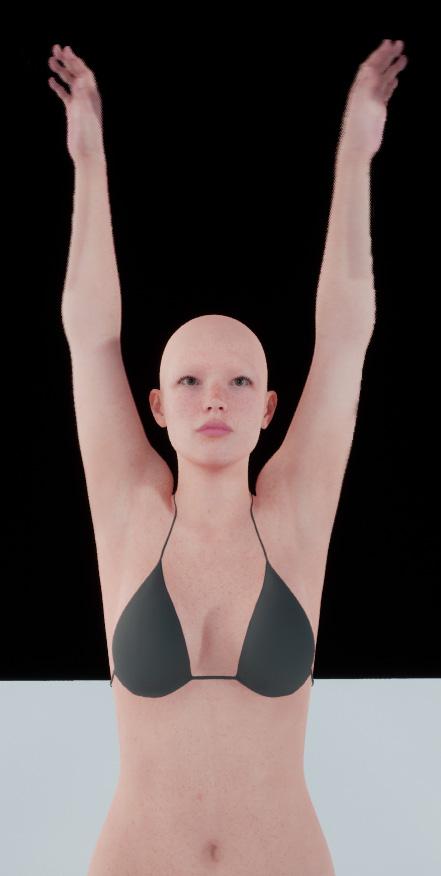
Experimenting with ML Deformer in UE5.1I updated my Houdini asset to support processing of Genesis 9 figures.
This figure is 129,728 polygons with the clothing.
Trained with the Vertex Delta Model on default settings. Took about 20 minutes for the training to complete.
On a somewhat related note, I'm not sure where Daz are going with Genesis 9. In some ways it's a step forward but in other ways it seems to be quite a few steps backwards.
For example, moving the twist bones to be leaf bones rather than inline is a good step forward, although I'm not convinced they needed two twist bones per joint. I think one would have been enough.
However, the face rig now seem to have far fewer bones, meaning they're relying on morphs a lot more to achieve good facial poses, rather than relying more on bones, with the morphs just performing minor corrections.
But the really odd thing, and someone please correct me if I'm wrong, is that the Genesis 9 figure has all these muscle flex morphs, but they don't seem to be connected to any joints. For example, when the forearm bends, the bicep flex morph doesn't trigger automatically. I looks like you have to add it manually but adjusting the slider yourself. This seems very strange to me.
This is going to make creating a training animation for Genesis 9 figures much more complicated.
Presumably it's also going to mean that the offocial Daz to Unreal bridge will need to include many more morph targets for Genesis 9 figures if they want to have realistic muscle deformations.
On the plus side, I've worked out that I can unpack the Alembic cache in Houdini, modify it and repack it without breaking things in terms of the ML training. This has some interesting implications. For example, you could import a single character with clothing into Houdini, separate the character and it's clothing out into different streams and export each separately. Which might be useful for having a character with changable clothing. That is, you can training the character mesh and the clothing separately.
Another thing that would be possible is to automatically delete the polygons on the character mesh that are obscued by the clothing, which could be a useful optimisation step.
Anyway, the next thing I'm going to look into is adding morphs for facial animations.
DAZ achieves new lows in customer support (but appears to have ambitions to go lower still)NylonGirl said:
Panzer Emerald said:
You know, I'm legitimately surprised that after all this time and with all the advances that've happened with plug-ins that no one has really stepped up to the plate to do their take on the GenX line as a spiritual successor. There was X-Transfer, but iirc that only worked between Gen3 and Gen8 and even that was highly unreliable and prone to frequent crashes from my experience.
Sorry to get off topic, but it's a thought that I sometimes have when this subject comes up every so often.
I think a big part of the problem is a lack of documentation, or that it is not organized very well. Even somebody who is good at programming would have a hard time figuring out how it's done in DAZ. I'd say the only thing less informative is the documentation for creating a plugin for Kodi.
Is that a new development, though? I'm relatively new to Daz, so if there was a time when better documentation was available, I wasn't around for it.
How to save Face Transfer after the fact?No my tutorials do not cover very specific problems such as the one you're mentioning unless it's a common problem which I also encountered. The scene subset that Face Transfer saves is a unit to its self. The morph is only in that file. It is not usable in other figures and I also realized that in making changes and resaving that scene subset - the changes would not stick.
I do save scene subsets through Face Transfer as a backup. I send the morphed figure over to Hexagon, in D/S load a fresh figure and then bring back the morphed figure to make a morph like one would normally make a morph. Zero and save that new morph. Then either load the new textures that were made in Face Transfer for the scene subset or the fixed textures [if you fixed them] or whichever skin set you want to use on your new character, and then save out a file as you please [scene subset or character preset for eg.].
n.b. Face Transfer scene subsets must be saved through the plugin for them to work correctly.
DAZ achieves new lows in customer support (but appears to have ambitions to go lower still)Panzer Emerald said:
You know, I'm legitimately surprised that after all this time and with all the advances that've happened with plug-ins that no one has really stepped up to the plate to do their take on the GenX line as a spiritual successor. There was X-Transfer, but iirc that only worked between Gen3 and Gen8 and even that was highly unreliable and prone to frequent crashes from my experience.
Sorry to get off topic, but it's a thought that I sometimes have when this subject comes up every so often.
I think a big part of the problem is a lack of documentation, or that it is not organized very well. Even somebody who is good at programming would have a hard time figuring out how it's done in DAZ. I'd say the only thing less informative is the documentation for creating a plugin for Kodi.
[Released] Ultimate Pose Converter Bundle for Genesis 9 [Commercial]...oops almost made an error as I thought that the G8 bundle was to G8 from all the listed Generations not the other way around. So to transfer from all four older generations to G8, I would need to purchase a separate one for each, correct?
DAZ Horse 3 - will there actually be any support this time?nonesuch00 said:
AllenArt said:
Here are some of the horses side by side. You decide ;)
My ranking:
1) DAZ Horse 2
2) Hivewire Horse
3) Linday Morph
4) DAZ Horse 3
+1 That's exactly the way I see it too. However glancing at the rest of the thread, seems the majority prefer the Hivewire Horse as #1. That said, the Hivewire one looks pretty great to me too, I just like Horse2 better.
Horse3 ought to be down at number 49, if only there were more entries... Green horses on mars would be freaked out if you showed them Horse3 :) Even the horses that the Nazgul rode would say, "Damn what the hell is that ugly thing?!" :)
Is there a solution to fix the stifness of woman private area in this pose?WendyLuvsCatz said:
you could probably use a Dformer or MeshGrabber
or if you install Hexagon and the bridge
send to Hexagon and use smooth brush to create a morph to send back to DAZ Studio
I think it would require a JCM which adds another layer of complexity. That's why we pay money for DAZ and PAs to make these morphs for DAZ figures. Best bet so far is to buy one of the 3rd Party products from R'otica. Otherwise, Zev0's Shape Shift has some Hip/Anatomy morphs included.
Is there a solution to fix the stifness of woman private area in this pose?I know how to morph.
But... I'm bad at sculpting T_T.
Not really sure what to fix, the thigh or maybe curve the vjj?Is there a solution to fix the stifness of woman private area in this pose?you could probably use a Dformer or MeshGrabber
or if you install Hexagon and the bridge
send to Hexagon and use smooth brush to create a morph to send back to DAZ Studio
2022 Christmas at DAZ & PA GiftsArtAngel said:
Merry Christmas Destiny's Design & Lyrra Madril. Thank you so so so much for the holiday freebie. The dForce Unionsuit, aka LongJohns is something I, and others, were searching for in the forums. Many thanks!
I actually didn't know that! well I hope you all have fun with it. btw - there are morphs to open the back hatch, but we couldn't show those in promos. Morphs are easy to miss so I thought I should point it out. Oh and it also unbuttons with a few morph options, if you gents get too hot ;)
LM
Creature Creator for G8 family?Was there ever a creature creator morph package for G8F-M? I can't find anything and the store Search isn't helpful.
The NightQueen Wardrobe Collection -how to get fur to show?Arki was kind enough to give info (and it worked!):
docs.daz3d.com/doku.php/public…
You will need the LAMH Player for the fur to work. Here is the paragraph of the readme with the appropriate instructions:
"The fur presets Included are fur presets for the free LAMH (Look At My Hair) Player. It is available in the DAZ 3D store: www.daz3d.com/look-at-my-hair-…. If you want to use the fur, please first load and morph your clothing set on your posed Genesis 3 Female (you need one of the hood types, one of the sleeve types or the stola), then select the piece you want to add fur to and open your LAMH player. By clicking on the “Attach LAMH Preset” Button in the bottom left corner of the LAMH Player. Then navigate to the folder Genesis 3 Female - Clothing - Arki - NightQueen and select the appropriate Fur preset.
Please note that this fur preset will only be visible when rendering in 3Delight. If you want to use your generated fur in Iray, plase select the fur prop in your scene hierarchy, then go back to the LAMH Player and click on the “to OBJ” button at the bottom. After a while, DAZ Studio will convert your for to a solid .obj prop which then will accept our provided Iray fur shaders.
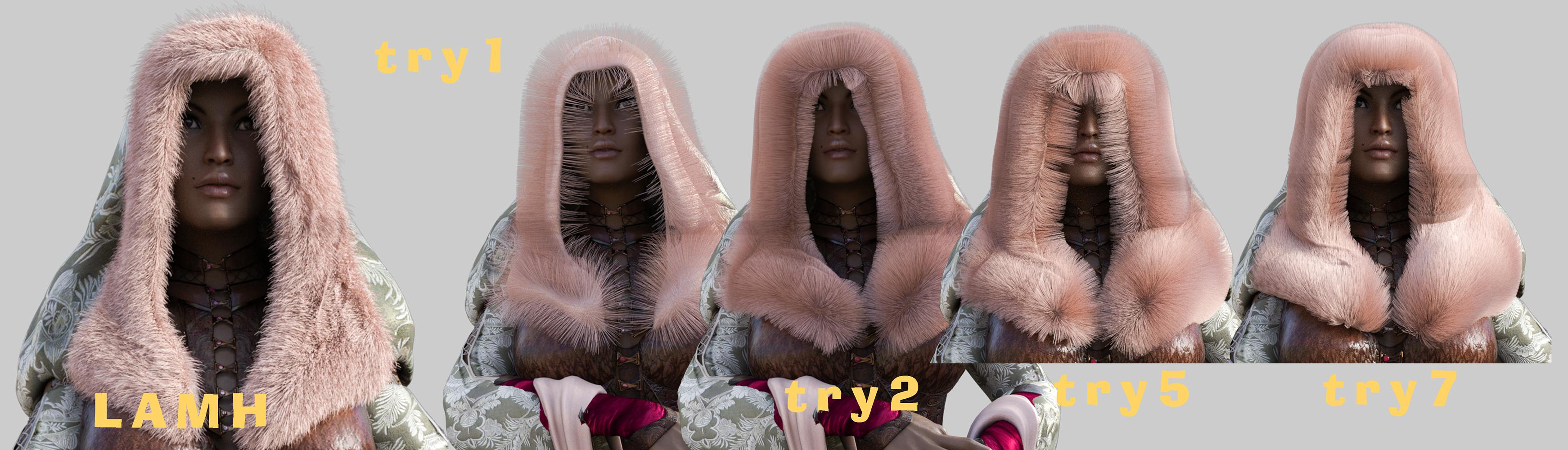
Make sure that the garment pieces you wish to add fur to are NOT parented to Genesis 3 Female. To do this, click on the piece in question in your hierarchy tree of your scene tab and drag it to the bottom of the list. It should now appear outside of the genesis 3 Female hierarchy, but still posed and morphed."But then any time I tried to parent it trying to pose with it and it was a disaster of lamh crashes so I took WendyLuvsCatz's / suggestion (thank you!) and looked into strand based hair. It's close and probably more than good enough for future use for me :)
For your entertainment :P
 DAZ achieves new lows in customer support (but appears to have ambitions to go lower still)
Panzer Emerald said:
You know, I'm legitimately surprised that after all this time and with all the advances that've happened with plug-ins that no one has really stepped up to the plate to do their take on the GenX line as a spiritual successor. There was X-Transfer, but iirc that only worked between Gen3 and Gen8 and even that was highly unreliable and prone to frequent crashes from my experience.
Sorry to get off topic, but it's a thought that I sometimes have when this subject comes up every so often.
Maybe it is simply that Dimension3d was a genius ...
DAZ achieves new lows in customer support (but appears to have ambitions to go lower still)You know, I'm legitimately surprised that after all this time and with all the advances that've happened with plug-ins that no one has really stepped up to the plate to do their take on the GenX line as a spiritual successor. There was X-Transfer, but iirc that only worked between Gen3 and Gen8 and even that was highly unreliable and prone to frequent crashes from my experience.
Sorry to get off topic, but it's a thought that I sometimes have when this subject comes up every so often.
Daz 3D is part of

Connect
DAZ Productions, Inc.
7533 S Center View Ct #4664
West Jordan, UT 84084Licensing Agreement | Terms of Service | Privacy Policy | EULA
© 2026 Daz Productions Inc. All Rights Reserved.