-
Is there any reason to upgrade to Genesis 8?
Honestly, I'm not sure how this generation isn't simply a significant downgrade over the previous one. The features are backwards compatibility, the expressions, and the horrible A pose? Is there more than that?
As for the expressions, they could've easily just added them to the previous generation, since they're just HD morphs. And G8 is no more backwards compatible past G3 than G3 is, so there's no upgrade there.
In return for this improvements (?) we get yet another lower resolution figure than the previous generation, and have to start all over again with content. It's like they're not even trying anymore.
Most of the lost polygon count is in the separation of the eyelash mesh from the main model mesh. And while they probaly could, in theory, have updated the older base mesh, as was done with Victoria 4, many people were expecting the new generation to come out in June of this year, just as it has every two years since the original Genesis figure came out. As for the pose change, unless you're a content creator, you don't realize how much of a pain in the backside the T-pose really is when if comes to properly modeling certain kinds of clothing items.
Adding the brows to Victoria 4 was possible as it was a Poser figure, with the geometry belonging to each body part and morphs loaded per body part - so a new eyebrows bone didn't break anything. Adding or removing geometry from a weight-mapped figure would break existing morphs as the geometry belongs to the figure node, and the total vertex count and order must be preserved.
I like G8 but this doesn't make much sense. They could easily have released conformers for G3 because that's what they did for G8's brows and lashes. It was already possible to remove G3's existing lashes through surfaces.
So Genesis 8 is here!I'm wondering if DAZ might have caused themselves a marketing problem.
Genesis 8 consists entirely of technology advancements. This time (perhaps to save money) they are using the same mesh (with a few tweaks) as the previous generation. And it shows. If you were casually glancing through the pics in the store and didn't notice all the mentions of "8", you'd just see another day in the cycle of Genesis 3. If you go back through the store there's a very clear visual demarkation between G2 and G3; but Victoria 8 looks no more significant (parhaps less so) than, say, Rune or Ophelia.
Will enough people buy into a new generation that doesn't look like one?
I think this is because the G3 figures were such a step closer in realism that any steps past that will seem insignificant in comparrison :P. Vicky 6 was very stylized. Vicky 7 looked like a person. Vicky 8 looks like....a person ;). Subsequent generations are going to be more for tech than for looks since the G3s looked so nice.
Laurie
Pretty much agree with that, but it remains the case that there is no visual distinction between generations. V7 and V8 do look like people: people who are closely related. This will likely carry on with further "base" figures in the G8 range.
Hence wondering about marketing problem. Car makers carefully present a new range in different clothes, even if it isn't really that new. Folk buy with their eyes.
Maybe I'm overthinking it a bit too much, but I think that the closer to realism the figures get, the differences between the generations will be harder to discern. That might be what we're running into. Once realism is closely achieved, how much more can one really improve, right? :). At least it's nice to think of that way. LOL
Laurie
Is there any reason to upgrade to Genesis 8?Honestly, I'm not sure how this generation isn't simply a significant downgrade over the previous one. The features are backwards compatibility, the expressions, and the horrible A pose? Is there more than that?
As for the expressions, they could've easily just added them to the previous generation, since they're just HD morphs. And G8 is no more backwards compatible past G3 than G3 is, so there's no upgrade there.
In return for this improvements (?) we get yet another lower resolution figure than the previous generation, and have to start all over again with content. It's like they're not even trying anymore.
Most of the lost polygon count is in the separation of the eyelash mesh from the main model mesh. And while they probaly could, in theory, have updated the older base mesh, as was done with Victoria 4, many people were expecting the new generation to come out in June of this year, just as it has every two years since the original Genesis figure came out. As for the pose change, unless you're a content creator, you don't realize how much of a pain in the backside the T-pose really is when if comes to properly modeling certain kinds of clothing items.
Adding the brows to Victoria 4 was possible as it was a Poser figure, with the geometry belonging to each body part and morphs loaded per body part - so a new eyebrows bone didn't break anything. Adding or removing geometry from a weight-mapped figure would break existing morphs as the geometry belongs to the figure node, and the total vertex count and order must be preserved.
Is there any reason to upgrade to Genesis 8?Honestly, I'm not sure how this generation isn't simply a significant downgrade over the previous one. The features are backwards compatibility, the expressions, and the horrible A pose? Is there more than that?
As for the expressions, they could've easily just added them to the previous generation, since they're just HD morphs. And G8 is no more backwards compatible past G3 than G3 is, so there's no upgrade there.
In return for this improvements (?) we get yet another lower resolution figure than the previous generation, and have to start all over again with content. It's like they're not even trying anymore.
Most of the lost polygon count is in the separation of the eyelash mesh from the main model mesh. And while they probaly could, in theory, have updated the older base mesh, as was done with Victoria 4, many people were expecting the new generation to come out in June of this year, just as it has every two years since the original Genesis figure came out. As for the pose change, unless you're a content creator, you don't realize how much of a pain in the backside the T-pose really is when if comes to properly modeling certain kinds of clothing items.
So Genesis 8 is here!Oh and 1 other thing, if it's not too late, there is never a rush to buy a new product (for all you newbies). It will always go on sale at some point on Daz. The longer you wait, the cheaper it will be. By the time I bought Victoria 7 Pro Bundle ($135), I got it for $30. Then I got the HD add-on at half price. Don't foget to use your monthly PC coupons (if you're a Platinum member)!!!
Michael 8I like him. In fact, he is the type of guy (Gabriel Aubry) I was going to suggest as the model for Genesis 8 Male. I love his eyebrows because they have never been plucked---ever. The hair that is not in the Pro Bundle looks like OOT (thinness of hair strands) on the top. Maybe it will be released tomorrow. We get 12 items in the Pro Bundle (up from 11), but I have no use or desire for the Dark Prince or Sci-Fi Settler (or their parts).
And if it was OK to say that Victoria 8 looked masculine, then perhaps I can say that the full body renders of Michael 8 on his promo page (body language and positioning) make him look like he would be more interested in Gianni than Victoria.
Oh goodie! FINALLY a gay Michael in the bunch! *smirks* I'm gay so I can joke about it! Just sayin'!
M8 reminds me more of Henry Cavill. https://en.wikipedia.org/wiki/Henry_Cavill
Henry Cavill is exactly who crossed my mind ;).
Laurie
How to use Genesis 3 Character UVs for Genesis 8 Female?You should be able to just "use it" (no user-facing files, just files in the Data folder). Select your G8 Female in the scene, find a G3 Figure whose materials you want to use in your Content Library (e.g. Victoria 7, Monique 7,..) and double-click on their skin materials to load up to that G8 Female - it should load the textures and skin settings and change the UV Map to V7/M7/etc for you so that they fit.Edit to Add: I don't actually have this product but I have similar ones for earlier generations and I believe they work in the same way.
PowerPose will sometimes blank the viewport screen.I've got a couple of Victoria based Genesis 8 figures installed and while posing them using PowerPose, an interaction with a node will suddenly blank the viewport screen and the characters disappear. They are still visible in the Scene pane and the options available in the edit pane are still showing the characters but he viewport is just a blank gray. This has happened numerous times. I'm using Studio 4.9.4.122 on a Mac OS Sierra 10.12.6.
I can't seem to find a way to make the figures visible in the viewport again. Any ideas?
Draenei LegsThe combined Creature Creator Morphs and Addon packages for either V4 or M4 will also allow the cretion of hoofed legs for those figures.
https://www.daz3d.com/victoria-4-2-creature-creator-morphs
https://www.daz3d.com/victoria-4-2-creature-creator-add-ons
https://www.daz3d.com/michael-4-creature-creator-morphs
https://www.daz3d.com/michael-4-creature-creator-add-ons
Or all four in a single bundle:
https://www.daz3d.com/m4-v4-creature-creator-bundle
If you aren't in a hurry, the older generation 4 products frequently come on sale in the store for substantial savings, if you don't mind waiting and watching.
Freebie: How to create a V4 clone (and transfer other figures) for G8F (now with video!)(June 3rd: Video tutorial now available https://youtu.be/og6YYWasj74 Procedure is slightly different though.)
(August 26: Adjusted title, discovered more possible with this process)
(August 26: Fixed Typo)
As I’m procrastinating on my other tutorial, I thought I’d do a quick tutorial on how to create a V4 clone for G8F. The V4 clone is very strange, in that we must create a V4 shape of G8F in the T-pose rather than the A pose of the other clones.
Creating this clone is rather straightforward: we must use a pre-existing figure’s V4 clone and “copy” its shape over to G8F.
Please note that this clone is purely meant to save time for future renders, as it is effectively the same as fitting V4 clothing to Genesis, then fitting again to G8F. However, this can be adapted to transfer other clones as well.
There's also another easy way to transfer the G8F shape to Genesis 3/2/1, which I can post if enough people are interested.
And finally, please let me know if you have any trouble with this tutorial, or if there are any typos. :)
Preparation:
1. Load Genesis or any figure you own that has a V4 clone. This tutorial uses Genesis because it comes with the V4 clone with additional purchases.
Note: You must load Genesis and not Basic Female!
2. In the Parameters Tab, click on the hamburger button and make sure “Show Hidden Properties” is checked.
3. In the Parameters Tab, click on Genesis/Hidden/Clones.
a. Locate the Victoria 4 morph. Click on the gear and select “Parameter Settings…”
b. Uncheck “Locked” and “Use Limits”, then hit Accept.
c. Dial the Victoria 4 morph to 1.
4. Set Genesis to Base Resolution, then export it as an OBJ. Name it such that you can identify it as the Victoria 4 shape.
Creating the clone:
1. Load “Genesis 8 Female Dev Load”.
2. Fit Genesis onto Genesis 8 Female. Select Genesis/Full-Body in the Autofit configuration.
Note: Depending on how many Genesis Assets you have, this may take a while to process.
3. Confirm that Genesis now looks like Genesis 8 Female. If Genesis does not have female features, then the incorrect auto-fit setting was used.
4. Once it is fitted, hide Genesis 8 Female, then export Genesis as an OBJ. Name it such that you can identify it as the Genesis 8 Female shape.
5. Delete Genesis, then load a fresh copy of Genesis into the scene.
6. Select Genesis, then select Edit/Figure/Geometry/Update Base Geometry. Select Update Vertex Positions, then load the Genesis-G8F shape.
7. Unhide Genesis 8 Female. Both Genesis and G8F should resemble each other now. Under the Transfer Utility, transfer Genesis into G8F using the following settings:
- Source: Genesis/Default
- Target: Genesis 8 Female/Default
- Projection Template: None
- Only check “Smart Left/Right Filtering”, “Use Near Vertices”, and “Weight Maps”
8. Fit G8F onto Genesis.
9. Using Morph Loader Pro, load the Genesis-V4 shape onto Genesis.
10. Dial in the Genesis-V4 shape on Genesis, and G8F should follow the morph exactly.
11. Hide Genesis, then set G8F to Base Resolution and export it as an OBJ.
Loading the Clone:
1. Clear the Scene and load a fresh copy of “Genesis 8 Female Dev Load”.
2. Using Morph Loader Pro, load the G8F-V4 shape just created. Make sure the Property Group is set to Hidden/Clones.
3. Select Genesis 8 Female. Under the Parameters Tab, enter Hidden/Clones.
4. Enter the properties of the newly created clone morph, then change the Type to Modifier/Clone.
5. To test, try fitting a full-body V4 item to G8F. The V4 clone should now appear.
Saving the Clone:
1. To save the clone, select Genesis 8 Female then File/Save As/Support Asset/Morph Asset.
2. Under Genesis 8 Female, drill down to Hidden/Clone and select the V4 Clone. Choose your library or any appropriate save location, then hit Accept.
3. To confirm that it is saved, close and reopen DAZ Studio, then load G8F and check under Hidden/Clones.
Michael 8I like him. In fact, he is the type of guy (Gabriel Aubry) I was going to suggest as the model for Genesis 8 Male. I love his eyebrows because they have never been plucked---ever. The hair that is not in the Pro Bundle looks like OOT (thinness of hair strands) on the top. Maybe it will be released tomorrow. We get 12 items in the Pro Bundle (up from 11), but I have no use or desire for the Dark Prince or Sci-Fi Settler (or their parts).
And if it was OK to say that Victoria 8 looked masculine, then perhaps I can say that the full body renders of Michael 8 on his promo page (body language and positioning) make him look like he would be more interested in Gianni than Victoria.
Oh goodie! FINALLY a gay Michael in the bunch! *smirks* I'm gay so I can joke about it! Just sayin'!
Sandals!How come it'so difficult to find flat sandals and flip flops that you would actually see a woman wearing in public? If it wasn't for DM's Elatha Sandals and a handful of other products I feel like it would be impossible for me to render a public scene with believable summer footwear. It seems like 90% of the sandals available fall under the historical or fantasy categories.
I have yet to find sandals like these, but they're so common in real life!

I found a free 3d model of the first pair online, but they fit horribly on Victoria 8 with just scale controls. I guess it might be time for me to learn how to edit models!
Michael 8Genesis 8 Male/Michael 8 can use MIchael 7 skins, right? Like G8F?
Yes
No. Michael 7 has a different UV then G3M. If you put Michael 7's textures on G8M you'll see there are visible seams and slight alignment issues.
While G3M and G8M share the same UV. Michael 7 has a different UV.
Though if Michael 8 is anything like Victoria 8, one should be able to use the base G3M and the base G8M textures on him.
Michael 8Genesis 8 Male/Michael 8 can use MIchael 7 skins, right? Like G8F?
No. Michael 7 uses a different UV then Michael 8. You can, however, use the base Genesis 3 Male textures on Genesis 8 Male, and if Michael 8 is like Victoria 8 you should be able to use the G3M textures on him as well.
uneven glossinessI just have the default specular maps of the model I use which is this one https://www.daz3d.com/fw-scarlett-hd-for-victoria-7
I tried playing around with some values but that didn't seem to do the trick.
Welding verticies and UV mapsI agree with Inkubo and DaremoK3 - one object can have multiple named UV maps. You can see this with any of the Genesis figures. Many of the characters change the UV map when you apply their textures and in DS you can also use a drop-down in the surface settings to switch between, for example the default Genesis UV and the Victoria UV. You can see those options in DS and in Blender, but while they exist in Carrara for those figures they are hidden.
I am with 3DAGE though on thinking that the solution is not necessarily to weld the pieces together but to just combine them into one vertex object but keep them as separate polygroups (ie do NOT weld them together!) with different material zones, or to just parent them.
It's also possible (and frequent) that I have no idea what I am talking about as there is a lot going on in this thread and I only skimmed it.
 Novica & Forum Members Tips & Product Reviews Pt 9
FW Ana-Sofia HD For Victoria 7 BOSS Pro Light Set For Portraits And Promos
Unfortunately your render isn't opening. Just bought BOSS and looking forward to it!
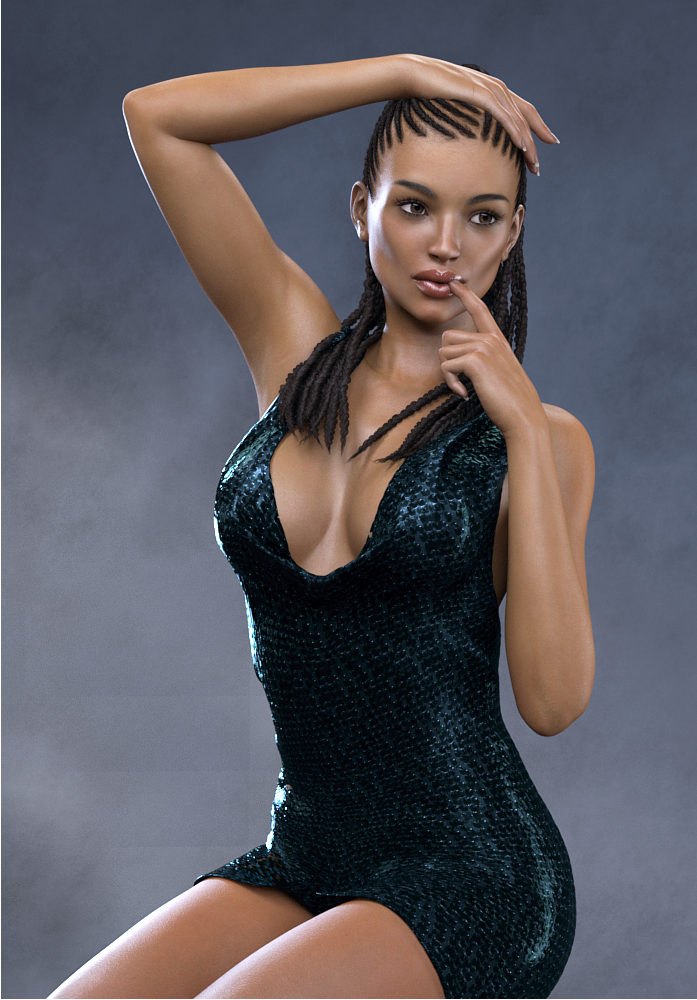
Novica & Forum Members Tips & Product Reviews Pt 9FW Ana-Sofia HD For Victoria 7 BOSS Pro Light Set For Portraits And Promos Rasta Tails Hair For Genesis 3 Female
Little Black Dress For Genesis 3 Females
See notes a couple posts down for the settings for Film ISO / Exposure Value for this darker skinned figure.
TIP: Just by rotating your figure, you will get completely different looks. She is not facing Front.
 Comics
Yes and yes..I am coming up on the 1 year anniversary of installing Daz. I think it was October of last year that I downloaded Daz. My PC died so I bought a new rig and started in January of 2017.
It looks like my first forum thread was January 13th and I'm asking about what Victoria 7 is. lol.
I know I was around for Christmas and would have been posting many questions because the start was very rough- both the store and the software.
I did own Poser though and had it for, like a year but never used it. I had Manga Studio (Or whatever it was called then) and the plan was to draw on top of the poser figures.
Then Manga got pose-able wireframe mannequins and I didn't need poser anymore- so it sat.
Once I saw the Daz store and saw some promo renders, I was like "I'm going to use THAT!"
And about a year later, here we are.
Wow, that is pretty impressive. Just curious because I didn't see it mentioned in the article, did you have a lot experience with photoshop, photography and that kind of stuff before getting into the 3D-Art aspect of things? Either way you've got a good grasp on it now. I like your style and the consitency of the quality of your images.
ComicsYes and yes..I am coming up on the 1 year anniversary of installing Daz. I think it was October of last year that I downloaded Daz. My PC died so I bought a new rig and started in January of 2017.
It looks like my first forum thread was January 13th and I'm asking about what Victoria 7 is. lol.
I know I was around for Christmas and would have been posting many questions because the start was very rough- both the store and the software.
I did own Poser though and had it for, like a year but never used it. I had Manga Studio (Or whatever it was called then) and the plan was to draw on top of the poser figures.
Then Manga got pose-able wireframe mannequins and I didn't need poser anymore- so it sat.
Once I saw the Daz store and saw some promo renders, I was like "I'm going to use THAT!"
And about a year later, here we are.
Daz 3D is part of

Connect
DAZ Productions, Inc.
7533 S Center View Ct #4664
West Jordan, UT 84084Licensing Agreement | Terms of Service | Privacy Policy | EULA
© 2026 Daz Productions Inc. All Rights Reserved.