-
Michael 8
I cannot shake how much the main promos look like they were taken from a low budget 1990's sci-fi, possibly Canadian.
While that gives me a bit of a chuckle, there is just something that feels very "off" about Micheal 8 and the whole of Genesis 8 for that matter. So many of these promos look both better and worse at the same time. It is extremely hard to explain but I'll try. One thing for sure is the overly waxy look these images possess, they could pass as wax figures in a museum, and wax figures are often super creepy. That is instantly off putting to me. Also, Micheal 8 is one really white dude in many pics, like he hasn't spent a day in the sun in years. That seems strange for a character who is supposed to be a bit more mature, and thus weathered. He has the skin of a teenager, which I thought would be a different product, lol. It just seems to me that there is a one step forward and one step back compared to some of the outstanding characters that were released at the end of the 7 cycle. V8/M8 (at least in the pictures I have seen posted) do not look as interesting as, say, a character by Kayleyss.
My guess as to why is perhaps the new dual lobe specularity settings are being used a bit too much. As this is new, it is something people are still figuring out. Maybe it will get better, but in general Genesis 3 had pretty much figured that stuff out. IMO, in so many pictures of G8, the skin lacks any significant detail, and this breaks the realism. Where did the detail go?
Like with real skin, lighting plays a big difference in how the skin looks on the Genesis 8 figures - more so than the previous figure lines. My recommendation: Don't try to render with the default settings. Those are kind of rubbish, imo, when it comes to decent lighting and render settings.
But lighting and render settings can make a difference for sure. Here's Victoria 8's textures "out of the box", I didn't change any of the skin settings - the only thing I changed was the lighting and render settings:


The skin can look quite different depending on the lights and render settings. Here's another with Victoria 8's textures:

To me, the skin doesn't lack detail at all. It just requires some adjustments to lighting and render settings.
The default settings don't look very good, imo. Here's Victora 8's textures "out of the box" with no changes and the default Iray render settings:

It doesn't look very good with the default Iray settings, in my opinion.
But here are the exact same textures with no changes to the skin settings, the only thing I changed was the lighting and render settings:

To me, Victoria 8's skin looks fantastic - just not under the default settings. Like with real skin, some thought needs to be put into lighting. And the render settings are really important as well.
I like how her face/skin looks in the adjusted versions with the shine seems to have more life in her and her eyes kinda got a soul to them
Michael 8I cannot shake how much the main promos look like they were taken from a low budget 1990's sci-fi, possibly Canadian.
While that gives me a bit of a chuckle, there is just something that feels very "off" about Micheal 8 and the whole of Genesis 8 for that matter. So many of these promos look both better and worse at the same time. It is extremely hard to explain but I'll try. One thing for sure is the overly waxy look these images possess, they could pass as wax figures in a museum, and wax figures are often super creepy. That is instantly off putting to me. Also, Micheal 8 is one really white dude in many pics, like he hasn't spent a day in the sun in years. That seems strange for a character who is supposed to be a bit more mature, and thus weathered. He has the skin of a teenager, which I thought would be a different product, lol. It just seems to me that there is a one step forward and one step back compared to some of the outstanding characters that were released at the end of the 7 cycle. V8/M8 (at least in the pictures I have seen posted) do not look as interesting as, say, a character by Kayleyss.
My guess as to why is perhaps the new dual lobe specularity settings are being used a bit too much. As this is new, it is something people are still figuring out. Maybe it will get better, but in general Genesis 3 had pretty much figured that stuff out. IMO, in so many pictures of G8, the skin lacks any significant detail, and this breaks the realism. Where did the detail go?
Like with real skin, lighting plays a big difference in how the skin looks on the Genesis 8 figures - more so than the previous figure lines. My recommendation: Don't try to render with the default settings. Those are kind of rubbish, imo, when it comes to decent lighting and render settings.
But lighting and render settings can make a difference for sure. Here's Victoria 8's textures "out of the box", I didn't change any of the skin settings - the only thing I changed was the lighting and render settings:
The skin can look quite different depending on the lights and render settings. Here's another with Victoria 8's textures:
To me, the skin doesn't lack detail at all. It just requires some adjustments to lighting and render settings.
The default settings don't look very good, imo. Here's Victora 8's textures "out of the box" with no changes and the default Iray render settings:
It doesn't look very good with the default Iray settings, in my opinion.
But here are the exact same textures with no changes to the skin settings, the only thing I changed was the lighting and render settings:
To me, Victoria 8's skin looks fantastic - just not under the default settings. Like with real skin, some thought needs to be put into lighting. And the render settings are really important as well.
BOSS Lights ~ Sharing Preset SettingsHere are three protraits done with the BOSS lights. I think they were all done with the 1FF CRT setting, but honestly, I wasn't recording the settings when I made the images. I know that in all cases I turned off or significantly reduced the sceondary behind ear light, because it shows white halos and bad effects on hair. I believe I pulled the camera back in all images also. On the woman with pale skin, I reduced all the lights to 90% lumens, using V3Digitimes Iray Light Manger Pro. That tool is indespensible for adjusting a large group of lights like this.
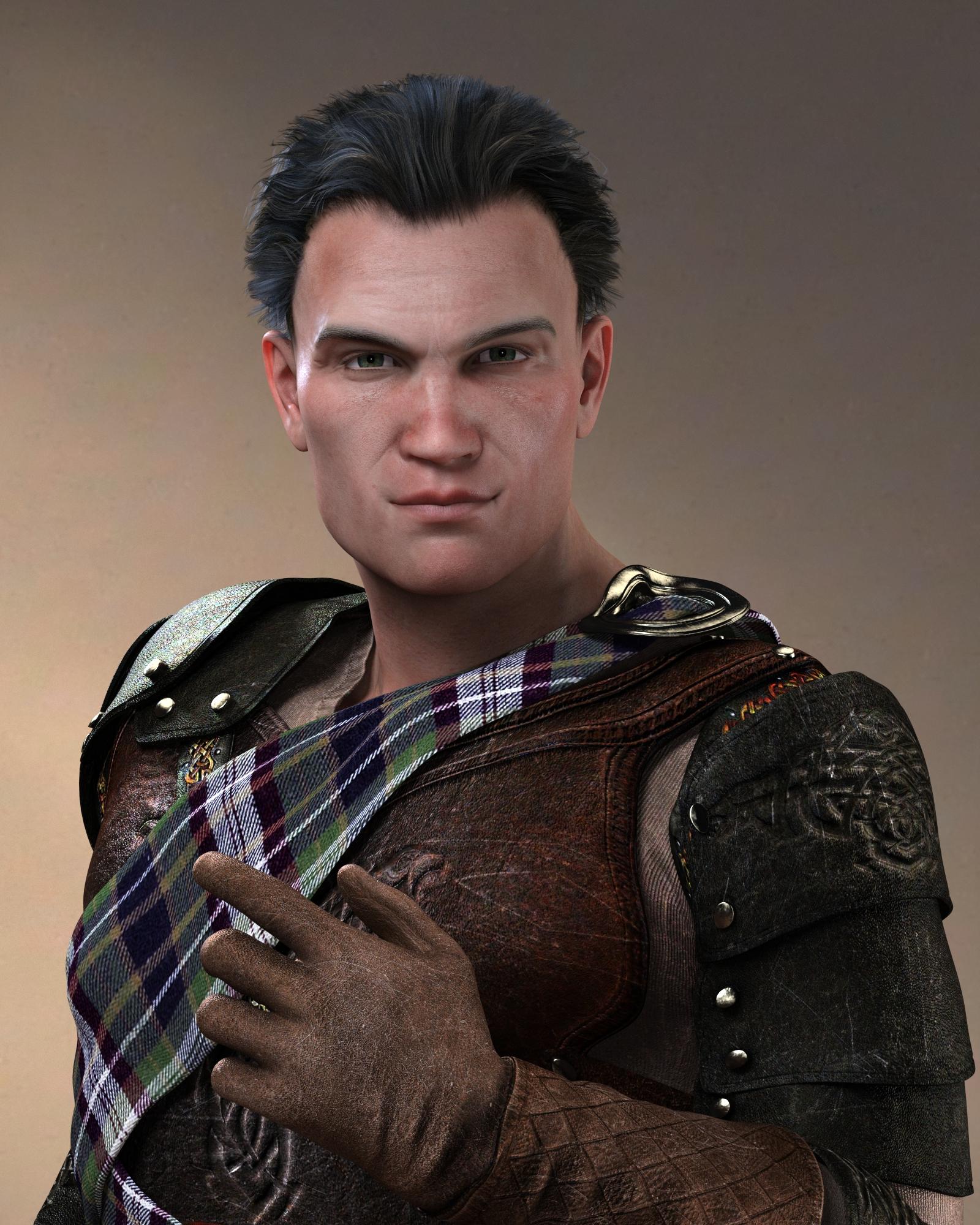
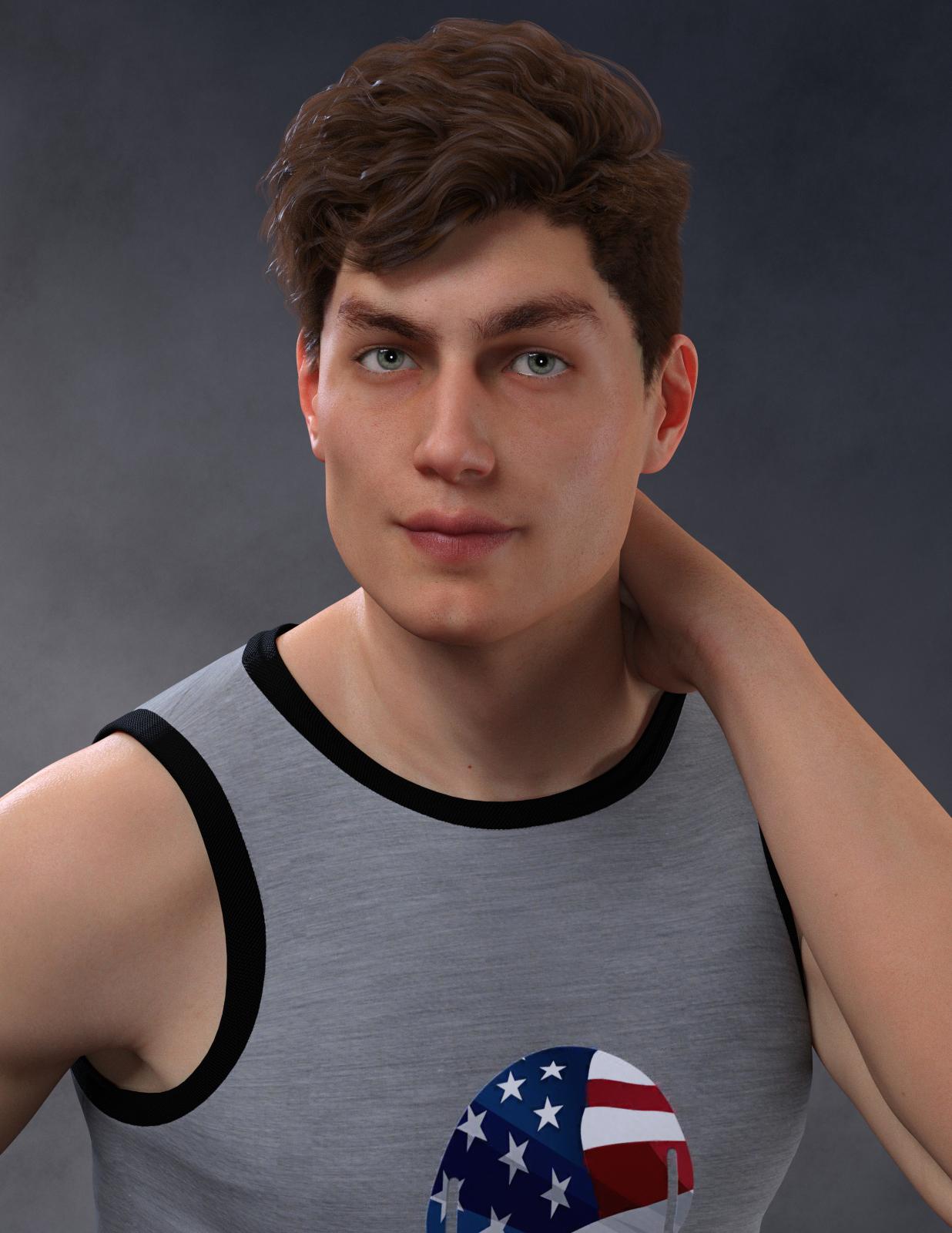
Benita for Victoria 8 with Lilith 7 skin
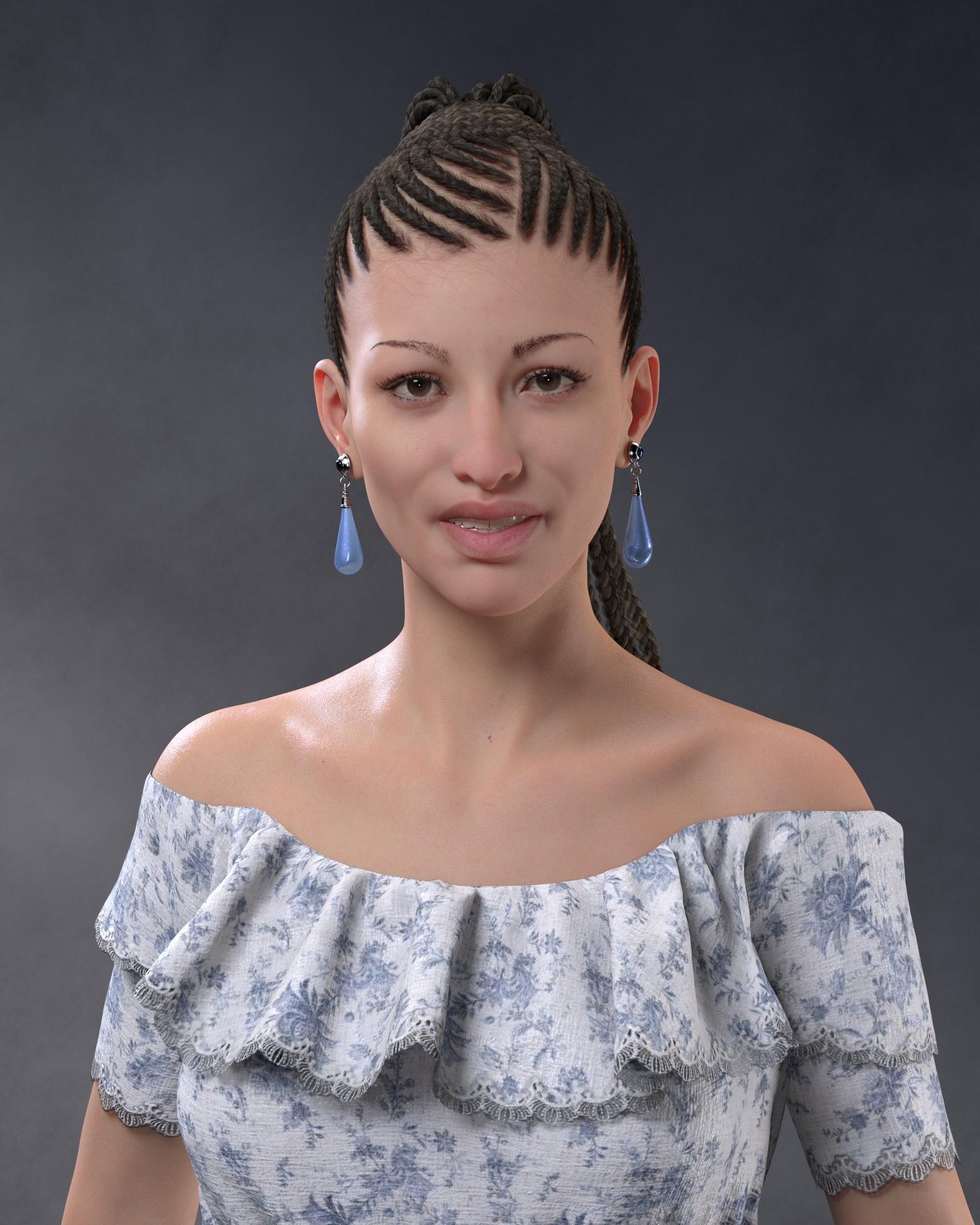 Morphs from G3 to G8


 Clothing deforms on loading scene
I have an ongoing issue where some clothing, particularly items attached to the head and feet, such as hats, jewelery, and the like, deform in weird ways. The thing is, this only happens when the file is loaded. If I put together a brand new file and fit items to the figure, everything looks fine. Save, and reload, and it deforms. In the attached file, I have made a file where I did nothing but load a G3 Victoria figure, and fit the footwear. It looked perfectly fine upon save, but on reload, it looks like this. This happens reliably, and not just for this product, but for most footwear, and many other items. I've tried redoing the database and uninstalling and reinstalling everything, and no change. What is broken here?
Is there any reason to upgrade to Genesis 8?''To me, G8 should really have been named Genesis 3.2, as there are lots of small improvements, but no major changes.''
If there was major changes you then get users complaining old content no longer works. Unfortunately there is always that decision to make. Go all out and break users investments, or improve a figure in a way where some of the old content is still usable. I for one fought for the fact that Daz loses the multiple UV sets per character for Genesis 8 and that it becomes standardized and is compatible with G3 skins by default. (Thank God that actually happened lol) Daz could have easily created a figure where all that wasn't possible. So yes, sometimes, keeping some things the same is beneficial, and minor improvements is better than changing everything completely:) Also the change in naming convention was to allign the figures with the base model. Calling Victoria 8 for Genesis 3.2 is a marketing nightmare and would just confuse new users.
What Upcoming Daz Original Genesis 8 Character Are You Waiting For?If I recall, the first male character after M7 was Leo 7, who arrived a few days after Olympia 7. Then is was Girl 7 / Guy 7, and after that Gia 7 / Gianni 7.
No idea if it will be the same this time round though, series 8 release order is already way different to 7. By the time M7 arrived, I think we already had six or seven girls as well as Victoria, this time we just have Olympia 8.
How to use Genesis 3 Character UVs for Genesis 8 Female?You should be able to just "use it" (no user-facing files, just files in the Data folder). Select your G8 Female in the scene, find a G3 Figure whose materials you want to use in your Content Library (e.g. Victoria 7, Monique 7,..) and double-click on their skin materials to load up to that G8 Female - it should load the textures and skin settings and change the UV Map to V7/M7/etc for you so that they fit.Edit to Add: I don't actually have this product but I have similar ones for earlier generations and I believe they work in the same way.
Thank you very much, that worked (I guess, using, viktoria, olympia or bethanys skin had me look a few time before I could notice a small difference).
I think this is the product to use the unique G3F UV's, i.e. Karen, Olympia, Eva, etc. ( https://www.daz3d.com/genesis-3-character-uvs-for-genesis-8-female )
In this case, Select your G8 character: Surface>Skin, Lips, scroll down until you get to UV Set. Click the dropdown menu and slect the UV set you want (Karen 7, Eva7, etc. Then find the G3F skin you want and double click your G8 character/
Thank you very much, unfortunatly this method gave some black tears in the skin using Bethanys skin.
Is there any reason to upgrade to Genesis 8?Honestly, I'm not sure how this generation isn't simply a significant downgrade over the previous one. The features are backwards compatibility, the expressions, and the horrible A pose? Is there more than that?
As for the expressions, they could've easily just added them to the previous generation, since they're just HD morphs. And G8 is no more backwards compatible past G3 than G3 is, so there's no upgrade there.
In return for this improvements (?) we get yet another lower resolution figure than the previous generation, and have to start all over again with content. It's like they're not even trying anymore.
Most of the lost polygon count is in the separation of the eyelash mesh from the main model mesh. And while they probaly could, in theory, have updated the older base mesh, as was done with Victoria 4, many people were expecting the new generation to come out in June of this year, just as it has every two years since the original Genesis figure came out. As for the pose change, unless you're a content creator, you don't realize how much of a pain in the backside the T-pose really is when if comes to properly modeling certain kinds of clothing items.
Adding the brows to Victoria 4 was possible as it was a Poser figure, with the geometry belonging to each body part and morphs loaded per body part - so a new eyebrows bone didn't break anything. Adding or removing geometry from a weight-mapped figure would break existing morphs as the geometry belongs to the figure node, and the total vertex count and order must be preserved.
I like G8 but this doesn't make much sense. They could easily have released conformers for G3 because that's what they did for G8's brows and lashes. It was already possible to remove G3's existing lashes through surfaces.
Well, there are already add-ons for that - I thought you were suggesting removing the existing lashes, which would have the issues I listed.
Is there any reason to upgrade to Genesis 8?Honestly, I'm not sure how this generation isn't simply a significant downgrade over the previous one. The features are backwards compatibility, the expressions, and the horrible A pose? Is there more than that?
As for the expressions, they could've easily just added them to the previous generation, since they're just HD morphs. And G8 is no more backwards compatible past G3 than G3 is, so there's no upgrade there.
In return for this improvements (?) we get yet another lower resolution figure than the previous generation, and have to start all over again with content. It's like they're not even trying anymore.
Most of the lost polygon count is in the separation of the eyelash mesh from the main model mesh. And while they probaly could, in theory, have updated the older base mesh, as was done with Victoria 4, many people were expecting the new generation to come out in June of this year, just as it has every two years since the original Genesis figure came out. As for the pose change, unless you're a content creator, you don't realize how much of a pain in the backside the T-pose really is when if comes to properly modeling certain kinds of clothing items.
...what about simply saving the default figure in the "A" pose?If you are truly starting with the A pase, you need JCM's specifically for that pose. Saving the figure in an A Pose will not change the underlying JCM's or address any problems with content creation for when the ams are down all the way.
well I fit Fuse, Skyrim and other A posed clothes mesh I imported to previous figures using the Transfer Utility by baking joint rotations first then reposing that clothes and converting to prop for t posed figures.
So it was doable.
No arguments there, it is doable. and they could have just updated G3 to an A pose ...... but ......
(If there was a lot of complaining among content creators about the T pose, then this may have been the reasoning (just speculation, no real knowledge one way or the other), and new JCM's would be needed to address those porblems. Of course the A pose could have also been added to increase the difference form G3 to G8. Whatever the reasoning, G8 is here, and now we just have to decide to buy .... or not.)
Is there any reason to upgrade to Genesis 8?Honestly, I'm not sure how this generation isn't simply a significant downgrade over the previous one. The features are backwards compatibility, the expressions, and the horrible A pose? Is there more than that?
As for the expressions, they could've easily just added them to the previous generation, since they're just HD morphs. And G8 is no more backwards compatible past G3 than G3 is, so there's no upgrade there.
In return for this improvements (?) we get yet another lower resolution figure than the previous generation, and have to start all over again with content. It's like they're not even trying anymore.
Most of the lost polygon count is in the separation of the eyelash mesh from the main model mesh. And while they probaly could, in theory, have updated the older base mesh, as was done with Victoria 4, many people were expecting the new generation to come out in June of this year, just as it has every two years since the original Genesis figure came out. As for the pose change, unless you're a content creator, you don't realize how much of a pain in the backside the T-pose really is when if comes to properly modeling certain kinds of clothing items.
...what about simply saving the default figure in the "A" pose?If you are truly starting with the A pase, you need JCM's specifically for that pose. Saving the figure in an A Pose will not change the underlying JCM's or address any problems with content creation for when the ams are down all the way.
well I fit Fuse, Skyrim and other A posed clothes mesh I imported to previous figures using the Transfer Utility by baking joint rotations first then reposing that clothes and converting to prop for t posed figures.
So it was doable.
Is there any reason to upgrade to Genesis 8?Honestly, I'm not sure how this generation isn't simply a significant downgrade over the previous one. The features are backwards compatibility, the expressions, and the horrible A pose? Is there more than that?
As for the expressions, they could've easily just added them to the previous generation, since they're just HD morphs. And G8 is no more backwards compatible past G3 than G3 is, so there's no upgrade there.
In return for this improvements (?) we get yet another lower resolution figure than the previous generation, and have to start all over again with content. It's like they're not even trying anymore.
Most of the lost polygon count is in the separation of the eyelash mesh from the main model mesh. And while they probaly could, in theory, have updated the older base mesh, as was done with Victoria 4, many people were expecting the new generation to come out in June of this year, just as it has every two years since the original Genesis figure came out. As for the pose change, unless you're a content creator, you don't realize how much of a pain in the backside the T-pose really is when if comes to properly modeling certain kinds of clothing items.
...what about simply saving the default figure in the "A" pose?If you are truly starting with the A pase, you need JCM's specifically for that pose. Saving the figure in an A Pose will not change the underlying JCM's or address any problems with content creation for when the ams are down all the way.
Is there any reason to upgrade to Genesis 8?
...what about simply saving the default figure in the "A" pose?Honestly, I'm not sure how this generation isn't simply a significant downgrade over the previous one. The features are backwards compatibility, the expressions, and the horrible A pose? Is there more than that?
As for the expressions, they could've easily just added them to the previous generation, since they're just HD morphs. And G8 is no more backwards compatible past G3 than G3 is, so there's no upgrade there.
In return for this improvements (?) we get yet another lower resolution figure than the previous generation, and have to start all over again with content. It's like they're not even trying anymore.
Most of the lost polygon count is in the separation of the eyelash mesh from the main model mesh. And while they probaly could, in theory, have updated the older base mesh, as was done with Victoria 4, many people were expecting the new generation to come out in June of this year, just as it has every two years since the original Genesis figure came out. As for the pose change, unless you're a content creator, you don't realize how much of a pain in the backside the T-pose really is when if comes to properly modeling certain kinds of clothing items.
Hunkering Down for Hurricane Harvey...We caught a good break in Corpus Christi, a lot of fences and trees down, but not a lot of building damage. Unfortunately the towns north (Rockport, Portland, Victoria) of us are taking a lot of damage.
The older generation: Victoria 2/3, Michael 2/3 and their children rendersLuci45, thank you. I must admit that I cheat and use such tools as XDresser for the older figures. My modeling skills are pretty rudimental but I keep working on them and one day I will be a lot better then I am now.
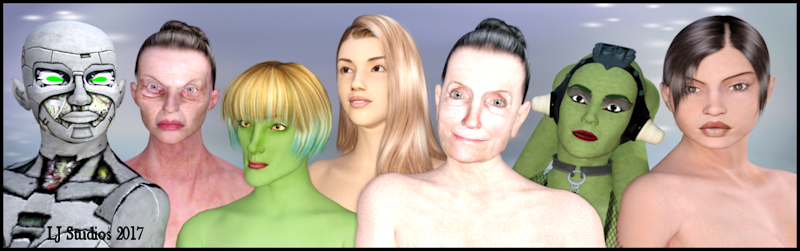
One of my contributions to the freebie world is to create images for Poser and DAZ Studio Free Resources Wiki The wiki has pages that function as an archive of multiple sources of products for various figures. In this case there is a page for Faces and Morphs for Victoria 1-2 This is the image I created for the page. Render is iRay. Don't know what my favorite Victoria is. I love the sexiness of Druuna but the texture on the Old Woman is really interesting and lovely. All those freckles and her breasts. Oh my.
The products I used in making the image. All are or were free:
01:Vorg:Textures Vorg for Victoria 2 by MrSparky.
02: Dragonessa: Hair and 05: Viky Old Woman: Hair Updo Hair SR1 by Kozaburo.
02: Dragonessa: Moprh and Textures * DNA The Dragonessa for Victoria 2 by Syyd.
03: Ladyelf: Base Roxanne for V2 by Capsces. direct link
03: Ladyelf: Hair Rei Hair by Kozaburo.
03: Ladyelf: Hair: Texture * JL Koz Rei Hair - 60 fresh colors by jorgeluso.
03: Ladyelf: Moprh and Textures V2 Ladyelf Set Featuring Grinchette by Syyd. [No longer available]
04: Karin V: Hair Kyoko Hair MK3 by kozaburo.
04: Karin V: Morph and Textures Karin V by PoserGirls Ken1.
05: Viky Old Woman2: Moprh and Textures * Viky Old Woman2 by arduino.
06: Oola: Morph and Textures * Oola by PhilC.
07: Drunna: Hair Short Hair Evolution by Kozaburo.
07: Drunna: Textures Odyssey Rebirth by SnowSultan. [No longer available]
07: Druuna: Morph * Gandolf50's Version of Drunna by Gandolf50.* means free registration is required to access the freebie.
 Is there any reason to upgrade to Genesis 8?
Honestly, I'm not sure how this generation isn't simply a significant downgrade over the previous one. The features are backwards compatibility, the expressions, and the horrible A pose? Is there more than that?
As for the expressions, they could've easily just added them to the previous generation, since they're just HD morphs. And G8 is no more backwards compatible past G3 than G3 is, so there's no upgrade there.
In return for this improvements (?) we get yet another lower resolution figure than the previous generation, and have to start all over again with content. It's like they're not even trying anymore.
Most of the lost polygon count is in the separation of the eyelash mesh from the main model mesh. And while they probaly could, in theory, have updated the older base mesh, as was done with Victoria 4, many people were expecting the new generation to come out in June of this year, just as it has every two years since the original Genesis figure came out. As for the pose change, unless you're a content creator, you don't realize how much of a pain in the backside the T-pose really is when if comes to properly modeling certain kinds of clothing items.
Adding the brows to Victoria 4 was possible as it was a Poser figure, with the geometry belonging to each body part and morphs loaded per body part - so a new eyebrows bone didn't break anything. Adding or removing geometry from a weight-mapped figure would break existing morphs as the geometry belongs to the figure node, and the total vertex count and order must be preserved.
I like G8 but this doesn't make much sense. They could easily have released conformers for G3 because that's what they did for G8's brows and lashes. It was already possible to remove G3's existing lashes through surfaces.
So Genesis 8 is here!I'm wondering if DAZ might have caused themselves a marketing problem.
Genesis 8 consists entirely of technology advancements. This time (perhaps to save money) they are using the same mesh (with a few tweaks) as the previous generation. And it shows. If you were casually glancing through the pics in the store and didn't notice all the mentions of "8", you'd just see another day in the cycle of Genesis 3. If you go back through the store there's a very clear visual demarkation between G2 and G3; but Victoria 8 looks no more significant (parhaps less so) than, say, Rune or Ophelia.
Will enough people buy into a new generation that doesn't look like one?
I think this is because the G3 figures were such a step closer in realism that any steps past that will seem insignificant in comparrison :P. Vicky 6 was very stylized. Vicky 7 looked like a person. Vicky 8 looks like....a person ;). Subsequent generations are going to be more for tech than for looks since the G3s looked so nice.
Laurie
Pretty much agree with that, but it remains the case that there is no visual distinction between generations. V7 and V8 do look like people: people who are closely related. This will likely carry on with further "base" figures in the G8 range.
Hence wondering about marketing problem. Car makers carefully present a new range in different clothes, even if it isn't really that new. Folk buy with their eyes.
Maybe I'm overthinking it a bit too much, but I think that the closer to realism the figures get, the differences between the generations will be harder to discern. That might be what we're running into. Once realism is closely achieved, how much more can one really improve, right? :). At least it's nice to think of that way. LOL
Laurie
Is there any reason to upgrade to Genesis 8?Honestly, I'm not sure how this generation isn't simply a significant downgrade over the previous one. The features are backwards compatibility, the expressions, and the horrible A pose? Is there more than that?
As for the expressions, they could've easily just added them to the previous generation, since they're just HD morphs. And G8 is no more backwards compatible past G3 than G3 is, so there's no upgrade there.
In return for this improvements (?) we get yet another lower resolution figure than the previous generation, and have to start all over again with content. It's like they're not even trying anymore.
Most of the lost polygon count is in the separation of the eyelash mesh from the main model mesh. And while they probaly could, in theory, have updated the older base mesh, as was done with Victoria 4, many people were expecting the new generation to come out in June of this year, just as it has every two years since the original Genesis figure came out. As for the pose change, unless you're a content creator, you don't realize how much of a pain in the backside the T-pose really is when if comes to properly modeling certain kinds of clothing items.
Adding the brows to Victoria 4 was possible as it was a Poser figure, with the geometry belonging to each body part and morphs loaded per body part - so a new eyebrows bone didn't break anything. Adding or removing geometry from a weight-mapped figure would break existing morphs as the geometry belongs to the figure node, and the total vertex count and order must be preserved.
Is there any reason to upgrade to Genesis 8?Honestly, I'm not sure how this generation isn't simply a significant downgrade over the previous one. The features are backwards compatibility, the expressions, and the horrible A pose? Is there more than that?
As for the expressions, they could've easily just added them to the previous generation, since they're just HD morphs. And G8 is no more backwards compatible past G3 than G3 is, so there's no upgrade there.
In return for this improvements (?) we get yet another lower resolution figure than the previous generation, and have to start all over again with content. It's like they're not even trying anymore.
Most of the lost polygon count is in the separation of the eyelash mesh from the main model mesh. And while they probaly could, in theory, have updated the older base mesh, as was done with Victoria 4, many people were expecting the new generation to come out in June of this year, just as it has every two years since the original Genesis figure came out. As for the pose change, unless you're a content creator, you don't realize how much of a pain in the backside the T-pose really is when if comes to properly modeling certain kinds of clothing items.
So Genesis 8 is here!Oh and 1 other thing, if it's not too late, there is never a rush to buy a new product (for all you newbies). It will always go on sale at some point on Daz. The longer you wait, the cheaper it will be. By the time I bought Victoria 7 Pro Bundle ($135), I got it for $30. Then I got the HD add-on at half price. Don't foget to use your monthly PC coupons (if you're a Platinum member)!!!
Daz 3D is part of

Connect
DAZ Productions, Inc.
7533 S Center View Ct #4664
West Jordan, UT 84084Licensing Agreement | Terms of Service | Privacy Policy | EULA
© 2026 Daz Productions Inc. All Rights Reserved.