-
Diomede's Notepad, Sketchpad, and Chilling Pad
Victoria 9 Loose Folds Skirt Marvelous Designer to Daz Studio Workflow
Create an Victoria 9 Avatar for Use in Marvelous Designer (note, my version of MD is not the most current)
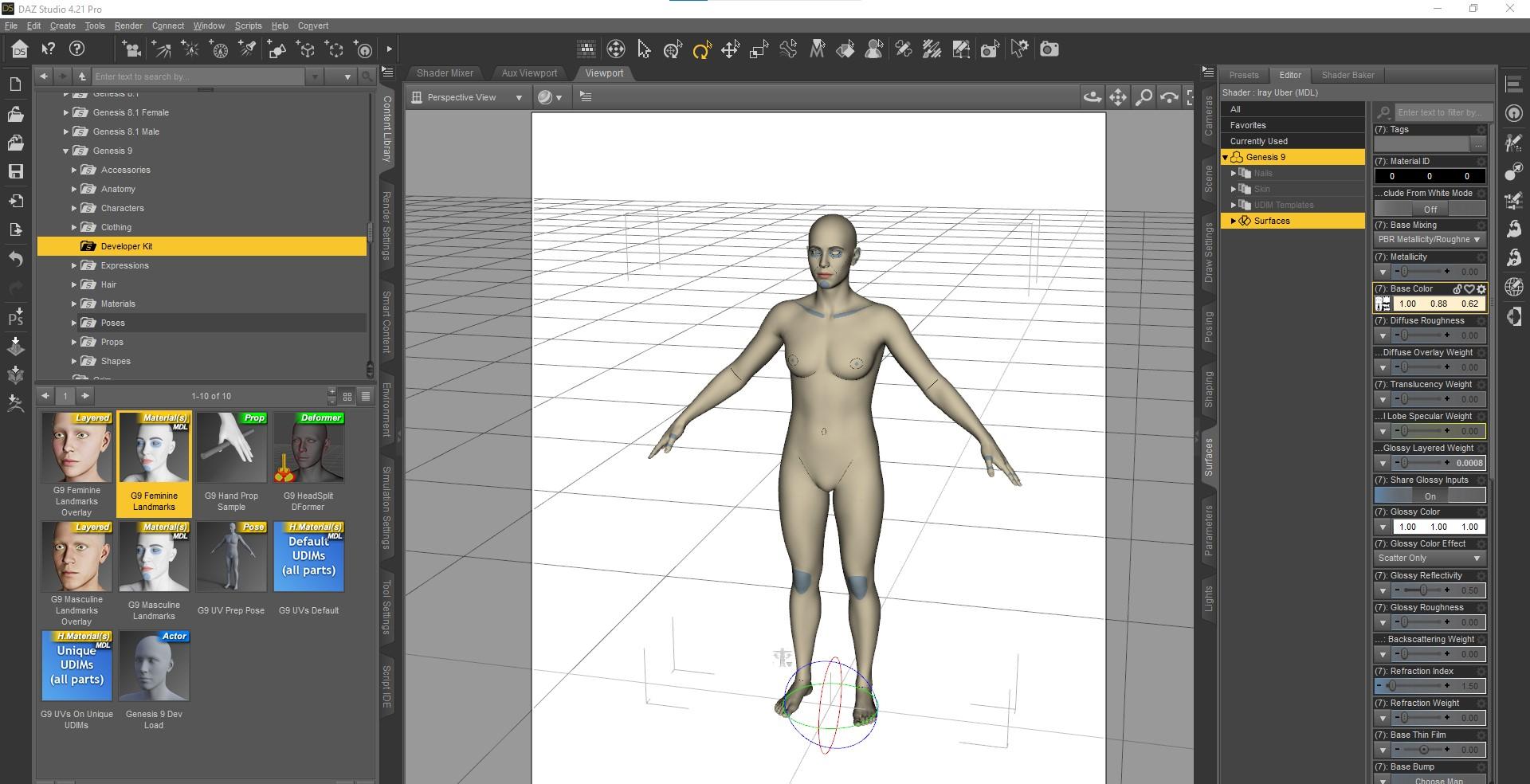
- Start a Daz Studio Scene and Load the Genesis 9 Development Rig (not Victoria 9 character because that has some scaling). I applied the material for body references but not necessary.
-- Mods! This is not a naked Genesis 9. This is a textureless G9 weariong a bodysuit with detail references.
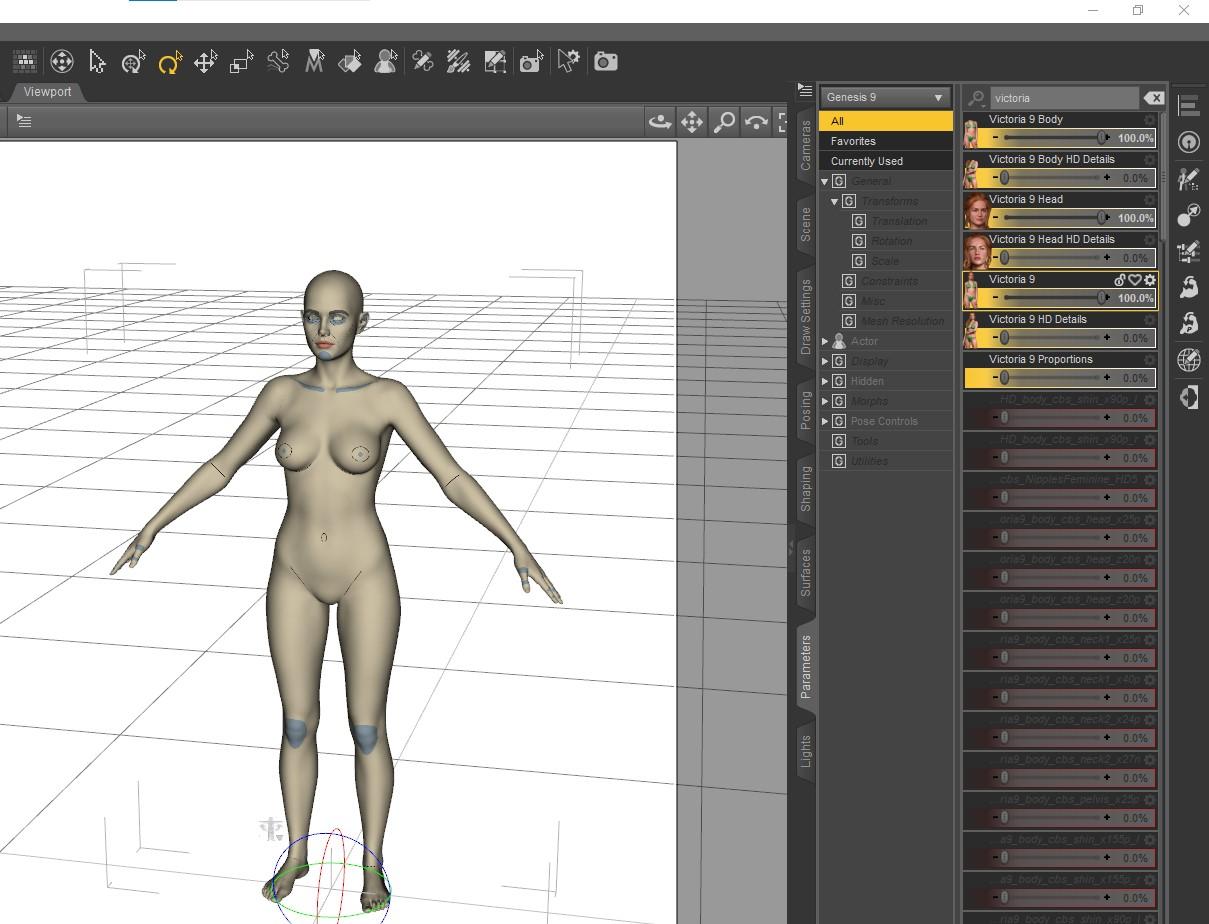
- In parameters tab, dial the Victoria 9 morph to 100, but do not touch the Victoria 9 proportion dial.
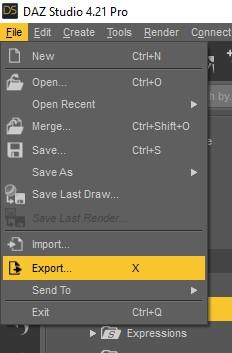
- Use File Export to save out the obj. I am using the daz Studio scale because Marvelous Designer has an option for the same scale. Just be consistent.
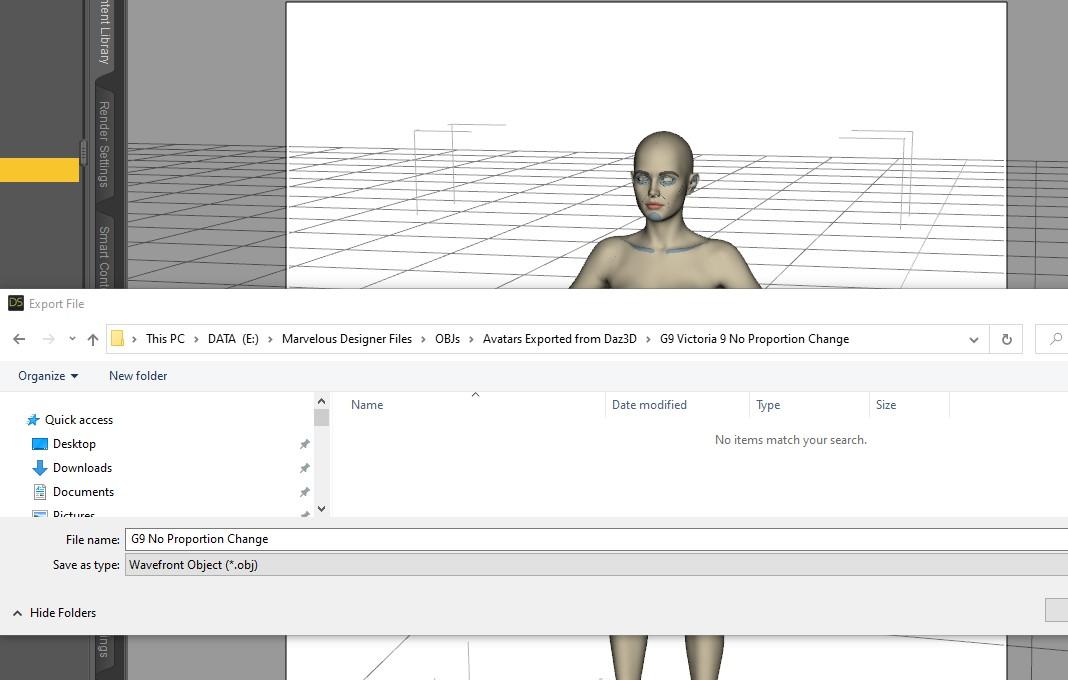
- Save to a place where you can find your Marvelous Designer Avatars. I save to my MD dedicated Avatars folder where MD looks by default but just make sure wherever you save you don't forget.
 Diomede's Notepad, Sketchpad, and Chilling Pad
Diomede said:
Practice Workflow for Upcoming Genesis 9
Return to Genesis 1
Genesis 9 and Genesis 1 each uses the same base for both the female and the male figures. This is different from Gensis 2-8 which had separate figures for male and female. In anticipation of release of Genesis 9, I am revisiting the original unimesh genesis 1. I have an old copy of Marveous Designer before they went subscription so I don't have all the tools, but I can use it to make a quick loose skirt for the Genesis 1 Basic Female shape morph. Will then use reverse deformation in the transfer utility when rigging the for Daz.
I am loosely following the very generous Jay Versluis and John Holden (Fugazzi) who held a webinar shortly after the announcement of G9 release. I will provide a link to their video with an edit. But for my own memory aid, I will be posting a series of screenshots on a Marvelous Designer to Daz Studio unimesh workflow. So here we go.
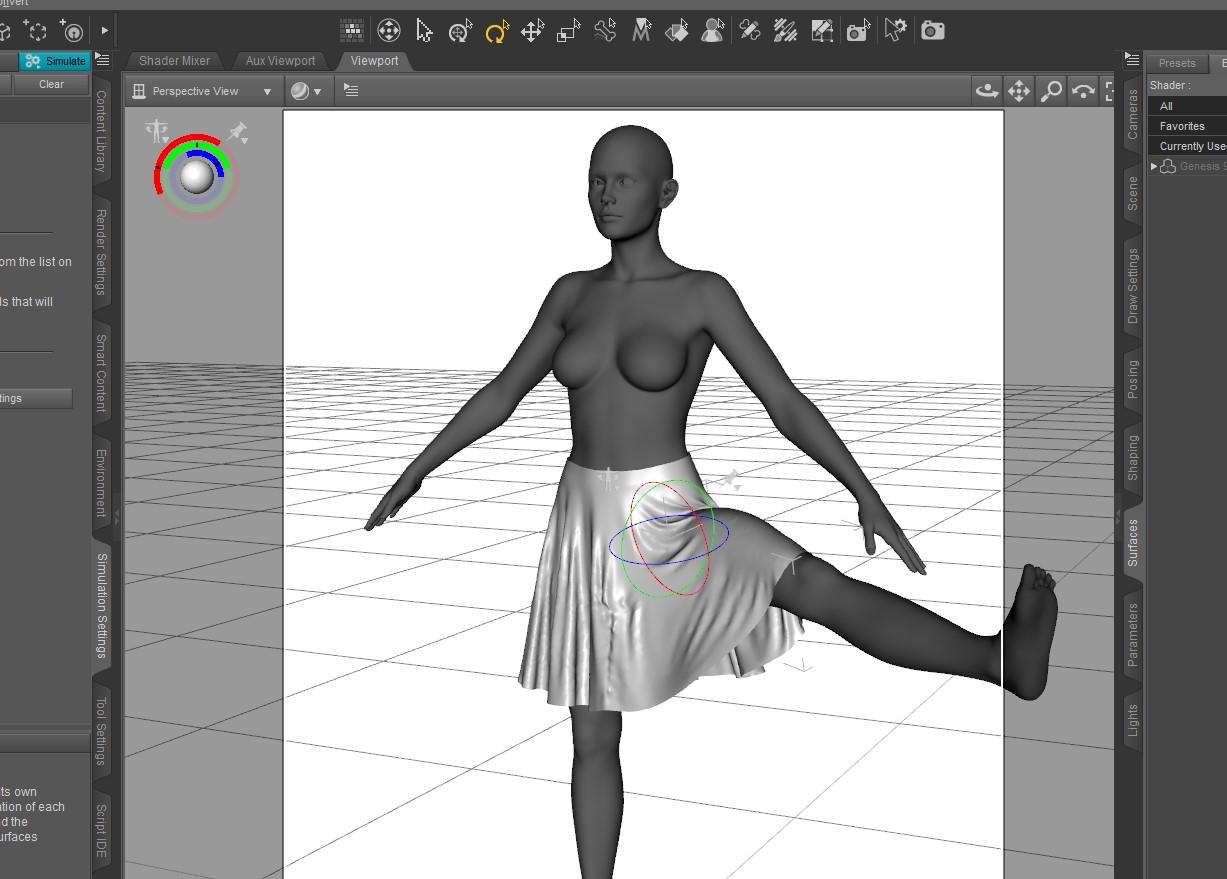
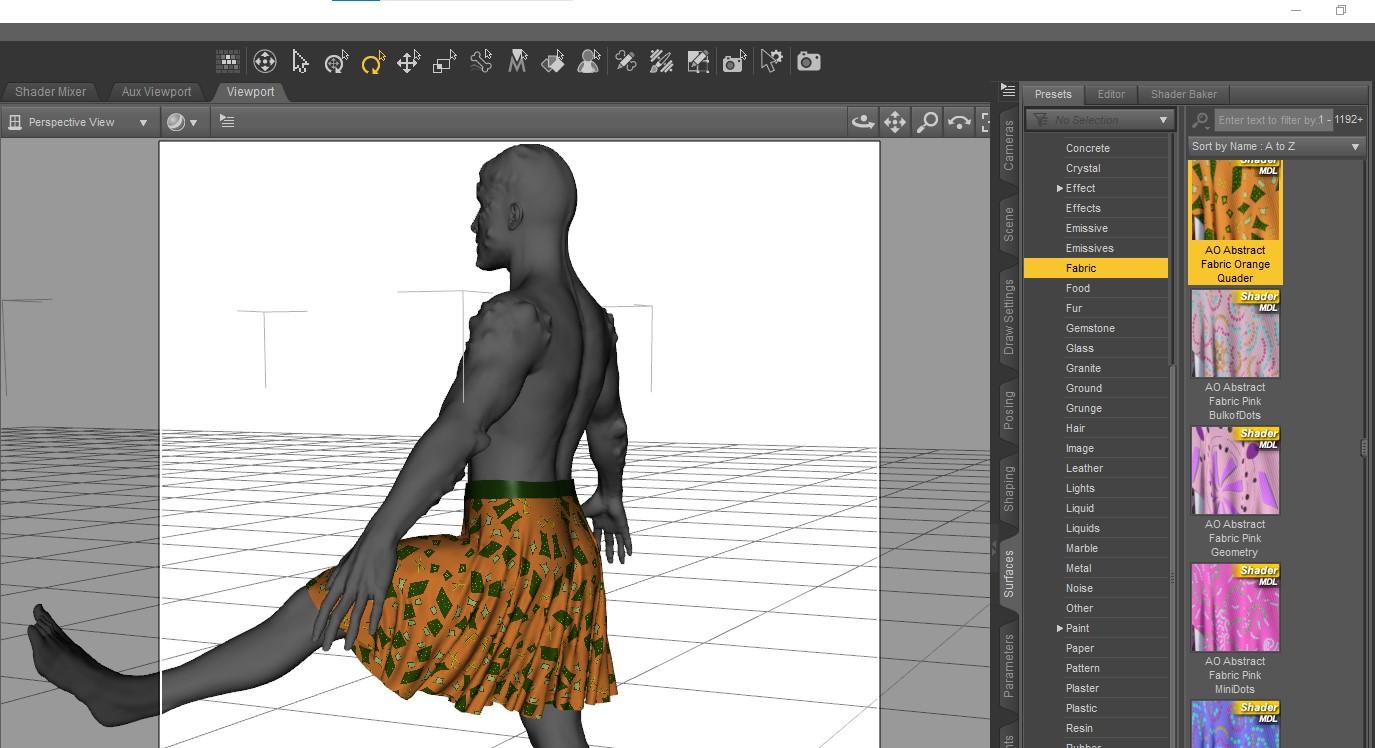
Update - they did release Genesis 9 (obviously), it is Gender-bob-ulous, the aforementioned Genesis 1 workflow did indeed have lots of useful info. I went ahead and created similar loosely folded skirt in Marvelous Designer designed for the Victoria 9 shape, turned it into a conforming figure, and applied DForce for Victoria 9 and for a mixed up G9 Male+Monster shape. I think the results are a good starting point. The steps are outlined below.
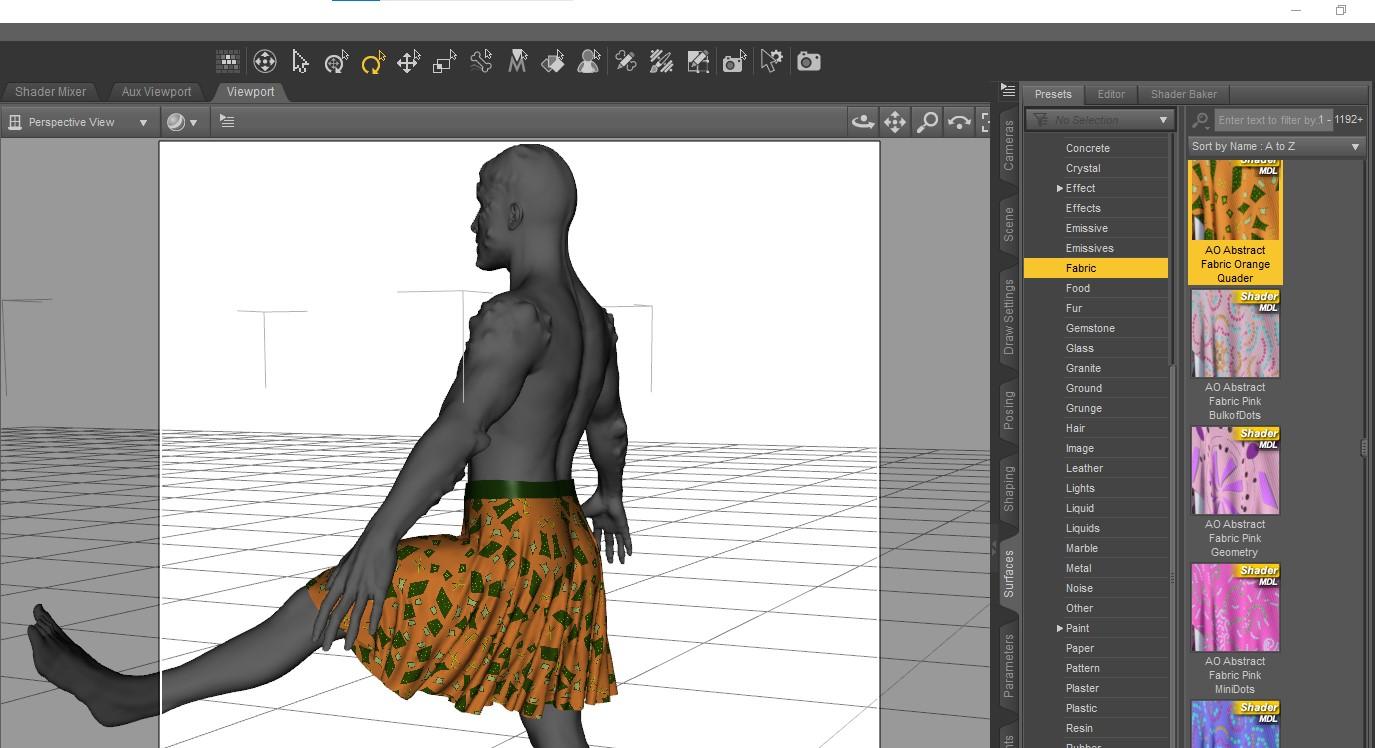
Results Victoria 9 Shaped Textureless G9 Dummy and Male Mix Monster Wearing Skirt
Note that UVMap allow 3rd party pattern applied
 any news on the hd plugin?? :D
One of the most annoying things is the inconsistent use of terminology. I am not even sure that the term HD Morph is being used the same way by Daz for Genesis 9 torso details as the term HD morph is being used more generally in the 3D community.
G8.1F Fingernails too longPerttiA said:
"Currently used" shows only dials that have their value at something else than the default value. If a morph/dial has it's default value set at 100%, it will not show up on currently used.
To fix any ill-behaving (non-zero default value) morphs, do as follows;
1. Open DS and load "Genesis 8.1 Basic Female" (to an empty scene)
2. Right Click at Parameters Tab->Preferences->Choose "Show Hidden Properties" (part 3 zeroes only 'visible' dials)
3. Right Click at Parameters Tab->Zero->Zero Figure (Zeroes the value of all the 'visible' dials)
4. Right Click at Parameters Tab->Memorize->Memorize Figure (Sets the current value of all the dials as their default value)
5. Edit->Save As->Support Asset->Save Modified Assets (Writes the changed default value to the morph files that were changed)
When saving "Modified Assets" DS shows a dialog and asks for confirmation;
"The following file(s) will be permanently modified:" - "Accept/Cancel" - Choose "Accept"
Thanks! It seems to have worked; however, in your step 5. Edit->, there's no "Save As", so I assume you were meant 5. "File"->Save As.... is that correct?
Josie 9
Yeah it's unfortunate that you have to dial in her proportion morph to correct the wild head exaggeration because the morph also adjusts her heights/size.billyben_0077a25354 said:I got her and her head is way out of proportion. She looks much better after dialing her head down by dialing in -20% on the proportion head size dial.*
Genesis 9 we are back in the game Carrara users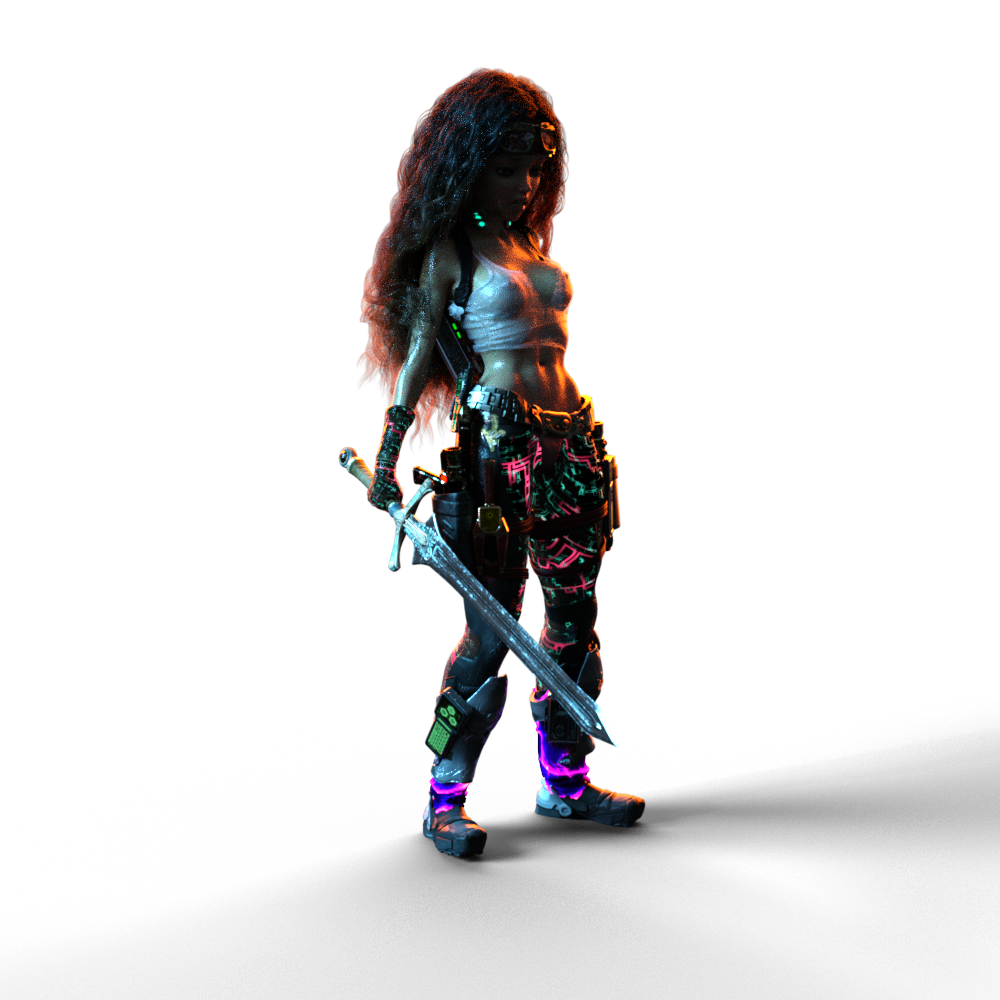 I completely understand. I do a Lot of concept testing. In fact, that's what I consider my last eleven or so years!
VWD Rocks!!! Everything that can't be glued to the collision actor needs to be welded, but I think all of your models are one mesh, right?
I've done a quite a bit of modeling for dForce and for VWD. When it comes to costumes for my hero actors, I buy from the store and edit the mesh and do it that way - so instead of modeling, it's more like un-modeling. DS Rocks for converting mesh to conforming... anything!
That cyberpunk costume Rosie is wearing is mostly Complicated Eve for V3, but it's been tweaked.
I love how both dForce and VWD help me make cloth more convincing that it's raining, and she's wet. I've been finding that even tight(ish) fitting clothes still look better in animations if their simulated by one or the other. I've also found that, what works really good in one might not work so good in the other, but if it doesn't work at all in one, chances are the other will be able to solve it - so I've been having tremendous sucess.
For cloth, I really like how VWD works in Carrara. Since it has to write a new OBJ morph for each frame, and that gets stored in the CAR file, not only do the simulations survive being saved, closed and reopened, but we can also finish one simulation and then do another, and another. Can't do that as easily in DS with VWD, but dForce relishes it.
I have a start with Genesis 9 and I'm a big fan of the new figure. Big Time! I love the new geometry. Did you notice the way the FACS is built into the figure's pose controls? I did that for Rosie 7 using the Genesis 3 & 8 Face Controls product. That was money well spent for me. I made a full set of body animation controls for Genesis 3 Female. Adding FACS to it really makes it complete. I'll likely do a better, cleaner product-like version for Genesis 9, but I won't need to add the FACS.
Making clothing and other simulation objects actually got me to try Hexagon a bit while my Carrara was broken. I'm still lost in a lot of ways in Hex, but it's a nice little modeler. I have yet to try the UV Mapping with it. Looking forward though. I'm also excited that they're dusting it off again and it's back in development - or so I've heard somewhere.
Josie 9The space/bend between the nose & the philtrum has always bugged me with this type of head morph. It's difficult to remove that bend sometimes regardless of how many septum/philtrum morphs I have. And I have very few since this is Genesis 9.
 Genesis 8.1 Tear misaligned
Catherine3678ab said:
Promos look fine. I did buy that one but haven't used it yet. Can't check it tonight though.
The morph that you are using - check it on the Parameters Tab that it has "auto-follow" enabled.
n.b. Not all morph poses and the like work well with all characters.
Thanks. Just checked, auto-follow is enabled. I just find it strange that the morph was made for this character and has this issue. Again though, I barely notice the difference with it off. If there's no easy fix, it's 100% fine.
Genesis 9 we are back in the game Carrara usersDartanbeck said:
Diomede said:
Yup. You can use the method in the tutorial to create any neckline you want. Just download the above starter mesh. Delete the existing collar. Delete further down the neckline to taste. Then select the edges of the hole and extrude a collar inward to taste.
This comment demonstrates with screenshots.
No one asked me - Diomede posts screenshots on whatever - Page 40 - Daz 3D Forums
That was the first thing I saw when I got back to the forums. You do such excellent tutorials! Brilliant, Diomede!
Thanks. I am on the Genesis 9 train at the moment. There are several forum regulars providing in depth instruction on how to create content for conforming and draping clothing. Mada and Bohemian3 in particular, and there are others as well. Thank you, Mada! Thank you, Bohemian3! They post videos, which is great. I like written manuals or similar. Therefore, I have been documenting for myself the steps I take to try to follow along. The conformers should work in Carrara using the 'blended' rigging, and saving as character presets. I think VWD should be able to substitute for DForce. Unfortunately, my VWD has been broken since my hard drive failure. I had backups of all the files but the drive references are screwed up somehow. Bottom line, I will be posting another screenshot tutorial on using Marvelous Designer to make clothing for a specific Genesis 9 full body morph, and then conforming and draping in Studio. The result should also work as a conformer and VWD item in Carrara.
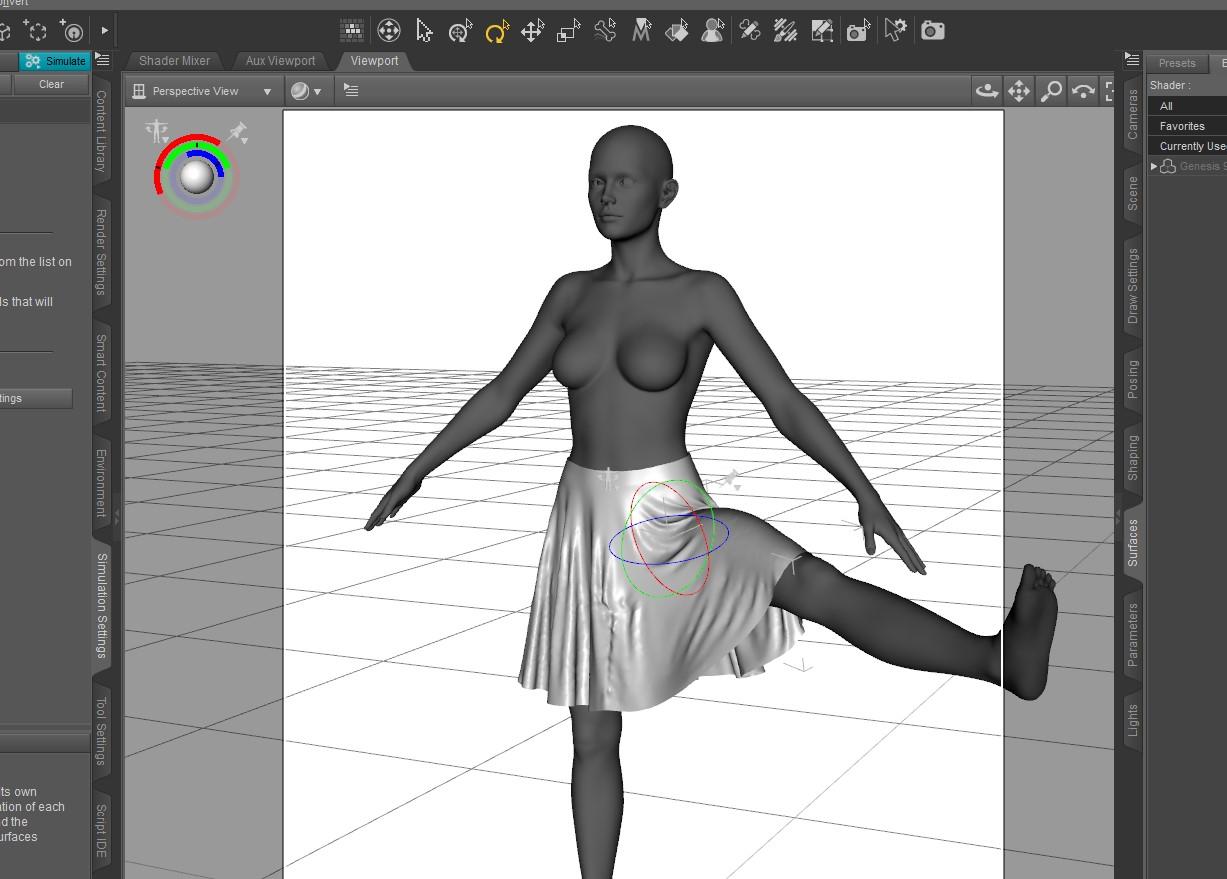
Here is a basic loose skirt that I made specifically for the shape of Victoria 9.
Here is the same skirt with a pattern applied the G9 morphed to a mix of a demon, Michael 9, and Toon. I am particularly happy with the UVs. It needs some additional work, such as creating a DForce Add-On for thickness.
 Genesis 8.1 Tear misaligned
Promos look fine. I did buy that one but haven't used it yet. Can't check it tonight though.
The morph that you are using - check it on the Parameters Tab that it has "auto-follow" enabled.
n.b. Not all morph poses and the like work well with all characters.
Genesis 8.1 Tear misalignedCatherine3678ab said:
Which character morph is this?
Quick fix would be to hide the tears until it can be ascertained what is going on there.
It's Sharon HD for Genesis 8 and 8.1 Female by Mousso. I will admit I don't see much of a difference between the tear on and off in renders but just checking in case I want to do any close-ups.
G8.1F Fingernails too long"Currently used" shows only dials that have their value at something else than the default value. If a morph/dial has it's default value set at 100%, it will not show up on currently used.
To fix any ill-behaving (non-zero default value) morphs, do as follows;
1. Open DS and load "Genesis 8.1 Basic Female" (to an empty scene)
2. Right Click at Parameters Tab->Preferences->Choose "Show Hidden Properties" (part 3 zeroes only 'visible' dials)
3. Right Click at Parameters Tab->Zero->Zero Figure (Zeroes the value of all the 'visible' dials)
4. Right Click at Parameters Tab->Memorize->Memorize Figure (Sets the current value of all the dials as their default value)
5. Edit->Save As->Support Asset->Save Modified Assets (Writes the changed default value to the morph files that were changed)
When saving "Modified Assets" DS shows a dialog and asks for confirmation;
"The following file(s) will be permanently modified:" - "Accept/Cancel" - Choose "Accept"
Genesis 8.1 Tear misalignedWhich character morph is this?
Quick fix would be to hide the tears until it can be ascertained what is going on there.
G8.1F Fingernails too longWhenever I apply a character morph to the G8.1F base the character always has extraoridinarily long fingernails. I use the "Currently Used" feature in the Parameters to see if some unwanted morph is an issue, but there's nothing there. Even when the character has its own fingernail morph, it doesn't seem to be able to overide the embedded long fingernail morph.
Does anyone know why this happens and how it can be fixed?
Face TransferHi everyone, I'm a new user.
Can anyone help me how to make a face similar to 2d photo.
I have used both face transfer and facegen but the result is not satisfactory. Picture 2 is me using a deepfake software. I want to reverse extract the face from photo 2 back to the studio, is there any way.
Thanks everyone.Freebie Challenge NOV 22 - "Thieves, Robbers, and Fraudsters all around!" - Entries Thread Only3D Art Freebie Challenge November 2022 "Thieves, Robbers, and Fraudsters all around!"
This didn't turn out quite what I had in mind, but I just had to try...
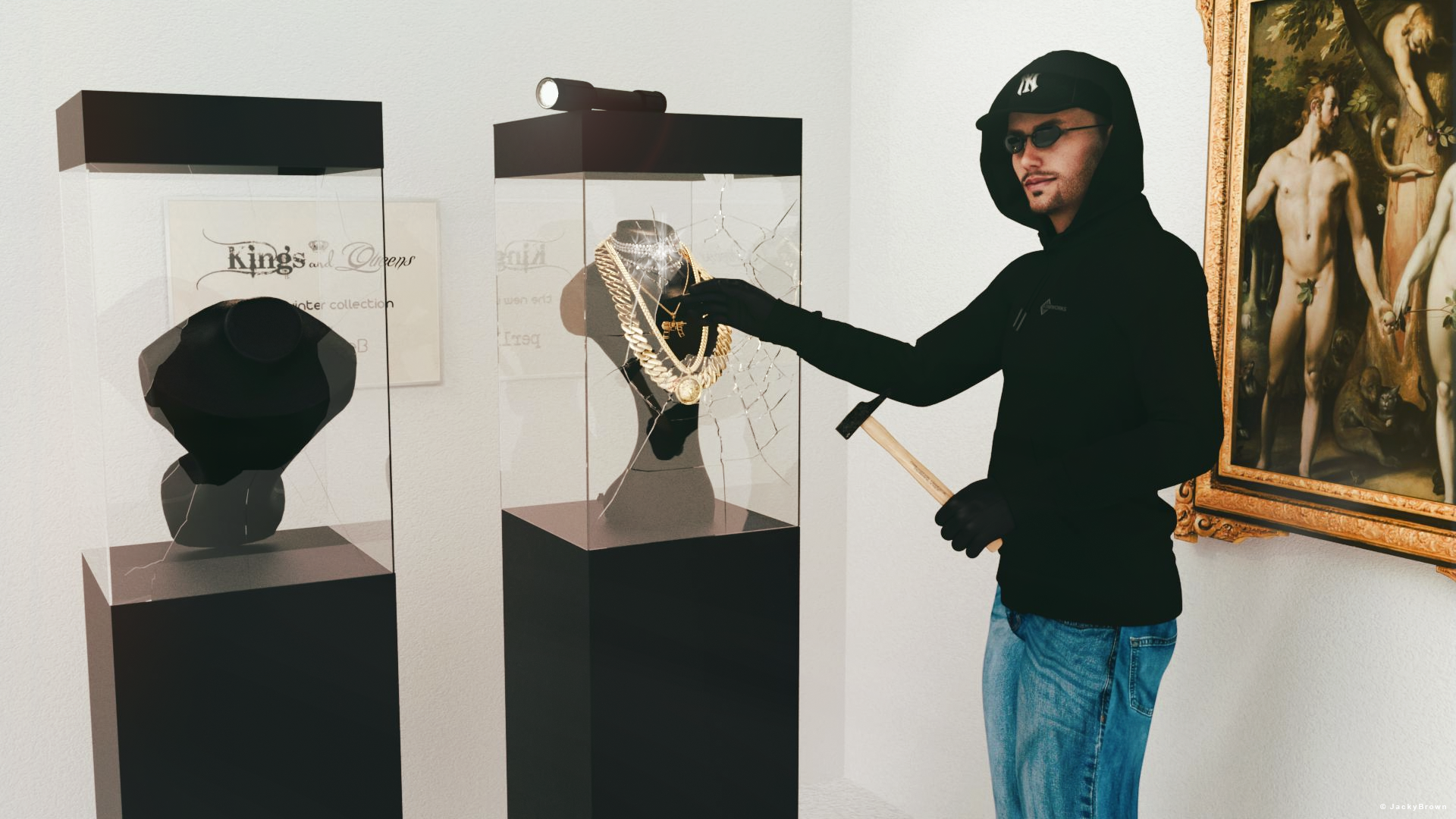
"The burglary at the jewelry store"
[Best watched at full size for details.]Starring: Walther 2.0 by Ruslanomar
The tale:
"Last showcase!" W. shouted to his mate when suddenly the light came back on, "FREEZE!" the police said...
Non-Motion Picture Soundtrack:Nick Lowe - I Love The Sound Of Breaking Glass (© 1978) https://www.youtube.com/watch?v=t-dpiIzYQ5g
Inner Circle - Bad Boys (© 1987) https://www.youtube.com/watch?v=jynW907oKDw
COUNTABLE FREEBIES: (Alphabetic order)#01! Bishop Necklace G8M-FREE by SdeB
https://www.sdebstore.com/collections/free-stuff/products/bishop-necklace-g8m-free **#02! Cuban Link Chain G8M-FREE by SdeB
https://www.sdebstore.com/collections/free-stuff/products/cuban-link-chain-g8m-free **#03! Dante DMC5 Free Stubble for Genesis 8 Male by InTheFlesh
https://sharecg.com/v/94752/gallery/21/DAZ-Studio/Dante-DMC5-Free-Stubble-for-Genesis-8-Male **#04! Diamonds are a girl's BFF G8F jewelry by perlk
https://www.renderosity.com/freestuff/items/92567/diamonds-are-a-girls-bff-g8f-jewelry **#05! EA Sidecut Hair for Genesis 3 & 8 Female(s) by EichhornArt
https://www.renderosity.com/freestuff/items/82972/ea-sidecut-hait-for-genesis-3-amp-8-femela-s- **
[Skullcap used]#06! Fiberhair Goatee Beard for Genesis 3 Male by RedzStudio
https://www.renderosity.com/freestuff/items/75957/fiberhair-goatee-beard-for-genesis-3-male **#07! Frame DIN-A by klausdbg
https://www.sharecg.com/v/66868/gallery/5/3D-Model/Frame-DIN-A **#08! G8M Walther 2.0 by Ruslanomar
https://sharecg.com/v/97276/gallery/21/DAZ-Studio/G8M-Walther-2.0 **#09! Hammer (.obj) by offrench
https://www.renderosity.com/freestuff/items/52734/hammer **#10! Heavy Curb G8M-FREE by SdeB
https://www.sdebstore.com/collections/free-stuff/products/heavy-curb-g8m-free **#11! Iray car related shader presets 'megapack' by Tom2099
https://www.deviantart.com/tom2099/art/Iray-car-related-shader-presets-megapack-539622361 **#12! Lights for Daz Studio w/ Iray by DrBoots
https://www.deviantart.com/drboots/art/Freebie-Lights-for-Daz-Studio-w-Iray-579993105 **#13! Military Paint shaders for DAZ Studio *IRAY* by Tom2099
https://www.deviantart.com/tom2099/art/Military-Paint-shaders-for-DAZ-Studio-IRAY-643567243 **#14! Mirror/Frame (.obj) by hypnagogia
https://sharecg.com/v/77468/gallery/5/3D-Model/Mirror-Frame **#15! Necklace Display Bust (OBJ Version) by LuxXeon
https://www.renderosity.com/freestuff/items/73726/necklace-display-bust-obj-version **#16! New Walther 2.0 tanned skin + hair system by Ruslanomar
https://sharecg.com/v/98463/browse/21/DAZ-Studio/New-Walther-2.0-tanned-skin-%2B-hair-system **#17! Police Gloves for Genesis 8 by zoro_d
https://www.renderosity.com/freestuff/items/82851/police-gloves-for-genesis-8 **#18! RGB HDRi Soft Lights for Daz Studio - Iray by VAlzheimer *1
https://gumroad.com/valzheimer (5th item)#19! Shattered Glass (.obj) by Spacebones
https://sharecg.com/v/66942/gallery/5/3D-Model/Shattered-Glass **#20! "STRONG" for G8M Character Morph & Pose by Mar3D
https://www.renderosity.com/mod/freestuff/strong-for-g8m-character-morph-amp-pose/82833 **#21! SWT Off-Brand FlashLight for Genesis 8 Females by SWTrium
https://www.renderosity.com/freestuff/items/83844/swt-off-brand-flashlight-for-genesis-8-females- **#22! SY 200 Morphs for Genesis 8 Head and Body by SickleYield
https://sharecg.com/v/91888/view/21/DAZ-Studio/SY-200-Morphs-for-Genesis-8-Head-and-Body **#23! UV remapped dforce G8M Jeans by perlk
https://www.renderosity.com/freestuff/items/90916/uv-remapped-dforce-g8m-jeans **#24! Wild Star Glasses for Genesis 8 by zoro_d
https://www.renderosity.com/freestuff/items/89848/wild-star-glasses-for-genesis-8 **NO-COUNT ITEMS:
--- Hoodie for G3M by Tab
++ Surf's Up Hat from Surf's Up Outfit and Board for G2M by Sarsa [Customized texture]PURCHASED/PAID FOR ITEMS: None 100% Freebies
*1 E-mail address required
** Registration required
#x! Countable Items (Bold ones are used by me for the first time I think.)
--- No longer available freebies
++ Free with DAZ Studio (or the Essentials)
$x. Purchased/Paid For Item
Rendered with DAZ Studio 4.10.0.123 (nVidia Iray)Other free software used: GIMP v2.10.32 and Irfanview 4.60
Postwork: used the AltaLux Image Enhancement Filter (Effect) by Stefano Tommesani that comes with Irfanview and some filters (oa) that come with GIMP. Also used mcjDenoise (https://sites.google.com/site/mcasualsdazscripts9/mcjdenoise) and mcjLut by mcasual (https://sites.google.com/site/mcasualsdazscripts9/mcjlut) with the free FilterGrade Cinematic LUTs Pack (https://filtergrade.com/free-cinematic-luts-video-editing/).
"The burglary at the jewelry store"
Genesis 8.1 Tear misalignedThe figure I'm using comes with an HD head detail morph that slightly alters the shape of the eyes among other things. It looks okay beforehand but when using the HD morphs, the tear does not conform to the shape of the eye. It results in a black visible line across the eye while rendering (where the tear crosses the eye in the viewport image below attached). Is there anyway to fix this or is this just an issue with the morph?
Zbrush GOZ object duplicatesDuplicates itself in DS or ZBrush? If it's in DS, did you save it over at base resolution or current resolution? Morph making requires the former (and that the mesh is not divided in ZBrush when you send it back).
Slide on slippers for Genesis 9@AllenArt - Thank you. :)
I love that slippers then I've create some Christmas textures-materials for them...
you can find them here: https://sharecg.com/v/99695/view/21/DAZ-Studio/XMas-Iray-Materials-for-Genesis-9-Slippers
I wish you like my free XMas gift...
(It's my first time to upload and I don't know if I did right). :o)

I used in render:
- AOBB Yves head G9 (body morph in Blender by me):
- RenderGuyNY G9 Unitard (my mat-Texture);
- AllenArt G9 Slippers (with my mat-Textures Free).Freebie Challenge NOV 22 - "Thieves, Robbers, and Fraudsters all around!" - Main ThreadJackyBrown said:
3D Art Freebie Challenge November 2022 "Thieves, Robbers, and Fraudsters all around!"
This didn't turn out quite what I had in mind, but I just had to try...
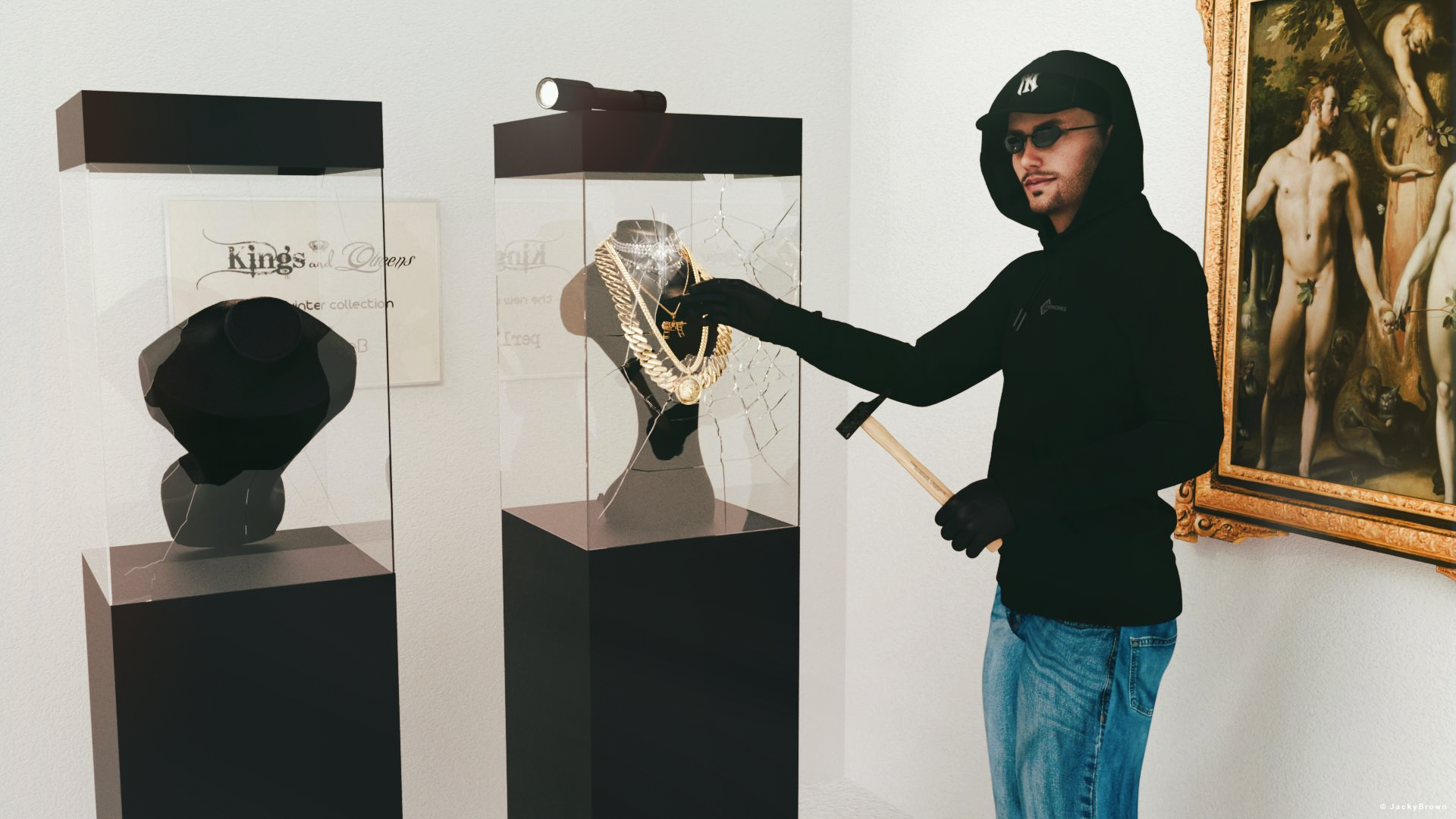
"The burglary at the jewelry store"
[Best watched at full size for details.]Starring: Walther 2.0 by Ruslanomar
The tale:
"Last showcase!" W. shouted to his mate when suddenly the light came back on, "FREEZE!" the police said...
Non-Motion Picture Soundtrack:Nick Lowe - I Love The Sound Of Breaking Glass (© 1978) https://www.youtube.com/watch?v=t-dpiIzYQ5g
Inner Circle - Bad Boys (© 1987) https://www.youtube.com/watch?v=jynW907oKDw
COUNTABLE FREEBIES: (Alphabetic order)#01! Bishop Necklace G8M-FREE by SdeB
https://www.sdebstore.com/collections/free-stuff/products/bishop-necklace-g8m-free **#02! Cuban Link Chain G8M-FREE by SdeB
https://www.sdebstore.com/collections/free-stuff/products/cuban-link-chain-g8m-free **#03! Dante DMC5 Free Stubble for Genesis 8 Male by InTheFlesh
https://sharecg.com/v/94752/gallery/21/DAZ-Studio/Dante-DMC5-Free-Stubble-for-Genesis-8-Male **#04! Diamonds are a girl's BFF G8F jewelry by perlk
https://www.renderosity.com/freestuff/items/92567/diamonds-are-a-girls-bff-g8f-jewelry **#05! EA Sidecut Hair for Genesis 3 & 8 Female(s) by EichhornArt
https://www.renderosity.com/freestuff/items/82972/ea-sidecut-hait-for-genesis-3-amp-8-femela-s- **
[Skullcap used]#06! Fiberhair Goatee Beard for Genesis 3 Male by RedzStudio
https://www.renderosity.com/freestuff/items/75957/fiberhair-goatee-beard-for-genesis-3-male **#07! Frame DIN-A by klausdbg
https://www.sharecg.com/v/66868/gallery/5/3D-Model/Frame-DIN-A **#08! G8M Walther 2.0 by Ruslanomar
https://sharecg.com/v/97276/gallery/21/DAZ-Studio/G8M-Walther-2.0 **#09! Hammer (.obj) by offrench
https://www.renderosity.com/freestuff/items/52734/hammer **#10! Heavy Curb G8M-FREE by SdeB
https://www.sdebstore.com/collections/free-stuff/products/heavy-curb-g8m-free **#11! Iray car related shader presets 'megapack' by Tom2099
https://www.deviantart.com/tom2099/art/Iray-car-related-shader-presets-megapack-539622361 **#12! Lights for Daz Studio w/ Iray by DrBoots
https://www.deviantart.com/drboots/art/Freebie-Lights-for-Daz-Studio-w-Iray-579993105 **#13! Military Paint shaders for DAZ Studio *IRAY* by Tom2099
https://www.deviantart.com/tom2099/art/Military-Paint-shaders-for-DAZ-Studio-IRAY-643567243 **#14! Mirror/Frame (.obj) by hypnagogia
https://sharecg.com/v/77468/gallery/5/3D-Model/Mirror-Frame **#15! Necklace Display Bust (OBJ Version) by LuxXeon
https://www.renderosity.com/freestuff/items/73726/necklace-display-bust-obj-version **#16! New Walther 2.0 tanned skin + hair system by Ruslanomar
https://sharecg.com/v/98463/browse/21/DAZ-Studio/New-Walther-2.0-tanned-skin-%2B-hair-system **#17! Police Gloves for Genesis 8 by zoro_d
https://www.renderosity.com/freestuff/items/82851/police-gloves-for-genesis-8 **#18! RGB HDRi Soft Lights for Daz Studio - Iray by VAlzheimer *1
https://gumroad.com/valzheimer (5th item)#19! Shattered Glass (.obj) by Spacebones
https://sharecg.com/v/66942/gallery/5/3D-Model/Shattered-Glass **#20! "STRONG" for G8M Character Morph & Pose by Mar3D
https://www.renderosity.com/mod/freestuff/strong-for-g8m-character-morph-amp-pose/82833 **#21! SWT Off-Brand FlashLight for Genesis 8 Females by SWTrium
https://www.renderosity.com/freestuff/items/83844/swt-off-brand-flashlight-for-genesis-8-females- **#22! SY 200 Morphs for Genesis 8 Head and Body by SickleYield
https://sharecg.com/v/91888/view/21/DAZ-Studio/SY-200-Morphs-for-Genesis-8-Head-and-Body **#23! UV remapped dforce G8M Jeans by perlk
https://www.renderosity.com/freestuff/items/90916/uv-remapped-dforce-g8m-jeans **#24! Wild Star Glasses for Genesis 8 by zoro_d
https://www.renderosity.com/freestuff/items/89848/wild-star-glasses-for-genesis-8 **NO-COUNT ITEMS:
--- Hoodie for G3M by Tab
++ Surf's Up Hat from Surf's Up Outfit and Board for G2M by Sarsa [Customized texture]PURCHASED/PAID FOR ITEMS: None 100% Freebies
*1 E-mail address required
** Registration required
#x! Countable Items (Bold ones are used by me for the first time I think.)
--- No longer available freebies
++ Free with DAZ Studio (or the Essentials)
$x. Purchased/Paid For Item
Rendered with DAZ Studio 4.10.0.123 (nVidia Iray)Other free software used: GIMP v2.10.32 and Irfanview 4.60
Postwork: used the AltaLux Image Enhancement Filter (Effect) by Stefano Tommesani that comes with Irfanview and some filters (oa) that come with GIMP. Also used mcjDenoise (https://sites.google.com/site/mcasualsdazscripts9/mcjdenoise) and mcjLut by mcasual (https://sites.google.com/site/mcasualsdazscripts9/mcjlut) with the free FilterGrade Cinematic LUTs Pack (https://filtergrade.com/free-cinematic-luts-video-editing/).
"The burglary at the jewelry store"
All The Links Check Out Plz Post In The Entries Thread!
Daz 3D is part of

Connect
DAZ Productions, Inc.
7533 S Center View Ct #4664
West Jordan, UT 84084Licensing Agreement | Terms of Service | Privacy Policy | EULA
© 2026 Daz Productions Inc. All Rights Reserved.