-
Anime Toons and Filatoon Shader Q&A
daznoob said:
Normally just a lurker here, and maybe I missed this, but I read through the thread and haven't seen the exact issue:
If any outline shader is applied, I get a black, glossy texture over the whole surface. Applies to the character skin as well as clothing. Disabling the outline on the specific surface lets me see the texture again. Used the default toon environment with distant light, filament, etc.
Even tried uninstalling and reinstalling all G9 essentials (3 parts), the 2 G9 default items, etc. via DIM. Same results. Messed with offset in the outline parameters, but it just looks like you're scaling a "shell" over the whole item.
I just use this stuff for fun so no big deal and no lost commissions/work or anything like that. Just wondering what the culprit might be.
Thanks! And otherwise looks really cool! Seeing everyone's renders makes me want to play with this some more.
Are you using the latest Daz Studio? The filament engine has undergone a lot of changes from earlier versions :)
Anime Toons and Filatoon Shader Q&Abluejaunte said:
PixelSploiting said:
bluejaunte said:
I'm not seeing anything in Shader Presets folder. Shouldn't that stuff be in this package?
IM00086958-03_Genesis9ToonStarterEssentials3of3.zip
Even downloading the zip I see no Shader Preset content in there.
It's in general Daz shaders inventory shaders. Shaders>Filament>Toon.
Default FilaToon environment is in Genesis 9 Stater Essentials, though.
I think I'll see if I can render a few Stonemason environs in white with 50% gray shadows + outlines only and then see how it comes colored with gradient maps.
This is easily one of the best Daz releases. It's so useful outside of only making Daz renders.
Shaders, do you mean in smart content? I see nothing in there, nor a Shaders folder anywhere. So weird.It's in the main default resources. The icon is black in smart content or just look under shaders.
Anime Toons and Filatoon Shader Q&A
Shaders, do you mean in smart content? I see nothing in there, nor a Shaders folder anywhere. So weird.PixelSploiting said:
bluejaunte said:
I'm not seeing anything in Shader Presets folder. Shouldn't that stuff be in this package?
IM00086958-03_Genesis9ToonStarterEssentials3of3.zip
Even downloading the zip I see no Shader Preset content in there.
It's in general Daz shaders inventory shaders. Shaders>Filament>Toon.
Default FilaToon environment is in Genesis 9 Stater Essentials, though.
I think I'll see if I can render a few Stonemason environs in white with 50% gray shadows + outlines only and then see how it comes colored with gradient maps.
This is easily one of the best Daz releases. It's so useful outside of only making Daz renders.
Anime Toons and Filatoon Shader Q&Abluejaunte said:
I'm not seeing anything in Shader Presets folder. Shouldn't that stuff be in this package?
IM00086958-03_Genesis9ToonStarterEssentials3of3.zip
Even downloading the zip I see no Shader Preset content in there.
It's in general Daz shaders inventory shaders. Shaders>Filament>Toon.
Default FilaToon environment is in Genesis 9 Stater Essentials, though.
I think I'll see if I can render a few Stonemason environs in white with 50% gray shadows + outlines only and then see how it comes colored with gradient maps.
This is easily one of the best Daz releases. It's so useful outside of only making Daz renders.
Anime Toons and Filatoon Shader Q&ANormally just a lurker here, and maybe I missed this, but I read through the thread and haven't seen the exact issue:
If any outline shader is applied, I get a black, glossy texture over the whole surface. Applies to the character skin as well as clothing. Disabling the outline on the specific surface lets me see the texture again. Used the default toon environment with distant light, filament, etc.
Even tried uninstalling and reinstalling all G9 essentials (3 parts), the 2 G9 default items, etc. via DIM. Same results. Messed with offset in the outline parameters, but it just looks like you're scaling a "shell" over the whole item.
I just use this stuff for fun so no big deal and no lost commissions/work or anything like that. Just wondering what the culprit might be.
Thanks! And otherwise looks really cool! Seeing everyone's renders makes me want to play with this some more.
Is Filament's Hair Issue Fixed?If you are referring to the toon hairs, that's solid geometry so it renders fine in filament. The transparency limitation for transmapped hair as Toulouse is not fixed, not even in 4.23.
MimicMolly's Renders & WIPsFinally, I have uploaded my freckled guy. DAZ Galleries link [x].
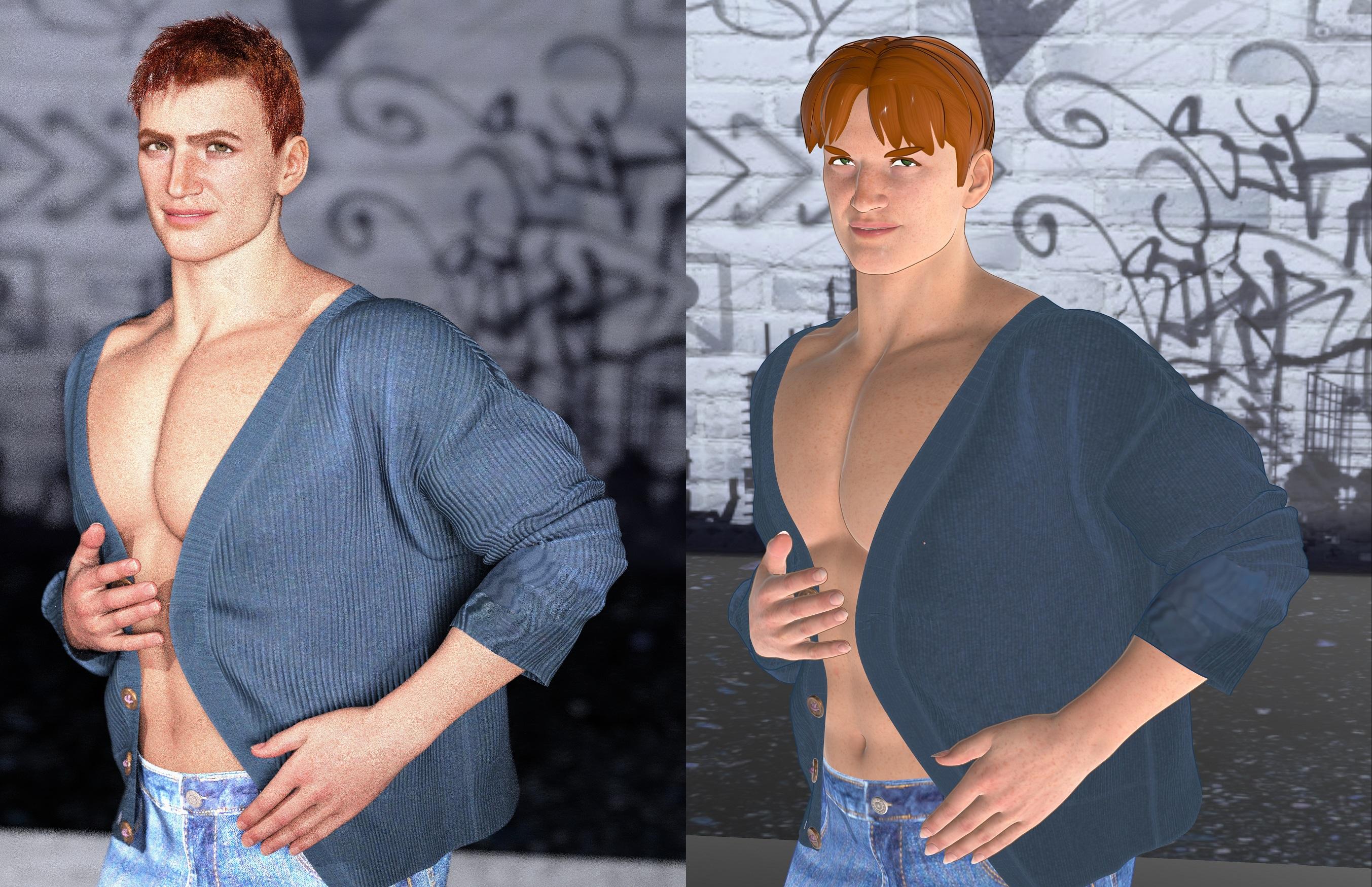
I made an attempt to convert him to FilaToon, but it's always better if I start off in Filament, instead of Iray. The Iray one (which was my original intention) came out better. Need more polygonal hairs that don't have so many quads. Those always come out looking good on Filament.
FilaToon / Cell shaded rendering with FilamentUnless/until I can load DS on a second computer, I'm gonna keep using PWToon. I found the complexity of trying to keep the newest resources separate from older resources and trying not to break backward compatibility was a bit overwhelming. Also, it seems Filament rendering has its own gotchas. So, I'll let others work the bugs out and maybe join the fun later. I'm used to working in 3DL, anyway.
Anime Toons and Filatoon Shader Q&AMy Filament renders are blurry/pixelated. Anyone else have that problem or know how to fix it? Or is this as good as it gets? See attached.
Toon Shader to match the recent Genesis 9 Toon figures?I'm interested in using the new toon styles for Genesis 9. But would want any enviornments or other objects to match with them.
Is there a shader that would apply a similar outline to the Genesis 9 Toon Outline?Just to clairify I'm not using Iray rendering. I use Filament style for rendering.
AIUTO...CHI CONOSCE L’ITALIANO? PARTE QUATTORDICIImago said:
Kainjy said:
Comunque mi sa che i modelli sono fatti per Filatoon, non so se usarli con altri tipi di rendering possa dare problemi o arteffatti.
Guarda che il motore di render non influisce sui modelli o viceversa...

Esistono materiali e shader studiati per un certo motore, non modelli tridimensionali.
Intendevo il fatto che quei modelli hanno shader appositi per Filament e se li butti su Iray non so cosa accade.
Ad esempio l'outline lo fai mettendo una sheoshell con normali invertite.. non so se renderizza bene questa cosa con altri engine
Lo stesso discorso vale per gli OSO che non avendoli non so se vanno bene con FilamentSolved with How-To Workflow - How do I get a less blurry/pixelated Filament/Filatoon render?SOLVED -- UPDATED WITH WORKFLOW 10/17/2024:
For those who are getting blurry/pixelated Filament/Filatoon renders or simply don't know how to render in Filament/Filatoon, here's a workflow based on comments in this thread and other threads to me:
(Step 0 - Make sure you've upgraded to DAZ Studio 4.23 Regular or Premier)
1. In the viewport (the main area where your models go), choose the view to be Filament. It kind of looks like a weird lightbulb. This is a drop-down box at the top of the viewport, left of the camera settings.
2. From the menu bar at the top of DAZ Studio (Where it says, "File Edit Create Tools Render, etc.", choose Edit > Preferences > Interface and then make your settings similar to these:
Under OpenGL...
Per Pixel Shading > Off
Hardware Anti-Aliasing > On
Display Optimization > Best
Backface Lighting > On
Texture Resources > Quality MAX
Pixel Buffer > Off
Layered Textures > Compression Low (instead of Speed/Size)
Multi-Threading > On
3. From the Menu Bar, choose Create > New Filament Draw Options Node... (at bottom). A pop-up will appear. You don't have to change anything. Click OK. This creates a new Filament render node in your scene.
4. Click on the new "Filament Draw Options" node on your Scene tab. Then, go to your Parameters tab.
5. On the Parameters tab, choose "Color Grading" and then change "Color Grading Quality" to "Ultra".
6. On the Parameters tab, choose "Anti-Aliasing" and then change "MSAA Sample Count" to something like 75 or greater. I maxed it out at 255.
7. Click on the "Render Settings" tab. Change the "Engine" to "Viewport." Make sure your render dimensions are 2-3 times greater than your desired final image size. Viewport does not render well at all at low resolution dimensions. As @3Diva and @crosswind stated, make sure you are at least 1920 or 1980 for the smallest side of your render.
8. Click render. Save to desired location.
You can change the shaders for the 3D objects in your scene so that they are Filament/Filatoon friendly by going to your Content Library tab. Choose the "Shader Presets" folder and then the "Filatoon" folder. More Genesis 9 specific settings are under People > Genesis 9 Toon > Materials > Daz Originals
Thanks for the help from @Crosswind @3Diva and everyone else! Please feel to improve/add/correct anything I've typed.
------------------------------------------
Original Post:
I'm a total noob to Filament, so please pardon the elementary troubleshooting, but hopefully this will help someone else, too.
I can't figure out why I'm getting a lousy render of the new Genesis 9 Toon figure. It's blurry/pixelated. Or is that just as good as it gets? I'm mentally comparing this to what you can get through Poser on the cartoon setting with OpenGL render and Poser is clearer. See attached render (I'm using DAZ Studio Premier vs Regular DAZ Studio, if that makes a difference).
I'm trying to render with Filament...
1. I have Filament displayed as the DrawStyle in the View.
2. Render Engine Settings > Viewport
3. Menu Bar > Edit > Preferences > Interface
OpenGL
Per Pixel Shading > Off
Hardware Anti-Aliasing > On
Display Optimization > Best
Backface Lighting > On
Texture Resources > Quality MAX
Pixel Buffer > Off
Layered Textures > Compression Low (instead of Speed/Size)
Multi-Threading > On
(Current Hardware Feeatures: Hardware NVDIA GeeForce RTX 3080 Laptop GPU/PCIe/SSE2)
Render dimensions - same as active viewport
Thanks for the help.
Filament gpu requirements?Filament does use the GPU of course, as it is a viewport engine. Any GPU is supported, as far as the drivers and chipset are recent enough. I can use filament both with my AMD Vega 8 and with my GTX 1060. To select the card in windows 10 go to graphics settings, where you can set the card to use for each application.
Filament bring out the Rendersare new Filament options to explore besides toon
there is Bloom and lens flares
and the Filatoon shader includes ambience you can add to flames

only used Bloom not lens flares here
my old scenes missing many things from the drive that died including M3 second skins I polypainted in Zbrush, just tiled fabric shaders for now
Premier QuestionsIs it actually part of the Premier subscription that the right of return is cancelled? I want to return the Vicky 9 Character Bundle and have been waiting for a response and refund since Friday, even though I've only had the best experiences with the sales department so far.
No, DazTafi, I'm not changing my mind. If you don't tell your customers that filament is not suitable for MacOS, don't be surprised if the stuff is returned.
Anime Toons and Filatoon Shader Q&AI think that's a general limitation of Filament. Emissives seem to only generate bloom, not light, so you'll have to use some point lights to compensate.
Filament gpu requirements?Oh? Huh. So it probably uses cpu. If so which is better fast cpu speed or more cores? If it's using CPU not gpu my gaming laptop probably will be my go to for filament toon renders. The cpu has a decent boost clock speed and 10 cores I forget how many of them are p cores and how many are e cores. It a 12 gen i7 laptop cpu
Filament gpu requirements?I could be wrong, but I don't think Filament uses the GPU.
Filament gpu requirements?What are the minimum requirements for filament rendering engine? I want to make use of the new g9 toon features.
FilaToon / Cell shaded rendering with FilamentI played with it for about two hours-not too bad. I will have to re-read the threads here and mada's post and go over some of Jay's filament settings. I love the tooning. (I got the extra filament options in the store also a couple of days ago too) :P
Daz 3D is part of

Connect
DAZ Productions, Inc.
7533 S Center View Ct #4664
West Jordan, UT 84084Licensing Agreement | Terms of Service | Privacy Policy | EULA
© 2026 Daz Productions Inc. All Rights Reserved.