-
Anime Toons and Filatoon Shader Q&A
Ok, maybe I'm blind, but please tell me how I switch to Filament Render Mode...I can't find it...
The Mac FAQMada, in her FAQ about Fila-toon, confirmed that currently Fila-toon won't work on Mac, regardless of the version:
Mada said:
Mark_e593e0a5 said:
If I undrestand this correctly, the shaders only work in Filament render mode - which is not available at all on Mac up until current 4.22 version. Mac users have been instructed NOT to upgrade to 4.23, so I cannot check if it has been made avilable - suppose it isn't. I really like the look of the shaders, but they seem to be not useable for me. Please tell me I am wrong.
Unfortunately you are correct - but there are work going on behind the scenes to get it out to mac users as soon as possible. The shader relies on filament to work properly.
About your other questions: Manfriday's plugins should work with the most recent public beta version (OBJ Companion and Seamster do, it's the only ones I have from MF but they were prevented to load by the same bug, a bug that Daz fixed in Daz Beta 4.23.0.3). If you don't want to install beta version, you'll have to wait for a public release based on at least Daz Beta 4.23.0.3.
I don't know when a new public release will be made available, but hopefully soon, especially because it should also include changes made by Daz to improve the stability of Daz Studio on Mac OS Sonoma and later (which would allow me to finally update my own Mac).
Regarding a native Apple Silicon version, your guess is as good as anyone else guesses and AFAIK, no one in the known has publically wrote something on the subject since I started using Daz Studio last year.
Anime Toons and Filatoon Shader Q&AI love the Filatoon shader!

Here are a few tips to get you started:
- Switch your viewport to Filament mode
- Add a distant light, at about 10000 to 15000 lumen
- To get a file of the workspace view, go to your render settings, set the size you want and switch your render engine to "Viewport" (right at the top of the panel).
Rendering is instant, it's amazing!Hope that helps; those were the things I struggled with when I used Filatoon for the first time, so I thought I'd pass this info on to make things easier for other users.
Anime Toons and Filatoon Shader Q&AVicky 9 looks awesome and is the only reason I will give Filament another try. But I run into a little problem. I upgraded to 4.23 via Install Manager and installed the character bundle also with IM. Now, when I try to use the figure I get the message that the BaseAnimeF_figure_ctrl_Character.dsf is missing. So where should the Morphs be located?
FilaToon / Cell shaded rendering with FilamentHylas said:
OMG
please tell me this can be applied to other characters and generations.
Yes it can!

You actually have several options, depending on the effect you want:
- Use both the toon outline and the toon shader (if you apply the shader to the selected surface, it will convert as much as it can).
- Use the toon outline but keep the Iray shader on the surface itself
- Use the toon shader without the outlineNote that this is based on Filament functionality. That means some special effects like Subsurface Scattering are not available, and transparency/opacity maps are tricky. (High-contrast black-white opacity maps work great, but intermediate shades get wonky results.)
Anime Toons and Filatoon Shader Q&AUthgard said:
First of all, this looks amazing, and it's something I've wished was available in DAZ for decades, so thank you very much! As to my first immediate questions, you mention that there was work made to have G9's eyes work with the cartoon shader; is there something the average user can do to replicate the effect on other figures? G8 would obviously be the priority, but animals would be quite important as well--and that brings up the issue about how, if at all, it works with strand-based hair. I haven't used Filament, but I guess that's a non-starter? What about VDB?
The eyes are completely new geometry with all kinds of effects and it was a lot of work. So right now no - its not easy to replicate.
Strand based hair does not work - you need geometry for the outline to show up.
No idea about VDB - hopefully someone else can answer that for you :)
Anime Toons and Filatoon Shader Q&AFirst of all, this looks amazing, and it's something I've wished was available in DAZ for decades, so thank you very much! As to my first immediate questions, you mention that there was work made to have G9's eyes work with the cartoon shader; is there something the average user can do to replicate the effect on other figures? G8 would obviously be the priority, but animals would be quite important as well--and that brings up the issue about how, if at all, it works with strand-based hair. I haven't used Filament, but I guess that's a non-starter? What about VDB?
Anime Toons and Filatoon Shader Q&AMada said:
scorpio said:
Is this an actual Shader - ie it can be applied to anything?
Does the latest version of DS 4.23 work in windows 10, I've got the impression that it needs windows 11?
Yes it is an actual shader and it can be applied to anything - and then use Filament to render it out. The scripts supplied will create an outline and set up the shader in your surfaces tab, then you can tweak till its how you like it.
I prefer to disconnect all the other maps and only use a base map, and then tweak the rim lighting.I am not sure about the windows 10 question, I will ask. I however don't think that's the case. Edit to add - yes it works fine on Windows 10
Thank you
Vicky 9 thoughts - Filament render only for cel-shading?Destiny's Design said:
So, in terms of your Iray products, so far I've had plenty of success just messing around with a applying the toon filament shaders to iray clothing, environments, etc so I'd say theres plenty of use for your older products though heavily painted in base colours will likely look a wee bit odd.
Of course, if toon was never your thing, this isn't going to suddenly change your mind. But I reckon it's sort of like, a taste thing. Like retro tech isn't really my thing, but I never thought to myself "Why did they release that? I don't even like retro tech." if you see what I mean aha
I love anime, this particular shape/style isn't may absoloute favourite, but just the system being here now makes me super excited for what PAs might create in the future.
Like I'd love to see a more modern style as well. Anime comes in all sorts of styles though, I love seeing them all! (quick render here, obvious I didn't get around to hair aha)As you might imagine, I had no intention of telling Daz what they could and could not publish. That was your thought, not mine. English is not my first language, so perhaps there was a misunderstanding.
Vicky 9 is certainly very welcome to anyone who makes manga and anime renders. The character and her male version look good to a layperson like me. But do they always have such red noses?
Anime Toons and Filatoon Shader Q&Ascorpio said:
Is this an actual Shader - ie it can be applied to anything?
Does the latest version of DS 4.23 work in windows 10, I've got the impression that it needs windows 11?
Yes it is an actual shader and it can be applied to anything - and then use Filament to render it out. The scripts supplied will create an outline and set up the shader in your surfaces tab, then you can tweak till its how you like it.
I prefer to disconnect all the other maps and only use a base map, and then tweak the rim lighting.I am not sure about the windows 10 question, I will ask. I however don't think that's the case. Edit to add - yes it works fine on Windows 10
Vicky 9 thoughts - Filament render only for cel-shading?caravelle said:
ArgleSW said:
You can try it now by updating to 4.23. Here is a quick render test.
Looks very good. But why do we need a Vicky 9 then? Toon figures, even those with an anime look, are already available in the shop (sorry; they all look very similar to me). But anime & co. aren't my genre anyway.
More choice, and aimed at Filament renders? After all, we don't really need any new character at this point, there are already so many available in the shop... (and quite a few of them look very similar to me as well ;-) ).
Anime Toons and Filatoon Shader Q&AMark_e593e0a5 said:
If I undrestand this correctly, the shaders only work in Filament render mode - which is not available at all on Mac up until current 4.22 version. Mac users have been instructed NOT to upgrade to 4.23, so I cannot check if it has been made avilable - suppose it isn't. I really like the look of the shaders, but they seem to be not useable for me. Please tell me I am wrong.
Unfortunately you are correct - but there are work going on behind the scenes to get it out to mac users as soon as possible. The shader relies on filament to work properly.
Anime Toons and Filatoon Shader Q&AIf I undrestand this correctly, the shaders only work in Filament render mode - which is not available at all on Mac up until current 4.22 version. Mac users have been instructed NOT to upgrade to 4.23, so I cannot check if it has been made avilable - suppose it isn't. I really like the look of the shaders, but they seem to be not useable for me. Please tell me I am wrong.
Premier QuestionsRod Wise Driggo said:
Well, my questions as a Mac user. If I subscribe Premier,...
- when will I be able to download and use 4.23? (read something that Mac users should wait)?
- when will all MF plugins work on Mac or will some of them probably never?
- does that FilaToon-thing run on Mac?
- If you're only using the public release and not the public beta, you still need to wait for the next public release because some plugins won't work on it.
- I tested with OBJ Companion and Seamster, who didn't work on the last 4.22.1.XXX public beta (who are, as far as I understand thing, the builts used to test Daz 4.23) but with the previous and current public beta (4.23.0.3 and 4.23.0.4), they are working fine.
- I don't think it will: it's based on Filament and as far as I can see, Filament is still not a thing for Mac even with the latest public beta. Maybe it's part of the recently released 4.23 Default ressources, but I'm not sure I want to install it to check with the beta version as long as the public release is not updated with the fix to the plugins.
The Mac FAQOK guys, guess this is finally the right place for my questions. So DAZ is talking a lot about Premier. And I am thinking about subscribing.
I was asking about the ManFriday plugins (like dForce Assistant or RenderQueue) which I was always interested in but which have been Win Only. One day after that I had an orange banner - just one day - stating that Mac users will get full plugin functionality but should not download Studio 4.23 at the moment.Well, Studio Premier is a vital part of the whole Premier thing, but...
- will Studio Premier have feature parity between Win and Mac? E.g. filament is a thing we are waiting for since ages or was that recently implemented?
- will all the ManFriday plugins be available for Mac and when?
- when to expect a first public version of 4.23 for Mac. I mean if I would subscribe Premier today, how many months would I pay for something I cannot fully use?
- is that new FilaToon-Thing available for Mac at all or is it limited to 4.23, which is of course not yet running properly on Macand finally
- when can we finally expect a real native Apple Silicon version of studio. It's ages since the M1 was released.
Vicky 9 thoughts - Filament render only for cel-shading?So, in terms of your Iray products, so far I've had plenty of success just messing around with a applying the toon filament shaders to iray clothing, environments, etc so I'd say theres plenty of use for your older products though heavily painted in base colours will likely look a wee bit odd.
Of course, if toon was never your thing, this isn't going to suddenly change your mind. But I reckon it's sort of like, a taste thing. Like retro tech isn't really my thing, but I never thought to myself "Why did they release that? I don't even like retro tech." if you see what I mean aha
I love anime, this particular shape/style isn't may absoloute favourite, but just the system being here now makes me super excited for what PAs might create in the future.
Like I'd love to see a more modern style as well. Anime comes in all sorts of styles though, I love seeing them all! (quick render here, obvious I didn't get around to hair aha)
Anime Toons and Filatoon Shader Q&AFinally the toons and the filatoon shaders are available :) I haven't had this much fun with a new feature in Daz Studio in a long time, and pretty much everyone who had the opportunity to test and play with it said the same.
You will find a new folder called Genesis 9 Toon with 2 figures - Genesis 9 Base Anime Feminine and Genesis 9 Base Masculine. MallenLane did an absolutely amazing job on sculpting and rigging the toons, everytime I use them I smile because its such a pleasure to work with :)
The Filatoon shader is used in combination with Filament’s fast rendering. The toon outline is accomplished by creating a geometry shell and applying a special shader to it.
***A general request - please don't post in this thread if all you have to say is you don't like it, it creates long threads to wade through in search of answers - I'd like to keep this thread easy to read for those users serious about wanting to learn and use the shaders and figures.
edit : under render settings I'm recommending to turn mipmaps off, but test with both options to get the best result for your image
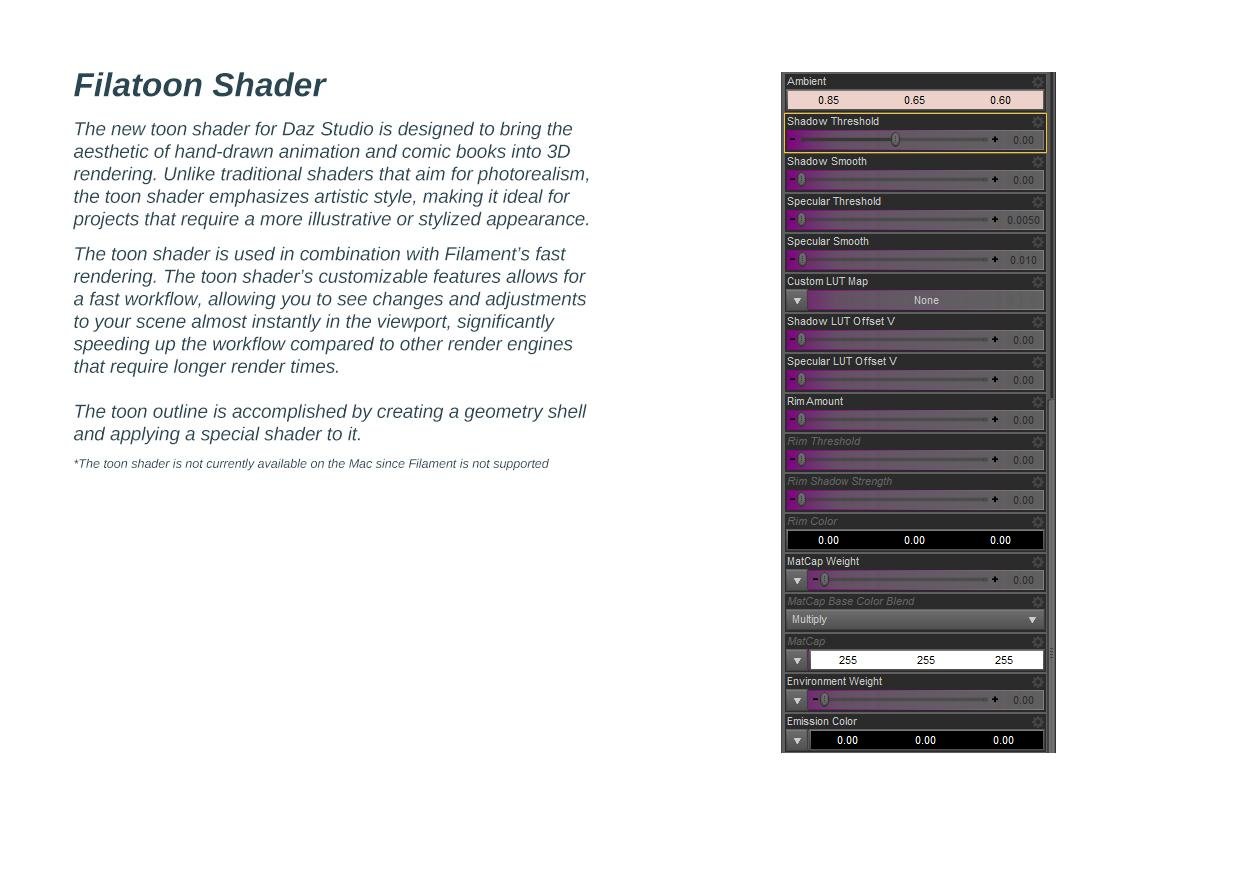
Text for translation purposes:
Filatoon ShaderThe new toon shader for Daz Studio is designed to bring the aesthetic of hand-drawn animation and comic books into 3D rendering.
Unlike traditional shaders that aim for photorealism, the toon shader emphasizes artistic style, making it ideal for projects that require
a more illustrative or stylized appearance.
The toon shader is used in combination with Filament’s fast rendering. The toon shader’s customizable features allows for a fast
workflow, allowing you to see changes and adjustments to your scene almost instantly in the viewport, significantly speeding up
the workflow compared to other render engines that require longer render times.The toon outline is accomplished by creating a geometry shell and applying a special shader to it.
*The toon shader is not currently available on the Mac since Filament is not supported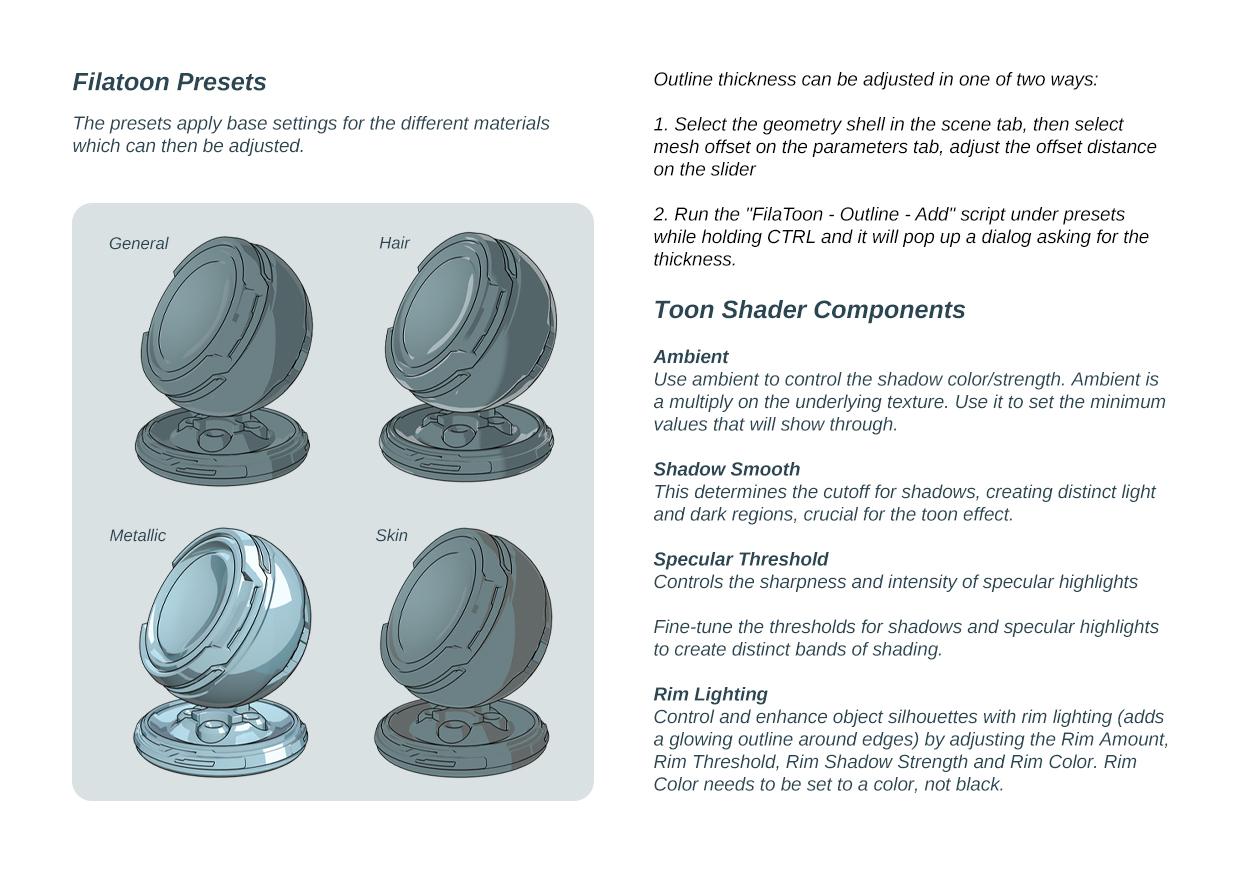
Text for translation purposes:
Filatoon Presets
The presets apply base settings for the different materials which can then be adjusted.
Outline thickness can be adjusted in one of two ways:
1. Select the geometry shell in the scene tab, then select mesh offset on the parameters tab, adjust the offset distance on the slider
2. Run the "FilaToon - Outline - Add" script under presets while holding CTRL and it will pop up a dialog asking for the thickness.
3. Filatoon - Constant
Use this preset for items that do not require an outline or shadow. The shadow line and outline are turned off, making it suitable for elements like eyelashes (which use alpha textures), irises, eye highlights, and eyebrows. It's also ideal for any clothing details where an alpha channel for opacity is necessary. It will remove the geoshell.4. Filatoon - General
Ideal for use with clothing, props, and environments. This preset includes a standard gray ambient shadow and a subtle rim light, providing a balanced and versatile toon shading effect.
*Can be applied to individual materials and tweaked5. FilaToon - Hair
Specifically designed for use with hairstyles, ensuring that hair renders with the appropriate toon shading properties.6. FilaToon - Skin
Tailored for characters' skin, this preset ensures that skin tones and details are shaded correctly within the toon shader framework.7. FilaToon - Metallic
Perfect for metallic items such as buckles. This preset enhances the reflective and shiny characteristics of metallic surfaces within the toon shader. Adjust the environment weight on the shader (last one on the list)... slide it from 0 until you get the effect you wanted.
Toon Shader Components
Ambient
Use ambient to control the shadow color/strength. Ambient is a multiply on the underlying texture.
Use it to set the minimum values that will show through.Shadow Smooth
This determines the cutoff for shadows, creating distinct light and dark regions, crucial for the toon effect.Specular Threshold
Controls the sharpness and intensity of specular highlightsFine-tune the thresholds for shadows and specular highlights to create distinct bands of shading.
Rim Lighting
Control and enhance object silhouettes with rim lighting (adds a glowing outline around edges) by adjusting the Rim Amount,
Rim Threshold, Rim Shadow Strength and Rim Color. Rim Color needs to be set to a color, not black.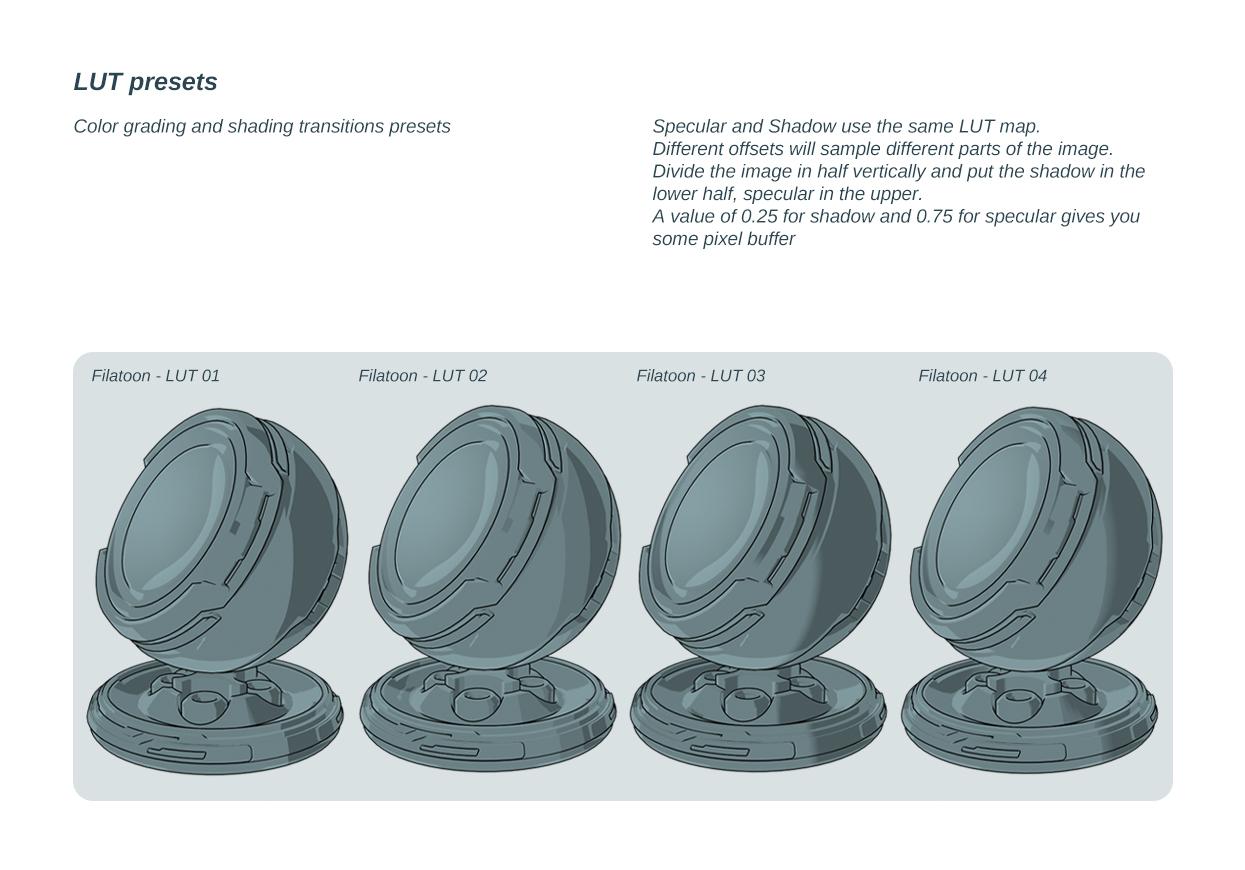
LUT presets
Color grading and shading transitions presets
Specular and Shadow use the same LUT map.
Different offsets will sample different parts of the image.
Divide the image in half vertically and put the shadow in the lower half, specular in the upper.
A value of 0.25 for shadow and 0.75 for specular gives you some pixel buffer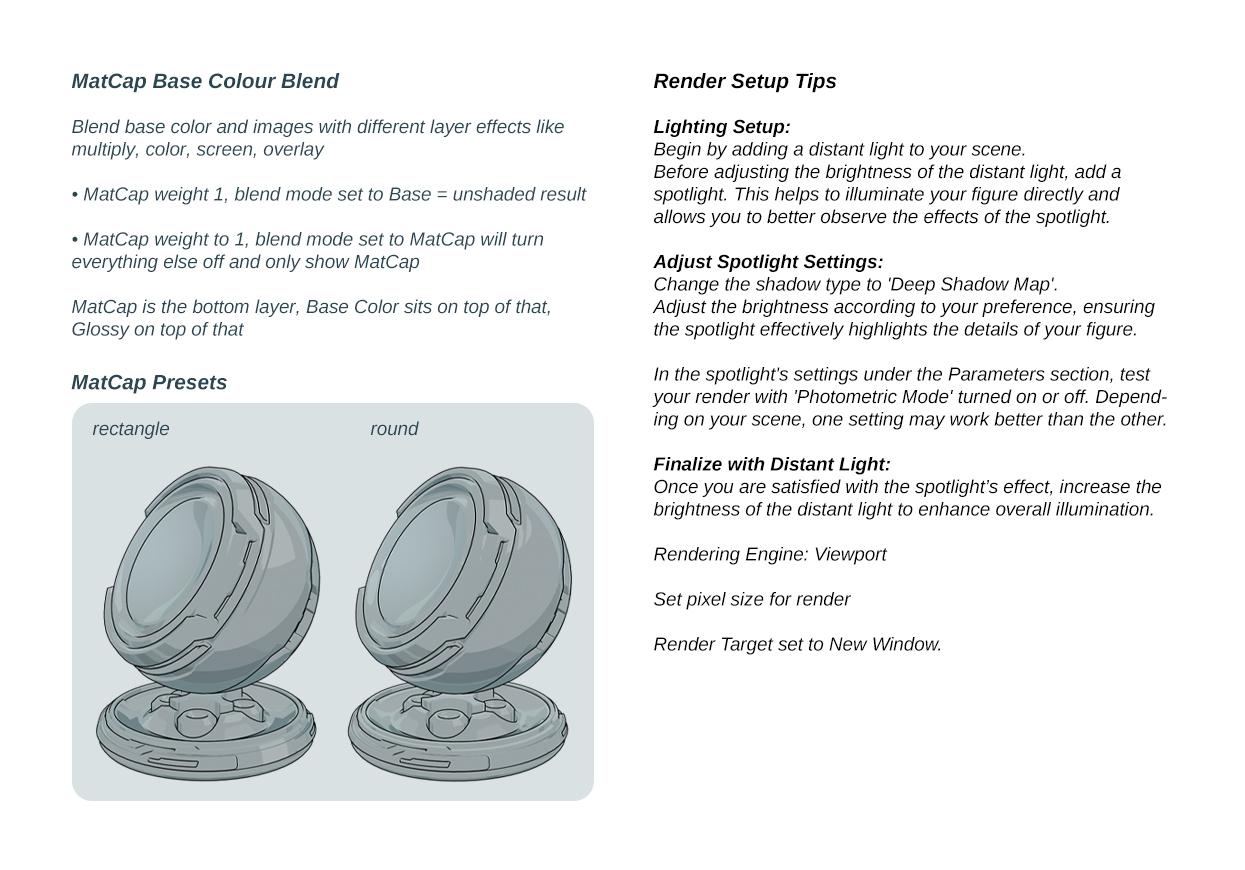
Text for translation purposes:
MatCap Base Colour BlendBlend base color and images with different layer effects like multiply, color, screen, overlay
• MatCap weight 1, blend mode set to Base = unshaded result
• MatCap weight to 1, blend mode set to MatCap will turn
everything else off and only show MatCapMatCap is the bottom layer, Base Color sits on top of that, Glossy on top of that
Render Setup Tips
Lighting Setup:
Begin by adding a distant light to your scene
Before adjusting the brightness of the distant light, add a spotlight. This helps to illuminate your figure directly and allows you to better observe the effects of the spotlight.Adjust Spotlight Settings:
Change the shadow type to 'Deep Shadow Map'.
Adjust the brightness according to your preference, ensuring the spotlight effectively highlights the details of your figure.In the spotlight's settings under the Parameters section, test your render with 'Photometric Mode' turned on or off. Depending on your scene, one setting may work better than the other.
Finalize with Distant Light:
Once you are satisfied with the spotlight’s effect, increase the brightness of the distant light to enhance overall illumination.Rendering Engine: Viewport
Set pixel size for render
Render Target set to New Window.
Q : Where can I find the FilaToon shader scripts
A : My DAZ 3D Library > Shader Presets > Filatoon. Under that you will find FilaToon - Base and Filatoon - Outline. You can also apply any of the presets and it will create the outline geoshell if it doesn't exist (except for FilaToon - Constant, it will apply the shader without the outline). If everything is black after you apply the preset make sure you're in the Filatoon renderer, and either turn on Auto Headlamp or add some lights.Q : How do I accentuate the black line in the middle of the nose as well as the lips?
A : Mouth Lips Part (3 shapes and 1 overall controller) was added under Pose Controls>Head>Mouth>Base Anime to control the gap between the lips to force line visibility at the lip seam; lines require a gap of space between geometry to appear. Three different regions so you can show the line where you want it, for things such as side smirk etc.Q : the outline is dotted or not showing on clothing
A : the outline shell needs to have a bit of thickness and if for example the edge is just a thin mesh it loses the line. First thing you can try to improve it is to use the expand all on the clothing item, the geoshell sometimes get hidden by the body if its tight fitting, so looser is better in this case. That should fix the dot lines.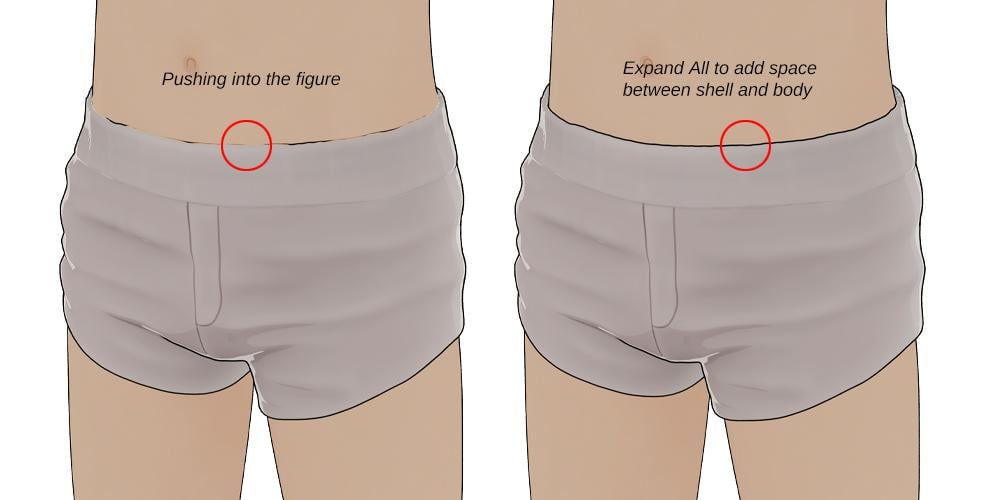
Q: How to make a surface looks metalic with FilaToon and Filament drawstyle
A: Apply the metallic preset to your item, then find the environment weight on the shader (last one on the list)... slide it from 0 until you get the effect you wanted.Q: The eyes create an optical illusion of always looking at the viewer
A: If you load a Toon figure and zero out the anime morph to get the default Genesis and that happens, you can use Toon Iris Depth Left and Right to fix it :)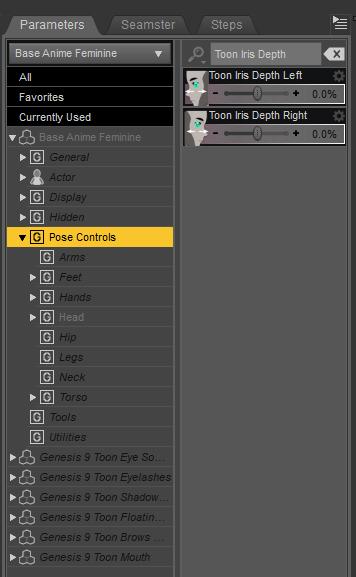
Tips and tricks from users in this thread :
Lights parented to nulls : https://www.daz3d.com/forums/discussion/comment/8905426/#Comment_8905426How do I use strandbased hair :
https://www.daz3d.com/forums/discussion/comment/8908286/#Comment_8908286
https://www.daz3d.com/forums/discussion/comment/8908356/#Comment_8908356
A: You need to have line tesselation set to 3 for both viewport and renderHow to control the effect of the specular highlights : https://www.daz3d.com/forums/discussion/comment/8920431/#Comment_8920431
How to use transmapped hair : https://www.daz3d.com/forums/discussion/comment/8923351/#Comment_8923351FilaToon / Cell shaded rendering with FilamentIs the running on Mac? Mac did never get filament in the first place.
FilaToon / Cell shaded rendering with FilamentJust for clarity, we Mac users have no access to Filament, no current access to 4.23, and hence can't really use the product?
Premier QuestionsCybersox said:
doubledeviant said:
Vicky 9 Anime Dark Elf Shape Add-On
Premier exclusive, huh? Is this going to be a regular thing - Daz picking items that would likely be popular and locking them behind the Premier subscription?
Going from bad to worse. Would've carted today's bundles with little to no hesitation in the past. Now I'm debating whether to spend $2.99 for the doorbuster because supporting Daz is becoming that distasteful. Sad state of affairs.What's especially annoying is that they're kind of glossing over the fact that the new figures are being rendered in Filament, not Iray. So, now you can get a semi-decent shader on the figure and the specifc outfits, the rest of the scene and any other clothes/hair will be shaderless.
doesn't the Filament shader work on anything?
not tried but holding ctl and choosing ignore maps should work
Daz 3D is part of

Connect
DAZ Productions, Inc.
7533 S Center View Ct #4664
West Jordan, UT 84084Licensing Agreement | Terms of Service | Privacy Policy | EULA
© 2026 Daz Productions Inc. All Rights Reserved.