-
Released: Looking at Poses for Genesis 8 Female and Victoria 8 [Commercial]
My first product is released today; I hope everyone likes it.
There are poses and props in the product.
Any queries, please post here.
Novica & Forum Members Tips & Product Reviews Pt 9As something to consider-
It's tough (unless you make notes in your wishlist, which of course I never remember to do) to keep track of what clothes have presets for certain pose sets. One of the nice clothes vendors, Aave, does just that. I had some poses wishlisted, and I wondered why (because I have so many, don't need any more) so then I realized they must go with outfits. So if you see any outfits in the Mega Fastgrab, please let people know what pose sets go with them- because those pose sets may turn up there on a different day.
Here's what I am seeing right away- (and yippee!! Remember a couple days ago when I forgot to check out and lost all those Megas? Sunny is back! So watch for ironman and DesignAnvil if you need these other pose sets. Always a Lady is Aave, who is featured today.
Sunny For Genesis 3 Female(s) in M.F. (Mega Fastgrab) has presets for Always A Lady poses. (Also M.F. Today!) And I love those poses, use them all the time.
The His Shirt for Genesis 3 Female(s) has morphs for:
Fashion Model Poses Capses Fun and Flirty Poses for Victoria 7 Mei Lin 7 Variety Pose Pack (I think this is what the product page meant, it was Variety Pack for Mei Lin 7) Greek Goddess Poses for Olympia 7Hongyu's Shirt for Victoria 7I've been wating to buy this product for a while now and at about 8 dollars it's even more of a temptation. But I've wondered about two things that perhaps someone here might be able to answer. How far up does the shirt button so that it looks less revealing and is it possible to fit a bra underneath it?
Thanks!
New pwToon Cel Shader PresetsI just bought pwToon, and it seems like a very interesting plugin. However, I cannot seem to find what shader I would have to use in order to add outlines. Are there any simple tutorials on how to use the pwToon shaders?
I double-clicked Outline Width, but I got a message saying "An error occurred while reading the file". I currently use Victoria 4.2 and Genesis 3 Female. Is pwToon compatible with Victoria 4.2?
UltraScatter - v1.5.0 released [Commercial]@PA_ThePhilospher - did you ever solve this? I was just catching up on this thread and saw your post and had an idea based on how I'd do this in Blender.
DAZ Studio supports multiple UV maps for an object (for example with Genesis you can choose between the Base UV or the Victoria X UV) - I wonder if you could create a second UV map, with the three squares separated in the UV, then use that one for a rotation map and the default/original UV map for the texture? I don't have Ultrascatter (been in my wishlist since it came out, but I don't render in DS enough to get it yet) so I don't know if it allows you to choose which UV map is used or if it just uses the active one.
Alternately, if you actual use is as simple as what you have shown, then maybe you could just put invisible proxy planes where yours are and scatter on those?
@MDO2010 Thanks for the suggestion. In my real life scenario, I have thousands of these planes, each with their own orientation. So I don't think separating the overlapping UV's will work in this case. I tried that in ZBrush and it just produced a massive UV map with thousands of little squares on it (as opposed to one single square). It just makes things too complicated. I was hoping there was a way for Ultrascatter to automatically detect the orientation of each plane in the OBJ. But it doesn't look like there is.
I may need to just shelve this project for now and come back to it at a later date.... Or just do it the old fashioned way and not use instancing.
-P
Library directoryOne thing to bear in mind - if you have ExP products (morph sets) for Victoria 4, Michael 4, Kids 4, or the SubDragon those do have to go in the same content directory as the base figure (but non-ExP addons, which would be most clothes and hair and many characters, you can place anywhere).
Released, Spartan Armor for Genesis 3 and Genesis 8 Female (Commercial)Ah, I was actually going to ask the same in regards to a male version. Thanks for changing the title of the thread. Regardless, I love how it looks and the entire wardrobe is right up my alley. Really nice work as always Zkuro. And thanks for offering a G3 and G8 version. I'll snatch it for the G3 version. Even though I have Michael and Victoria 8 as well as a few G8 characters, I have yet to use a G8 figure and not sure if I'm going to continue purchasing G8 only products...at least in the forseeable future.
This outfit would be great for classical Amazon warriors. ;)
Thanks, I really appreciate it, I mean the " Really nice work as always Zkuro". I try to do that as I've said, I've gathered a lot of info on this, by the way, thanks Swordkensia for the officer plume clarification. That, I didn't catch. Going back on the research and quality matter, the shield for instance has a lot of work, it doesn't have only on the inside something to place on the hand of the figure because "it's the inside who cares", I worked on the inside of the shield a lot, has everything a real one had but the wooden structure
 , the leather, the rope, the anchors for the knots on the rope, the little tails on each one, the forearm holder.... of course both holders have enough morphs to fit any figure.
I enjoy the detail part a lot, and I'm really grateful seeing that people notice that.
In deed Swordkensia, this helmet have G3 size, but can match a male perfectly as it is a wearable, so, no figure issues.
I've just did a quick render with G3 Male and the G3 female versions, not the G3 female for any special reason more than, I was on the G3 folder

By the way, I love both helmets, who knows, I'm not saying that it will have it, but, I'm seriously thinking about making the male version with both helmet versions.
I've also done a close up of the Dory, where you can see all the parts that I mentioned before.
Released, Spartan Armor for Genesis 3 and Genesis 8 Female (Commercial)Ah, I was actually going to ask the same in regards to a male version. Thanks for changing the title of the thread. Regardless, I love how it looks and the entire wardrobe is right up my alley. Really nice work as always Zkuro. And thanks for offering a G3 and G8 version. I'll snatch it for the G3 version. Even though I have Michael and Victoria 8 as well as a few G8 characters, I have yet to use a G8 figure and not sure if I'm going to continue purchasing G8 only products...at least in the forseeable future.
This outfit would be great for classical Amazon warriors. ;)
Cyber Stealth bodysuit no longer in shop?Hi, it was my work.
I'm going to explain here what has happened to all of the products. The first day the bundle and the suit were removed, the textures were still there, but was just for a day or two. The bow, will remain in my store, as it has nothing to do with that, is just a compound bow, which I did using internet references.
The bow still have the camos there, so could be usefull to anyone. I plan to do another sci-fi suit, it was my second one, as the first was the main suit of the Victoria 8 Bundle, the Sci-Fi Samurai. Right now working on another project, so even if it's not on a 0 stage, don't expect to see it soon.
Some of you will know the game Crysis, I used the bodysuit as inspiration, even though I use a muscular an tendon as reference to do it, but the helmet was made using the real thing as reference, and was quite similar on the overall form, not on the suit itself, so it made it to the store.
Now, for the ones that just want the fast answer, the game developers asked DAZ to remove it. So there was nothing left to do, no images showing that is just inspired, being as I said, the helmet the most, so, it was taken out of my store. It means that no further action can't be done, and that the product WILL NOT RETURN to my store.
Sorry for all of you that wanted to buy it, probably waiting for the PA sale of my store (another armor will be out really soon), it was a good product.
I'm going btw to open a promotional topic, to show my ( will hit the store in less than five days) new product.
Thanks, I understood. What I mostly loved was the red muscle textures on body and the stealth effect on promos, you can reapply these things
My Renders, Now I can go to bedGeorgia HD for Victoria 7 was on sale, last week I think it was, really have no idea how I missed seeing Georgia before and was never in my wish list.
Course I was only interested in the mat's , not the shape. so I dialed in my own , kuz I like doinig that

Hongyu's Bikini for Victoria 7, used 2 different light preset's course the recently purchased Expanded Godrays Iray and Second Circle lights (forgot if I bought or picked up as freebie so no link)
oh and Sally hair
seems I don't have permisson to upload, weird, well at least this time I'm told why nothing gets uploaded
 Cyber Stealth bodysuit no longer in shop?
Hi, it was my work.
I'm going to explain here what has happened to all of the products. The first day the bundle and the suit were removed, the textures were still there, but was just for a day or two. The bow, will remain in my store, as it has nothing to do with that, is just a compound bow, which I did using internet references.
The bow still have the camos there, so could be usefull to anyone. I plan to do another sci-fi suit, it was my second one, as the first was the main suit of the Victoria 8 Bundle, the Sci-Fi Samurai. Right now working on another project, so even if it's not on a 0 stage, don't expect to see it soon.
Some of you will know the game Crysis, I used the bodysuit as inspiration, even though I use a muscular an tendon as reference to do it, but the helmet was made using the real thing as reference, and was quite similar on the overall form, not on the suit itself, so it made it to the store.
Now, for the ones that just want the fast answer, the game developers asked DAZ to remove it. So there was nothing left to do, no images showing that is just inspired, being as I said, the helmet the most, so, it was taken out of my store. It means that no further action can't be done, and that the product WILL NOT RETURN to my store.
Sorry for all of you that wanted to buy it, probably waiting for the PA sale of my store (another armor will be out really soon), it was a good product.
I'm going btw to open a promotional topic, to show my ( will hit the store in less than five days) new product.
Victoria 4.2 base in 4.9 pro issues.Okay, the second after I posted this I lovely Victoria. Can I move her into my smart content?
Victoria 4.2 base in 4.9 pro issues.I downloaded victoria 4.2 base bundle. I can find everything but the character. I looked everywhere known to mankind for figure to no avail. Should I just chalk it up as a loss?
Cynda Hair Promo QuestionI'm pretty sure that it's the texture of this character: https://www.daz3d.com/p3d-patricia-for-victoria-7Thank you!!
Cynda Hair Promo QuestionI'm pretty sure that it's the texture of this character: https://www.daz3d.com/p3d-patricia-for-victoria-7UltraScatter - v1.5.0 released [Commercial]<snip>
Thanks barbult. I really appreciate the help in this. After doing some more testing, I am still running into a slight hurdle with this project. Using a distribution map is helpful. But in my situation, my planes are in a single OBJ file with overlapping/stacked UVs, which prevents me from using your solution above. IOW, rather than controlling the orientation of the arrows using a UV map, I would need to instead control the orientation of the arrows by the orientation of the UV-projection on each plane (Each plane shares the same UV map---since they are part of the same OBJ file---but rotated in different directions).
I am probably making this sound more complicated than it is.
-P
@PA_ThePhilospher - did you ever solve this? I was just catching up on this thread and saw your post and had an idea based on how I'd do this in Blender.
DAZ Studio supports multiple UV maps for an object (for example with Genesis you can choose between the Base UV or the Victoria X UV) - I wonder if you could create a second UV map, with the three squares separated in the UV, then use that one for a rotation map and the default/original UV map for the texture? I don't have Ultrascatter (been in my wishlist since it came out, but I don't render in DS enough to get it yet) so I don't know if it allows you to choose which UV map is used or if it just uses the active one.
Alternately, if you actual use is as simple as what you have shown, then maybe you could just put invisible proxy planes where yours are and scatter on those?
Morphs from G3 to G8If it's on a Windows system, I've found that the morphs are saved to "user" in my case "David" after which is a standardized Studio file directory. My problem was that my studio directory is not under my David user name but under the "Shared" user name so I had to move all the morphs to the correct directory. Took me several tries of running the script thinking it wasn't creating the morphs when actually it was. It was very frustrating. Maybe someone who can make an UI can step up and create one.
I found the transferred morphs under my library/data/ G8F/morphs/thorneworks/fantasy ears . It was exactly the same directory structure as under G3
Next time you load any figure (while the progress bar is up) click the history button.
Daz will not forget you did that.
When the script runs, the history box will display the location is writing to, and because you clicked the history button when you loaded that figure, you'll be able to see that information.
The script can't transfer A morph. It transfers packages of morphs.
It does this by file name. And is the problem. The first thing to bear in mind is that there's no way around this. (For those who've followed my previous comments, this is a repeat. now new info here.) Daz script API does not expose the information necessary to return data it must have. It opened the file at some point, and it is relying on the linked file's data to point to the file, but if the morph owns itself, and you ask it where it is on the disk, it returns null. The figure owns the morph, it will actually tell you the file location. Why the difference, I don't know, but it is a thing. Pretty much all actual morphs own themselves. Controllers are usually owned by the figure. So Victoria is probably owned by the figure, Victoria Head and Victoria Body probably own themselves. For best results with this script, you would choose Victoria, because that will always return the right file and the Script will transfer anything and everything in the folder with it (if the file ends in DSF or PNG).
Morph packs typically don't have controllers. So the script has a fall back. It IS a fallback. It is the less reliable way of doing it. That is "why." You asked the script to move an ear and it moved different ears. Because this is not as reliable a way to transfer as the other.
If you pick "Clever name Ears Elf" the script will say, tell me where you are and tell me who owns you.
The script will then say, Which question did I get an answer to? If it got an answer to both, it transfer the morph. Because it knows where it is. If it did not get both, it probably only got the owner data. (it checks this again in case it did not, and aborts if it has nothing) 99.9ish percent of the time, the owner name in these cases is the file name, So it searches the figure's morph directory for that name. Whatever it finds last, it transfers. So if Clever name Ears Elf is labeled "EarsElf" then the Owner data will be "EarsElf" and script will search all morphs for EarElf. If the last thing it finds is EarsElfZXY in a different package, that's what it will transfer.
Poor naming on the part of vendors can cause issues. Yes, I blame vendors. The Daz docs on creation say add your initials to the end of they morph names. So Clever name Ears Elf might be labeled EarsElfABC. If that is case, then the script will almost certainly not find any other morphs matching that name. But odds are that the Label in you case was something generic like EarsElf.
Basically, when it does this (and there's no predicting when that will happen), you go back to the original figure and pick a different morph.
Normally you can find something that does have a unique name, but there are some cases (Like Morpheus) where the naming and file structure are so nonstandard that the script will never correctly handle them. In such cases, you'll have to use one of manual methods, because I can't think of a way around the issue, at present.
Confusion On Where To Start For A New User...I'd like to answer a few questions. If you wish to start with Michael 8, you don't need to purchase Michael 7 to make use of all the G3M content. You can use the clothes, hair, props and G3M character SKIN only. The morphs for how G3M mesh is shaped will not be available for G8M.
Poses require a pose converter, because Genesis 8 starts in the "A" pose rather than a "T" pose. Aran for G3M is on the left in the T pose, Michael 8 on the right in the A pose.
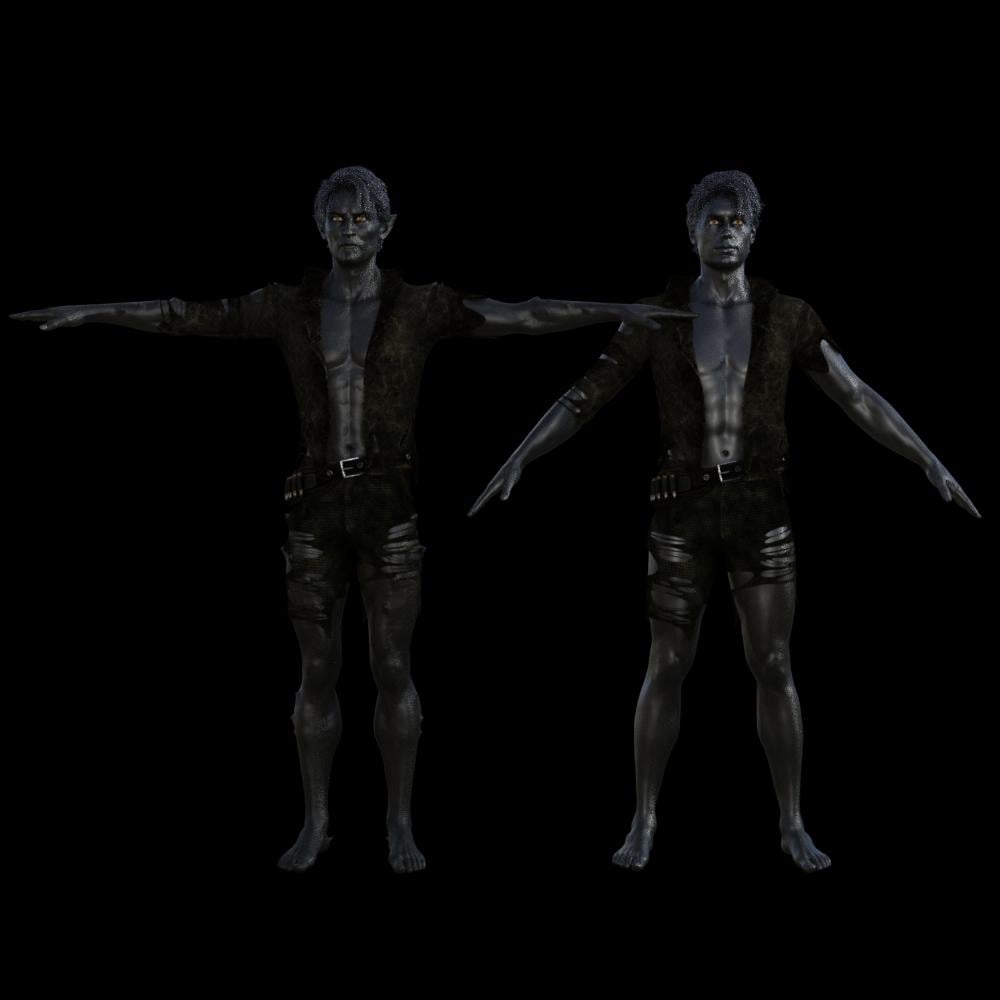
Zev0 has utilities to convert poses from one generation to another, because they are all a little wonky and need correction. These convert back and forth between the figures. There are several available, but here's the one for G3 to G8 (for male and female). https://www.daz3d.com/genesis-3-to-genesis-8-pose-converter

Notice that Michael 8 is able to wear Aran's skin, but still has M8's features. The morphs must be converted in order to get those. Here's where it gets complicated. There was a wonderful product known as GenX2 (https://www.daz3d.com/genesis-generation-x2, you will need the add-ons for Genesis 2 and Genesis 3) which converted characters, from Michael and Victoria 4 all the way up to Genesis 3 (M7/V7). However, the creator, Dimension3D, has passed away, so Genesis 3 is as far as it goes. So now we must manually convert the morphs ourselves. There is a thread which explains how to do it, but it is advanced and I don't recommend it until you gain some experience. Bookmark this thread for use later:
https://www.daz3d.com/forums/discussion/comment/2806356#Comment_2806356
The second render shows Michael 8 looking funny because the M7 pose has not been converted. I noticed that M7 expressions don't work on M8 either.
If you want to use the latest technology, then purchase Michael 8 Pro Bundle. If you find a character you really like that is for "Genesis 3 Male", go ahead and get it. Make sure you note the requirements. Some characters require the Head and Body Morphs, and others don't. Some are based on other characters which you will have to purchase if you want to use them.
Utilities that you will want:
Just about anything by Zev0! He's the man!
You will also want the Muscularity Morphs by xenic101. These won't be available until the end of the year, as xenic101 said he was working on other projects.
When purchasing a morph package, make sure it states "dials," "morph dials" and not just presets. A Preset is the full morph at 100% like a character. A dial allows you to use the slider to apply only a portion of the morph, and thus gives you more options from mixing morphs.
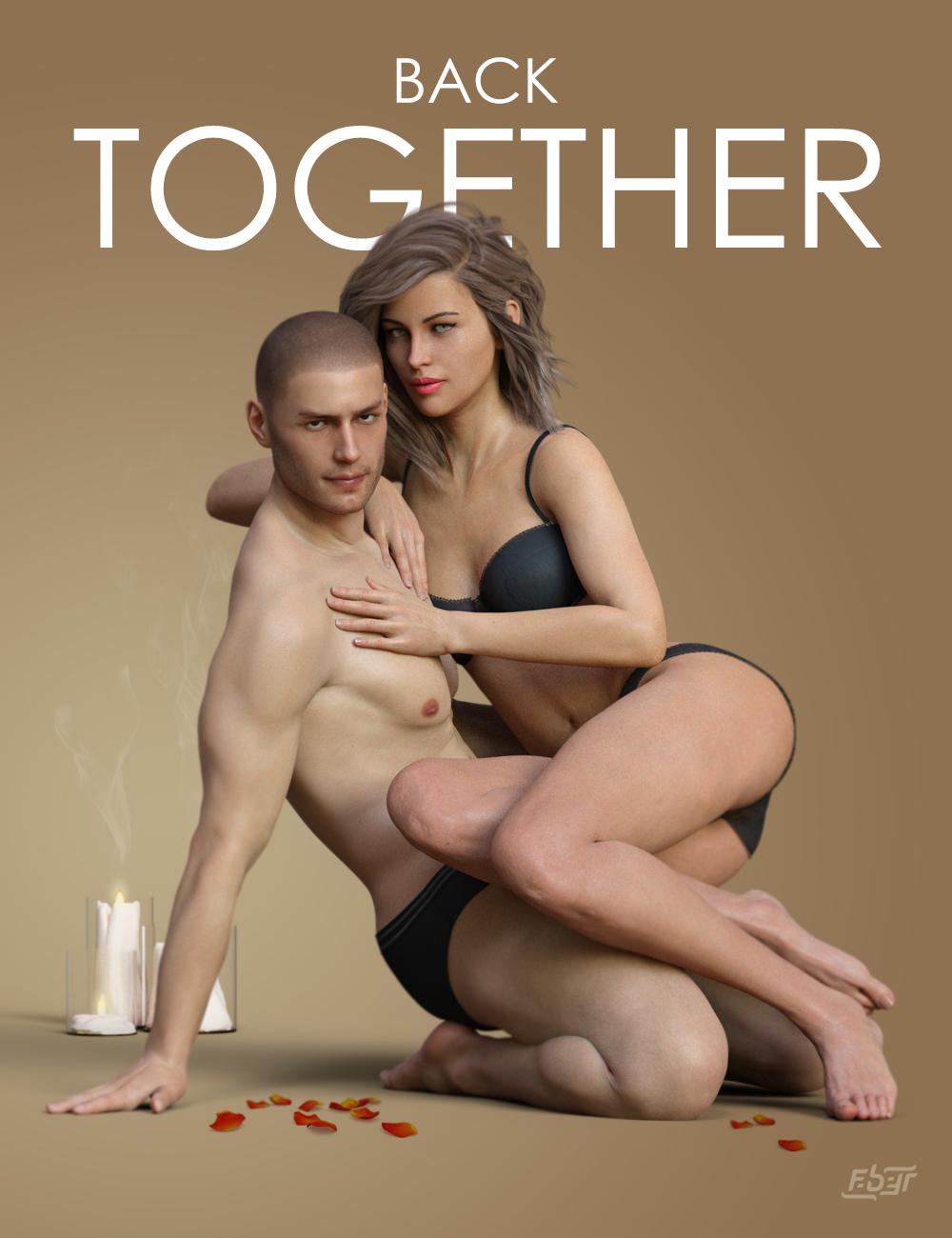
Released: Back Together Poses for Genesis 8 [Commercial]Hey Everyone!
my most popular pose set series are back!

this time with "Back Together" a set of 20 diverse couple poses to keep Michael 8 and Victoria 8 "Together."
Additional 40 Pose presets adjusted for Genesis 8 base Male and Female included.
 Genesis 3 female anatomical elements - SKU to find in DIM? Or how else to install?
Somehow this is missing from my current install of stuff... The automated installer keeps failing. I have Victoria 7 Pro that should include it among with some other Genesis 3 female Pro packs but I cannot find it in DIM. The SKU # would pull it up easy, but I can't find it.
Daz 3D is part of

Connect
DAZ Productions, Inc.
7533 S Center View Ct #4664
West Jordan, UT 84084Licensing Agreement | Terms of Service | Privacy Policy | EULA
© 2026 Daz Productions Inc. All Rights Reserved.