-
Let's appreciate/discuss today's new releases - ongoing thread
Ha, same thing for me but for some of the masculine morphs. I'm on the fence because it is a lot of morphs and sounds like a good deal, but the promos don't show much in the way of clear "Here it is without the morph, here it is with this/these specific morphs applied". I know they obviously can't do that for every morph or it would be way too many images, but it's hard to get a sense of the kinds of morphs based on names. Especially since the SF morphs have some similar names, these might work really well together.
Well, if I end up getting it before someone else posts I'll try to post some sample images here.
Let's appreciate/discuss today's new releases - ongoing threadTimbales said:
Vinme Morphs for Genesis 9 looks like it offers a lot in one package.
I just took it out of my cart waiting for other's opinions. The morph list looks very useful but the promo images are awful. If anyone gets this I'd like to see some better promos, especially of female face and lip morphs.
Carpet sweeperHave started. Modelled the body and the handle (except where the 3 sections can separate). Next need to model 4 wheels, dirt collector trays and the brush. After that it's the small matter of transfer to obj, surface allocation, Tex mapping, into DS, rigging and then creating the installation zip. Regards, Richard.help with D-ForceBella said:
Saxa -- SD said:
Would check dforce weighting for that tee. You may have to add dF weight map - then you'll see if rigid painted. You may have to reweight to 100% yourself.
Other times clothes can get trapped under breasts depending on moprhs used. Doesn't look like situation here based on pic.
Thank you for your answer, what is a dF weight map ?
Select the item in the scene tab, and then Create > New dForce Modifier Weight Node
Then select the weightnode, enable weight brush, and in tool setting select the weight map. Then the clothing should become red-blue-grey and you can change the weights
But personally I think your problem comes from the projected morph. If using timeline, try at start to dial the character out (at least till the deformation is gone) and then dial the character shape up along the timeline, e.g. at frame 15. You can do that together when posing.
Eidt: reg. weightmaps, try to see this
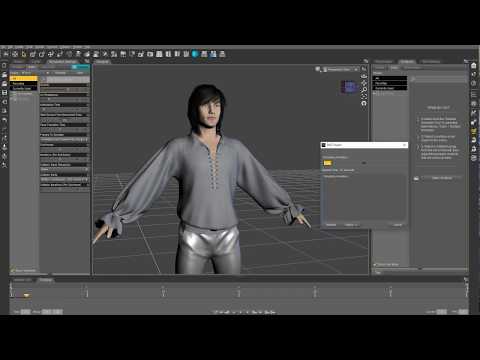 How to make content for Genesis 9?
If you are asking about modelling clothes, you should model it towards the base character.
If waanted to can model towards base male or female shape if you use reverse defomation when using transfer utility.
Footwear, is a special case, especially high heeled shoes, where you have get them transferred so they essentially ends up on as being fitted to a flatfooted pose, while not seen by the user, if you also apply the pose. There is a video by Daz describing that process.
Using clones, is relevant when using autofit.
How to make content for Genesis 9?I've read a bit further and it seems they use a clone in DS, export that as on obj to use as a template for modelling the clothing. Then they import it into DS by using the transfer utility and the template using the clone. I can't do that. The feet poses don't tranfer even on older figures and they certainly don't transfer on G9. As I've said, even the calves don't transfer correctly. So it seems I'm out of luck. I have to manually adjust for the base G9 figure. And I haven't even gotten to how to not have custom character morphs distort the shoes.
How to make content for Genesis 9?Thanks! I'll take a look. Most of the discussion seems to be the transfer utility. I've used that quite a lot already. And my suspicions seem to be confirmed that the feet are quite different from previous figures and do not transfer well. In fact, I was no able to transfer morphs on the calves. And you need to use very specific settings for the morphs that did transfer fine. Looks like I'm not alone with these issues.
Is there an easy way to transfer an animation from one figure to another?ekajuan_9f765a669b said:
Is there an easy way to transfer an animation from one figure to another?
I forget the exact name of all the options, but there should be something like a preset 'save as pose' option. You can then click and load that preset with the new character.
If it is a Genesis character, this usually works between generations (although some tweaking may be necessary) (and I do not think I have tried this with 8.1 and 9 )
Can't apply material to specific Wardrobe itemsThe H.Mats are applying to the Smooth Morph Maker versions that load with the "Full Outfit" option instead of to all of the versions.
Anyone figured out how to use Geo-Grafting Navel and Nipples for Genesis 9?The HD morph has two components, a base mesh morph and a HD sculpting over that. The base mesh morph will follow the uv map, the HD sculpting will not, in that you can sculpt any feature anywhere, that's what HD sculpting is for.
Is there an easy way to transfer an animation from one figure to another?ekajuan_9f765a669b said:
Is there an easy way to transfer an animation from one figure to another?
Are they from the same generation?
g3-g3
g8-g8 etc.[Released] RSE Mirror Geometry for Genesis 8 [Commercial]I'm having a bit of an issue with the script.
It runs like a charm, I follow the procedure for the manual step and it does create a mirror piece of clothing as intended.
Problem is that the piece of clothing (in my case is a glove), comform to the basic Genesis 8 female, but when you move any slider, nothing happens. They do not get "transfer" to the mirrored part.
Tried over and over, with a piece of stocking as well (both the glove and stocking are single piece of clothing).
The log states the following
17:22:11 GMT+0100 (ora solare Europa occidentale): Adding "Follower/Wardrobe/Unknown" file: C:/DazX/People/Genesis 8 Female/Clothing/!!Cosplay/Default Collar.duf17:22:11 GMT+0100 (ora solare Europa occidentale): Adding "Follower/Wardrobe/Unknown" file: C:/DazX/People/Genesis 8 Female/Clothing/!!Cosplay/Default Left Socks.duf
17:22:11 GMT+0100 (ora solare Europa occidentale): Adding "Follower/Wardrobe/Unknown" file: C:/DazX/People/Genesis 8 Female/Clothing/!!Cosplay/Default Right Glove.duf
17:22:11 GMT+0100 (ora solare Europa occidentale): Adding "Follower/Wardrobe/Unknown" file: C:/DazX/People/Genesis 8 Female/Clothing/!!Cosplay/Default Right Shirt.duf
17:22:11 GMT+0100 (ora solare Europa occidentale): Adding "Follower/Wardrobe/Unknown" file: C:/DazX/People/Genesis 8 Female/Clothing/!!Cosplay/Default Shoes.duf
17:22:11 GMT+0100 (ora solare Europa occidentale): Adding "Follower/Wardrobe/Unknown" file: C:/DazX/People/Genesis 8 Female/Clothing/!!Cosplay/Default Shorts.duf
17:22:34 GMT+0100 (ora solare Europa occidentale): Executing Script
17:22:34 GMT+0100 (ora solare Europa occidentale): Selecting Preset: C:/DazX/People/Genesis 8 Female/Clothing/!!Cosplay/Default Right Glove.duf
17:22:34 GMT+0100 (ora solare Europa occidentale): Converting item from C:/DazX/People/Genesis 8 Female/Clothing/!!Cosplay/Default Right Glove.duf to C:/DazX/People/Genesis 8 Female/Clothing/!!Cosplay/!!Cosplay/Default Right Glove M.duf
17:22:34 GMT+0100 (ora solare Europa occidentale): Default Glove is of type Follower/Wardrobe/Glove/Right
17:22:34 GMT+0100 (ora solare Europa occidentale): Directory does not exist: C:/DazX/People/Genesis 8 Female/Clothing/!!Cosplay/!!Cosplay
17:22:45 GMT+0100 (ora solare Europa occidentale): Copy Icons from C:/DazX/People/Genesis 8 Female/Clothing/!!Cosplay/Default Right Glove.duf to C:/DazX/People/Genesis 8 Female/Clothing/!!Cosplay/!!Cosplay/Default Right Glove M.duf
17:22:45 GMT+0100 (ora solare Europa occidentale): Copy Categories from C:/DazX/People/Genesis 8 Female/Clothing/!!Cosplay/Default Right Glove.duf to C:/DazX/People/Genesis 8 Female/Clothing/!!Cosplay/!!Cosplay/Default Right Glove M.duf
17:22:45 GMT+0100 (ora solare Europa occidentale): Cannot find assets for old preset /People/Genesis 8 Female/Clothing/!!Cosplay/Default Right Glove.duf
17:22:47 GMT+0100 (ora solare Europa occidentale): Execution Complete.
What exacly am I missing, or doing wrong for what matters?
I'm currencly running Daz Studio 4.20 and I install all the files manually.Anyone figured out how to use Geo-Grafting Navel and Nipples for Genesis 9?
That's not how HD morphs work. They are added to an existing base figure morph, even if that morph doesn't get distributed as a standalone morph. At least that's how it was explained to me a few years ago, and I'm sure someone like Oso3D or RawArt could confirm if that's still how it works. So if a base morph follows the UV markers, the HD morph will too.Padone said:plasma_ring said:
The "template" I'm talking about is the landmark overlay found in the Genesis 9 Starter Essentials under Materials. It shows exactly where to place the nipple textures on the UV so that they line up with the default sculpted nipples. That is the texture on the figure in the examples I posted earlier. The grafts that are the actual topic of this thread load exactly where the landmarks suggest PAs put those textures.
In your initial post in this thread, you seemed to be under the impression that these geografts will only work on a default G9 character because any different custom body shape will move the position of the nipples. That is only the case if a PA has chosen not to follow the guide landmarks Daz has provided, and so far everyone has used them.
Those "templates" are the uv map that's based on topology. Again the HD sculpt is not forced in any way to follow the topology. If you find that the uv map works for a certain HD shape it is just because the PA was very careful to conform to that. Same for geografts.
Is there an easy way to transfer an animation from one figure to another?Is there an easy way to transfer an animation from one figure to another?
[Released] Content Wizard [Commercial]clerian said:
Just want to follow up, and I think this warrants a new post instead of an edit. I have been able to get one of my problematic files to install without throwing an error. I have attached a Daz log which pointed me in the right direction. After the crash, I went to %USERPROFILE%\AppData\Roaming\DAZ 3D\Studio4 directory and opened the log.txt file before running daz again, and it showed the messages in the attached file as the final output.
The thing that stuck out to me was the warnings about nodes. So I went and tried a few things. First, I tried to simply load the object into daz and save it as a wearable, then use the newly saved version in the CW package, but that crashed as well. I figured that simply resaving an item doesn't alter it intrinsically (strangely, Daz throws no errors about nodes when these objects are loaded in, only during the install smart content operation), so I would have to change the file. Seeing that node mismatch in the DUF earlier made me think if I altered the polygon count, it might fix things up a bit, so I loaded up the Decimator plugin and the following process is what actually worked:
- Load the figure into Daz and make sure it is selected
- Navigate to the Decimator pane and click "Prepare to Decimate"
- Check the "Nodes" and "Polygons" checkboxes in the "Remove invisible" section at the top of the Decimator section with Resolution % set to 100
- Click "Create LOD" and use either the pregenerated name or choose something
- In the Parameters tab of the figure, there should now be a new section called "Mesh Resolution" and make sure the LOD you created is selected
- Export the object to OBJ, use Daz measurements
- Import the object, use Daz measurements
- Select the new object, then go to Edit > Object > Rigging > Convert Prop to Figure and click Accept
- Go to Edit > Figure > Transfer Utility... and select the original as the source and target as the new object and click Accept
- Go to the Surfaces tab for your original version and copy them, then paste the surfaces onto the new version
- Unparent the new outfit from the old one
- Load in a basic Genesis figure that the outfit was supposed to be worn by, right-click your new outfit in the Scene pane and choose Fit "your outfit" To... and choose whatever options are appropriate in your situation
- Select the Genesis figure and then choose File > Save As > Wearable(s) Preset and make sure only the outfit you want to export is checked in dialog window.
- Copy the newly saved DUF into the file structure of the CW package that was failing (please make a backup of the original first) and zip it
- Load CW in Daz
- If you already have a configuration file for the package, load it, and replace the zips with the new ones (this must be done even if the zip files have the exact same name as before)
- Click Analyze and set up metadata
- Install Content (overwrite if prompted)
- Install Smart Content
- Export Zip File(s) & Self-Installer
I did have a complex multi-figure outfit and I thankfully only had to decimate the main figure and then re-fit the child figures to the main one. I also attached a screenshot of that since it had some unusual objects in between the figures in the original (which I retained).
Hopefully this helps others.
EDIT: It's possible that the Decimator steps are unnecessary and simply exporting to OBJ and reimporting is all that's needed. If you don't have the Decimator plugin and are running into the same issue as me, it's worth a shot to try, otherwise I would recommend using Decimator to remove any hidden/missing nodes.
I agree that that DzAssetDaz.cpp error is a little concerning. I am pretty sure you did NOT need the decimator step. In fact, it is probably a matter of editing the .duf file. Unfortunately, I do not have that product though.
daz clothing overlay toolI would do a check on youtube on Fitting clothes in Daz Studio. There are lots of tutorials. The best way is to take item into Blender and morph it yourself. If this too complicated there are tools in Daz for this but they don't work perfectly.
Force Feeding G9BlueFingers said:
From my perspective, I'm kind of relieved not too much G8/G8.1 stuff comes out, there is still plenty in the shops for me, and it real helps me manage my Daz Assett Acquiring Syndrom. Though I would still love some historical (accurate) headwear and clothing and some characters with the quality of Vicky 8.1/Jacquiline 8.1/Bluejaunte (male or female), but I tend the think this is better for me.
Very much the same here, I'm also relieved that I will finally have to cut down on my spending, because I'm not going to invest in G9 like I did in G8. That said, I do like the free base package with all those textures, also the morph pack, and I did buy V9 and M9, which I think are really well made characters. Of course there'll be lots of new stuff for G9 coming out now, it's only natural, but lots of G8 is still in the store and will most likely stay for a long time. So I don't feel force-fed really.
Comment here if anyone wants a tutorial on getting results like these, if you like it.ARealiti said:
Artini said:
Have not solved yet, this open mouth problem, while using humanoid animations from Unity.On the Prefab's underlying model, choose Rig, Configure, then Head and remove the Jaw Transform to None. Animation of the mouth still works and all morph animation still works on the face which is nearly all talking and facial expression animation. See screenshot attachements.
Unfortunately, you can't get visual results like the first one I posted with anything other than HDRP.
Thanks for that fix. I will try to setup a scene in HDRP, as well.
Force Feeding G9Well I guess that I will find out how well those prior toon products actually sold for: JCade, JoeQuick (already answered), 3D Universe, PedroFurtadoArts, AM (his great Man-Hippo), RawArts (a few of his manimals I consider toons), Oso, DAZ Originals, and a couple of other PAs whose names escape me now.
There is absolutely no good technical or artistic reason for me to buy them again knowing that the improved realism in Genesis 9 is not needed in making good toons. That, and the fact that the toons I have from V4/M4 - Genesis - Genesis 2 - Genesis 3 - Genesis 8 - Gensis 8.1 are together more than enough, but doesn't change I'll likely buy the Genesis 9 toons in any case.
The ones that I really want though is DO updated His/Hers Multiman Bundle! Although I guess I could transfer the morphs and materials myself to Genesis 9.
Force Feeding G9There's the end of the thread... On the contrary, I'm excited about G9. I want to use G9. I want to buy clothes and hair and poses and morphs. Hence my dissapointment so far, only in that I can plainly see that I can't do much with G9 in practical use yet, so I haven't joined into the fun of buying and checking out all the odds and ends. I have bought more than I may have led on, multiple Zev0 products, a couple of characters and the few morph packs. It's just not enough yet for me to want to buy clothes and hair and poses. It'll get there, I just wish a little more could have been in place to make this all as fun and exciting for me as it is for many, that's all.
Daz 3D is part of

Connect
DAZ Productions, Inc.
7533 S Center View Ct #4664
West Jordan, UT 84084Licensing Agreement | Terms of Service | Privacy Policy | EULA
© 2026 Daz Productions Inc. All Rights Reserved.