-
Let's appreciate/discuss today's new releases - ongoing thread
Wonderland said:
Timbales said:
Vinme Morphs for Genesis 9 looks like it offers a lot in one package.
I just took it out of my cart waiting for other's opinions. The morph list looks very useful but the promo images are awful. If anyone gets this I'd like to see some better promos, especially of female face and lip morphs.
There's, uh, a lot of lip morphs, any names/areas in particular catch your eye?
Mouth and eyes dont fit Genesis 9 after new morph loaded and appliedHi, Just tried to create my first morph for G9. Watched some youtube vids and then went through the process. All seems to have worked except that the mouth and eyes no longer fit the new shape which has a much smaller head. Didn't have this issue with G8 as these were part of the same mesh. Do I need to create separate morphs now for mouth and eyes?!
Head gamesluci45 said:
I wasn't going to get involved with the 9 generation for a number of reasons, mostly expense. But I was lured in by the beautiful eyes. Anyway I bought the morph package and Legacy UVs for Genesis 9: Genesis 3, 8, and 8.1 Female and Josie's Cat Suit. I hope to stop there. LOL. The guy has Mabel's textures and uses the aged face and body and some others. The cat lady has August textures.
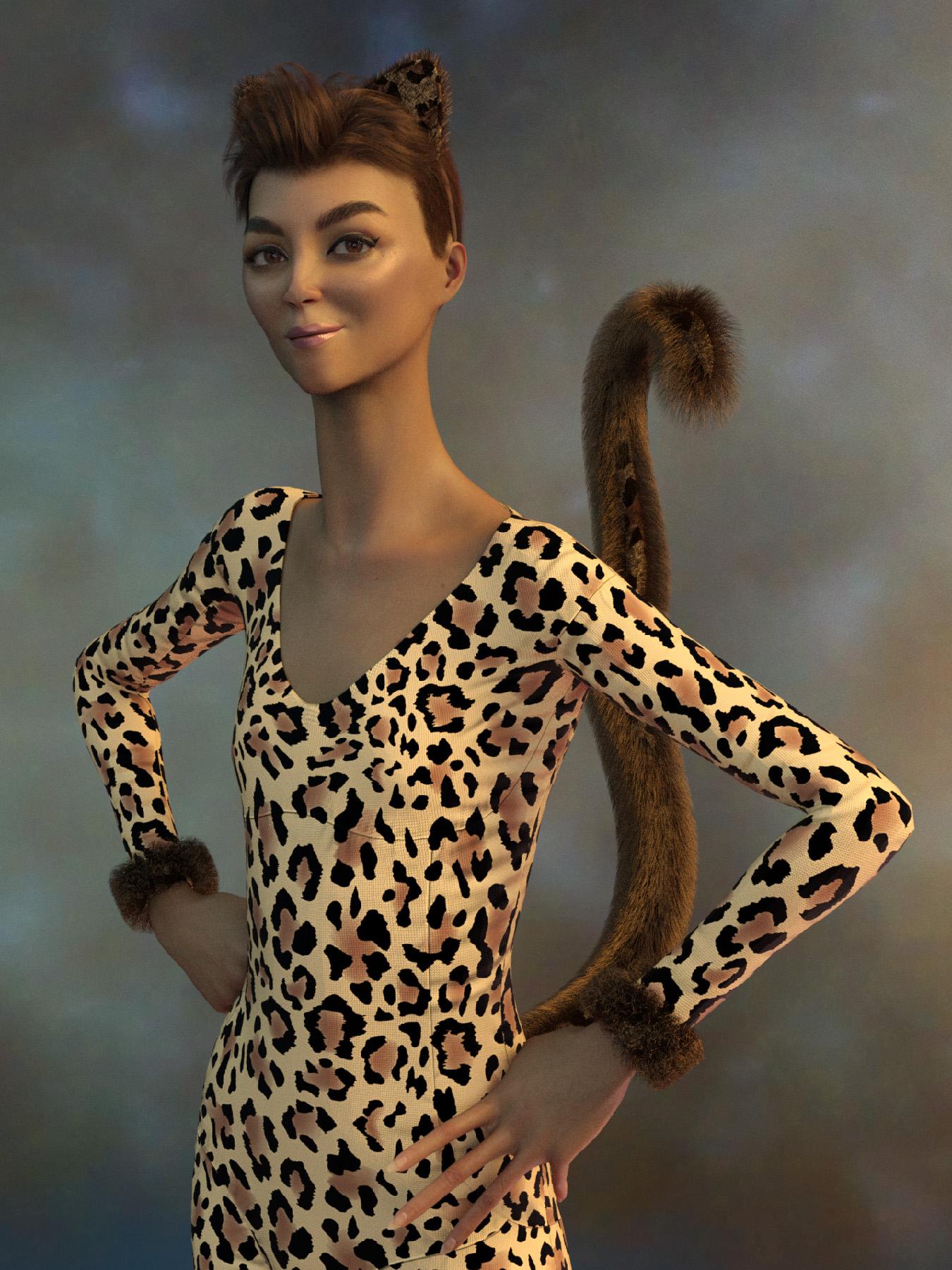
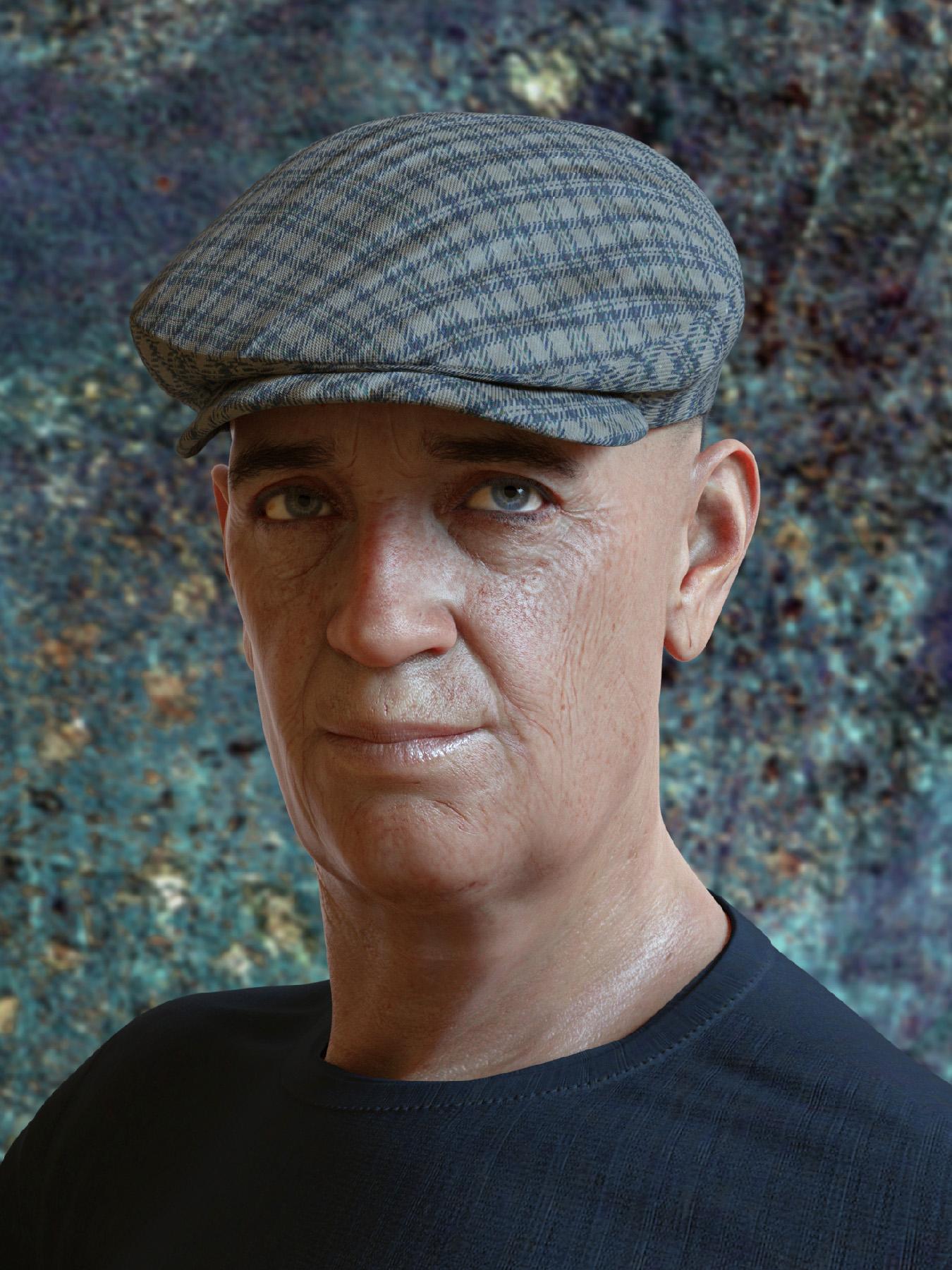
They both look fantastic! :) I had the morph package in my cart, but decided against it. I'd rather wait for some of Zev0 and I think it was Dogz morphs? :)
Genesis 9 clothing questions & answersA couple questions about templates:
- Why are there no breast adjustment morphs? There are morphs for many other body areas.
- Who is Nikolai9? He looks kind of chubby according to the morph. Why would he have morphs in the bodysuit template, but released characters like Michael and Victoria do not? Do they not need them, but he does because of his size?
I have reinstalled Bend Control three times and I am still not getting any results fromAll morph sliders coming with Bend Control are liste here : Bend Control
What does not work ? If you look for some of the sliders names listed in the link above, do they appear in the Parameters Tab ? If so... everything is installed properly and should work ?
it use to work great, but now nothing at all.
This is a bit short to help understand what's happening on your side.
Head gamesI wasn't going to get involved with the 9 generation for a number of reasons, mostly expense. But I was lured in by the beautiful eyes. Anyway I bought the morph package and Legacy UVs for Genesis 9: Genesis 3, 8, and 8.1 Female and Josie's Cat Suit. I hope to stop there. LOL. The guy has Mabel's textures and uses the aged face and body and some others. The cat lady has August textures.
help with D-Forcefelis said:
Or you can use animated timeline for dForce and dial the character in during the timeline.Careful though, if dForce simulation runs while a morph is timeline animated, dForce takes over and cloth doesn't adapt properly to the new morphology. If Base Genesis and morph are similar it'll be just fine. But if they're too different... then the problem will become obvious :
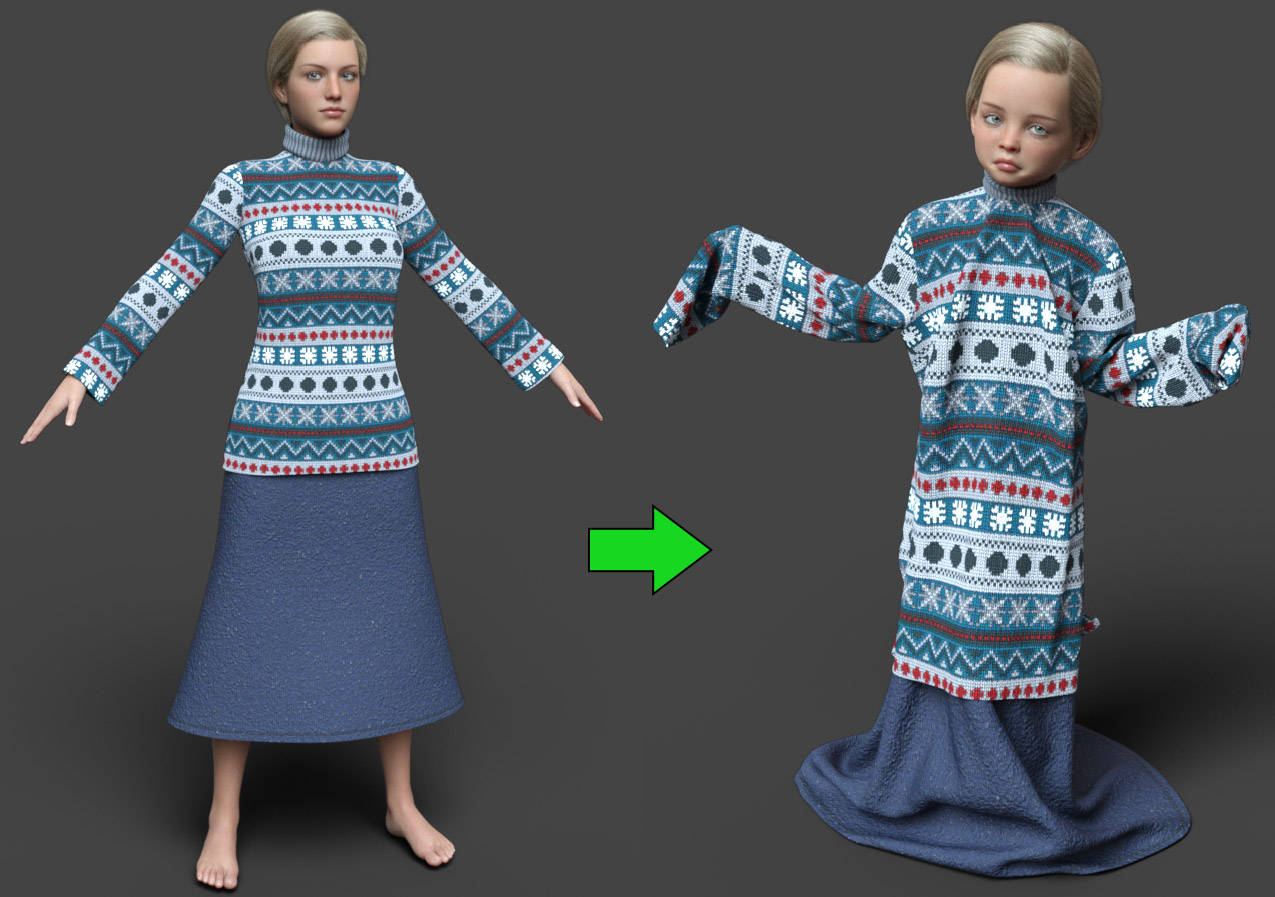
Such issue as the one described by the OP can be fixed with the Weight Brush Tool, by smoothing a bit the way vertices in the breast area are weighted to adjacent bones (Abdomen Upper, Chest Lower).
---
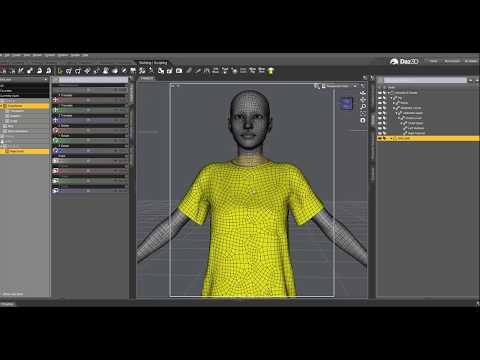
If you're using Blender or ZBrush, this video gives another way (custom morph) to fix such issues. Could help too :
 help with D-Force
felis said:
Richard Haseltine said:
It's probably the way the figure morph is projected into the clothing - that is broadly done by matching the moves of the nearest bit of the base figure, if the breasts are pulling in more than the lower chest then it will leave a ridge behind. The only real way to fix that, if smoothing won't do the job, is to make a custom morph to match the body morph that will smooth out areas like this.
Or you can use animated timeline for dForce and dial the character in during the timeline.
True, yes.
Quick question about SubD and detail maps.No problem. Glad if it helps you understand. I just finished something that'll make it easier to explain than words. I wanted to make a quick example... but ended up working on it for about 3 hours (ᴗ˳ᴗ) So I hope it'll help some.
In the following exampling, I use a Base plane and an HD subdivided plane. It'd be the exact same for a Base Genesis and an HD subdivided Genesis.
I started with a simple plane in Daz. I subdivided it and exported that plane to ZBrush. I sculpted a Lion head in it then used that sculpt to showcase the 3 main different options available (in Daz) to get more details onto a Base object : 1/ HD Morph 2/ Displacement Map 3/ Normal Map.
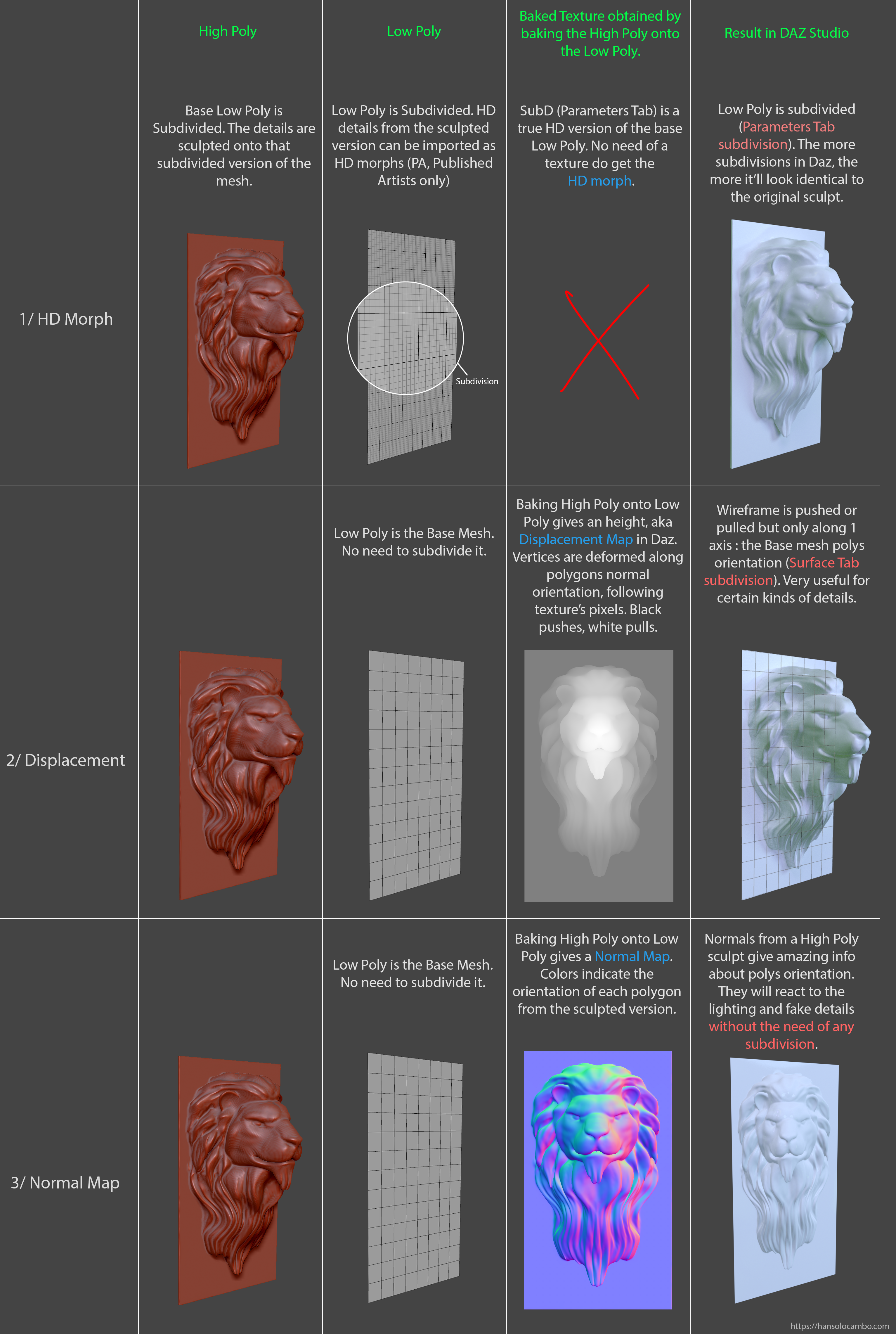
And again, all 3 methods can be combined. None eclipses the other. They are all very useful and complementary.
Genesis 9 QuestionI can understand your view of G9's 'doughy' look, as that was my first reaction as well. I think I called them 'Gumby'.
I love Victoria 9 and Michael 9, and picked up both Mega bundles because of their excellent content, and got the Pixie 9 bundle yesterday. But after going through my 20,000+ products to pick which to load onto my MacBookPro M1, and try to keep it simple, I found what I like to use and not use. And many of the items I installed go back to David 3, M4/V4, G1, G2, G3, and of course, G8/G8.1.
In between, I have pulled up the Base 9 figures and played with them as more morph packs, and then the few characters I bought from by PAs, that gave me a little more confidence in the character. As each release comes from my favorite PAs, it will give me the options I look for. And I am finding many of the non-G9 clothing and hairs I put on them work quite well, with some reservations (shoes and I understand long hair).
As far as clothes go for your current characters, that is a reasonable concern. Women especially change styles often, but I am finding men do as well, especially in pant shapes. I have been studying Marvelous Designer and today broke through problem I had. I want to be able to bring my ideas to life, if set in the past or today or the future for guys or gals. That is an option for you. There are other programs I understand that can do it, Blender is one I think? And shaders which keep up to new styles in colors, can keep basic clothing fresh.
But the Genesis 9 Essentials has everything you need to play with the characters for free. No extra expense.
Genesis 9 clothing questions & answersMada said:
Catherine3678ab said:
Thank you so much.
Next question I have concerns putting morphs into my clothing template. Would I make the morphs after I have moved the clothing template to its final location? or before and then move the entire lot over at the same time?
I usually finish everything completely as a regular clothing item, including morphs etc. Once its finished I resave with the correct folder names and transfer the duf to the right folder.
Okay, thank you so much. Something new for me to discover how to do :-)
help with D-ForceRichard Haseltine said:
It's probably the way the figure morph is projected into the clothing - that is broadly done by matching the moves of the nearest bit of the base figure, if the breasts are pulling in more than the lower chest then it will leave a ridge behind. The only real way to fix that, if smoothing won't do the job, is to make a custom morph to match the body morph that will smooth out areas like this.
Or you can use animated timeline for dForce and dial the character in during the timeline.
help with D-ForceBella said:
Richard Haseltine said:
Bella said:
Richard Haseltine said:
Bella said:
Richard Haseltine said:
It may simply be the model - especially if it was not made for dForce. If it was modelled with cups around the breasts, as is often the case, and with a certain separation between skin and cloth then when you simulate the cupped areas will form loose pockets and the looseness will allow them to drop down below the breasts.
This is the item
https://www.daz3d.com/dforce-harem-jumpsuit-for-genesis-8-and-81-female
it seems it was made for dforce but indeed like you say with a certain separation between skin and cloth
The promo images don't show the same effect, do you get it on a default figure and with default settings?
yes, this is the figure
https://www.daz3d.com/millawa-8
just loaded, dressed and posed, nothing else
Do you see the issue with the base Genesis 8 (or 8.1) Female?
No I don't! I just tried with the Base Genesis 8 and it worked perfectly, loaded and it was without that wave and after dforce still no wave!
It's probably the way the figure morph is projected into the clothing - that is broadly done by matching the moves of the nearest bit of the base figure, if the breasts are pulling in more than the lower chest then it will leave a ridge behind. The only real way to fix that, if smoothing won't do the job, is to make a custom morph to match the body morph that will smooth out areas like this.
Let's appreciate/discuss today's new releases - ongoing threadPixelSploiting said:
Right now there's conflict between Vinme morphs and previously released morph packs for G9, I need to check which G9 morph pack exactly is causing it.
Body Morphs, at least - the morphs here have unique main names but truncate them to the name of the standard morph in the formulas, so of course they conflict.
Let's appreciate/discuss today's new releases - ongoing threadRight now there's conflict between Vinme morphs and previously released morph packs for G9, I need to check which G9 morph pack exactly is causing it.
Genesis 9 Questionmaikdecker said:
Richard Haseltine said:
... Beyond that, there are threads on creating your own clone shape to AutoFit Genesis 9 items to earlier versions, and to use various tools to transfer maps and non-HD morphs to Gensis 9 (or, in principle, the reverse).
...which, of course, would not be needed if such compatibility would have been just built into G9. Which, of course, would make certain products unnecessary. Which, of course, would please some customers (= spending less money) and not please some PAs (= earning less money). How's that adage? You can please some people all of the time or all people some of the time, but you can't please all the people all of the time.
It doesn't have anything to do with making more money :) It is because there's only a certain amount of staff and you have to pick what is going to be of the most benefit to users from the start. Sure - they can employ more and more people - but their salaries have to come from somewhere. Prices will have to raised even further. They already spent a huge amount of money on making clothing items compatible from previous generations - more than users realise.
Genesis 9 clothing questions & answersDiomede said:
Thank you again. A lot of great information to digest.
I am still confused about templates and morphs. I can understand the template transferring rigging related to the skeleton, such as placement of bones, rotation of joints, and weightmaps. I don't understand the discussion of the template and morphs. I thought the meshes needed to have the same number of vertexes in the same order for morphs to work. How does a template created from one garment match the number of vertexes and order of vertexes for another garment?
Its not a vertex based morph like you use on the figures - its a projection morph. Basically it will take your clothing mesh and project the morph from the template into your clothing item. That is why the closer in volume/position your clothing item is to the template the better the results. The further away the receiving mesh is from the donor mesh, the smaller the effect of the projection morph.
Genesis 9 QuestionRichard Haseltine said:
... Beyond that, there are threads on creating your own clone shape to AutoFit Genesis 9 items to earlier versions, and to use various tools to transfer maps and non-HD morphs to Gensis 9 (or, in principle, the reverse).
...which, of course, would not be needed if such compatibility would have been just built into G9. Which, of course, would make certain products unnecessary. Which, of course, would please some customers (= spending less money) and not please some PAs (= earning less money). How's that adage? You can please some people all of the time or all people some of the time, but you can't please all the people all of the time.
Force Feeding G9mazinkaiserzero said:
Also, to finish, one little thing I just remembered. There is also the issue that if the HD details for characters will be now included in the same base character morph, you won't be able to use them partially for your own characters.
Anyway, the point is that Daz is starting to make more stuff only possible if you can import HD morphs, which is still only a PA tool.
You are believing wrong.
The V9 and M9 shapes do NOT included HD details. They each have their own seperate HD detail morphs that can be dialed in as you please. What is different from G8 is that the HD morphs will come with a characters instead of being sold seperataly. For those characters that will end up with them.
The end user, who is just rendering images and animations does NOT require the HD import tool in order to use HD morphs inside Daz Studio. V9, M9, Josie and all the other characters to come are all modeled on the low res base shape and imported at base resolution.
Foot Pose Resetthd777 said:
Check the parameter tab for active morphs. I have a few high heeled shoes that add and set a morph to shape the foot into a high heel base rather than posing the foot. If that's the case you need find and zero the morph.
ciaoTD
thank you
none of the solutions worked, and there don't seem to be any active morphs.
i ended up dialing back metatarsels bend to 0 on one foot, but the other foot was 0 already, so i had to bend the foot up to get it to lay flat
I wish there was something that was an easy fix for this stuff. I could probably zero the entire pose and that would work, but I just need the feet to not be on tip toes.

Daz 3D is part of

Connect
DAZ Productions, Inc.
7533 S Center View Ct #4664
West Jordan, UT 84084Licensing Agreement | Terms of Service | Privacy Policy | EULA
© 2026 Daz Productions Inc. All Rights Reserved.