-
Here’s a suggestion for PAs
Matt_Castle said:
If I may make a suggestion to users in kind?
Damsel said:
Could somebody, ANYBODY, create a decent looking Gen 9 male?
... this is not a good way to get PAs on your side. Insinuating that everything already on the market is of poor quality is just likely to make many PAs dismiss your opinion, not motivate them.
You'd get much better results out of something like "G9 has obviously got several female characters already, but I'm really eager for PAs to show us more of what they can do with it as a base for male characters. There's obviously so much potential in the new figure (just look at the new expressions!), and I'd love to put it to more use."
A more basic point is that "decent looking" is entirely relative. I think Michael 9 looks fantastic, and is my favorite Michael so far. Nikolai's a great morph, and he's not the most conventionally attractive, but I'm sure he does it for some percentage of people. So we've got two male base figures for G9 so far that are both "decent looking" depending on how one defines it, and on one's own tastes.
How to fix normals?I figured it out. Since these are using a very different pose than the base pose, there is a lot of deformation when the shoe is placed into the base pose. This is happening where the weight maps of the toes bone and the foot bone meet up. At small rotations from the shoe's toes bend pose (say 0 to 50 degrees), it looks fine and this is all I care about. But the toes are actually bent close to 70 degrees. At that extreme, even small differences in weight map values get exaggerated and you get polygons facing in opposite directions in the base pose. So what this tells me is that DAZ Studio applies the smoothing angle on the original base pose, not the current pose. So I smoothed out the polygons in the base pose best I could with the weight map tool then re-applied the original shape (after fit) with a morph, unfit the shoes, exported that mesh, deleted the morph, and replaced the geometry with the baked mesh. It looks perfect now.
Female Blouse/Shirt with Variable Button-UpPerttiA said:
https://www.daz3d.com/flirty-school-uniform-for-genesis-8-female-s
Do you (or anybody else) have this product, and can tell me whether the "L/R Breast Reveal" morphs are binary toggles, or if they are applied with a slider? If they use a slider, then I I might be able to get it the way I want by applying them partway.
If they're binary, then I might end up using this for some particularly risque poses/frames, but it's not the main thing I'm looking for. I'm looking for a morph in which the shirt is being worn with the top buttons undone, whereas those morphs (applied fully as in the product images) make it look as though it's being actively being pulled off. Turning on both of them at once would look sort of like what I'm aiming for I think, but I suspect it would look physically unnatural; those morphs (again if applied fully) look like they're supposed to have a hand pulling the shirt, not like the shirt is resting like that naturally.
The fully unbuttoned morphs might be of some use, but I'm less interested in that than in a morph where the shirt is unbuttoned to show the bra but still has one or more of the bottom-most buttons closed. Sorry if that wasn't clear before; I've updated the original post to clarify that.
Genesis 9 clothing questions & answersbarbult said:
A couple questions about templates:
- Why are there no breast adjustment morphs? There are morphs for many other body areas.
- Who is Nikolai9? He looks kind of chubby according to the morph. Why would he have morphs in the bodysuit template, but released characters like Michael and Victoria do not? Do they not need them, but he does because of his size?
I ignored this question up to now because I didn't want to draw more attention to a shape that's not released yet. Unfortunately this means that from now on upcoming shapes will have to go into the templates after the figure gets released, not before. With the templates so easily accessible there's no other way for me to prevent the shapes being posted in a public forum.
Yes he has morphs in the suit because he is very chubby, and there were some clothing distortions especially on the back.
The loosen morphs are aimed at helping with kitbashing, for example to fit items from different sets to each other - tops over pants etc. If you meant breast adjustment morphs to fix issues with the shrinkwrap effect - there are too many scenarios and should be a product by itself.
Um…$99 for frozen FBX files of cheaper assets?It says it also has a Maya format version. I use the Maya bridge all the time to animate and bring the keys back into Daz to render with, and the reason I don't just use Maya to render is I can't for the life of me figure out what I'm doing wrong as I can't get clothing and hair to transfer via the bridge and then be able to retarget the skeleton. Everything gets wonky after I press the retarget button unless I send over a character that's just the character with nothing else. So for someone who isn't looking to use Daz, but use Maya, and just wants characters completely premade and, presumably, ready to go, this isn't a bad deal considering the cost of assets on Turbosquid.
Where are dforce and mesh deforms saved?Do you mean the simulations adn the results of baking dForms to a morph? Simulations get stored in the file, morphs spawned from dForms or imported OBJs ar also stored in the file unless saved as a Morph Asset, in which case they go to the Data directory in the item's morphs folder - /data/Daz 3d/Genesis 8/female/morphs/author/product/ for example, where author and products come from the fileds you entered in the options dialogue when saving.
Combined Morph explodesI created a custom morph out of several morphs by exporting it as obj and importing it by morph loader pro - and the character looks good, but when i try to use a pose, it turn into spagetti
What am I doing wrong?
Thank you for the new Eldritch Seeker!FSMCDesigns said:
zombiewhacker said:
This probably has been addressed before, but how well do the original Seeker gun holsters autofit to later Genesis generations?
Works fine for me. Here is it on G9

Heh...I couldn't get the autofit looking good for the holster, but then again I haven't tried since G9 was brand new. It's been updated since at least once ;). I'll give it another shot.
BTW, how did you get the veins in the arms? Did you paint those on in post or transfer a morph somehow? Inquiring minds and all that....lol.
Is Beautiful Bends for G2F still available?takezo_3001 said:
As far as muscles/flexion type of morphs, you would do well to snag Simon WM's Muscularity Morphs for Genesis 2 Female(s) as a companion morph package!yes, I'm
Yes, I'm already using that. That's how I tweaked Gia's muscularity/arms. Thanks.
Nikolai 9 HDNikolai 9 HD has a good-looking morph, but the promos make his skin look like 8.1 instead of Victoria 9, Michael 9, or even Minerva 9. I'll be looking forward to some user renders. I've learned to wait at least a day; plus, I have to get my punch total up.
Is Beautiful Bends for G2F still available?RenderPretender said:
UN is specifically for Vicky 6, though, right? Would I be better off in this instance getting Ideal Beauty with its Gia 6 add-on? Or maybe use RiverSoft's product to convert her to G8 and get it over with. I can't believe these tools for legacy figures are still so expensive.
By illustration, the image on the left is the one initially posted above. In the one on the right, however, I've added a slight bit of muscularity overall, and then adjusted Gia's coracobrachalis (proximal to her armpits) and adjusted the long head of her triceps to fill out the area above her elbows a bit. It's slight, but makes the bends more natural.
Most definitely, yes!
As far as muscles/flexion type of morphs, you would do well to snag Simon WM's Muscularity Morphs for Genesis 2 Female(s) as a companion morph package!
Can Geoshells be officially edited (Geometry editor, MeshGrabber) independent of its parent object?delete polygons on the shell
Select the shell > Paramters Tab > Shell > Visibility.
There you can set parts of the shell On of Off. That's how you hide parts. No deleting them.
reloading the scene the shell is as expected, it follows the parent. The Meshgrabber indents stayed, though.
As explained by Richard, Shells have the exact same geometry as the object they were made from. The push modifier (offset) or MeshGrabber do NOT modify the geometry, they just move things around like a morph. Same amount of polygons, same vertices order, same rigging to bones. So yes of course, it still follows the original object's bones, and modifications to the Shell's geometry (movements) is taken into account.
this way one could create rather cool effects.
If you want total control over a shell... don't use a shell.
- Create a Geoshell. Export it as obj (or send it to ZBrush, etc).
- Edit this shell object (a pure copy of Genesis) with any 3D app. Let's say you want a tattoo on the arm : delete all shell's polygons but the ones on the part of the arm you need. Export that object as obj.
- Import the obj into Daz and use the Transfer Utility to fit it to Genesis like you'd do for socks, etc. You now have only a small portion of a "shell", which is a basic 3D object, fitted to the arm. But because it was made from a shell : it has the exact same shape as the arm (with the offset of the orginial shell) and the exact same UVs. Which makes it easy to texture it with anything you want.
- Such an object has most of the advantages of a shell : it moves with Genesis, adapts to morphs, accepts any shader and materials, still has UVs from the original arm, etc... without some eventual inconvenients of a shell.
Copying Morphs from G8 to G8.1Is there a quick and easy way to transfer over dialed-in morphs from a G8 character to a G8.1 character if both have already been loaded into the same scene?
No one asked me - Diomede screenshots on whatever - Warning AI Discussion OKAdjust the Hobbit Book Cover
Select the mesh contained within the cover wrap animation group. The morphs will appear in the general properties tray. Set the 1 point 5 to 1 morph at full strength.
.
A test render shows the cover distortion is greatly reduced. Yay.
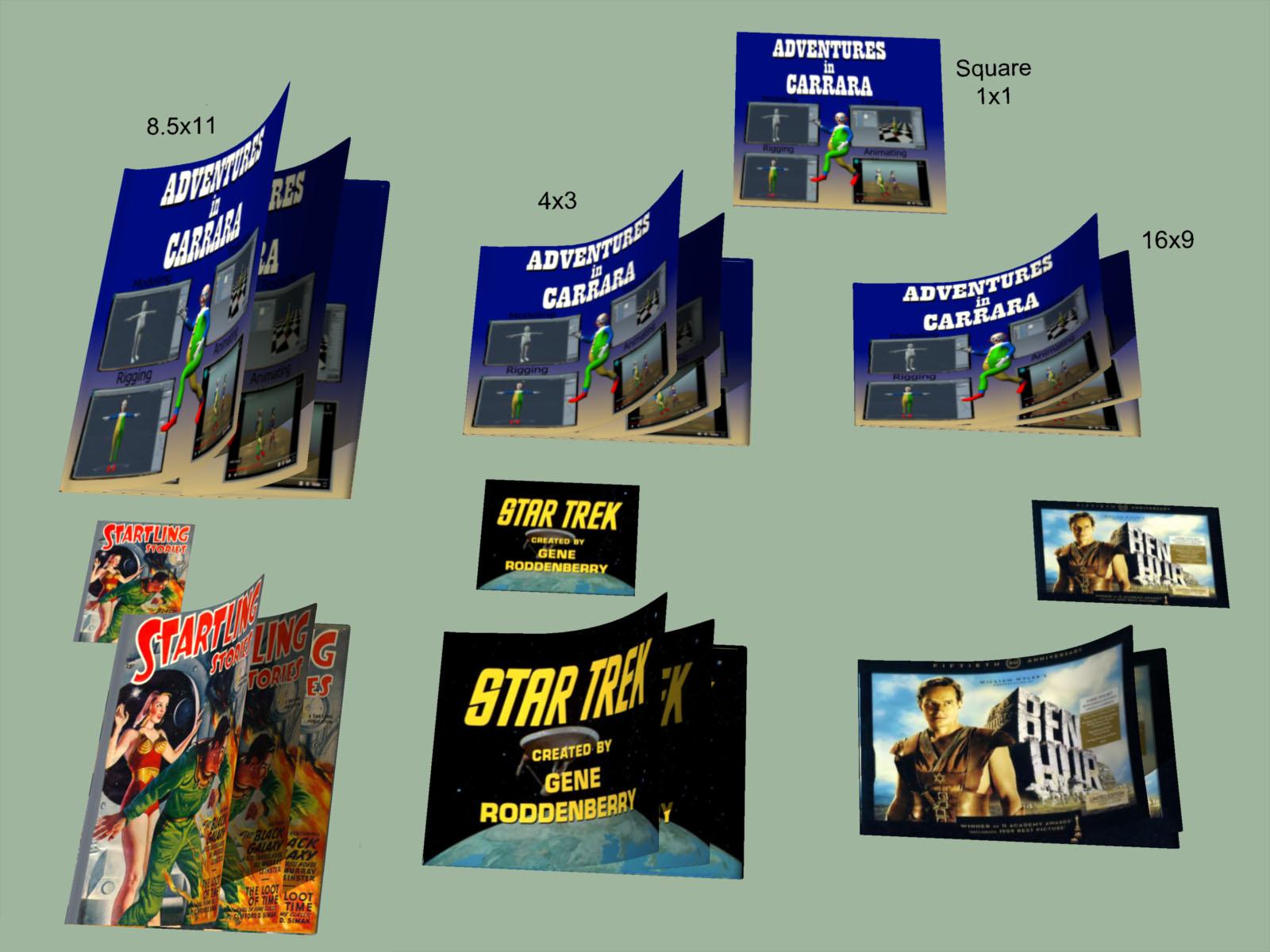
No one asked me - Diomede screenshots on whatever - Warning AI Discussion OKFree Magazine/Book Rigged in Carrara - Apply your own covers and Pages
Model is posted in the Challenge #65 thread here. https://www.daz3d.com/forums/discussion/comment/7922816/#Comment_7922816 ; I will post a series of screen shots explaining how to apply your own covers and morph the model to fit, then pose/animate.
 Using V4/G3F Morphs on a G8F
caraTRON.7263 said:
Okay, so what I need is:
GenX base product to convert from V4 or M4
GenX addon for Genesis 3 to convert to Genesis 3 instead of Genesis 1
You need the GenX2 Genesis 2 add-on too, it’s required by the Genesis 3 add-on.
G3 to G8 converter to then convert the morph from Genesis 3 to Genesis 8
And if the morph is made for Genesis 3, I only need that third one.
That one or the character converter, yes.
Do I need anything else?
If you want just the morph, no. If you want to use the textures you'll need the legacy UVs products which enable you to use V4 textures on G3F or G8F
The "V4 to G8" one is this: https://www.daz3d.com/legacy-uvs-for-genesis-8-victoria-4
The "V4 to G3F" one is sold at Renderosity, the vendor wasn't selling at Daz yet when they released it.
Also, are those last two products that I linked in my original post indeed interchangeable, or is there a difference in what they do that's going over my head?
They essentially do the same thing, but use different methods to do it.
Female Blouse/Shirt with Variable Button-UpIs there a buttoned blouse/shirt for a female model (preferably G8F, but not crucially since AutoFit exists) where you can control how many buttons are done up, taking it from fully or almost fully closed to very open? It doesn't necessarily need to be made completely open (though that would be nice), but I'd like it to go down to at least below the chest. (EDIT - I'm more interested in a morph where the shirt is unbuttoned to show the bra but still has one or more of the bottom-most buttons closed, than one where it's completely open. Sorry if that wasn't clear.)
(EDIT - A product has been suggested with a shirt that can be both closed and opened down to the midriff, which is the main thing I need, but I'm still interested in whether there is one that can be opened one button at a time. The shirt in this product works that way, but which buttons can be moved and the manner in which they are opened doesn't give the result that I want.)
That's the gist, but more details follow.
What I want to do is to create a "sexy secretary" character where the blouse is undone to show a significant portion of the bra and preferably some amount of skin below it, where the same garment can also be worn closed; if not completely closed, then at least closed enough that it looks normal. It would be much preferred if there were also intermediates between those two states, but not 100% essential.
The only item somewhat like this that I've found so far is this, but the unbuttoning options for that aren't very good for my purposes. As can be seen in the product images, it only opens enough that you can only really see anything inside if viewed from a sharp side angle, and if the other side is closed so as to not get in the way. This product has the right idea with multiple buttons being openable; it just can't open them in the right way. If it opened the same number of buttons as in the center pose of the main image, but more "pulled apart" - so more like the amount exposed by the jacket in the pose on the right - instead of those buttons barely being open, it would be great.
As another example of what I do want, what I'd like is a shirt which opens at least as much as this, and preferably one or two buttons more (so showing about as much as the right-most pose in the third to last product image, where the jacket is closed with no blouse), but can also be closed up.
Hopefully that gets the idea across sufficiently without rambling too much. Thanks. :)
will I ever be able to transfer my g8 chars to g9?I have worked on several characters at this point with the g8 bases. Lot of them use the torment skin and were built with quite a few daz morph mods for the face and body.
Would it ever be possible to convert them to g9 somehow in the future? Does anyone know if there is anything in the works that will let me do this? At the least a genesis 8.1 to 9 skin utility or something that converts the UV for g9 into g8?
Hands Morph into Paws and/or HoovesOso3D said:
It's a tricky issue. If I were doing such a thing, I'd probably make a morph for the animal form, and then a separate morph for the in between, because I strongly suspect just dialing it halfway wouldn't function well.
If by that you mean using a G8 hand (or full body morph) for the inbetween and an unrelated G8 hand or full body morph for the animal form, then that's fine, because it still allows me to shift between them, it just involves moving multiple dials at once. If I want an eight-stage transformation, then instead of taking one morph form 0 to 100 in eight increments, I can take morph A from 0 to 100 in four increments, and then take morph B from 0 to 100 in four increments while simultaneously decreasing morph A; where B is the animal form and A is the halfway form.
This however doesn't solve my main problem, which is that I don't have any good morphs to serve as morph B. The closest I've mdanaged is the images I attached, which I'm not happy with for the reasons I described. So morphs to serve as B, whether a single product or a combination of products, are the main thing I'm seeking.
The significance of my saying that I wanted to depict characters "in varying stages" of transformation wasn't that I wanted to do it all with a single slider, or a synchronized combination of sliders. The significance was that I want to do it using G8 morphs (or morphs for other human figures, G3 or V4 etc) that can be applied with sliders at all - even if it means chaining them in sequence instead of in parallel - as opposed to having the animal form be a Daz Dog or Daz Horse which cannot morph to and from a human figure. Maybe the final-final stage can be a true animal figure, but I want to get at least 80% there using morphs on human figures; the images I attached feel like 50-60% at best, and not a very good 50% at that.
Hands Morph into Paws and/or HoovesIt's a tricky issue. If I were doing such a thing, I'd probably make a morph for the animal form, and then a separate morph for the in between, because I strongly suspect just dialing it halfway wouldn't function well.
Daz 3D is part of

Connect
DAZ Productions, Inc.
7533 S Center View Ct #4664
West Jordan, UT 84084Licensing Agreement | Terms of Service | Privacy Policy | EULA
© 2026 Daz Productions Inc. All Rights Reserved.

















