-
Novica & Forum Members Tips & Product Reviews Pt 9
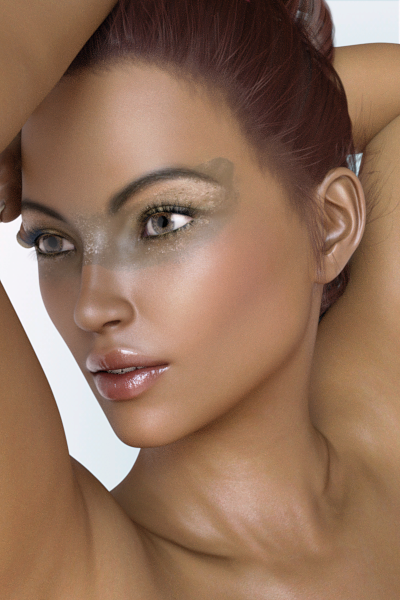
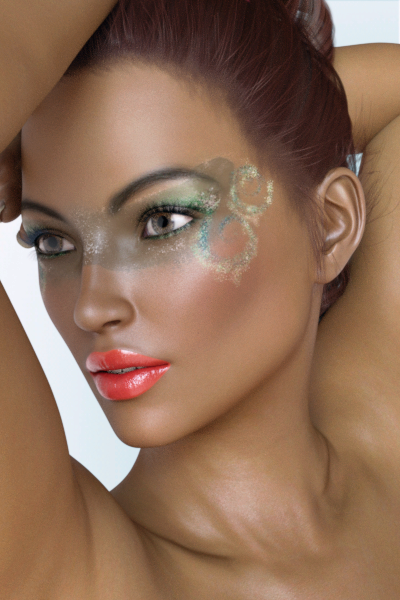
Extreme Closeup: High Fashion Makeup for Genesis 3 Females FWSA Cadence for Victoria 7
Showing the default Cadence, then the makeups. I don't like the hairline of the hair, was wondering if the makeup LIE was doing it but as you can see from the original, it's not. Since I was testing the makeups for myself, I just left the hair alone. Then I thought you might like to see these, so just ignore the hairline. I did change the lips on one of them, they were a bright pink. I'll note the color I used for you.
What I'm going to do- I will do Stephanie 8 in this EXACT SAME LIGHT SETUP and we'll see about the color of her skin. I'll be off and on the thread all day today, showing some things for you in between doing errands. I know there's concern about her skin color and level of detail, so we'll check that out using lighting that has been established on another character. I'll try some of the various Pro-Studio lights since that's my mainstay and you're used to see those lights/ what they can do.
The first is the default, the second is eyeshadow 17, blush 2, lips 4.
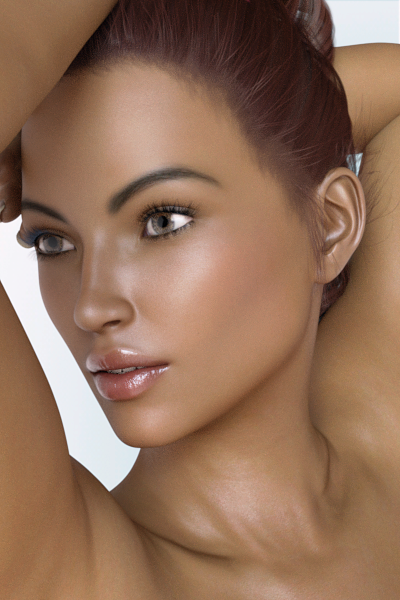
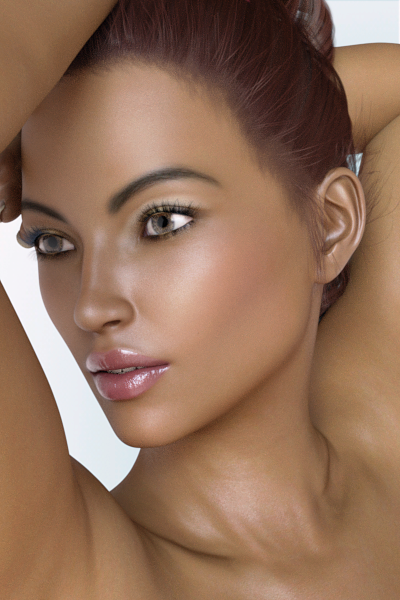
The third is FF01 and fourth is FF06 and put this color in Surfaces pane, in the base color 122 130 134
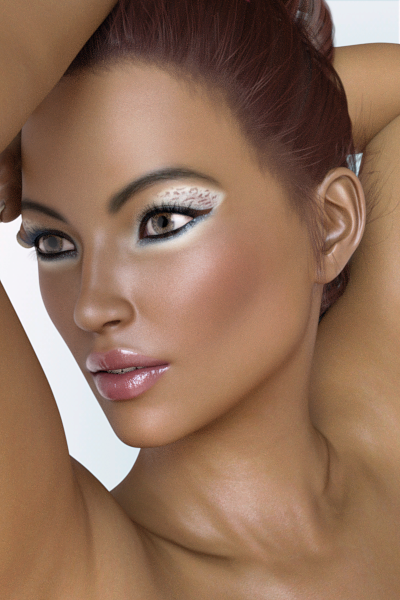
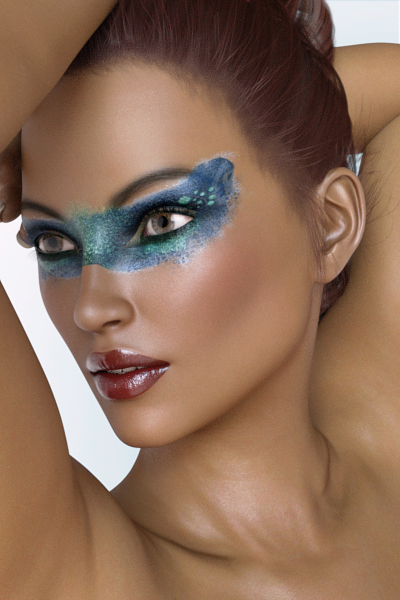
The fifth one is FF07 and last one is FF08
 Novica & Forum Members Tips & Product Reviews Pt 9
I'm looking at this G3F character in megafastgrab: https://www.daz3d.com/blanca-for-victoria-7 The promos look wonderful, but not sure whether that's due to the undoubted skill of the vendor or whether she really looks like that. Also, it's bugging me that she reminds me of an actress that I can't place. Anyone have her and can give some thoughts?
Stephanie 8 !Still has an extremely masculine face. Diversity is fine and all, but Victoria 8 and Olympia 8 are already masculine women.
Ditto. I loved that V8 had stronger features. It's the same look that I tend to dial on purpose. But S8 looks like her, O8 looks like her...they've all got that chin. So much sameface in the DAZ flagship line. I expect them to have distinctive looks.

Also in the first couple portraits she legitimately looks like a drag queen (yet the full body she does not). I have to wonder if the focal lengths on the camera aren't being adjusted for closeups, it can cause that same effect.
Stephanie 8 !Still has an extremely masculine face. Diversity is fine and all, but Victoria 8 and Olympia 8 are already masculine women.
I don't see it.
I think y'all are just used to the super idealized femminine faces that borderline on looking cartoonish.
Anyhow, as much as I love the Stephanie line, ehhh... I think I might need to think a little bit before plunking down on her. I haven't really gotten into Genesis 8 as much as I'd hoped I would, but some of the items look really useful, at least.
Stephanie 8 !Does anyone who has Steph 5 and Steph 6 and Steph 8 feel like doing a comparison render, particularly for the faces and skins? I've just been playing with Steph 6 and I can't for the life of me figure out why I ignored her for so long, she's fantastic. So I'm curious how they all look next to each other.
(Or maybe a Victoria 8, Olympia 8 and Steph 8 comparison as a few peeps are saying they all look the same and I'm curious)
Stephanie 8 !Ha! i had that with Olympia 8 - Olympia 7 is my favourite figure hands down ever. I adore her. So I got Olympia 8 and wanted to cry. Her shape is fine, but good gravy, her skin is dreadful.
Does anybody else think that Olympia 8 and now Stephanie 8 look kinda unfinished? I quite liked Victoria 8, but then O8 looked as if they just changed V8s body, tinkered slightly with the face and said "good enough". Olympia 7 has a very distinct face, O8 (to me, at least) has not - and now Stephanie seems like the same thing: smaller body, but nearly the same kind of face. I sincerely hope it will be different for Gia 8 and Eva 8 - G7 is my favourite character by far.
Stephanie 8 !Does anybody else think that Olympia 8 and now Stephanie 8 look kinda unfinished? I quite liked Victoria 8, but then O8 looked as if they just changed V8s body, tinkered slightly with the face and said "good enough". Olympia 7 has a very distinct face, O8 (to me, at least) has not - and now Stephanie seems like the same thing: smaller body, but nearly the same kind of face. I sincerely hope it will be different for Gia 8 and Eva 8 - G7 is my favourite character by far.
Stephanie 8 !Not working for me financially either. Wrong week always. Mind you, I had JUST checked out 4 minutes before with my LAST $8 store credit and Steph arrived. :headdesk:
Just a heads up for owners of previous Stephanies.....there's no orange banner, but it looks like there is an 'exclusive message" in the account area.
Thanks for the heads up.
Sigh. As usual, it expires right before I can take advantage. I'm not investing in Gen 8 not because I don't want to, but because timing of release sale to funding has not worked to my favor more or less since the arrival of Victoria 8...
Ah well. I can still finish getting all the stuff I want for previous generations. :)
Stephanie 8 !Just a heads up for owners of previous Stephanies.....there's no orange banner, but it looks like there is an 'exclusive message" in the account area.
Thanks for the heads up.
Sigh. As usual, it expires right before I can take advantage. I'm not investing in Gen 8 not because I don't want to, but because timing of release sale to funding has not worked to my favor more or less since the arrival of Victoria 8...
Ah well. I can still finish getting all the stuff I want for previous generations. :)
Stephanie 8 !I was just saying to a friend, that I think I'm in the minority here, liking the more mature, more "mannish" look of V8's face. I don't have her yet, but every time I look at her face, I really like it. I have Olympia 8, and while I like her shape (and I actually don't find her very masculine looking), I absolutely LOATHE her skin. I keep thinking I wish I could swap Olympia for Victoria LOL I'm reserving judgement on Stephanie 8 till I see more customers renders, as I feel they are more of a selling point for me than the store promos. I think her skin looks orange like O8's in most of the promos....and I can't work out why her foot looks so bizarre in that one promo......but I'm kinda liking her face.
Still has an extremely masculine face. Diversity is fine and all, but Victoria 8 and Olimpya 8 are already masculine women.
Stephanie 8 !Still has an extremely masculine face. Diversity is fine and all, but Victoria 8 and Olympia 8 are already masculine women.
Custom Product Metadata not Searchable in Smart ContentWanted to create a clean thread reguarding this issue cause this came up during a different issue I was having. Since re-installing DAZ on my brand new computer, I am no longer able to search for custom added products in Smart Content tab by Artist. I did find that all of my custom products seem to be showing up in Smart Content and seem to be working with a few caveats.
I have an external drive called "Backup 1 HDD" which has all of my DAZ and third party content. Everything worked correctly on my old computer including my custom Metadata for 3rd party products. All were searchable by artist in SmartContent and with correct categories, product types, etc. Aside from some known problem products that are still missing metadata from the DAZ store itself.
Here is my setup:
Backup 1 HDD / DAZ 3D >
- > 3rd Party (Runtime subfolder for Rendo content, etc)
- > Studio > My Library > Runtime > Support (all DAZ 3D* files, my custom ones as Local_User* and my UserData_1.dsx has correct date stamp from last export)
- > Studio > My DAZ Connect Library > Data > Cloud
So here are a few oddities I noticed... I have searched through the SmartContent categories and most of my custom Products are in fact showing up if I do not load a character into scene, but if I load up say Victoria 4, some will not show up in SmartContent anymore even though the metadata defined them as compatible with V4. Nothing is searchable by Artist anymore and when I try to load some of the products, it gives me an "unsupported product" error. This of course didn't happen before because I was very careful to assign proper compatibility base, etc. Also, I used to be able to highlight all the products and "merge into scene" and they would all load up. Now that doesn't work either. I need to double click each item individually.
FYI - I followed this doc 100% to customize dozens of third party products and it worked great up until now. I even created proper thumbnail jpg's!
So if there are any Metadata and custom product gurus out there... I could use some help here. It took me a whole week to do all of this custom work in the first place.
Thanks!
Is There A Product That Allows Genesis 8 clothing to fit to Genesis 3?Yeah and so many of the items are rehashes.
Yeah, why do we need similar items for the new figures?
So now, just becuase I buy a gen 8 figure I have to fall back off from YEARS worth(s) of purchases and ONLY render (for the time being) clothing that comes out in the first few weeks of Vic 8s' launch?
No way. It's not as if Daz has released a full mix of clothing and accessories or that many of the new products have BOTH figure generations in mind.
Some do and it's appreciated. Would I rather have them separated so I can stick with stuff that adds on to my current library? yes.
And, not to be more of a jerk, but lots of the Victoria 8 figures look a lot like....Victoria 8.
I guess it's early so.......
Variety is on the way.....
i've put the brakes on buying as I really expected a backwards Utility to hit the market a month ago..... certainly didn't think it take this long.
Damn skippy. Well, I'm not even seeing the early 'work in progress' info...
I dunno. Long as the new clothing is going of triggering some other deep-dish discounts, it's worth it to have patience.
------------------------------
But to say on a happy note: Today's Halloween sale is the bomb and I got a free item that I wanted for some time.
AND AND that SHADER is one of those endlessly useful purchases.
Today is a great day for shopping.
SicklYield's enhancements for Autofit were released today, so it's not entirely true that they aren't going to work on them; as I stated up thread, they usually do things in a certain order, which seems to be different than what customers want. And, I think I saw somewhere that Valzhimer got married, so she's been otherwise occupied.
 Babes on a Budget
I think for a successful first submission, I need to present something that's a bit more unusual from another adult female. I know that Daz gets a lot of adult female characters. So I think perhaps for the submission that gets me "in the door" it might have to be something a little bit different. So I might submit my "Lil Sister" character next:
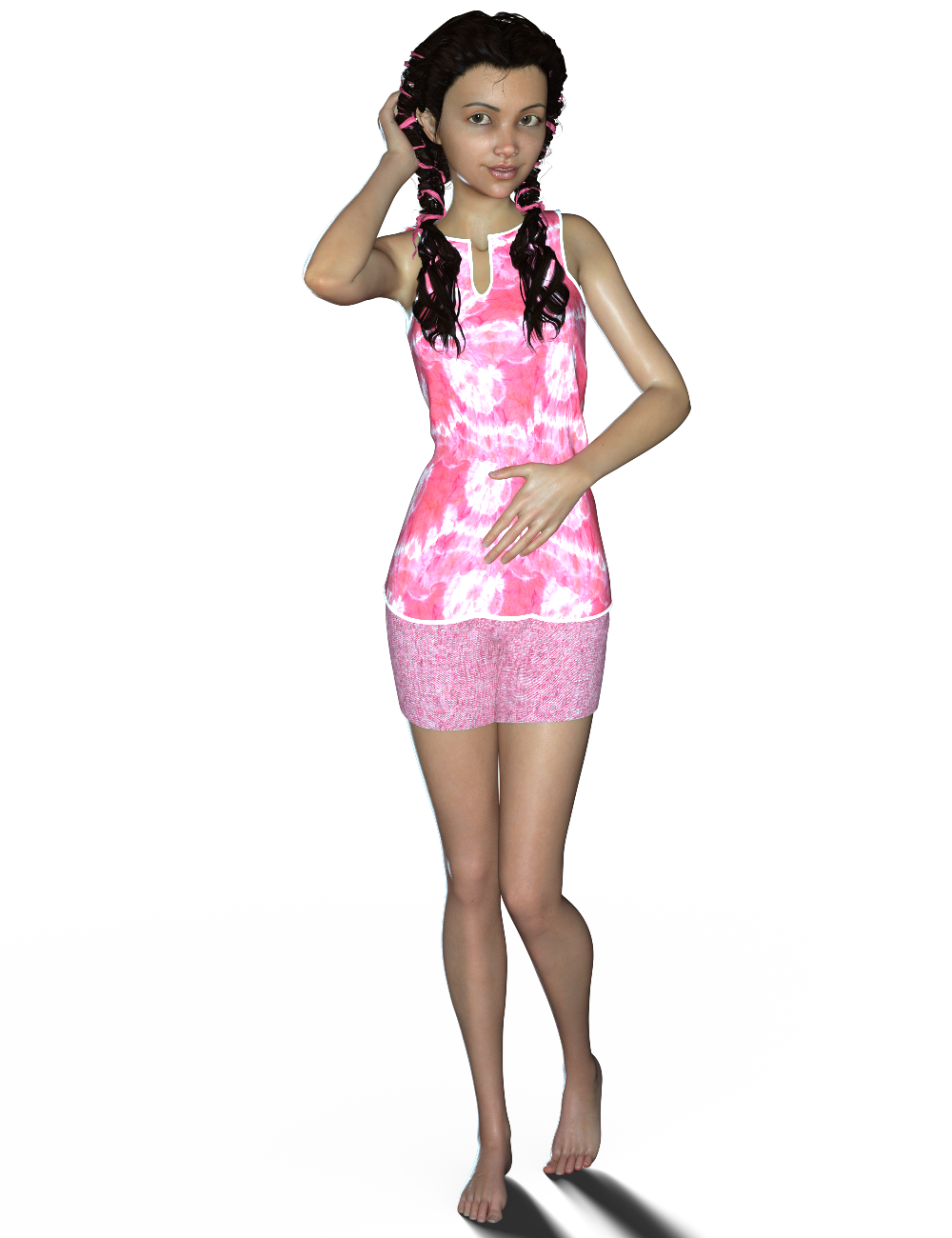
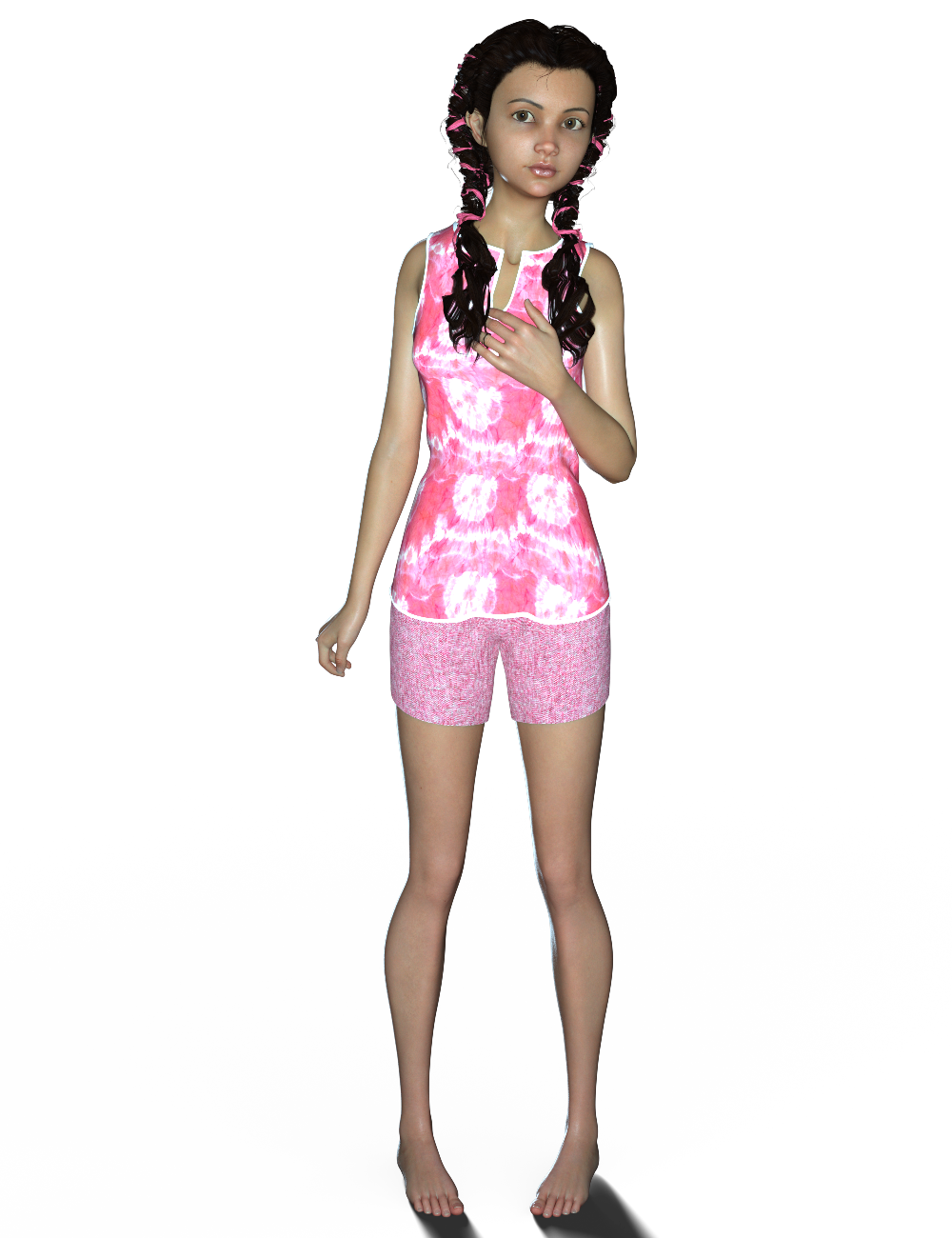
I'm calling her "Lil Sister" for now, until I come up with a name for her. She's using Victoria 8's textures in these renders, as I'm still working on her textures.
Here she is dialled in at 50% with Victoria 8:
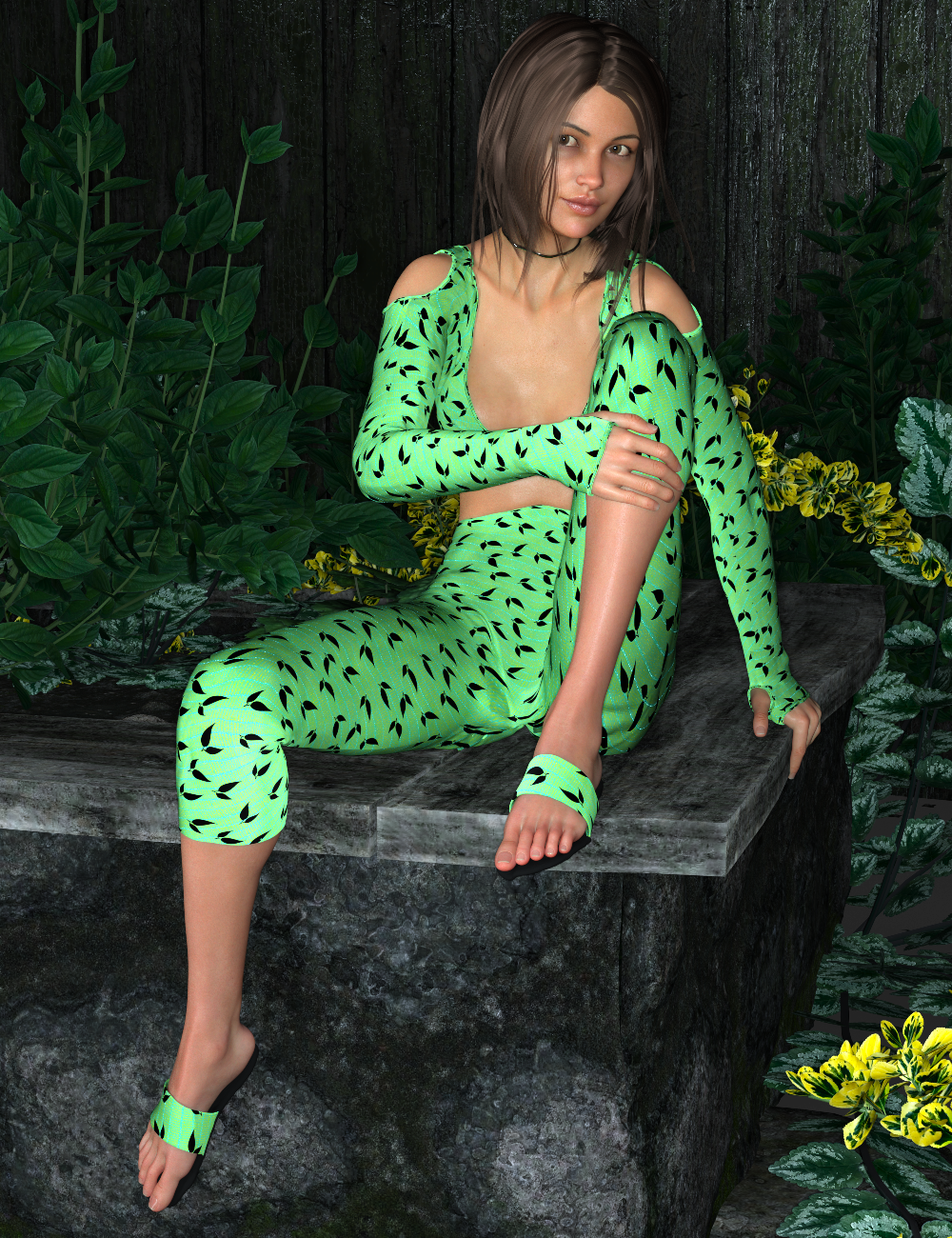
Again, she's rendered with V8's skin textures, as I'm still working on her textures. Textures are HARD! Ahhhh I really wish I could team up with a PA that enjoys doing textures, and I could do the character sculpting. :) I really enjoy creating characters in ZBrush - the texture creation though ....whew, very much a struggle for me. lol I'm learning though and getting better at it! :D
So I might end up submitting Lil Sister first before resubmitting my curvy girl. :) I think Daz might be more interested in a younger character than another adult female. I really like Lil Sister's shape too - I think she's really cute. I just need to work a bit more on her textures.
If you guys know of any good texture tutorials or texture resources, please let me know. :) Or if you know of a PA that enjoys doing textures that would like to team up with someone who enjoys sculpting characters and morphs, please point them in my direction! lol
Ooh, Great morph! I really like her. > I can't wait to see what you do with her textures. Also I totally understand, textures are super hard for me, so I'm trying to learn to make them faster and more realistic right now.
I know of quite a few good texture resources, but unfortunately I didn't bookmark where I've seen them or downloaded them from. When I find them, I will come back here and add them to my post. ,( Sorry about that) As for tutoials, I'm still looking for some myself. XD, Can't seem to find any.
I like your first character alot btw
Anyways, good work with your characters!
Hair Used?Hey all,
Wondering if I could get your help on spotting the hair used in the main product image for this character. I looked at the bottom of the page and "additional products used" and none of them match the look of the hair thats featured on the main image.
https://www.daz3d.com/gwennili-hd-for-victoria-7
Thanks in advance for any help!
-Inky
* closed* RRRR The're ba....ack! Render contestAnd now it's time for the next one: pull #3.
2658 - i13 100 Essential Expressions for Victoria 7
3569 - Hayden for Young Teen
5517 - Dress Code Violation Outfit
596 - Genesis 3 Male(s) Expressions and Face AniBlocksHmm, so all I have to do is have Mike and Vicky sit there, mugging the camera, and we're good? Works for me...!
Um, it turned out to be not quite as simple as that....
Also used:
Preppy for Genesis
Ashe for Genesis (Shoes)
Crazy Male Hair
Belle 6
Skyler Long Hair
FWSA Cole HD for Gianni 7
Adam Hair for Genesis 3 Male(s)
Everyday Casual Outfit for Genesis 3 Male(s)
Carmilla for Victoria 7
Casual Style for Genesis 3 Female(s)
Long Shag Hair for Genesis 3 Female(s)
i13 Steakhouse Environment
i13 Steakhouse Poses
Bijou for Genesis 2 Female (She seems to turn up in a lot of my renders; I wonder why...?)
Leyton Hair
Piratess for Genesis 2 Female(s)
Dinnerware for Iray
MHE: Glasses
Moonshine's Diner Interior II (Yep; there's a Tomalin something in everything I do!)
Diner Food 4Okay, I've wrestled with this damned thing long enough! I aborted the first render after an hour because there was a scaling issue with the food. I aborted the second render after four hours due to an issue with the shaders applied to the glasses. The third render ran for a little over nine hours (pretty much overnight, actually), when the system lapsed into a coma, and I had to restart. I started the fourth render this morning, and after some six hours, it's still saying it's only 1% complete.
Well, screw it! I'm entering it "as-is", graininess and all! Like I said earlier, I'm gonna be dead in thirty years; I don't have time for this crap!
TAG: obanion#03
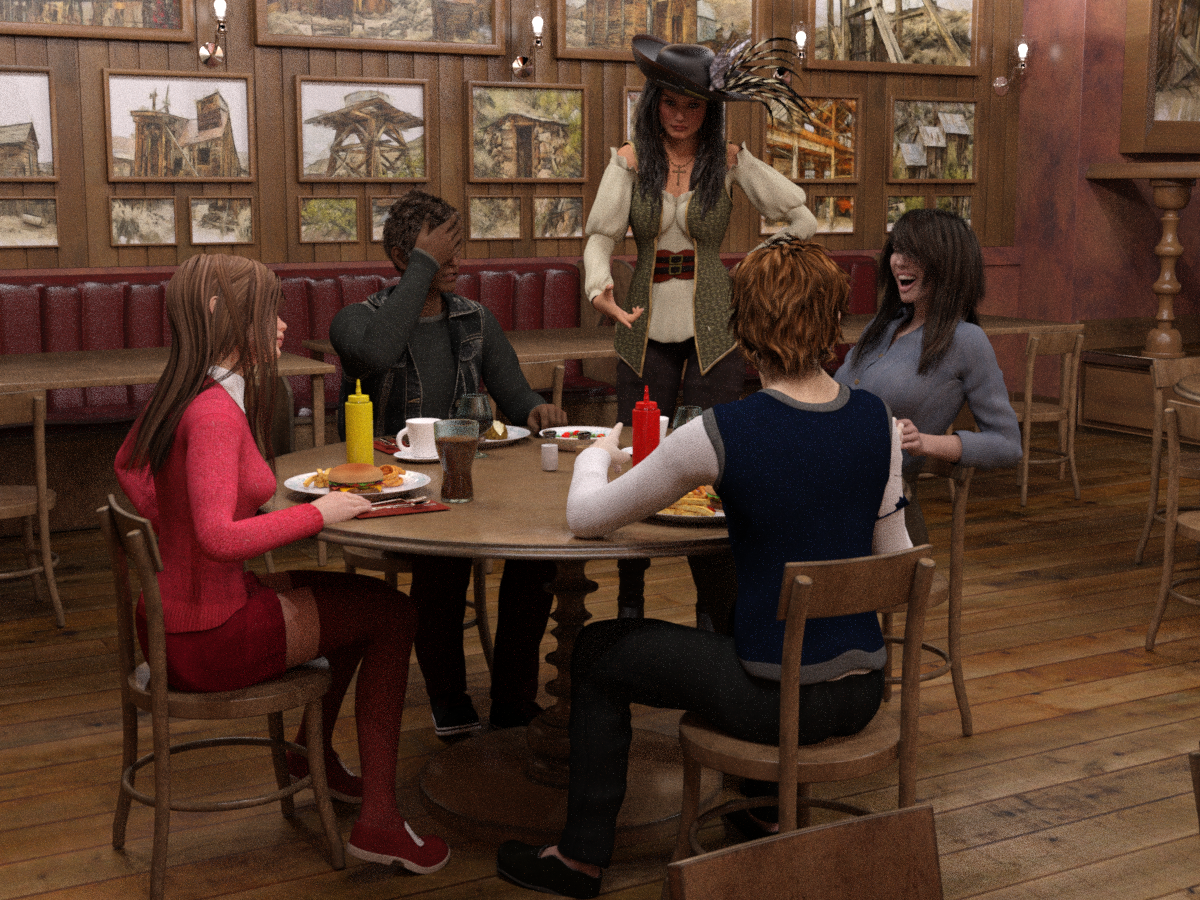
Title: Family Night Out: "Can't Take This Kid Anywhere!"
Back by popular demand, we're celebrating National 'Talk Like a Pirate Day' at the Sizzler Steakhouse!Hayden's parents could always count on him to say or do something to embarrass his family in public; it was practically his superpower! And he did not disappoint, when he told their waitress that she "can walk my plank anytime!" His mother thought it was hysterical -- especially when the server 'returned fire'! His dad..., um, not so much.
Server: "No, thanks, kid. I have this rule: anytime I'm forced to fraternize outside my own species, I always at least try to date UP!"
 Adding geoshell causes IRay viewport render infinite loop?
Posting this one on behalf of my father. Tell me what we're doing wrong here.
Version 4.9.4.117. Windows 10. Dual GTX 1080 GPUs.
1. Start with the default empty scene (except for the Default Camera)
2. Add an instance of Victoria 7 into the scene. (Doesn't seem to depend on the particular character, so why not use the default one.)
3. Add the "anatomical elements" to her.
4. Switch your viewport to "NVIDIA Iray"
After giving Daz time to load up the textures, etc., etc., you get a viewport rendered using Iray. All well and good. Here's where it gets weird.
5. Select the anatomical elements in the scene hierarchy, and then Create >> New Geometry Shell. Select the "Parent to Selected Item" option.
Of course, since the geometry has changed, Daz and Iray have to start over again. But they never seem to get done. Looking at the log files, I see essentially the same set of lines over and over again:
2017-10-02 15:26:00.356 Iray INFO - module:category(IRAY:RENDER): 1.0 IRAY rend info : Updating geometry.
2017-10-02 15:26:00.356 Iray VERBOSE - module:category(IRAY:RENDER): 1.35 IRAY rend stat : Materials memory consumption: 78.4141 KiB (GPU)
2017-10-02 15:26:00.382 Iray INFO - module:category(IRAY:RENDER): 1.0 IRAY rend info : Using OptiX Prime ray tracing (3.9.1).
2017-10-02 15:26:00.382 Iray INFO - module:category(IRAY:RENDER): 1.0 IRAY rend info : Importing geometry.
2017-10-02 15:26:00.411 Iray INFO - module:category(IRAY:RENDER): 1.0 IRAY rend info : Geometry import (1 object with 147k triangles, 1 instance yielding 147k triangles) took 0.029666
2017-10-02 15:26:00.421 Iray INFO - module:category(IRAY:RENDER): 1.0 IRAY rend info : Updating materials.
2017-10-02 15:26:00.425 Iray INFO - module:category(MATCNV:RENDER): 1.0 MATCNV rend info : found 106 textures, 0 lambdas (0 unique)
2017-10-02 15:26:00.429 Iray INFO - module:category(IRAY:RENDER): 1.0 IRAY rend info : Emitter geometry import (1 light source with 2 triangles, 1 instance) took 0.00s
2017-10-02 15:26:00.429 Iray INFO - module:category(IRAY:RENDER): 1.0 IRAY rend info : Updating lights.
2017-10-02 15:26:00.433 Iray INFO - module:category(IRAY:RENDER): 1.0 IRAY rend info : Updating object flags.
2017-10-02 15:26:00.433 Iray INFO - module:category(IRAY:RENDER): 1.0 IRAY rend info : Updating caustic portals.
2017-10-02 15:26:00.433 Iray INFO - module:category(IRAY:RENDER): 1.0 IRAY rend info : Updating decals.
2017-10-02 15:26:00.435 Iray INFO - module:category(IRAY:RENDER): 1.0 IRAY rend info : Allocating 1 layer frame buffer
2017-10-02 15:26:00.436 Iray INFO - module:category(IRAY:RENDER): 1.0 IRAY rend info : Using interactive scheduling, architectural sampler unavailable, caustic sampler disabled
2017-10-02 15:26:00.467 Iray INFO - module:category(IRAY:RENDER): 1.0 IRAY rend info : Rendering with 2 device(s):
2017-10-02 15:26:00.467 Iray INFO - module:category(IRAY:RENDER): 1.0 IRAY rend info : CUDA device 1 (GeForce GTX 1080)
2017-10-02 15:26:00.467 Iray INFO - module:category(IRAY:RENDER): 1.0 IRAY rend info : CUDA device 0 (GeForce GTX 1080)
2017-10-02 15:26:00.467 Iray INFO - module:category(IRAY:RENDER): 1.0 IRAY rend info : Rendering...
2017-10-02 15:26:00.484 Iray INFO - module:category(IRAY:RENDER): 1.33 IRAY rend info : Initializing light hierarchy.
2017-10-02 15:26:00.490 Iray INFO - module:category(IRAY:RENDER): 1.33 IRAY rend info : Light hierarchy initialization took 0.00s
2017-10-02 15:26:00.601 Iray INFO - module:category(IRAY:RENDER): 1.40 IRAY rend info : CUDA device 1 (GeForce GTX 1080): Scene processed in 0.134s
2017-10-02 15:26:00.607 Iray INFO - module:category(IRAY:RENDER): 1.31 IRAY rend info : CUDA device 0 (GeForce GTX 1080): Scene processed in 0.140s
2017-10-02 15:26:00.609 Iray INFO - module:category(IRAY:RENDER): 1.35 IRAY rend info : CUDA device 1 (GeForce GTX 1080): Allocated 2.62379 MiB for frame buffer
2017-10-02 15:26:00.618 Iray INFO - module:category(IRAY:RENDER): 1.38 IRAY rend info : CUDA device 0 (GeForce GTX 1080): Allocated 2.62379 MiB for frame buffer
2017-10-02 15:26:00.619 Iray INFO - module:category(IRAY:RENDER): 1.40 IRAY rend info : CUDA device 1 (GeForce GTX 1080): Allocated 1.65625 GiB of work space (2048k active samples in 0.000s)
2017-10-02 15:26:00.619 Iray INFO - module:category(IRAY:RENDER): 1.31 IRAY rend info : CUDA device 0 (GeForce GTX 1080): Allocated 1.65625 GiB of work space (2048k active samples in 0.000s)
2017-10-02 15:26:00.629 Iray INFO - module:category(IRAY:RENDER): 1.31 IRAY rend info : CUDA device 0 (GeForce GTX 1080): Used for display, optimizing for interactive usage (performance could be sacrificed)
2017-10-02 15:26:00.629 Iray INFO - module:category(IRAY:RENDER): 1.40 IRAY rend info : CUDA device 1 (GeForce GTX 1080): Used for display, optimizing for interactive usage (performance could be sacrificed)
2017-10-02 15:26:00.715 Iray INFO - module:category(IRAY:RENDER): 1.0 IRAY rend info : Updating geometry.Lather, rinse, repeat.
Seems like it sets things up, then decides the geometry has changed, so starts over, but then thinks the geometry has changed, so starts over, ad infinitum. There's some slight variation between the iterations, but it always gets back around to "Updating geometry" and starting over. Doesn't appear to matter whether you start from the NVIDIA Iray mode, or whether you switch out to Texture Shaded and back.
Is there something illegal about parenting a geoshell to the anatomical elements? Or is there something broken with my father's setup?
Isimple Shader System Tutorial Videos [Commercial]I'm using G8F with Cayman's V4 for G8F uv/geograft kit ( https://www.daz3d.com/legacy-uvs-for-genesis-8-victoria-4 ) to allow the use of V4 skins on G8F. Changing the translucency didn't seem to affect anything though. I'll try the +translucency version and see what happens.
/edit
The +translucency version does work, even with the translucency colour set to pure white./edit 2
Alright, after some more fiddling, I've come to the conclusion that it's due to the geograft kit. Even using G8F's default skin, the Iskin works fine, but the second I add in the geograft setup, her own skin turns to white.Talking morphs for Victoria 4 figure?Does anybody know how I can create poses with talking morphs (moving lips, showing inside of mouth)? I would like to create render frames with talking in them.
Is There A Product That Allows Genesis 8 clothing to fit to Genesis 3?Yeah and so many of the items are rehashes.
Yeah, why do we need similar items for the new figures?
So now, just becuase I buy a gen 8 figure I have to fall back off from YEARS worth(s) of purchases and ONLY render (for the time being) clothing that comes out in the first few weeks of Vic 8s' launch?
No way. It's not as if Daz has released a full mix of clothing and accessories or that many of the new products have BOTH figure generations in mind.
Some do and it's appreciated. Would I rather have them separated so I can stick with stuff that adds on to my current library? yes.
And, not to be more of a jerk, but lots of the Victoria 8 figures look a lot like....Victoria 8.
I guess it's early so.......
Variety is on the way.....
i've put the brakes on buying as I really expected a backwards Utility to hit the market a month ago..... certainly didn't think it take this long.
Damn skippy. Well, I'm not even seeing the early 'work in progress' info...
I dunno. Long as the new clothing is going of triggering some other deep-dish discounts, it's worth it to have patience.
------------------------------
But to say on a happy note: Today's Halloween sale is the bomb and I got a free item that I wanted for some time.
AND AND that SHADER is one of those endlessly useful purchases.
Today is a great day for shopping.
Daz 3D is part of

Connect
DAZ Productions, Inc.
7533 S Center View Ct #4664
West Jordan, UT 84084Licensing Agreement | Terms of Service | Privacy Policy | EULA
© 2026 Daz Productions Inc. All Rights Reserved.