-
G9 TOON is so nice ,but I still have some questions...
Leana said:
G9 toon is indeed G9 with a toon shape, and alternate eyes.
You can mix the toon shape with your other G9 morphs but I would recommend not using either of them at 100%. Mada suggested using the anime morph at 30% and a G9 morph at 70%, for example.To render with filament, set the render engine to "viewport" and use the filament style for the viewport.
Thank u !
But how can I render a roadlamp at the park in the night ?
G9 TOON is so nice ,but I still have some questions...G9 toon is indeed G9 with a toon shape, and alternate eyes.
You can mix the toon shape with your other G9 morphs but I would recommend not using either of them at 100%. Mada suggested using the anime morph at 30% and a G9 morph at 70%, for example.To render with filament, set the render engine to "viewport" and use the filament style for the viewport.
Anime Toons and Filatoon Shader Q&ALlola Lane said:
Ok.. I'll join in the fun... been playing with Filament... Does anyone know HOW to do DOF? I can't seem to do it with the camera... I wanted the background blurry to bring out the character more. This is Aiko 5 with a bunch of morphs and expressions.
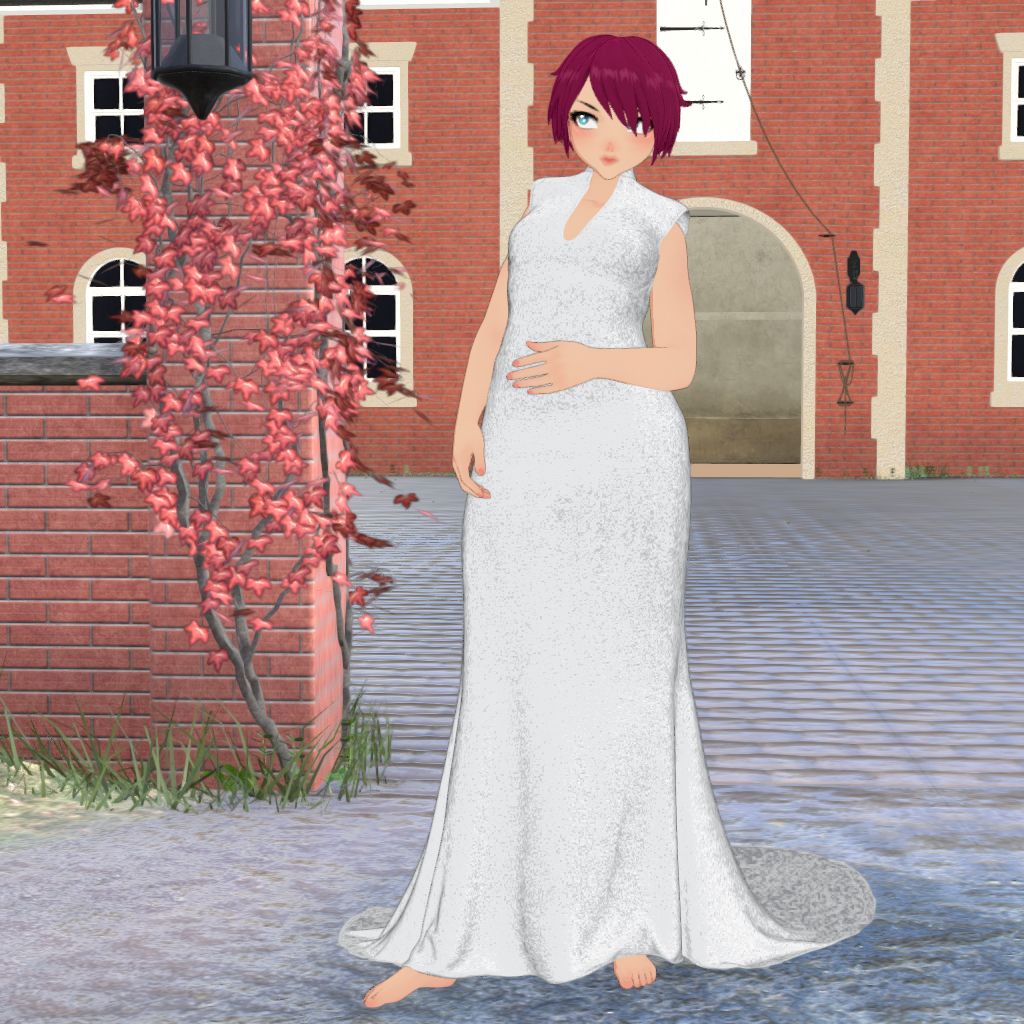
you could try basic depth map maker using iray canvas - theres a run through video on the product page.
AIUTO...CHI CONOSCE L’ITALIANO? PARTE QUATTORDICIKainjy said:
non so se vanno bene con Filament
Ovvio che non funzionano...

Come ti dicevo materiali e shader per un certo motore funzioneranno appieno solo col loro motore.
FilaToon / Cell shaded rendering with Filament3Diva said:
Wonderland said:
I started watching some anime on Netflix and noticed, at least in the particular show I was watching, that the lighting was totally flat. No shading on skin at all. The only shadows were ground shadows. Which makes me feel better because I can't seem to get lighting to work in FilaToon. I tried putting in colored rim lighting and it did nothing. But non-anime comics definitely do have shading so I will have to figure it out. I'm not sure why my lighting doesn't work even if I crank it up...
Can you share a screenshot of everything in your scene tab? Sometimes that can help to narrow down what the issue might be. For instance, you need a Distant Light in the scene, I recommend NOT having an Environment Options Node, NOR a Tonemapper Options node and JUST using the Filament Draw Options node and adjust the settings on the Filament Options Node accordingly.
I'm not on the computer now but basically I was setting it up with a three point lighting like I would in iRay with the light on one side a blue or purple color and the other yellow, orange or green. Nothing seemed to show up. There may have been a little light but no colors.
Anime Toons and Filatoon Shader Q&A3Diva said:
Llola Lane said:
Ok.. I'll join in the fun... been playing with Filament... Does anyone know HOW to do DOF? I can't seem to do it with the camera... I wanted the background blurry to bring out the character more. This is Aiko 5 with a bunch of morphs and expressions.
Lovely render!
I don't think Filament can do Depth of Field. To get the focus off the background and on the figure you can try a "fade out" of the background by making the background surfaces an Emission surface in the Surfaces Tab.
Ok.. I think I understand that... I'll give it a try :) If worse comes to worse I can always render the background and girl separate.. then merge them together... but DOF looks more realistic
FilaToon / Cell shaded rendering with FilamentWonderland said:
I started watching some anime on Netflix and noticed, at least in the particular show I was watching, that the lighting was totally flat. No shading on skin at all. The only shadows were ground shadows. Which makes me feel better because I can't seem to get lighting to work in FilaToon. I tried putting in colored rim lighting and it did nothing. But non-anime comics definitely do have shading so I will have to figure it out. I'm not sure why my lighting doesn't work even if I crank it up...
Can you share a screenshot of everything in your scene tab? Sometimes that can help to narrow down what the issue might be. For instance, you need a Distant Light in the scene, I recommend NOT having an Environment Options Node, NOR a Tonemapper Options node and JUST using the Filament Draw Options node and adjust the settings on the Filament Options Node accordingly.
Anime Toons and Filatoon Shader Q&Aelsephster said:
Elor said:
I'm likely still missing something.
I think I put something like 200000 lumens, but it only started having a visible impact once I got the spotlight close enough:
I ran into the same problem but then I finally found the Ray Length setting under Display was the solution. I have no idea why this is under Display instead of Light, but at least it worked. The default setting is only 2.5, which is very short.
in the Filament Draw environment settings, crank up scene light and distant light as needed
Anime Toons and Filatoon Shader Q&ALlola Lane said:
Ok.. I'll join in the fun... been playing with Filament... Does anyone know HOW to do DOF? I can't seem to do it with the camera... I wanted the background blurry to bring out the character more. This is Aiko 5 with a bunch of morphs and expressions.
Lovely render!
I don't think Filament can do Depth of Field. To get the focus off the background and on the figure you can try a "fade out" of the background by making the background surfaces an Emission surface in the Surfaces Tab.
Anime Toons and Filatoon Shader Q&AOk.. I'll join in the fun... been playing with Filament... Does anyone know HOW to do DOF? I can't seem to do it with the camera... I wanted the background blurry to bring out the character more. This is Aiko 5 with a bunch of morphs and expressions.
UltraScenery - new(er) territory [Commercial]daveso said:
paulawp (marahzen) said:
barbult said:
memcneil70 said:
I think folks are playing with filatoons and rediscovering the 3DL roots.
That is a very astute and interesting observation. Here we are, all excited about essentially regressing a decade.
 Filament is a much faster renderer (Viewport) than 3DL, though, and the outline is interesting.
Not to derail this thread, my only "toonish" interest was in being able to create coloring book page-type images, particularly including USC. One of my coworkers was creating coloring book pages to distribute at work and I offered to help, thinking that I could whip up something from Daz. Never made a single one.
with the new line making capability, would it be possible to create a coloring book page? Using ultrascenery could result in some really interesting coloring work.
The new stuff is only in 4.23 beta, right? I have to admit I'm a little reluctant to upgrade my beta instance, which is still on a somewhat older 4.22.1.x version. It's the only way I can render many/most USC scenes.
ETA: I see that it looks like 4.23 is available for general release. That I will try, not today but soon. I've been a little out of touch the last few days with work stuff.
Anime Toons and Filatoon Shader Q&AMada said:
Mark_e593e0a5 said:
If I undrestand this correctly, the shaders only work in Filament render mode - which is not available at all on Mac up until current 4.22 version. Mac users have been instructed NOT to upgrade to 4.23, so I cannot check if it has been made avilable - suppose it isn't. I really like the look of the shaders, but they seem to be not useable for me. Please tell me I am wrong.
Unfortunately you are correct - but there are work going on behind the scenes to get it out to mac users as soon as possible. The shader relies on filament to work properly.
Well, it's true that they're working behind the scenes to get it out to Mac users, but I've been waiting almost a full four years now for Filament on the Mac and it won't be availble until Daz Studio 5 comes out. I'm not holding my breath.
Thanks for this thread, though, it's exciting to see what's being done for those who can use it.
UltraScenery - new(er) territory [Commercial]paulawp (marahzen) said:
barbult said:
memcneil70 said:
I think folks are playing with filatoons and rediscovering the 3DL roots.
That is a very astute and interesting observation. Here we are, all excited about essentially regressing a decade.
Filament is a much faster renderer (Viewport) than 3DL, though, and the outline is interesting.Not to derail this thread, my only "toonish" interest was in being able to create coloring book page-type images, particularly including USC. One of my coworkers was creating coloring book pages to distribute at work and I offered to help, thinking that I could whip up something from Daz. Never made a single one.
with the new line making capability, would it be possible to create a coloring book page? Using ultrascenery could result in some really interesting coloring work.
Anime Toons and Filatoon Shader Q&ATaoz said:
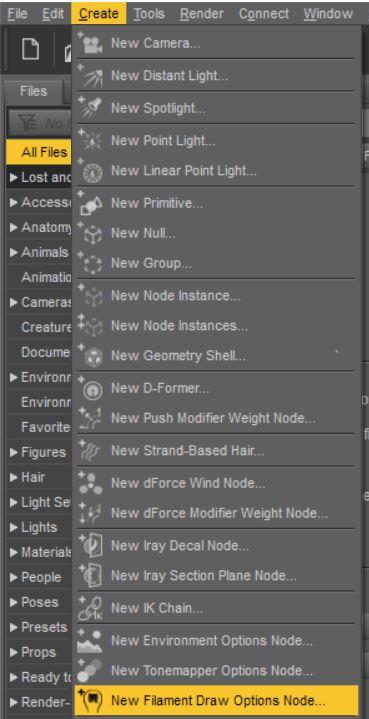
Mmm, not seeing that "Filament Draw Options" node on the Scene tab?
You need to add one from the Create menu.
Anime Toons and Filatoon Shader Q&ATaoz said:
3Diva said:
MarcCCTx said:
Working on some old figures. Can anyone confirm is you reapply a shader, does it resize the black line? I was changing to filadtoon-base to the skin or the hair and it seemed to change the toon-outline's mesh offset to .10 (too small to show.)
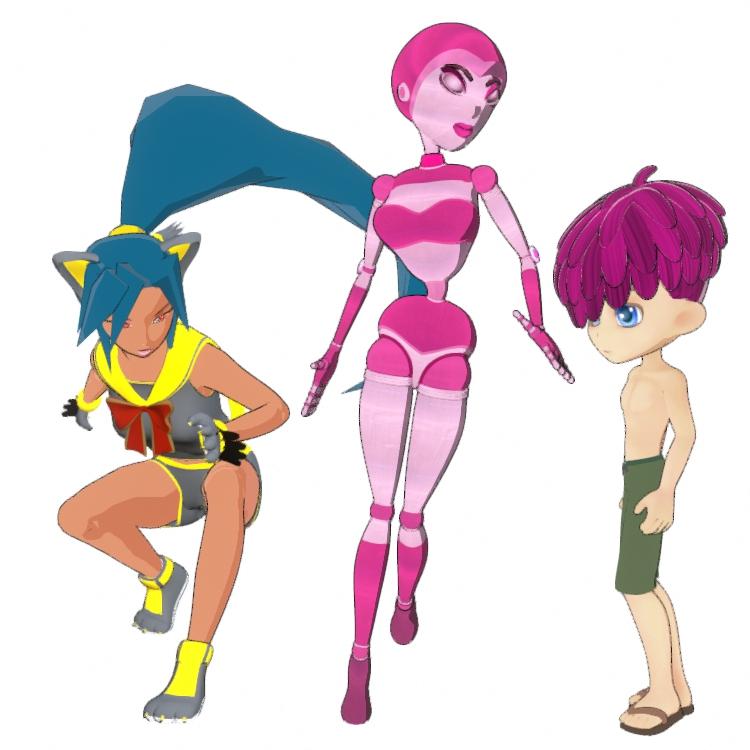
I'm not sure if it reapplies the default line width, but it likely does. One thing that can help with the jaggy lies though is to select the Filament Draw Options node in the Scene Tab and then in the Parameters Tab select "Anti-Aliasing" and increase the sample count. I bump it up to around 75 for mine and it helps smooth the outline.
Mmm, not seeing that "Filament Draw Options" on the Scene tab?
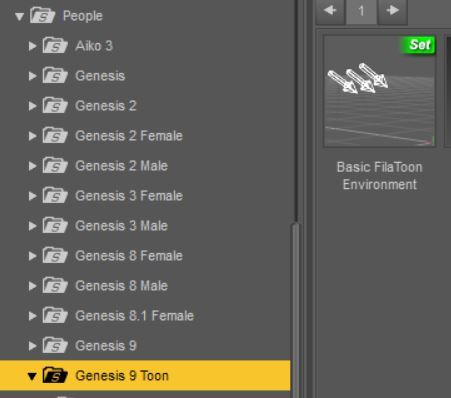
You can load one manually or I believe also one might load when you apply the FilaToon Environment.
Manual load can be done from Create >> New Filament Draw Options Node:
Or from your content library, the FilaToon Environment can be loaded from People >> Genesis 9 Toon >> Basic Filatoon Environment:
 Anime Toons and Filatoon Shader Q&A
3Diva said:
MarcCCTx said:
Working on some old figures. Can anyone confirm is you reapply a shader, does it resize the black line? I was changing to filadtoon-base to the skin or the hair and it seemed to change the toon-outline's mesh offset to .10 (too small to show.)
I'm not sure if it reapplies the default line width, but it likely does. One thing that can help with the jaggy lies though is to select the Filament Draw Options node in the Scene Tab and then in the Parameters Tab select "Anti-Aliasing" and increase the sample count. I bump it up to around 75 for mine and it helps smooth the outline.
Mmm, not seeing that "Filament Draw Options" node on the Scene tab?
UltraScenery - new(er) territory [Commercial]barbult said:
memcneil70 said:
I think folks are playing with filatoons and rediscovering the 3DL roots.
That is a very astute and interesting observation. Here we are, all excited about essentially regressing a decade.
Filament is a much faster renderer (Viewport) than 3DL, though, and the outline is interesting.Not to derail this thread, my only "toonish" interest was in being able to create coloring book page-type images, particularly including USC. One of my coworkers was creating coloring book pages to distribute at work and I offered to help, thinking that I could whip up something from Daz. Never made a single one.
Anime Toons and Filatoon Shader Q&Adaznoob said:
Normally just a lurker here, and maybe I missed this, but I read through the thread and haven't seen the exact issue:
If any outline shader is applied, I get a black, glossy texture over the whole surface. Applies to the character skin as well as clothing. Disabling the outline on the specific surface lets me see the texture again. Used the default toon environment with distant light, filament, etc.
Even tried uninstalling and reinstalling all G9 essentials (3 parts), the 2 G9 default items, etc. via DIM. Same results. Messed with offset in the outline parameters, but it just looks like you're scaling a "shell" over the whole item.
I just use this stuff for fun so no big deal and no lost commissions/work or anything like that. Just wondering what the culprit might be.
Thanks! And otherwise looks really cool! Seeing everyone's renders makes me want to play with this some more.
Are you using the latest version of Daz Studio? It doesn't look right on older versions of Daz Studio. Filatoon also doesn't work with Mac, if you're on a Mac.
Anime Toons and Filatoon Shader Q&Aandolaurina said:
My Filament renders are blurry/pixelated. Anyone else have that problem or know how to fix it? Or is this as good as it gets? See attached.
Did you try adjusting the anit-aliasing: https://www.daz3d.com/forums/discussion/comment/8912036/#Comment_8912036
UltraScenery - new(er) territory [Commercial]memcneil70 said:
I think folks are playing with filatoons and rediscovering the 3DL roots.
That is a very astute and interesting observation. Here we are, all excited about essentially regressing a decade.
Filament is a much faster renderer (Viewport) than 3DL, though, and the outline is interesting.Daz 3D is part of

Connect
DAZ Productions, Inc.
7533 S Center View Ct #4664
West Jordan, UT 84084Licensing Agreement | Terms of Service | Privacy Policy | EULA
© 2026 Daz Productions Inc. All Rights Reserved.