-
FilaToon / Cell shaded rendering with Filament
Umi no Senshi no Ishi said:
thank you Dartanbeck. I'll check out your video when i get home. I'm stuck waiting to get my car worked on on my day off and of course I'm itching to play with this.
I'm also thinking this might be a fun way to get Daz characters into CA5 by reallusion for animating in 2D.
You could try - but I'm wondering why - aside from having the CA5 animtion tools.
Filament in Daz Studio is Fantastic for this. Try it out before getting too huge of a headache trying to make this Daz Studio Optimized system work in something else.
But that's just my two-cents. I mean, hey... if it works... Ultra Cool, right?!!!
Hair makes my Animations lagThere is an eye icon in the Scene tree - find the hair and hide it. The goal is to get he major animation work done without the lag, right?
Once that is done, then unhide the hair, do whatever animation you need on the hair (if needed), then render. If your hair is complex, playback of the animation will be slow. Rendering should not be an issue. Are you using Iray or Filament?
FilaToon / Cell shaded rendering with FilamentHere's the thing - Daz 3D developers have given us a Lot more to work with in the Filament Draw Options as well as this ingenius new shader and figures setup.
For a real Anime/Toon/Manga look, I find it best to start with the Toon presets - like Base Anime Male or Female, Vicky 9, etc., and work out the changes from there.
The Anime Anatomy pieces that were skillfully developed for them really make the whole thing work Very VERY well. Those freaking Eyes!!!! :)
That said, seeing how it all works, converting our favorite actors from any generation will not only be a fairly simple process - but it's an Amazing amount of fun!
Just remember that we have a "Save" option and a "Save As" option. Swapping to entirely new things does come with its whole learning curve and we're bound to try things that just don't work to our liking.
Load the last favorite save or start over - this system is Hugely Powerful!!!
We can go Waaaaay beyond just Anime/Manga with this. We can make comic characters, props and envirnoments in a multitude of styles.
Oh... and if your stuff has any illumination... don't forget to scroll to the bottom of the Filament Draw Options settings to find the Bloom slider!
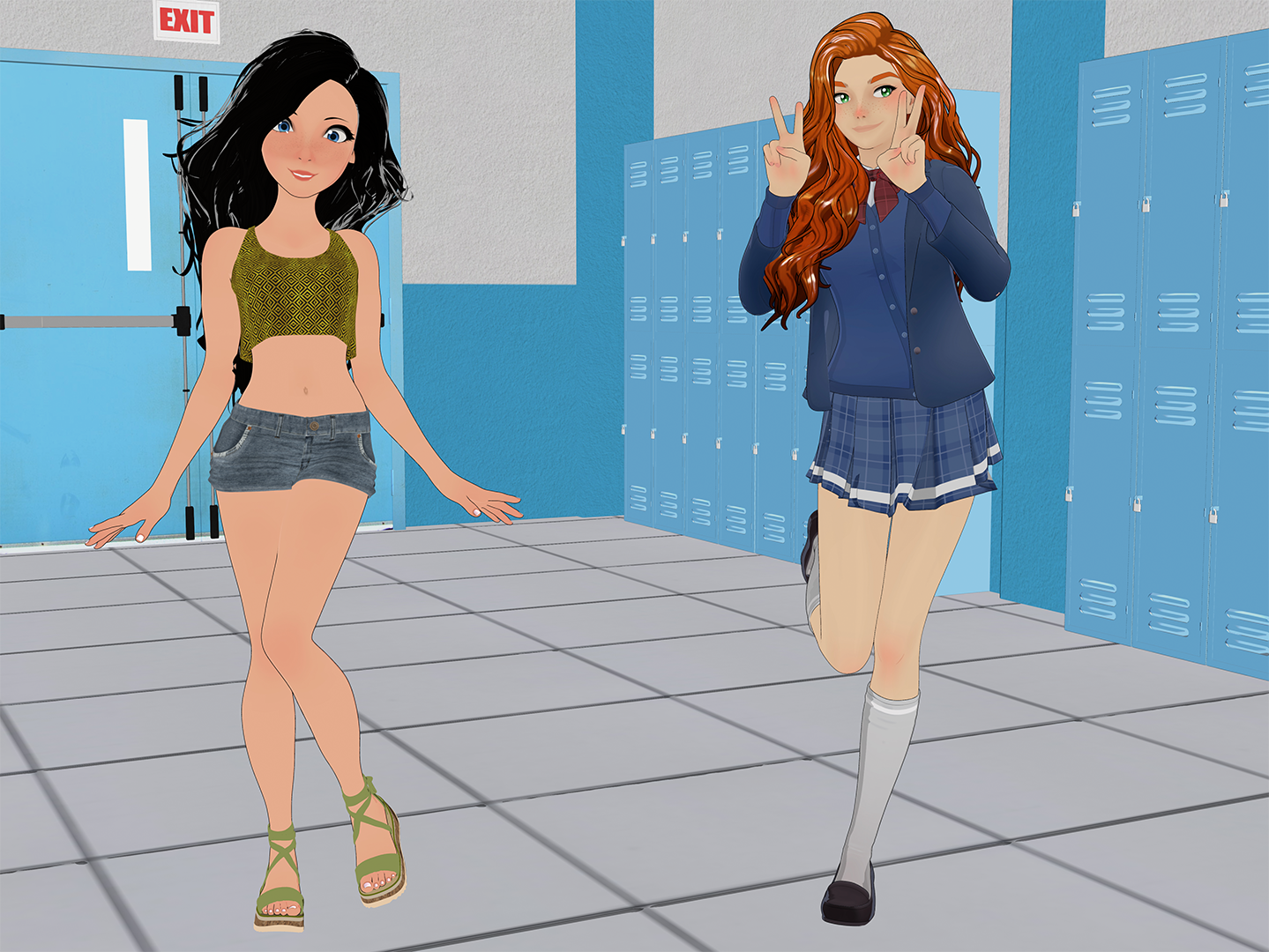
FilaToon / Cell shaded rendering with FilamentI'm an absolute newb when it comes to filament.
But I tried anyway to adapt some of the postwork techniques I use for my typical comic work.
Also, I wanted to see what a converted G9 toon would like compared to Vicky 9.
The first one is the plain Filament render the second one is my first shots in Ps with it.
 Anime Toons and Filatoon Shader Q&A
I'm excited for this. I liked using Filament before, except for the hair problems. I would set the opacity maps for hair on none, and the hair would render, but then you'd have semi-realistic skin textures with blocky, cartoon-looking hair.
FilaToon / Cell shaded rendering with FilamentTorquinox said:
The Tom shade gives a good reason to take a look at filament. I like the idea of filament, especially its speed. Would be nice if it could be more all around capable, not trip on little things like transparency.
Something cool that I've discovered -
When I convert things like Rosie 8.24 to FilaToon, I deselect anything that's supposed to remain transparent - like the cornea and eye moisture, then convert.
I still get my overall Toon outline
If clothing looks best with a touch of translucency, etc., I don't convert it.
Turns out pretty darned nice!
FilaToon / Cell shaded rendering with FilamentUmi no Senshi no Ishi said:
This looks great. Can't wait to try it. Ironicallly i was playing with the iray toon render using canvases yesterday after discovering it existed.
Question, as i've never played with filament. Does it have a canvas type function like iray? I'm guessing not.
What I'm thinkin is it might look cool to use this shader then use an AO render from the toon iray to add some depth and layer them in PS.
Anyone have any feedback?
It may not have those options, but since it renders straight from the viewport, it would work Great for what you want to do!
An example being all of the sweet new options in the Filament Draw Options settings. There's a LOT in there.
Make a preset for yourself for each of the different passes you'd like to run - so that any (Any) scene you want to run in this way, just load, get it all set up, then apply This preset (Filament Draw Options) and run that pass - load That preset and run that, and so on.
In my video you'll see that I've converted entire environments.
Running various 'passes' using different settings would be an absolutle Blast to play with!
I do animation work, so I use Fusion instead of PhotoShop, but the principles behind it are exactly the same.
FilaToon / Cell shaded rendering with FilamentThis looks great. Can't wait to try it. Ironicallly i was playing with the iray toon render using canvases yesterday after discovering it existed.
Question, as i've never played with filament. Does it have a canvas type function like iray? I'm guessing not.
What I'm thinkin is it might look cool to use this shader then use an AO render from the toon iray to add some depth and layer them in PS.
Anyone have any feedback?
FilaToon / Cell shaded rendering with FilamentThe Tom shade gives a good reason to take a look at filament. I like the idea of filament, especially its speed. Would be nice if it could be more all around capable, not trip on little things like transparency.
FilaToon / Cell shaded rendering with Filamentmidgard229 said:
TesseractSpace said:
Yeah, some kind of scene-wide shader conversion script would help a lot. Hopefully one is in the works.
You can use the general shader like a normal shader. Select multiple surfaces then apply. General toon shader and it should work. Sometimes it will miss some items and you have to reslect them and try again. Overall it works almost on anything that is an actual mesh, just nothing like vdb or opacity mapsTrue, but a script could help with having the shader a bit more tuned based on the whatever the original shader was. Something like the RSSY 3delight and Iray to Filament converter
Anime Toons and Filatoon Shader Q&AI never used Filament so I'm wondering what steps are required to switch any existing scene from iRay to Filament?
Is there a script? Do I have to change all the shaders?
Are the official instructions from DAZ hidden somewhere?
The Mac FAQRod Wise Driggo said:
- will Studio Premier have feature parity between Win and Mac? E.g. filament is a thing we are waiting for since ages or was that recently implemented?Filament is still not available for Mac.
- will all the ManFriday plugins be available for Mac and when?
From what I've read, that was the plan.
- is that new FilaToon-Thing available for Mac at all or is it limited to 4.23, which is of course not yet running properly on Mac
It uses filament, so not yet.
The Mac FAQinquire said:
Rod Wise Driggo said:
OK guys, guess this is finally the right place for my questions. So DAZ is talking a lot about Premier. And I am thinking about subscribing.
I was asking about the ManFriday plugins (like dForce Assistant or RenderQueue) which I was always interested in but which have been Win Only. One day after that I had an orange banner - just one day - stating that Mac users will get full plugin functionality but should not download Studio 4.23 at the moment.Well, Studio Premier is a vital part of the whole Premier thing, but...
- will Studio Premier have feature parity between Win and Mac? E.g. filament is a thing we are waiting for since ages or was that recently implemented?
- will all the ManFriday plugins be available for Mac and when?
- when to expect a first public version of 4.23 for Mac. I mean if I would subscribe Premier today, how many months would I pay for something I cannot fully use?
- is that new FilaToon-Thing available for Mac at all or is it limited to 4.23, which is of course not yet running properly on Macand finally
- when can we finally expect a real native Apple Silicon version of studio. It's ages since the M1 was released.
what is the Fla-Toon Thing?
The Mac FAQinquire said:
Rod Wise Driggo said:
OK guys, guess this is finally the right place for my questions. So DAZ is talking a lot about Premier. And I am thinking about subscribing.
I was asking about the ManFriday plugins (like dForce Assistant or RenderQueue) which I was always interested in but which have been Win Only. One day after that I had an orange banner - just one day - stating that Mac users will get full plugin functionality but should not download Studio 4.23 at the moment.Well, Studio Premier is a vital part of the whole Premier thing, but...
- will Studio Premier have feature parity between Win and Mac? E.g. filament is a thing we are waiting for since ages or was that recently implemented?
- will all the ManFriday plugins be available for Mac and when?
- when to expect a first public version of 4.23 for Mac. I mean if I would subscribe Premier today, how many months would I pay for something I cannot fully use?
- is that new FilaToon-Thing available for Mac at all or is it limited to 4.23, which is of course not yet running properly on Macand finally
- when can we finally expect a real native Apple Silicon version of studio. It's ages since the M1 was released.
what is the Fla-Toon Thing?
The toon stuff, which is suitable for Filament
The Mac FAQElor said:
Mada, in her FAQ about Fila-toon, confirmed that currently Fila-toon won't work on Mac, regardless of the version:
Mada said:
Mark_e593e0a5 said:
If I undrestand this correctly, the shaders only work in Filament render mode - which is not available at all on Mac up until current 4.22 version. Mac users have been instructed NOT to upgrade to 4.23, so I cannot check if it has been made avilable - suppose it isn't. I really like the look of the shaders, but they seem to be not useable for me. Please tell me I am wrong.
Unfortunately you are correct - but there are work going on behind the scenes to get it out to mac users as soon as possible. The shader relies on filament to work properly.
About your other questions: Manfriday's plugins should work with the most recent public beta version (OBJ Companion and Seamster do, it's the only ones I have from MF but they were prevented to load by the same bug, a bug that Daz fixed in Daz Beta 4.23.0.3). If you don't want to install beta version, you'll have to wait for a public release based on at least Daz Beta 4.23.0.3.
I don't know when a new public release will be made available, but hopefully soon, especially because it should also include changes made by Daz to improve the stability of Daz Studio on Mac OS Sonoma and later (which would allow me to finally update my own Mac).
Regarding a native Apple Silicon version, your guess is as good as anyone else guesses and AFAIK, no one in the known has publically wrote something on the subject since I started using Daz Studio last year.
Thanks for the info. Well I am already on Sonoma and kind of live with the instability of DAZ Studio at the moment:
- Don't use Menus, especially nested ones as they are doomed.
- Access scripts not via menus but smart content and double-click.
(not that this makes any sense but it's a way to use things live look@this and dforce2morph without killing studio out of the sudden all the time)
- Save often, really often. And even more often.
It is really funny that I pay this company loads of money for content when they still treat mac users like customers second third fouth class.Anime Toons and Filatoon Shader Q&AMake sure you're using the filament renderer, anything else will show up as black
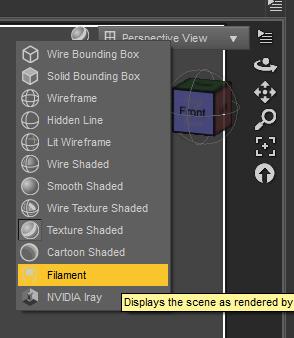
Also make sure you're not clicking on the geoshell, but on the prop. The geoshell base colour is black. Once you added the outline apply one of the presets depending on the material you're using. If you're using armour I assume it would be metallic. Turn up the environment weight on the filatoon shader to make it more or less metallic.
Anime Toons and Filatoon Shader Q&AFantastArt said:
Ok, maybe I'm blind, but please tell me how I switch to Filament Render Mode...I can't find it...
It's where you switch between view modes, like Iray preview, texture shaded, wire shaded etc. Filament is the one with the lightbulb icon.
The Mac FAQRod Wise Driggo said:
OK guys, guess this is finally the right place for my questions. So DAZ is talking a lot about Premier. And I am thinking about subscribing.
I was asking about the ManFriday plugins (like dForce Assistant or RenderQueue) which I was always interested in but which have been Win Only. One day after that I had an orange banner - just one day - stating that Mac users will get full plugin functionality but should not download Studio 4.23 at the moment.Well, Studio Premier is a vital part of the whole Premier thing, but...
- will Studio Premier have feature parity between Win and Mac? E.g. filament is a thing we are waiting for since ages or was that recently implemented?
- will all the ManFriday plugins be available for Mac and when?
- when to expect a first public version of 4.23 for Mac. I mean if I would subscribe Premier today, how many months would I pay for something I cannot fully use?
- is that new FilaToon-Thing available for Mac at all or is it limited to 4.23, which is of course not yet running properly on Macand finally
- when can we finally expect a real native Apple Silicon version of studio. It's ages since the M1 was released.
what is the Fla-Toon Thing?
Anime Toons and Filatoon Shader Q&Aainm.sloinneadh said:
FantastArt said:
Ok, maybe I'm blind, but please tell me how I switch to Filament Render Mode...I can't find it...
There's a scene file in the starter essentials that'll set the environment up for you. You can switch between iRay and Viewport rendering in the render settings tab. For viewport rendering, make sure your viewport is set to filament. I think that's how it works.
sorry but is this written somewhere? I still can't find this. How did you know?
Anime Toons and Filatoon Shader Q&AFantastArt said:
Ok, maybe I'm blind, but please tell me how I switch to Filament Render Mode...I can't find it...
There's a scene file in the starter essentials that'll set the environment up for you. You can switch between iRay and Viewport rendering in the render settings tab. For viewport rendering, make sure your viewport is set to filament. I think that's how it works.
Daz 3D is part of

Connect
DAZ Productions, Inc.
7533 S Center View Ct #4664
West Jordan, UT 84084Licensing Agreement | Terms of Service | Privacy Policy | EULA
© 2026 Daz Productions Inc. All Rights Reserved.