-
Anime Toons and Filatoon Shader Q&A
I feel like a newbie all over.
I loaded the new Vicky 9 and she comes in all black?
I've got 4.23
Filament is on
Render to viewport
No idea what's going on.
There's Always Another Sale Thread -- Discussions Only Pt 3daveso said:
rokkr said:
First lesson for Premier members learned the hard way: never use your Free Character Bundle coupon at the beginning of the month...
well, it appears useless to me. i dont need an anima cartoon character.-- especially when it appears some of the stuff will only work while a premier member, and it needs to be downloaded/installed through smart content. not happening for me.
Nah... You don't even need to be Daz+ member. It's all shipped in the Daz 4.23 (.1 also, I guess) and the Genesis 9 Starter Essentials update (for the G9 Base Anime characters and their add-ons, materials, etc., but the shaders are in the Default Resources).
EDIT: and there's also the new and improved Filament Draw Options Node in the create menu (which, of course, works not only for toon filamente renders, but for any filament render and, also, the preview).
Anime Toons and Filatoon Shader Q&AI'm almost a Filament noob but I lover anime ~ so I converted a scene with FilaToon shader but I'm a bit lost and have a couple of questions. Dear Filament veterans, pls help !
Firstly, I don't want to make the char. look too toony, as well as all wearables, env. / props, etc. so I didn't use G9 toon skin mat. presets but just converted G8F's skin texture ~~ I know they're different...
- Q1: does Filament support Spotlight ? Why it looks weird with splotlight ? (ss1) If I crank up Lumen, it looks even worse ! (ss2)
- Q2: how to make soft shadow on the figure, it looks too harsh. With a distant light in the scene, I made a spotlight a mesh light with Disk + Height as usual, the shadow on the face is still harsh. (ss3) It's totally different from Iray render (ss4) Besides, there's meant to be a shadow on some area on char's face with that spotlight, but there isn't ~~
- Q3: as for Outline shell, why I cannot see outline in some area... like the outline on the hoodies body, on the hair sides... (ss5) And the outline is not so smooth, like sort of dot lines ( in the render...).
- Q4: Opacity on the hair cards doesn't work . Is there any good way to make hair a bit transparent ?
- Q5: Depth of Field doensn't work in Filament at all ! Is that true ?
Many thanks in advance !
Anime Toons and Filatoon Shader Q&Anynico_8c2302db09 said:
Mada said:
Mark_e593e0a5 said:
If I undrestand this correctly, the shaders only work in Filament render mode - which is not available at all on Mac up until current 4.22 version. Mac users have been instructed NOT to upgrade to 4.23, so I cannot check if it has been made avilable - suppose it isn't. I really like the look of the shaders, but they seem to be not useable for me. Please tell me I am wrong.
Unfortunately you are correct - but there are work going on behind the scenes to get it out to mac users as soon as possible. The shader relies on filament to work properly.
I'm heartbroken, this shader is everything i've wanted. 2024 continues to keep on giving.
Buy a PC for it. You don't even need an expensive graphic card for it. Filament is all CPU/RAM rendering. Just did my first test now, 3840x2160 on my laptop with only 16GB and it rendered almost instantly. I bet you can get a good desktop with, like, 64GB ram or more and a good processor for less than $500 bucks (even less, depending on where you live). I got one last year for those toon experiments (filament and 3Delight) and paid about this. I know Mac users are attached to it, but if this shader is all you've dreamed of, maybe it's worth it.
Let's appreciate/discuss today's new releases - more ongoinger threadYeah the filament rendering is a massive selling point for these new shaders. I've experimented with many of the older cell-shading and line renderers and they were just too much work. I've been creating a lot of assets for a project I'm working, resigned to a more realistic, longer rendering time. The speed of the filament shaders and the ease of applying them now has me rethinking what I want to do with the project style-wise.
Anime Toons and Filatoon Shader Q&AMada said:
Mark_e593e0a5 said:
If I undrestand this correctly, the shaders only work in Filament render mode - which is not available at all on Mac up until current 4.22 version. Mac users have been instructed NOT to upgrade to 4.23, so I cannot check if it has been made avilable - suppose it isn't. I really like the look of the shaders, but they seem to be not useable for me. Please tell me I am wrong.
Unfortunately you are correct - but there are work going on behind the scenes to get it out to mac users as soon as possible. The shader relies on filament to work properly.
I'm heartbroken, this shader is everything i've wanted. 2024 continues to keep on giving.
Anime Toons and Filatoon Shader Q&AHighElf said:
I still have trouble with the outlines.
On some items I get them to work quite nicely, like in the fruit bowl. On others I can do what I want, they appear to be very slim., like with the stools. Also, the shading isn't there yet. Currently, I'm thinking of doing shading in postwork with a dedicated. Or do I don't see anything "obvious" that would add basic shading to the scene? Filament is a book with seven seals to me right now.

Growing pains, my friend!
A lot of how we get cool shading out of FilaToon with all of the new Filament Draw Options comes from lighting - how we place them, which lights we use, and how we set them up.
At the beginning of this video we see my current lighting rig setup.
One Distant Light and three Spot Lights
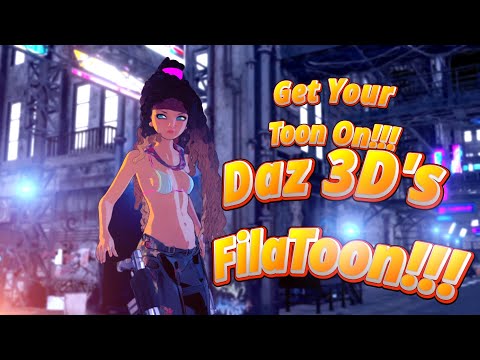
(EDIT: Actually you can see it without even playing the video - this image on the video's thumbnail is what I'm talking about below)
The yellowish shading from the left is a bit of a cascading rim light. The highlight on the right is a key light. The third spot light is pretty much where the camera is pointing at the character, and is set very slightly - just to help offset what the Distant Light is doing, which is the strongest of them all.
When we load a Base Anime figure, they automatically turn the Headlight "On" in Filament, so that we can see it beautifully no matter what else is going on in the scene. However, for FilaToon to really shine, we must add at least a Distant Light to the scene. At this point, you'll notice that where it is and how it's facing is less important than the fact that it's in there.
Now we can go to the Filament Draw Options and fing the Headlamp slider and turn it off.
Once that's done, we can truly paint our Anime/Toon look wonderfully using whatever type of lights we feel most comfortable using.
I begin by setting the look using the setting of the lights themselve - leaving the Filament Scene and Distant light sliders in their default state. This way I can truly hone how I want the lights to affect the scene.
Anime Toons and Filatoon Shader Q&AOso3D said:
HighElf: Outline uses a geoshell. Increase the Mesh Offset to make thicker outlines.
Be sure the light source is set to shadows: raytrace (rather than default of off)
Meanwhile, someone asked 'can you apply the shader to anything?' and here's one of the oldest assets I own (it rendered in maybe 5 seconds?)
Oh boy. So simple. Yep, now the outlines are solved. thank you.
Is there a good tutorial or documentation for Filament? I guess I will have to learn how lighting setups can be realized in that engine. Otherwise, I have to do the shading manually in Ps.
Anime Toons and Filatoon Shader Q&AI still have trouble with the outlines.
On some items I get them to work quite nicely, like in the fruit bowl. On others I can do what I want, they appear to be very slim., like with the stools. Also, the shading isn't there yet. Currently, I'm thinking of doing shading in postwork with a dedicated. Or do I don't see anything "obvious" that would add basic shading to the scene? Filament is a book with seven seals to me right now.
Let's appreciate/discuss today's new releases - more ongoinger threadI picked up the new bundles today and have been very impressed with them. The cell shading style works with other assets and it's great to have a different style. The anime morphs are well done and can be used with other models, even Face Transfers.
The best part? Because you need to render the filament style in your active viewport, the renders are instant!
Question regarding updates in DIM and DS 4.23You can install the latest essentials and default resources, the only thing is that you won't be able to use the new filament options without 4.23 if I understood it correctly.
With the essentials and defualt updates you have more morphs and shapes and other things you can use with 4.22
Anime Toons and Filatoon Shader Q&Ajoanna said:
Shimrian said:
I don't have Filament in my Shaders in Smart Content. I'm using the lastest Daz Studio 4.23 public build (beta). I do have the new Base Anime figures in the G9 Starter Essentials.
Did you check the shaders section of the smart content? They are there for me, in the Daz Default resources section. They do not appear when you try to search for them, only when you manually navigate to them.
Edit: Maybe try reinstalling Default Resourcer then?
That did it! I uninstalled Default Resources for DAZ studio 4.23+ and reinstalled them. The shaders are there now!
Anime Toons and Filatoon Shader Q&AShimrian said:
I don't have Filament in my Shaders in Smart Content. I'm using the lastest Daz Studio 4.23 public build (beta). I do have the new Base Anime figures in the G9 Starter Essentials.
"Filatoon"
I never use Smart Content pane, so I'm of no help there. But they're under:
Shader Presets > Filatoon
Inside Filatoon are various other presets we can use!
Anime Toons and Filatoon Shader Q&AShimrian said:
I don't have Filament in my Shaders in Smart Content. I'm using the lastest Daz Studio 4.23 public build (beta). I do have the new Base Anime figures in the G9 Starter Essentials.
Did you check the shaders section of the smart content? They are there for me, in the Daz Default resources section. They do not appear when you try to search for them, only when you manually navigate to them.
Edit: Maybe try reinstalling Default Resourcer then?
FilaToon / Cell shaded rendering with FilamentDid you see the new Filament Options?
FilaToon / Cell shaded rendering with FilamentDartanbeck said:
Torquinox said:
The Tom shade gives a good reason to take a look at filament. I like the idea of filament, especially its speed. Would be nice if it could be more all around capable, not trip on little things like transparency.
Something cool that I've discovered -
When I convert things like Rosie 8.24 to FilaToon, I deselect anything that's supposed to remain transparent - like the cornea and eye moisture, then convert.
I still get my overall Toon outline
If clothing looks best with a touch of translucency, etc., I don't convert it.
Turns out pretty darned nice!
Cool! Translucency is another kettle of fish - That involves subsurface scattering and becomes too render-intensive for something that's supposed to work in real time. I'd be very happy if Filament could handle mundane opacity maps. Filament doesn't know what to do with those! At least that's my observation. And I like opacity maps. But hey, a decent filament-based toon shader is a very nice bonus for DS.
Anime Toons and Filatoon Shader Q&AI don't have Filament in my Shaders in Smart Content. I'm using the lastest Daz Studio 4.23 public build (beta). I do have the new Base Anime figures in the G9 Starter Essentials.
Anime Toons and Filatoon Shader Q&Aesha said:
Here are some experiments:
This is my Toon Dining Room (https://www.daz3d.com/toon-dining-room) with its default Iray shaders:
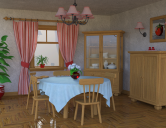
The same scene rendered in Filament:
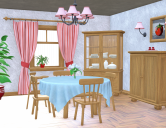
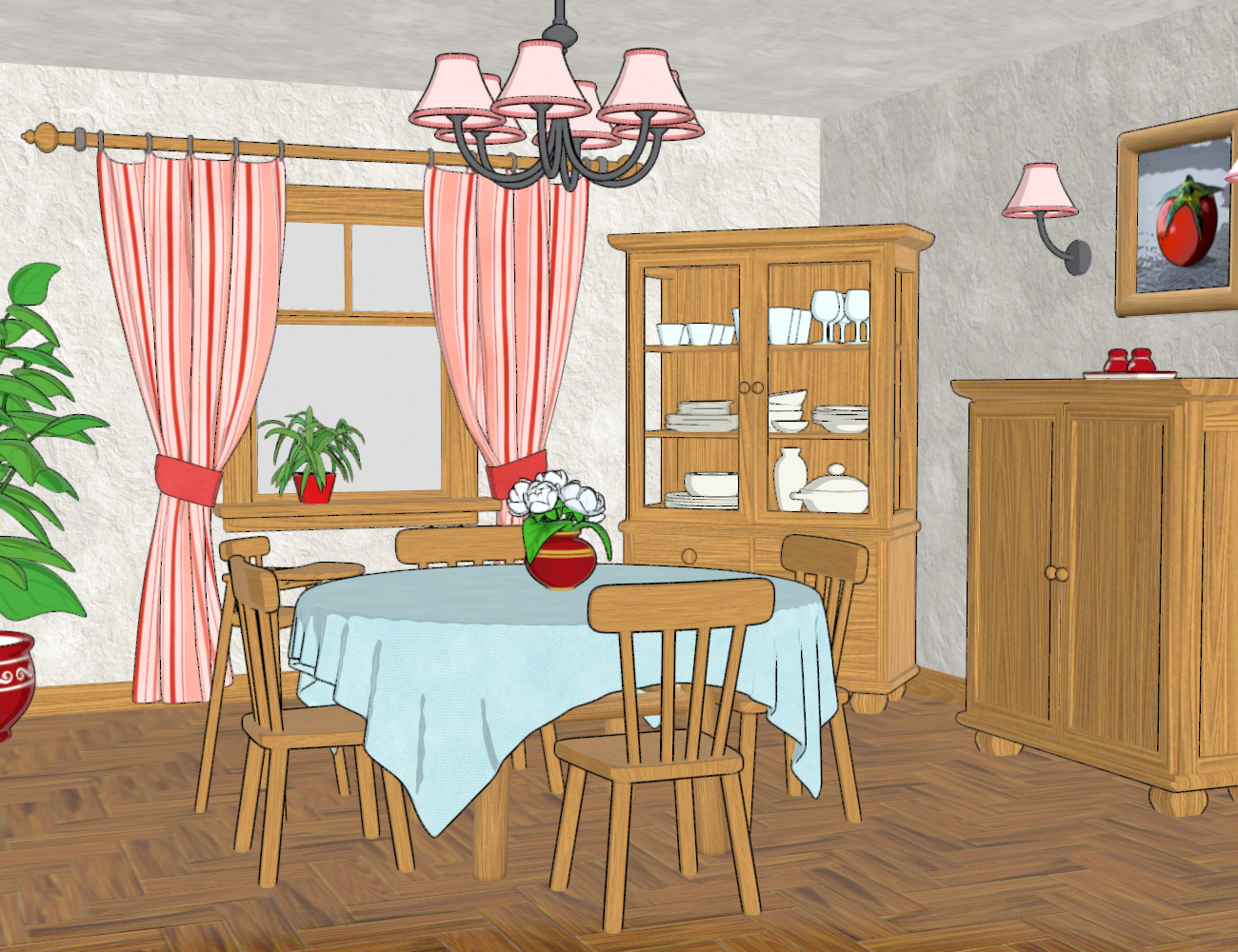
And here rendered in Filament, with the Toon Shader and Outlines applied but without major tweaks:
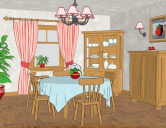
This is pretty much out of the box.
I only switched off the outline for the glass parts in the window and the cupboard doors because those went completely black. I also set the outline offset to 0.5 (default is 0.1 which was barely noticeable).
As you can see, it still needs a little more work; I'd need to play with the ambient and rim settings and tweak the lighting to get a better result. I should also move the furniture up a little so the outline shows at the bottom, too.
I'd also need a different wood texture, I think, for a more toonish look.But as it is, it gives decent results out of the box, a solid starting point for further tweaks.

This is Fantastic, Esha!!! Very nice!
 Anime Toons and Filatoon Shader Q&A
Ok, found them. In smart content, Shaders > Filament > Toon. Hopefully that helps everyone get to where they are in whatever content manager they use inside of Daz. They're bundled under the Daz Default Resources product.
Anime Toons and Filatoon Shader Q&AHere are some experiments:
This is my Toon Dining Room (https://www.daz3d.com/toon-dining-room) with its default Iray shaders:
The same scene rendered in Filament:
And here rendered in Filament, with the Toon Shader and Outlines applied but without major tweaks:
This is pretty much out of the box.
I only switched off the outline for the glass parts in the window and the cupboard doors because those went completely black. I also set the outline offset to 0.5 (default is 0.1 which was barely noticeable).
As you can see, it still needs a little more work; I'd need to play with the ambient and rim settings and tweak the lighting to get a better result. I should also move the furniture up a little so the outline shows at the bottom, too.
I'd also need a different wood texture, I think, for a more toonish look.But as it is, it gives decent results out of the box, a solid starting point for further tweaks.
Daz 3D is part of

Connect
DAZ Productions, Inc.
7533 S Center View Ct #4664
West Jordan, UT 84084Licensing Agreement | Terms of Service | Privacy Policy | EULA
© 2026 Daz Productions Inc. All Rights Reserved.