-
November 2017 - Daz 3D New User Challenge - Materials
Textures/materials good 'challenge' since I’m having trouble with them. ; )
Couple of thumbnails...
"Darius & Freinds"
“Garret” and the cat look horrible. Skin (and fur) looks plastic & cheesy compared to updated Darius & Vicky 8. (Grateful to a couple of members here who helped me correct Darius, or would’ve been a return.)
Goals if decide to pursue:
1.) Correct skin on Garret so it looks more like.. Skin & not plastic.
2.) Have cat’s fur look more like hair & not a wax cat mannequin!
3.) Learn how to make things like sunglasses semi-transparent while still being reflective.
"50's Advert"
Second thumbnail might need a bit of background. Came across a vintage calendar at an estate sale. “Bryant Plumbing & Electrical Company” had the “Bryant Girl” posing with products each month. She had on roll up jeans, and a red plaid shirt. Even B&W shoes! So I copied one pose where she’s showing off a sump pump or some piece of machinery. The copy is fun. “Your basement will never flood again-- Guaranteed!”
50’s trailer was on sale, so “Trailer Girl” model just needs two tone shoes and a plaid shirt. No luck at store, so if anyone knows where poor Vicky might get these items. “What’s a poor super fashion model to do!”
Goals:
1.) Improve textures on things like tires.
2.) Texture on grasses that look fake and placed.
3.) Anything else to improve composition. (Her hand needs adjustment. The trailer needs to be moved to left, or close door a bit so it isn't growing out of her head.)

@Tynkere what render engine are you using (Iray? 3Delight? other?). Knowing that will help people offer suggestions for improving the look of skin, tires, grass, etc. Which generation of Vicky are you using (Victoria 4,5,6,7, or 8)? Knowing that will help people offer suggestions for that plaid shirt and saddle shoes you are looking for.
I'd recommend adjusting the girl's eyes to look at the camera or at the item she is demonstrating. Right now, it looks like she is looking off to the left side (her right) out of the picture.
It is a good idea to set goals for yourself. I like that you've done that and listed them in your post. It looks like you've done a good job on the pose.
Getting Victoria 4 Shape/Morph onto Genesis 8Does anyone know how to get the Victoria 4 shape/morph onto Genesis 8? Is there a product someone has created like Generation X or is there a tutorial I am missing?
Thanks so much!
Not To Worry, Friend, "There's Always Another Sale™"You need a NEW item, not a still new item.
Then you need 3 items from Stonemason's catalog that are NOT in category A or B...
Here is a sample cart that should work.
Saree for G8 Female and Victoria 8 (New item)
Dark Places, Black Alley 2k9 (free item) Cat A
Dark Places, Industrial 2k9 (free item) Cat A
Dark Places - Sewer 2k9 (free item) Cat A
Greek Ruin (Free Item) Cat A
The Dark Star (Free Item) Cat B
The Treehouse Paid item... not in Cat A or B $2.39
Jungle Ruins 2 Paid item... not in Cat A or B $3.98
Jungle Ruins Paid Item... not in Cat A or B $3.98
Cart total $12.74
Which, honestly... for a bunch of Stonemason sets... it isn't the nice expensive ones in my wishlist... but they'll have to wait... if you're not willing to drop $50-$60 for a few hundred dollars worth of Stonemason's sets... then $12 for $100 of his stuff is still a decent deal...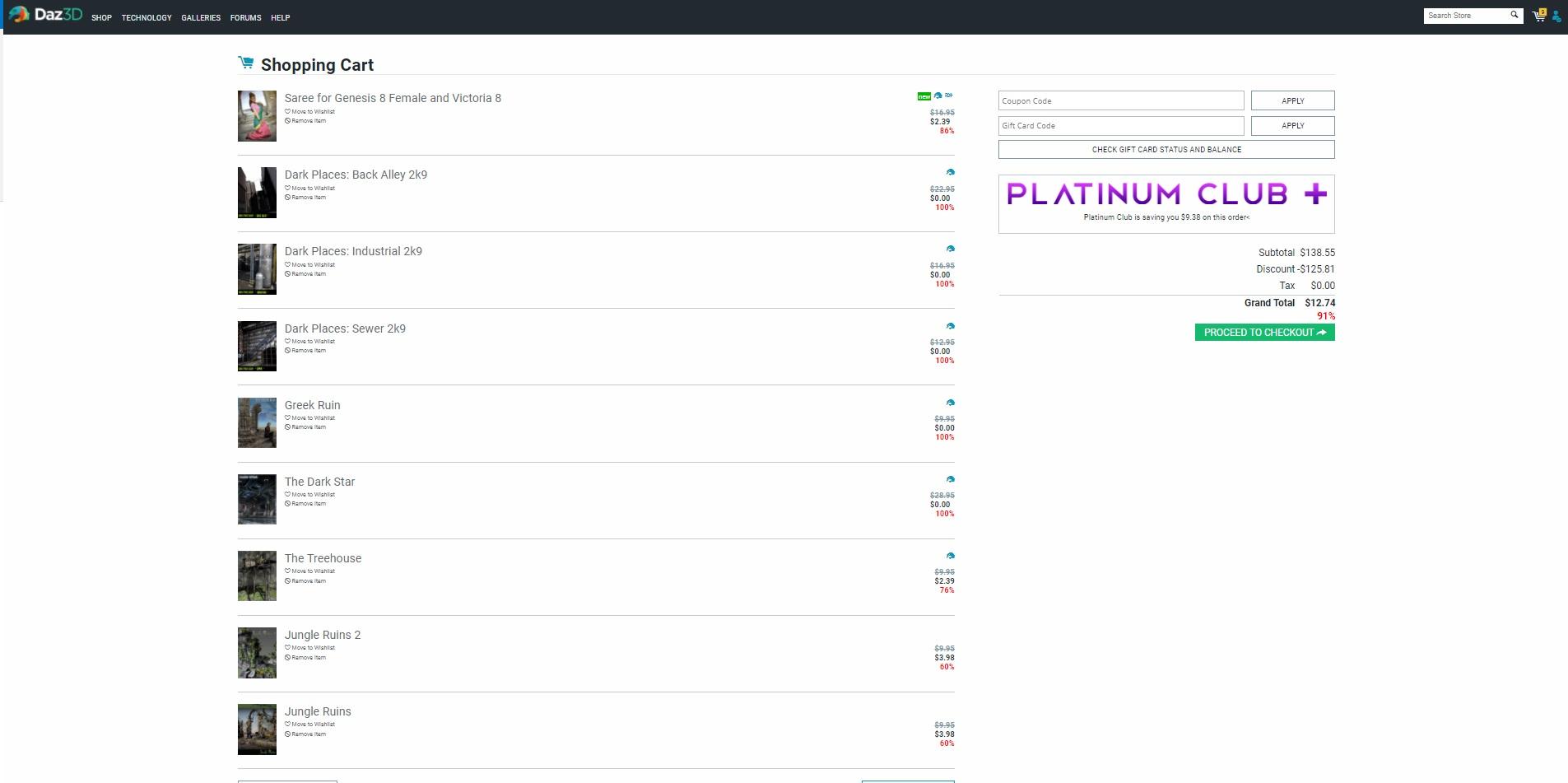 November 2017 - Daz 3D New User Challenge - Materials
Textures/materials good 'challenge' since I’m having trouble with them. ; )
Couple of thumbnails...
"Darius & Freinds"
“Garret” and the cat look horrible. Skin (and fur) looks plastic & cheesy compared to updated Darius & Vicky 8. (Grateful to a couple of members here who helped me correct Darius, or would’ve been a return.)
Goals if decide to pursue:
1.) Correct skin on Garret so it looks more like.. Skin & not plastic.
2.) Have cat’s fur look more like hair & not a wax cat mannequin!
3.) Learn how to make things like sunglasses semi-transparent while still being reflective."50's Advert"
Second thumbnail might need a bit of background. Came across a vintage calendar at an estate sale. “Bryant Plumbing & Electrical Company” had the “Bryant Girl” posing with products each month. She had on roll up jeans, and a red plaid shirt. Even B&W shoes! So I copied one pose where she’s showing off a sump pump or some piece of machinery. The copy is fun. “Your basement will never flood again-- Guaranteed!”
50’s trailer was on sale, so “Trailer Girl” model just needs two tone shoes and a plaid shirt. No luck at store, so if anyone knows where poor Vicky might get these items. “What’s a poor super fashion model to do!”
Goals:
1.) Improve textures on things like tires.
2.) Texture on grasses that look fake and placed.
3.) Anything else to improve composition. (Her hand needs adjustment. The trailer needs to be moved to left, or close door a bit so it isn't growing out of her head.)
I like your starts here - your photography/layout background definitely shows. I'm not artistic at all - and that shows, too. I just like playing with virtual paper dolls
 . That said, I always appreciate feedback and critique. I can be resistant to itl, but it always pushes me to try things outside my comfort box. For your questions:
Semi-transparent but still reflective glass - there are some awesome iRay glass shaders out there. I personally love this one: https://www.daz3d.com/iray-glass-workshop. You can also use the Surfaces tool to select the glass in the glasses and go into the Surfaces tab to play with the settings. You may have to apply the Uber shader first to get all the shader options, but I've gotten some pretty good glass surfaces just playing with the reflection, refraction, and cutout opacity settings.
Plaid flannel shirt: I picked this one up really cheap earlier in the PC+ sale - it's bundled in several other products, inclulding Carrara: https://www.daz3d.com/town-and-country-for-genesis. You may also find something if you search for flannel shirt at ShareCG
Two-tone oxford shoes: I get a LOT of mileage out of Everyday 1950 for Genesis (with maps for Victoria 5). Not just the shoes, but a nice circle skirt, a plain, non-sexy blouse, serviceable socks and a nice, loose cardigan. There are a couple of texture add-ons that expand the options further - and if you're a PC+ member, they're just $1.99 each.
Transferred Morphs from V4 Don't WorkVictoria 4 doesn't use weight mapping, it uses the old parametric rigging system (angles and speheres, the position of a vertex relative to which determines its weighting). I would not expect the transfer utility to work at all, I suppose it may be baking the weights from the parametric rigging and projecting those into the clothing. In any even, try right-clicking and select transfer Active Morphs to get the morphs across.
Transferred Morphs from V4 Don't WorkOkay. I've made some freebie clothing items for the Genesis series of clothing, etc. But I've had people asking me to convert them to V4 (don't ask me why; far as I'm concerned, Generation 4 figures became obsolete as soon as the Genesis series of figures hit the scene). But in any case, I've been working on it. I've managed to rig the clothing with the Transfer Utility, even managed to transfer all of the morphs. But whenever I use the morphs on Victoria 4, the clothing doesn't morph with it. Any ideas what I'm doing wrong?
Poser is for animators?After genesis2 Daz broke Dson importer for poser
DAZ didn't "break DSON Importer", Poser simply does not have support for the type of rigging G3 and G8 use so they can't work in Poser even with the importer.
I still use Poser, but not with any figures beyond Generation 4. The irony is that, in my experience, Poser handles Generation-4 figures better than DAZ Studio! (Loading Victoria 4 into DS results in a seemingly-endless sequence of 'circular-reference' warnings.)
Actually it doesn't. There is a bunch of scaling controls in Gen4 for things such as height that are non-functional in poser because at the time Poser's figure scaling was broken. I don't think it got fixed until maybe Poser 2014
Poser is for animators?After genesis2 Daz broke Dson importer for poser
DAZ didn't "break DSON Importer", Poser simply does not have support for the type of rigging G3 and G8 use so they can't work in Poser even with the importer.
Actually, the DSON Importer never worked all that well to begin with; at least, not for me. It was ponderously slow loading a figure, and I could never get clothing to fit properly after the figure was loaded. Especially if the figure was morphed to even the slightest degree. And you could only install it into a single instance/version. (I have three-and-a-half versions of Poser installed: 9, 10, Pro 2012 (which is essentially Poser 9, with a few extra features), and 11 Pro. When I installed the DSON Importer into my Poser 11 Pro instance, it clobbered the installation in my Poser Pro 2012 instance; which, when I installed it there, clobbered the installation in my Poser 10 instance. Apparently, the DSON Importer files are installed local to the Poser directory, but the registry keys are global in scope, and only allow one reference.)
I still use Poser, but not with any figures beyond Generation 4. The irony is that, in my experience, Poser handles Generation-4 figures better than DAZ Studio! (Loading Victoria 4 into DS results in a seemingly-endless sequence of 'circular-reference' warnings.)
Even so, Poser has many features that I wish DAZ Studio had: dynamic cloth and hair (although dForce might change that; I say 'might' because I haven't had great success using dForce so far), and camera support in Poser is much better (Face camera, Right- and Left-Hand cameras, Posing camera, Main and Aux cameras -- DAZ Studio has nothing like them). Poser's Materials Room is easier for me to use than DAZ Studio's Surfaces tab; I can animate texture transitions in Poser (think Bruce Banner turning into the Hulk), that I have yet to figure out how to do in Studio, nor have I found anyone who could explain the process coherently. And that is one more "feature" where Poser stands head-and-shoulders above DAZ Studio: Poser is far better documented, both official, and third-party.
Morphs from G3 to G8Hi
First I just wanted to say thank you for making the script.
I just did a computer uppgrade and reinstalled Windows and Daz3d and runned the script one character at the time. and now I got this errors in the log when loading G8 female,
I tried to reinstall g8 female but that did not solve the issue.
Annyone have a clue where I messed up?
2017-11-05 11:36:21.590 WARNING: fileinput\dzassetdaz.cpp(5795): Could not find target property for formula: lCollar:/data/DAZ%203D/Genesis%208/Female/Morphs/DAZ%203D/Base%20Correctives/lCollar_CTRLMD_N_XRotate_n30.dsf#CTRLMD_N_XRotate_n30?value in file : /data/DAZ%203D/Genesis%208/Female/Morphs/DAZ%203D/Victoria%207/pJCMVictoria7CollarTwistn30ShoulderBndn75_L.dsf
2017-11-05 11:36:21.590 WARNING: fileinput\dzassetdaz.cpp(5795): Could not find target property for formula: rCollar:/data/DAZ%203D/Genesis%208/Female/Morphs/DAZ%203D/Base%20Correctives/rCollar_CTRLMD_N_XRotate_n30.dsf#CTRLMD_N_XRotate_n30?value in file : /data/DAZ%203D/Genesis%208/Female/Morphs/DAZ%203D/Victoria%207/pJCMVictoria7CollarTwistn30ShoulderBnd75_R.dsf
2017-11-05 11:36:21.590 WARNING: fileinput\dzassetdaz.cpp(5795): Could not find target property for formula: lCollar:/data/DAZ%203D/Genesis%208/Female/Morphs/DAZ%203D/Base%20Correctives/lCollar_CTRLMD_N_YRotate_n26.dsf#CTRLMD_N_YRotate_n26?value in file : /data/DAZ%203D/Genesis%208/Female/Morphs/DAZ%203D/Victoria%207/pJCMVictoria7CollarFwdn26ShoulderBndn75_L.dsf
2017-11-05 11:36:21.590 WARNING: fileinput\dzassetdaz.cpp(5795): Could not find target property for formula: rCollar:/data/DAZ%203D/Genesis%208/Female/Morphs/DAZ%203D/Base%20Correctives/rCollar_CTRLMD_N_YRotate_26.dsf#CTRLMD_N_YRotate_26?value in file : /data/DAZ%203D/Genesis%208/Female/Morphs/DAZ%203D/Victoria%207/pJCMVictoria7CollarFwd26ShoulderBnd75_R.dsf
2017-11-05 11:36:21.606 WARNING: fileinput\dzassetdaz.cpp(5737): Could not find output property for formula: lHeel:/data/DAZ%203D/Genesis%208/Female/Genesis8Female.dsf#lHeel?center_point/x in file : /data/DAZ%203D/Genesis%208/Female/Morphs/DAZ%203D/Victoria%207/FBMVictoria7.dsf
2017-11-05 11:36:21.606 WARNING: fileinput\dzassetdaz.cpp(5737): Could not find output property for formula: lHeel:/data/DAZ%203D/Genesis%208/Female/Genesis8Female.dsf#lHeel?center_point/y in file : /data/DAZ%203D/Genesis%208/Female/Morphs/DAZ%203D/Victoria%207/FBMVictoria7.dsf
2017-11-05 11:36:21.606 WARNING: fileinput\dzassetdaz.cpp(5737): Could not find output property for formula: lHeel:/data/DAZ%203D/Genesis%208/Female/Genesis8Female.dsf#lHeel?center_point/z in file : /data/DAZ%203D/Genesis%208/Female/Morphs/DAZ%203D/Victoria%207/FBMVictoria7.dsf
2017-11-05 11:36:21.606 WARNING: fileinput\dzassetdaz.cpp(5737): Could not find output property for formula: lHeel:/data/DAZ%203D/Genesis%208/Female/Genesis8Female.dsf#lHeel?end_point/x in file : /data/DAZ%203D/Genesis%208/Female/Morphs/DAZ%203D/Victoria%207/FBMVictoria7.dsf
2017-11-05 11:36:21.621 WARNING: fileinput\dzassetdaz.cpp(5737): Could not find output property for formula: lHeel:/data/DAZ%203D/Genesis%208/Female/Genesis8Female.dsf#lHeel?end_point/y in file : /data/DAZ%203D/Genesis%208/Female/Morphs/DAZ%203D/Victoria%207/FBMVictoria7.dsf
2017-11-05 11:36:21.621 WARNING: fileinput\dzassetdaz.cpp(5737): Could not find output property for formula: lHeel:/data/DAZ%203D/Genesis%208/Female/Genesis8Female.dsf#lHeel?end_point/z in file : /data/DAZ%203D/Genesis%208/Female/Morphs/DAZ%203D/Victoria%207/FBMVictoria7.dsf
2017-11-05 11:36:21.621 WARNING: fileinput\dzassetdaz.cpp(5737): Could not find output property for formula: lHeel:/data/DAZ%203D/Genesis%208/Female/Genesis8Female.dsf#lHeel?orientation/x in file : /data/DAZ%203D/Genesis%208/Female/Morphs/DAZ%203D/Victoria%207/FBMVictoria7.dsf
2017-11-05 11:36:21.621 WARNING: fileinput\dzassetdaz.cpp(5737): Could not find output property for formula: lHeel:/data/DAZ%203D/Genesis%208/Female/Genesis8Female.dsf#lHeel?orientation/y in file : /data/DAZ%203D/Genesis%208/Female/Morphs/DAZ%203D/Victoria%207/FBMVictoria7.dsf
2017-11-05 11:36:21.621 WARNING: fileinput\dzassetdaz.cpp(5737): Could not find output property for formula: lHeel:/data/DAZ%203D/Genesis%208/Female/Genesis8Female.dsf#lHeel?orientation/z in file : /data/DAZ%203D/Genesis%208/Female/Morphs/DAZ%203D/Victoria%207/FBMVictoria7.dsf
2017-11-05 11:36:21.621 WARNING: fileinput\dzassetdaz.cpp(5737): Could not find output property for formula: rHeel:/data/DAZ%203D/Genesis%208/Female/Genesis8Female.dsf#rHeel?center_point/x in file : /data/DAZ%203D/Genesis%208/Female/Morphs/DAZ%203D/Victoria%207/FBMVictoria7.dsf
2017-11-05 11:36:21.621 WARNING: fileinput\dzassetdaz.cpp(5737): Could not find output property for formula: rHeel:/data/DAZ%203D/Genesis%208/Female/Genesis8Female.dsf#rHeel?center_point/y in file : /data/DAZ%203D/Genesis%208/Female/Morphs/DAZ%203D/Victoria%207/FBMVictoria7.dsf
2017-11-05 11:36:21.621 WARNING: fileinput\dzassetdaz.cpp(5737): Could not find output property for formula: rHeel:/data/DAZ%203D/Genesis%208/Female/Genesis8Female.dsf#rHeel?center_point/z in file : /data/DAZ%203D/Genesis%208/Female/Morphs/DAZ%203D/Victoria%207/FBMVictoria7.dsf
2017-11-05 11:36:21.637 WARNING: fileinput\dzassetdaz.cpp(5737): Could not find output property for formula: rHeel:/data/DAZ%203D/Genesis%208/Female/Genesis8Female.dsf#rHeel?end_point/x in file : /data/DAZ%203D/Genesis%208/Female/Morphs/DAZ%203D/Victoria%207/FBMVictoria7.dsf
2017-11-05 11:36:21.637 WARNING: fileinput\dzassetdaz.cpp(5737): Could not find output property for formula: rHeel:/data/DAZ%203D/Genesis%208/Female/Genesis8Female.dsf#rHeel?end_point/y in file : /data/DAZ%203D/Genesis%208/Female/Morphs/DAZ%203D/Victoria%207/FBMVictoria7.dsf
2017-11-05 11:36:21.637 WARNING: fileinput\dzassetdaz.cpp(5737): Could not find output property for formula: rHeel:/data/DAZ%203D/Genesis%208/Female/Genesis8Female.dsf#rHeel?end_point/z in file : /data/DAZ%203D/Genesis%208/Female/Morphs/DAZ%203D/Victoria%207/FBMVictoria7.dsf
2017-11-05 11:36:21.637 WARNING: fileinput\dzassetdaz.cpp(5737): Could not find output property for formula: rHeel:/data/DAZ%203D/Genesis%208/Female/Genesis8Female.dsf#rHeel?orientation/x in file : /data/DAZ%203D/Genesis%208/Female/Morphs/DAZ%203D/Victoria%207/FBMVictoria7.dsf
2017-11-05 11:36:21.637 WARNING: fileinput\dzassetdaz.cpp(5737): Could not find output property for formula: rHeel:/data/DAZ%203D/Genesis%208/Female/Genesis8Female.dsf#rHeel?orientation/y in file : /data/DAZ%203D/Genesis%208/Female/Morphs/DAZ%203D/Victoria%207/FBMVictoria7.dsf
2017-11-05 11:36:21.637 WARNING: fileinput\dzassetdaz.cpp(5737): Could not find output property for formula: rHeel:/data/DAZ%203D/Genesis%208/Female/Genesis8Female.dsf#rHeel?orientation/z in file : /data/DAZ%203D/Genesis%208/Female/Morphs/DAZ%203D/Victoria%207/FBMVictoria7.dsf
2017-11-05 11:36:21.653 WARNING: fileinput\dzassetdaz.cpp(5795): Could not find target property for formula: Genesis8Female:/data/DAZ%203D/Genesis%208/Female/Morphs/DAZ%203D/Expressions/eCTRLTriumph_HD.dsf#eCTRLTriumph_HD?value in file : /data/DAZ%203D/Genesis%208/Female/Morphs/DAZ%203D/Victoria%207/eJCMVictoria7Triumph.dsf
2017-11-05 11:36:21.653 WARNING: fileinput\dzassetdaz.cpp(5795): Could not find target property for formula: Genesis8Female:/data/DAZ%203D/Genesis%208/Female/Morphs/DAZ%203D/Expressions/eCTRLSilly_HD.dsf#eCTRLSilly_HD?value in file : /data/DAZ%203D/Genesis%208/Female/Morphs/DAZ%203D/Victoria%207/eJCMVictoria7Silly.dsf
2017-11-05 11:36:21.653 WARNING: fileinput\dzassetdaz.cpp(5795): Could not find target property for formula: Genesis8Female:/data/DAZ%203D/Genesis%208/Female/Morphs/DAZ%203D/Expressions/eCTRLScream_HD.dsf#eCTRLScream_HD?value in file : /data/DAZ%203D/Genesis%208/Female/Morphs/DAZ%203D/Victoria%207/eJCMVictoria7Scream.dsf
2017-11-05 11:36:21.653 WARNING: fileinput\dzassetdaz.cpp(5795): Could not find target property for formula: Genesis8Female:/data/DAZ%203D/Genesis%208/Female/Morphs/DAZ%203D/Expressions/eCTRLRage_HD.dsf#eCTRLRage_HD?value in file : /data/DAZ%203D/Genesis%208/Female/Morphs/DAZ%203D/Victoria%207/eJCMVictoria7Rage.dsf
2017-11-05 11:36:21.653 WARNING: fileinput\dzassetdaz.cpp(5795): Could not find target property for formula: Genesis8Female:/data/DAZ%203D/Genesis%208/Female/Morphs/DAZ%203D/Expressions/eCTRLPain_HD.dsf#eCTRLPain_HD?value in file : /data/DAZ%203D/Genesis%208/Female/Morphs/DAZ%203D/Victoria%207/eJCMVictoria7Pain.dsf
2017-11-05 11:36:21.653 WARNING: fileinput\dzassetdaz.cpp(5795): Could not find target property for formula: Genesis8Female:/data/DAZ%203D/Genesis%208/Female/Morphs/DAZ%203D/Base%20Pose/eCTRLMouthOpenWide.dsf#eCTRLMouthOpenWide?value in file : /data/DAZ%203D/Genesis%208/Female/Morphs/DAZ%203D/Victoria%207/eJCMVictoria7MouthOpenWide.dsf
2017-11-05 11:36:21.653 WARNING: fileinput\dzassetdaz.cpp(5795): Could not find target property for formula: Genesis8Female:/data/DAZ%203D/Genesis%208/Female/Morphs/DAZ%203D/Expressions/eCTRLHappy_HD.dsf#eCTRLHappy_HD?value in file : /data/DAZ%203D/Genesis%208/Female/Morphs/DAZ%203D/Victoria%207/eJCMVictoria7Happy.dsf
2017-11-05 11:36:21.653 WARNING: fileinput\dzassetdaz.cpp(5795): Could not find target property for formula: Genesis8Female:/data/DAZ%203D/Genesis%208/Female/Morphs/DAZ%203D/Expressions/eCTRLFear_HD.dsf#eCTRLFear_HD?value in file : /data/DAZ%203D/Genesis%208/Female/Morphs/DAZ%203D/Victoria%207/eJCMVictoria7Fear.dsf
2017-11-05 11:36:21.653 WARNING: fileinput\dzassetdaz.cpp(5795): Could not find target property for formula: Genesis8Female:/data/DAZ%203D/Genesis%208/Female/Morphs/DAZ%203D/Expressions/eCTRLExcitement_HD.dsf#eCTRLExcitement_HD?value in file : /data/DAZ%203D/Genesis%208/Female/Morphs/DAZ%203D/Victoria%207/eJCMVictoria7Excitement.dsf
2017-11-05 11:36:21.653 WARNING: fileinput\dzassetdaz.cpp(5795): Could not find target property for formula: Genesis8Female:/data/DAZ%203D/Genesis%208/Female/Morphs/DAZ%203D/Expressions/eCTRLTriumph_HD.dsf#eCTRLTriumph_HD?value in file : /data/DAZ%203D/Genesis%208/Female/Morphs/DAZ%203D/Victoria%207/eCTRLVictoria7Triumph.dsf
2017-11-05 11:36:21.668 WARNING: fileinput\dzassetdaz.cpp(5795): Could not find target property for formula: Genesis8Female:/data/DAZ%203D/Genesis%208/Female/Morphs/DAZ%203D/Expressions/eCTRLRage_HD.dsf#eCTRLRage_HD?value in file : /data/DAZ%203D/Genesis%208/Female/Morphs/DAZ%203D/Victoria%207/eCTRLVictoria7Rage.dsf
2017-11-05 11:36:21.668 WARNING: fileinput\dzassetdaz.cpp(5795): Could not find target property for formula: Genesis8Female:/data/DAZ%203D/Genesis%208/Female/Morphs/DAZ%203D/Expressions/eCTRLPain_HD.dsf#eCTRLPain_HD?value in file : /data/DAZ%203D/Genesis%208/Female/Morphs/DAZ%203D/Victoria%207/eCTRLVictoria7Pain.dsf
2017-11-05 11:36:21.668 WARNING: fileinput\dzassetdaz.cpp(5795): Could not find target property for formula: Genesis8Female:/data/DAZ%203D/Genesis%208/Female/Morphs/DAZ%203D/Base%20Pose/eCTRLMouthOpenWide.dsf#eCTRLMouthOpenWide?value in file : /data/DAZ%203D/Genesis%208/Female/Morphs/DAZ%203D/Victoria%207/eCTRLVictoria7MouthOpenWide.dsf
2017-11-05 11:36:21.668 WARNING: fileinput\dzassetdaz.cpp(5795): Could not find target property for formula: Genesis8Female:/data/DAZ%203D/Genesis%208/Female/Morphs/DAZ%203D/Expressions/eCTRLGlare_HD.dsf#eCTRLGlare_HD?value in file : /data/DAZ%203D/Genesis%208/Female/Morphs/DAZ%203D/Victoria%207/eCTRLVictoria7Glare.dsf
2017-11-05 11:36:21.668 WARNING: fileinput\dzassetdaz.cpp(5795): Could not find target property for formula: Genesis8Female:/data/DAZ%203D/Genesis%208/Female/Morphs/DAZ%203D/Expressions/eCTRLFear_HD.dsf#eCTRLFear_HD?value in file : /data/DAZ%203D/Genesis%208/Female/Morphs/DAZ%203D/Victoria%207/eCTRLVictoria7Fear.dsf
2017-11-05 11:36:21.668 WARNING: fileinput\dzassetdaz.cpp(5795): Could not find target property for formula: Genesis8Female:/data/DAZ%203D/Genesis%208/Female/Morphs/DAZ%203D/Expressions/eCTRLExcitement_HD.dsf#eCTRLExcitement_HD?value in file : /data/DAZ%203D/Genesis%208/Female/Morphs/DAZ%203D/Victoria%207/eCTRLVictoria7Excitement.dsf
2017-11-05 11:36:21.668 WARNING: fileinput\dzassetdaz.cpp(5795): Could not find target property for formula: Genesis8Female:/data/DAZ%203D/Genesis%208/Female/Morphs/DAZ%203D/Expressions/eCTRLDisgust_HD.dsf#eCTRLDisgust_HD?value in file : /data/DAZ%203D/Genesis%208/Female/Morphs/DAZ%203D/Victoria%207/eCTRLVictoria7Disgust.dsf
2017-11-05 11:36:21.668 WARNING: fileinput\dzassetdaz.cpp(5795): Could not find target property for formula: Genesis8Female:/data/DAZ%203D/Genesis%208/Female/Morphs/DAZ%203D/Expressions/eCTRLDesire_HD.dsf#eCTRLDesire_HD?value in file : /data/DAZ%203D/Genesis%208/Female/Morphs/DAZ%203D/Victoria%207/eCTRLVictoria7Desire.dsf
2017-11-05 11:36:21.684 WARNING: fileinput\dzassetdaz.cpp(5795): Could not find target property for formula: Genesis8Female:/data/DAZ%203D/Genesis%208/Female/Morphs/DAZ%203D/Expressions/eCTRLConfident_HD.dsf#eCTRLConfident_HD?value in file : /data/DAZ%203D/Genesis%208/Female/Morphs/DAZ%203D/Victoria%207/eCTRLVictoria7Confident.dsf
2017-11-05 11:36:21.684 WARNING: fileinput\dzassetdaz.cpp(5795): Could not find target property for formula: Genesis8Female:/data/DAZ%203D/Genesis%208/Female/Morphs/DAZ%203D/Expressions/eCTRLBereft_HD.dsf#eCTRLBereft_HD?value in file : /data/DAZ%203D/Genesis%208/Female/Morphs/DAZ%203D/Victoria%207/eCTRLVictoria%207Bereft.dsfThe "Go Back and Do It Again" ChallengeI finally had a chance to go back and play with this. The original was one of the first cards that I did for my Tarot deck, and was actually the reason I reopened DAZ Studio after not touching any sort of rendering for years - I had been working strictly in digital collage, but I couldn't find figures in the pose I wanted, so I decided to set them up and render them myself. Everything else was assembled in GIMP.
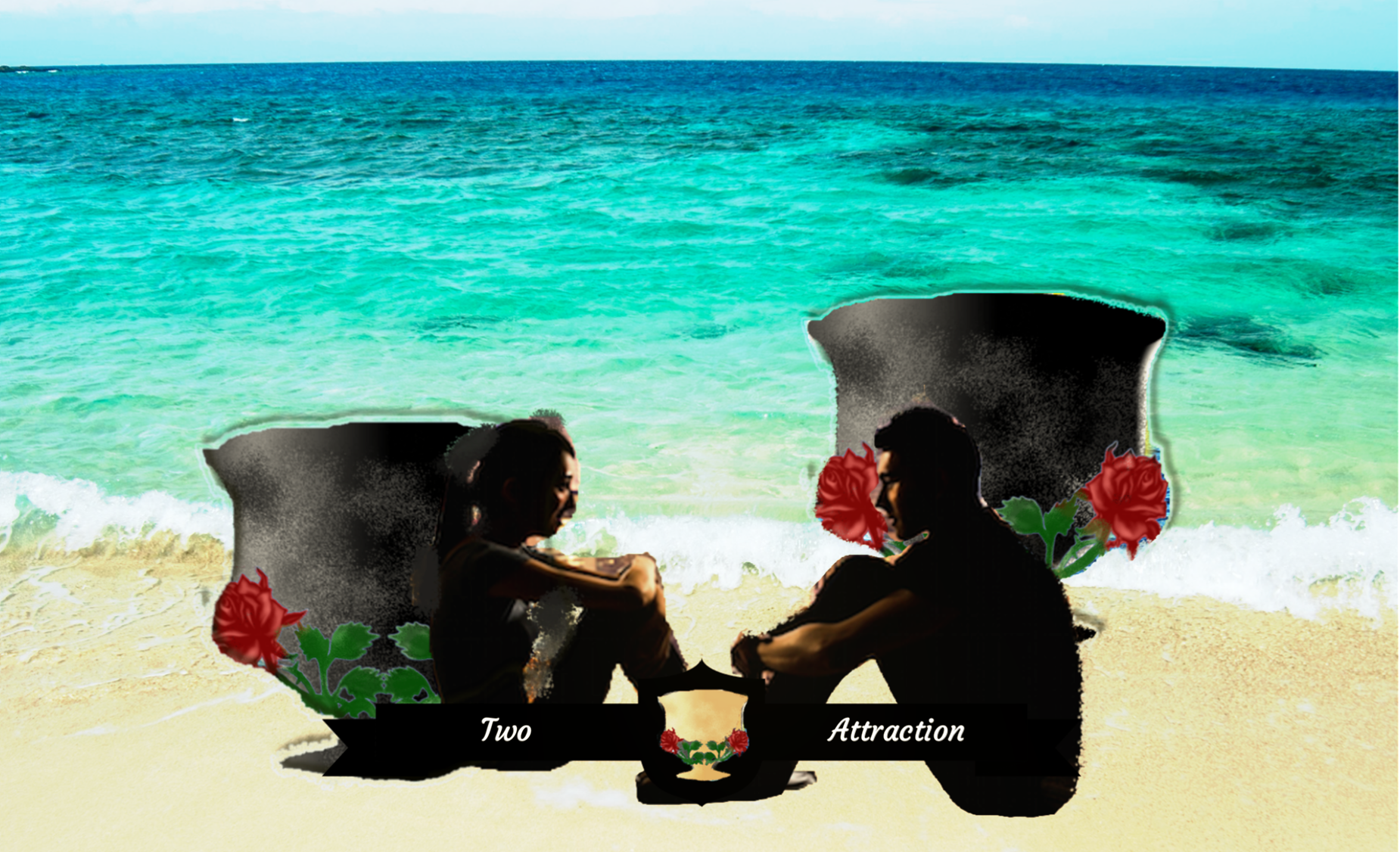
In the new render, I retextured and slightly changed the shape of the goblet from The Church Props, used David and Victoria 5 with lightly adjusted poses, added a cyclorama background (LB Summer Sunset Skies). The lighting is a combination of a three-point setup and sun-sky in the iRay render settings. No postwork...
 Interactive License?Edit: I think I understand now. This part is not specific to the Interactive license but general terms of use about selling in other stores for example (i.e. selling a mod by requiring assets from the DAZ store like a base model). It's in chapters 1.5 and replaced in 3. Thanks, I think you helped me understand it!
Yeah that was my mistake I should have been more clear. When I said create Tina from Victoria 8 I dd not mean a game character named Tina. I was talking about taking Victoria 8 into zbrush and altering her to sell the new base shape as a character named Tina on the Daz store
Interactive License?This part of the EULA is very confusing to me: --------------------------- "Three Dimensional Works. DAZ wishes to encourage the expansion of the catalog of Content available to its users. Accordingly, User may access, use, copy, and modify the Content to create one or more derived or additional three-dimensional works provided that: any such derived or additional three-dimensional works are designed to require or encourage the use of CRT Content available through the online DAZ store either by (i) requiring the use of such CRT Content to function, or (ii) allowing only limited function when not used in conjunction with CRT Content from the online DAZ store; and upon receipt of a written request from DAZ, User immediately ceases any and all distribution of the art that User has created from the CRT Content, if DAZ has determined, in its sole discretion, that (i) such art is substantially similar to or is a clone of existing Content; or (ii) such derived or additional work fails to require the use of Content available through the online DAZ store."I believe that section deals with taking an item we buy on daz and using as a base to create a new item. Like taking the base Victoria 8 and creating a new chracter named Tina. In order for me to sell Tina I must require the buyer to own Victoria 8.
Smart Content and 3rd party content compatible?I should have added that I used the method of the two separated folders, as advised by Daz, since I've read that putting items from outside of DAZ store directly in the main "My DAZ 3D Library" folder can lead to issues. I don't know if this "content package assistant tool" would prevent that kind of issue, but I don't really plan to use it for now (and I don't know what the percentage of items on the net it can make compatible with DIM).
There are a few typs of content where the separate fodlrs simply won't work -the mopst obvious being morph expansions for exP figues like Michael 4 and Victoria 4 where only the main /Runtime/Libraries/!DAZ/Figurename folder will be used.
I'm sorry but I'm not sure to understand that :
For the rest, if you drag the icon from the Content Library to a category in the Smart Content pane while the base figure is loaded and selected it will be made "smart".
I've tried to drag everything from Content Library into Smart Content pane, figure selected or not, nothing "moves". Did you mean that I can make the Smart Content pane interacting with an item loaded via Content library as if it were an item from Smart Content itself (and show items compatible with it in the Smart content pane)?
In short, I will never be able to really use items (meaning "choosing them from") Smart content if I've downloaded them from outside of DIM and put them on another folder than "My DAZ 3D Library" ? Is that correct?
Thank you for your answer.
They shouldn't move - the Content Library (under ... Formats) is showing files on disc. However, dragging them should add them to categories adn make them smart in that they get tagged as compatible with the active figure (so you want to handle materials separately). Another option is to create a product from a folder, via right-click, which lets you set a clothign item as the smart filter for its materials.
Laguna Mermaid Pack... How Do they Do the Scales?Dayanara has a similar effect
https://www.daz3d.com/fwsa-dayanara-hd-for-victoria-7
It should be do able on any skin in photshop or equivalent using a scale brush.
help for iray hair for daz studiothe hair are oot samira hair and le character is tess , i have the same probleme with hair who have hair line
Just to make certain - you are using these two items?
- https://www.renderosity.com/mod/bcs/tess-character-for-v4/77711/
- https://www.renderosity.com/mod/bcs/samira-bob-hair-for-victoria-4-and-genesis-3-females/116521/
anatomy is grey for genesis 3 and 8
I figured it out as New Gens For Victoria 8 has a feature that matches whatever skin may thingy you use. I had to add the gen, load the mat, and click the update thingy that comes with it and it finally worked.If you choose a figure that comes with materials for the 'anatomical elements' (in the store some figures list the fact that they have anatomical mats, if its not listed chances are they are not included) you can apply the gens mats as you were initially trying, by selecting the gens and dblclking the gens mats (in some instances it helps to use the surfaces tool and use the surfaces pane to select the desired surfaces before mats will apply but I think just for applying skin/gens mats it should not be necessary). If you do not see any gens mats in the figure's materials folder and the skin mat is not heirarchical as spottedkitty describes above then things get more complicated as you will have to resort to creating the mats yourself somehow. Or using a gen prop that auto generates the mats like you are trying.
Daz to C4D Export Issue - Eyelashes Importing Without KeyframesHello I have an issue when exporting a from DAZ to C4D. I cannot successfully export eyelash animations. I am using Victoria 8 figure. Here are my export and import settings:
http://img.photobucket.com/albums/v611/agentjosh77/Daz-fbx-export-options_zps3lp5u5le.png
http://img.photobucket.com/albums/v611/agentjosh77/C4D-fbx-import-options_zpsz5ywszw1.png
This is what happend when I move the timeline to frpom the t-posed figure, to the posed figure. I have also noticed that the eyelashes group, does not have keyfames assigned to them, if that shine a light on any issue in particular:
http://img.photobucket.com/albums/v611/agentjosh77/Daz-fbx-export-options_zps3lp5u5le.png
Anyone have a suggestion on how to fix the loss of animation between Daz and C4D?
Thank you!
Interactive License?So, while waiting to find out if Daz is going to adjust the options, it could be a fun and productive option to figure out just what games you COULD make on a $500 licensing budget.
When you say 500, do you mean just for license total or lincense plus the items cost? I think the biggest issue witht he new licnese is the first time base cost; needing the genesis starter essentals pack for the generation you are using eats up your first 100. If you decided to forgo the main characters like Victoria and buy morph kits for 500 you could get
500 - 100 (starter essentals) - 140 (35 * 4 for male and female body/head morphs) - 70 (35 * 2 for aging morphs male and female) = 190
With that 190 you vould get 5 (35 * 5 = 175) genesis characters
or
a gen male and female pro pack (50 * 2 = 100) the last 90 could be used to get any extra item you need. This option would give you 6 characters some cloths and hair along with extra stuff
Interactive License?So: Victoria in an Austrani outfit, given a unique face by a morph set. In a first person game, she can be the NPC! Ooh, maybe it's a game about time travel? Hmmm....
Or you could look at older figures like Genesis or Genesis 2, since PA content for them is likely to have a lower licensing cost (I was checking out Lyoness' store earlier). Or you could take a cue from movies like The Road Warrior and have the bad guys in straps and ragged outfits (the aforementioned Post Apocalyptic outfit) and the good guys in more modest attire.
Interactive License?So, while waiting to find out if Daz is going to adjust the options, it could be a fun and productive option to figure out just what games you COULD make on a $500 licensing budget. And while you do, keep in mind these games: Gone Home. Bendy and the Ink Machine. The many games like them that use very limited 3d environments. And then-- I know 2d is passé-- but you can do stuff like Limbo using Daz assets too... You want to make games! You can still do it!
(Yes: I know there's frustration and disappointment in not being able to make the game you wanted at the price you planned. But there's other ways to have fun still.)
So: Victoria in an Austrani outfit, given a unique face by a morph set. In a first person game, she can be the NPC! Ooh, maybe it's a game about time travel? Hmmm....Daz 3D is part of

Connect
DAZ Productions, Inc.
7533 S Center View Ct #4664
West Jordan, UT 84084Licensing Agreement | Terms of Service | Privacy Policy | EULA
© 2026 Daz Productions Inc. All Rights Reserved.