-
Monique 8
72% off? On release day? Why? Victoria, Teen Josie, Stephanie, Olympia, Michael were nowhere near this percentage off. Is this the new price for future characters? Aiko, Rune, Lilith, Sunny, Gia.....etc
Probably has to do with PC+ and the Platinum Club sale.
Monique 872% off? On release day? Why? Victoria, Teen Josie, Stephanie, Olympia, Michael were nowhere near this percentage off. Is this the new price for future characters? Aiko, Rune, Lilith, Sunny, Gia.....etc
Genesis 8 Female modelsOkay Richard.
Loaded base genesis 8 female figure which looks okay. Checked parameter pane and checked the currently used group. Heading was genesis 8 female and all morphs were at 0 (including hidden). As a precaution I uninstalled the Demona figure which is reported to be bugged.
Loaded a genesis 8 figure - in this case 3DA Airlie for G8F and voila - bug eyes, 2nd helping of botiox mouth/lips and heavy weight lifter thighs. parameter pane showed all zerod morphs so unsure how to explain it.
The reason I chose 3DA Airlie is she comes with a version for G3F. Loaded the Gen 3 version and no deformity issues.
Tested Stephanie 8, Victoria 8 and 1 or 2 other G8F figures. Stephanie and Victoria appeared normal. The alternate G8F figures - varying degress of deformity.
Having already unistalled the genesis 8 female starter essentials,head and boy morphs and anall 3rd paty morphs for gen8 I am not sure how to proceed,
As a different way to test Ioaded the genesis 8 base female, and used shaping to add full body/hed of 3da Airlie again. This time a different kind of deformity - sunken eyes and jaw, ultra thin body.
Any ideas appreciated. Have already redone all the meta data via DIM and reset content via content manager and reloaded.
Genesis 8 and old contentYes, that should work - and yes, all the map types use the same UVs. Don't forget that you need the materials as a .duf file, so you'd need to apply them (to Genesis say, or better to Victoria 4 if you have the figure) and save as a Materials preset. Of course the shader would be the basic one, not one of the newer 3Delight or Iray shaders, so there might be a need for reworking.
Genesis 8 and old contentThe attached image shows a comparison between the Muscle Maps on Victoria 4 and the same textures on Genesis 8 Female using the Legacy UVs. Bear in mind that the Muscle Maps were designed specifically for the Victoria 4 shape and that they are more unforgiving in terms of minor unavoidable distortions than a normal skin texture would be.
 Getting skin to look more realistic. Maps?
You really don't need an expensive program. The texture maps that Daz creates are often detailed enough. Occasionally they need slight adjustments with Photoshop or Gimp or pretty much any photo editing program - but most of them are detailed enough "out of the box". The problem is their Iray settings are usually pretty bad, imo. You just have to learn how iray settings affect the look of the textures and adjust accordingly.
It depends on your definition of "detailed enough". The DAZ tex maps I've seen are jpg (!), so you are already talking about a lot of loss of fidelity from the start. JPG files are lossy and only 8 bit, so you are already starting out on the low end of the spectrum. But a good knowledge of how textures work in relation to realistic skin is a must.
That sounds a bit condescending. I think my definition of "detailed enough" would cover many (most?) people's idea of "detailed enough".
This is Victoria 7's textures - with no changes made to the texture maps (click for full size):
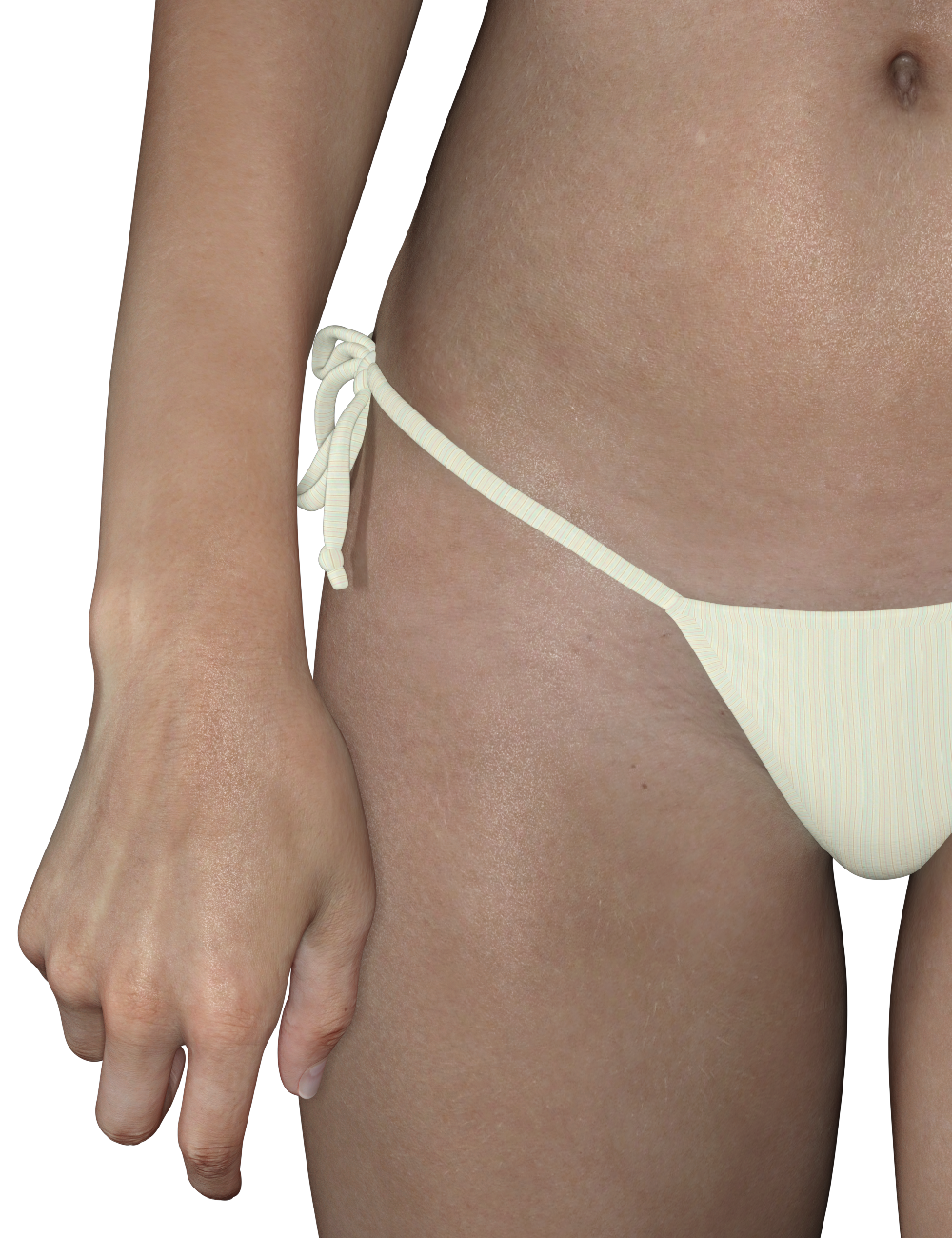
Most people aren't going to need more detail than that. The only things I changed where her Iray settings, added displacement maps, and Duel Lobe Specular bumps.
And as I said earlier, lighting and render settings can play a big role in adding realism.
Skin looks fantastic, Diva! Was just checking out your flavor of Lee 6, too, which also looks really good.
- Greg
Genesis 8 and old contentHey Richard,
So would Cayman's "Legacy UVs for Genesis 8: Victoria 4" work for the "V4 Muscle Maps"? To get them to work on G8? And if so, would it also allow for the included "bump maps" to work?
Been hoping forever that someone would update the V4 Muscle Maps, but it seems to have been forgotten about.
Thanks.
- Sol
GenX2 - Missing ClonesApart from Genesis 8 the base figures came only with clones for the previous geenration of the same sex and the current geenration of the opposite sex - oh, and since Genesis was unisex it had clones for Michael 4, Victoria 4, and Kids 4.
Getting skin to look more realistic. Maps?You really don't need an expensive program. The texture maps that Daz creates are often detailed enough. Occasionally they need slight adjustments with Photoshop or Gimp or pretty much any photo editing program - but most of them are detailed enough "out of the box". The problem is their Iray settings are usually pretty bad, imo. You just have to learn how iray settings affect the look of the textures and adjust accordingly.
It depends on your definition of "detailed enough". The DAZ tex maps I've seen are jpg (!), so you are already talking about a lot of loss of fidelity from the start. JPG files are lossy and only 8 bit, so you are already starting out on the low end of the spectrum. But a good knowledge of how textures work in relation to realistic skin is a must.
That sounds a bit condescending. I think my definition of "detailed enough" would cover many (most?) people's idea of "detailed enough".
This is Victoria 7's textures - with no changes made to the texture maps (click for full size):
Most people aren't going to need more detail than that. The only things I changed where her Iray settings, added displacement maps, and Duel Lobe Specular bumps.
And as I said earlier, lighting and render settings can play a big role in adding realism.
I can totally see the DL specular bump at work! Gotta love those scattered shines on the skin
 Pascal Hair Promo Character?
Who is this gorgeous character in the Pascal Hair promos? The product page lists FWSA Zoe, but that's definitely not her skin. Is she custom or something available? She's a knockout!

I was wondering that too, she is gorgeous!
Getting skin to look more realistic. Maps?You really don't need an expensive program. The texture maps that Daz creates are often detailed enough. Occasionally they need slight adjustments with Photoshop or Gimp or pretty much any photo editing program - but most of them are detailed enough "out of the box". The problem is their Iray settings are usually pretty bad, imo. You just have to learn how iray settings affect the look of the textures and adjust accordingly.
It depends on your definition of "detailed enough". The DAZ tex maps I've seen are jpg (!), so you are already talking about a lot of loss of fidelity from the start. JPG files are lossy and only 8 bit, so you are already starting out on the low end of the spectrum. But a good knowledge of how textures work in relation to realistic skin is a must.
That sounds a bit condescending. I think my definition of "detailed enough" would cover many (most?) people's idea of "detailed enough".
This is Victoria 7's textures - with no changes made to the texture maps (click for full size):
Most people aren't going to need more detail than that. The only things I changed where her Iray settings, added displacement maps, and Duel Lobe Specular bumps.
And as I said earlier, lighting and render settings can play a big role in adding realism.
wow, looks wonderful! I guess I need to do some reading up on maps and bumps and figure out how to change them in PS..but yes, I have noticed lights play a huge role..
Monique 8Kudos to Daz for getting the character morph, skin, and promos right. I don't know why joelegecko isn't handling everything, but it's a nice change to have professional-looking promos that flatter the character rather than having to wait for users to post renders so we can see what the girls really look like. After Victoria & Olympia, I was about to check out. Thanks also for heeding our request to introduce Monique and Darius earlier than usual. Five months from Victoria to Monique is a huge improvement over a year plus.
A similar thing happened to me last week, HorusRa. I was charged $78 for a $27 purchase, but that amount never appeared in my cart or at checkout. Yes, Sales Support credited me the difference within 24 hours, but now I check my Orders page and card account after each purchase, which sucks really.
Pascal Hair Promo Character?Who is this gorgeous character in the Pascal Hair promos? The product page lists FWSA Zoe, but that's definitely not her skin. Is she custom or something available? She's a knockout!
Monique 8Damn right. I'm actually impressed! LOL. And considering my loathing of the G8 line, I surprised myself! Other than PA-created characters, I haven't liked a single G8 base. But Monique is fantastic.
Oh, she's BEAUTIFUL!! The best G8 female yet!
I know right!
My feelings to the G8 line started out with optimism, which quickly turned into tepid interest. But Monique 8 is stellar. I think maybe Daz is starting to take some of the concrits of the last few female figures, because I feel she strikes a good balance between idealism and realism (even though I didn't mind the non-Barbie doll looks of Victoria, Olympia, and Stephanie). I know I can be very critical of Daz, but credit where credit is due: she's one of the best so far. Makes me very optimistic for Darius 8, whom I hope we'll get next month.
She also will work as a great "base" for a model of an original character of mine (one of my oldest characters I've created) to get 3D printed eventually too, hehe. Just need to get subbed to MD7 again and learn how to make some of my own props and textures for her. XP
AIUTO...CHI CONOSCE L’ITALIANO? PARTE UNDICIRagazzi ho comprato questo prodotto:
https://www.daz3d.com/otherworldly-wonders-tanwen
E non funzona perchè chiama un INJ/DELTAS che non trovo.
Però nella descrizione ho notato questa cosa:
- Victoria 4.2 must be initialized for this morph add on to work
Però non ricordo come si fà. Qualcuno può darmi suggerimenti?
How to convert a Genesis figure to a G2F figure step by step?Mind giving a link to this figure?
OT: You should be able to put her on Genesis 2 via GenX and UV Legacy items.
If you're converting it via Genesis 1 to Genesis 2 then check this section:
https://www.daz3d.com/forums/discussion/comment/925558/#g1-to-g2
If you're converting via Mil4 (Aiko4, Victoria 4) to Genesis 2 then check this section:
https://www.daz3d.com/forums/discussion/comment/925559/#gen4-to-g2
November 2017 - Daz 3D New User Challenge - Materials@ Everyone,
Thanks everyone for suggestions, tips & encouragement.
Think this will do it, although I think Daybird called it right in saying the grass texture is horrible. Looks like green linoleum tile-- not grass at all.
“Sugar in Gas Tank” done in DS 4.10
Major resources used:
1961 AM Roadster
Darius 7 - Diesel Hair
Garrett for M8 - Buzzed Hair for G2/G3
Millennium Cat
Modern Bungalow
Monique 7 - Karissa Hair
Terradome3
Victoria 8 - Whitney Hair for G3 & G8Very nice finish. BTW, if you use Carrara at all, there's a nice real hair product for the Millenium Cat for use in Carrara.
3D Art Freebie Challenge-November 2017-Winners Announced-Remembering the Fallen -Entries Thread OnlyA piece of my heart
Janis Joplin - First Lady of Rock'n'Roll. (1/19/1943 - 10/4/1970)
We lost her way too soon.No Count: Genesis 2, Michael 4, Lumberjack shirt & vest - DAZ free content
Paid: Amarseda hair, Genesis boots
Free items:
Janis:
Mini skirt #
Tights#
Shoes #
Glasses #
Bangles 1 #
Bangles 2 #
Microphone & cable row 4Guy 1:
Koz Messy hair - downloads - 6 down
MMBlousonSetForM4 part 1 & 2
Shoes #
guitar pose #
mcjstrat guitarGuy 2:
Kaz Longhair evo - downloads - 3 down
shirt #
pants #
Gibson guitar row 6Stage: Rock-Stage #
Poses from several sets adjusted with some dial tweaking.
# free site registration required.Software Used:
PoseRay
Paint Shop Pro 7
Rendered in DAZ Studio 4.8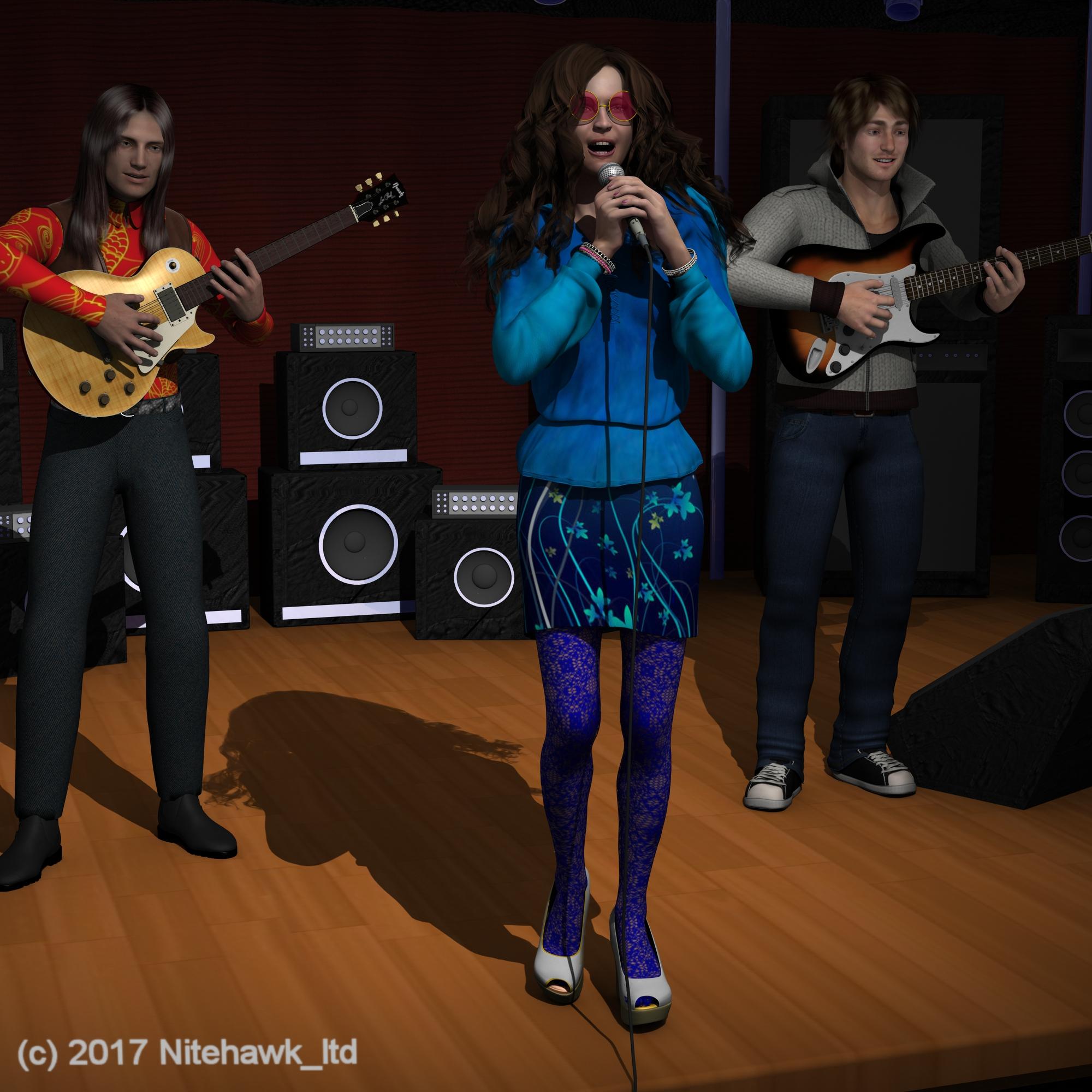 Carrara Challenge #36 - Pinups and Cheesecake and Hunks - Oh My! ..voting closed, WINNERS ANNOUNCED
Entry: #32
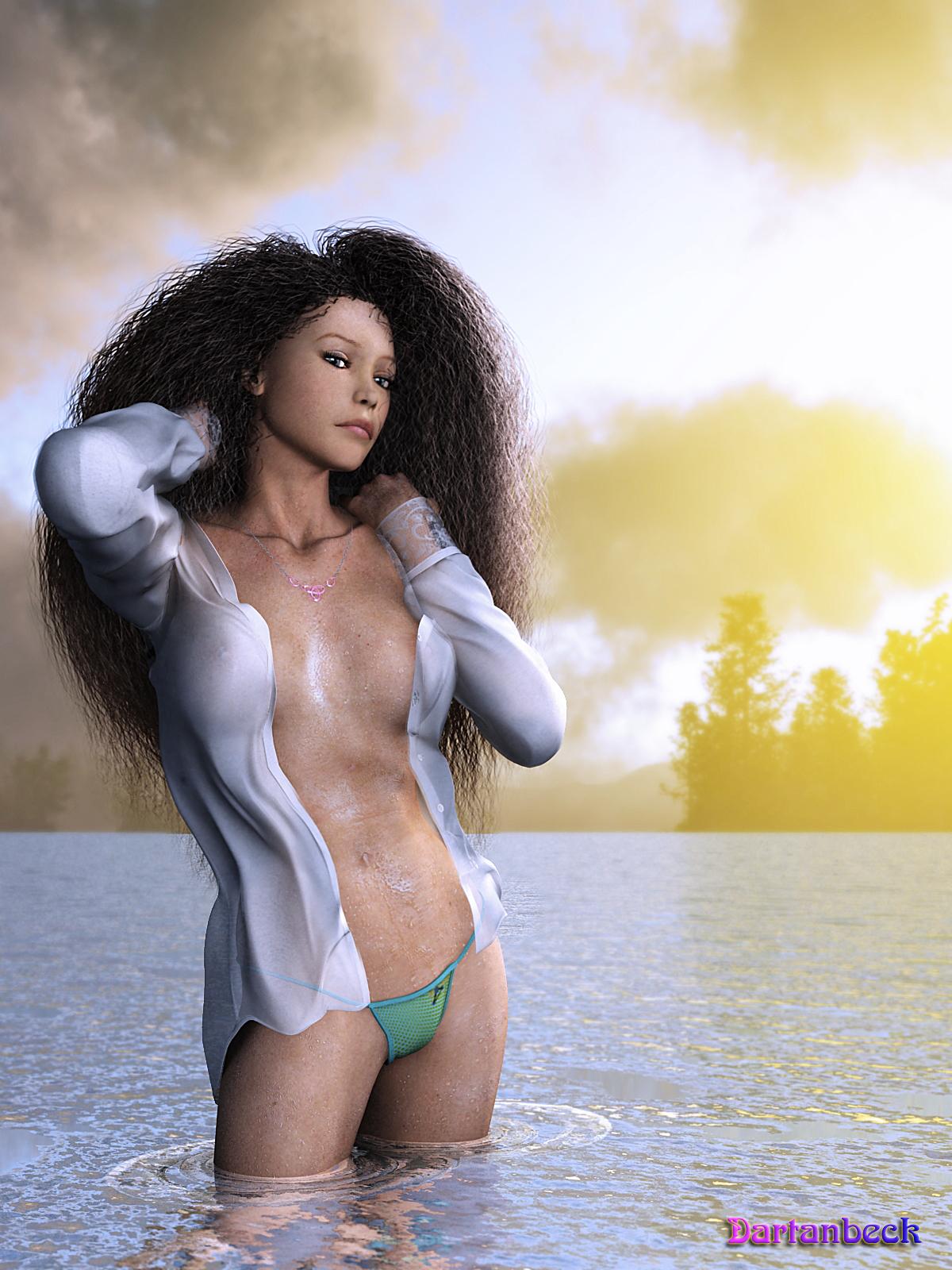
Title: Water Sport Monthly - Issue November 2017
Artist: Dartanbeck
PR/ NPR/Halloween: PR
WIP Links: Comment_3025891
Products Used:
Victoria 4.2, Arki's EYEdeas 3+, Carrara Hair (set up myself), Shirt by Supernova, Panties from Aery Soul, Used both Ringo and GKDANTAS shaders to help construct V4's materials - the rest is all Carrara - I used my EnvironKits and Carrara to create the HDRI for the surrounding background and main lighting
Additional Notes:
Postwork done in Affinity and Howler 11
 Getting skin to look more realistic. Maps?
You really don't need an expensive program. The texture maps that Daz creates are often detailed enough. Occasionally they need slight adjustments with Photoshop or Gimp or pretty much any photo editing program - but most of them are detailed enough "out of the box". The problem is their Iray settings are usually pretty bad, imo. You just have to learn how iray settings affect the look of the textures and adjust accordingly.
It depends on your definition of "detailed enough". The DAZ tex maps I've seen are jpg (!), so you are already talking about a lot of loss of fidelity from the start. JPG files are lossy and only 8 bit, so you are already starting out on the low end of the spectrum. But a good knowledge of how textures work in relation to realistic skin is a must.
That sounds a bit condescending. I think my definition of "detailed enough" would cover many (most?) people's idea of "detailed enough".
This is Victoria 7's textures - with no changes made to the texture maps (click for full size):
Most people aren't going to need more detail than that. The only things I changed where her Iray settings, added displacement maps, and Duel Lobe Specular bumps.
And as I said earlier, lighting and render settings can play a big role in adding realism.
Daz 3D is part of

Connect
DAZ Productions, Inc.
7533 S Center View Ct #4664
West Jordan, UT 84084Licensing Agreement | Terms of Service | Privacy Policy | EULA
© 2026 Daz Productions Inc. All Rights Reserved.