-
Limited Time Freebies Discussion Thread
If some people likes to use Smart Content, the two files needed to add Smart Content for 'French Style Shabby Chic Vol 2 Kitchen' are in the archive attached to this message.
I kept the original name, I simply deleted the almost empty 'DAZ_3D_27311_French_Style_Shabby_Chic_Vol_2__Kitchen_.dsx' file created by DIM to force Daz to create a new one, and added metadata to every item. As they are no material presets, either included or as a addon in the store, I didn't bother with creating Compatibility Bases for each of them.
I didn't include the thumbnail so if you want one, you'll have to either create one yourself or do what I did:
- Download the promo render with 'artistic render' written on it from the product's page: https://www.daz3d.com/french-style-shabby-chic-vol-2-kitchen
- (Optional step) Resize it to 380x494 (it's optionnal because the render as the correct picture ratio).
- Save it as a JPEG picture (you may have a webp picture at that point and I didn't check if Daz Studio is able to deal with them) named 'DAZ_3D_27311_French_Style_Shabby_Chic_Vol_2__Kitchen_.jpg'
- Move it in the same directory as the dsx and dsa files
- Move all of them inside a 'Runtime/Support' in either your 'My DAZ 3D Library' (and replace the 'DAZ_3D_27311_French_Style_Shabby_Chic_Vol_2__Kitchen_.dsx' file created by DIM), or, better, in a library not managed by DIM (My Library is perfect for that if you don't have any other library) and deleted the existing 'DAZ_3D_27311_French_Style_Shabby_Chic_Vol_2__Kitchen_.dsx' file created by DIM.
The benefit of using a library not managed by DIM is that you'll keep the metadata file safe: in the improbable case of Daz pushing an update to such an old product, I think I read that DIM would replace the existing one.
Then, you'll have to tell Daz Studio to install the metadata (I remember whatching a video of someone explaining how to replace the metadata included in the DIM package and ask DIM to reinstall, but in the current situation, they are no metadata files included in
How to install metadata?
With the Content Library active (I’m reusing older screenshots but the text should be up-to-date):
1. Open your Content Library, right-click on the tab to get the following menu and select Content DB Maintenance
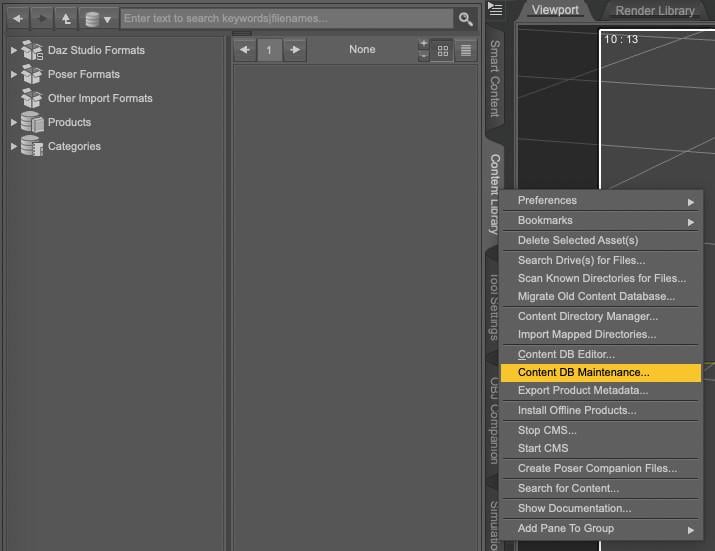
2. Select Re-import Metadata
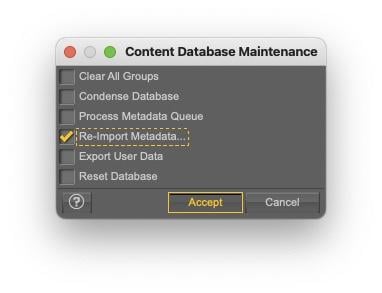
3. UNSELECT everything by unchecking User Data and All Products, to avoid overwriting existing metadata (it’ll also be much faster to only import one product metadata than your whole library…).
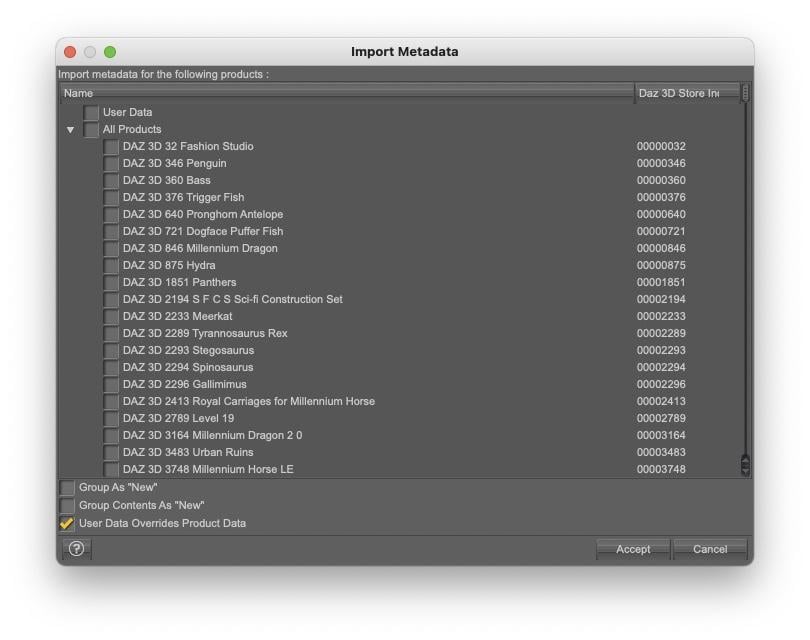
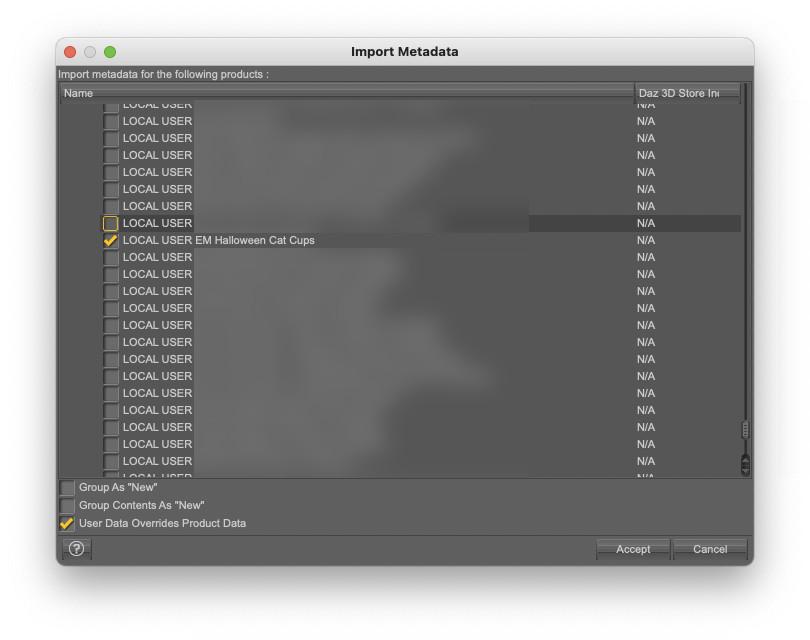
4. Select ‘DAZ 3D 27311 French Style Shabby Chic Vol 2 Kitchen ’ (as announced, it’s an old screenshot done for another set of metadata) and click accept:
Once installed, you will be able to find the kitchen in Smart Content:
- By searching for ‘kitchen’
- By searching for the author, by typing key::"Anima Gemini", or key::RuntimeDNA or key::"Daz Originals" (the latter being the less useful because you likely already have a lot of Daz Originals content installed).
Or by looking into one of the categories shows on the following screenshot, which is also what you should see:
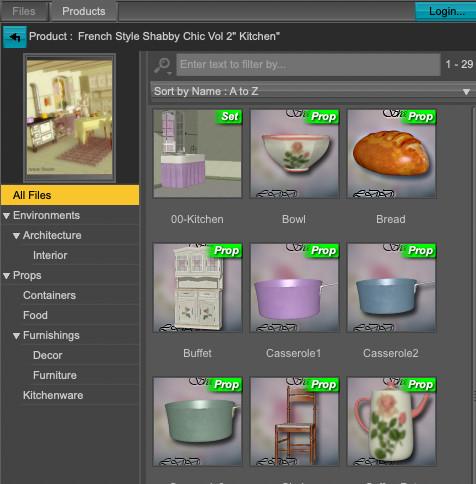
Let me know if there is any problem.
Categories not removing references? [SOLVED]crosswind said:
Right ~ DO NOT export / re-import User Data.
Also refer to: https://www.daz3d.com/forums/discussion/738831/bug-studio-stops-remembering-categories
This issue I had is a slightly different thing than importing user data, but along a similar vein. Thanks all for your help! Much appreciated!
Categories not removing references? [SOLVED]Right ~ DO NOT export / re-import User Data.
Also refer to: https://www.daz3d.com/forums/discussion/738831/bug-studio-stops-remembering-categories
Categories not removing references? [SOLVED]Richard Haseltine said:
Customise or Categorise?
I figured out the issue, Who here has not had to redo their Daz library even once?
Well if you have many "thousands" of user assets (like I do), when you delete your Daz library and Daz's program files, the connection to Daz gets lost for your user data. So how do you fix it? Well, you rebuild your library then you rescan for metadata.
Well the user metadata is meant for a different Daz install. They are like from different dimensions or even a different OS. Daz may detect the metadata fine but it is locked with incongruent product permissions (the only way I know how to explain this).
Thus, Daz will display it, but it will not let you delete or customize it because it does not belong to your current Daz library, it belongs to a different Daz or different OS and Daz.
So I went through many months trying to figure out what was wrong. Reinstalling many times just to have the problem over time resurface and not knowing why. After a fresh install of everything, all it would take was to reinstall my library or Daz, and the permissions problem was back. No amount of Windows ownerships and permissions changes would fix it other than a complete reinstall of the OS and a fresh install of the library and even that would not always fix it.
Let me detail how this problem manifests itself.
In the content tab at the bottom of the list of items is a folder called "categories".
You can right click on categories and create a sub-category folder(s).
Then you can find files that you like. You can choose from files that are part of the Daz Product library or you can choose files that are your own custom files.
Once these files appear in the categories you can ideally, either delete the whole sub folder or remove individual references.
You can also remove them by unchecking them in the original folder by selecting categorize in the rt click dropdown menu.
The point is you can add and remove these files in the categorize folder singly or multiply.
The issue I ran into is when you disconnect your user library from Daz and it needs to rebuild the library, often you will no longer be able to remove individual or multiple references in the category folder.
They are locked. Daz will allow them to be placed into the category folder but it will not let them be removed other than by deleting the whole folder.
It is like they are read only, locked or do not have correct native Daz product permissions. I spend months changing Windows permissions to no avail.
Daz would not let me edit my user contents in the folder.
It turned out to be one check box in Daz that was the issue. Just one, lol.
When you need to reconnect you user data back to Daz after a reinstall, (when it will not let you edit it in categories)
you go to Smart Content > Content DB Maintenance > Re-import Metadata
You will see, the box pictured below.

If you check the box, "User Data Overrides Product Data" it will import your user data with its own permissions and old disconnected Daz product associations. Or it imports no product data.
This can result in Daz not having the right permissions to fully connect with the user data.
Instead, uncheck the box and Daz will build brand new metadata product connections to the old user data and it will then work again in categories.
Problem "SOLVED".DIM operationDS does not care about absolute paths, only relative paths (except for Custom Actions). However, you will need either to put the database on the removable drive too or reimport metadata - and Connect (though Daz Studio) instalaltions cannot be reimported.
DIM, on the other hand, does use absilute paths in its manifests (the way it tracks what was installed) so if you are also sharing its files you will need to use the same frive letter for both machines..
Daz Studio 6 Beta - version 6.25.2026.19821! (Updated July 23, 2026)Okay, talk about your basic, "One step forward, two steps back".
On the Mac, the new version 6.25.2025.26119 (September 19, 2025):-
Fixed an issue with the selection of composite keys in the Timeline pane dopesheet view
Hooray! Yes, a step forward!
HOWEVER, now I can't import my audio files, something that's worked since the very first ALPH (but hasn't for a decade in the 4.xx.xx versions). I can *see* the .wav files in the selection box, but they're all greyed out.
Is it enough to list this here, or do I need to report it somewhere else?
 DIM operation
So I installed content on a local drive but want to move it to an external drive so I can share it between two different computers. Will I loose all of the metadata/smart content If I do that? (I used to know a lot more about this than I do now, but take a decade off and you forget a lot, besides what might have changed over that time...)
Velvet Ropes FreebieI attached the archive (it'll have a gibberish name, once downloaded, but you can name it back to 'VelvetRopes.zip') as downloaded from Slosh ShareCG account, untouched and unmodified. I just checked the content in Daz Studio and everything should work fine.
By downloading it, you'll get access to Slosh's Velvet Ropes as he shared it back in 2013.
As he said eloquently in the readme, ’Have fun with this, and use it any way you want, just do not redistribute as your own’.
If you want to thank someone, thank him.
Full text of the readme:
Velvet Ropes
by Slosh
05/01/2013Instructions: Unzip files to your DAZ Library or preferred content directory. To install metadata, open the Content DB Maintenance tab and choose "Re-Import Metadata". Select "Velvet Ropes" from the list and click "Accept"
I made this velvet rope set for use in a recent image and would now like to share it with all of you. The ropes and posts come with a few material options, including brass, silver, chrome, and gold, plus red or blue velvet (other colors are easily made in surfaces tab).
Also included are pose presets which will move additional posts the correct distance away from each other so that the ropes fit between them. The ropes have pose presets that determine if they swing left, right, forward or back to connect with other posts.
There is a preload set that is a post with a rope attached, but separate post and rope props are available to end your rows with. To add additional ropes, just be sure to have the post selected in your scene, then the rope will parent to the post automatically. Then, select the rope and either use the preset poses to rotate them around the post, or use your Y-Rotate parameter slider.
Have fun with this, and use it any way you want, just do not redistribute as your own.
Regards,
SloshCertain outfits breaking metadataUnfortunately the preferred base and auto-fit base are not set in the metadata, but in the object data file itself (.dsf). The Rocker Outfit gets it right (it was first), but the Dragon Lady Outfit kept an auto-filled field for those two base identifiers in the Scene Identification dialog when it was created.
In the "\data\Mada\Dragonlady\Dragon Lady Panty\DragonladyPant.dsf" file, replace the following two lines:
"auto_fit_base" : "/Rocker Outfit for Genesis 3 Female(s) and Genesis 8 Female(s)/Rocker Thong G8","preferred_base" : "/Rocker Outfit for Genesis 3 Female(s) and Genesis 8 Female(s)/Rocker Thong G8"with:
"preferred_base" : "/Genesis 8/Female"Save over the original, and you should not have any more problems with it.
Daz Studio 6 Beta - version 6.25.2026.19821! (Updated July 23, 2026)Metadata issue split to https://www.daz3d.com/forums/discussion/743331/certain-outfits-breaking-metadata
Certain outfits breaking metadataThis discussion was created from comments split from: Daz Studio 2025 ALPHA - version 6.25.2025.25616! (Updated September 16, 2025).Certain outfits breaking metadataIceCrMn said:
Richard Haseltine said:
IceCrMn said:
Not sure how this happened, but nearly all of my clothing has had their Auto-fit Base and Preferred Base set to the "Rocker Outfit for Genesis 3 Females and Genesis 8 Females".
I'm going to take the nuclear option and just delete the database and re-import it from DIM.
This is going to take a while so not sure, but it should fix it.We'll see in about an hour or so.
This sounds like bad product metadata - did you check DS 4 befoe applying the nuclear option? I would have tried reinstalling the base figures first.
I'm pretty sure you are correct.
After doing all the DB stuff and reinstalling the Rocker Outfit and Dragon Lady outfit the metadata is still wrong for the Dragon Lady outfit.
The Rocker Panties has correct metadata, the Dragon lady panties do not.
The panties for both are identical so it looks like the Rocker panties were reused in the Dragon Lady product.
Could someone with the Dragon Lady product please check if theirs is showing the same bad meta data please?
The Rocker set is included with the DS4 bundle so everyone should have that one.
https://www.daz3d.com/dforce-dragon-lady-outfit-for-genesis-8-females
https://www.daz3d.com/rocker-outfit-for-genesis-3-female-s-and-genesis-8-female-s
I'll sort thru the other products as I get time.
They may have the same problem.
edit: Here's the other one
https://www.daz3d.com/dforce-blue-nile-outfit-for-genesis-8-females
...also this is NOT an ALPHA issue. It appears to be a content product problem so my posts concerning this really should be moved to a more appropriate forum topic.
Problem with hair functioning from Maya3D in DAZWendyLuvsCatz said:
we do not have access to the import options and tools needed for strandbased Dforce hair unless you are a DAZ premier Artist
Thank you for your response. I'm not sure if he is a premiere artist, but let's assume he is; can such hair be used in Daz3D with dForce if it was created in Maya?
Certain outfits breaking metadataRichard Haseltine said:
IceCrMn said:
Not sure how this happened, but nearly all of my clothing has had their Auto-fit Base and Preferred Base set to the "Rocker Outfit for Genesis 3 Females and Genesis 8 Females".
I'm going to take the nuclear option and just delete the database and re-import it from DIM.
This is going to take a while so not sure, but it should fix it.We'll see in about an hour or so.
This sounds like bad product metadata - did you check DS 4 befoe applying the nuclear option? I would have tried reinstalling the base figures first.
I'm pretty sure you are correct.
After doing all the DB stuff and reinstalling the Rocker Outfit and Dragon Lady outfit the metadata is still wrong for the Dragon Lady outfit.
The Rocker Panties has correct metadata, the Dragon lady panties do not.
The panties for both are identical so it looks like the Rocker panties were reused in the Dragon Lady product.
Could someone with the Dragon Lady product please check if theirs is showing the same bad meta data please?
The Rocker set is included with the DS4 bundle so everyone should have that one.
https://www.daz3d.com/dforce-dragon-lady-outfit-for-genesis-8-females
https://www.daz3d.com/rocker-outfit-for-genesis-3-female-s-and-genesis-8-female-s
I'll sort thru the other products as I get time.
They may have the same problem.
edit: Here's the other one
https://www.daz3d.com/dforce-blue-nile-outfit-for-genesis-8-females
Problem with hair functioning from Maya3D in DAZwe do not have access to the import options and tools needed for strandbased Dforce hair unless you are a DAZ premier Artist
Certain outfits breaking metadataIceCrMn said:
Not sure how this happened, but nearly all of my clothing has had their Auto-fit Base and Preferred Base set to the "Rocker Outfit for Genesis 3 Females and Genesis 8 Females".
I'm going to take the nuclear option and just delete the database and re-import it from DIM.
This is going to take a while so not sure, but it should fix it.We'll see in about an hour or so.
This sounds like bad product metadata - did you check DS 4 befoe applying the nuclear option? I would have tried reinstalling the base figures first.
Certain outfits breaking metadataNot sure how this happened, but nearly all of my clothing has had their Auto-fit Base and Preferred Base set to the "Rocker Outfit for Genesis 3 Females and Genesis 8 Females".
I'm going to take the nuclear option and just delete the database and re-import it from DIM.
This is going to take a while so not sure, but it should fix it.We'll see in about an hour or so.
The New Mac FAQI am hoping the Beta on my MacBook Pro M1 will be more stable. I have been working for the past weeks to update my .dsa, .png/.jpg files in my Runtime>Support folder to match the new configurations entered in updated metadata by Daz Connect. I had to log in when Customer Service said they could only update one file that way. And ruined my files. But when I open the Beta it will crash at least once before becoming stable. I did have to remove the old drive that used to have my main files on it, once I did that the mouse stopped crashing constantly D|S. I will still have to fix the missing categorizations that were borked later.
Best way to render characters outside DAZ Studio?WendyLuvsCatz said:
why
I mean there definitely are better renderers out there but not free and it is possible to export to them but you have iray already and nothing free is likely better without work and Blender is the obvious one in that catagory.
I use Unreal Engine and Octane but I wouldn't actually say they are better than iray but are a fair bit of work getting there but I do animations and the extra work in my case is still faster than using iray on my PC because I do animations
It seems that OP doesn't really care about free or paid (but better be perpetual license...?) but "what he DOES want" in the above list still shows a high demand, e.g. just the 1st point (- quick and easy SCENE export, import) may kick out most of the platforms / renderers, let alone: - support of geografts and geoshells; and - fully textured with material conversion to the host rendering software...
...while Blender has Diffeo, UE has DTU that Thomas and David have been spending lots of effort and time on developing the bridges to make it effective in terms the above point 1, at least.
Marmoset, Renderman, Maya, C4D, so on and so forth, will cost more time 'n effort in terms of point 1 and 3, and making "geo-grafts and geoshells work" requires work arounds, etc. etc.
HS Viola hair parenting issuesbarbult said:
Taoz said:
Do I need the Premier Geometry Editor for this? And can I use Hexagon or Carrara instead of Blender?
No, you don't need any Premier tools or even Mesh Grabber. The Geometry Editor is a tool that is part of Daz Studio. You don't even have to interact with Geometry Editor other than to have that tool selected when you export the hair to OBJ. I have only ever used Blender, but I would expect any modeling tool to work, as long as it can handle the large hair OBJ files and you use the right import and export options. I don't know other tools, so I can't advise on specific settings for Hexagon or Carrara.
OK. I'm quite familiar with the Geometry Editor in DS, so I may give it a try with Hexagon or Carrara when I get the time. Thanks!
Daz 3D is part of

Connect
DAZ Productions, Inc.
7533 S Center View Ct #4664
West Jordan, UT 84084Licensing Agreement | Terms of Service | Privacy Policy | EULA
© 2026 Daz Productions Inc. All Rights Reserved.