-
New Store and Features Discussion Thread
I wanted to know how many Stonemason 'Streets" products I owned. I typed 'Streets' into the store search bar...guess how many Stonemason products came up...you guessed it - none. Not a single Streets product from the vendor who probably uses that word the most in his products. Very poor. (I only own seven, I obviously need to spend more)
Freebie Challenge July 2026 - "Summer holidays" - Main ThreadVacation on Earth

No count:
Genesis 3 Male
Genesis 3 Starter Essential (boxers)
Paid:
https://www.daz3d.com/stf-retro-ufo
https://www.daz3d.com/varginha-alien-for-genesis-3-male
https://www.renderosity.com/marketplace/products/168609/relaxation-beach
Free:
https://www.renderhub.com/mysticartdesign/soft-ice
https://www.renderhub.com/ext3nd-studio/e3d-seashells
https://www.renderhub.com/bubblecloud/surfboard
https://www.renderhub.com/bubblecloud/beachball
https://www.renderhub.com/laticis/li-elemental-dynamics-li-rock-large-003
https://www.renderhub.com/herhey/roberto-romoli-s-nuka-cola-bottle
https://polyhaven.com/a/spiaggia_di_mondello
Mechasar's Characters Catalog: Who's next? (commercial)jmucchiello said:
The issue I have with Beverly is these parameters are littered throughout all my save files. When one of the parameters becomes non-zero they all get added to the save of every G9 figure in the scene, bloating all the file's size and slowing loads and saves of the files. Since uninstalling Beverly, my loads and saves are noticably quicker. That, and Beverly always shows up as "used" in MikeD's List of All Products for any scene with any G9 figure.
Okay, the situation is clearer to me now.
I'm sorry for the inconvenience, but as you know, Beverly 9 is a unique character that required more controllers than my other characters in order to provide the most natural animation experience possible while preventing body part intersections. Because of this, Beverly 9 is inherently more demanding, and its performance is also influenced by the hardware being used.
The issue is that if I were to add even more controllers on top of the existing ones, the software would have to process even more information in real time. While this could make saved scenes lighter, it would also make the character itself heavier during use, potentially causing slower and less responsive movement.
For this reason, I'd like to propose a customizable solution, so each user can decide whether or not to apply these changes based on their own needs.
What I propose is creating a simple ON/OFF boolean control that allows you to manually enable or disable the KEY values whenever needed.
The process is straightforward:
1) Load a standard Genesis 9 figure into the scene.
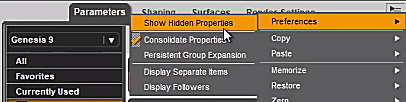
2) In the Parameters pane options, select Preferences, then enable Show Hidden Properties.
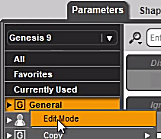
3) Right-click anywhere inside the Parameters pane and select Edit Mode.
4) Right-click the General group in the Parameters pane and select Create New Property.
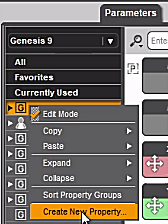
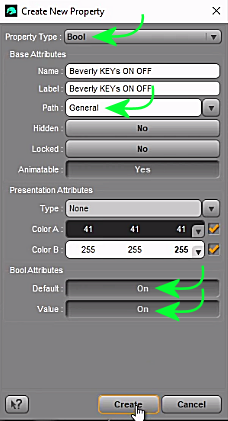
5) Create the new property as shown in the image. It will immediately appear under the General path.
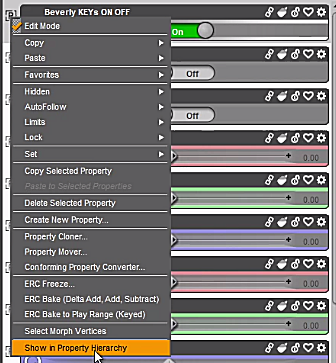
6) Right-click the new property (Beverly KEYs ON/OFF) and select Show in Property Hierarchy.
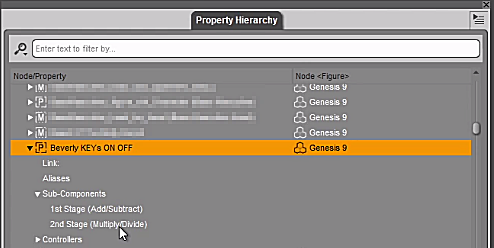
7) A new panel will open listing all available properties (controllers), with the new Beverly KEYs ON/OFF property highlighted. Expand it until you can see the 2nd Stage under Sub-Components.
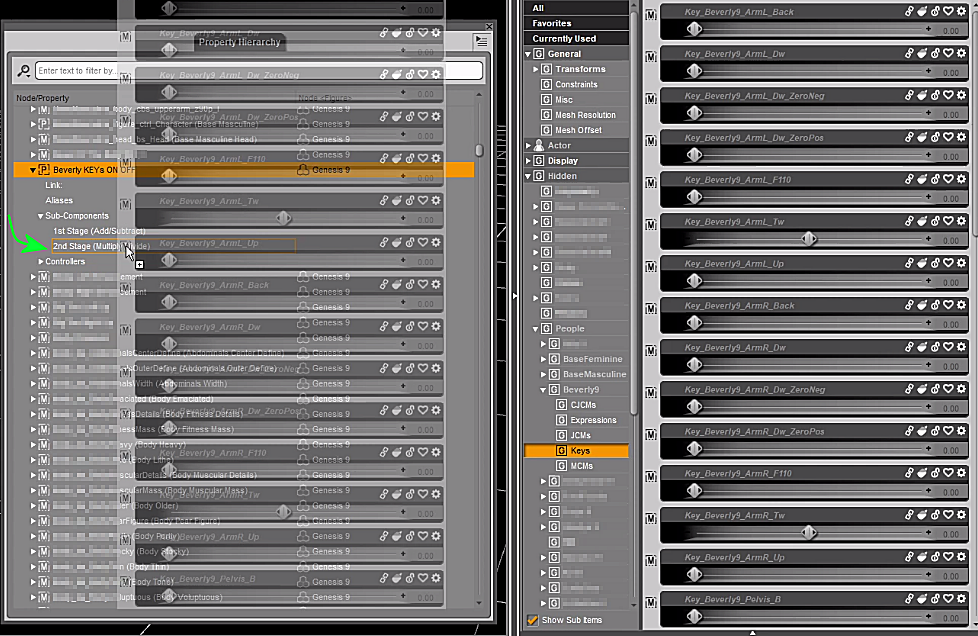
8) Navigate to Hidden > People > Beverly9 > Keys in the Parameters pane, then select all Beverly 9 Keys by holding down the Shift key and clicking the first and last Key in the list.
9) Drag and drop the selected Keys into the 2nd Stage under Sub-Components, as shown in the image. This makes all of the Keys dependent on the Beverly KEYs ON/OFF toggle.
10) Select the Genesis 9 model, then navigate to File > Save As > Support Asset > Modifier Asset(s) and save the Keys and the new property back to the same installation path where Beverly 9 is installed, as shown in the image.
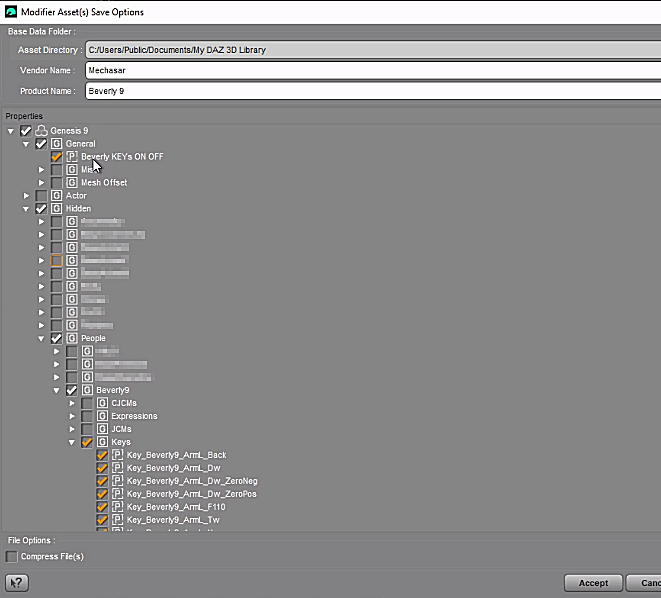
11) Remember to deactivate the Edit Mode.
Now you can turn off the Beverly’s Key values whenever you need. I hope it helps solve the problem.
Happy Halloween! Yes I know what day it is. CommercialI always wanted to do some old school masks for the Daz figures. The kind I had as a kid that never fit right and left you blind in one eye walking around some neighborhood with a sack of candy. I hope the fit here is better but if I am honest it should be uncomfortable to be more realistic.
Anyway Halloween comes and goes and I miss the window because of one reason or another. This year I decided to hell with the calendar, I am going to make them early. So here they are.
I have no idea if anyone else even remembers these things but Happy Halloween even in July.
AIUTO...CHI CONOSCE L’ITALIANO? PARTE QUATTORDICIKainjy said:
emanuela1 said:
Kainjy said:
emanuela1 said:
Grazie Kainjy per la risposta. La promozione wishlist funziona normalmente, per i new release non lo so perchè non ho neanche provato, sono troppo cari per me, se qualcosa mi piace la metto nella wishlist per comprarla quando scende di prezzo. Mi riferisco invece allo sconto del 20% o 30% o 40% che dovrebbe essere applicato agli oggetti elencati nella promozione dei Featured Artist del giorno, se possiedi 1 o 2 o 3 oggetti DD rispettivamente. Lo sconto viene applicato automaticamente quando metti gli oggetti nel carrello. Avendo comprato dForce Hailey Dress for Genesis 9 due giorni fa, fin quando appare nella pagina promozionale dovrei avere uno sconto 20% sugli oggetti che trovo elencati nella lista Featured Artist del giorno (anche questa cambia ogni giorno). Questa promozione per me ha funzionato fino a qualche giorno fa, ora invece non funziona più. Ho chiesto nel forum apposito "New Year, New Sales etc", ma dalle risposte mi sono resa conto che per gli altri funziona ed il problema sembra solo mio. L'unica cosa che è cambiata è che ho fatto una breve vacanza e fino a qualche giorno mi collegavo da un'altro computer, mentre adesso sono tornata a casa e mi collego dal mio computer di sempre e da quel momento ha smesso di funzionare quella specifica promozione. Non penso però che c'entri niente, perchè la promozione della wishlist e le altre funzionano. In allegato lo screenshot della promozione dell'elenco dei FA a cui mi riferisco. Visto che sembra riguardi solo me, mentre per gli altri funziona normalmente, ho aperto un ticket, vediamo cosa mi rispondono e, soprattutto, quando.
Alla fine risolto ?
In questi giorni non ho sfruttato questa promozione per cui non saprei che dirti...
A me non va.. ma ho preso un item 3-4 giorni fa (non è più in lista.. era la bambina G9) .Fino all'ultimo non ha funzionato. Mi hanno risposto al ticket che avevo aperto dicendo che erano molto dispiaciuti e che se ero molto interessata all'oggetto mi avrebbero fatto un offerta personale ad hoc, ho risposto che potevo essere interessata, poi più nulla, nessuna proposta, nessuna offerta. Quindo da lì non ho comprato più nulla, il mio magro credito lo tengo per qualche oggetto OS o QG che esce, ormai compro quasi solo lì, sono prezzi idonei a quanto sono disposta a spendere. Ho comprato parecchie cose nel tempo, ho già abbastanza oggetti per divertirmi con questo hobby.:)
Loro sono in USA e fanno orari da ufficio USA.. per cui la mattina difficilmente rispondono ai ticket.. di solito sempre il pomeriggio.
PS ho visto il render contest... hai sbagliato la scadenza nel regolamento (31 Maggio).
Se ho del tempo libero magari partecipo o pubblico un freebie per il contest (se trovo qualcosa di interessante e a tema).Non mi ero accorta, ora correggo, grazie dell'avviso. :) Partecipa, è divertente!
Mechasar's Characters Catalog: Who's next? (commercial)Mechasar said:
Uthgard said:
Hi, first of all, love every single one of your products (it needs to be said and repeated). There's an issue with Beverly 9, though: the JCMs trigger even when she's at 0%. I've uninstalled her for the moment, but she's a really nice shape to add to the genepool, and I would like to know if there's a fix planned. Thanks for everything!
Hello! As you may have noticed, Beverly 9 includes many JCMs, so I’ll need to ask which specific JCM you’re referring to. I haven’t been able to reproduce any issue, and no problems were found during the testing phase either, which I can assure you was carried out thoroughly. Therefore, I believe that if the defect exists, it may have arisen during the upload process to the store or as a result of some package update.
If, on the other hand, you’re referring to the parameters labeled KEY and are concerned that they remain active even when Beverly’s morphs are disabled, please note that these are neither JCMs nor do they contain any morph data. The KEY parameters simply convert the numeric rotation values of the limbs into values ranging from 0 to 1. That’s all they do. At the same time, the JCMs that use these KEY values already include an internal multiplicative control that activates only when Beverly’s body or head morphs are enabled. So if that’s your concern, you can rest assured.
Multiplicative controls were not added to the KEY parameters themselves in order to avoid introducing redundant constraints, which could slow down character animation or, in worse cases, create conflicts.The issue I have with Beverly is these parameters are littered throughout all my save files. When one of the parameters becomes non-zero they all get added to the save of every G9 figure in the scene, bloating all the file's size and slowing loads and saves of the files. Since uninstalling Beverly, my loads and saves are noticably quicker. That, and Beverly always shows up as "used" in MikeD's List of All Products for any scene with any G9 figure.
Let's appreciate/discuss today's new releases - ongoinger still further threadWendyLuvsCatz said:
richardandtracy said:
Oh dear: Punk DAZ House Cat Outrageous. But someone's going to get their face ripped off.
Love it.
Richard
possibly barbult by Richard Haseltine if she buys it

as soon as saw it reminded me of Gonk, Elvira's dog in the movie
Outlet and Quick Grab DiscussionSpace Elsa's various bags products are all nice
 Characters Not showing up and not loading
I have done several things like uninstall my files, reinstall, delete the daz studio and stuff. I only get 6 of my characters to show up in my content library. I have about 40 characters or more. When I click on them to show them in the scene, I get this error
an error occured while reading the file, see the log for more details.
2026-07-01 22:09:33.142 [INFO] :: Begin asset load (open): /People/Genesis 9/Characters/Daz Originals/Andy/Materials/Andy All MAT.duf
2026-07-01 22:09:33.164 [INFO] :: Clearing the scene...
2026-07-01 22:09:33.178 [INFO] :: Scene Cleared
2026-07-01 22:09:33.179 [INFO] :: Determining missing assets...
2026-07-01 22:09:33.353 [WARNING] :: Invalid hierarchy for selected node(s) and "preset_hierarchical_material" type; no root(s) found.
2026-07-01 22:09:33.353 [WARNING] :: Error loading asset: C:/Users/Public/Documents/My DAZ 3D Library/People/Genesis 9/Characters/Daz Originals/Andy/Materials/Andy All MAT.duf
Operation failed
2026-07-01 22:09:33.386 [INFO] :: Unlocking viewport redraw...
2026-07-01 22:09:33.386 [INFO] :: Viewport redraw unlocked.
2026-07-01 22:09:38.366 [INFO] :: Prepare asset load (open): /People/Genesis 9/Characters/Daz Originals/Charlotte Jr HD/Materials/CNB Charlotte !Full Base Skin.duf
2026-07-01 22:09:38.366 [INFO] :: Locking viewport redraw...
2026-07-01 22:09:38.367 [INFO] :: Viewport redraw locked.
2026-07-01 22:09:38.412 [VERBOSE] :: Native format content directories: 2
2026-07-01 22:09:38.412 [VERBOSE] :: Poser format content directories: 2
2026-07-01 22:09:38.412 [VERBOSE] :: Other import format content directories: 0
2026-07-01 22:09:38.412 [INFO] :: Begin asset load (open): /People/Genesis 9/Characters/Daz Originals/Charlotte Jr HD/Materials/CNB Charlotte !Full Base Skin.duf
2026-07-01 22:09:38.418 [INFO] :: Clearing the scene...
2026-07-01 22:09:38.429 [INFO] :: Scene Cleared
2026-07-01 22:09:38.431 [INFO] :: Determining missing assets...
2026-07-01 22:09:38.525 [WARNING] :: Invalid node selection for "preset_material" type.
2026-07-01 22:09:38.525 [WARNING] :: Error loading asset: C:/Users/Public/Documents/My DAZ 3D Library/People/Genesis 9/Characters/Daz Originals/Charlotte Jr HD/Materials/CNB Charlotte !Full Base Skin.duf
Operation failed
2026-07-01 22:09:38.558 [INFO] :: Unlocking viewport redraw...
2026-07-01 22:09:38.558 [INFO] :: Viewport redraw unlocked.
This is only part of my error load. This error happens when I click on any of the characters, but like I said only 6 are showing up out of the 40+ I have. Everything else loads up, environments and all load up, it is just the characters. I would upload my log file, but I can't find it. If someone will tell me where it is, I will upload it.The "The Weather Changes More Often than the Thread Title" Complaint Threadcomplaint: Little Dude REALLY wanted to go for a walk this evening, so we went. He was very excited initially, but at about 1/2 way through he started getting fussy, and by 3/4 he had had enough of being sticky and hot and lost his ever-lovin' poo over it. That was a long final mile.
non-complaint: He was all sunshine and smiles once we got into the air conditioning. So at least it doesn't seem to have tanked the rest of the day.
non-complaint: Today's the seven-year anniversary of getting to change the locks on my house to keep the ex- out (and begin 8.5 months of excavation/renovations in order to make it safe to live in). Teen Kiddo asked for French toast to celebrate. The original plan was root beer floats, which we're still doing, but they decided something substantial needed to be sent down before the massive sugar bomb. So I got French toast, and I still have floats to look forward to. And they've been intermittently running off with my cookbooks again over the past week, so I might get cookies or something this weekend too. :)
The "The Weather Changes More Often than the Thread Title" Complaint Threadmiladyderyni_173d399f47 said:
richardandtracy said:
My lady wife is getting ordained on Saturday, she was 'Deaconed' last year and after a year of on-the-job training she's going to be priested to become a Church of England Vicar. We'd hoped to avoid the record temperatures of 37.7C (99.9F) that were last week. And we are missing them, -ish. It's now predicted to be 28C (82F) which is better, a fair bit better. However, she's going to be in full robes in the sun after the service for all the glad-handing which goes on for ages in the cathedral precinct. The area is open to the sun and the clean sandstone of the cathedral wall will be like a furnace reflecting the heat back. Hmm. The boss will feel as if the temperatures are close to records again in that get-up.
Regards,
Richard
What an amazing achievement. Yes, for you both. This Methodist will pray that the weather moderates.
This Pagan adds a good word to the weather gods to your prayers. :)
Congrats to your wife and you/your family, Richard. I hope the day is memorable for you all in all the best ways possible. (And as someone who's frequently done historical re-enactment in full medieval getup in 80-90+ F with humidity... my sympathies to your wife.)
Let's appreciate/discuss today's new releases - ongoinger still further threadAhh, right, yes, thank you! Now it shows me a huge list of additional products used. Previously it had only one icon for some reason.
Looks like the coal inside has different shader than in the braziers product promo images.butterflyfish said:
daer-thing said:
https://www.daz3d.com/mmx-vdb-smoke-trails-06
Does anyone know where are the braziers+glowing coal on the 1st promo pic from?
I recognize the environment as a Stonemason product but that one has no such braziers next to the stepping stones.Possibly from the Braziers set listed at the bottom of the page? https://www.daz3d.com/braziers
V3Digitimes Daz Studio 2025 (6) compatibility Statusthanks for going about updates in an organized way.
i hope that DAZ will start tagging products as "2025" compatible.
i will problaby hold off any purchases unless there is a 2025 version.Auto Muscle Enhancer HD [Commercial]
I am sorry to learn that your best friend passed. It makes it hard to really think about anything else for a good long while.Zev0 said:
Hi. It is going to be released as a regular product. Sorry took a break from Daz for a while. Was busy studying expanding my knowledge base. Also my dog who was my best friend died this year so ye..Needed some time off.
Gallery "Under Construction"Matt_Castle said:
In theory, yes, but as Daz no longer has any AI products, and AI generations are now in direct conflict with their primary business model, it simply doesn't make good sense for Daz to continue to allow those uploads and thus it would be pretty strange to continue to have sections and filters for it.
I'm just giving just a solution for the perceived flood of AI pictures, using the tools of the current gallery, not my position in favor or against allowing these pictures.
At present (even disallowing for commenting being suspended at the moment), you really can't, because there's no notifications on any comments, and I'm exceedingly unlikely to find them on anything that I posted more than a couple of days ago (and even if I do find them, it's probably months afterwards and now the other person won't see the answer).
If you answer under the message of someone else, that person can see if there is a reply using the 'Pages with Replies to [name]' link visible on their gallery homepage (to bad message left under our pictures don't count as replies to us).
Before the gallery was frozen, I though about trying to put a message on top, asking for people leaving a comment to leave one under that message, so that I could see someone answered but I forgot to test it with my last picture.
And at worse, the forum is still here.
Torquinox said:
No one knows what the actual Daz stance is on this. This thread is a house of speculation and invented narrative. The only thing we do know is, the gallery is closed to new submissions and apparently no longer linked on the main menu.
I suppose by Main menu, you're speaking about the menu opening after clicking on the orange icon? It's actually still visible here if you're opening that menu on Daz homepage (so https://www.daz3d.com/) but is now replaced by a link to our Product Library elsewhere.
Otherwise, it's still the first link in the 'Community' menu, and there is still some activity (some of my pictures are still getting Like as an example, and it's likely true for the pictures of other people) and while there isn't any new pictures, the system is pulling pictures from the past, so if someone is looking for inspirations or arts, they're likely to see something they either never saw or at worse, it will be a trip down memory lane.
No one knows what Daz has in store, so we will have to wait to see if the report of the gallery's desmise were, or not, exagerrated
 Gallery "Under Construction"
davidwski_16294691f0 said:
"The irony is that the 'full bore AI' image is achievable in Daz Studio, making it a good example of why I don't think AI image generation should be including in a gallery for Daz Studio works."
"I can understand that in certain cases, AI can expand the limits of what you or the software can do. However, I do not want to see AI on Daz. The whole point of the gallery is to showcase Daz products and the users who create from them. Adding AI to the mix detracts from that and devalues the work that has gone into creation."
Following that logic, do you believe that the gallery (If/when) reopened, should never allow any image that has any postwork done in Photoshop, GIMP, or Paint Shop Pro? That is basically all that was done using AI in any of the images, and a background can be pulled easily from the internet. All of the items in all of the images were rendered using V4 era models.
I don't agree with the stance that running an image through an AI image generator is the same as doing post work.
Gallery "Under Construction"Matt_Castle said:
Elor said:
You can switch to 'Traditionnal' and you should not see pictures with AI elements or AI generated ones.
In theory, yes, but as Daz no longer has any AI products, and AI generations are now in direct conflict with their primary business model, it simply doesn't make good sense for Daz to continue to allow those uploads and thus it would be pretty strange to continue to have sections and filters for it.
AI elements or enhancements *maybe*, but pure AI generations? What does Daz get out of having those in their marketing gallery?
You can also ask, either directly the artist in their gallery, or everyone else on the forum, if one item is exactly what you're looking for.
(Emphasis mine).
At present (even disallowing for commenting being suspended at the moment), you really can't, because there's no notifications on any comments, and I'm exceedingly unlikely to find them on anything that I posted more than a couple of days ago (and even if I do find them, it's probably months afterwards and now the other person won't see the answer).
I think that the direction of the business model Daz plans, is shown in the "AI Solutions" link in the black Daz3D bar at the top of the page. I'm simply doing a similar thing, on a smaller scale, for my own enjoyment, with models I already own.
Gallery "Under Construction""The irony is that the 'full bore AI' image is achievable in Daz Studio, making it a good example of why I don't think AI image generation should be including in a gallery for Daz Studio works."
"I can understand that in certain cases, AI can expand the limits of what you or the software can do. However, I do not want to see AI on Daz. The whole point of the gallery is to showcase Daz products and the users who create from them. Adding AI to the mix detracts from that and devalues the work that has gone into creation."
Following that logic, do you believe that the gallery (If/when) reopened, should never allow any image that has any postwork done in Photoshop, GIMP, or Paint Shop Pro? That is basically all that was done using AI in any of the images, and a background can be pulled easily from the internet. All of the items in all of the images were rendered using V4 era models.
The "The Weather Changes More Often than the Thread Title" Complaint Threadrichardandtracy said:
My lady wife is getting ordained on Saturday, she was 'Deaconed' last year and after a year of on-the-job training she's going to be priested to become a Church of England Vicar. We'd hoped to avoid the record temperatures of 37.7C (99.9F) that were last week. And we are missing them, -ish. It's now predicted to be 28C (82F) which is better, a fair bit better. However, she's going to be in full robes in the sun after the service for all the glad-handing which goes on for ages in the cathedral precinct. The area is open to the sun and the clean sandstone of the cathedral wall will be like a furnace reflecting the heat back. Hmm. The boss will feel as if the temperatures are close to records again in that get-up.
Regards,
Richard
What an amazing achievement. Yes, for you both. This Methodist will pray that the weather moderates.
Daz Studio 4.24 Face Chains not useableThe images you attached to your first message are inconsistent. The first image shows a different product (ear chains) than the SKU you said you purchased from the Daz store (Face Chains SKU:94046). There is no context visible in that second image. Is that in the Smart Content pane or what? Further down in another message, you attached another screenshot, which is also NOT the product you said you purchased. So I am not sure what you are really looking at.
But anyway, in the second image, there is no thumbnail for the product, because Daz didn't provide one. Did you try just double clicking on the exclamation icon to open it and see the items in it? If this is in Smart Content, when you double click on the exclamation icon, you would see that all the items are in the Lost and Found category, because Daz didn't make the effort to provide ANY metadata for the product they sold you. Be aware that when you buy any of those "other store" imported products from Daz, you won't get a readme or metadata, as crosswind previously explained.Did you install with DIM, or just drag to files to your content library? Either way, if you did it correctly, you would see the files in the content library. They will be under the People folder and then under the character generation the files are for (e.g. Genesis 9). Then under Accessories. Then under FK-Simplicity FaceChains. In the attached screenshot from my product library, I captured just from Genesis 9 on down. (This screenshot is of the mapped folders, not categories or products in the Content Library.)
Daz 3D is part of

Connect
DAZ Productions, Inc.
7533 S Center View Ct #4664
West Jordan, UT 84084Licensing Agreement | Terms of Service | Privacy Policy | EULA
© 2026 Daz Productions Inc. All Rights Reserved.