-
Uneven Eyes For G8 Male...?
Hey, folks. Weird question, here!
I'm in the process of converting hundreds of V4/M4 OCs to G8 M&Fs. Spent a bomb getting all the bits and pieces I need from clothes to conversion scripts and everything is going according to plan, but I've hit a brick wall.
One of the male characters that I'm converting has a distinctly uneven pair of irises as part of his look. I can't seem to achieve this appearence in G8 male, unless I'm missing something. I have a lot of trouble using the search engine on Daz3D.com (in fact, I find use Google instead of Daz3D's search engine, now. I just type what I'm looking for and put "Daz3D.com" at the end. Works like a dream!) - So I am hoping that it's just a morphing kit that I've overlooked or missed.
None of the expressions or head/face morph related items seem to have sliders to change the left or right eyes independantly. There's sliders to edit both iris sizes simmultaniously, which is great, but not individually. This was tough for G8 Female too, but fortunately I found this pack; https://www.daz3d.com/eyedeas-5-extended-for-genesis-8-female-s which worked like a dream, but unfortunately there doesn't appear to be a male version of it.
Plan B would be to use some sort of male-body morph on the G8 Female model, and build the feller that way, but I don't know if such a morph exists!
So in short:
1 - Is there a morph pack that allows the resizing of G8M irises independantly?
2 - Is there a morph pack that can turn G8F into a man??
Sincerely appreciate any help with this!
- Doc
XTransfer Module 1- Genesis 3 to Genesis 8 Morph Converter (Commercial)...not sure if this was already asked, but can fit control morphs for G3 also be transferred to G8 clothing?

Update :
Ran a couple tests and Fit Control morphs apparently require a specific piece of clothing to be fitted to a character to work and only work on that set of clothing. The morphs can be saved for that particular clothing item and character but cannot be transferred to other clothing/characters. Pretty much that means there is no way to transfer the morphs over to G8 so the G8 version needs to be installed
Thought I could save a few zlotys.ah well.
War Witch - G9 or G8/8.1?????I bought the G9 version because this is exactly the kind of outfit I'm hoping to see more of. It has a ton of kitbashable pieces, most of which would not transfer over well from G8.
Creating morph for the figure and geo-graft together@Catherine3678ab
@crosswind
Just testing right now.The test graft:
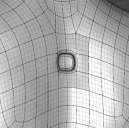
I plan multiple modifications to the figure and a set of full body morphs, so I want to have them all on when I work in blender:
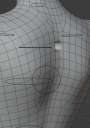
I apply a morph for testing made on the whole model with graft in blender, it moves a region of the back.. back:
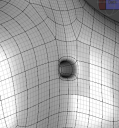
Everyhthing works as desired except the spot with where the graft is does not try to conform to the graft and the vertices there are at default positions when I remove the graft:
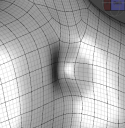
I don't even think that it should "work" and conform figure morph to the graft vertices morph on morph import.. but it sure would be nice as an option and actually makes sense in many cases.
Not the best demo of what and why I need and how it looks, but there it is. I might just start modeliong the figure changes separately from the graft changes. I think it is fine and I can think of additional reasons to do so. If I ever see a bad transition then I can export both and import the morph for both. In most cases it might be fine. Just wanted to see everything together and work on it together and still be able to disable or swap grafts.
Creating morph for the figure and geo-graft togetherillinarv said:
crosswind said:
I'm still not so clear about what you've done... But in general, if you import modified obj as a morph that already exists, you have to use Delta. Reverse Deformations applies for the case that some other morphs have been already dialed on the figure. If it's not the case, there'll be no difference by setting Yes or No...
For 'projection' issue, if I understand correctly, the morph you make on the figure normally should be triggered on the geograft by Auto Follow... as the attached screenshots...
Now I see what Reverse Deformations does. Thanks for the clarification. However.. when I use Reverse Deformations, it deforms the entire body sometimes as if changing the pose, and the pose seems to be zero, so are all the morphs. Not sure why that would happen, I'll be trying more things later with more morphs.
I need figure to follow the morph with attachment, not the other way around. Because I make the morph by exporting WITH attachment so that I have full control.
I might end up doing figure separately if that will produce good enough reslts. From my experience the transition between figure and attachment is bad sometimes if their morphs are made separately.
I'm a little confused... maybe you can post some screenshots... The graft fits to the figure and hides the relevant figure's geometry. So just like a wearable, the graft can auto follows the morphs dialed on the figure but the same could not be done the other way around as far as I know.
The only way may be that you still have to make a morph on the figure and set the morph on the graft as its controller. When you dial the graft's morph, the figure's morph could be automatically triggered...
Can't get rid of Morph Loader FolderRichard Haseltine said:
The .dsf file of the morph in the Daat folder has the path. make sure you haven't ended up with two copies of the file, in different places within the one Daat folder or in two different data folders, as DS will load only the first it finds (which may be an unfixed version if there are multiple copies)
The Parameter Settings dialogue will display the asset path, which won't eleminate same location in two different content directories but will show up two versions in different locations.
Creating morph for the figure and geo-graft togethercrosswind said:
I'm still not so clear about what you've done... But in general, if you import modified obj as a morph that already exists, you have to use Delta. Reverse Deformations applies for the case that some other morphs have been already dialed on the figure. If it's not the case, there'll be no difference by setting Yes or No...
For 'projection' issue, if I understand correctly, the morph you make on the figure normally should be triggered on the geograft by Auto Follow... as the attached screenshots...
Now I see what Reverse Deformations does. Thanks for the clarification. However.. when I use Reverse Deformations, it deforms the entire body sometimes as if changing the pose, and the pose seems to be zero, so are all the morphs. Not sure why that would happen, I'll be trying more things later with more morphs.
I need figure to follow the morph with attachment, not the other way around. Because I make the morph by exporting WITH attachment so that I have full control.
I might end up doing figure separately if that will produce good enough reslts. From my experience the transition between figure and attachment is bad sometimes if their morphs are made separately.
Creating morph for the figure and geo-graft togetherI'm still not so clear about what you've done... But in general, if you import modified obj as a morph that already exists, you have to use Delta. Reverse Deformations applies for the case that some other morphs have been already dialed on the figure. If it's not the case, there'll be no difference by setting Yes or No...
For 'projection' issue, if I understand correctly, the morph you make on the figure normally should be triggered on the geograft by Auto Follow... as the attached screenshots...
Creating morph for the figure and geo-graft togetherThanks to both of you, that worked! I think both suggestions combined produced the necessary effect.
I got wrong instructions from another thread. I was creating two morphs and they said it would just override the old one if I don't. But if I override just deltas than it makes sense.
So it seems that I need to load the morph for the figure normally or overriding all. Then load the morph for the attachment while overriding deltas only.
Also reverse deformations doesn't seem to have any meaningful effect. It actually is causing issues when it is on the base only or maybe on both too. When it is on attachment only it seems fine. So I'll set "no".
Now there is something else. I hoped that the morph would be somehow projected to the part of the figure that is replaced by attachment. But it is not and the figure recieves no morphing in that spot. I want it in case if I modify my attachment and I want to keep the morphs at lest on the base. Or if I get rid of the attachment. Or to have my worph work with and without attachment. Currently it would mess up all the morphs. So there must be a way to reproject the morphs onto it if I modify the topology right?
I would love to if I can change topology of the attachments non-destructively by preserving or reprojecting the morphs.Can't get rid of Morph Loader FolderAgain, that is not a folder and has nothing to do with folders on your harddrive. It doesn't have anything to do with Daz Studio the program either and therefore reinstalling Daz Studio does not make it go away.
The group heading "Morph Loader" is specified within the code in the morph "JCM-rThighSide" as a sort of address to help categorizing the morphs installed and locating the morph in the Parameters Tab - See the attached screenshot for a sample that I took from code within a morphfile.
Creating morph for the figure and geo-graft togetherWhen importing obj, have you set Reverse Deformations: 'Yes' and Overwrite Existing: 'Delta Only' in Morph Loader Pro dialog box ?
Creating morph for the figure and geo-graft togetherJust an idea -- try naming the morph for the geograft exactly the same as the morph for the figure. Then when the morph on the figure is dialed on, it should also activate the morph for the geograft when it is fitted on.
Zebra for Daz Horse 3For some reason, there never have been any zebra models for DAZ Studios. There needs to be a zebra morph for Daz Horse 3.
Shape Shift for Genesis 9 (Commercial)Zev0 said:
Hi. It's nearly done.


One morph that I have often needed is one that would close or at least bring together a top button unbuttoned shirt collar.
Creating morph for the figure and geo-graft togetherI have made and attached a geograft, exported them together and deformed them together in Blender.
Now I need to be able to use that morph in DAZ.The morph is imported back and created successfully and is correctly applied to the figure itself when added and activated on the figure, and to attachment itself when added to attachment. But it is incorrectly applied to the attachment when it is activated on the figure.
When the morph is activated on the figure (slider moved) it moves vertices of the figure according to morph and vertices of the attachment fall to the floor as if they have registered positions in a wrong space with Y and Z swapped. WHen the morph is activated on the attachment the vertices of the attachment move correctly.
So I want all that behavior except when it is activated on the figure it shouldn't mess up the attachment.
Did I do some settings incorretly?
Otherwise the attachment is functioning perfectly fine.EDIT: Totally forgot. The eyelashes also fly out of the face and fall to the floor when the morph is activated on the figure. Even though they have nothing to do with attachment.
Can't get rid of Morph Loader FolderOkay this is weird. I saved it once and two morph folders were created. One my vendor name and the other info. So I changed my vendor name to info and it didn't save anything. Something is whacked. And I tried both of the saved folders and they both had Morph Loaded thing even though figure was saved without it. I already tried reinstalling Daz Studio twice. I'm at a loss.
Can't get rid of Morph Loader FolderI see only the right morphs in the morphs folder. But the morph load thing is still there. I searched the dsf for the word loader and it's not there. Is there anywhere else this could be?
Can't get rid of Morph Loader FolderThe .dsf file of the morph in the Daat folder has the path. make sure you haven't ended up with two copies of the file, in different places within the one Daat folder or in two different data folders, as DS will load only the first it finds (which may be an unfixed version if there are multiple copies)
Can't get rid of Morph Loader FolderThat isn't a folder, it's a property group. It will persist until it is empty so click the gear icocn on the morph slider>Parameter Settings and change the Path (probably to /Hidden/something) then resave the morph (Save Modified Assets doesn't seem to catch path changes). You could also manually edit the path value in the .dsf file, but make sure to proeprly excape any non-URI xcharacters such as space (%20).
Set of eyes for sci-fi alien characterThat isn't something that could really be done with a morph, it's more a task for a GeoGraft.
Daz 3D is part of

Connect
DAZ Productions, Inc.
7533 S Center View Ct #4664
West Jordan, UT 84084Licensing Agreement | Terms of Service | Privacy Policy | EULA
© 2026 Daz Productions Inc. All Rights Reserved.











